seat Seat Leon Sportstourer 2015 Owners Manual
[x] Cancel search | Manufacturer: SEAT, Model Year: 2015, Model line: Leon Sportstourer, Model: Seat Leon Sportstourer 2015Pages: 308, PDF Size: 5.93 MB
Page 209 of 308
Driver assistance systems
Cupra Drive Profile button
Y ou c
an sel
ect the required mode either by
repeatedly pressing the button with the Cu-
pra logotype ››› Fig. 210, or on the touch
screen, in the menu that opens when the
above button is pressed.
An icon on the Easy Connect system display
informs about the active mode.
The light of the button with the Cupra logo-
type remains lit up only when the Cupra pro-
file is active.
Driving profileCharacteristics
Conven- ienceIt permits more relaxed and comfortable
driving, for example for long motorway
journeys. Its main characteristic is the
soft suspension setting (DCC).
SportIt represents the vehicle's default behav-
iour, suitable for dynamic driving.
CupraIt gives the vehicle a decidedly sportier
nature, and makes for maximum perform-
ance.
Individ- ual
Enables some configurations to be modi-
fied by pressing the Profile settings
button. The functions that can be adjus-
ted depend on the equipment fitted in the
vehicle. WARNING
When operating SEAT Drive Profile, pay atten-
tion to a l
l traffic: doing otherwise could cause
an accident. Note
● When the v ehic
le is switched off it will al-
ways store the driving profile that was selec-
ted when the ignition key was removed. Nev-
ertheless, when the engine is restarted the
engine and the gear will not restart in its
sportier mode in order to save fuel. For en-
gine and gear to revert to a sportier mode,
select the corresponding driving profile again
on the Easy Connect system screen.
● Your speed and driving style must always
be adjus
ted to visibility, weather, and traffic
conditions. Kick-down
The kick-down feature allows maximum ac-
c
el
er
ation to be reached.
If the eco* ›››
page 206 mode has been se-
lected in SEAT Drive Profile*, and the acceler-
ator is pressed beyond a hard point, the en-
gine power is automatically controlled to give
your vehicle maximum acceleration. WARNING
Please note that if the road surface is slip-
pery or w
et, the kick-down feature could
cause the driving wheels to spin, which could
result in skidding. 207
Technical data
Advice
Operation
Emergencies
Safety
Page 213 of 308
Driver assistance systems
Function and operation Fig. 212
On the instrument panel display:
tir edne
s
s detection symbol. Tiredness detection determines the driving
beh
av
iour of
the driver when starting a jour-
ney, making a calculation of tiredness. This is
constantly compared with the current driving
behaviour. If the system detects that the driv-
er is tired, an audible warning is given with a
sound and an optic warning is shown with a
symbol and complementary message on the
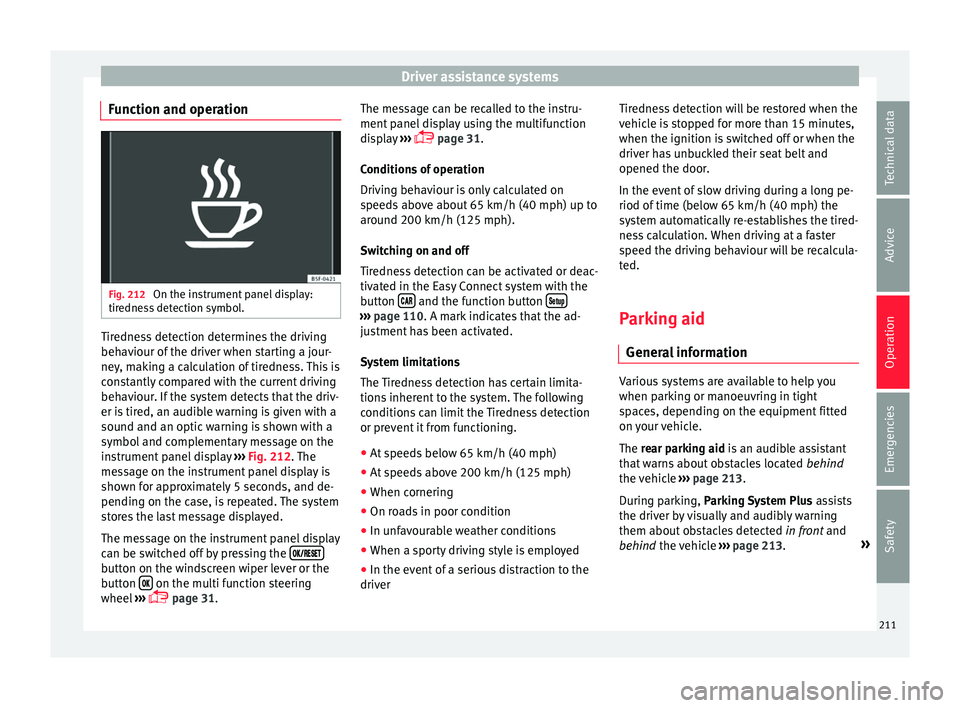
instrument panel display ››› Fig. 212. The
message on the instrument panel display is
shown for approximately 5 seconds, and de-
pending on the case, is repeated. The system
stores the last message displayed.
The message on the instrument panel display
can be switched off by pressing the button on the windscreen wiper lever or the
b
utt
on on the multi function steering
wheel
›
›
› page 31. The message can be recalled to the instru-
ment panel
display using the multifunction
display ›››
page 31.
Conditions of operation
Driving behaviour is only calculated on
speeds above about 65 km/h (40 mph) up to
around 200 km/h (125 mph).
Switching on and off
Tiredness detection can be activated or deac-
tivated in the Easy Connect system with the
button and the function button
›››
pag e 110. A mark indicates that the ad-
ju
stment has been activated.
System limitations
The Tiredness detection has certain limita-
tions inherent to the system. The following
conditions can limit the Tiredness detection
or prevent it from functioning. ● At speeds below 65 km/h (40 mph)
● At speeds above 200 km/h (125 mph)
● When cornering
● On roads in poor condition
● In unfavourable weather conditions
● When a sporty driving style is employed
● In the event of a serious distraction to the
driver Tir
edne
ss detection will be restored when the
vehicl
e is stopped for more than 15 minutes,
when the ignition is switched off or when the
driver has unbuckled their seat belt and
opened the door.
In the event of slow driving during a long pe-
riod of time (below 65 km/h (40 mph) the
system automatically re-establishes the tired-
ness calculation. When driving at a faster
speed the driving behaviour will be recalcula-
ted.
Parking aid
General
information Various systems are available to help you
when p
ark
in
g or manoeuvring in tight
spaces, depending on the equipment fitted
on your vehicle.
The rear parking aid is an audible assistant
that warns about obstacles located behind
the vehicle ›››
page 213.
During parking, Parking System Plus assists
the driver by visually and audibly warning
them about obstacles detected in front and
behind the vehicle ›››
page 213. »
211
Technical data
Advice
Operation
Emergencies
Safety
Page 214 of 308
Operation
WARNING
● Alw a
ys pay attention, also when looking
straight ahead, to traffic and the vehicle
surroundings. The assistance systems are not
a replacement for driver awareness. When in-
serting or removing the vehicle from a park-
ing space, or when performing similar ma-
noeuvres the driver always assumes the re-
sponsibility.
● Adapt your speed and driving style at all
times t
o suit visibility, weather, road and traf-
fic conditions.
● The ultrasound sensors have blind spots in
which ob
stacles and people are not regis-
tered. Pay special attention to children and
animals.
● Always keep visual control of the vehicle
surrou
ndings: use the rear vision mirrors for
additional help. CAUTION
Parking Aid functions may be negatively af-
fect ed b
y different factors that may lead to
damage to the vehicle or its immediate sur-
rounds:
● Under certain circumstances, the system
does not
detect or display certain objects:
– Objects such as chains, trailer draw bars,
fences, posts and thin trees.
– Objects that are located above the sen-
sors, such as protrusions in a wall. –
Ob j
ects with certain surfaces or struc-
tures, such as wire mesh fences or pow-
der snow.
● Certain surfaces of objects and garments
do not refl
ect the ultrasound sensors' sig-
nals. The system cannot detect, at least cor-
rectly, these objects or people wearing such
clothes.
● Ultrasound sensor signals may be affected
by e
xternal sound sources. In certain circum-
stances this may prevent them from detect-
ing people or objects.
● Please note that low obstacles detected by
the syst
em may no longer be registered by
the sensors as the car moves closer, so the
system will not give any further warning. In
certain circumstances, objects such as high
kerbs that could damage the bottom of the
vehicle are not detected either.
● If the first warning from the Park Pilot is ig-
nored, the v
ehicle could suffer considerable
damage.
● The knocks or damage on the radiator
grill
e, bumper, wheel arch and vehicle under-
body can adjust the orientation of the sen-
sors. This can affect the parking aid function.
Have the function checked by a specialised
workshop. Note
● In cer t
ain situations, the system can give a
warning even though there is no obstacle in
the detected area, e.g: –
with r ough or c
obbled floors or ground
with long grass;
– with external ultrasound sources, such as
cleaning vehicles or other vehicles;
– In downpours, intense snow or dense ex-
haust gases;
– if the registration plate (front or rear) is
not properly affixed to the bumper sur-
face;
– or in locations such as the brow of a hill.
● In order to guarantee good system opera-
tion, keep the ultr
asound sensors clean, free
of snow or ice, and do not cover them with
adhesives or other objects.
● If you use high-pressure or vapour equip-
ment to c
lean the ultrasound sensors, apply
it directly only very briefly and always from a
distance of more than 10 cm.
● Retrofitting of accessories to the vehicle,
such a
s a bicycle carrier, may interfere with
the operation of the Parking Aid.
● In order to familiarise yourself with the sys-
tem, it i
s advised that you practice parking in
an area or car park that is free from traffic.
There must be good weather and light condi-
tions.
● The volume and tone of the warnings can
be modified, in addition t
o the indications
››› page 216.
● In vehicles without a driv
er information
system, these parameters can be modified in
a SEAT Official Service or in a specialised
workshop. 212
Page 218 of 308
Operation
Moreover, with the SEAT Media System
Plu s/Nav
i
System radios, a yellow trail indi-
cates the vehicle's expected journey based
on the steering wheel angle.
Whenever the obstacle is located in the vehi-
cle’s direction of travel, the corresponding
audible warning will sound.
As the vehicle approaches an obstacle, the
segments are displayed closer to the vehicle.
When the penultimate segment is displayed,
this means that the vehicle has reached the
collision zone. In the collision zone, the ob-
stacles are represented in red, including
those out of the path. Do not continue to
move forward (or backward) ››› in General
inf orm
ation on p
age 212, ››› in General in-
f orm
ation on p
age 212 !
Adjusting the display and audible
warning
s The settings for the display and audible
w
arnin
g
s are controlled via the Easy Con-
nect*.
Automatic activation
on – activates the Automatic activa-
tion option ›››
page 215.
off – deactivates the Automatic ac-
tivation option ››› page 215. Front volume*
Volume in the fr
ont and rear area.
Front sound settings/sharpness*
Frequency (tone) of the sound in the front
area.
Rear volume*
Volume in the rear area.
Rear sound settings/sharpness*
Frequency (tone) of the sound in the rear
area.
Adjust volume
With the parking aid switched on, the active
audio/video source volume will be reduced
to the intensity of the selected setting.
Error messages When the Parking Aid is activated or when it
i
s
sw
itched on, if a message reporting a Park-
ing aid error is displayed on the instrument
panel, there is a fault in the system.
If the fault doesn't disappear before discon-
necting the ignition, next time that parking
aid is engaged in reverse, it will not be indi-
cated. Parking System Plus*
If there i
s a fault in the parking aid system a
message will appear on the instrument panel
indicating the error. In addition the key
LED will blink.
If there is a fault in a sensor, the symbol is
displayed on the Easy Connect display in
front of/behind the vehicle. If a rear sensor is
faulty, only the obstacles in the areas A and
B are displayed
››
›
Fig. 213. If a front sensor
is faulty, only the obstacles in the areas C and
D are displayed.
Hav e the f
au
lt corrected by a specialised
workshop without delay.
Towing bracket In vehicles equipped with a towing bracket
dev
ic
e fr
om the factory, when the trailer is
connected electrically, the Parking Aid rear
sensors will not be activated when reverse
gear is engaged, when the selector lever is
turned to position R or when the button is
pressed.
Parking System Plus
The distance to possible obstacles at the rear
of the vehicle will not be displayed on the
screen and nor will it be indicated by means
of audible sound signals.
216
Page 220 of 308
Operation
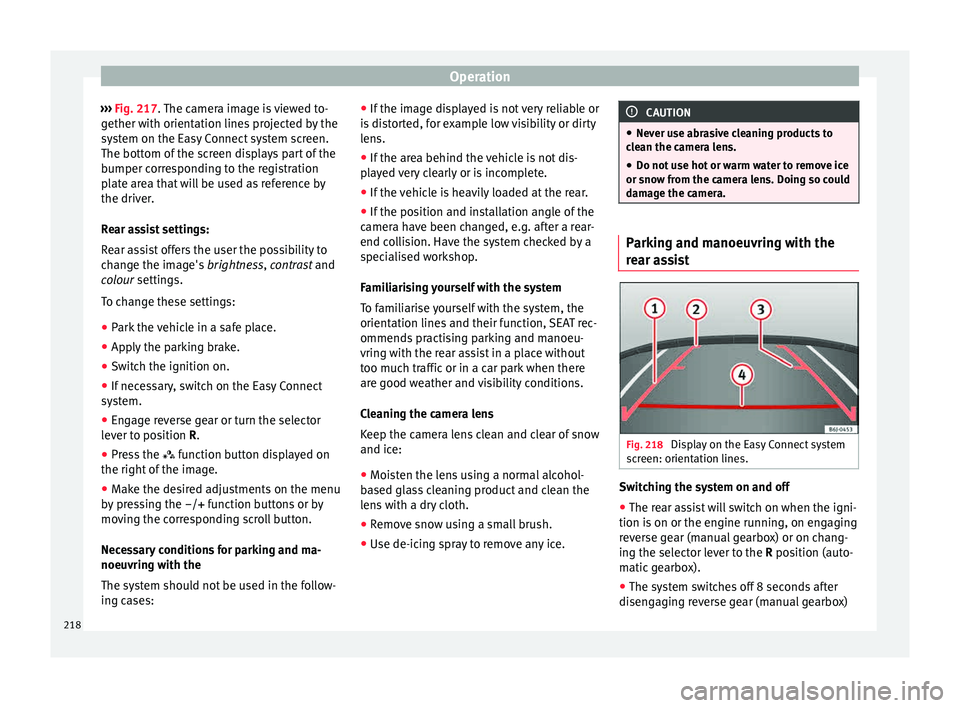
››› Fig. 217. The c
amer a image is viewed to-
gether with orientation lines projected by the
system on the Easy Connect system screen.
The bottom of the screen displays part of the
bumper corresponding to the registration
plate area that will be used as reference by
the driver.
Rear assist settings:
Rear assist offers the user the possibility to
change the image's brightness, contrast and
colour settings.
To change these settings:
● Park the vehicle in a safe place.
● Apply the parking brake.
● Switch the ignition on.
● If necessary, switch on the Easy Connect
syst
em.
● Engage reverse gear or turn the selector
lever t
o position R.
● Press the function b
utton displayed on
the right of the image.
● Make the desired adjustments on the menu
by pr
essing the –/+ function buttons or by
moving the corresponding scroll button.
Necessary conditions for parking and ma-
noeuvring with the
The system should not be used in the follow-
ing cases: ●
If the imag
e displayed is not very reliable or
is distorted, for example low visibility or dirty
lens.
● If the area behind the vehicle is not dis-
pla
yed very clearly or is incomplete.
● If the vehicle is heavily loaded at the rear.
● If the position and installation angle of the
camera h
ave been changed, e.g. after a rear-
end collision. Have the system checked by a
specialised workshop.
Familiarising yourself with the system
To familiarise yourself with the system, the
orientation lines and their function, SEAT rec-
ommends practising parking and manoeu-
vring with the rear assist in a place without
too much traffic or in a car park when there
are good weather and visibility conditions.
Cleaning the camera lens
Keep the camera lens clean and clear of snow
and ice:
● Moisten the lens using a normal alcohol-
based gl
ass cleaning product and clean the
lens with a dry cloth.
● Remove snow using a small brush.
● Use de-icing spray to remove any ice. CAUTION
● Never u se abr
asive cleaning products to
clean the camera lens.
● Do not use hot or warm water to remove ice
or snow fr
om the camera lens. Doing so could
damage the camera. Parking and manoeuvring with the
re
ar a
ssist Fig. 218
Display on the Easy Connect system
s c
r
een: orientation lines. Switching the system on and off
●
The rear assist will switch on when the igni-
tion i s
on or the en
gine running, on engaging
reverse gear (manual gearbox) or on chang-
ing the selector lever to the R position (auto-
matic gearbox).
● The system switches off 8 seconds after
diseng
aging reverse gear (manual gearbox)
218
Page 222 of 308
Operation
Towing bracket device
T o
w
ing bracket device*
Introduction The towing bracket device fitted to your vehi-
cl
e, be it
factory-fitted or a genuine SEAT ac-
cessory, meets all the national technical and
legal requirements for towing.
Your vehicle is fitted with a 13-pin connector
for the electrical connection between the
trailer and the vehicle. If the trailer is equip-
ped with a 7-pin connector you can use the
corresponding available adaptor that is a
genuine SEAT accessory.
The maximum authorised towing load is
80 kg. WARNING
● Bef or
e each journey, make sure that the de-
tachable ball joint is properly fitted and se-
cured in its housing.
● If the detachable ball joint is not properly
fitted and secur
ed, do not use it.
● Do not use the towing bracket device for
tow
ing if it is damaged or has missing parts.
● Do not modify or adapt the towing device
connection.
● Never u
nhook the detachable ball joint
when the trail
er is hitched. CAUTION
Handle the detachable ball joint with care in
order t o av
oid damaging the bumper paint-
work. Note
Towing the vehicle with the detachable ball
joint ›
›› page 90. Description
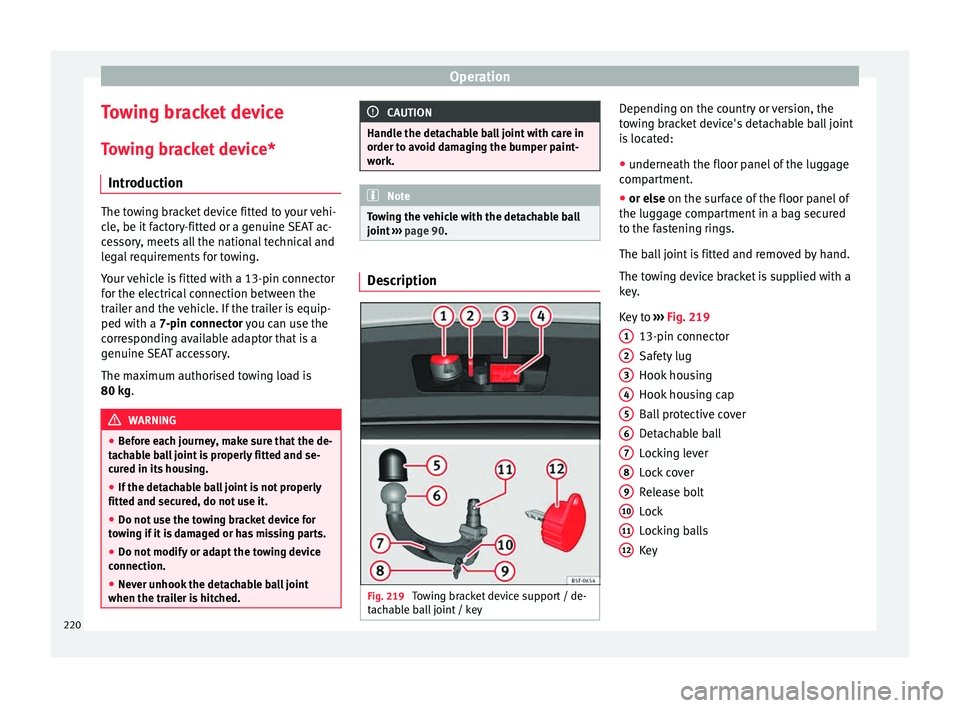
Fig. 219
Towing bracket device support / de-
t ac h
able ball joint / key Depending on the country or version, the
t
o
w
ing bracket device's detachable ball joint
is located:
● underneath the floor panel of the luggage
compar
tment.
● or else on the surf
ace of the floor panel of
the luggage compartment in a bag secured
to the fastening rings.
The ball joint is fitted and removed by hand.
The towing device bracket is supplied with a
key.
Key to ››› Fig. 219
13-pin connector
Safety lug
Hook housing
Hook housing cap
Ball protective cover
Detachable ball
Locking lever
Lock cover
Release bolt
Lock
Locking balls
Key
1 2
3
4
5
6
7
8
9
10
11
12
220
Page 231 of 308
Towing bracket device
If a towing bracket is to be fitted after the ve-
hic l
e i
s purchased, this must be completed
according to the instructions of the towing
bracket manufacturer.
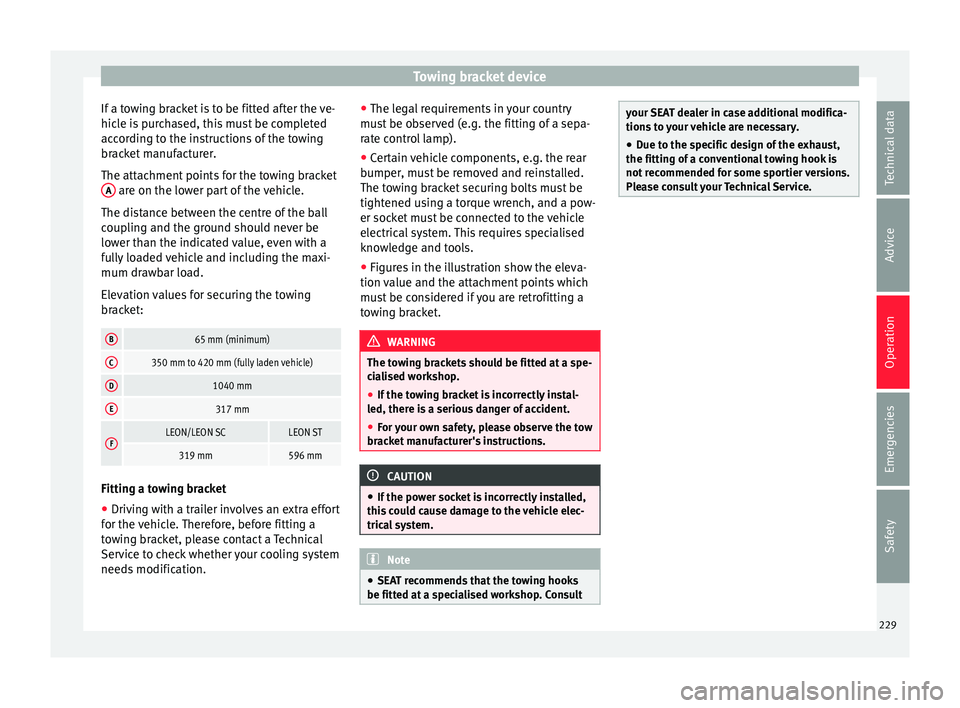
The attachment points for the towing bracket A are on the lower part of the vehicle.
The di s
t
ance between the centre of the ball
coupling and the ground should never be
lower than the indicated value, even with a
fully loaded vehicle and including the maxi-
mum drawbar load.
Elevation values for securing the towing
bracket:
B65 mm (minimum)
C350 mm to 420 mm (fully laden vehicle)
D1040 mm
E317 mm
FLEON/LEON SCLEON ST
319 mm596 mm Fitting a towing bracket
●
Driving with a trailer involves an extra effort
f or the
v
ehicle. Therefore, before fitting a
towing bracket, please contact a Technical
Service to check whether your cooling system
needs modification. ●
The leg
al requirements in your country
must be observed (e.g. the fitting of a sepa-
rate control lamp).
● Certain vehicle components, e.g. the rear
bumper, mu
st be removed and reinstalled.
The towing bracket securing bolts must be
tightened using a torque wrench, and a pow-
er socket must be connected to the vehicle
electrical system. This requires specialised
knowledge and tools.
● Figures in the illustration show the eleva-
tion value and the att
achment points which
must be considered if you are retrofitting a
towing bracket. WARNING
The towing brackets should be fitted at a spe-
ci a
lised workshop.
● If the towing bracket is incorrectly instal-
led, there i
s a serious danger of accident.
● For your own safety, please observe the tow
brack
et manufacturer's instructions. CAUTION
● If the po w
er socket is incorrectly installed,
this could cause damage to the vehicle elec-
trical system. Note
● SEA T r
ecommends that the towing hooks
be fitted at a specialised workshop. Consult your SEAT dealer in case additional modifica-
tions
t
o your vehicle are necessary.
● Due to the specific design of the exhaust,
the fitting of a c
onventional towing hook is
not recommended for some sportier versions.
Please consult your Technical Service. 229
Technical data
Advice
Operation
Emergencies
Safety
Page 232 of 308
Advice
Advice
C ar
e and m
aintenance
Accessories and modifications to the vehicle
Accessories, replacement parts and
repair work Always ask your dealer or specialist retailer
f
or a
dv
ice before purchasing accessories and
replacement parts.
Your vehicle is designed to offer a high
standard of active and passive safety. For this
reason, we recommend that you ask a SEAT
Official Service for advice before fitting ac-
cessories or replacement parts. Your SEAT Of-
ficial Service has the latest information from
the manufacturer and can recommend acces-
sories and replacement parts which are suita-
ble for your requirements. They can also an-
swer any questions you might have regarding
official regulations.
We recommend you to use only SEAT acces-
sories and Genuine SEAT parts ®
. SEAT has
tested these parts and accessories for suita-
bility, reliability and safety. SEAT Official
Services have the necessary experience and
facilities to ensure that the parts are installed
correctly and professionally. Any
retro-fitted equipment which has a direct
effect
on the vehicle and/or the way it is driv-
en, such as a cruise control system or elec-
tronically-controlled suspension, must be
approved for use in your vehicle and bear the
e mark (the European Union's authorisation
symbol).
If any additional electrical devices are fitted
which do not serve to control the vehicle it-
self (for instance a refrigerator box, laptop or
ventilator fan, etc.), they must bear the
sign (manufacturer conformity declaration in
the European Union). WARNING
Accessories, for example telephone holders
or cup ho l
ders, should never be fitted on the
covers, or within the working range of the air-
bags. Otherwise, there is a danger of injury if
the airbag is triggered in an accident. Modifications
Modifications must always be carried out ac-
c
or
din
g to our specifications.
Unauthorised modifications to the electronic
components, software, wiring or data transfer
in the vehicle may cause malfunctioning. Due
to the way the electronic components are
linked together in networks, other indirect
systems may be affected by the faults. This
can seriously impair safety, lead to excessive wear of components, and also invalidate your
vehicl
e registration documents.
You will appreciate that your SEAT dealership
cannot be held liable for any damage caused
by modifications and/or work performed in-
correctly.
We therefore recommend that all work should
be performed by a SEAT Official Service using
genuine SEAT parts ®
. WARNING
Incorrectly performed modifications or other
work on
your vehicle can lead to malfunctions
and cause accidents. Radio transmitters and office equip-
ment
Radio transmitters (fixed installation)
An
y
r
etrofit installations of radio transmitters
in the vehicle require prior approval. SEAT
generally authorises in-vehicle installations
of approved types of radio transmitters provi-
ded that:
● The aerial is installed correctly.
● The aerial is installed on the exterior of the
vehicl
e (and shielded cables are used togeth-
er with non-reflective aerial trimming).
● The effective transmitting power does not
exc
eed 10 Watts at the aerial base.
230
Page 233 of 308
Care and maintenance
A SEAT Official Service and specialised work-
shop w i
l
l be able to inform you about options
for installing and operating radio transmitters
with a higher transmitting power.
Mobile radio transmitters
Commercial mobile telephones or radio
equipment might interfere with the electron-
ics of your vehicle and cause malfunctions.
This may be due to:
● No external aerial.
● External aerial incorrectly installed.
● Transmitting power more than 10 W.
You mus
t, therefore, do not operate portable
mobile telephones or radio equipment inside
the vehicle without a properly installed exter-
nal aerial ››› .
Pl e
a
se note also that the maximum range of
the equipment can only be achieved with an
external aerial.
Business equipment
Retrofit installation of business or private
equipment in the vehicle is permitted, provi-
ded the equipment cannot interfere with the
driver's immediate control of the vehicle and
that any such equipment carries the mark.
Any retrofit equipment that could influence
the driver's control of the vehicle must have a
type approval for your vehicle and must carry
the e mark. WARNING
Mobile telephones or radio equipment which
is oper
ated inside the vehicle without a prop-
erly installed external aerial can create exces-
sive magnetic fields that could cause a health
hazard. Note
● The pos t
erior fitting of electric and elec-
tronic equipment in this vehicle affects its li-
cence and could lead to the withdrawal of the
vehicle registration document under certain
circumstances.
● Please use the mobile telephone/radio op-
erating in
structions. Care and cleaning
Gener a
l
information Regular and careful care helps to
maint
ain
the
value of the vehicle. This may also be one
of the requirements for upholding any war-
ranty claims in the event of corrosion or paint
defects.
SEAT Official Services and specialist retailers
carry stocks of suitable car care materials.
Please follow the instructions for use on the
packaging. WARNING
● Cle
aning products and other materials used
for car care can be damaging to your health if
misused.
● Always keep care products in a safe place,
out of the r
each of children. Failure to comply
could result in poisoning. For the sake of the environment
● If po s
sible, use environmentally friendly
products.
● The remains of car care products should not
be dispo
sed of with ordinary household
waste. Vehicle exterior care
W a
shin
g the vehicle The longer substances such as insects, bird
dr
op
pin
gs, resinous tree sap, road dirt, in-
dustrial deposits, tar, soot or road salt and
other aggressive materials remain on the ve-
hicle, the more damage they do to the paint-
work. High temperatures (for instance due to
strong sunlight) further intensify the corro-
sive effect.
After the period when salt is put on the roads
it is important to have the underside of the
vehicle washed thoroughly. »
231
Technical data
Advice
Operation
Emergencies
Safety
Page 235 of 308
Care and maintenance
Camera sensors and lenses ●
Use a small brush to remove snow and a
de-icer s pr
ay to remove ice.
● Clean the sensors with a solvent-free prod-
uct and a soft, dr
y cloth.
● Moisten the camera lens using a standard
alcohol-b
ased glass cleaning agent and
clean the lens with a dry cloth. In the active
lane assist*, the area in front of the lens is
normally cleaned with the windscreen wash-
er. CAUTION
● When y ou c
lean the vehicle with a pressure
washer:
–Stay a suitable distance from the sensors
on the front and rear bumpers.
– Do not clean the camera lenses or sur-
rounding area with the pressure washer.
● Never use warm or hot water to remove
snow and ic
e from the reverse camera lens,
as it could crack the lens.
● Never use abrasive cleaning agents on the
lens. Waxing and polishing
Care
W
ax
in
g protects the paintwork. It is time to
apply a coat of good wax when water no lon- ger forms droplets
and ro
lls off the clean
paintwork.
Even if a wax solution is used regularly in the
vehicle washing tunnel, it is advisable to pro-
tect the paint with a hard wax coating at least
twice a year.
In the summer, you will find it is much easier
to remove dead insects (which accumulate
on the bumper and the front of the bonnet) if
the car has been treated with care products
recently.
Polishing
Polishing is only necessary if the paint has
lost its shine, and the gloss cannot be
brought back by putting on wax.
If the polish does not contain wax, a wax
product should be applied after polishing. CAUTION
● Do not u se po
lishes and hard wax on pain-
ted parts with a matt finish or on plastic
parts.
● Do not apply paint polishes to the side trim
that ru
ns around the panoramic roof and ends
on the windscreen. However, it can be treated
with hard wax. Trims
In respect for the environment, the silver-
pl
at
ed trims on the body are made of pure
aluminium (they do not contain chrome).
Dirt or marks on the trim mouldings should
be removed with a cleaning product with a
neutral PH (do not use a chrome cleaner).
Body polish is also unsuitable for use on trim
mouldings. The intensive cleaning fluids of-
ten used before the car goes into a car wash
may contain alkaline substances, which can
cause dull or milky patches when they dry
out.
SEAT Official Services carry stocks of cleaning
products which have been tested for use on
your vehicle and are not harmful to the envi-
ronment.
Plastic parts Plastic parts are cleaned with a power wash-
er
. If
thi
s is not sufficient, plastic parts
should only be treated with a special solvent-
free plastic cleaning agent . Do not use paint-
work cleaners, polishes or wax on plastic
parts.
233
Technical data
Advice
Operation
Emergencies
Safety