wheel Seat Mii 2012 User Guide
[x] Cancel search | Manufacturer: SEAT, Model Year: 2012, Model line: Mii, Model: Seat Mii 2012Pages: 308, PDF Size: 4.13 MB
Page 74 of 308

72Ensuring you are correctly and safely seated
Front airbags
Fig. 47 Location and deployment area of the front air-
bag for the driver
Fig. 48 Location and deployment area of the front air-
bag for the driver
In conjunction with the seat belts, the front airbag system gives the front
occupants additional protection for the head and chest in the event of a se-
vere frontal collision. Always remain as far away as possible from the front
airbag ⇒ page 48. This way, the front airbags can completely deploy when
triggered, providing their maximum protection. The front airbag for the driver is located in the steering wheel
⇒ Fig. 47 and
the airbag for the front passenger is located in the dash panel ⇒ Fig. 48. Air-
bags are identified by the word “AIRBAG”.
Page 75 of 308

73
Ensuring you are correctly and safely seated
When the front airbags are triggered they fill the zones marked in
red ⇒ Fig. 47 and ⇒ Fig. 48 (radius of action). Therefore, objects should
never be placed or mounted in these areas ⇒
. Factory-fitted accessories
are outside the range of the front airbag for the driver and the front passen-
ger, e.g. the baseplate for the mobile telephone support.
The airbag covers fold out of the steering wheel ⇒ Fig. 47 or dash panel
⇒ Fig. 48 when the driver and front passenger airbags are triggered. The air-
bag covers remain connected to the steering wheel or the dash panel.
WARNING
The airbag is deployed at high speed in fractions of a second.
● Always keep the deployment areas of the front airbags vacant.
● Never secure objects to the covers or in the deployment area of the
airbag modules, e.g. drink holders or phone supports.
● The deployment space between the front passengers and the airbags
must not in any case be occupied by other passenger, pets and objects.
● Never fix any object to the windscreen above the front airbag on the
front passenger side.
● Do not alter, cover or stick anything to the steering wheel hub or the
surface of the airbag module on the passenger side of the dash panel.
WARNING
Front airbags are deployed in front of the steering wheel ⇒ Fig. 47 and
the dash panel ⇒ Fig. 48.
● When driving, always hold the steering wheel on the outer edge of
the ring with both hands: 9 o'clock and 3 o'clock position.
WARNING (Continued)
● Adjust the driver seat so that there is a distance of at least
25 cm(10 inches) between the centre of your chest and the hub of the
steering wheel. If you physical constitution prevents you from meeting
these requirements, make sure you contact a Specialised workshop.
● Adjust the front passenger seat so there is as much distance as possi-
ble between the front passenger and the dash panel.
Deactivating and activating the front passenger airbag
using the key switch
Fig. 49 On front passen-
ger side: key switch for
disabling and enabling
the front passenger air-
bag
Disable the front passenger airbag when a rear-facing child seat is moun-
ted.
Deactivating the front passenger airbag
● Switch the ignition off.
● Open the door on the front passenger side.
● Unfold the key shaft ⇒ page 28.
Vehicle diagramPrior to a journey...While drivingCare, cleaning and mainte-
nanceIf and whenTechnical Data
Page 88 of 308

86Lights and visibility
Turning on and off lights
Fig. 56 Next to the steering wheel: diagram of some of
the types of light switch
Observe the legal requirements regarding the use of vehicle lights in each
country.
Turn the light switch to the required position ⇒ Fig. 56: when the ignition is turned offwhen the ignition is on
Fog lights, dipped beam and
side lights off.Lights off, daytime driving light
on.
Side light on.Side light on.
Dipped beam off; if necessary,
the side light comes on for a
time.Dipped beam switched on.
Fog lights*
The control lamp appears on the fog lights control connected. ●
Switching on the fog lights : Turn the switch to position or pull out
to the first stop.
● Switching on the rear fog light : turn the light switch to position or
pull out to the maximum.
● To switch off the fog lights, press the light switch or turn it to position .
Audible warnings to advise the driver that the lights have not been
switched off
If the key is not in the ignition and the driver door is open, an audible warn-
ing signal is heard in the following cases: This is a reminder to turn off the
lights.
● When the light switch is in position .
● When the light switch is in position .
Page 90 of 308

88Lights and visibility
Headlight range control, lighting of instruments and
controls
Fig. 57 Next to the
steering wheel: Head-
light range control
Headlamp height adjustment
The headlight range control ⇒ Fig. 57 is modified according to the value of
the headlight beam and the vehicle load status. This offers the driver opti-
mum visibility and the headlights do not dazzle oncoming drivers ⇒
.
The headlights can only be adjusted when the dipped beam is switched on.
To reset, turn switch ⇒ Fig. 57:ValueVehicle load status a)–Two front occupants, luggage compartment empty1All seats occupied, luggage compartment empty2All seats occupied, luggage compartment full.3Driver only, luggage compartment full.a)
If the vehicle load does not correspond to those shown in the table, it is possible to select
intermediary positions. Instrument and switch lighting
When the side lights or dipped beam headlights are switched on, the light-
ing for instruments and controls lights up at a constant brightness.
WARNING
Heavy objects in the vehicle may mean that the headlights dazzle and
distract other drivers. This could result in serious accident.
● Adjust the light beam to the vehicle load status so that it does not
blind other drivers.
Reading light
Button / SwitchFunction
Switching off the reading light.
Switching on the reading light.
Switches door contact control on (central position).
The reading light comes on automatically when the vehicle is un-
locked, a door is opened or the key is removed from the ignition.
The light goes off a few seconds after all the doors are closed,
the vehicle is locked or the ignition is switched on.
Note
The reading lights go out when the vehicle is locked, or a few minutes after
the key is removed from the ignition. This prevents the battery from dis-
charging.
Page 99 of 308

97
Transporting
Transporting
Driving tips Introduction
Always transport heavy loads in the luggage compartment and place the
seat backs in a vertical position. Never overload the vehicle. Both the carry-
ing capacity as well as the distribution of the load in the vehicle have ef-
fects on the driving behaviour and braking ability ⇒
.
Additional information and warnings:
● Rear lid ⇒ page 40
● To lower the front passenger seat backrest ⇒ page 55
● Light ⇒ page 84
● Luggage compartment ⇒ page 100
● Roof carrier ⇒ page 104
● Wheels and tyres ⇒ page 210
WARNING
Unsecured or incorrectly secured objects can cause serious injury in case
of a sudden manoeuvring or breaking or in case of an accident. This is es-
pecially true when objects are struck by a detonating airbag and fired
through the vehicle interior. To reduce the risks, please note the follow-
ing:
● Secure all objects in the vehicle. Always keep equipment and heavy
objects in the luggage compartment.
WARNING (Continued)
● Always secure objects with suitable rope or slings so that they cannot
enter the deployment areas around the frontal or side airbags in case of
sudden braking or an accident.
● Always ensure that objects inside the vehicle cannot move into the
deployment area of the bags while driving.
● While driving, always keep object compartments closed.
● Remove all objects from the front passenger seat when this is fol-
lowed down. When the seat backrest is folded down, it presses on small
and light objects and these are detected by the weight sensor on the
seat; this sends false information to the airbag control unit.
● While the backrest of the front passenger seat is folded, the frontal
airbag must remain disconnected and the PASSENGER AIRBAG OFF
light on.
● Objects secured in the vehicle should never be placed in such a way
as to make passengers sit in an incorrect position.
● If secured objects occupy a seat then this should not be occupied or
used by anybody.
WARNING
The driving behaviour and braking ability change when transporting
heavy and large objects.
● Adjust your speed and driving style to visibility, road, traffic and
weather conditions.
● Accelerate gently and carefully.
● Avoid sudden braking and manoeuvres.
● Brake early.
Vehicle diagramPrior to a journey...While drivingCare, cleaning and mainte-
nanceIf and whenTechnical Data
Page 102 of 308

100Transporting
Loading luggage compartment
Introduction
Always transport heavy loads in the luggage compartment and place the
seat backs in a vertical position. Never overload the vehicle. Both the carry-
ing capacity as well as the distribution of the load in the vehicle have ef-
fects on the driving behaviour and braking ability ⇒
.
Additional information and warnings:
● Airbag system ⇒ page 67
● Light ⇒ page 84
● Transporting ⇒ page 97
● Wheels and tyres ⇒ page 210
WARNING
When the vehicle is not in use or being watched, always lock the doors
and the rear lid to reduce the risk of serious injury or death.
● Do not leave children unwatched, especially when the rear lid is open.
Children could climb into the luggage compartment, close the rear lid
from inside and be unable to escape themselves. This could lead to seri-
ous injury or death.
● Never allow children to play in or around the vehicle.
● Never transport people in the luggage compartment.
WARNING
Unsecured or incorrectly secured objects can cause serious injury in case
of a sudden manoeuvring or breaking or in case of an accident. This is es-
pecially true when objects are struck by a detonating airbag and fired
through the vehicle interior. To reduce the risks, please note the follow-
ing:
● Secure all objects in the vehicle. Always keep equipment and heavy
objects in the luggage compartment.
● Always secure objects with suitable rope or straps so that they can-
not enter the deployment areas around the frontal or side airbags in case
of sudden braking or an accident.
● While driving, always keep object compartments closed.
● Do not place hard, heavy or sharp objects inside the interior, in open
storage compartments, the rear shelf or on the dash panel.
● Remove hard, heavy and sharp objects from clothes and pockets in-
side the vehicle and store securely.
WARNING
The transport of heavy object changes vehicle handling and increases
braking distance. Heavy loads that have not been stored or secured cor-
rectly could cause loss of control and result in serious injury.
● The vehicle handling changes when transporting heavy objects due
to a change in the centre of gravity.
● Distribute the load as uniformly and as low down on the vehicle as
possible.
● Store heavy objects in the luggage compartment as far from the rear
axle as possible.
CAUTION
Hard objects on the rear shelf could chafe against the wires of the heating
element in the heated rear window and cause damage.
Page 106 of 308
104Transporting
Roof carrier system
Introduction
The vehicle roof has been designed to optimise aerodynamics. For this rea-
son, conventional roof carrier systems cannot be secured to the water
drains.
Given that the water drains have been incorporated into the roof for aerody-
namic reasons, only the SEAT approved basic supports and roof carrier sys-
tems can be used.
When the roof carrier system should be removed:
● When it is not being used.
● When the vehicle is being washed in a car wash.
● When the vehicle height exceeds the maximum height, for example, in a
garage.
Additional information and warnings:
● Light ⇒ page 84
● Transporting ⇒ page 97
● Ecological driving ⇒ page 144
● Wheels and tyres ⇒ page 210
● Accessories, parts replacement, repairs and modifications ⇒ page 222
WARNING
The risk of an accident is increased by transporting heavy or bulky loads
on the roof, which affects the vehicle's handling by shifting the centre of
gravity and increasing susceptibility to cross winds.
● Always secure loads correctly with suitable and undamaged attach-
ment rope or straps.
● Large, heavy, wide and flat loads negatively affect the vehicle aerody-
namics, centre of gravity and handling.
● Avoid brusque manoeuvres and sudden braking.
● Adjust your speed and driving style to visibility, road, traffic and
weather conditions.
CAUTION
● Always remove the roof carrier system from the roof before entering a car
wash.
● The height of your vehicle is changed by the installation of the roof carri-
er and the load secured on it. Compare the vehicle height with the passage
height, for example in underground car parks or entering garage doors.
● The roof antenna and the range of the rear lid should not be affected by
the roof carrier system and the load being transported.
● Take extra care not to let the rear lid strike the roof load when opening.
For the sake of the environment
The vehicle uses more fuel when the roof carrier system is fitted.
Page 107 of 308

105
Transporting
Securing the base supports and roof carrier system
Fig. 70 Attachment
points for the basic sup-
port and the roof carrier
system
The mounts are the basis of a complete roof carrier system. Special fixtures
must then be added in order to safely transport luggage, bicycles, skis, surf
boards or boats on the roof. The suitable accessories can be acquired at
SEAT dealerships.
Securing the base supports and roof carrier system
The roof carrier system must always be installed exactly according to the in-
structions provided.
The front attachment opening can be found in the lower part of the sides of
the roof and are fixed with plastic bolts ⇒ Fig. 70 (left magnified image).
The openings can only be seen with the door open. The markings for attach-
ment in the lower part are found in the upper part of the rear side windows
⇒ Fig. 70 (right magnified image).
The base support should only be fitted to the points indicated in the dia-
gram.
WARNING
If the base supports and the roof carrier system are incorrectly fitted or
used in an unsuitable manner, the entire system could break free causing
accident and injury.
● Always take the manufacturer assembly instructions into account.
● Only use base supports and roof carrier systems that are not dam-
aged and are correctly fitted.
● The base support should only be fitted to the points indicated in the
diagram ⇒ Fig. 70.
● Secure the base supports and roof carrier system correctly.
● Check the screw fittings and attachments before driving and after a
short distance. During each long journey, check the attachments during
every break.
● Always fit the roof carrier system correctly for wheels, skis and surf-
boards, etc.
● Never change or repair the basic supports or roof carrier system.
Note
Read and take into account the instructions included with the roof carrier
system fitted and keep them in the vehicle.
Loading the roof carrier system
Loads can only be correctly secured when the roof carrier system is correctly
fitted ⇒ .
Maximum authorised roof load
The maximum authorised roof load is 50 kg. The roof load includes the
weight of the base support, the roof carrier system and the load being
transported ⇒
.
Vehicle diagramPrior to a journey...While drivingCare, cleaning and mainte-
nanceIf and whenTechnical Data
Page 123 of 308

121
Starting, changing gears, parking
WARNING
Unsuitable or careless use of the vehicle key could result in serious in-
jury.
● Always take all the keys with you whenever you leave the vehicle. The
engine could accidentally be started and electrical equipment such as
the windows could accidentally be operated resulting in serious injury.
● Never leave children or disabled people alone in the vehicle. They
could be trapped in the vehicle in an emergency and will not be able to
get themselves to safety. For example, depending on the time of the
year, temperatures inside a locked and closed vehicle can be extremely
high or extremely low resulting in serious injuries and illness or even
death, particularly for young children.
● Never remove the key from the ignition if the vehicle is in motion. The
steering may lock and it will not be possible to turn the steering wheel.
Note
● If the key is left in the ignition lock with the engine off for long periods,
the vehicle battery will run flat.
● For automatic gearbox vehicles the key can only be removed from the ig-
nition lock if the gear selector lever is in position P. In this case, press and
release the selector lever locking button.
Starting the engine
Complete operations only in the sequence given.
1.Press the brake pedal and keep pressed until step 5 has been completed.
1 a.In vehicles with a manual gearbox: Press the clutch pedal all
the way and keep pressed until the engine starts.
Complete operations only in the sequence given.
2.Put the gearbox lever in neutral or the selector lever in posi- tion P or N.
3.Turn the key in the ignition lock to position ⇒ Fig. 83 2; do
not press the accelerator.
4.When the engine has started, release the key in the ignition lock.
5.If the engine does not start, stop the process and try again af-ter one minute.
6.Release the handbrake when you want to begin driving⇒ page 134.
WARNING
Never leave the vehicle unattended if the engine is running. The vehicle
could move off suddenly, especially if it is in gear, resulting in an acci-
dent and serious injury.
WARNING
Cold start sprays could explode or cause a sudden increase in the engine
speed.
● Never use start boosters.
CAUTION
● An attempt to start the engine while driving or starting the engine imme-
diately after turning it off can cause damage to the engine or starter motor.
● When the engine is cold, avoid high revs and heavy acceleration and do
not make the engine work hard.
● Do not push or tow start the engine. Sunburnt fuel could damage the
catalytic converter.
Vehicle diagramPrior to a journey...While drivingCare, cleaning and mainte-
nanceIf and whenTechnical Data
Page 131 of 308
129
Starting, changing gears, parking
● When changing gear, always make sure the clutch pedal is pushed right
to the floor.
● Never hold the vehicle “on the clutch” on hills.
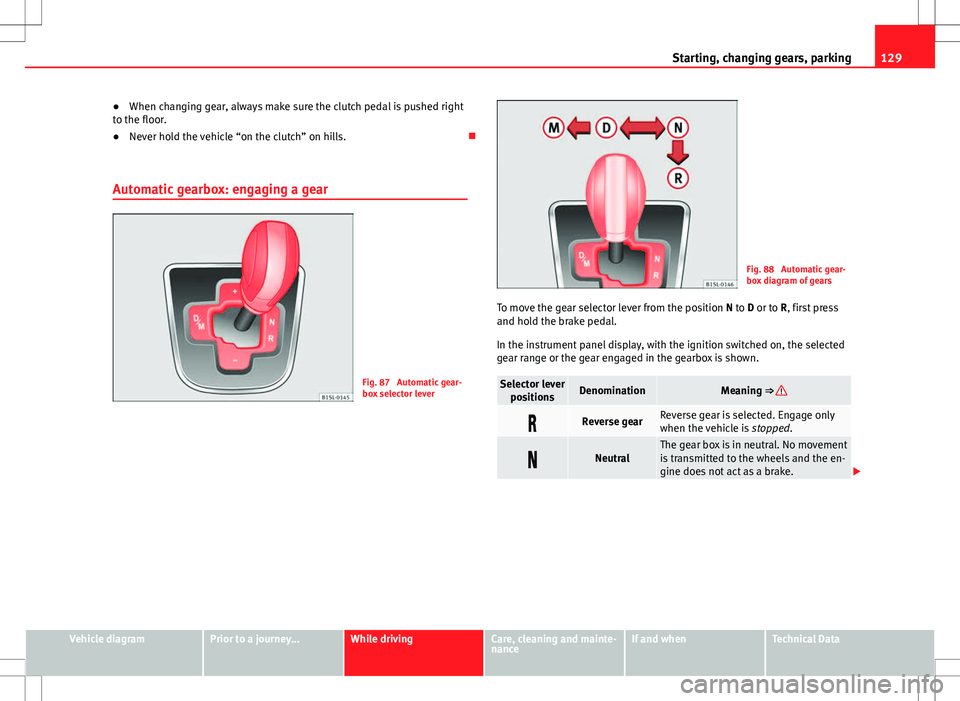
Automatic gearbox: engaging a gear
Fig. 87 Automatic gear-
box selector lever
Fig. 88 Automatic gear-
box diagram of gears
To move the gear selector lever from the position N to D or to R, first press
and hold the brake pedal.
In the instrument panel display, with the ignition switched on, the selected
gear range or the gear engaged in the gearbox is shown.
Selector lever positionsDenominationMeaning ⇒
Reverse gearReverse gear is selected. Engage only
when the vehicle is stopped.
NeutralThe gear box is in neutral. No movement
is transmitted to the wheels and the en-
gine does not act as a brake.
Vehicle diagramPrior to a journey...While drivingCare, cleaning and mainte-
nanceIf and whenTechnical Data