radio Seat Mii 2012 Owner's manual
[x] Cancel search | Manufacturer: SEAT, Model Year: 2012, Model line: Mii, Model: Seat Mii 2012Pages: 308, PDF Size: 4.13 MB
Page 14 of 308

12Vehicle interior
Overview of centre console
Top part of the centre console
Fig. 6 Detail of the top part of the centre console
Legend for the Fig. 6:
SEAT Portable System (supplied by SEAT) . . . . . . . . . . . . . . . . . . .222
Hazard warning lights switch . . . . . . . . . . . . . . . . . . . . . . . . . . . . 240
Passenger front airbag off warning lamp PASSENGER AIR-
BAG . . . . . . . . . . . . . . . . . . . . . . . . . . . . . . . . . . . . . . . . . . . . . . . . 67
Right seat heating controls or rear window heating but-
ton (alternative position) . . . . . . . . . . . . . . . . . . . . . . . . . . . . . . . 55, 164
1
23
4
Radio (factory-fitted) ⇒ Booklet Radio system, cover or stor-
age compartment
. . . . . . . . . . . . . . . . . . . . . . . . . . . . . . . . . . . . . . . . . 108
Left seat heating controls . . . . . . . . . . . . . . . . . . . . . . . . . . . . . . . . 55
Rear window heating button . . . . . . . . . . . . . . . . . . . . . . . . . . . . 164
Start-Stop system button . . . . . . . . . . . . . . . . . . . . . . . . . . . . . . 160
Switches for:
– Heating and ventilation system . . . . . . . . . . . . . . . . . . . . . . . . . . 164
– Air conditioner . . . . . . . . . . . . . . . . . . . . . . . . . . . . . . . . . . . . . . . . . 1645
6789
Page 24 of 308

22Instrument panel
SEAT information system
Introduction
With the ignition switched on it is possible to access different messages via
the display on the instrument panel display.
The number of messages displayed on the instrument panel display will
vary according to the vehicle electronics and equipment.
A specialised dealer will be able to programme or modify additional func-
tions, according to the vehicle equipment. SEAT recommends visiting a
Technical Service.
Additional information and warnings:
● Instrument panel ⇒ page 18
● Exterior mirrors ⇒ page 95
● Driver assistance systems ⇒ page 149
● Radio system ⇒ Booklet Radio system
WARNING
Any distraction may lead to an accident, with the risk of injury.
● Do not consult the messages on the instrument panel screen when
driving.
Note
On the screen of the SEAT Portable System (supplied by SEAT) ⇒ page 222
other functions of the vehicle can be seen. Control functions of the instrument panel display
Fig. 11 Windscreen wip-
er lever: button
A to
confirm the options and
rocker switch B
to
change the options
Calling up options
● Switch the ignition on.
● If a message or vehicle symbol is displayed, press OK/RESET
(⇒ Fig. 11
A).
● Press the top or bottom part of the rocker switch B until the desired op-
tion appears.
Multifunction display (MFI)
The multifunction display (MFI) has two automatic memories: 1 - Partial
memory and 2 - Total memory . The selected memory will be shown in the
lower right-hand corner of the display.
Page 31 of 308

29
Unlocking and locking
Remote control vehicle key*
Fig. 12 Remote control
key
Remote control key
With the vehicle key the vehicle may be locked or unlocked remotely
⇒ page 33.
The vehicle key includes an emitter and battery. The receiver is in the interi-
or of the vehicle. The range of the vehicle key with remote control and new
battery is several metres around the vehicle.
If it is not possible to open or close the vehicle using the remote control key,
this should be re-synchronised ⇒ page 31 or the battery changed
⇒ page 31.
Different keys belonging to the vehicle may be used.
Folding the key shaft in and out
When the button is pressed ⇒ Fig. 12 A
, the key shaft is released and un-
folds.
To fold it press the button and fold the key shaft in until it locks in place. Duplicate keys
To obtain a spare key and other vehicle keys, the vehicle chassis number is
required.
Each new key must contain a microchip and be coded with the data from the
electronic vehicle immobilizer. In vehicle key will not work if it does not con-
tain microchip or the microchip has not been encoded. This is also true for
keys cut for the vehicle.
The vehicle keys or new spare keys can be obtained from a SEAT dealership,
a Specialised workshop or approved key service qualified to create this kind
of key.
Synchronise new keys or spare keys before use
⇒ page 31.
CAUTION
The remote control key contains electronic components. Protect the vehicle
keys from damage, impacts and humidity.
Note
Only use the key button when you require the corresponding function. Push-
ing the button unnecessarily could accidentally unlock the vehicle or trigger
the alarm. It is also possible even when you are outside the radius of action.
Note
Remote control key operation can be greatly influenced by overlapping ra-
dio signals around the vehicle working in the same range of frequencies (for
example, radio transmitters, mobile telephones).
Note
Obstacles between the remote control and the vehicle, bad weather condi-
tions and discharged batteries can considerably reduce the range of the re-
mote control.
Vehicle diagramPrior to a journey...While drivingCare, cleaning and mainte-
nanceIf and whenTechnical Data
Page 110 of 308

108Practical equipment
Practical equipment
Storage compartments
Introduction
Storage compartments must only be used to store light or small objects.
Additional information and warnings:
● Care and cleaning of the vehicle interior ⇒ page 205
● ⇒ Booklet Radio system
WARNING
In the event of sudden braking movements or turns, loose objects may be
thrown around the vehicle interior. This could cause serious injuries to
passengers and cause the driver to lose control of the vehicle.
● Do not transport animals or place hard, heavy or sharp objects in the
interior of the vehicle in: open storage compartments, dash panel, stor-
age tray, items of clothing or bags.
● While driving, always keep object compartments closed.
WARNING
Objects falling into the driver's footwell could prevent use of the pedals.
This could lead the driver to lose control of the vehicle, increasing the
risk of a serious accident.
● Make sure the pedals can be used at all times, with no objects rolling
underneath them.
● The floor mat should always be secured to the floor.
WARNING (Continued)
● Never place other mats or rugs on top of the original mat supplied by
the factory.
● Make sure that no objects can fall into the driver's footwell while the
vehicle is in motion.
CAUTION
● Objects on the shelf could chafe against the wires of the heating ele-
ment in the heated rear window and cause damage.
● Do not keep temperature-sensitive objects, food or medicines inside the
vehicle. Heat and cold could damage them or render them useless.
● Light-transparent objects placed inside the vehicle, such as lenses,
magnifying glasses or transparent suction caps on the windows, could con-
centrate the sun's rays and cause damage to the vehicle.
Note
The ventilating slits between the heated rear window and the rear shelf
must not be covered so that used air can escape from the vehicle.
Page 114 of 308
112Practical equipment
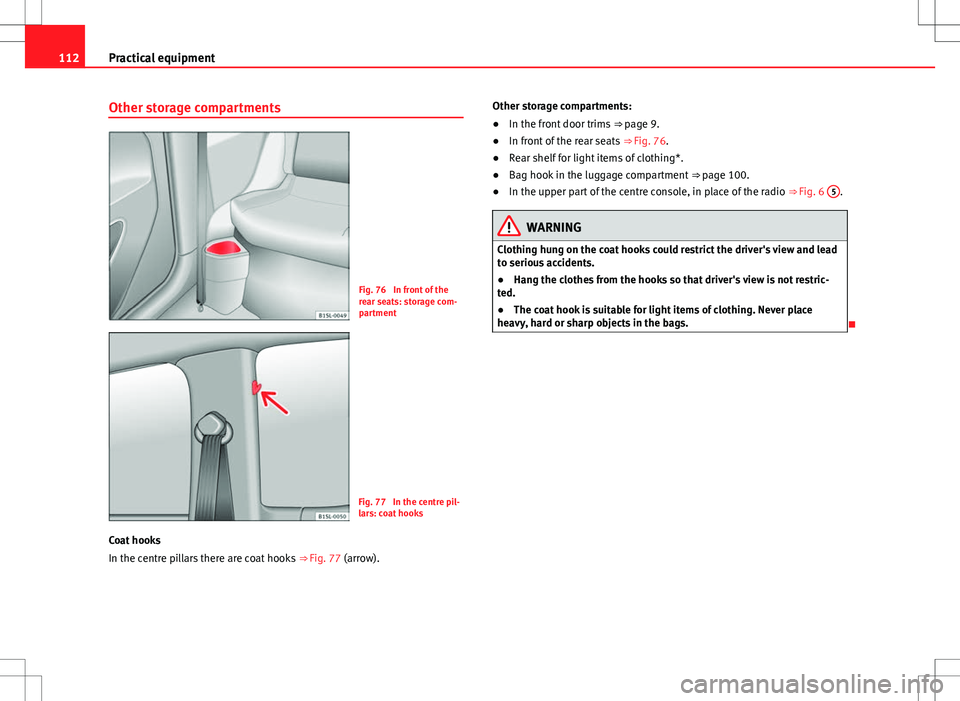
Other storage compartments
Fig. 76 In front of the
rear seats: storage com-
partment
Fig. 77 In the centre pil-
lars: coat hooks
Coat hooks
In the centre pillars there are coat hooks ⇒ Fig. 77 (arrow). Other storage compartments:
●
In the front door trims ⇒ page 9.
● In front of the rear seats ⇒ Fig. 76.
● Rear shelf for light items of clothing*.
● Bag hook in the luggage compartment ⇒ page 100.
● In the upper part of the centre console, in place of the radio ⇒ Fig. 6 5
.
WARNING
Clothing hung on the coat hooks could restrict the driver's view and lead
to serious accidents.
● Hang the clothes from the hooks so that driver's view is not restric-
ted.
● The coat hook is suitable for light items of clothing. Never place
heavy, hard or sharp objects in the bags.
Page 119 of 308

117
Practical equipment
Electrical power socket* Introduction
Electrical equipment can be connected to the socket in the vehicle.
Connected equipment must be in perfect condition and show no signs of
faults.
Additional information and warnings:
● Cigarette lighter ⇒ page 115
● Accessories, parts replacement, repairs and modifications ⇒ page 222
WARNING
Improper use of the socket or electrical devices could lead to a fire and
cause serious injuries.
● Never leave children unsupervised in the vehicle. The socket and
equipment connected to it can be used when the ignition is switched on.
● Should a connected electrical device overheat, switch it off and un-
plug it immediately.
CAUTION
● To avoid damage to the vehicle's electrical system, never connect equip-
ment that generates electrical current, such as solar panels or battery charg-
ers, to the 12 Volt sockets in order to charge the vehicle's battery.
● Only use accessories with approved electromagnetic compatibility ac-
cording to current regulations. ●
To avoid damage due to voltage variations, switch off all appliances con-
nected to the 12 V socket before switching the ignition on or off and before
starting the engine.
● Never connect an appliance to the 12 Volt socket that consumes more
than the power indicated in watts. Exceeding the maximum power absorp-
tion could damage the vehicle's electrical system.
For the sake of the environment
Do not leave the engine running when the vehicle is at a standstill.
Note
Using electrical appliances with the engine stopped and the ignition switch-
ed on will drain the battery.
Note
Unshielded equipment can cause interference on the radio system equip-
ment and the vehicle's electrical system.
Note
If electrical equipment is used near an aerial, you may observe interference
in the reception of AM stations.
Vehicle diagramPrior to a journey...While drivingCare, cleaning and mainte-
nanceIf and whenTechnical Data
Page 173 of 308

171
At the filling station
At the filling station Refuelling
Introduction
The fuel tank plug is on the rear right of the vehicle.
Additional information and warnings:
● Exterior detail ⇒ page 6
● Fuel ⇒ page 177
● Working in the engine compartment ⇒ page 180
WARNING
Refuelling or handling fuel carelessly can cause an explosion or fire re-
sulting in serious burns and injuries.
● Always make sure that you correctly close the fuel tank flap to avoid
evaporation and fuel spillage.
● Fuels are highly explosive and inflammable substances that can
cause serious burns and injuries.
● Fuel could leak out or be spilt if the engine is not switched off or if the
filler fuel nozzle is not fully inserted into the tank filler mouth when refu-
elling. This could lead to a fire, explosion and severe injuries.
● When refuelling, turn off the engine and turn off the ignition for safe-
ty reasons.
● Always turn off mobile telephones, radio system apparatus and other
radio wave emitting equipment before refuelling. Electromagnetic waves
could cause sparks and lead to a fire.
WARNING (Continued)
● Never enter the vehicle while refuelling. If it is absolutely necessary
to enter the vehicle, close the door and touch a metal surface before
touching the filler nozzle again. This will prevent the generation of static
electricity. Sparks could cause a fire when refuelling.
● Never handle fuel close to open flames, sparks or objects with slow
combustion (e.g. cigarettes).
● Avoid static electricity and electro-magnetic radiation when refuel-
ling.
● Observe the safety regulations of the service station.
● Never spill fuel on the vehicle or in the luggage compartment.
WARNING
For safety reasons, SEAT does not recommend carrying a spare fuel canis-
ter in the vehicle. Fuel could be spilled and catch fire, above all in case of
an accident and this applies to a full container as well as empty contain-
ers. This could lead to explosions, fires and injuries.
● Observe the following if you exceptionally have to carry fuel in a can-
ister:
–Never place a fuel container, to fill it, inside the vehicle or on the
vehicle, for example, in the luggage compartment. Filling in these cir-
cumstances could create an electrostatic charge and spark that could
ignite fuel fumes.
– Always place the canister on the ground to fill it.
– Insert the fuel nozzle into the mouth of the canister as far as possi-
ble.
Vehicle diagramPrior to a journey...While drivingCare, cleaning and mainte-
nanceIf and whenTechnical Data
Page 224 of 308

222Vehicle care and maintenance
Accessories, replacements, repairs and
modifications
Introduction
Additional information and warnings:
● Seat belts ⇒ page 57
● Airbag system ⇒ page 67
● Roof carrier ⇒ page 104
● Ashtray and cigarette lighter ⇒ page 115
● Power socket ⇒ page 117
● Braking, stopping and parking ⇒ page 134
● Parking distance warning system ⇒ page 149
● Cruise control system (CCS) ⇒ page 152
● Working in the engine compartment ⇒ page 180
● Engine oil ⇒ page 185
● Engine coolant ⇒ page 189
● Vehicle battery ⇒ page 193
● Caring for and cleaning the vehicle exterior ⇒ page 197
● Care and cleaning of the vehicle interior ⇒ page 205
● Notes for the user ⇒ page 233
● ⇒ Booklet Radio system
● Instruction Manual for the Portable Navigation System (supplied by
SEAT) in the equipment.
WARNING
The use of unsuitable spare parts and accessories, or incorrectly per-
formed modifications or repairs may result in damage to the vehicle, acci-
dents and serious injury.
● SEAT strongly recommends you to only use SEAT approved accesso-
ries and SEAT ®
original spare parts. These parts and accessories have
been specially tested by SEAT for suitability, reliability and safety.
● Have any repairs or modifications carried out at a Specialised work-
shop. Specialised workshops have the necessary tools, diagnostics
equipment, repair information and qualified personnel.
● Only mount parts with the same specifications as the parts fitted at
factory.
● Never mount, fasten or fit objects such as drink holders or telephone
cradles over the covers of the airbag modules or within their deployment
zones.
● Only use wheels and tyre combinations which have been approved by
SEAT for your vehicle type.
Page 228 of 308

226Vehicle care and maintenance
Retro-fitting of two-way radios
An exterior aerial is required for the use of two-way radios in the vehicle.
The retro-fitting of electrical or electronic appliances in the vehicle is sub-
ject to their approval for use in your vehicle. Under certain circumstances,
this could mean that your vehicle registration documents are no longer val-
id.
SEAT has approved your vehicle for use with two-way radios providing the
following conditions are observed:
●The exterior aerial must be mounted professionally.
● The maximum transmitting power is 10 watts.
An only external aerial is needed to give the equipment its optimal reach.
Check first with a Specialised workshop if you wish to use a two-way radio
with a transmitting power of over 10 watts. The Specialised workshops are
familiar with the technical options for installation. SEAT recommends visit-
ing a Technical Service.
All legal requirements, together with the instructions for the use of two-way
radios must be observed.
WARNING
If the two-way radio is not securely fastened in position, it could be sent
flying around the vehicle in the event of sharp braking, sudden manoeu-
vres or accident, causing injury.
● While driving, two-way radios must be securely fastened in position,
outside the airbags deployment zones, or safely stowed away.
WARNING
When using a two-way radio without a connection to an exterior aerial,
the maximum permitted levels of electromagnetic radiation may be ex-
ceeded. This is also the case if the aerial has not been correctly installed.
● You should only use a two-way radio inside the vehicle if it has first
been correctly connected to an exterior aerial.
Information stored by the control units
Your vehicle is fitted at the factory with a series of electronic control units
responsible for the engine and gearbox management. In addition, the con-
trol units supervise the performance of the exhaust gas system and the air-
bag systems.
Therefore, while the vehicle is being driven, these electronic control units
are continuously analysing the vehicle data. In the event of faults or devia-
tions from the theoretical values, only this data is stored. Normally, the
warning lamps on the instrument panel light up in the event of faults.
This data can only be read and analysed using special equipment.
The storing of the data allows specialised workshops to detect and repair
faults. Stored data may include:
● Data relating to the engine or the gearbox
● Speed
● Direction of travel
● Braking force
● Detection of seat belt
The vehicle control units never record conversations held by passengers in
the vehicle.
Page 229 of 308

227
Vehicle care and maintenance
In vehicles equipped with an emergency call function via the mobile tele-
phone or other appliances connected in the vehicle, it is possible to send
the vehicle position. If the control unit records an accident with airbag acti-
vation, the system may automatically send a signal. This will depend on the
network operator. Normally, transmission is only possible in areas with
good coverage.
Event Data Recorder
The vehicle is not fitted with an event data recorder.
An event data recorder temporarily stores the vehicle information. There-
fore, in the event of accident, it is possible to obtain detailed information
about how the accident occurred. For example, in vehicles with airbag sys-
tems, data relating to speed of impact, seat belt status, seat positions and
airbag activation times may be stored. The volume of data depends on the
manufacturer.
Event data recorders can only be mounted with authorisation from the vehi-
cle owner and, in some countries, they are governed by local legislation.
Reprogramming control units
On the whole, all the data required for the component management is stor-
ed in the control units. The programming of certain convenience functions,
such as the convenience indicators, individual door opening and instruc-
tions on the display can be modified using special equipment at the work-
shop. If the comfort functions are reprogrammed, the information and In-
struction Manual descriptions will not coincide with the modified functions.
Therefore, SEAT recommends that any modifications are recorded in the sec-
tion “Other workshop notes” in the Maintenance Programme.
The SEAT Official Service must have a record of any modification to the pro-
gramming.
Reading the vehicle fault memory
There is a diagnostics connector in the vehicle interior for reading the vehi-
cle fault memory. The fault memory documents errors and deviations from
the theoretical values of the electronic control units. The diagnostics connector is in the driver side footwell area, next to the lev-
er for opening the bonnet, below a cover.
The fault memory should only be read and reset by a Specialised workshop.
Using a mobile telephone in a vehicle without connection
to an exterior aerial
Mobile telephones transmit and receive radio waves also called high-fre-
quency energy, both when in use and when on stand-by. Scientific studies
state that radio waves exceeding certain values may be harmful to the hu-
man body. International committees and authorities have established limits
and directives in order to ensure electromagnetic radiation from mobile
phones remains within certain limits that do not endanger human health.
However, there is no available conclusive scientific evidence that cordless
phones are completely safe.
That is why some experts recommend moderate use of the mobile tele-
phone, and the appliance of measures to reduce radiation on the human
body.
When a mobile telephone not connected to an exterior aerial is used inside
the vehicle, the electromagnetic radiation may be greater than if the mobile
phone were connected to a built-in aerial or to another exterior aerial.
If the vehicle is fitted with a suitable hands-free device that allows the em-
ployment of numerous additional mobile telephone functions with compati-
ble Bluetooth technology ®
, it will comply with the legislation in many coun-
tries which only permits the use of mobile phones inside vehicles using a
hands-free device.
The hands-free system of the Portable Navigation System (supplied by
SEAT) has been designed for use with conventional mobile phones and
phones with Bluetooth technology ®
⇒ page 229. Mobile telephones must
be placed in a suitable telephone support or stored safely in the vehicle. If a
support is used for the telephone, it must be securely fastened to the base
Vehicle diagramPrior to a journey...While drivingCare, cleaning and mainte-
nanceIf and whenTechnical Data