air condition Seat Mii 2013 User Guide
[x] Cancel search | Manufacturer: SEAT, Model Year: 2013, Model line: Mii, Model: Seat Mii 2013Pages: 306, PDF Size: 4.3 MB
Page 147 of 306
145
Starting, changing gears, parking
Moderate use of additional electrical appliances
It is important to travel in comfort, but convenience systems should be used
in an ecological manner.
Some equipment, when connected, increase fuel consumption considera-
bly, for example:
● Air conditioning cooling system: If the air conditioning system is re-
quired to cool to significantly lower temperatures than the true outside tem-
perature, it will require a large quantity of energy from the engine. There-
fore, we recommend that the selected temperature for the vehicle is not too
different to the outside temperature. It is a good idea to open all the win-
dows of the car before starting your journey, and to drive a short distance
with all the windows open to allow the vehicle to cool down slightly. Only
then should you close all the windows and switch on the air conditioning.
Keep windows closed when travelling at high speeds. Driving with the win-
dows open increases fuel consumption.
● Switch off the seat heating when the seats have warmed up.
● Switch off the heated rear window when it is not moist or covered in ice.
Other factors which increase fuel consumption (examples):
● Fault in engine management.
● Driving on hills. Saving fuel while driving
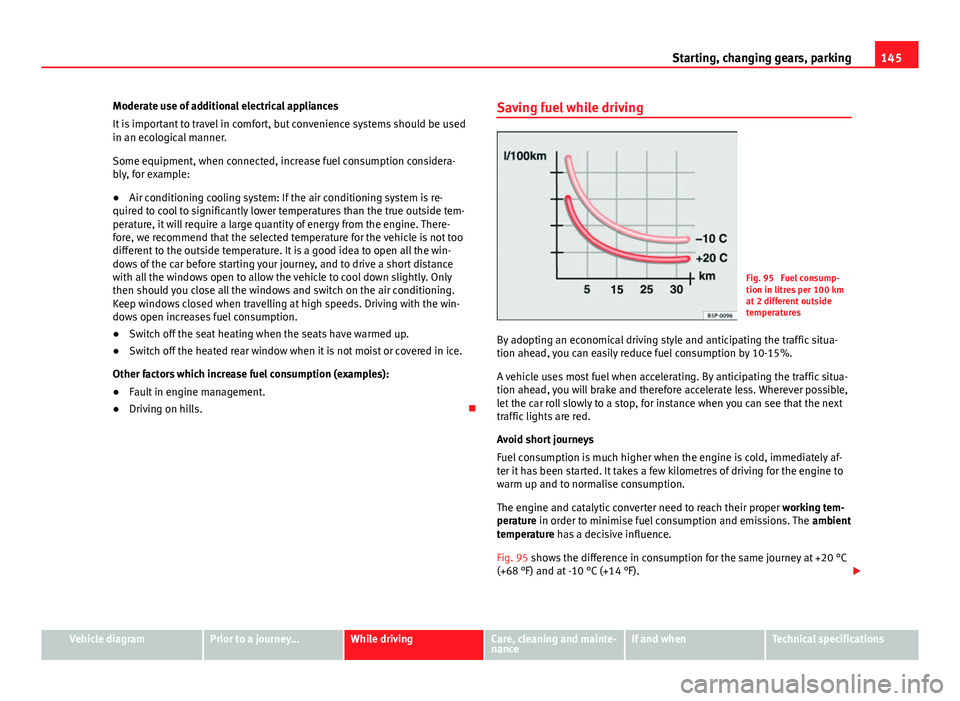
Fig. 95 Fuel consump-
tion in litres per 100 km
at 2 different outside
temperatures
By adopting an economical driving style and anticipating the traffic situa-
tion ahead, you can easily reduce fuel consumption by 10-15%.
A vehicle uses most fuel when accelerating. By anticipating the traffic situa-
tion ahead, you will brake and therefore accelerate less. Wherever possible,
let the car roll slowly to a stop, for instance when you can see that the next
traffic lights are red.
Avoid short journeys
Fuel consumption is much higher when the engine is cold, immediately af-
ter it has been started. It takes a few kilometres of driving for the engine to
warm up and to normalise consumption.
The engine and catalytic converter need to reach their proper working tem-
perature in order to minimise fuel consumption and emissions. The ambient
temperature has a decisive influence.
Fig. 95 shows the difference in consumption for the same journey at +20 °C
(+68 °F) and at -10 °C (+14 °F).
Vehicle diagramPrior to a journey...While drivingCare, cleaning and mainte-
nanceIf and whenTechnical specifications
Page 154 of 306
152Driver assistance systems
Cruise control* (Cruise control system - CCS)
Introduction
The cruise control system (CCS) is able to individually maintain the set
speed when driving forwards from approx. 20 km/h (15 mph).
The CCS only slows down by reducing the accelerator but not by braking
⇒
.
Additional information and warnings:
● Changing gear ⇒ page 124
● Accessories, parts replacement, repairs and modifications ⇒ page 222
WARNING
Use of the cruise control could cause accidents and severe injuries if it is
not possible to drive at a constant speed maintaining the safety distance.
● Do not use the cruise control in heavy traffic, if the distance from the
vehicle in front is insufficient, on steep roads, with several bends or in
slippery circumstances (snow, ice, rain or loose gravel), or on flooded
roads.
● Never use the CCS when driving off-road or on unpaved roads.
● Always adapt your speed and the distance to the vehicles ahead in
line with visibility, weather conditions, the condition of the road and the
traffic situation.
● To avoid unexpected operation of the cruise control system, turn it off
every time you finish using it.
● It is dangerous to use a set speed which is too high for the prevailing
road, traffic or weather conditions.
● When travelling down hills, the CCS cannot maintain a constant
speed. The vehicle tends to accelerate under its own weight. Select a
lower gear or use the foot brake to slow the vehicle.
Control lamp
lights upPossible cause
This cruise control system maintains the set speed of
the vehicle.
Several warning and control lamps should light up for a few seconds when
the ignition is switched on, signalling that the function is being verified.
They will switch off after a few seconds.
WARNING
If the warning lamps are ignored, the vehicle may stall in traffic, or may
cause accidents and severe injuries.
● Never ignore the warning lamps.
CAUTION
Failure to heed the warning lamps when they appear may result in faults in
the vehicle.
Page 157 of 306
155
Driver assistance systems
Safety Assist* (City Safety Assist function) Introduction
The City Safety Assist function covers driving situations at a distance of
about 10 metres in front of the vehicle, in a speed range of approximately
5-30 km/h (3-19 mph).
When the system detects a possible collision with a vehicle in front, the ve-
hicle prepares for a possible emergency braking ⇒
.
If the driver does not react to an imminent collision, the system can auto-
matically brake the vehicle in order to reduce speed faced with a possible
collision. The system can help to reduce the consequences of an accident.
If the City Safety Assist function determines that the driver braked insuffi-
ciently faced with an imminent collision, the system can increase the brake
force in order to reduce speed. The system can help to reduce the conse-
quences of an accident.
Additional information and warnings:
● Exterior detail ⇒ page 6
● Centre console, lower section ⇒ page 12
● Instrument panel ⇒ page 15
● Accessories, parts replacement, repairs and modifications ⇒ page 222
WARNING
The intelligent technology in the City Safety Assist system cannot change
the limits imposed by the laws of physics and by the system itself. The
increased comfort offered by the City Safety Assist system should never
prompt you to take risks. The driver always assumes the responsibility of
braking in time.
● The City Safety Assist function can not individually prevent accidents,
nor serious injury.
● The City Safety Assist system may carry out unwanted brake interven-
tions in complex driving situations e.g. when a vehicle crosses at a short
distance.
WARNING
Including the role of the City Safety Assist system in driving conduct may
cause accidents and serious injury. The system is not a replacement for
driver awareness.
● Always adapt your speed and the distance to the vehicles ahead in
line with visibility, weather conditions, the condition of the road and the
traffic situation.
● The City Safety Assist function does not react to people, animals or
vehicles that cross or move in the opposite direction in the same lane.
● If after switching on the City Safety Assist function the vehicle begins
to move, slow the vehicle with the foot brake.
CAUTION
If you suspect that the laser sensor of the City Safety Assist function is dam-
aged, switch off the City Safety Assist function. This will avoid additional
damage.
● Any reparation of the laser sensor requires specialist knowledge. SEAT
recommends visiting a Technical Service.
Vehicle diagramPrior to a journey...While drivingCare, cleaning and mainte-
nanceIf and whenTechnical specifications
Page 162 of 306
160Driver assistance systems
Malfunction in the laser sensor
If the laser sensor operation is impaired, for example due to heavy rain,
spray, snow or dirt, the City Safety Assist system function is temporarily
switched off. On the instrument panel display the control lamp flashes.
When the fault in the laser sensor has been rectified, the City Safety Assist
system function automatically becomes available. The control lamp
switches off.
The following conditions could prevent the City Safety Assist system from
functioning:
● Tight bends.
● Accelerator pressed all the way down to the floor.
● If the City Safety Assist system is switched off or there is a fault
⇒ page 156.
● If the laser sensor is dirty, covered or overheated ⇒ page 157.
● In the event of snow, heavy rain or dense fog.
● If there are vehicles in front.
● Vehicles changing lanes.
● Vehicles moving in the opposite direction in the same lane.
● Very dirty vehicles with a low degree of reflection.
● Presence of thick dust.
Hill hold
Introduction
Additional information and warnings:
● SEAT information system ⇒ page 22
● Braking, stopping and parking ⇒ page 134 ●
Vehicle battery ⇒ page 193
● Wheels and tyres ⇒ page 210
● Accessories, parts replacement, repairs and modifications ⇒ page 222
● Jump starting ⇒ page 275
WARNING
The smart technology included in the hill hold cannot change the laws of
physics. Do not let the extra convenience afforded by the hill hold tempt
you into taking any risks when driving.
● Any accidental movement of the vehicle could result in serious injury.
● The hill hold is not a replacement for driver awareness.
● Adjust your speed and driving style to visibility, weather, road and
traffic conditions.
● The hill hold cannot always keep the vehicle at a standstill on a slope
or brake sufficiently when travelling downhill (e.g. on slippery or frozen
surfaces).
Warning lamps
lights upPossible causeSolution
The Start-Stop system is ena-
bled.
The Start-Stop system is ena-
bled but the engine cannot be
automatically stopped.Contact a specialised
workshop.
The Start-Stop system cannot
start the engine.Start the engine by hand
using the vehicle's key
⇒ page 120.
There is a fault in the alternator.⇒ page 193
Page 166 of 306
164Air conditioning
Air conditioning
Heating, Ventilation and Air conditioning
system
Introduction
Dust and pollen filter
The dust and pollen filter with its activated charcoal cartridge serves as a
barrier against impurities in the interior ambient air.
For the air conditioner to work with maximum efficiency, the dust and pollen
filter must be replaced at the intervals specified in the Maintenance Pro-
gramme.
If the filter loses efficiency prematurely due to use in areas with very high
levels of air pollution, the filter must be changed more frequently than sta-
ted in the Service Schedule.
Additional information and warnings:
● SEAT information system ⇒ page 22
● Windscreen wash system ⇒ page 89
● Caring for and cleaning the vehicle exterior ⇒ page 197
WARNING
Reduced visibility through the windows increases the risk of serious acci-
dents.
● Ensure that all windows are free of ice and snow and that they are not
fogged up preventing a clear view of everything outside.
WARNING (Continued)
● The maximum heat output required to defrost windows as quickly as
possible is only available when the engine has reached its normal run-
ning temperature. Only drive when you have good visibility.
● Always ensure that you use the heating system, ventilation, air condi-
tioner and the heated rear window to maintain good visibility.
● Never leave the air recirculation on for a long period of time. If the
cooling system is switched off and air recirculation mode switched on,
the windows can mist over very quickly, considerably limiting visibility.
● Switch air recirculation mode off when it is not required.
WARNING
Stuffy or used air will increase fatigue and reduce driver concentration
possibly resulting in a serious accident.
● Never leave the fresh air fan turned off or use the air recirculation for
long periods of time; the air in the vehicle interior will not be refreshed.
CAUTION
● Switch the air conditioner off if you think it may be broken. This will
avoid additional damage. Have the air conditioner checked by a specialised
workshop.
● Repairs to the air conditioner require specialist knowledge and special
tools. SEAT recommends visiting a Technical Service.
Page 167 of 306
165
Air conditioning
Note
When the cooling system is turned off, air coming from the outside will not
be dried. To avoid fogging up the windows, SEAT recommends leaving the
cooler (compressor) on. To do this, press the AC
button. The button lamp
should light up.
Note
The maximum heat output required to defrost windows as quickly as possi-
ble is only available when the engine has reached its normal running tem-
perature.
Note
Keep the air intake slots in front of the windscreen free of snow, ice and
leaves to ensure heating and cooling are not impaired, and to prevent the
windows from misting over.
Vehicle diagramPrior to a journey...While drivingCare, cleaning and mainte-
nanceIf and whenTechnical specifications
Page 168 of 306
166Air conditioning
Controls
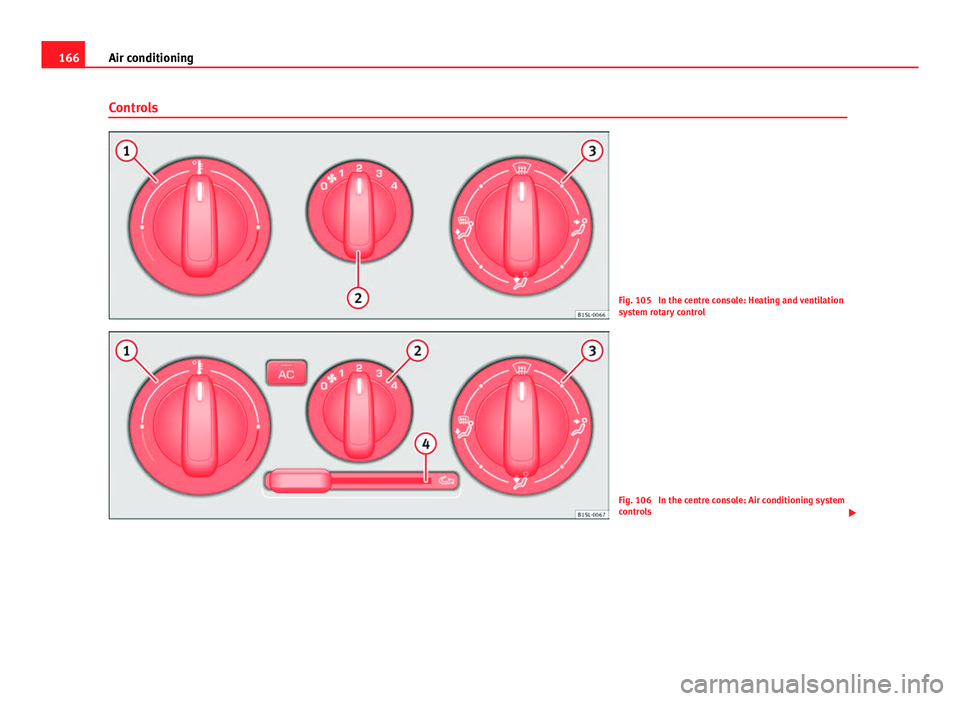
Fig. 105 In the centre console: Heating and ventilation
system rotary control
Fig. 106 In the centre console: Air conditioning system
controls
Page 169 of 306
167
Air conditioning
Control
buttonAdditional information. Heating and ventilation system
⇒ Fig. 105 and air conditioning system ⇒ Fig. 106.
1 ...
Temperature.
Rotate the control to adjust the temperature accordingly.
2
...
Air fan.
setting 0: Air fan and air conditioning system switched off, set-
ting 4: Air fan maximum setting.
3Air distribution.
Rotate the continuous control to direct the airflow to the desired
area.
Heating and ventilation system: defrost function. Distribution of
air to the windscreen and the side windows in the exterior rear
vision mirror area.
Air conditioning system: defrost function. Distribution of air to
the windscreen and the side windows in the exterior rear vision
mirror area. Press the AC
button, increase the air fan speed and
switch on the air recirculation ⇒ page 169 to clear the wind-
screen of condensation as soon as possible.
Air distribution towards the body.
Air distribution towards the footwell.
Air distribution towards the windscreen and the footwell.
Air conditioner: press the button to turn off/on the cooling sys-
tem ⇒ page 167.
4
Air conditioner: sliding control for air recirculation ⇒ page 169.
Switch off
Turn the air fan switch 2 to position 0.
Heated rear window
The heated rear window button is located on the centre console. The
heated rear window only works when the engine is running and switches off
automatically after a maximum of 10 minutes.
WARNING
Never turn off the air fan for a long time or the air in the vehicle interior
will not be refreshed.
● Stuffy or used air will increase fatigue and reduce driver and passen-
ger concentration possibly resulting in a serious accident.
Heating and ventilation system user instructions
Temperature
The desired temperature for the interior cannot be lower than that of the ex-
terior air temperature, as the heating and fresh air system cannot cool or de-
humidify the air.
Setting for conditions of optimal visibility
● Set the fan ⇒ Fig. 105 2
to setting 1 or 2.
● Turn the temperature control ⇒ Fig. 105 1 to the centre position.
● Open and direct the air outlets in the dash panel ⇒ page 169.
● Turn the air distribution control ⇒ Fig. 105 3
to the required position.
User instructions for the air conditioner*
The interior cooling system only works when the engine is running and fan
is switched on.
Vehicle diagramPrior to a journey...While drivingCare, cleaning and mainte-
nanceIf and whenTechnical specifications
Page 170 of 306

168Air conditioning
The air conditioning operates most effectively with the windows closed.
However, if the vehicle has heated up after standing in the sun for some
time, the air inside can be cooled more quickly by opening the windows
briefly.
Setting for conditions of optimal visibility
When the air conditioning is switched on, the temperature and the air hu-
midity in the vehicle interior drop. Hence, when the outside air humidity is
high, the windows do not mist over and comfort for the vehicle occupants is
improved:
● Disable air recirculation mode ⇒ page 169.
● Set the fan to the required setting.
● Turn the temperature control to the centre position.
● Open and direct the air outlets in the dash panel ⇒ page 169.
● Turn the air distribution control to the defrost position.
● Press the AC
button to turn on cooling. The button will light up.
The cooling system does not switch on
If the air conditioning system cannot be switched on, this may be caused by
the following: ●
The engine is not running.
● The fan is switched off.
● The air conditioner fuse has blown.
● The outside temperature is lower than approximately +2 °C (+36 °F).
● The air conditioner compressor has been temporarily switched off be-
cause the engine coolant temperature is too high.
● Another fault in the vehicle. Have the air conditioner checked by a speci-
alised workshop.
Things to note
If the humidity and temperature outside the vehicle are high, condensation
can drip off the evaporator in the cooling system and form a pool under-
neath the vehicle. This is normal and does not indicate a leak!Note
After starting it, any residual humidity in the air conditioner could mist over
the windscreen. Switch on the defrost function as soon as possible to clear
the windscreen of condensation.
Page 171 of 306
169
Air conditioning
Air vents
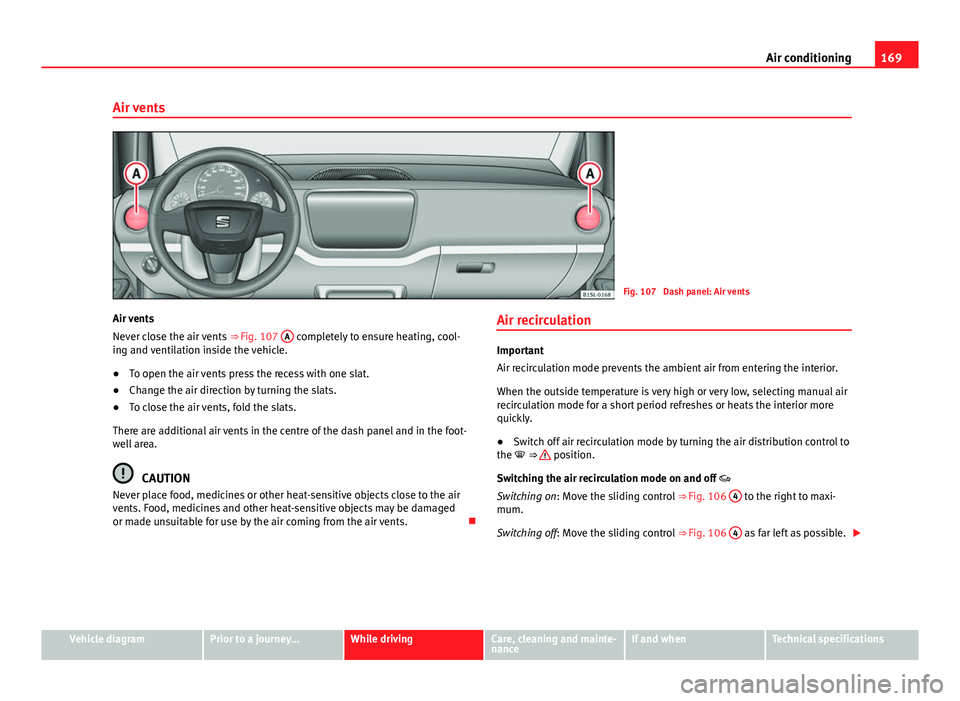
Fig. 107 Dash panel: Air vents
Air vents
Never close the air vents ⇒ Fig. 107 A
completely to ensure heating, cool-
ing and ventilation inside the vehicle.
● To open the air vents press the recess with one slat.
● Change the air direction by turning the slats.
● To close the air vents, fold the slats.
There are additional air vents in the centre of the dash panel and in the foot-
well area.
CAUTION
Never place food, medicines or other heat-sensitive objects close to the air
vents. Food, medicines and other heat-sensitive objects may be damaged
or made unsuitable for use by the air coming from the air vents. Air recirculation
Important
Air recirculation mode prevents the ambient air from entering the interior.
When the outside temperature is very high or very low, selecting manual air
recirculation mode for a short period refreshes or heats the interior more
quickly.
●
Switch off air recirculation mode by turning the air distribution control to
the ⇒
position.
Switching the air recirculation mode on and off
Switching on: Move the sliding control ⇒ Fig. 106 4
to the right to maxi-
mum.
Switching off: Move the sliding control ⇒ Fig. 106 4
as far left as possible.
Vehicle diagramPrior to a journey...While drivingCare, cleaning and mainte-
nanceIf and whenTechnical specifications