change time Seat Mii 2013 User Guide
[x] Cancel search | Manufacturer: SEAT, Model Year: 2013, Model line: Mii, Model: Seat Mii 2013Pages: 306, PDF Size: 4.3 MB
Page 152 of 306
150Driver assistance systems
Parking distance warning system
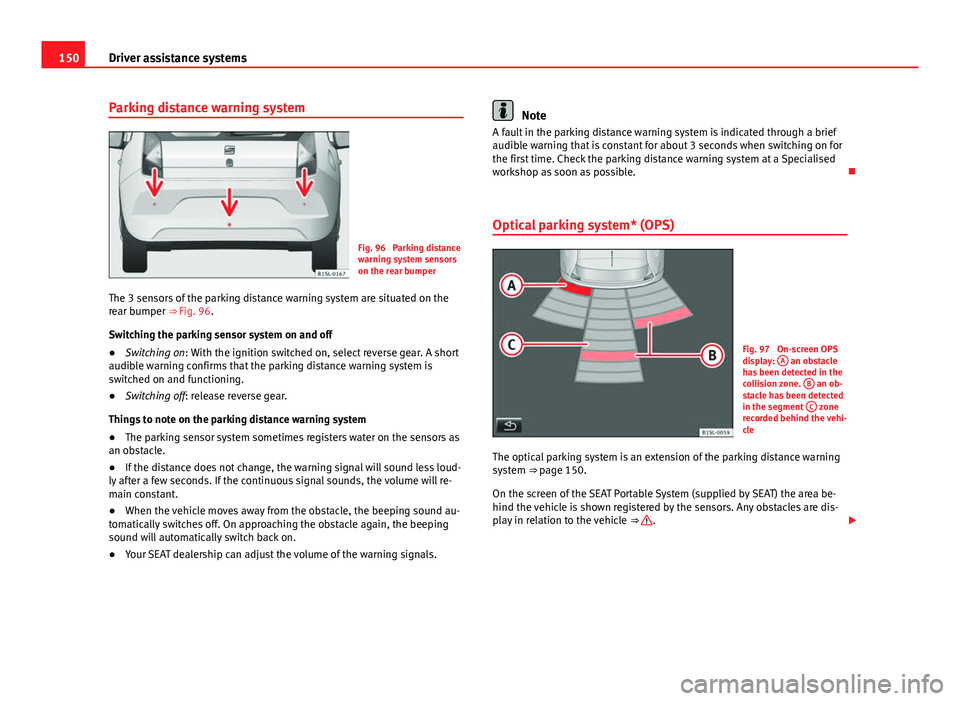
Fig. 96 Parking distance
warning system sensors
on the rear bumper
The 3 sensors of the parking distance warning system are situated on the
rear bumper ⇒ Fig. 96. Switching the parking sensor system on and off
● Switching on: With the ignition switched on, select reverse gear. A short
audible warning confirms that the parking distance warning system is
switched on and functioning.
● Switching off: release reverse gear.
Things to note on the parking distance warning system
● The parking sensor system sometimes registers water on the sensors as
an obstacle.
● If the distance does not change, the warning signal will sound less loud-
ly after a few seconds. If the continuous signal sounds, the volume will re-
main constant.
● When the vehicle moves away from the obstacle, the beeping sound au-
tomatically switches off. On approaching the obstacle again, the beeping
sound will automatically switch back on.
● Your SEAT dealership can adjust the volume of the warning signals.
Note
A fault in the parking distance warning system is indicated through a brief
audible warning that is constant for about 3 seconds when switching on for
the first time. Check the parking distance warning system at a Specialised
workshop as soon as possible.
Optical parking system* (OPS)
Fig. 97 On-screen OPS
display: A an obstacle
has been detected in the
collision zone. B
an ob-
stacle has been detected
in the segment C
zone
recorded behind the vehi-
cle
The optical parking system is an extension of the parking distance warning
system ⇒ page 150. On the screen of the SEAT Portable System (supplied by SEAT) the area be-
hind the vehicle is shown registered by the sensors. Any obstacles are dis-
play in relation to the vehicle ⇒
.
Page 156 of 306
154Driver assistance systems
● If the system detects a fault that could affect the working order of the
CCS.
● If you increase the stored speed by pressing the accelerator pedal for a
certain time.
● if the brake or clutch pedal is depressed.
● If the gear is changed with the manual gearbox.
● If the airbag is triggered.
Page 157 of 306
155
Driver assistance systems
Safety Assist* (City Safety Assist function) Introduction
The City Safety Assist function covers driving situations at a distance of
about 10 metres in front of the vehicle, in a speed range of approximately
5-30 km/h (3-19 mph).
When the system detects a possible collision with a vehicle in front, the ve-
hicle prepares for a possible emergency braking ⇒
.
If the driver does not react to an imminent collision, the system can auto-
matically brake the vehicle in order to reduce speed faced with a possible
collision. The system can help to reduce the consequences of an accident.
If the City Safety Assist function determines that the driver braked insuffi-
ciently faced with an imminent collision, the system can increase the brake
force in order to reduce speed. The system can help to reduce the conse-
quences of an accident.
Additional information and warnings:
● Exterior detail ⇒ page 6
● Centre console, lower section ⇒ page 12
● Instrument panel ⇒ page 15
● Accessories, parts replacement, repairs and modifications ⇒ page 222
WARNING
The intelligent technology in the City Safety Assist system cannot change
the limits imposed by the laws of physics and by the system itself. The
increased comfort offered by the City Safety Assist system should never
prompt you to take risks. The driver always assumes the responsibility of
braking in time.
● The City Safety Assist function can not individually prevent accidents,
nor serious injury.
● The City Safety Assist system may carry out unwanted brake interven-
tions in complex driving situations e.g. when a vehicle crosses at a short
distance.
WARNING
Including the role of the City Safety Assist system in driving conduct may
cause accidents and serious injury. The system is not a replacement for
driver awareness.
● Always adapt your speed and the distance to the vehicles ahead in
line with visibility, weather conditions, the condition of the road and the
traffic situation.
● The City Safety Assist function does not react to people, animals or
vehicles that cross or move in the opposite direction in the same lane.
● If after switching on the City Safety Assist function the vehicle begins
to move, slow the vehicle with the foot brake.
CAUTION
If you suspect that the laser sensor of the City Safety Assist function is dam-
aged, switch off the City Safety Assist function. This will avoid additional
damage.
● Any reparation of the laser sensor requires specialist knowledge. SEAT
recommends visiting a Technical Service.
Vehicle diagramPrior to a journey...While drivingCare, cleaning and mainte-
nanceIf and whenTechnical specifications
Page 165 of 306
163
Driver assistance systems
The system maintains brake pressure for approximately two seconds after
the driver takes his foot off the brake pedal to prevent the vehicle from
lurching backwards when it is started. During these two seconds, the driver
has enough time to release the clutch pedal and accelerate without vehicle
moving and without having to use the handbrake, making start-up easier,
more comfortable and safer.
These are the basic operation conditions:
● being on a ramp or hill/slope,
● closed doors,
● vehicle completely stationary,
● engine running and foot on the brake,
● besides having a gear engaged or being in neutral for manual gear
change and with the selector lever at positions S, D or R in vehicles with au-
tomatic gearbox.
This system is also active in reversing uphill.
WARNING
● If you do not start the vehicle immediately after taking your foot off
the brake pedal, the vehicle may start to roll back under certain condi-
tions. Depress the brake pedal or use the hand brake immediately.
● If the engine stalls, depress the brake pedal or use the hand brake
immediately.
● When following a line of traffic uphill, if you want to prevent the vehi-
cle from rolling back accidentally when starting off, hold the brake pedal
down for a few seconds before starting off.
Note
The Official Service or a specialist workshop can tell you if your vehicle is
equipped with this system.
Vehicle diagramPrior to a journey...While drivingCare, cleaning and mainte-
nanceIf and whenTechnical specifications
Page 166 of 306
164Air conditioning
Air conditioning
Heating, Ventilation and Air conditioning
system
Introduction
Dust and pollen filter
The dust and pollen filter with its activated charcoal cartridge serves as a
barrier against impurities in the interior ambient air.
For the air conditioner to work with maximum efficiency, the dust and pollen
filter must be replaced at the intervals specified in the Maintenance Pro-
gramme.
If the filter loses efficiency prematurely due to use in areas with very high
levels of air pollution, the filter must be changed more frequently than sta-
ted in the Service Schedule.
Additional information and warnings:
● SEAT information system ⇒ page 22
● Windscreen wash system ⇒ page 89
● Caring for and cleaning the vehicle exterior ⇒ page 197
WARNING
Reduced visibility through the windows increases the risk of serious acci-
dents.
● Ensure that all windows are free of ice and snow and that they are not
fogged up preventing a clear view of everything outside.
WARNING (Continued)
● The maximum heat output required to defrost windows as quickly as
possible is only available when the engine has reached its normal run-
ning temperature. Only drive when you have good visibility.
● Always ensure that you use the heating system, ventilation, air condi-
tioner and the heated rear window to maintain good visibility.
● Never leave the air recirculation on for a long period of time. If the
cooling system is switched off and air recirculation mode switched on,
the windows can mist over very quickly, considerably limiting visibility.
● Switch air recirculation mode off when it is not required.
WARNING
Stuffy or used air will increase fatigue and reduce driver concentration
possibly resulting in a serious accident.
● Never leave the fresh air fan turned off or use the air recirculation for
long periods of time; the air in the vehicle interior will not be refreshed.
CAUTION
● Switch the air conditioner off if you think it may be broken. This will
avoid additional damage. Have the air conditioner checked by a specialised
workshop.
● Repairs to the air conditioner require specialist knowledge and special
tools. SEAT recommends visiting a Technical Service.
Page 175 of 306
173
At the filling station
lights upGauge position
⇒ Fig. 108Possible cause ⇒ Solution
a)Red mark (ar-
row)The fuel tank is almost
empty.
The reserve tank is being
used ⇒ page 288.Refuel as soon as
possible ⇒ .
–The vehicle is running in
natural gas operating
mode.–
a)This only applies to vehicles with the fuel gauge on the instrument panel ⇒ Fig. 108.
flashes
for about 10 sec- ondsState of the barsPossible cause ⇒ Solution
and
the seg-
ments re-
maining a)Reserve zone
(four small seg- ments)The fuel tank is almost
empty.
The reserve tank is being
used ⇒ page 288.Refuel as soon as
possible ⇒ .
–The vehicle is running in
natural gas operating
mode.–
a)This only applies to vehicles with the fuel gauge on the instrument panel display.
Several warning and control lamps should light up for a few seconds when
the ignition is switched on, signalling that the function is being verified.
They will switch off after a few seconds.
In natural gas engines
The warning lamp lights up when both fuel types (petrol and natural gas)
have reached reserve level.
The warning lamp lights up when the vehicle is running in natural gas op-
erating mode. The warning lamp
switches off when the natural gas is exhausted. The
engine changes to operate with petrol.
Problem: If the vehicle is left parked for a long time immediately after refuel-
ling, the gas level indicator does not accurately indicate the same level
shown after refuelling when the vehicle is started up again. This is not due
to a leak in the system, but to a drop in pressure in the gas tank for techni-
cal reasons after a cooling phase immediately after refuelling.
WARNING
Driving with insufficient fuel reserve could result in the vehicle breaking
down in traffic and a serious accident.
● If the fuel level is too low then the fuel supply to the engine can be-
come irregular especially on slopes.
● If the engine “is choked” or stalls due to lack of or irregularity of the
fuel supply, the power steering as well as all of the driver assistance sys-
tems including braking assistance will stop working.
● Always refuel when there is only one quarter of the fuel tank left to
avoid running out of fuel.
CAUTION
● Always pay attention to any lit control lamps and to the corresponding
descriptions and instructions to avoid damage to the vehicle.
● Never run the fuel tank completely dry. An irregular fuel supply may lead
to ignition faults and unburnt fuel could enter the exhaust system. This
could damage the catalytic converter.
Note
The arrow next to the fuel pump symbol on the instrument panel ⇒ Fig. 108
indicates the side of the vehicle on which the tank flap is located.
Vehicle diagramPrior to a journey...While drivingCare, cleaning and mainte-
nanceIf and whenTechnical specifications
Page 188 of 306
186In the engine compartment
The correct oil must be used to ensure the correct operation and long serv-
ice life of the engine. The engine comes with a high-quality multigrade oil
that can generally be used all year round.
Only use an engine oil that complies to SEAT standards whenever possible
⇒
. Only refill engine oil using approved engine oil in accordance with the
corresponding SEAT standard ( ⇒ table on page 186). All oils indicated are
synthetic multigrade oils .
Engine oils are being continuously further developed. Technical Services
are permanently informed of any modifications. SEAT therefore recommends
that you have the engine oil changed by a Technical Service.
EnginesSpecifications of engine oil with a service dependent on time/dis- tance travelled
44 kW - 55 kW Petrol enginesVW 504 00, VW 502 00
CAUTION
● Only use engine oils whose specifications are expressly approved by
SEAT. The use of any other type of engine oil could cause engine damage!
● No additives should be used with engine oil. Any damage caused by the
use of such additives would not be covered by the factory warranty. Checking the engine oil level and topping up
Fig. 114 Marked engine
oil dipstick
Fig. 115 In the engine
compartment: Engine oil
filler cap
Preparations
● Park the vehicle on flat ground so that the engine oil reading is correct.
● The engine must be hot to be able to check the engine oil level. Stop the
engine and wait a few minutes for the oil to drain back into the sump.
Page 213 of 306
211
Vehicle care and maintenance
About your tyres and wheels
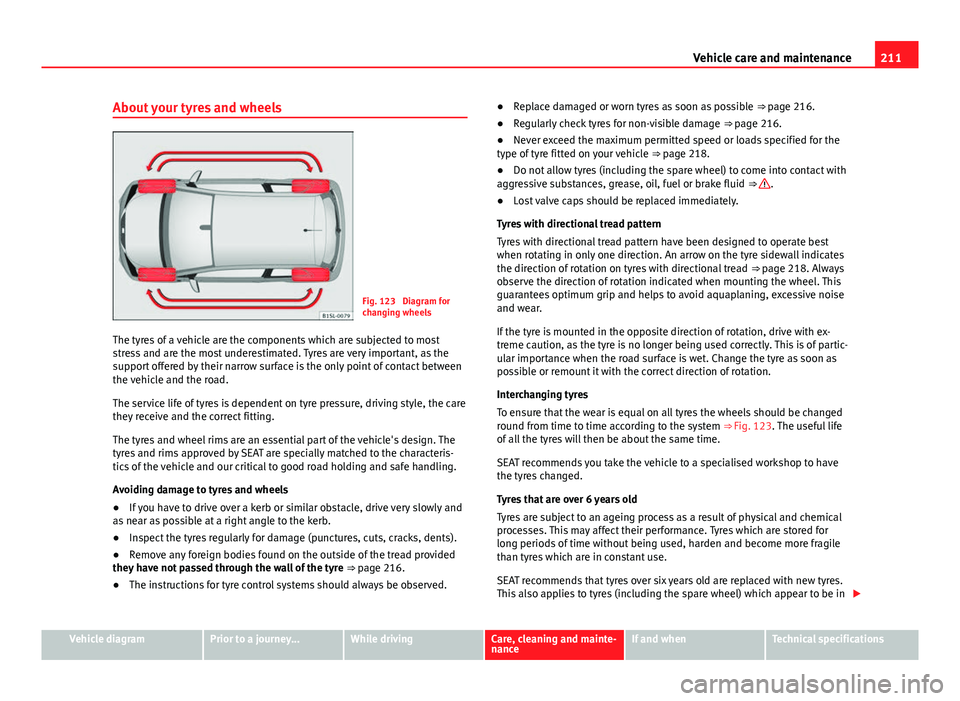
Fig. 123 Diagram for
changing wheels
The tyres of a vehicle are the components which are subjected to most
stress and are the most underestimated. Tyres are very important, as the
support offered by their narrow surface is the only point of contact between
the vehicle and the road.
The service life of tyres is dependent on tyre pressure, driving style, the care
they receive and the correct fitting.
The tyres and wheel rims are an essential part of the vehicle's design. The
tyres and rims approved by SEAT are specially matched to the characteris-
tics of the vehicle and our critical to good road holding and safe handling.
Avoiding damage to tyres and wheels
● If you have to drive over a kerb or similar obstacle, drive very slowly and
as near as possible at a right angle to the kerb.
● Inspect the tyres regularly for damage (punctures, cuts, cracks, dents).
● Remove any foreign bodies found on the outside of the tread provided
they have not passed through the wall of the tyre
⇒ page 216.
● The instructions for tyre control systems should always be observed. ●
Replace damaged or worn tyres as soon as possible ⇒ page 216.
● Regularly check tyres for non-visible damage ⇒ page 216.
● Never exceed the maximum permitted speed or loads specified for the
type of tyre fitted on your vehicle ⇒ page 218.
● Do not allow tyres (including the spare wheel) to come into contact with
aggressive substances, grease, oil, fuel or brake fluid ⇒
.
● Lost valve caps should be replaced immediately.
Tyres with directional tread pattern
Tyres with directional tread pattern have been designed to operate best
when rotating in only one direction. An arrow on the tyre sidewall indicates
the direction of rotation on tyres with directional tread ⇒ page 218. Always
observe the direction of rotation indicated when mounting the wheel. This
guarantees optimum grip and helps to avoid aquaplaning, excessive noise
and wear.
If the tyre is mounted in the opposite direction of rotation, drive with ex-
treme caution, as the tyre is no longer being used correctly. This is of partic-
ular importance when the road surface is wet. Change the tyre as soon as
possible or remount it with the correct direction of rotation.
Interchanging tyres
To ensure that the wear is equal on all tyres the wheels should be changed
round from time to time according to the system ⇒ Fig. 123. The useful life
of all the tyres will then be about the same time.
SEAT recommends you take the vehicle to a specialised workshop to have
the tyres changed.
Tyres that are over 6 years old
Tyres are subject to an ageing process as a result of physical and chemical
processes. This may affect their performance. Tyres which are stored for
long periods of time without being used, harden and become more fragile
than tyres which are in constant use.
SEAT recommends that tyres over six years old are replaced with new tyres.
This also applies to tyres (including the spare wheel) which appear to be in
Vehicle diagramPrior to a journey...While drivingCare, cleaning and mainte-
nanceIf and whenTechnical specifications
Page 244 of 306

242Practical information
Checklist (Continued) 8. Place an emergency warning triangle to indicate the position of your vehicle to other road users.
9. Allow the engine to cool and check if a specialist is required.
When being towed with the hazard warning lights on, a change in direction
or traffic lane can be indicated as usual using the turn signal lever. The haz-
ard lights will be interrupted temporarily.
Examples of when to use the hazard warning lights:
● If the vehicles ahead suddenly slow down or reach the end of a traffic
jam, to warn the vehicles behind.
● In case of an emergency.
● If the vehicle breaks down.
● When tow-starting or towing.
Always comply with the applicable laws regarding the use of hazard warn-
ing lights.
If the hazard warning lights are not working, you must use an alternative
method of drawing attention to your vehicle. This method must comply with
traffic legislation.
WARNING
Failure to follow the checklist prepared for your own safety could lead to
accidents and severe injuries.
● Always complete the operations given in the checklist and observe
the general rules of safety.
WARNING
The components of the exhaust system reach very high temperatures.
This could cause a fire and considerable damage.
● Always park your vehicle so that no part of the exhaust system can
come in contact with flammable materials (such as dried grass or fuel).
Note
The vehicle battery will discharge and run down if the hazard warning lights
remain on for too much time (even with the ignition turned off).
Note
For some vehicles, the brake lights will blink when braking suddenly at
speeds of approximately 80 km/h (50 mph) to warn vehicles behind. If brak-
ing continues, then the hazard warning lights system will automatically be
turned on at the speed of less than approximately 10 km/h (6 mph). The
brake lights remain lit. Upon accelerating, the hazard warning lights will be
automatically turned off.
Page 250 of 306

248Practical information
Access the tools and anti-puncture kit in vehicles equipped
with SEAT SOUND 7 speakers (with subwoofer)*
●Open the rear lid and lift the shelf.
● If necessary, remove the luggage compartment variable floor
⇒ page 101.
● Lift up the carpet from the recess and remove it from the luggage com-
partment.
● Disconnect the subwoofer’s speaker cable.
● Remove the whole hand wheel located in the centre of the subwoofer by
rotating it anti-clockwise.
● Remove the subwoofer, under which the tools and anti-puncture kit are
stowed.
● After you have used them, put the the tools and anti-puncture kit back
exactly as you found them so that the speaker will sit properly in its hous-
ing.
● Fit the subwoofer in the direction of the arrow, with the “FRONT” indica-
tion facing forwards.
● Reconnect the speaker cable and firmly rotate the securing wheel clock-
wise so that the subwoofer system is firmly in place. Components
Fig. 140 Components of the vehicle tool kit
The vehicle tool kit depends on the vehicle equipment. The following is a
description for a vehicle with all options.
The individual elements of the vehicle tool kit ⇒ Fig. 140
Screwdriver with hexagon socket in the handle for screwing and un-
screwing the wheel bolts once loosened. The screwdriver bit is inter-
changeable. The screwdriver may be found underneath the wheel span-
ner.
Adapter for anti-theft bolt. SEAT recommend you carry the wheel bolt
adapter in the vehicle tool kit at all times. The code number of the anti-
theft wheel bolt is stamped on the front of the adapter. In case it is lost,
another adapter can be ordered using this number. Note the anti-theft
bolt code for the wheels and keep it in a place other than the vehicle.
Towline anchorage, removable.
Wire hook for pulling off the wheel cover, integral hubcaps and the
wheel bolt caps.
1
2
34