wheel Seat Mii 2014 User Guide
[x] Cancel search | Manufacturer: SEAT, Model Year: 2014, Model line: Mii, Model: Seat Mii 2014Pages: 219, PDF Size: 4.19 MB
Page 44 of 219

OperationMenuFunction
Warning at ---
km/hIf the stored speed is exceeded (be-
tween 30 - 250 km/h, or 18 -
155 mph), an audible warning is giv-
en together with a visual warning.
Changing between display modes
● Press the rocker switch in the windscreen
wiper lever.
Storing a speed for the speed warning
● Select the display Speed warning at --- km/h
.
● Press OK on the windscreen wiper lever to
store the current speed and switch off the
warning.
● In addition, set the required speed by
pressing the rocker switch on the windscreen
wiper lever or or
buttons on the multi-
function steering wheel for 5 seconds. Next,
press OK again or wait a few seconds. The
speed is stored and the warning activated.
● To switch off , press OK . The stored speed is
deleted.
Manually erasing memory 1 or 2
● Select the memory to be erased.
● Press and hold the eject button OK for ap-
proximately 2 seconds. Note
On the screen of the SEAT Portable System
(supplied by SEAT) ››› page 123 other func-
tion s
of the multifunction display can be
seen. 42
Page 45 of 219
Opening and closing
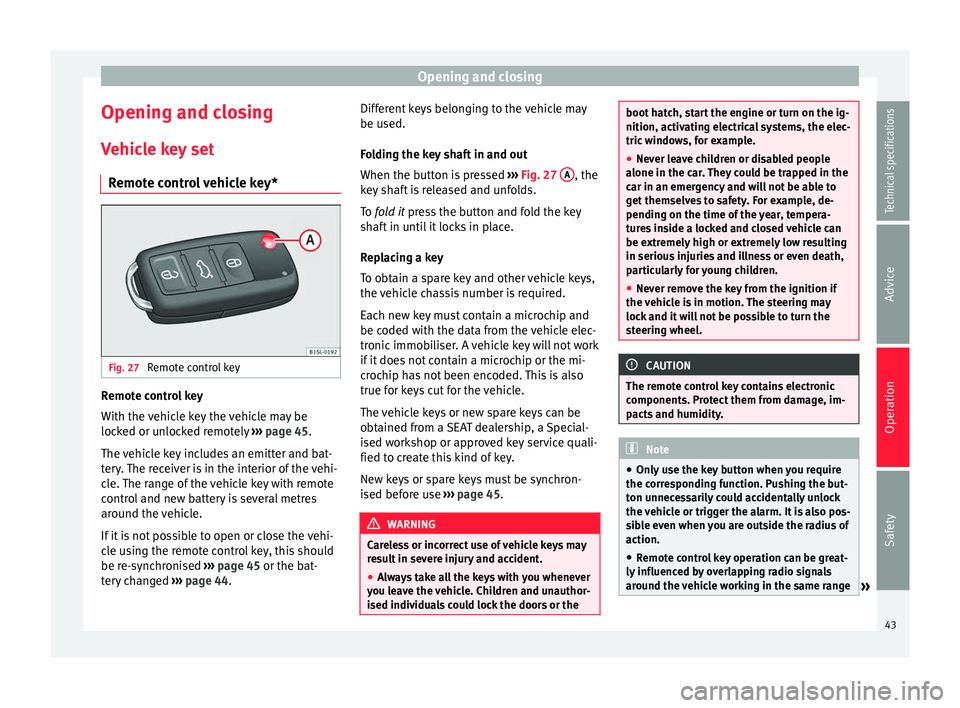
Opening and closing Vehicle key set Remote control vehicle key* Fig. 27
Remote control key Remote control key
With the vehicle key the vehicle may be
locked or unlocked remotely
››› page 45.
The vehicle key includes an emitter and bat-
tery. The receiver is in the interior of the vehi-
cle. The range of the vehicle key with remote
control and new battery is several metres
around the vehicle.
If it is not possible to open or close the vehi-
cle using the remote control key, this should
be re-synchronised ››› page 45 or the bat-
tery changed ››› page 44. Different keys belonging to the vehicle may
be used.
Folding the key shaft in and out
When the button is pressed
››› Fig. 27 A , the
key shaft is released and unfolds.
To fold it
press the button and fold the key
sh
aft in until it locks in place.
Replacing a key
To obtain a spare key and other vehicle keys,
the vehicle chassis number is required.
Each new key must contain a microchip and
be coded with the data from the vehicle elec-
tronic immobiliser. A vehicle key will not work
if it does not contain a microchip or the mi-
crochip has not been encoded. This is also
true for keys cut for the vehicle.
The vehicle keys or new spare keys can be
obtained from a SEAT dealership, a Special-
ised workshop or approved key service quali-
fied to create this kind of key.
New keys or spare keys must be synchron-
ised before use ››› page 45. WARNING
Careless or incorrect use of vehicle keys may
result in severe injury and accident.
● Always take all the keys with you whenever
you leave the vehicle. Children and unauthor-
ised individuals could lock the doors or the boot hatch, start the engine or turn on the ig-
nition, activating electrical systems, the elec-
tric windows, for example.
●
Never leave children or disabled people
alone in the car. They could be trapped in the
car in an emergency and will not be able to
get themselves to safety. For example, de-
pending on the time of the year, tempera-
tures inside a locked and closed vehicle can
be extremely high or extremely low resulting
in serious injuries and illness or even death,
particularly for young children.
● Never remove the key from the ignition if
the vehicle is in motion. The steering may
lock and it will not be possible to turn the
steering wheel. CAUTION
The remote control key contains electronic
components. Protect them from damage, im-
pacts and humidity. Note
● Only use the key button when you require
the corresponding function. Pushing the but-
ton unnecessarily could accidentally unlock
the vehicle or trigger the alarm. It is also pos-
sible even when you are outside the radius of
action.
● Remote control key operation can be great-
ly influenced by overlapping radio signals
around the vehicle working in the same range » 43Technical specifications
Advice
Operation
Safety
Page 58 of 219
OperationIt lights
upPossible causeSolution
Front fog lights switch-
ed on›››
page 56
Left or right turn sig-
nal.
The control lamp flash-
es twice as fast when a
vehicle turn signal is
faulty.
If necessary,
check the vehi-
cle's lights.
Main beam on or
flasher on.›››
page 57 Several warning and control lamps light up
for a few seconds when the ignition is switch-
ed on, signalling that the function is being
verified. They will switch off after a few sec-
onds.
WARNING
Observe the safety warnings ››› in Control
and warning lamps on page 40. Turning on and off lights
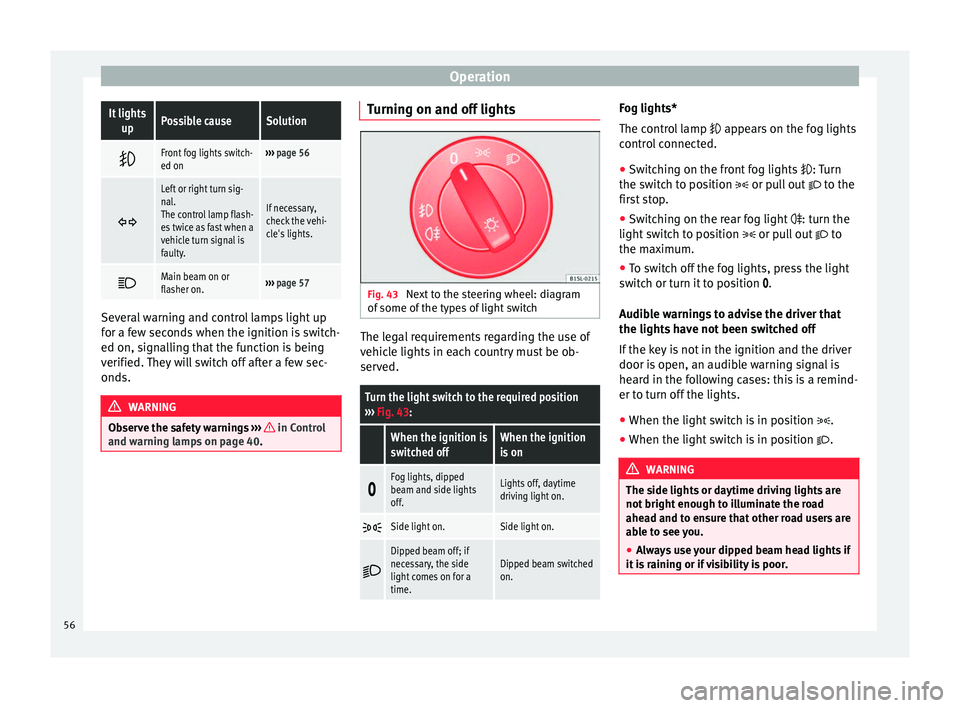
Fig. 43
Next to the steering wheel: diagram
of some of the types of light switch The legal requirements regarding the use of
vehicle lights in each country must be ob-
served.
Turn the light switch to the required position
››› Fig. 43:
When the ignition is
switched offWhen the ignition
is on
Fog lights, dipped
beam and side lights
off.Lights off, daytime
driving light on.
Side light on.Side light on.
Dipped beam off; if
necessary, the side
light comes on for a
time.Dipped beam switched
on. Fog lights*
The control lamp
appears on the fog lights
c ontr
ol connected.
● Switching on the front fog lights
: Turn
the switch to position or pull out to the
first stop.
● Switching on the rear fog light
: turn the
light switch to position or pull out to
the maximum.
● To switch off the fog lights, press the light
switch or turn it to position
.
Audible warnings to advise the driver that
the lights have not been switched off
If the key is not in the ignition and the driver
door is open, an audible warning signal is
heard in the following cases: this is a remind-
er to turn off the lights.
● When the light switch is in position .
● When the light switch is in position . WARNING
The side lights or daytime driving lights are
not bright enough to illuminate the road
ahead and to ensure that other road users are
able to see you.
● Always use your dipped beam head lights if
it is raining or if visibility is poor. 56
Page 60 of 219

Operation
Note
● The turn signal only works when the igni-
tion is switched on. The hazard warning
lights also work when the ignition is switch-
ed off ››› page 170.
● If an
y of both turn signals fails, the warning
lamp will start flashing twice faster than nor-
mal.
● The main beam headlights can only be
sw
itched on if the dipped beam headlights
are already on. Adjusting the headlights
In those countries where vehicles drive on
the other side of the road to the home coun-
try, the asymmetric dipped beam may dazzle
drivers of oncoming vehicles.
For this reason, stickers may be needed to
cover the headlights when driving abroad.
For further information, please refer to a spe-
cialised workshop. SEAT recommends visiting
a technical service.
Note
The use of stickers to cover headlights is only
permitted over a short period. To modify the
direction of the headlamps more permanent-
ly, please take the vehicle to a specialised
workshop. SEAT recommends taking your car
in for technical service. Headlight range control, lighting of
instruments and controls
Fig. 45
Next to the steering wheel: Headlight
range control Headlamp height adjustment
The headlight range control
››› Fig. 45 is
modified ac c
ording to the value of the head-
light beam and the vehicle load status. This
offers the driver optimum visibility and the
headlights do not dazzle oncoming drivers
››› .
The headlights can only be adjusted when
the dipped beam is switched on.
To reset, turn switch ››› Fig. 45:
ValueVehicle load status a)
–Two front occupants, luggage compart-
ment empty
To reset, turn switch
››› Fig. 45:
ValueVehicle load status a)
1All seats occupied, luggage compartment
empty
2All seats occupied, luggage compartment
full
3Driver only, luggage compartment full
a)
If the vehicle load does not correspond to those shown in the
table, it is possible to select intermediary positions.
Instrument and switch lighting
When the side lights or dipped beam head-
lights are switched on, the lighting for instru-
ments and controls lights up at a constant
brightness. WARNING
Heavy objects in the vehicle may mean that
the headlights dazzle and distract other driv-
ers. This could result in a serious accident.
● Adjust the light beam to the vehicle load
status so that it does not blind other drivers. Reading light
But-
ton/SwitchFunction
Switching off the reading light.
58
Page 81 of 219
Transport and practical equipment
●
Only use base supports and roof carrier
systems that are not damaged and are cor-
rectly fitted.
● The base support should only be fitted to
the points indicated in the diagram ››› Fig. 74.
● Sec ur
e the base supports and roof carrier
system correctly.
● Check the screws and attachments before
driving and after a short distance. During
each long journey, check the attachments
during every break.
● Always fit the roof carrier system correctly
for wheels, skis and surfboards, etc.
● Never modify or repair the basic supports
or roof carrier system. Note
Read and take into account the instructions
included with the roof carrier system fitted
and keep them in the vehicle. Loading the roof carrier system
Loads can only be correctly secured when the
roof carrier system is correctly fitted
››› .
Maximum authorised roof load
The maximum authorised roof load is 50 kg.
The r oof
load includes the weight of the base
support, the roof carrier system and the load
being transported ››› .Always check the weight of the base support,
the roof carrier system and the weight of the
load to be transported and, if necessary,
weigh them. Never exceed the maximum au-
thorised roof load.
If you are using a roof carrier with a lower
weight rating, you cannot transport the maxi-
mum roof load. Do not exceed the maximum
weight limit for the roof carrier given in the
fitting instructions.
Distributing a load
Uniformly distribute loads and secure them
correctly
››› .
Check attachments
After fitting the base supports and the roof
carrier system, always check the attachments
after a short trip and at regular intervals. WARNING
Exceeding the maximum authorised roof load
can result in accidents and/or vehicle dam-
age.
● Never surpass the maximum authorised
weight for the roof, the maximum authorised
weight on the axles and the total maximum
authorised weight of the vehicle.
● Never exceed the capacity of the roof carri-
er system even if this is less than the maxi-
mum authorised roof load. ●
Secure heavy items as far forward as possi-
ble and distribute the vehicle load uniformly. WARNING
Loose and incorrectly secured loads can fall
from the roof carrier system causing acci-
dents and injury.
● Always use suitable ropes and straps in
good condition.
● Always secure loads correctly. 79
Technical specifications
Advice
Operation
Safety
Page 86 of 219
Operation
CAUTION
Never place food, medicines or other heat-
sensitive objects close to the air vents. Being
heat-sensitive, they may be damaged or
made unsuitable for use by the air coming
from the air vents. Air recirculation
Important
Air recirculation mode prevents the ambient
air from entering the interior.
When the outside temperature is very high or
very low, selecting manual air recirculation
mode for a short period refreshes or heats
the interior more quickly.
● Switch off air recirculation mode by turning
the air distribution control to the ››› po-
sition.
Switching the air recirculation mode on and
off
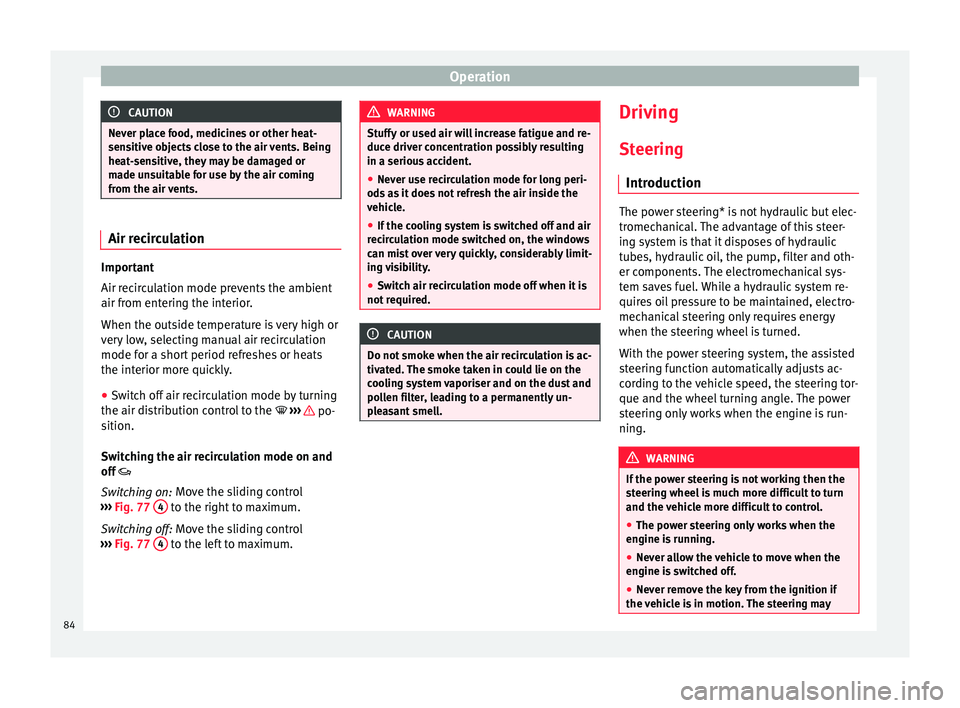
Switching on: Move the sliding control
› ›
› Fig. 77 4 to the right to maximum.
Switching off: Move the sliding control
› ›
› Fig. 77 4 to the left to maximum. WARNING
Stuffy or used air will increase fatigue and re-
duce driver concentration possibly resulting
in a serious accident.
● Never use recirculation mode for long peri-
ods as it does not refresh the air inside the
vehicle.
● If the cooling system is switched off and air
recirculation mode switched on, the windows
can mist over very quickly, considerably limit-
ing visibility.
● Switch air recirculation mode off when it is
not required. CAUTION
Do not smoke when the air recirculation is ac-
tivated. The smoke taken in could lie on the
cooling system vaporiser and on the dust and
pollen filter, leading to a permanently un-
pleasant smell. Driving
Steering Introduction The power steering* is not hydraulic but elec-
tromechanical. The advantage of this steer-
ing system is that it disposes of hydraulic
tubes, hydraulic oil, the pump, filter and oth-
er components. The electromechanical sys-
tem saves fuel. While a hydraulic system re-
quires oil pressure to be maintained, electro-
mechanical steering only requires energy
when the steering wheel is turned.
With the power steering system, the assisted
steering function automatically adjusts ac-
cording to the vehicle speed, the steering tor-
que and the wheel turning angle. The power
steering only works when the engine is run-
ning.
WARNING
If the power steering is not working then the
steering wheel is much more difficult to turn
and the vehicle more difficult to control.
● The power steering only works when the
engine is running.
● Never allow the vehicle to move when the
engine is switched off.
● Never remove the key from the ignition if
the vehicle is in motion. The steering may 84
Page 87 of 219

Driving
lock and it will not be possible to turn the
steering wheel.
Control and warning lampsIt lights
upPossible causeSolution
(red)Power steering
faulty.
The steering system
should be checked
by a specialised
workshop as soon as
possible.
(yellow)Power steering op-
eration reduced.
The steering system
should be checked
by a specialised
workshop as soon as
possible.
If, after restarting the
engine and driving
for a short distance,
the yellow warning
lamp no longer
comes on, it will
not
be necessary to take
the vehicle to a spe-
cialised workshop.
FlashesPossible causeSolution
(red)
Fault in the steer-
ing column elec-
tronic lock. Do not drive on!
Seek professional
advice.
FlashesPossible causeSolution
(yellow)
Steering column
deviation.Gently turn the steer-
ing wheel to and fro.
Steering wheel not
unlocked or
locked.
Remove the key from
the ignition and then
switch the ignition
back on. If necessa-
ry, check the mes-
sages displayed on
the instrument panel
display.
Do not drive on, if
the steering column
remains locked after
the ignition has
been switched on.
Seek specialist as-
sistance. Several warning and control lamps light up
for a few seconds when the ignition is switch-
ed on, signalling that the function is being
verified. They will switch off after a few sec-
onds.
WARNING
If the warning lamps are ignored, the vehicle
may stall in traffic, or may cause accidents
and severe injuries.
● Never ignore the warning lamps.
● Stop the vehicle safely as soon as possible. CAUTION
Failure to heed the warning lamps when they
appear may result in faults in the vehicle. Information on the steering
To prevent theft, we recommend you lock the
steering before leaving the vehicle.
Mechanical steering lock
Lock the steering column by removing the
key from the ignition when the vehicle is
stopped.
Please engage steer-
ing lockUnlocking the steering
Parking the vehicle
››› page 89.Insert the key in the igni-
tion lock.
Remove the key from the
ignition.Turn the steering wheel
slightly to release the
steering lock.
Turn the steering wheel
slightly until you hear the
steering lock.Hold the steering wheel in
this position and switch
on the ignition. Electromechanical power steering
With the power steering system, the assisted
steering function automatically adjusts ac-
cording to the vehicle speed, the steering tor-
que and the wheel turning angle. The power
»
85
Technical specifications
Advice
Operation
Safety
Page 89 of 219

Driving
Key not authorised for the vehicle
If a key which is not authorised for this vehi-
cle is inserted in the ignition lock, it can be
removed as follows:
● Automatic gearbox : the key cannot be re-
moved from the ignition lock. Press and re-
lease the selector lever locking button. Key
can be removed from the vehicle.
● Manual gearbox : Remove the key from the
ignition. WARNING
Unsuitable or careless use of the vehicle key
could result in serious injury.
● Always take all the keys with you whenever
you leave the vehicle. If not, the engine could
accidentally be started and electrical equip-
ment such as the windows could accidentally
be operated resulting in serious injury.
● Never leave children or disabled people
alone in the car. Passengers could be trapped
in the car in an emergency and not be able to
get themselves to safety. For example, de-
pending on the time of the year, tempera-
tures inside a locked and closed vehicle can
be extremely high or extremely low resulting
in serious injuries and illness or even death,
particularly for young children.
● Never remove the key from the ignition if
the vehicle is in motion. The steering may
lock and it will not be possible to turn the
steering wheel. Note
● If the key is left in the ignition lock with the
engine off for long periods, the vehicle bat-
tery will run flat.
● For automatic gearbox vehicles the key can
only be removed from the ignition lock if the
gear selector lever is in position P. In this
case, press and release the selector lever
locking button. Starting the engineComplete operations only in the sequence giv-
en.
1.Press the brake pedal and keep pressed until
step 5 has been completed.
1 a.In vehicles with a manual gearbox: Press the
clutch pedal all the way and keep pressed un- til the engine starts.
2.Put the gearbox lever in neutral or the selector lever in position N.
3.Turn the key in the ignition lock to position
››› Fig. 79 2; do not press the accelerator.
4.When the engine has started, release the key
in the ignition lock.
5.If the engine does not start, stop the processand try again after one minute.
6.Release the handbrake when you want to be- gin driving ››› page 89. WARNING
Never leave the vehicle unattended if the en-
gine is running. The vehicle could move off
suddenly, especially if it is in gear, resulting
in an accident and serious injury. WARNING
Cold start sprays could explode or cause a
sudden increase in the engine speed.
● Never use start boosters. CAUTION
● An attempt to start the engine while driving
or starting the engine immediately after turn-
ing it off can cause damage to the engine or
starter motor.
● When the engine is cold, avoid high revs
and heavy acceleration and do not make the
engine work hard.
● Do not push or tow start the engine. Un-
burnt fuel could damage the catalytic con-
verter. For the sake of the environment
Do not warm the engine at idle speed; start
driving immediately if the visibility is OK.
This helps the engine reach operating tem-
perature faster and reduces emissions. » 87
Technical specifications
Advice
Operation
Safety
Page 91 of 219
Driving
Braking and parking Introduction The assisted braking systems
are the elec-
tr
onic distribution of the brake force (EBV),
the anti-lock brake system (ABS), the brake
assist system (BAS), the electronic differen-
tial lock (EDL), the traction control (TC), the
traction control system (ASR) and the elec-
tronic stability control (ESC*). WARNING
Driving with worn brake pads or a faulty
brake system may lead to serious accident.
● If you believe the brake pads to be worn or
the brake system to be faulty, immediately
refer to a specialised workshop to check the
brake pads and replace the worn ones. WARNING
Careless parking can cause serious injury.
● Never remove the key from the ignition if
the vehicle is in motion. The steering lock
may engage and lock the steering wheel mak-
ing the vehicle impossible to control.
● Always park your vehicle so that no part of
the exhaust system can come in contact with
flammable materials (such as wood, leaves,
dried grass, spilled fuel, etc.).
● Always apply the handbrake when you
leave your vehicle and when you park. ●
Never leave children or disabled people
alone in the vehicle. They could release the
electronic parking brake, activate the selec-
tor lever or gear stick and start the vehicle
moving. This could result in a serious acci-
dent.
● Always take all the keys with you whenever
you leave the vehicle. The engine could acci-
dentally be started and electrical equipment
such as the windows could accidentally be
operated resulting in serious injury.
● Never leave children or disabled people
alone in the car. They could be trapped in the
car in an emergency and will not be able to
get themselves to safety. For example, de-
pending on the time of the year, tempera-
tures inside a locked and closed vehicle can
be extremely high or extremely low resulting
in serious injuries and illness or even death,
particularly for young children. CAUTION
● Special care should be taken when parking
in areas with high kerbs or fixed barriers. Ob-
jects protruding from the ground may dam-
age the bumper or other parts of the vehicle
during manoeuvres. To avoid damage, stop
before the wheels touch the barrier or kerb.
● Special attention is required when driving
through entrances, over ramps, kerbs or oth-
er objects. The vehicle underbody, bumpers,
mudguards and running gear, and the engine
and exhaust system could be damaged as
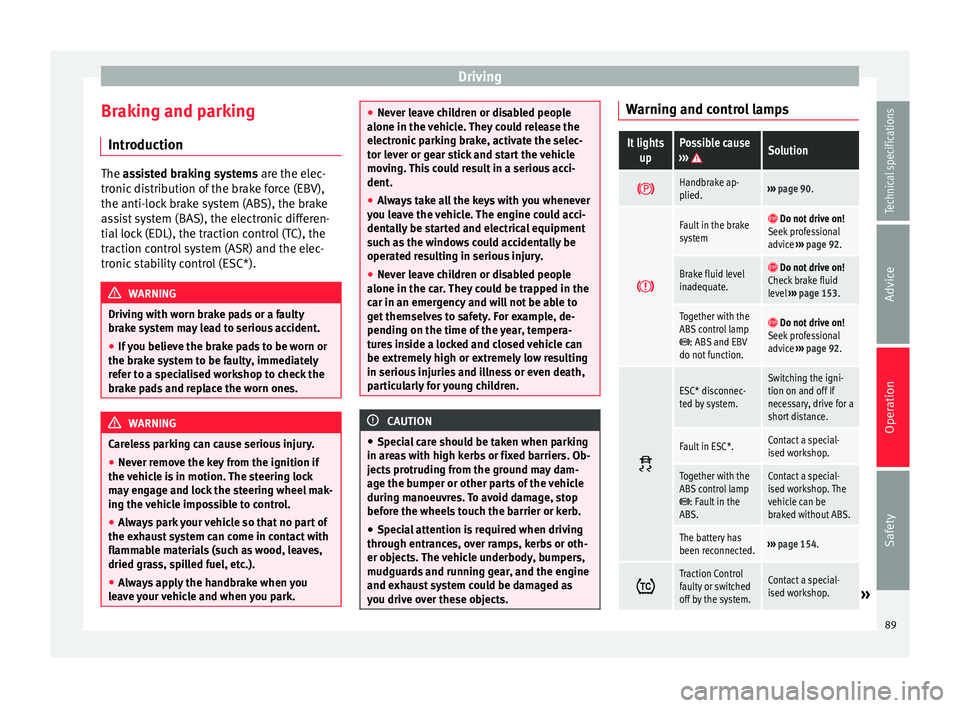
you drive over these objects. Warning and control lamps
It lights
upPossible cause
››› Solution
Handbrake ap-
plied.›››
page 90.
Fault in the brake
system Do not drive on!
Seek professional
advice ››› page 92.
Brake fluid level
inadequate. Do not drive on!
Check brake fluid
level ››› page 153.
Together with the
ABS control lamp
: ABS and EBV
do not function.
Do not drive on!
Seek professional
advice ››› page 92.
ESC* disconnec-
ted by system.Switching the igni-
tion on and off If
necessary, drive for a
short distance.
Fault in ESC*.Contact a special-
ised workshop.
Together with the
ABS control lamp
: Fault in the
ABS.
Contact a special-
ised workshop. The
vehicle can be
braked without ABS.
The battery has
been reconnected.››› page 154.
Traction Control
faulty or switched
off by the system.Contact a special-
ised workshop.»
89
Technical specifications
Advice
Operation
Safety
Page 92 of 219
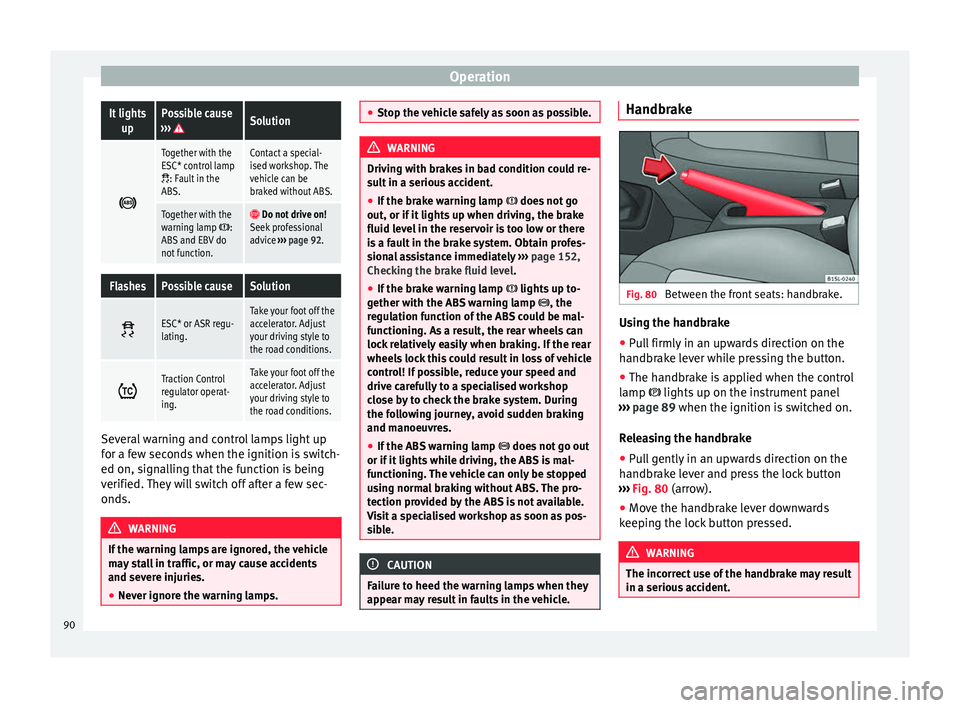
OperationIt lights
upPossible cause
››› Solution
Together with the
ESC* control lamp
: Fault in the
ABS.
Contact a special-
ised workshop. The
vehicle can be
braked without ABS.
Together with the
warning lamp :
ABS and EBV do
not function. Do not drive on!
Seek professional
advice ››› page 92.
FlashesPossible causeSolution
ESC* or ASR regu-
lating.Take your foot off the
accelerator. Adjust
your driving style to
the road conditions.
Traction Control
regulator operat-
ing.Take your foot off the
accelerator. Adjust
your driving style to
the road conditions.
Several warning and control lamps light up
for a few seconds when the ignition is switch-
ed on, signalling that the function is being
verified. They will switch off after a few sec-
onds.
WARNING
If the warning lamps are ignored, the vehicle
may stall in traffic, or may cause accidents
and severe injuries.
● Never ignore the warning lamps. ●
Stop the vehicle safely as soon as possible. WARNING
Driving with brakes in bad condition could re-
sult in a serious accident.
● If the brake warning lamp does not go
out, or if it lights up when driving, the brake
fluid level in the reservoir is too low or there
is a fault in the brake system. Obtain profes-
sional assistance immediately ››› page 152,
Checking the brake fluid level.
● If the brake warning lamp lights up to-
gether with the ABS warning lamp , the
regulation function of the ABS could be mal-
functioning. As a result, the rear wheels can
lock relatively easily when braking. If the rear
wheels lock this could result in loss of vehicle
control! If possible, reduce your speed and
drive carefully to a specialised workshop
close by to check the brake system. During
the following journey, avoid sudden braking
and manoeuvres.
● If the ABS warning lamp does not go out
or if it lights while driving, the ABS is mal-
functioning. The vehicle can only be stopped
using normal braking without ABS. The pro-
tection provided by the ABS is not available.
Visit a specialised workshop as soon as pos-
sible. CAUTION
Failure to heed the warning lamps when they
appear may result in faults in the vehicle. Handbrake
Fig. 80
Between the front seats: handbrake. Using the handbrake
●
Pull firmly in an upwards direction on the
handbrake lever while pressing the button.
● The handbrake is applied when the control
lamp lights up on the instrument panel
››› page 89 when the ignition is switched on.
R el
easing the handbrake
● Pull gently in an upwards direction on the
handbrake lever and press the lock button
››› Fig. 80 (arrow).
● Mov
e the handbrake lever downwards
keeping the lock button pressed. WARNING
The incorrect use of the handbrake may result
in a serious accident. 90