battery Seat Mii 2014 Owner's manual
[x] Cancel search | Manufacturer: SEAT, Model Year: 2014, Model line: Mii, Model: Seat Mii 2014Pages: 219, PDF Size: 4.19 MB
Page 5 of 219
Table of Contents
Table of Contents
Safety . . . . . . . . . . . . . . . . . . . . . . . . . . . . . . . . 5
Safe driving . . . . . . . . . . . . . . . . . . . . . . . . . . . . 5
Safety first! . . . . . . . . . . . . . . . . . . . . . . . . . . . . . 5
Tips for driving . . . . . . . . . . . . . . . . . . . . . . . . . . 5
Correct sitting position for vehicle occupants . 6
Pedal area . . . . . . . . . . . . . . . . . . . . . . . . . . . . . . 10
Seat belts . . . . . . . . . . . . . . . . . . . . . . . . . . . . . . 11
Using seat belts . . . . . . . . . . . . . . . . . . . . . . . . . 11
How to properly adjust your seatbelt . . . . . . . . 15
Seat belt tensioners . . . . . . . . . . . . . . . . . . . . . . 16
Airbag system . . . . . . . . . . . . . . . . . . . . . . . . . . 17
Brief introduction . . . . . . . . . . . . . . . . . . . . . . . . 17
General overview of the airbag . . . . . . . . . . . . . 21
Deactivating airbags . . . . . . . . . . . . . . . . . . . . . 23
Transporting children safely . . . . . . . . . . . . . . . 25
Child safety . . . . . . . . . . . . . . . . . . . . . . . . . . . . . 25
Operation . . . . . . . . . . . . . . . . . . . . . . . . . . . . . 35
Cockpit . . . . . . . . . . . . . . . . . . . . . . . . . . . . . . . . 35
Overview . . . . . . . . . . . . . . . . . . . . . . . . . . . . . . . 34
Instruments . . . . . . . . . . . . . . . . . . . . . . . . . . . . 36
Control lamps . . . . . . . . . . . . . . . . . . . . . . . . . . . 39
SEAT information system . . . . . . . . . . . . . . . . . . 40
Opening and closing . . . . . . . . . . . . . . . . . . . . . 43
Vehicle key set . . . . . . . . . . . . . . . . . . . . . . . . . . 43
Central locking* and locking system . . . . . . . . 45
Doors . . . . . . . . . . . . . . . . . . . . . . . . . . . . . . . . . . 49
Rear lid . . . . . . . . . . . . . . . . . . . . . . . . . . . . . . . . 50
Electric windows . . . . . . . . . . . . . . . . . . . . . . . . . 52
Sliding/tilting electric panoramic sunroof . . . . 53
Lights and visibility . . . . . . . . . . . . . . . . . . . . . . 55
Lights . . . . . . . . . . . . . . . . . . . . . . . . . . . . . . . . . 55
Visibility . . . . . . . . . . . . . . . . . . . . . . . . . . . . . . . 59 Windscreen wiper and rear window wiper
systems . . . . . . . . . . . . . . . . . . . . . . . . . . . . . . . . 60
Rear vision mirror . . . . . . . . . . . . . . . . . . . . . . . . 61
Seats and head restraints
. . . . . . . . . . . . . . . . . 63
Adjusting the seat and head restraints . . . . . . 63
Seat functions . . . . . . . . . . . . . . . . . . . . . . . . . . 64
Transport and practical equipment . . . . . . . . . 65
Transporting objects . . . . . . . . . . . . . . . . . . . . . 65
Practical equipment . . . . . . . . . . . . . . . . . . . . . . 67
Loading luggage compartment . . . . . . . . . . . . . 73
Roof carrier system . . . . . . . . . . . . . . . . . . . . . . . 77
Air conditioning . . . . . . . . . . . . . . . . . . . . . . . . . 80
Heating, ventilation and air conditioning
system . . . . . . . . . . . . . . . . . . . . . . . . . . . . . . . . . 80
Driving . . . . . . . . . . . . . . . . . . . . . . . . . . . . . . . . 84
Steering . . . . . . . . . . . . . . . . . . . . . . . . . . . . . . . 84
Stopping and starting the engine . . . . . . . . . . . 86
Braking and parking . . . . . . . . . . . . . . . . . . . . . 89
Changing gear . . . . . . . . . . . . . . . . . . . . . . . . . . 93
Run-in and economical driving . . . . . . . . . . . . . 98
Engine management and exhaust gas
purification system . . . . . . . . . . . . . . . . . . . . . . 101
Driving abroad . . . . . . . . . . . . . . . . . . . . . . . . . . 102
Driving along flooded roadways . . . . . . . . . . . . 103
Driver assistance systems . . . . . . . . . . . . . . . . . 103
Braking and stability systems . . . . . . . . . . . . . . 103
Parking sensor system* . . . . . . . . . . . . . . . . . . . 105
Cruise control* (Cruise control system - CCS) . . 107
Safety Assist* (City Safety Assist function) . . . . 110
Hill driving assistant* . . . . . . . . . . . . . . . . . . . . 114
Start-Stop system . . . . . . . . . . . . . . . . . . . . . . . . 115
Towing bracket device . . . . . . . . . . . . . . . . . . . . 117
Trailer coupling . . . . . . . . . . . . . . . . . . . . . . . . . . 117 Advice
. . . . . . . . . . . . . . . . . . . . . . . . . . . . . . . . 118
Care and maintenance . . . . . . . . . . . . . . . . . . . . 118
Accessories, replacement of parts and
modifications . . . . . . . . . . . . . . . . . . . . . . . . . . . 118
Care and cleaning the vehicle exterior . . . . . . . 125
Caring for and cleaning the vehicle interior . . . 131
Notes for the user . . . . . . . . . . . . . . . . . . . . . . . . 134
Checking and refilling levels . . . . . . . . . . . . . . . 137
Fuel . . . . . . . . . . . . . . . . . . . . . . . . . . . . . . . . . . . 137
Filling the tank . . . . . . . . . . . . . . . . . . . . . . . . . . 139
Bonnet . . . . . . . . . . . . . . . . . . . . . . . . . . . . . . . . 143
Engine oil . . . . . . . . . . . . . . . . . . . . . . . . . . . . . . 146
Engine coolant . . . . . . . . . . . . . . . . . . . . . . . . . . 150
Brake fluid . . . . . . . . . . . . . . . . . . . . . . . . . . . . . 152
Checking and topping up the windscreen
washer reservoir with water . . . . . . . . . . . . . . . . 154
Vehicle battery . . . . . . . . . . . . . . . . . . . . . . . . . . 154
Wheels and tyres . . . . . . . . . . . . . . . . . . . . . . . . 158
Wheels . . . . . . . . . . . . . . . . . . . . . . . . . . . . . . . . 158
Emergencies . . . . . . . . . . . . . . . . . . . . . . . . . . . . 170
In case of emergency . . . . . . . . . . . . . . . . . . . . . 170
Vehicle tool kit* . . . . . . . . . . . . . . . . . . . . . . . . . 172
Changing a wheel . . . . . . . . . . . . . . . . . . . . . . . 174
Tyre repair . . . . . . . . . . . . . . . . . . . . . . . . . . . . . . 178
Starting assistance . . . . . . . . . . . . . . . . . . . . . . 181
Towing and tow starting . . . . . . . . . . . . . . . . . . . 183
Emergency locking and unlocking . . . . . . . . . . 186
Changing the windscreen wiper blades . . . . . . 188
Fuses and bulbs . . . . . . . . . . . . . . . . . . . . . . . . . 189
Fuses . . . . . . . . . . . . . . . . . . . . . . . . . . . . . . . . . . 189
Changing bulbs . . . . . . . . . . . . . . . . . . . . . . . . . 191
Technical specifications . . . . . . . . . . . . . . . 197
Technical features . . . . . . . . . . . . . . . . . . . . . . . 197
Important information . . . . . . . . . . . . . . . . . . . . 197
Wheels . . . . . . . . . . . . . . . . . . . . . . . . . . . . . . . . 199
Engine specifications . . . . . . . . . . . . . . . . . . . . . 200
3
Page 40 of 219
Operation
passengers in the rear seats have fastened
their seat belts ››› page 11 .
St ar
t-Stop system status display
The instrument panel display shows informa-
tion on the current status ››› page 115. WARNING
If the warning lamps are ignored, the vehicle
may stall in traffic, or may cause accidents
and severe injuries.
● Never ignore the warning lamps.
● Stop the vehicle safely as soon as possible.
● A faulty vehicle represents a risk of acci-
dent for the driver and for other road users. If
necessary, switch on the hazard warning
lamps and put out the warning triangle to ad-
vise other drivers.
● Park the vehicle away from traffic and en-
sure that no highly flammable materials are
under the vehicle that could come into con-
tact with the exhaust system (e.g. dry grass,
fuel). WARNING
Even though outside temperatures are above
freezing, some roads and bridges may be icy.
● At outside temperatures above +4°C
(+39°F), even when the “ice crystal symbol”
is not visible, there may still be patches of ice
on the road. ●
Never rely on the outside temperature indi-
cator! CAUTION
Failure to heed the warning lamps when they
appear may result in faults in the vehicle. Note
● Different versions of the instrument panel
are available and therefore the versions and
instructions on the display may vary.
● When several warnings are active at the
same time, the symbols are shown succes-
sively for a few seconds and will stay on until
the fault is rectified. Service interval display
The inspection display appears on the instru-
ment panel display
›››
Fig. 24 or ›
›
›
Fig. 25 2 .
SEAT makes a difference between services
with engine oil change (Interval Service) and
ser v
ices without engine oil change (Inspec-
tion Service). The service interval display only
gives information for service dates which in-
volve an engine oil change. The dates of the
remaining services (e.g. the next Inspection
Service or change of brake fluid) are listed on
the label attached to the door strut, or in the
Maintenance Programme. The set service intervals have been specified
with the service dependent on time/distance
trav
elled.
Inspection reminder
If the inspection period is due to expire
shortly,
Inspection reminder appears when
starting the ignition abbreviated to and a
warning in
km. The number of kilometres
shown is the maximum number that may be
driven until the next service.
Service due
After the service date, an audible warning is
giv
en when the ignition is switched on and
the abbreviation displayed on the screen
flashes for a few seconds. Note
The service message disappears after a few
seconds, when the engine is started or when OK is pressed on the windscreen wiper lever.
Note
In vehicles in which the battery has been dis-
connected for a long period of time, it is not
possible to calculate the date of the next
service. Therefore the service interval display
may not be correct. In this case, bear in mind
the maximum service intervals permitted in
the ››› Booklet Maintenance Programme.38
Page 45 of 219
Opening and closing
Opening and closing Vehicle key set Remote control vehicle key* Fig. 27
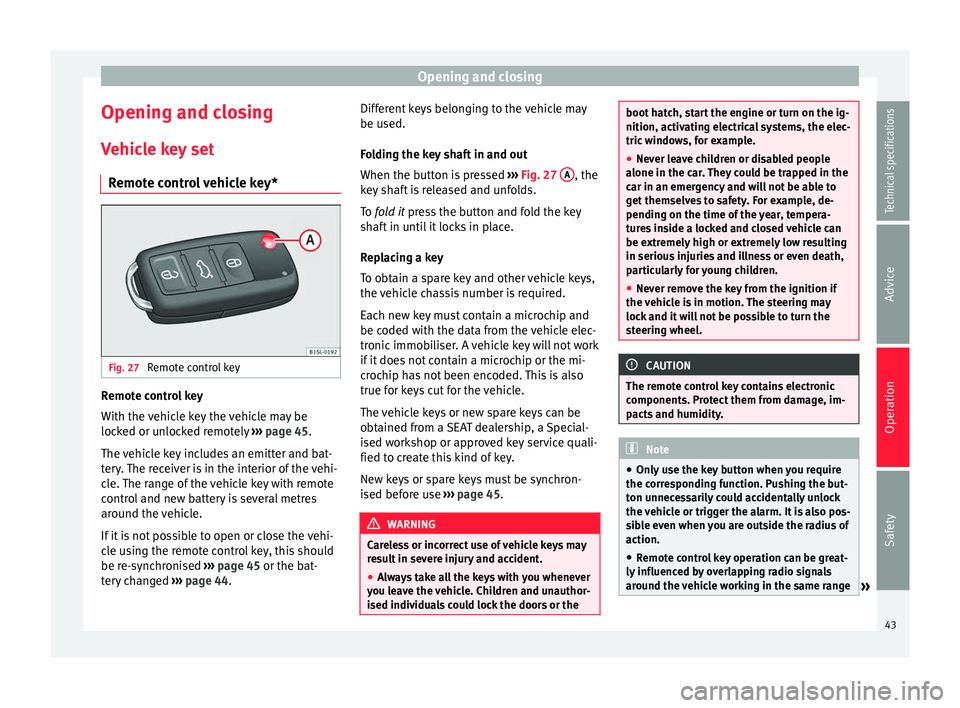
Remote control key Remote control key
With the vehicle key the vehicle may be
locked or unlocked remotely
››› page 45.
The vehicle key includes an emitter and bat-
tery. The receiver is in the interior of the vehi-
cle. The range of the vehicle key with remote
control and new battery is several metres
around the vehicle.
If it is not possible to open or close the vehi-
cle using the remote control key, this should
be re-synchronised ››› page 45 or the bat-
tery changed ››› page 44. Different keys belonging to the vehicle may
be used.
Folding the key shaft in and out
When the button is pressed
››› Fig. 27 A , the
key shaft is released and unfolds.
To fold it
press the button and fold the key
sh
aft in until it locks in place.
Replacing a key
To obtain a spare key and other vehicle keys,
the vehicle chassis number is required.
Each new key must contain a microchip and
be coded with the data from the vehicle elec-
tronic immobiliser. A vehicle key will not work
if it does not contain a microchip or the mi-
crochip has not been encoded. This is also
true for keys cut for the vehicle.
The vehicle keys or new spare keys can be
obtained from a SEAT dealership, a Special-
ised workshop or approved key service quali-
fied to create this kind of key.
New keys or spare keys must be synchron-
ised before use ››› page 45. WARNING
Careless or incorrect use of vehicle keys may
result in severe injury and accident.
● Always take all the keys with you whenever
you leave the vehicle. Children and unauthor-
ised individuals could lock the doors or the boot hatch, start the engine or turn on the ig-
nition, activating electrical systems, the elec-
tric windows, for example.
●
Never leave children or disabled people
alone in the car. They could be trapped in the
car in an emergency and will not be able to
get themselves to safety. For example, de-
pending on the time of the year, tempera-
tures inside a locked and closed vehicle can
be extremely high or extremely low resulting
in serious injuries and illness or even death,
particularly for young children.
● Never remove the key from the ignition if
the vehicle is in motion. The steering may
lock and it will not be possible to turn the
steering wheel. CAUTION
The remote control key contains electronic
components. Protect them from damage, im-
pacts and humidity. Note
● Only use the key button when you require
the corresponding function. Pushing the but-
ton unnecessarily could accidentally unlock
the vehicle or trigger the alarm. It is also pos-
sible even when you are outside the radius of
action.
● Remote control key operation can be great-
ly influenced by overlapping radio signals
around the vehicle working in the same range » 43Technical specifications
Advice
Operation
Safety
Page 46 of 219

Operation
of frequencies (for example, radio
transmitters, mobile telephones).
● Obstacles between the remote control and
the vehicle, bad weather conditions and
draining batteries can considerably reduce
the range of the remote control.
● If the buttons of the vehicle key are press-
ed ››› Fig. 27 or one of the central locking but-
t on
s ››› page 45 is pressed repeatedly in
quick
succession, the central locking briefly
disconnects as protection against overload-
ing. The vehicle is then unlocked. Lock it if necessary. Vehicle mechanical key
Fig. 28
Vehicle mechanical key The vehicle key set may include a mechanical
key
››› Fig. 28 . D
up
licate keys
To obtain a spare key and other vehicle keys,
the vehicle chassis number is required.
Each new key must contain a microchip and
be coded with the data from the vehicle elec-
tronic immobiliser. A vehicle key will not work
if it does not contain a microchip or the mi-
crochip has not been encoded. This is also
true for keys cut for the vehicle.
The vehicle keys or new spare keys can be
obtained from a SEAT dealership, a special-
ised workshop or an approved locksmith
qualified to create them.
Control lamp on the vehicle key Fig. 29
Control lamp on the vehicle key When a button on the vehicle key is pressed,
the control lamp flashes
››› Fig. 29 (arrow)
onc e briefly
. If the button is pressed and
held, the indicator blinks several times, for example: for the convenience opening func-
tion.
When the control lamp does not light upon
pushing a button, the vehicle key batteries
must be changed
››› page 44.
Changing the battery Fig. 30
Vehicle key: battery compartment cov-
er Fig. 31
Vehicle key: removing the battery44
Page 47 of 219
Opening and closing
SEAT recommend having the batteries
changed in a specialised workshop.
The battery is located to the rear of the vehi-
cle key, under a cover.
Changing the battery
● Unfold the vehicle key shaft ››› page 43.
● Remove the cover from the back of the ve-
hicle key ››› Fig. 30 in the direction of the ar-
r o
w ››› .
● Extract the battery from the compartment
using a suitable thin object ››› Fig. 31 .
● Plac
e the new battery in the compartment,
pressing in the direction of the arrow as
shown ››› Fig. 31 ››› .
● Fit the battery compartment cover, pressing
in the direction of the arrow as shown
››› Fig. 30 until it clicks into place. CAUTION
● If the battery is not changed correctly, the
vehicle key may be damaged.
● Use of unsuitable batteries may damage
the vehicle key. For this reason, always re-
place the dead battery with another of the
same voltage, size and specifications.
● When fitting the battery, check that the po-
larity is correct. For the sake of the environment
Please dispose of your used batteries correct-
ly and with respect for the environment. Synchronising the vehicle key
If the button
is pressed frequently outside
of the vehicle range, it is possible that the ve-
hicle can no longer be locked or unlocked us-
ing the key. In this case, the vehicle key must
be synchronised once more as follows:
● Unfold the vehicle key shaft ›››
page 43.
● Press the button on the vehicle key. For
this, it must remain with the vehicle.
● Open the vehicle within one minute using
the key shaft.
● Turn on the ignition using the vehicle key.
The key has been synchronised.
● If necessary, fit the cap.
Central locking* and locking
system Introduction Central locking functions correctly when all
the doors and the rear lid are correctly shut.If the driver door is open, the vehicle
cannot
be locked with the key.
The battery of an unlocked vehicle parked for
a long period (e.g. in a private garage) may
run down and fail to start the motor. WARNING
The incorrect use of the central locking sys-
tem may cause serious injuries.
● The central locking system will lock all
doors. A vehicle locked from the inside can
prevent any non-authorised individual from
opening the doors and accessing the vehicle.
Nevertheless, in case of emergency or acci-
dent, locked doors will complicate access to
the vehicle interior to help the passengers.
● Never leave children or disabled people
alone in the vehicle. The central locking but-
ton can be used to lock all the doors from
within. Therefore, passengers will be locked
inside the vehicle. Individuals locked in the
vehicle can be exposed to very high or very
low temperatures.
● Depending on the time of the year, temper-
atures inside a locked and closed vehicle can
be extremely high or extremely low resulting
in serious injuries and illness or even death,
particularly for young children.
● Never leave individuals locked in a closed
and locked vehicle. In case of emergency,
they may not be able to exit the vehicle by
themselves or get help. 45
Technical specifications
Advice
Operation
Safety
Page 49 of 219

Opening and closing
Central lockingFunctionHandling
the buttons
on the vehi-
cle ››› Fig. 32Handling the vehicle
key ››› Fig. 32 in the
lock cylinder or with
the vehicle mechani-
cal key ››› Fig. 33.
Unlocking
the vehi-
cle.Press button.Insert the vehicle key in-
to the lock cylinder of
the driver door and turn
the key in an anticlock-
wise direction.
Lock the
vehicle.Press button.Insert the vehicle key in-
to the lock cylinder of
the driver door and turn
the key in a clockwise
direction.
Unlocking
the rear lid.Press button.Insert the vehicle key in-
to the lock cylinder of
the driver door and turn
the key in an anticlock-
wise direction.
Locking
the rear lid.Press button.Insert the vehicle key in-
to the lock cylinder of
the driver door and turn
the key in a clockwise
direction. Please note:
depending on the operation of
the c entr
al locking feature set by a special-
ised workshop, in order to unlock all the
doors and the rear lid, press the button twice. The vehicle key only locks and unlocks the
vehicle if it is within range of the vehicle and
if the battery has enough power.
● Upon locking the vehicle, all turn signals
will flash once in confirmation.
● Upon u
nlocking the vehicle, all turn signals
will flash twice
in confirmation.
If the turn signals do not
flash in confirma-
tion, at least one of the doors or the rear lid
has been left unlocked.
If the driver door is open, the vehicle cannot
be locked with the key. If you unlock the vehi-
cle without opening any doors or the rear lid,
it will lock again automatically after a few
seconds. This function prevents the vehicle
from remaining unlocked if the unlocking
button is pressed by mistake.
Mechanical locking
FunctionUsing the vehicle's mechani-
cal key ››› Fig. 33 in the lock
cylinder
Locking the driv-
er door manually.
To unlock, insert the vehicle key in-
to the lock cylinder of the driver
door and turn the key in an anti-
clockwise direction.
To lock, insert the vehicle key into
the lock cylinder of the driver door
and turn the key in a clockwise di-
rection.
FunctionUsing the vehicle's mechani-
cal key ››› Fig. 33 in the lock
cylinder
Locking and un-
locking the rear
lid.
To unlock, insert the vehicle key in-
to the lock cylinder of the driver
door and turn the key in an anti-
clockwise direction.
To lock, insert the vehicle key into
the lock cylinder of the driver door
and turn the key in a clockwise di-
rection. If the driver's door is open, it cannot be
locked with the vehicle key.
47
Technical specifications
Advice
Operation
Safety
Page 61 of 219
Lights and visibilityBut-
ton/SwitchFunction
Switching on the reading light.
Switches door contact control on (cen-
tral position).
The reading light comes on automati-
cally when the vehicle is unlocked, a
door is opened or the key is removed
from the ignition.
The light goes off a few seconds after
all the doors are closed, the vehicle is
locked or the ignition is switched on.
Note
The reading lights go out when the vehicle is
locked, or a few minutes after the key is re-
moved from the ignition. This prevents the
vehicle's battery from discharging. Visibility
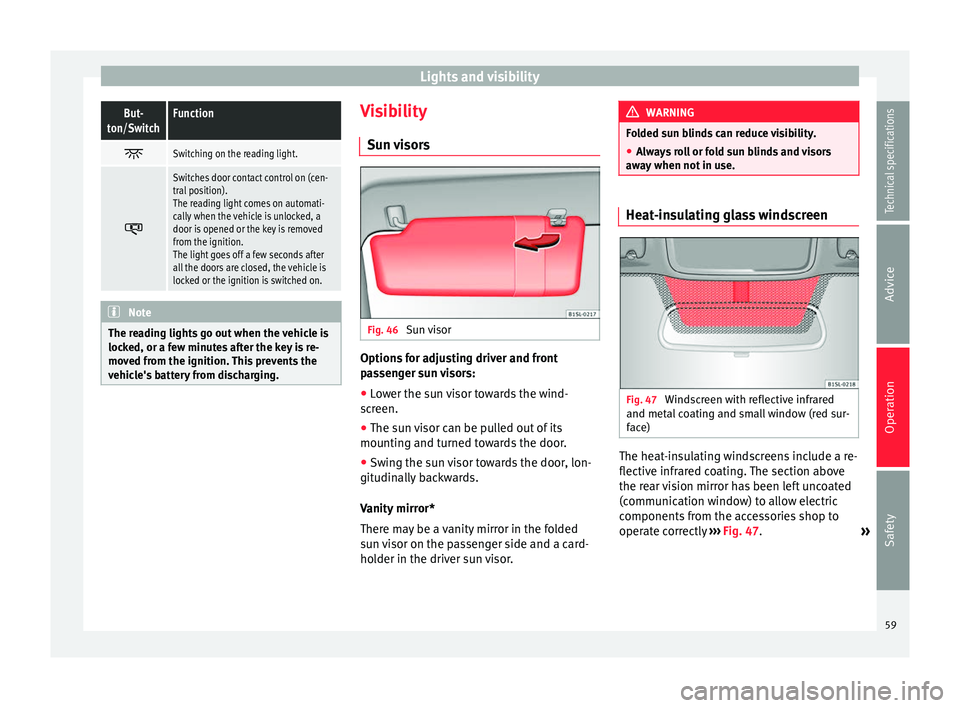
Sun visors Fig. 46
Sun visor Options for adjusting driver and front
passenger sun visors:
● Lower the sun visor towards the wind-
screen.
● The sun visor can be pulled out of its
mounting and turned towards the door.
● Swing the sun visor towards the door, lon-
gitudinally backwards.
Vanity mirror*
There may be a vanity mirror in the folded
sun visor on the passenger side and a card-
holder in the driver sun visor. WARNING
Folded sun blinds can reduce visibility.
● Always roll or fold sun blinds and visors
away when not in use. Heat-insulating glass windscreen
Fig. 47
Windscreen with reflective infrared
and metal coating and small window (red sur-
face) The heat-insulating windscreens include a re-
flective infrared coating. The section above
the rear vision mirror has been left uncoated
(communication window) to allow electric
components from the accessories shop to
operate correctly
›››
Fig. 47 .
»
59
Technical specifications
Advice
Operation
Safety
Page 74 of 219
Operation
● After emptying the ashtray, insert it into the
drink holder from above. WARNING
Incorrect use of the ashtray may cause a fire
or burns and other serious injuries.
● Never put paper or other flammable objects
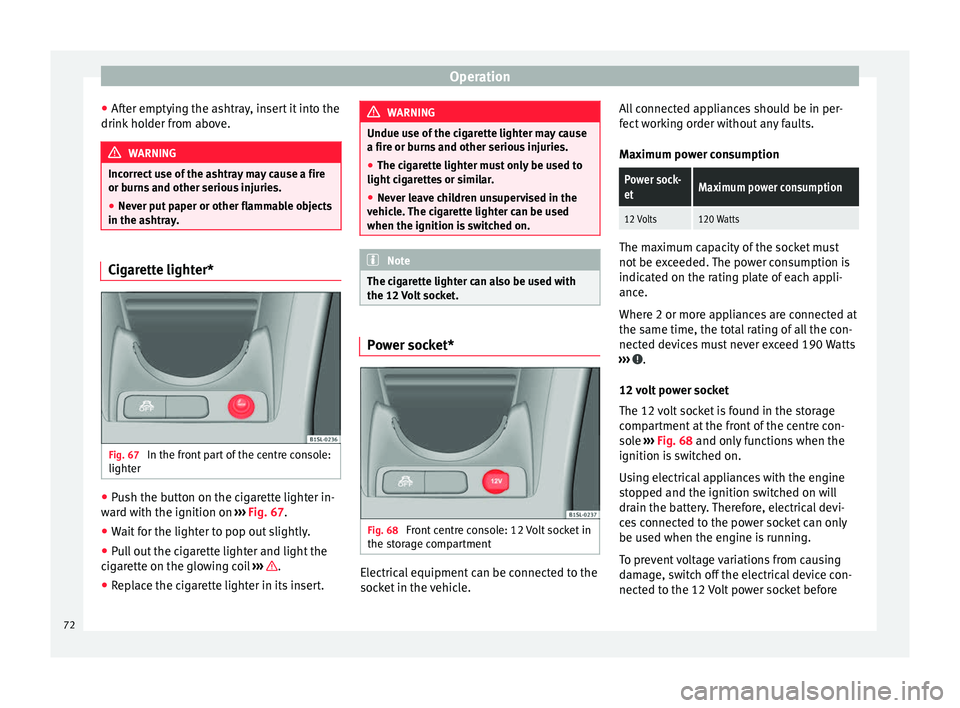
in the ashtray. Cigarette lighter*
Fig. 67
In the front part of the centre console:
lighter ●
Push the button on the cigarette lighter in-
ward with the ignition on ››› Fig. 67
.
● Wait
for the lighter to pop out slightly.
● Pull out the cigarette lighter and light the
cigarette on the glowing coil ››› .
● Replace the cigarette lighter in its insert. WARNING
Undue use of the cigarette lighter may cause
a fire or burns and other serious injuries.
● The cigarette lighter must only be used to
light cigarettes or similar.
● Never leave children unsupervised in the
vehicle. The cigarette lighter can be used
when the ignition is switched on. Note
The cigarette lighter can also be used with
the 12 Volt socket. Power socket*
Fig. 68
Front centre console: 12 Volt socket in
the storage compartment Electrical equipment can be connected to the
socket in the vehicle.All connected appliances should be in per-
fect working order without any faults.
Maximum power consumption
Power sock-
etMaximum power consumption
12 Volts120 Watts
The maximum capacity of the socket must
not be exceeded. The power consumption is
indicated on the rating plate of each appli-
ance.
Where 2 or more appliances are connected at
the same time, the total rating of all the con-
nected devices must never exceed 190 Watts
››› .
12 volt power socket
The 12 volt socket is found in the storage
compartment at the front of the centre con-
sole ›››
Fig. 68 and only functions when the
ignition i s
switched on.
Using electrical appliances with the engine
stopped and the ignition switched on will
drain the battery. Therefore, electrical devi-
ces connected to the power socket can only
be used when the engine is running.
To prevent voltage variations from causing
damage, switch off the electrical device con-
nected to the 12 Volt power socket before
72
Page 75 of 219
Transport and practical equipment
switching the ignition on or off and before
starting the engine. WARNING
Improper use of the socket or electrical devi-
ces could lead to a fire and cause serious in-
juries.
● Never leave children unsupervised in the
vehicle. The socket and equipment connected
to it can be used when the ignition is switch-
ed on.
● Should a connected electrical device over-
heat, switch it off and unplug it immediately. CAUTION
● Always follow the operating instructions for
the appliances to be connected!
● Never exceed the maximum power rating as
this could damage the vehicle's general elec-
trical system.
● 12 volt power socket:
– Only use accessories with approved elec-
tromagnetic compatibility according to
current regulations.
– Never power the socket. CAUTION
● To avoid damage to the vehicle's electrical
system, never connect equipment that gener-
ates electrical current, such as solar panels
or battery chargers, to the 12 Volt power sockets in order to charge the vehicle's bat-
tery.
● Only use accessories with approved elec-
tromagnetic compatibility according to cur-
rent regulations.
● To avoid damage due to voltage variations,
switch off all devices connected to the 12 V
socket before switching the ignition on or off
and before starting the engine.
● Never connect an appliance to the 12 Volt
power socket that consumes more than the
power indicated in watts. Exceeding the max-
imum power absorption could damage the ve-
hicle's electrical system. For the sake of the environment
Do not leave the engine running when the ve-
hicle is at a standstill. Note
● Using devices with the engine stopped and
the ignition switched on will drain the bat-
tery.
● Unshielded equipment can cause interfer-
ence on the radio equipment and the vehi-
cle's electrical system.
● If electrical equipment is used near an aer-
ial, you may observe interference in the re-
ception of AM stations. Loading luggage compartment
Introduction Always transport heavy loads in the luggage
compartment and place the seat backs in a
vertical position. Never overload the vehicle.
Both the carrying capacity as well as the dis-
tribution of the load in the vehicle have ef-
fects on the driving behaviour and braking
ability
››› .
WARNING
When the vehicle is not in use or being
watched, always lock the doors and the rear
lid to reduce the risk of serious injury or
death.
● Do not leave children unwatched, especial-
ly when the boot is open. Children could
climb into the luggage compartment, close
the rear lid from inside and be unable to es-
cape themselves. This could lead to serious
injury or death.
● Never allow children to play in or around
the vehicle.
● Never transport people in the luggage com-
partment. WARNING
Unsecured or incorrectly secured objects can
cause serious injury in case of a sudden ma-
noeuvring or breaking or in case of an acci-
dent. This is especially true when objects are » 73Technical specifications
Advice
Operation
Safety
Page 91 of 219
Driving
Braking and parking Introduction The assisted braking systems
are the elec-
tr
onic distribution of the brake force (EBV),
the anti-lock brake system (ABS), the brake
assist system (BAS), the electronic differen-
tial lock (EDL), the traction control (TC), the
traction control system (ASR) and the elec-
tronic stability control (ESC*). WARNING
Driving with worn brake pads or a faulty
brake system may lead to serious accident.
● If you believe the brake pads to be worn or
the brake system to be faulty, immediately
refer to a specialised workshop to check the
brake pads and replace the worn ones. WARNING
Careless parking can cause serious injury.
● Never remove the key from the ignition if
the vehicle is in motion. The steering lock
may engage and lock the steering wheel mak-
ing the vehicle impossible to control.
● Always park your vehicle so that no part of
the exhaust system can come in contact with
flammable materials (such as wood, leaves,
dried grass, spilled fuel, etc.).
● Always apply the handbrake when you
leave your vehicle and when you park. ●
Never leave children or disabled people
alone in the vehicle. They could release the
electronic parking brake, activate the selec-
tor lever or gear stick and start the vehicle
moving. This could result in a serious acci-
dent.
● Always take all the keys with you whenever
you leave the vehicle. The engine could acci-
dentally be started and electrical equipment
such as the windows could accidentally be
operated resulting in serious injury.
● Never leave children or disabled people
alone in the car. They could be trapped in the
car in an emergency and will not be able to
get themselves to safety. For example, de-
pending on the time of the year, tempera-
tures inside a locked and closed vehicle can
be extremely high or extremely low resulting
in serious injuries and illness or even death,
particularly for young children. CAUTION
● Special care should be taken when parking
in areas with high kerbs or fixed barriers. Ob-
jects protruding from the ground may dam-
age the bumper or other parts of the vehicle
during manoeuvres. To avoid damage, stop
before the wheels touch the barrier or kerb.
● Special attention is required when driving
through entrances, over ramps, kerbs or oth-
er objects. The vehicle underbody, bumpers,
mudguards and running gear, and the engine
and exhaust system could be damaged as
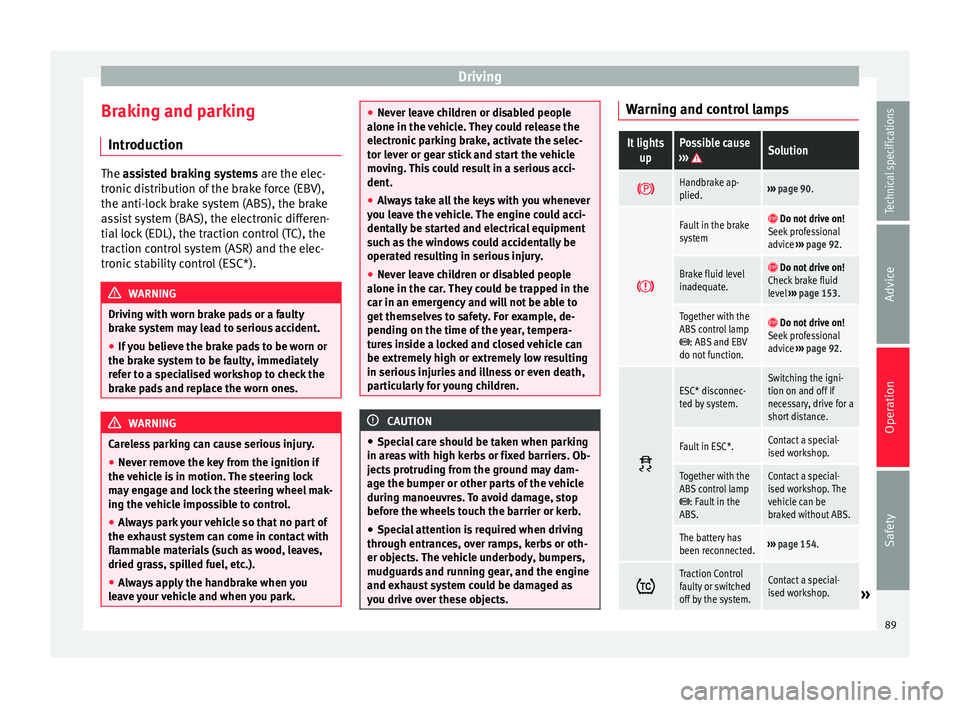
you drive over these objects. Warning and control lamps
It lights
upPossible cause
››› Solution
Handbrake ap-
plied.›››
page 90.
Fault in the brake
system Do not drive on!
Seek professional
advice ››› page 92.
Brake fluid level
inadequate. Do not drive on!
Check brake fluid
level ››› page 153.
Together with the
ABS control lamp
: ABS and EBV
do not function.
Do not drive on!
Seek professional
advice ››› page 92.
ESC* disconnec-
ted by system.Switching the igni-
tion on and off If
necessary, drive for a
short distance.
Fault in ESC*.Contact a special-
ised workshop.
Together with the
ABS control lamp
: Fault in the
ABS.
Contact a special-
ised workshop. The
vehicle can be
braked without ABS.
The battery has
been reconnected.››› page 154.
Traction Control
faulty or switched
off by the system.Contact a special-
ised workshop.»
89
Technical specifications
Advice
Operation
Safety