air condition Seat Mii 2015 User Guide
[x] Cancel search | Manufacturer: SEAT, Model Year: 2015, Model line: Mii, Model: Seat Mii 2015Pages: 232, PDF Size: 4.23 MB
Page 128 of 232
Operation
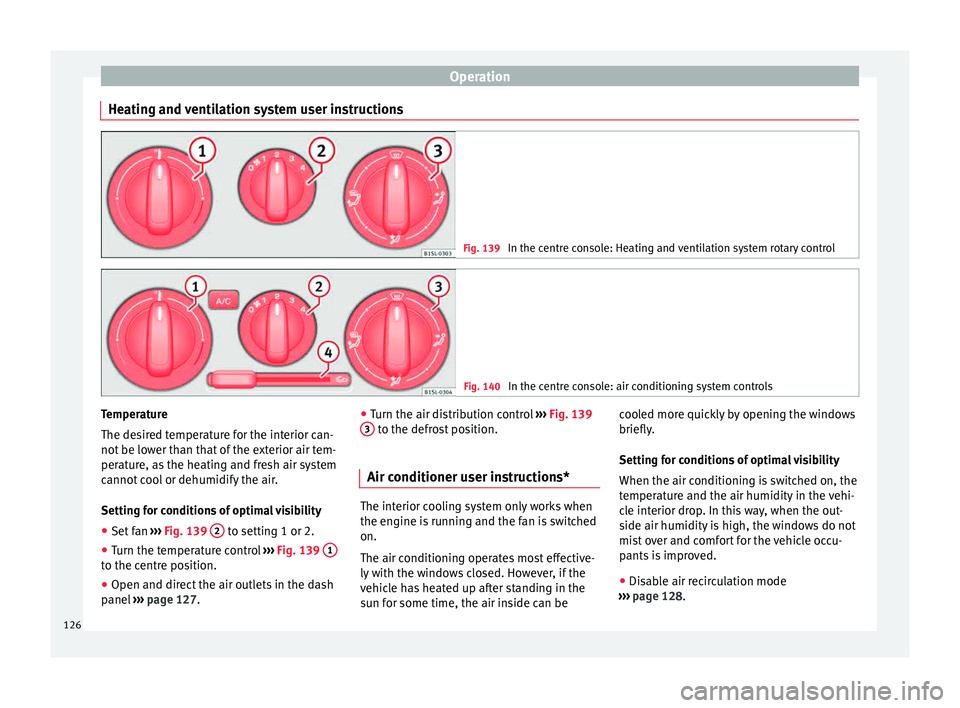
Heating and ventilation system user instructions Fig. 139
In the centre console: Heating and ventilation system rotary control Fig. 140
In the centre console: air conditioning system controls Temperature
The de
s
ir
ed temperature for the interior can-
not be lower than that of the exterior air tem-
perature, as the heating and fresh air system
cannot cool or dehumidify the air.
Setting for conditions of optimal visibility
● Set fan ››› Fig. 139 2 to setting 1 or 2.
● Turn the temperature control ››
›
Fig. 139 1 to the centre position.
●
Open and direct the air outlets in the dash
p anel
›
›› page 127. ●
Turn the air dis
tribution control ››› Fig. 139
3 to the defrost position.
Air conditioner user instructions* The interior cooling system only works when
the engine i
s
running and the fan is switched
on.
The air conditioning operates most effective-
ly with the windows closed. However, if the
vehicle has heated up after standing in the
sun for some time, the air inside can be cooled more quickly by opening the windows
briefly.
Settin
g f
or conditions of optimal visibility
When the air conditioning is switched on, the
temperature and the air humidity in the vehi-
cle interior drop. In this way, when the out-
side air humidity is high, the windows do not
mist over and comfort for the vehicle occu-
pants is improved.
● Disable air recirculation mode
›››
page 128.
126
Page 129 of 232

Air conditioning
● Set the f
an t
o the required setting.
● Turn the temperature control to the centre
position.
● Open and dir
ect the air outlets in the dash
panel ›
›› page 127.
● Turn the air distribution control to the de-
fros
t position.
● Press the A/C button to switch it on. The in-
dic at
or on the b
utton will light up.
The air conditioning system does not switch
on
If the air conditioning system cannot be
switched on, this may be caused by the fol-
lowing: ●
The engine is
not running.
● The fan is switched off.
● The air conditioner fuse has blown.
● The outside temperature is lower than ap-
prox
imately +2 °C (+36 °F).
● The air conditioner compressor has been
temporari
ly switched off because the engine
coolant temperature is too high.
● Another fault in the vehicle. Have the air
conditioner chec
ked by a specialised work-
shop. Special features
If the humidity and t
emperature outside the
vehicle are high, condensation can drip off
the evaporator in the cooling system and
form a pool underneath the vehicle. This is
normal and does not indicate a leak! Note
After starting it, any residual humidity in the
air conditioner c ou
ld mist over the wind-
screen. Switch on the defrost function as
soon as possible to clear the windscreen of
condensation. Air outlets
Fig. 141
Dash panel: Air vents » 127
Technical data
Advice
Operation
Emergencies
Safety
Page 137 of 232

Driving
● When l e
av
ing the vehicle, take all keys with
you.
● Lock the vehicle.
Additiona
l information for steep slopes and
hills
Before switching off the engine, rotate the
steering wheel so that if the vehicle should
move, it will be held by the kerb.
● On slopes, turn the front wheels so that
they are ag
ainst the edge of the kerb.
● Uphill, turn the wheels towards the centre
of the ro
ad. WARNING
The components of the exhaust system reach
ver y
high temperatures. This could cause a
fire and considerable damage.
● Always park your vehicle so that no part of
the exhau
st system can come in contact with
flammable materials (such as wood,
leaves,dried grass, or spilled fuel). CAUTION
● Spec i
al care should be taken when parking
in areas with high kerbs or fixed barriers. Ob-
jects protruding from the ground may dam-
age the bumper or other parts of the vehicle
during manoeuvres. To avoid damage, stop
before the wheels touch the barrier or kerb. ●
Spec i
al attention is required when driving
through entrances, over ramps, kerbs or oth-
er objects. The vehicle underbody, bumpers,
mudguards and running gear, and the engine
and exhaust system could be damaged as
you drive over these objects. Information on the brakes
For the first 200 to 300 km, the new brak
e
p
ads have not yet reached their maximum
braking capacity, and need to be “run in”
first ››› . The slightly reduced braking effect
c an be c
ompen
sated for by increasing pres-
sure on the brake pedal. While running in,
the full braking distance or emergency brak-
ing distance is larger then when the brake
pads have been run in. While running in,
avoid full power braking or situations requir-
ing braking performance. For example, in
heavy traffic.
The rate of wear of the brake pads depends
to a great extent on the conditions in which
the vehicle is used and the way the vehicle is
driven. If the vehicle is used frequently in city
traffic or for short trips or driven sport style,
visit a specialised workshop regularly, more
frequently than advised in the Maintenance
Programme, to have the brake pads checked.
If you drive with wet brakes, for example, af-
ter crossing areas of water, in heavy rainfall
or even after washing the car, the effect of the brakes is lessened as the brake discs are
wet or ev
en frozen (in winter). At higher
speed, “dry” the brakes as quickly as possi-
ble by braking gently several times. Only do
this without endangering vehicles behind
you or any other road users ››› .
A l a
y
er of salt on the discs and brake pads
will reduce the effectiveness of the brakes
and increase braking distance. If you drive for
a prolonged period on salted roads without
braking then brake carefully several times to
eliminate the layer of salt on the brakes ››› .
If the
v
ehicle remains parked for considera-
ble lengths of time, is used little, or if the
brakes are not used, there may be corrosion
on the brake discs and a build up of dirt on
the brake pads. If the brakes are not used fre-
quently, or if rust has formed on the discs,
SEAT recommends cleaning the pads and
discs by braking firmly a few times at a mod-
erately high speed. Only do this without en-
dangering vehicles behind you or any other
road users ››› .
F au
lt
s in the brake system
During braking, if you notice that the vehicle
does not react as usual (that the braking dis-
tance has increased suddenly) it may be pos-
sible that there is a fault in the braking sys-
tem. This is indicated by the warning lamp
. Take the vehicle to a specialised work-
shop immediately and have the fault re-
paired. Drive at a moderate speed and be »
135
Technical data
Advice
Operation
Emergencies
Safety
Page 138 of 232

Operation
prepared to use more pressure on the brake
ped al, and al
lo
w for longer stopping distan-
ces.
Brake servo
The brake servo only operates when the en-
gine is running and the pressure applied by
the driver on the brake pedal increases.
If the brake servo does not operate or the ve-
hicle must be towed, then the brake pedal
will have to be pressed with more force given
that the braking distance will be increased
when the brake servo does not operate ››› .
WARNING
New brake pads do not brake to full efficien-
cy.
● For the fir
st 320 km, new brake pads have
not y
et reached their maximum braking ca-
pacity, and need to be “run in” first. For this,
to compensate for reduced braking efficiency
the brake pedal will have to be pressed with
more force.
● To avoid losing control of the vehicle and
caus
ing serious accidents, always take great
care when driving with new brake pads.
● When running in new brake pads, always
res
pect the safety distances between you and
other vehicles and do not cause situations re-
quiring extreme braking performance. WARNING
When brakes overheat, braking is less effi-
cient and br
aking distances increase.
● When driving on slopes, brakes can be
overlo
aded and overheat quickly.
● Reduce speed or change down a gear when
faced w
ith steep and long slopes. This allows
you to use the engine braking effect and to
reduce the strain on the brake system.
● Non-standard or damaged front spoilers
coul
d restrict the airflow to the brakes and
cause them to overheat. WARNING
Wet, frozen or salt-covered brakes take lon-
ger t o en
gage and this increases braking dis-
tances.
● Test the brakes carefully.
● Dry the brakes, free them of ice and salt by
brakin
g gently several times, when visibility,
weather, and road and traffic conditions per-
mit. WARNING
Driving without the brake servo may signifi-
cantly inc
rease the braking distance and re-
sult in a severe accident.
● Never allow the vehicle to move forwards
when the engine is
switched off.
● If the brake servo does not operate or the
vehicl
e must be towed, then the brake pedal will have to be pressed with more force given
that
the br
aking distance will be increased
when the brake servo does not operate. CAUTION
● Nev er m ak
e the brakes “slip” by pressing
the pedal gently, if it is not really necessary
to brake. Continuously pressing on the brake
pedal will heat the brakes. This could signifi-
cantly reduce braking power, increase brak-
ing distance or even result in the total failure
of the brake system.
● Reduce speed or change down a gear when
faced w
ith steep and long slopes. This allows
you to use the engine braking effect and to
reduce the strain on the brake system. Other-
wise, the brakes may overheat and fail. Only
use the brakes to reduce speed or to stop. Note
Make use, when having the front brake pads
chec k
ed, and have the rear pads checked al-
so. The thickness of the brake pads should be
checked visually and regularly, by looking
through the openings in the wheel rims or
from underneath the vehicle. If necessary, re-
move the wheels to check them thoroughly.
SEAT recommends taking your car in for tech-
nical service. 136
Page 145 of 232

Driving
Economical and environmentally
friendly driv
in
gFig. 147
Fuel consumption in litres per
100 km at 2 diff
er
ent outside temperatures Fuel consumption, environmental impact and
en
gine, br
ak
e and tyre wear depend largely
on three factors:
● Personal driving style.
● Conditions of use (weather, road surface).
● Technical requirements.
Saving
s of up to 25% in fuel consumption
are possible with an appropriate driving style
and the adoption of certain simple tips.
Changing gear early
General instructions: The highest gear is al-
ways the most economical. As a guide, for
most vehicles at a speed of 30 km/h
(19 mph), drive in third gear, at 40 km/h (25 mph) in fourth gear and at 50 km/h
(31 mph) in fifth ge
ar.
In addition, “skipping” gears when shifting
up helps to save fuel, weather and traffic
conditions permitting.
Do not wait until the last moment before
changing gear. Only use first gear when you
move off and change to second gear quickly.
Avoid the kick-down function in vehicles with
automatic gearbox.
Vehicles with a gear display help to achieve
an economical driving style as the display in-
dicates the best moment to change gear.
Let the vehicle roll
If you take your foot off the accelerator, the
fuel supply is stopped and consumption is
reduced.
Allow the vehicle to roll without accelerating,
for example when approaching a red traffic
light. However, if the vehicle is rolling too
slowly or the distance is too long, the clutch
pedal should be pressed to declutch. The en-
gine will then operate at idle speed.
If the vehicle is going to be at a standstill for
a period of time, switch off the engine; for ex-
ample, while waiting at a level crossing.
Think ahead and “flow” with the traffic
Frequent acceleration and braking considera-
bly increase fuel consumption. If you think ahead as you drive and keep a safe distance
from the v
ehicle in front, it is possible to slow
down by simply lifting your foot off the accel-
erator. This eliminates the need for constant
braking and acceleration.
Calm and steady driving
Constancy is more important than speed: The
more you drive at a constant speed, the lower
the fuel consumption.
When driving on the motorway, it is more effi-
cient to drive at a constant and more moder-
ate speed than to be continuously accelerat-
ing and braking. As a general rule, you will
reach your destination just as quickly when
you drive at a constant speed.
The cruise control function helps you to ach-
ieve a constant style of driving.
Moderate use of additional devices
It is important to travel in comfort, but con-
venience systems should be used ecological-
ly.
Some equipment, when connected, increase
fuel consumption considerably, for example:
● Air conditioning cooling system: If the air
conditioning sy
stem is required to cool to
significantly lower temperatures than the true
outside temperature, it will require a large
amount of energy from the engine. Therefore,
we recommend that the selected temperature »
143
Technical data
Advice
Operation
Emergencies
Safety
Page 146 of 232

Operation
for the vehicle is not too different to the out-
s ide t
emper
ature. It is a good idea to air the
vehicle before starting your journey and to
drive a short distance with the windows
open. Then you can close the windows and
switch on the air conditioning. Keep windows
closed when travelling at high speeds. Driv-
ing with the windows open increases fuel
consumption.
● Switch off the seat heating when the seats
have w
armed up.
● Switch off the heated rear window when it
is not
moist or covered in ice.
Avoid short journeys
Fuel consumption is much higher when the
engine is cold, immediately after it has been
started. It takes a few kilometres of driving
for the engine to warm up and to normalise
consumption.
The engine and catalytic converter need to
reach their proper working temperature in or-
der to minimise fuel consumption and emis-
sions. The ambient temperature has a deci-
sive influence.
Fig. 147 shows the difference in consump-
tion for the same journey at +20 °C (+68 °F)
and at -10 °C (+14 °F).
Therefore, unnecessary short journeys
should be avoided. Try to combine trips. The vehicle uses more fuel in winter than in
summer, ev
en when other conditions are the
same.
The engine takes a long time to warm up
when it is idling. In addition, mechanical
wear and pollutant emissions are also espe-
cially high during this initial warm-up phase.
It is therefore best to drive off immediately af-
ter starting the engine. Doing this avoids run-
ning the engine at a high speed.
Adjusting type pressures.
Having the correct pressure in your tyres
helps to reduce rolling resistance and, as a
result reduces fuel consumption. Increasing
the tyre pressure slightly (+0.2
bar/+3 psi/+200 kPa) can help to save fuel.
When you buy new tyres, make sure they are
optimised for minimum rolling resistance.
Use low friction engine oil
The use of low viscosity totally synthetic oils,
known as low friction engine oil, helps to re-
duce fuel consumption. These oils reduce the
resistance caused by friction in the engine,
they flow around the engine more quickly
and efficiently, particularly in cold starts. The
effect is particularly noticeable in vehicles
frequently used for short journeys.
Always check the engine oil level and ob-
serve service intervals (engine oil change in-
tervals). When purchasing engine oil, always observe
leg
al requirements and ensure that the oil is
approved by SEAT.
Avoid carrying unnecessary loads
The lighter the vehicle, the more economical
and ecological the driving style. For example,
an additional weight of 100 kg will increase
fuel consumption up to 0.3 l/100 km.
Remove any unnecessary objects or loads
from the vehicle.
Remove optional equipment and unnecessa-
ry accessories
The more aerodynamic the vehicle, the lower
the fuel consumption. Optional equipment
and accessories (such as roof racks or bike
carriers) reduce the aerodynamic benefits of
the vehicle.
Therefore, we recommend you remove all op-
tional and unnecessary equipment and racks,
especially if you intend to drive at high
speeds.
Other factors which increase fuel consump-
tion (examples):
● Fault in engine management.
● Driving on hills.
144
Page 148 of 232

Operation
For the sake of the environment
Even when the emission control system is
work in
g perfectly, there may be a smell of
sulphur under certain conditions. This de-
pends on the sulphur content of the fuel
used. Driving abroad
In some countries, certain safety regulations
and requir
ements
are in force relating to ex-
haust gas emissions, which differ from the
technical characteristics of the vehicle. Be-
fore travelling abroad, SEAT recommends you
consult a technical service about the legal re-
quirements and the following points:
● Does the vehicle need technical modifica-
tions f
or driving abroad, for example, adjust-
ment of the headlamps?
● Does the vehicle have all the tools, diag-
nostic
s equipment and spare parts required
for inspections and repairs?
● Are there any SEAT dealers in the destina-
tion countr
y?
● For petrol vehicles: Is unleaded petrol avail-
able at
the right octane rating?
● For diesel engines: is diesel fuel available
with a low s
ulphur content?
● Are a suitable engine oil ( ›››
page 186) and
other engine fluids complying with SEAT specifications available in the destination
countr
y?
● Will the navigation system fitted at the fac-
tory
operate correctly in the destination coun-
try with the available navigation data?
● Are special tyres required in the destination
countr
y? CAUTION
SEAT does not accept liability for any damage
to the v
ehicle due to the use of a lower quali-
ty fuel, an inadequate service or the non-
availability of genuine spare parts. Driving along flooded roadways
To prevent damage to the vehicle when driv-
in
g thr
ough w
ater, for example, along a floo-
ded road, please observe the following:
● Check the depth of the water before enter-
ing the flooded z
one. The water should never
come above the lower edge of the bodywork
››› .
● Do not drive faster than a pedestrian.
● Do not stop in the water, use reverse gear
or sw it
c
h off the engine.
● Oncoming traffic will cause waves which
raise the l
evel of the water, making it difficult
to cross the water. ●
Disc
onnect the Start-Stop system whenever
crossing water. WARNING
When driving through water, mud, melted
sno w
, etc., please remember that due to
damp or frozen brake discs and shoes in win-
ter, the braking effect may be delayed, there-
fore the required braking distance is greater.
● “Dry the brakes and remove ice” by braking
caref
ully. Ensure that you are not endanger-
ing other road-users or breaking traffic regu-
lations in the process.
● After driving through water, avoid sudden
sharp manoeu
vres. CAUTION
● Drivin g thr
ough flooded areas may severely
damage vehicle components such as the en-
gine, transmission, drive train or electrical
system.
● Never drive through salt water as salt cau-
ses c
orrosion. Always rinse any parts of the
vehicle which have been in contact with salt
water. 146
Page 153 of 232

Driver assistance systems
WARNING
Do not be distracted from traffic to look at the
sc r
een. Note
● SEA T r
ecommends practising using the
parking distance warning system in a traffic-
free zone or in a car park to familiarise your-
self with the system and its operation.
● Representation of the registered area on
the scr
een of the portable navigation system
may take up to 5 seconds.
● Note the Instruction Manual provided for
the device of
the additional information relat-
ing to the Portable Navigation System (sup-
plied by SEAT) ››› page 164. Cruise control* (Cruise control
sy
s
t
em - CCS)
Control lamp
It lights upPossible cause
This cruise control system maintains the
set speed of the vehicle.
Several warning and indication lamps light
up f
or a f
ew sec
onds when the ignition is
switched on, signalling that the function is being verified. They will switch off after a few
seconds. WARNING
If the warning lamps are ignored, the vehicle
ma y
stall in traffic, or may cause accidents
and severe injuries.
● Never ignore the warning lamps. CAUTION
Failure to heed the warning lamps when they
appe ar m
ay result in faults in the vehicle. Cruise control operation
Read the additional information carefully
› ›
›
page 25
The cruise control system (CCS) is able to in-
dividually maintain the set speed when driv-
ing forwards from approx. 20 km/h (15 mph).
The CCS only slows down by reducing the ac-
celerator but not by braking ››› .
T r
av
elling down hills with the CCS
When travelling down hills the CCS cannot
maintain a constant speed. Slow the vehicle
down using the brake pedal and reduce
gears if required. Automatic off
The cruise c
ontrol system (CCS) is switched
off automatically or temporarily:
● If the system detects a fault that could af-
fect the w
orking order of the CCS.
● If you increase the stored speed by press-
ing the acc
elerator pedal for a certain time.
● if the brake or clutch pedal is depressed.
● If the gear is changed with the manual
gearbo
x.
● If the airbag is triggered. WARNING
Use of the cruise control could cause acci-
dents and sev
ere injuries if it is not possible
to drive at a constant speed maintaining the
safety distance.
● Do not use the cruise control in heavy traf-
fic, if the dis
tance from the vehicle in front is
insufficient, on steep roads, with several
bends or in slippery circumstances (snow,
ice, rain or loose gravel), or on flooded roads.
● Never use the CCS when driving off-road or
on unpav
ed roads.
● Always adapt your speed and the distance
to the v
ehicles ahead in line with visibility,
weather conditions, the condition of the road
and the traffic situation.
● To avoid unexpected operation of the cruise
contro
l system, turn it off every time you fin-
ish using it. » 151
Technical data
Advice
Operation
Emergencies
Safety
Page 154 of 232

Operation
●
It i s
dangerous to use a set speed which is
too high for the prevailing road, traffic or
weather conditions.
● When travelling down hills, the CCS cannot
maintain a c
onstant speed. The vehicle tends
to accelerate under its own weight. Select a
lower gear or use the foot brake to slow the
vehicle. Safety Assist* (City Safety As-
si
s
t function)
Introduction The City Safety Assist function covers driving
s
it
uation
s at a distance of about 10 metres in
front of the vehicle, in a speed range of ap-
proximately 5-30 km/h (3-19 mph).
When the system detects a possible collision
with a vehicle in front, the vehicle prepares
for a possible emergency braking ››› .
If the driv
er doe
s not react to an imminent
collision, the system can automatically brake
the vehicle in order to reduce speed faced
with a possible collision. The system can
help to reduce the consequences of an acci-
dent.
If the City Safety Assist function determines
that the driver has braked insufficiently when
faced with an imminent collision, the system can increase the brake force in order to re-
duce speed.
The system can help to reduce
the consequences of an accident. WARNING
The smart technology in the City Safety As-
si s
t system cannot change the limits imposed
by the laws of physics and by the system it-
self. The increased convenience offered by
the City Safety Assist system should never
prompt you to take risks. The driver always
assumes the responsibility of braking in
time.
● The City Safety Assist function cannot pre-
vent ac
cidents or serious injury by itself.
● The City Safety Assist system may carry out
unw
anted brake interventions in complex
driving situations e.g. when a vehicle crosses
at a short distance. WARNING
Relying on the City Safety Assist system in
city driv
ing as part of one's driving behaviour
may cause accidents and serious injury. The
system is not a replacement for driver aware-
ness.
● Always adapt your speed and the distance
to the v
ehicles ahead in line with visibility,
weather conditions, the condition of the road
and the traffic situation.
● The City Safety Assist function does not re-
act to peop
le, animals or vehicles that cross or move in the opposite direction in the same
lane.
●
If af
ter switching on the City Safety Assist
function the
vehicle begins to move, slow the
vehicle with the foot brake. CAUTION
If you suspect that the City Safety Assist ra-
d ar f e
ature is damaged, switch it off. This will
avoid additional damage.
● Any repair of the radar sensor requires spe-
cia
list knowledge. SEAT recommends taking
your car in for technical service. Note
● If the C ity
Safety Assist function activates a
brake, the brake pedal range is reduced. This
makes the brake pedal seem “harder”.
● Automatic brake intervention by the City
Safety As
sist function can be cancelled by
pressing the clutch pedal, the accelerator
pedal or by a corrective intervention.
● During automatic braking by the City Safety
Assi
st function you may hear unusual noises.
This is normal and is produced in the brake
system. 152
Page 157 of 232

Driver assistance systems
Special driving situations Fig. 153
A: Vehicle on a bend. B: Motorcyclist
driv in
g ahe
ad out of range of the radar sen-
sor. Fig. 154
Other vehicles changing lanes The City Safety Assist function is limited by
the l
a
w
s of physics and by the nature of the
system itself. For this reason, this may pro-
duce reactions from the City Safety Assist
system in certain circumstances that are late
or unexpected by the driver. For this reason,
always pay due attention and if necessary, in-
tervene.
For example, the following driving situations
require special attention:
Driving through a bend
When entering or leaving a “long” bend, the
vehicle may decelerate when the radar sen-
sor detects a vehicle travelling in the adjoin-
ing lane ››› Fig. 153 A. To interrupt decelera-
tion you can accelerate, turn the steering
wheel or press the clutch.
Narrow vehicles in front
The radar sensor will only detect narrow vehi-
cles in front if they are in the sensor detec-
tion zone ››› Fig. 153 B. This applies especial-
ly to narrow vehicles such as motorbikes.
Other vehicles changing lanes
Vehicles moving into your lane in close prox-
imity can cause unexpected braking from the
City Safety Assist system ›››
Fig. 154. To inter-
rupt deceleration you can accelerate, turn the
steering wheel or press the clutch. Malfunction in the radar sensor
If the ra
dar sensor operation is impaired, for
example due to heavy rain, mist, snow or dirt,
the City Safety Assist system function is tem-
porarily switched off. On the instrument pan-
el display the control lamp flashes.
When the fault in the radar sensor has been
rectified, the City Safety Assist system func-
tion automatically becomes available. The
control lamp switches off.
The following conditions could prevent the
City Safety Assist system from functioning:
● Tight bends.
● Accelerator pressed all the way down to the
floor.
● If the C
ity Safety Assist system is switched
off or there i
s a fault ››› page 153.
● If the radar sensor is dirty, covered or over-
heated ›
›› page 153.
● In the event of snow, heavy rain or dense
fog.
● If ther
e are vehicles in front.
● Vehicles changing lanes.
● Vehicles moving in the opposite direction
in the same lane.
● V
ery dirty vehicles with a low degree of re-
flection.
● Pre
sence of thick dust.
155
Technical data
Advice
Operation
Emergencies
Safety