change time Seat Mii 2015 Owner's Guide
[x] Cancel search | Manufacturer: SEAT, Model Year: 2015, Model line: Mii, Model: Seat Mii 2015Pages: 232, PDF Size: 4.23 MB
Page 153 of 232

Driver assistance systems
WARNING
Do not be distracted from traffic to look at the
sc r
een. Note
● SEA T r
ecommends practising using the
parking distance warning system in a traffic-
free zone or in a car park to familiarise your-
self with the system and its operation.
● Representation of the registered area on
the scr
een of the portable navigation system
may take up to 5 seconds.
● Note the Instruction Manual provided for
the device of
the additional information relat-
ing to the Portable Navigation System (sup-
plied by SEAT) ››› page 164. Cruise control* (Cruise control
sy
s
t
em - CCS)
Control lamp
It lights upPossible cause
This cruise control system maintains the
set speed of the vehicle.
Several warning and indication lamps light
up f
or a f
ew sec
onds when the ignition is
switched on, signalling that the function is being verified. They will switch off after a few
seconds. WARNING
If the warning lamps are ignored, the vehicle
ma y
stall in traffic, or may cause accidents
and severe injuries.
● Never ignore the warning lamps. CAUTION
Failure to heed the warning lamps when they
appe ar m
ay result in faults in the vehicle. Cruise control operation
Read the additional information carefully
› ›
›
page 25
The cruise control system (CCS) is able to in-
dividually maintain the set speed when driv-
ing forwards from approx. 20 km/h (15 mph).
The CCS only slows down by reducing the ac-
celerator but not by braking ››› .
T r
av
elling down hills with the CCS
When travelling down hills the CCS cannot
maintain a constant speed. Slow the vehicle
down using the brake pedal and reduce
gears if required. Automatic off
The cruise c
ontrol system (CCS) is switched
off automatically or temporarily:
● If the system detects a fault that could af-
fect the w
orking order of the CCS.
● If you increase the stored speed by press-
ing the acc
elerator pedal for a certain time.
● if the brake or clutch pedal is depressed.
● If the gear is changed with the manual
gearbo
x.
● If the airbag is triggered. WARNING
Use of the cruise control could cause acci-
dents and sev
ere injuries if it is not possible
to drive at a constant speed maintaining the
safety distance.
● Do not use the cruise control in heavy traf-
fic, if the dis
tance from the vehicle in front is
insufficient, on steep roads, with several
bends or in slippery circumstances (snow,
ice, rain or loose gravel), or on flooded roads.
● Never use the CCS when driving off-road or
on unpav
ed roads.
● Always adapt your speed and the distance
to the v
ehicles ahead in line with visibility,
weather conditions, the condition of the road
and the traffic situation.
● To avoid unexpected operation of the cruise
contro
l system, turn it off every time you fin-
ish using it. » 151
Technical data
Advice
Operation
Emergencies
Safety
Page 154 of 232

Operation
●
It i s
dangerous to use a set speed which is
too high for the prevailing road, traffic or
weather conditions.
● When travelling down hills, the CCS cannot
maintain a c
onstant speed. The vehicle tends
to accelerate under its own weight. Select a
lower gear or use the foot brake to slow the
vehicle. Safety Assist* (City Safety As-
si
s
t function)
Introduction The City Safety Assist function covers driving
s
it
uation
s at a distance of about 10 metres in
front of the vehicle, in a speed range of ap-
proximately 5-30 km/h (3-19 mph).
When the system detects a possible collision
with a vehicle in front, the vehicle prepares
for a possible emergency braking ››› .
If the driv
er doe
s not react to an imminent
collision, the system can automatically brake
the vehicle in order to reduce speed faced
with a possible collision. The system can
help to reduce the consequences of an acci-
dent.
If the City Safety Assist function determines
that the driver has braked insufficiently when
faced with an imminent collision, the system can increase the brake force in order to re-
duce speed.
The system can help to reduce
the consequences of an accident. WARNING
The smart technology in the City Safety As-
si s
t system cannot change the limits imposed
by the laws of physics and by the system it-
self. The increased convenience offered by
the City Safety Assist system should never
prompt you to take risks. The driver always
assumes the responsibility of braking in
time.
● The City Safety Assist function cannot pre-
vent ac
cidents or serious injury by itself.
● The City Safety Assist system may carry out
unw
anted brake interventions in complex
driving situations e.g. when a vehicle crosses
at a short distance. WARNING
Relying on the City Safety Assist system in
city driv
ing as part of one's driving behaviour
may cause accidents and serious injury. The
system is not a replacement for driver aware-
ness.
● Always adapt your speed and the distance
to the v
ehicles ahead in line with visibility,
weather conditions, the condition of the road
and the traffic situation.
● The City Safety Assist function does not re-
act to peop
le, animals or vehicles that cross or move in the opposite direction in the same
lane.
●
If af
ter switching on the City Safety Assist
function the
vehicle begins to move, slow the
vehicle with the foot brake. CAUTION
If you suspect that the City Safety Assist ra-
d ar f e
ature is damaged, switch it off. This will
avoid additional damage.
● Any repair of the radar sensor requires spe-
cia
list knowledge. SEAT recommends taking
your car in for technical service. Note
● If the C ity
Safety Assist function activates a
brake, the brake pedal range is reduced. This
makes the brake pedal seem “harder”.
● Automatic brake intervention by the City
Safety As
sist function can be cancelled by
pressing the clutch pedal, the accelerator
pedal or by a corrective intervention.
● During automatic braking by the City Safety
Assi
st function you may hear unusual noises.
This is normal and is produced in the brake
system. 152
Page 158 of 232

Operation
Hill driving assistant* Oper ation This function is only included in vehicles with
ESC.
The hi
l
l driving assistant helps the driver to
move off and upward on a hill when the vehi-
cle is stationary.
The system maintains brake pressure for ap-
proximately two seconds after the driver
takes his foot off the brake pedal to prevent
the vehicle from lurching backward when it is
started. During these 2 seconds, the driver
has enough time to release the clutch pedal
and accelerate without the vehicle moving
and without having to use the handbrake,
making start-up easier, more comfortable
and safer.
These are the basic operation conditions:
● being on a ramp or hill/slope,
● doors closed,
● vehicle completely stationary,
● engine running and foot on the brake,
● besides having a gear engaged or being in
neutral f
or manual gear change and with the
selector lever at positions S, D or R in vehi-
cles with an automatic gearbox.
This system is also active when reversing up-
hill. WARNING
● If y
ou do not start the vehicle immediately
after taking your foot off the brake pedal, the
vehicle may start to roll back under certain
conditions. Depress the brake pedal or use
the hand brake immediately.
● If the engine stalls, depress the brake ped-
al or u
se the hand brake immediately.
● When following a line of traffic uphill, if you
want t
o prevent the vehicle from rolling back
accidentally when starting off, hold the brake
pedal down for a few seconds before starting
off. Note
The Official Service or a specialist workshop
can t el
l you if your vehicle is equipped with
this system. Start-Stop System
C ontr
o
l lamps
It lights up
The Start-Stop system is enabled.
It lights up
The Start-Stop sys-
tem is enabled but
the engine cannot
be automatically
stopped.
Contact a specialised workshop.
It lights up
The Start-Stop sys-
tem cannot start the
engine.Start the engine by hand using
the vehicle's key
››› page 130.
There is a fault in the
alternator.››› page 193
Flashes
The Start-Stop sys-
tem is not available.Contact a specialised workshop.
Some warning and indication lamps will light
up briefly
when the ignition i
s
switched on to
check certain functions. They will switch off
after a few seconds. WARNING
Observe the safety warnings ›››
in On the
ins trument
panel on page 27. 156
Page 159 of 232
Driver assistance systems
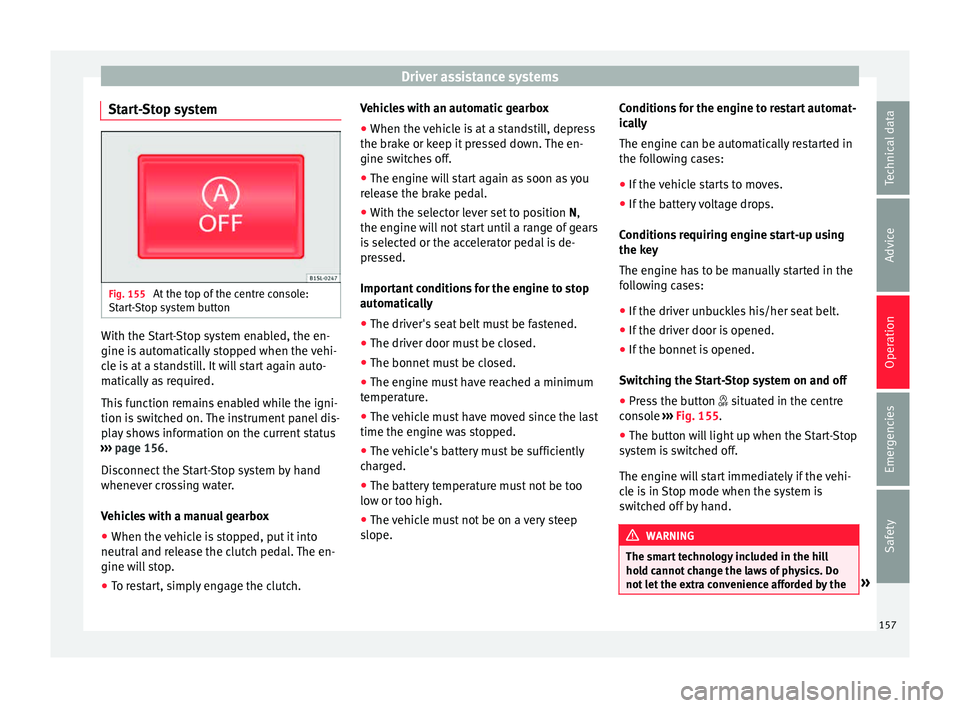
Start-Stop system Fig. 155
At the top of the centre console:
St ar
t
-Stop system button With the Start-Stop system enabled, the en-
gine i
s
aut
omatically stopped when the vehi-
cle is at a standstill. It will start again auto-
matically as required.
This function remains enabled while the igni-
tion is switched on. The instrument panel dis-
play shows information on the current status
››› page 156.
Disconnect the Start-Stop system by hand
whenever crossing water.
Vehicles with a manual gearbox
● When the vehicle is stopped, put it into
neutral and r
elease the clutch pedal. The en-
gine will stop.
● To restart, simply engage the clutch. Vehicles with an automatic gearbox
●
When the vehicle is at a standstill, depress
the brake or k
eep it pressed down. The en-
gine switches off.
● The engine will start again as soon as you
rele
ase the brake pedal.
● With the selector lever set to position N,
the engine wi
ll not start until a range of gears
is selected or the accelerator pedal is de-
pressed.
Important conditions for the engine to stop
automatically
● The driver's seat belt must be fastened.
● The driver door must be closed.
● The bonnet must be closed.
● The engine must have reached a minimum
temperat
ure.
● The vehicle must have moved since the last
time the engine wa
s stopped.
● The vehicle's battery must be sufficiently
char
ged.
● The battery temperature must not be too
low or too high.
● The
vehicle must not be on a very steep
slope. Condition
s for the engine to restart automat-
ical
ly
The engine can be automatically restarted in
the following cases:
● If the vehicle starts to moves.
● If the battery voltage drops.
Conditions
requiring engine start-up using
the key
The engine has to be manually started in the
following cases:
● If the driver unbuckles his/her seat belt.
● If the driver door is opened.
● If the bonnet is opened.
Switc
hing the Start-Stop system on and off
● Press the button situat
ed in the centre
console ››› Fig. 155.
● The button will light up when the Start-Stop
syst
em is switched off.
The engine will start immediately if the vehi-
cle is in Stop mode when the system is
switched off by hand. WARNING
The smart technology included in the hill
hol d c
annot change the laws of physics. Do
not let the extra convenience afforded by the » 157
Technical data
Advice
Operation
Emergencies
Safety
Page 184 of 232
AdviceFlashes for about 10
secondsState of the barsPossible cause ››› Solution
and the segments
remaining a)Reserve zone (four small segments)The fuel tank is almost empty.
The reserve tank is being used
››› page 30.Refuel as soon as possible ››› .
–The vehicle is running in natural gas operating mode.–
a)
This only applies to vehicles with the fuel gauge on the dash panel display.
Several warning and indication lamps light
up for a few seconds when the ignition is
switched on, signalling that the function is
being verified. They will switch off after a few
seconds.
In natural gas engines
The warning lamp lights up when both fuel
types (petrol and natural gas) have reached
reserve level.
The warning lamp lights up when the vehi-
cle is running in natural gas operating mode.
The warning lamp switches off when the
natural gas is exhausted. The engine
changes to operate with petrol.
Problem: if the vehicle is left parked for a
long time just after refuelling, the gas level
indicator does not accurately indicate the
same level shown after refuelling when the
vehicle is started up again. This is not due to
a leak in the system, but to a drop in pres-
sure in the gas tank for technical reasons af- ter a cooling phase immediately after refuel-
ling. WARNING
Driving with insufficient fuel reserve could re-
su lt
in the vehicle breaking down in traffic
and a serious accident.
● If the fuel level is too low then the fuel sup-
ply t
o the engine can become irregular espe-
cially on slopes.
● If the engine “is choked” or stalls due to
lack
of or irregularity of the fuel supply, the
power steering as well as all of the driver as-
sistance systems including braking assis-
tance will stop working.
● Always refuel when there is only one quar-
ter of the f
uel tank left to avoid running out of
fuel. CAUTION
● Alw a
ys pay attention to any lit control
lamps and to the corresponding descriptions and instructions to avoid damage to the vehi-
cl
e.
● Nev
er run the fuel tank completely dry. An
irregu
lar fuel supply may lead to ignition
faults and unburnt fuel could enter the ex-
haust system. This could damage the catalyt-
ic converter. Note
The arrow next to the fuel pump symbol on
the ins trument
panel ››› Fig. 163 indicates the
side of the vehicle on which the fuel tank flap
is located. 182
Page 189 of 232
Checking and refilling levels
Warning and indication lamps Flashes
Engine oil pres-
sure too low.
Stop the vehicle!
Switch off the engine. Check the
engine oil level, and if necessary,
refill with ››› page 187.
engine oil - If the warning indicator
flashes although the oil level is cor-
rect, do not continue driving or
leave the engine running. Other-
wise, the engine could be dam-
aged. Seek specialist assistance. WARNING
Observe the safety warnings ›››
in On the
ins trument
panel on page 27. Engine oil specifications
Replacement engine oil must strictly comply
w
ith the s
pec
ifications.
The correct oil must be used to ensure the
correct operation and long service life of the
engine. The engine comes with a high-quality
multigrade oil that can generally be used all
year round.
Only use an engine oil that complies to SEAT
standards whenever possible ››› . Only refill
en gine oi l
using approved engine oil in ac-
cordance with the corresponding VW stand- ard (
››› table on page 187). All oils indicated
ar
e synthetic multigrade oils .
Engine oils are being continuously further
developed. Technical services are constantly
updated with any modifications. SEAT there-
fore recommends that you have the engine
oil changed by a technical service.
Specifications of engine oil with a service de-
pendent on time/distance travelled
44 kW - 55 kW Petrol en-
ginesVW 504 00, VW 502 00
Natural gas engineVW 502 00 CAUTION
● Only u
se engine oils whose specifications
are expressly approved by SEAT. The use of
any other type of oil could cause engine dam-
age!
● No additives should be used with engine
oil. An
y damage caused by the use of such
additives would not be covered by the factory
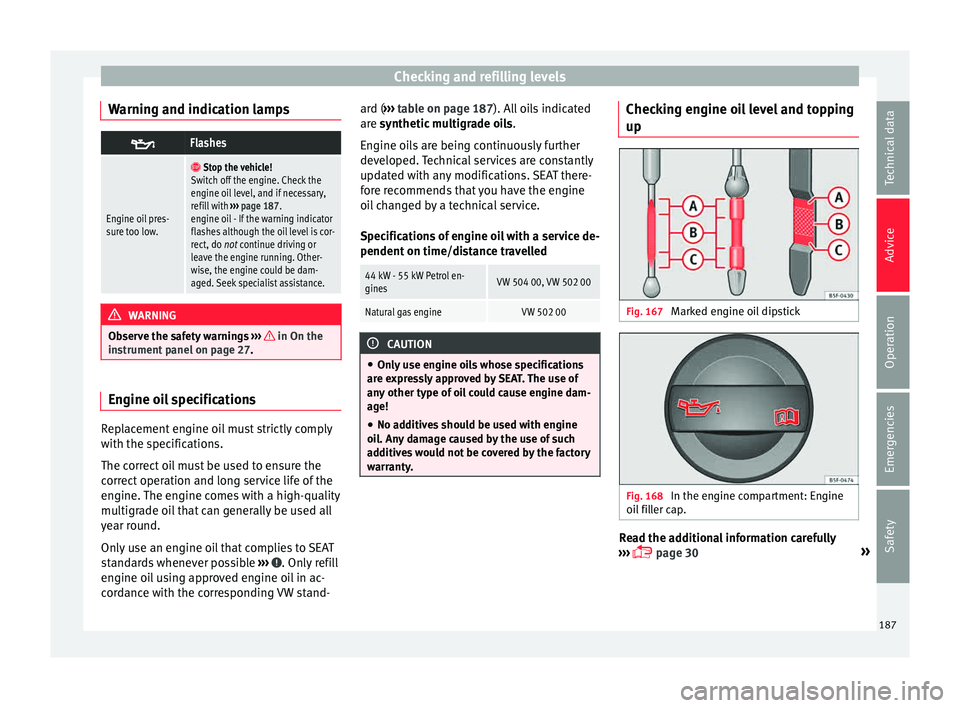
warranty. Checking engine oil level and topping
up
Fig. 167
Marked engine oil dipstick Fig. 168
In the engine compartment: Engine
oi l
fi
ller cap. Read the additional information carefully
› ›
›
page 30 »
187
Technical data
Advice
Operation
Emergencies
Safety
Page 193 of 232

Checking and refilling levels
●
Never open the c oo
lant expansion tank if
steam or coolant is coming from the engine
compartment. Wait until you cannot see or
hear any steam or coolant escaping.
● Always wait until the engine has complete-
ly coo
led before very carefully opening the
expansion tank cap. Contact with hot ele-
ments of the engine can cause skin burns.
● When the engine is warm or hot, the cool-
ing sys
tem is pressurised. Do not unscrew
the cap on the expansion tank when the en-
gine is hot. Otherwise, coolant may spray out
under pressure causing burns and serious in-
jury.
– Carefully and slowly unscrew the cap an-
ti-clockwise, gently pressing down on it.
– Always protect your face, hands and arms
from hot coolant and steam using a large,
thick cloth.
● When refilling liquids, avoid spilling them
on part
s of the engine and the exhaust sys-
tem. Spilled liquids could cause a fire. Under
specific circumstances, the ethylene glycol
can catch fire. WARNING
If there is not enough anti-freeze in the cool-
ant sy s
tem, the engine may fail leading to se-
rious damage.
● Please make sure that the percentage of
additiv
e is correct with respect to the lowest
expected ambient temperature in the zone in
which the vehicle is to be used. ●
When the outs ide t
emperature is very low,
the coolant could freeze and the vehicle
would be immobilised. In this case, the heat-
ing would not work either and inadequately
dressed passengers could die of cold. CAUTION
● If ther e i
s no appropriate coolant liquid
available, fill it using distilled water, and
nothing else. Any other type of water may
lead to considerable rusting in the engine
due to its chemical components. This could
consequently damage the engine. If you have
not used distilled water but another type of
water to top up the coolant, a specialised
workshop must immediately replace all of the
fluid in the engine cooling system.
● Only top up coolant to the top level of the
marked ar
ea ››› Fig. 169. Otherwise the ex-
cess coolant will be forced out of the cooling
system when the engine is hot, causing dam-
age.
● If a lot of liquid coolant has been lost, wait
for the engine t
o cool down completely before
adding coolant. Extensive coolant loss is an
indication of leaks in the engine cooling sys-
tem. Have the engine cooling system inspec-
ted immediately by a specialised workshop.
Otherwise engine damage may occur.
● When refilling service liquids, ensure that
you put
the liquids into the right tank. Mak-
ing a mistake when refilling could cause seri-
ous malfunctions and damage the engine! CAUTION
The original additives should never be mixed
with c oo
lants which are not approved by
SEAT. Otherwise, you run the risk of causing
severe damage to the engine and the engine
cooling system.
● If the fluid in the expansion tank is not pur-
ple b
ut is, for example, brown, this indicates
that the G13 additive has been mixed with an
inadequate coolant. The coolant must be
changed as soon as possible if this is the
case! This could result in serious faults and
engine damage. Brake fluid
Chec k
in
g the brake fluid level Read the additional information carefully
› ›
›
page 32
In the course of time, the brake fluid absorbs
water from the ambient air. If there is too
much water in the brake fluid, the brake sys-
tem could be damaged. In addition, the boil-
ing point of the brake fluid is significantly
lowered. When the brake fluid contains too
much water and the brakes are subject to
considerable forces, bubbles of water vapour
can form in the system. These bubbles can
significantly reduce braking power, notably
increasing braking distance, and could even
result in the total failure of the brake system. »
191
Technical data
Advice
Operation
Emergencies
Safety
Page 200 of 232
Advice
The service life of tyres is dependent on tyre
pr e
s
sure, driving style, the care they receive
and the correct fitting.
The tyres and wheel rims are an essential
part of the vehicle's design. The tyres and
rims approved by SEAT are specially matched
to the characteristics of the vehicle and our
critical to good road holding and safe han-
dling.
Avoiding damage to tyres and wheels
● If you have to drive over a kerb or similar
obs
tacle, drive very slowly and as near as
possible at a right angle to the kerb.
● Inspect the tyres regularly for damage
(punct
ures, cuts, cracks, dents).
● Remove any foreign bodies found on the
outside of the ty
re tread and ensure that they
have not passed through the wall of the tyre
››› page 202.
● In addition, the instructions for tyre control
syst
ems should always be observed.
● Replace damaged or worn tyres as soon as
poss
ible ››› page 202.
● Regularly check tyres for non-visible dam-
age ››
› page 202.
● Never exceed the maximum permitted
speed or loa
ds specified for the type of tyre
fitted on your vehicle ››› page 205.
● Do not allow tyres (including the spare
wheel) to come int
o contact with aggressive substances, grease, oil, fuel or brake fluid
›››
.
● Lost valve caps should be replaced imme-
di at
ely
.
Tyres with directional tread pattern
Tyres with directional tread pattern have
been designed to operate best when rotating
in only one direction. An arrow on the tyre
sidewall indicates the direction of rotation on
tyres with directional tread ››› page 205. Al-
ways observe the direction of rotation indica-
ted when mounting the wheel. This guaran-
tees optimum grip and helps to avoid aqua-
planing, excessive noise and wear.
If the tyre is mounted in the opposite direc-
tion of rotation, drive with extreme caution,
as the tyre is no longer being used correctly.
This is of particular importance when the
road surface is wet. Change the tyre as soon
as possible or remount it with the correct di-
rection of rotation.
Interchanging tyres
To ensure that the wear is equal on all tyres
the wheels should be changed round from
time to time according to the system
››› Fig. 172. The useful life of all the tyres will
then be about the same time.
SEAT recommends you take the vehicle to a
specialised workshop to have the tyres
changed. Tyres over 6 years old
Tyr
es are subject to an ageing process as a
result of physical and chemical processes.
This may affect their performance. Tyres
which are stored for long periods of time
without being used, harden and become
more fragile than tyres which are in constant
use.
SEAT recommends that tyres over six years
old are replaced with new tyres. This also ap-
plies to tyres (including the spare wheel)
which appear to be in perfect condition on
the outside and which have a tread depth
within the values stipulated by the Law ››› .
The d at
e of
manufacture, part of the tyre
identification number (TIN), indicates the age
of the tyre ( ) ››› page 205.
Storing tyres
Mark tyres when you remove them to indicate
the direction of rotation (left, right, forwards,
backwards). This ensures you will be able to
mount them correctly when you replace
them. When removed, the wheels and/or
tyres should be stored in a cool, dry and pref-
erably dark location. Do not place tyres
mounted on the wheel in a vertical position.
Protect tyres not mounted on wheels from
dirt by storing them in suitable bags and
standing them on the ground on their tread.
198
Page 223 of 232
Index
Preparation before replacing . . . . . . . . . . . . . . . 33
r ep
l
acing . . . . . . . . . . . . . . . . . . . . . . . . . . . . . . . 33
G Gearbox lever . . . . . . . . . . . . . . . . . . . . . . . . . . . . . 27
Gear change . . . . . . . . . . . . . . . . . . . . . . . . . . . . . . 27 automatic gearbox . . . . . . . . . . . . . . . . . . . . . . . 27
changing gears manually . . . . . . . . . . . . . . . . . 138
gear recommendation . . . . . . . . . . . . . . . . . . . 141
Manual gear change . . . . . . . . . . . . . . . . . . . . . . 27
putting the vehicle in gear (manual gearbox) 138
Gear engaged . . . . . . . . . . . . . . . . . . . . . . . . . . . . . 27
General instrument panel Instrument panel . . . . . . . . . . . . . . . . . . . . . . . . 85
General view control and warning lamps . . . . . . . . . . . . . . . . 25
Generator . . . . . . . . . . . . . . . . . . . . . . . . . . . . . . . 194
Glove compartment . . . . . . . . . . . . . . . . . . 113, 114
H
Handbrake . . . . . . . . . . . . . . . . . . . . . . . . . . . . . . 134
Hazard warning lights . . . . . . . . . . . . . . . . . 22, 103
Head-on collisions and the laws of physics . . . . . 54
Headlight range control . . . . . . . . . . . . . . . . . . . . 104
Headlights driving abroad . . . . . . . . . . . . . . . . . . . . . . . . . 104
Head rest adjustment . . . . . . . . . . . . . . . . . . . . . . . . . . . . 108
Head restraints Adjusting . . . . . . . . . . . . . . . . . . . . . . . . . . . . . . 108
Rear head restraints . . . . . . . . . . . . . . . . . . . . . . 50
Heated rear window . . . . . . . . . . . . . . . . . . . . . . . . 29
Heating and ventilation system . . . . . . . . . . . . . 124 controls . . . . . . . . . . . . . . . . . . . . . . . . . . . . . . . . 28
instructions . . . . . . . . . . . . . . . . . . . . . . . . . . . . 126
Hill driving assistant . . . . . . . . . . . . . . . . . . . . . . 156 Hill hold
contro l and warning lamps . . . . . . . . . . . . . . . 156
Start-Stop system . . . . . . . . . . . . . . . . . . . . . . . 157
Horn . . . . . . . . . . . . . . . . . . . . . . . . . . . . . . . . . . . . 85
How to jump start . . . . . . . . . . . . . . . . . . . . . . . . . . 42 description . . . . . . . . . . . . . . . . . . . . . . . . . . . . . 43
Hubcaps . . . . . . . . . . . . . . . . . . . . . . . . . . . . . . . . . 36
I
Identifying letters on engine . . . . . . . . . . . . . . . . 209
Ignition . . . . . . . . . . . . . . . . . . . . . . . . . . . . . . . . . . 20 see "Engine and ignition" . . . . . . . . . . . . . . . . 130
Ignition lock . . . . . . . . . . . . . . . . . . . . . . . . . . . . . . 20 removal lock . . . . . . . . . . . . . . . . . . . . . . . . . . . 131
unauthorised vehicle key . . . . . . . . . . . . . . . . . 130
In case of emergency . . . . . . . . . . . . . . . . . . . . . . . 69
Indications on the display . . . . . . . . . . . . . . . . . . . 87 odometer . . . . . . . . . . . . . . . . . . . . . . . . . . . . . . . 87
recommended gear . . . . . . . . . . . . . . . . . . . . . . 88
reminder . . . . . . . . . . . . . . . . . . . . . . . . . . . . . . . 89
seat belt status . . . . . . . . . . . . . . . . . . . . . . . . . . 88
selector lever positions . . . . . . . . . . . . . . . . . . . 88
Start-Stop . . . . . . . . . . . . . . . . . . . . . . . . . . . . . . 88
temperature . . . . . . . . . . . . . . . . . . . . . . . . . . . . 88
Instrument panel . . . . . . . . . . . . . . . . . . . . . . . . . . 86 control and warning lamps . . . . . . . . . . . . . . . . 25
display . . . . . . . . . . . . . . . . . . . . . . . . . . . . . . 86, 87
general instrument panel . . . . . . . . . . . . . . . . . . 85
instruments . . . . . . . . . . . . . . . . . . . . . . . . . . . . . 86
menus . . . . . . . . . . . . . . . . . . . . . . . . . . . . . . . . . 23
service intervals . . . . . . . . . . . . . . . . . . . . . . . . . 88
symbols . . . . . . . . . . . . . . . . . . . . . . . . . . . . . . . . 25
Instrument panel lighting . . . . . . . . . . . . . . . . . . 104
Interior lights . . . . . . . . . . . . . . . . . . . . . . . . . . . . . 22
Interior rear vision mirror anti-dazzle . . . . . . . . . . . . . . . . . . . . . . . . . . . . 107 Interior view
left . . . . . . . . . . . . . . . . . . . . . . . . . . . . . . . . . . . . . 7
ISOFIX system . . . . . . . . . . . . . . . . . . . . . . . . . . . . . 19
J Jack . . . . . . . . . . . . . . . . . . . . . . . . . . . . . . 35, 69, 71 mounting points . . . . . . . . . . . . . . . . . . . . . . . . . 38
Jump leads . . . . . . . . . . . . . . . . . . . . . . . . . . . . . . . 42
K Keys control lamp . . . . . . . . . . . . . . . . . . . . . . . . . . . . 91
duplicates . . . . . . . . . . . . . . . . . . . . . . . . . . . . . . 91
mechanical key . . . . . . . . . . . . . . . . . . . . . . . . . . 91
remote control . . . . . . . . . . . . . . . . . . . . . . . . . . 90
replacing the battery . . . . . . . . . . . . . . . . . . . . . 91
spare key . . . . . . . . . . . . . . . . . . . . . . . . . . . . . . . 90
Synchronising . . . . . . . . . . . . . . . . . . . . . . . . . . . 92
unlocking and locking . . . . . . . . . . . . . . 8, 93, 95
vehicle key . . . . . . . . . . . . . . . . . . . . . . . . . . . . . 90
Kick-down . . . . . . . . . . . . . . . . . . . . . . . . . . . . . . . 140
L Labels and plates . . . . . . . . . . . . . . . . . . . . . . . . . 176
Level control . . . . . . . . . . . . . . . . . . . . . . . . . . . . . . 30
Lift platform . . . . . . . . . . . . . . . . . . . . . . . . . . . . . 166
Lights . . . . . . . . . . . . . . . . . . . . . . . . . . 21, 101, 102 audible warnings . . . . . . . . . . . . . . . . . . . . . . . 102
control and warning lamps . . . . . . . . . . . . . . . 101
control lighting . . . . . . . . . . . . . . . . . . . . . . . . . 104
daytime running lights . . . . . . . . . . . . . . . . . . . 102
dipped beam headlights . . . . . . . . . . . . . . . . . 102
driving abroad . . . . . . . . . . . . . . . . . . . . . . . . . 104
fog lights . . . . . . . . . . . . . . . . . . . . . . . . . . . . . . . 21
functions . . . . . . . . . . . . . . . . . . . . . . . . . . . . . . 102
Hazard warning lights . . . . . . . . . . . . . . . . . . . . 22
headlight range control . . . . . . . . . . . . . . . . . . 104
221
Page 231 of 232

SEAT S.A. is permanently concerned about continuous development of its t\
ypes and models. For this reason we ask you to under-
stand, that at any given time, changes regarding shape, equipment and te\
chnique may take place on the car delivered. For this reason
no right at all may derive based on the data, drawings and descriptions \
in this current handbook.
All texts, illustrations and standards in this handbook are based on the\
status of information at the time of printing. Except for error
or omission, the information included in the current handbook is valid a\
s of the date of closing print.
Re-printing, copying or translating, whether total or partial is not all\
owed unless SEAT allows it in written form.
SEAT reserves all rights in accordance with the “Copyright” Act.
All rights on changes are reserved.
❀This paper has been manufactured using bleached non-chlorine cellulose.
© SEAT S.A. - Reprint: 15.11.15
About this manual
This manual contains a description of the
equipment supplied with the vehicle at the
time this manual was published. Some of the
units described herein will not be available
until a later date or are only available in cer -
tain markets.
Because this is a general manual for the Mii,
some of the equipment and functions that are
described in this manual are not included in
all types or variants of the model; they may
vary or be modied depending on the techni -
cal requirements and on the market; this is in
no way deceptive advertising.
The illustrations are intended as a general
guide and may vary from the equipment tted
in your vehicle in some details.
The steering indications (left, right, forward,
reverse) appearing in this manual refer to the
normal driving movements of the vehicle ex -
cept when otherwise indicated.
The equipment marked with an aster -
isk* is tted as standard only in certain
versions, and is only supplied as op -
tional extras for some versions, or are
only offered in certain countries.
® All registered marks are indicated with
®. Although the copyright symbol does
not appear, it is a copyrighted mark.
>> The section is continued on the follow -
ing page.
Important warnings on a given page
Detailed contents on a given page
General information on a given page
Emergency information on a given page
WARNING
Texts preceded by this symbol contain infor -
mation on safety. They warn you about possi -
ble dangers of accident or injury.
CAUTION
Texts with this symbol draw your attention to
potential sources of damage to your vehicle.
For the sake of the environment
Texts preceded by this symbol contain rele-
vant information concerning environmental
protection.
Note
Texts preceded by this symbol contain additio -
nal information.
This manual is divided into six large parts,
which are:
1. The essentials
2. Safety
3. Emergencies
4. Operation
5. Tips
6. Technical data
At the end of this manual, there is a detailed
alphabetical index that will help you quickly
nd the information you require.