gearbox Seat Mii 2016 Owner's Guide
[x] Cancel search | Manufacturer: SEAT, Model Year: 2016, Model line: Mii, Model: Seat Mii 2016Pages: 232, PDF Size: 4.9 MB
Page 150 of 232
Operation
Automatic gearbox overheating
The aut om
atic
gearbox can overheat with a
prolonged start up, or when stopping and
starting continuously. This overheating is dis-
played with a warning lamp in the instru-
ment panel. Additionally, an audible warning
can be heard. Stop and let the gearbox cool
››› .
The v
ehic
le moves forward or back despite
having selected a gear range
When the vehicle does not move in the re-
quired direction, the system may not have
the gear range correctly engaged. Press the
brake pedal and engage the gear range
again. If the vehicle still does not move in the
required direction, there is a system malfunc-
tion. Seek specialist assistance and have the
system checked. CAUTION
● When the ge arbo
x is displayed as overheat-
ing for the first time, the vehicle must be
parked safely or must be driven at a speed of
more than 20 km/h (12 mph).
● When the warning lamp lights up and the
audible w
arning is heard, the vehicle must be
parked safely and the engine switched off.
Let the gearbox cool down.
● To prevent damage to the gearbox, driving
must
only be continued when the warning
lamps are no longer lit up. While the gearbox is overheated, starting up and driving, even
at a s
lo
w speed should be avoided. Recommended gear display
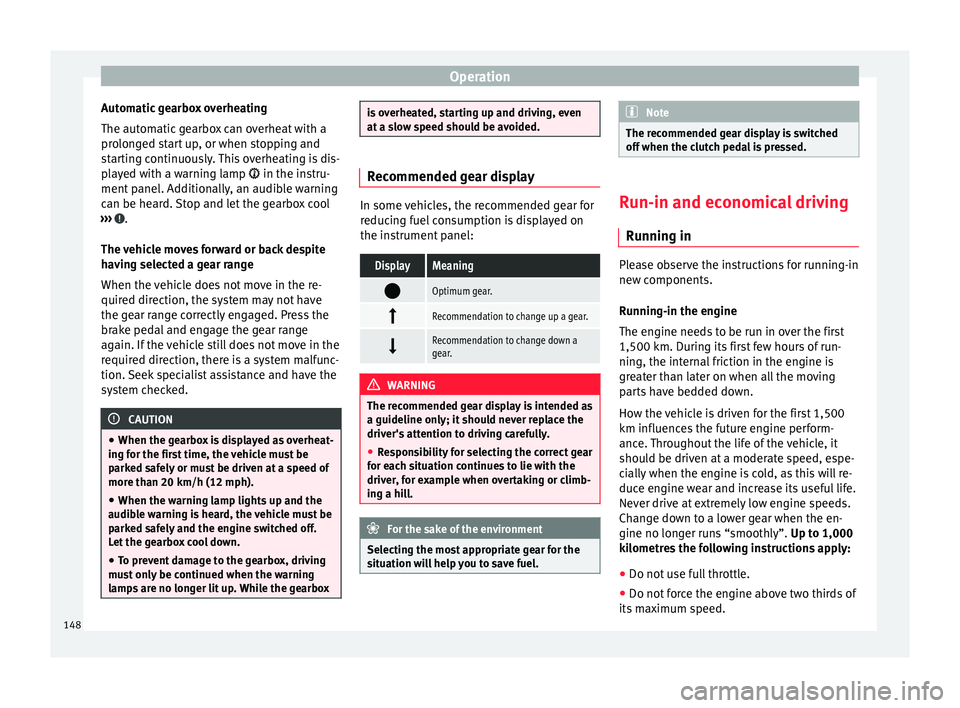
In some vehicles, the recommended gear for
reduc
in
g fuel consumption is displayed on
the instrument panel:
DisplayMeaning
Optimum gear.
Recommendation to change up a gear.
Recommendation to change down a
gear.
WARNING
The recommended gear display is intended as
a guideline only; it shou
ld never replace the
driver's attention to driving carefully.
● Responsibility for selecting the correct gear
for eac
h situation continues to lie with the
driver, for example when overtaking or climb-
ing a hill. For the sake of the environment
Selecting the most appropriate gear for the
sit uation w
ill help you to save fuel. Note
The recommended gear display is switched
off when the c lut
ch pedal is pressed. Run-in and economical driving
Ru nnin
g in Please observe the instructions for running-in
new components.
R u
nning-in the engine
The engine needs to be run in over the first
1,500 km. During its first few hours of run-
ning, the internal friction in the engine is
greater than later on when all the moving
parts have bedded down.
How the vehicle is driven for the first 1,500
km influences the future engine perform-
ance. Throughout the life of the vehicle, it
should be driven at a moderate speed, espe-
cially when the engine is cold, as this will re-
duce engine wear and increase its useful life.
Never drive at extremely low engine speeds.
Change down to a lower gear when the en-
gine no longer runs “smoothly”. Up to 1,000
kilometres the following instructions apply:
● Do not use full throttle.
● Do not force the engine above two thirds of
its m ax
imum speed.
148
Page 152 of 232
Operation
(25 mph) in fourth gear and at 50 km/h
(31 mph) in fif th g
e
ar.
In addition, “skipping” gears when shifting
up helps to save fuel, weather and traffic
conditions permitting.
Do not wait until the last moment before
changing gear. Only use first gear when you
move off and change to second gear quickly.
Avoid the kick-down function in vehicles with
automatic gearbox.
Vehicles with a gear display help to achieve
an economical driving style as the display in-
dicates the best moment to change gear.
Let the vehicle roll
If you take your foot off the accelerator, the
fuel supply is stopped and consumption is
reduced.
Allow the vehicle to roll without accelerating,
for example when approaching a red traffic
light. However, if the vehicle is rolling too
slowly or the distance is too long, the clutch
pedal should be pressed to declutch. The en-
gine will then operate at idle speed.
If the vehicle is going to be at a standstill for
a period of time, switch off the engine; for ex-
ample, while waiting at a level crossing.
Think ahead and “flow” with the traffic
Frequent acceleration and braking considera-
bly increase fuel consumption. If you think ahead as you drive and keep a safe distance
from the v
ehicle in front, it is possible to slow
down by simply lifting your foot off the accel-
erator. This eliminates the need for constant
braking and acceleration.
Calm and steady driving
Constancy is more important than speed: The
more you drive at a constant speed, the lower
the fuel consumption.
When driving on the motorway, it is more effi-
cient to drive at a constant and more moder-
ate speed than to be continuously accelerat-
ing and braking. As a general rule, you will
reach your destination just as quickly when
you drive at a constant speed.
The cruise control function helps you to ach-
ieve a constant style of driving.
Moderate use of additional devices
It is important to travel in comfort, but con-
venience systems should be used ecological-
ly.
Some equipment, when connected, increase
fuel consumption considerably, for example:
● Air conditioning cooling system: If the air
conditioning sy
stem is required to cool to
significantly lower temperatures than the true
outside temperature, it will require a large
amount of energy from the engine. Therefore,
we recommend that the selected temperature for the vehicle is not too different to the out-
side temper
ature. It is a good idea to air the
vehicle before starting your journey and to
drive a short distance with the windows
open. Then you can close the windows and
switch on the air conditioning. Keep windows
closed when travelling at high speeds. Driv-
ing with the windows open increases fuel
consumption.
● Switch off the seat heating when the seats
have w
armed up.
● Switch off the heated rear window when it
is not
moist or covered in ice.
Avoid short journeys
Fuel consumption is much higher when the
engine is cold, immediately after it has been
started. It takes a few kilometres of driving
for the engine to warm up and to normalise
consumption.
The engine and catalytic converter need to
reach their proper working temperature in or-
der to minimise fuel consumption and emis-
sions. The ambient temperature has a deci-
sive influence.
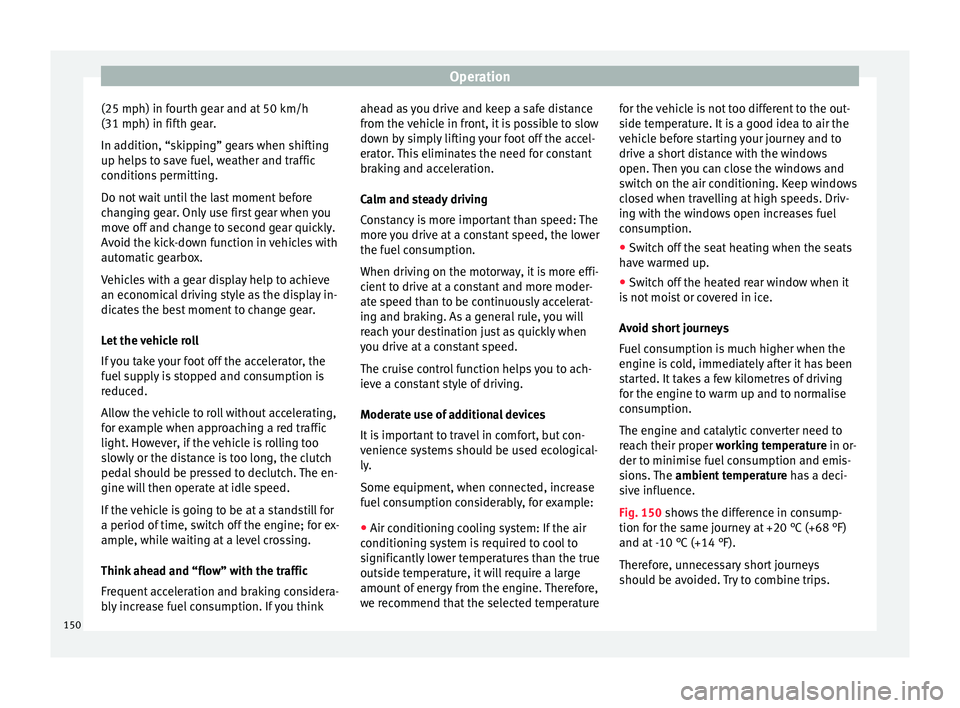
Fig. 150 shows the difference in consump-
tion for the same journey at +20 °C (+68 °F)
and at -10 °C (+14 °F).
Therefore, unnecessary short journeys
should be avoided. Try to combine trips.
150
Page 158 of 232
Operation
CAUTION
Failure to heed the warning lamps when they
appe ar m
ay result in faults in the vehicle. Cruise control operation
Read the additional information carefully
›› ›
page 24
The cruise control system (CCS) is able to in-
dividually maintain the set speed when driv-
ing forwards from approx. 20 km/h (15 mph).
The CCS only slows down by reducing the ac-
celerator but not by braking ››› .
T r
av
elling down hills with the CCS
When travelling down hills the CCS cannot
maintain a constant speed. Slow the vehicle
down using the brake pedal and reduce
gears if required.
Automatic off
The cruise control system (CCS) is switched
off automatically or temporarily:
● If the system detects a fault that could af-
fect the w
orking order of the CCS.
● If you increase the stored speed by press-
ing the acc
elerator pedal for a certain time.
● if the brake or clutch pedal is depressed. ●
If the ge
ar is changed with the manual
gearbox.
● If the airbag is triggered. WARNING
Use of the cruise control could cause acci-
dents and sev
ere injuries if it is not possible
to drive at a constant speed maintaining the
safety distance.
● Do not use the cruise control in heavy traf-
fic, if the dis
tance from the vehicle in front is
insufficient, on steep roads, with several
bends or in slippery circumstances (snow,
ice, rain or loose gravel), or on flooded roads.
● Never use the CCS when driving off-road or
on unpav
ed roads.
● Always adapt your speed and the distance
to the v
ehicles ahead in line with visibility,
weather conditions, the condition of the road
and the traffic situation.
● To avoid unexpected operation of the cruise
contro
l system, turn it off every time you fin-
ish using it.
● It is dangerous to use a set speed which is
too high for the pr
evailing road, traffic or
weather conditions.
● When travelling down hills, the CCS cannot
maintain a c
onstant speed. The vehicle tends
to accelerate under its own weight. Select a
lower gear or use the foot brake to slow the
vehicle. Safety Assist* (City Safety As-
s
i
s
t function)
Introduction The City Safety Assist function covers driving
sit
uation
s at a distance of about 10 metres in
front of the vehicle, in a speed range of ap-
proximately 5-30 km/h (3-19 mph).
When the system detects a possible collision
with a vehicle in front, the vehicle prepares
for a possible emergency braking ››› .
If the driv
er doe
s not react to an imminent
collision, the system can automatically brake
the vehicle in order to reduce speed faced
with a possible collision. The system can
help to reduce the consequences of an acci-
dent.
If the City Safety Assist function determines
that the driver has braked insufficiently when
faced with an imminent collision, the system
can increase the brake force in order to re-
duce speed. The system can help to reduce
the consequences of an accident. WARNING
The smart technology in the City Safety As-
si s
t system cannot change the limits imposed
by the laws of physics and by the system it-
self. The increased convenience offered by
the City Safety Assist system should never
prompt you to take risks. The driver always 156
Page 162 of 232
Operation
The City Safety Assist function is limited by
the l a
w
s of physics and by the nature of the
system itself. For this reason, this may pro-
duce reactions from the City Safety Assist
system in certain circumstances that are late
or unexpected by the driver. For this reason,
always pay due attention and if necessary, in-
tervene.
For example, the following driving situations
require special attention:
Driving through a bend
When entering or leaving a “long” bend, the
vehicle may decelerate when the laser sensor
detects a vehicle travelling in the adjoining
lane ››› Fig. 156 A. To interrupt deceleration
you can accelerate, turn the steering wheel or
press the clutch.
Narrow vehicles in front
The laser sensor will only detect narrow vehi-
cles in front if they are in the sensor detec-
tion zone ››› Fig. 156 B. This applies especial-
ly to narrow vehicles such as motorbikes.
Other vehicles changing lanes
Vehicles moving into your lane in close prox-
imity can cause unexpected braking from the
City Safety Assist system ›››
Fig. 157. To inter-
rupt deceleration you can accelerate, turn the
steering wheel or press the clutch. Possible malfunction to the laser sensor
If the la
ser sensor operation function is im-
paired, for example due to heavy rain, mist,
snow or dirt, the City Safety Assist system
function is temporarily disconnected. On the
instrument panel display the control lamp
flashes.
When the malfunction in the laser sensor has
been rectified, the availability of the City
Safety Assist system function is automatically
restored. The control lamp switches off.
The following conditions could prevent the
City Safety Assist system from functioning:
● Tight bends.
● Accelerator pressed all the way down to the
floor.
● If the C
ity Safety Assist system is switched
off or there i
s a fault ››› page 157.
● If the laser sensor is dirty, covered or over-
heated ›
›› page 158.
● In the event of snow, heavy rain or dense
fog.
● If ther
e are vehicles in front.
● Vehicles changing lanes.
● Vehicles moving in the opposite direction
in the same lane.
● V
ery dirty vehicles with a low degree of re-
flection.
● Pr e
sence of thick dust. Hill driving assistant*
Operation This function is only included in vehicles with
ESC.
The hi l
l driving assistant helps the driver to
move off and upward on a hill when the vehi-
cle is stationary.
The system maintains brake pressure for ap-
proximately two seconds after the driver
takes his foot off the brake pedal to prevent
the vehicle from lurching backward when it is
started. During these 2 seconds, the driver
has enough time to release the clutch pedal
and accelerate without the vehicle moving
and without having to use the handbrake,
making start-up easier, more comfortable
and safer.
These are the basic operation conditions:
● being on a ramp or hill/slope,
● doors closed,
● vehicle completely stationary,
● engine running and foot on the brake,
● besides having a gear engaged or being in
neutral f
or manual gear change and with the
selector lever at positions S, D or R in vehi-
cles with an automatic gearbox.
This system is also active when reversing up-
hill.
160
Page 163 of 232
Driver assistance systems
WARNING
● If y
ou do not start the vehicle immediately
after taking your foot off the brake pedal, the
vehicle may start to roll back under certain
conditions. Depress the brake pedal or use
the hand brake immediately.
● If the engine stalls, depress the brake ped-
al or u
se the hand brake immediately.
● When following a line of traffic uphill, if you
want t
o prevent the vehicle from rolling back
accidentally when starting off, hold the brake
pedal down for a few seconds before starting
off. Note
The Official Service or a specialist workshop
can t el
l you if your vehicle is equipped with
this system. Start-Stop System
C ontr
o
l lamps
It lights up
The Start-Stop system is enabled.
It lights up
The Start-Stop sys-
tem is enabled but
the engine cannot
be automatically
stopped.
Contact a specialised workshop.
It lights up
The Start-Stop sys-
tem cannot start the
engine.Start the engine by hand using
the vehicle's key
››› page 135.
There is a fault in the
alternator.››› page 196
Flashes
The Start-Stop sys-
tem is not available.Contact a specialised workshop.
Some warning and control lamps will light up
briefly
when the ignition i
s
switched on to
check certain functions. They will switch off
after a few seconds. WARNING
Observe the safety warnings ›››
in On the
ins trument
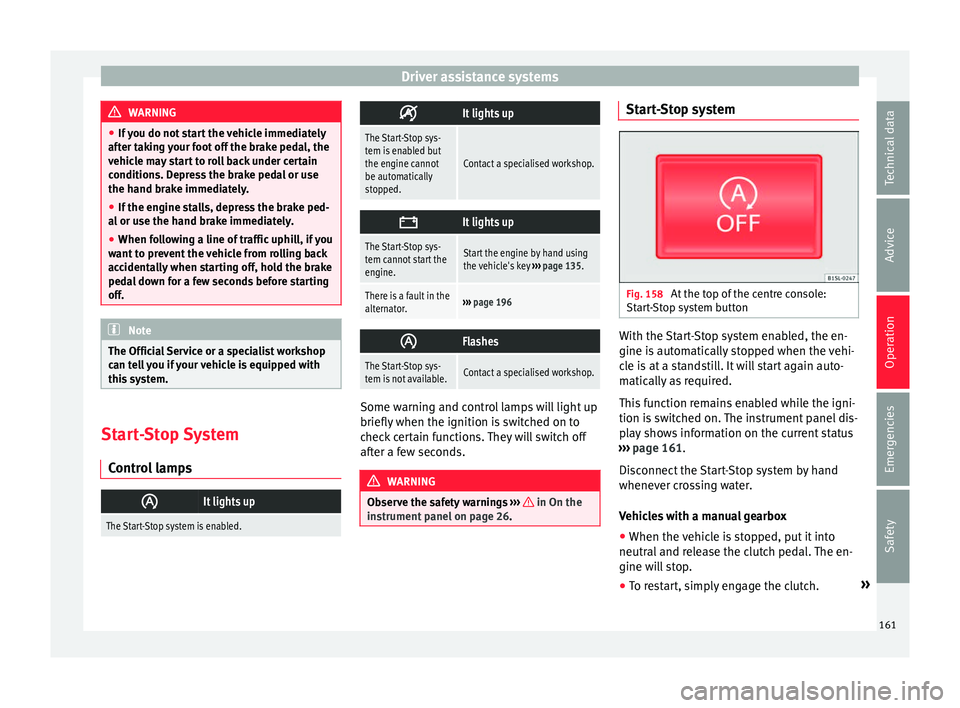
panel on page 26. Start-Stop system
Fig. 158
At the top of the centre console:
St ar
t
-Stop system button With the Start-Stop system enabled, the en-
gine i
s
aut
omatically stopped when the vehi-
cle is at a standstill. It will start again auto-
matically as required.
This function remains enabled while the igni-
tion is switched on. The instrument panel dis-
play shows information on the current status
››› page 161.
Disconnect the Start-Stop system by hand
whenever crossing water.
Vehicles with a manual gearbox
● When the vehicle is stopped, put it into
neutral and r
elease the clutch pedal. The en-
gine will stop.
● To restart, simply engage the clutch. »
161
Technical data
Advice
Operation
Emergencies
Safety
Page 164 of 232
Operation
Vehicles with an automatic gearbox
● When the vehicle is at a standstill, depress
the br ak
e or k
eep it pressed down. The en-
gine switches off.
● The engine will start again as soon as you
rele
ase the brake pedal.
● With the selector lever set to position N,
the engine wi
ll not start until a range of gears
is selected or the accelerator pedal is de-
pressed.
Important conditions for the engine to stop
automatically
● The driver's seat belt must be fastened.
● The driver door must be closed.
● The bonnet must be closed.
● The engine must have reached a minimum
temperat
ure.
● The vehicle must have moved since the last
time the engine wa
s stopped.
● The vehicle's battery must be sufficiently
char
ged.
● The battery temperature must not be too
low or too high.
● The
vehicle must not be on a very steep
slope. Condition
s for the engine to restart automat-
ical
ly
The engine can be automatically restarted in
the following cases:
● If the vehicle starts to moves.
● If the battery voltage drops.
Conditions
requiring engine start-up using
the key
The engine has to be manually started in the
following cases:
● If the driver unbuckles his/her seat belt.
● If the driver door is opened.
● If the bonnet is opened.
Switc
hing the Start-Stop system on and off
● Press the button situat
ed in the centre
console ››› Fig. 158.
● The button will light up when the Start-Stop
syst
em is switched off.
The engine will start immediately if the vehi-
cle is in Stop mode when the system is
switched off by hand. WARNING
The smart technology included in the hill
hol d c
annot change the laws of physics. Do
not let the extra convenience afforded by the hill hold tempt you into taking any risks
when drivin
g.
● An
y accidental movement of the vehicle
coul
d result in serious injury.
● The hill hold is not a replacement for driver
awar
eness.
● Adjust your speed and driving style to visi-
bility
, weather, road and traffic conditions.
● The hill hold cannot always keep the vehi-
cle at
a standstill on a slope or brake suffi-
ciently when travelling downhill (e.g. on slip-
pery or frozen surfaces). WARNING
The brake servo and the electromechanical
st eerin
g do not work when the engine is
switched off.
● The vehicle must never be allowed to move
with the engine sw
itched off.
● Disconnect the Start-Stop system before
workin
g in the engine compartment. CAUTION
The vehicle's battery could be damaged if the
vehic l
e is used for long periods at very high
outside temperatures. Note
In some cases, it may be necessary to start
the engine b y
hand using the key. Refer to162
Page 169 of 232
Care and maintenance
The optimal reach of the equipment is only
ac hiev
ed w
ith an external aerial.
Check first with a specialised workshop that
understands the technical possibilities of in-
stallation if you wish to use a two-way radio
with a transmitting power of over 10 watts.
SEAT recommends taking your car in for tech-
nical service.
All legal requirements, together with the in-
structions for the use of two-way radios must
be observed. WARNING
If the two-way radio is not securely fastened
in pos ition, it
could be sent flying around the
vehicle in the event of sharp braking, sudden
manoeuvres or accident, causing injury.
● While driving, two-way radios must be se-
curely
fastened in position, outside the air-
bags deployment zones, or safely stowed
away. WARNING
When using a two-way radio without a con-
nection to an e xt
erior aerial, the maximum
permitted levels of electromagnetic radiation
may be exceeded. This is also the case if the
aerial has not been correctly installed.
● You should only use a two-way radio inside
the vehic
le if it has first been correctly con-
nected to an exterior aerial. Information stored by the control
u
nit
s Your vehicle is fitted at the factory with a ser-
ies
of
electronic control units responsible for
the engine and gearbox management. In ad-
dition, the control units supervise the per-
formance of the exhaust gas system and the
airbag systems.
Therefore, while the vehicle is being driven,
these electronic control units are continuous-
ly analysing the vehicle data. In the event of
faults or deviations from the theoretical val-
ues, only this data is stored. Normally, the
warning lamps on the instrument panel light
up in the event of faults.
This data can only be read and analysed us-
ing special equipment.
The storing of the data allows specialised
workshops to detect and repair faults. Stored
data may include:
● Data relating to the engine or the gearbox
● Speed
● Direction of travel
● Braking force
● Detection of seat belt
The v ehic
le control units never record conver-
sations held by passengers in the vehicle.
In vehicles equipped with an emergency call
function via the mobile phone or other appli- ances connected in the vehicle, it is possible
to send the v
ehicle position. If the control
unit records an accident with airbag activa-
tion, the system may automatically send a
signal. This will depend on the network oper-
ator. Normally, transmission is only possible
in areas with good coverage.
Event Data Recorder
The vehicle is not fitted with an event data re-
corder.
An event data recorder temporarily stores the
vehicle information. Therefore, in the event of
an accident, it is possible to obtain detailed
information about how the accident occur-
red. Vehicles with airbag systems can store
data relating to impact speed, seat belt sta-
tus, seat positions and airbag activation
times may be stored, etc. The volume of data
depends on the manufacturer.
Event data recorders can only be mounted
with authorisation from the vehicle owner
and, in some countries, they are governed by
local legislation.
Reprogramming control units
On the whole, all the data required for the
component management is stored in the con-
trol units. The programming of certain con-
venience functions, such as the turn signals,
individual door opening and instructions on
the display can be modified using special »
167
Technical data
Advice
Operation
Emergencies
Safety
Page 171 of 232
Care and maintenance
●
Whil e driv
ing, the mobile telephone, other
equipment including telephone accessories
such as telephone supports, notepads and
navigators must be correctly secured, away
from the airbags deployment zones, or stored
in a safe place. WARNING
When using a mobile telephone or two-way
r a dio w
ithout connecting an external aerial,
the maximum permitted levels of electromag-
netic radiation in the vehicle may be excee-
ded, thus putting the driver and the rest of
the vehicle occupants in danger. This is also
the case if the aerial has not been correctly
installed.
● A minimum of 20 centimetres should be
kept betw
een mobile phone aerials and artifi-
cial pacemakers, as mobile telephones may
affect the working of pacemakers.
● Do not keep mobile phones in breast pock-
ets dir
ectly above pacemakers.
● Immediately switch off the mobile tele-
phone if y
ou suspect any interference with
pacemakers or other types of medical equip-
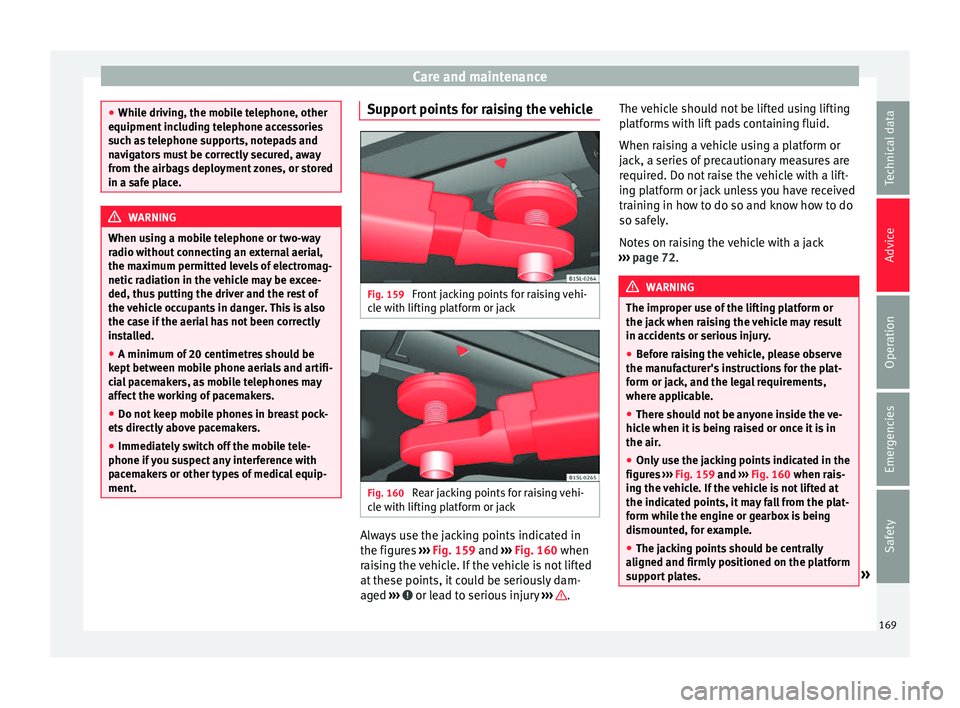
ment. Support points for raising the vehicle
Fig. 159
Front jacking points for raising vehi-
c l
e w
ith lifting platform or jack Fig. 160
Rear jacking points for raising vehi-
c l
e w
ith lifting platform or jack Always use the jacking points indicated in
the figur
e
s
››› Fig. 159 and ››› Fig. 160 when
raising the vehicle. If the vehicle is not lifted
at these points, it could be seriously dam-
aged ››› or lead to serious injury
›
››
.The vehicle should not be lifted using lifting
p
latf
orms with lift pads containing fluid.
When raising a vehicle using a platform or
jack, a series of precautionary measures are
required. Do not raise the vehicle with a lift-
ing platform or jack unless you have received
training in how to do so and know how to do
so safely.
Notes on raising the vehicle with a jack
››› page 72. WARNING
The improper use of the lifting platform or
the jac k
when raising the vehicle may result
in accidents or serious injury.
● Before raising the vehicle, please observe
the manufact
urer's instructions for the plat-
form or jack, and the legal requirements,
where applicable.
● There should not be anyone inside the ve-
hicle when it
is being raised or once it is in
the air.
● Only use the jacking points indicated in the
figures
››› Fig. 159 and ››› Fig. 160 when rais-
ing the vehicle. If the vehicle is not lifted at
the indicated points, it may fall from the plat-
form while the engine or gearbox is being
dismounted, for example.
● The jacking points should be centrally
aligned and firmly
positioned on the platform
support plates. » 169
Technical data
Advice
Operation
Emergencies
Safety
Page 172 of 232
Advice
●
Never s t
art the engine when the vehicle is
raised! The vehicle may fall from the platform
due to the engine vibrations.
● If it is necessary to work underneath the ve-
hicle whi
le it is raised, you should check that
the supporting stands have an adequate load
capacity.
● Never climb onto the lifting platform.
● Always make sure that the weight of the ve-
hicle doe
s not exceed the lifting platform
load capacity. CAUTION
● Never r ai
se the vehicle at the engine oil
sump, the gearbox or the rear or front axles.
● Always use an intermediate rubber support
to prev
ent damage to the vehicle underbody.
Check that the arms of the lifting platform are
able to move with obstruction.
● The arms should not come into contact with
the side runnin
g boards or other parts of the
vehicle. Caring for and cleaning the ve-
hic
le e
xterior
Introduction Regular maintenance and washing help to
m
aint
ain the
value of the vehicle. This may
also be one of the requirements for acknowl- edging warranty claims in the event of body-
work c
orrosion or paint defects.
Products suitable for the care of your vehicle
are available at any technical service. WARNING
Car-care products may be toxic and hazard-
ous. If c
ar care products are not suitable or
are used inappropriately, this could result in
accident, serious injury, burns or intoxica-
tion.
● Car care products must always be stored in
the original
container which should be kept
closed.
● Observe information provided by the manu-
factur
er.
● To prevent confusion, never store car care
products
in empty food cans, bottles or other
containers.
● Keep all care products out of reach of chil-
dren.
● Harmfu
l vapours may be produced when us-
ing car c
are products. Therefore, care prod-
ucts should only be used in well-ventilated
spaces or in the open air.
● Never use fuel, turpentine, engine oil, ace-
tone or any
other volatile liquid to wash,
clean or care for the vehicle. These are toxic
and highly flammable. WARNING
Inappropriate care and cleaning of vehicle
component s
may effect the vehicle safety
equipment, increasing the risk of severe in-
jury.
● Vehicle components should only be
cle
aned and maintained in accordance with
the manufacturer's instructions.
● Only use approved or recommended care
products. CAUTION
Cleaning products which contain solvents will
dam ag
e the material. For the sake of the environment
Only wash the vehicle in areas allocated for
this p
urpose, to prevent dirty water which
may be contaminated by oil, grease or fuel,
from entering the drains. In some places,
even washing it outside the planned areas is
banned. For the sake of the environment
Where possible, always use products which
re s
pect the environment. For the sake of the environment
The remains of car care products should not
be dis po
sed of with ordinary household170
Page 182 of 232
Advice
It may be necessary to fit or remove certain
piec e
s
of equipment or to deactivate certain
functions. Service work may also be affected.
This is particularly true if the vehicle is used
in a different climate for an extended period
of time. CAUTION
● SEA T doe
s not accept liability for any dam-
age to the vehicle due to the use of a lower
quality fuel, an inadequate service or the
non-availability of genuine spare parts.
● SEAT does not accept liability if the vehicle
does not
comply in part or in full with the le-
gal requirements of other countries or conti-
nents. Radio and antenna reception
For factory-fitted radio equipment, the aerial
f
or r
a
dio reception is fitted to the roof of the
vehicle. Note
If electrical equipment such as mobile tele-
phones, i s
used near a roof aerial, you may
observe interference in the reception of AM
stations. Notes on SEAT repairs
WARNING
Repairs or modifications which are not per-
formed c orr
ectly may result in damage or er-
rors in the vehicle operation, affecting the ef-
fectiveness of the driver assist and airbag
systems. This could result in serious acci-
dent.
● Have any repairs or modifications carried
out at a s
pecialised workshop. Conformity certification
The respective manufacturer hereby declares
th
at
the pr
oducts indicated below comply
with basic requirements and the following
provisions and important legislation on the
date of manufacture of the vehicle, among
others FCC Part 15.19, FCC Part 15.21 and
RSS-Gen Issue 1:
Radio frequency equipment
● Electronic gearbox lock.
● Vehicle key
Electrica
l equipment
● 12 volt power socket Collection and scrapping of end-of-life
vehicl
es Collection of end-of-life vehicles
SEA
T i
s already prepared for the moment
when you wish to scrap your vehicle and of-
fers you an environmentally-friendly solution.
An extensive network of used car reception
centres already exists in much of Europe. Af-
ter the vehicle has been delivered, you will
receive a certificate of destruction describing
the environmentally friendly scrapping of the
vehicle in accordance with applicable legisla-
tion.
We will collect the used vehicle free of
charge, provided it complies with all national
legislation.
Please see your technical service for further
information about the collection and scrap-
ping of end-of-life vehicles.
Scrapping
The relevant safety requirements must be ob-
served when the vehicle or components of
the airbag or belt tensioner systems are
scrapped. These requirements are known to
specialised workshops. 180