light Seat Mii 2016 Owner's Guide
[x] Cancel search | Manufacturer: SEAT, Model Year: 2016, Model line: Mii, Model: Seat Mii 2016Pages: 232, PDF Size: 4.9 MB
Page 89 of 232
General instrument panel
Operation
Gener a
l
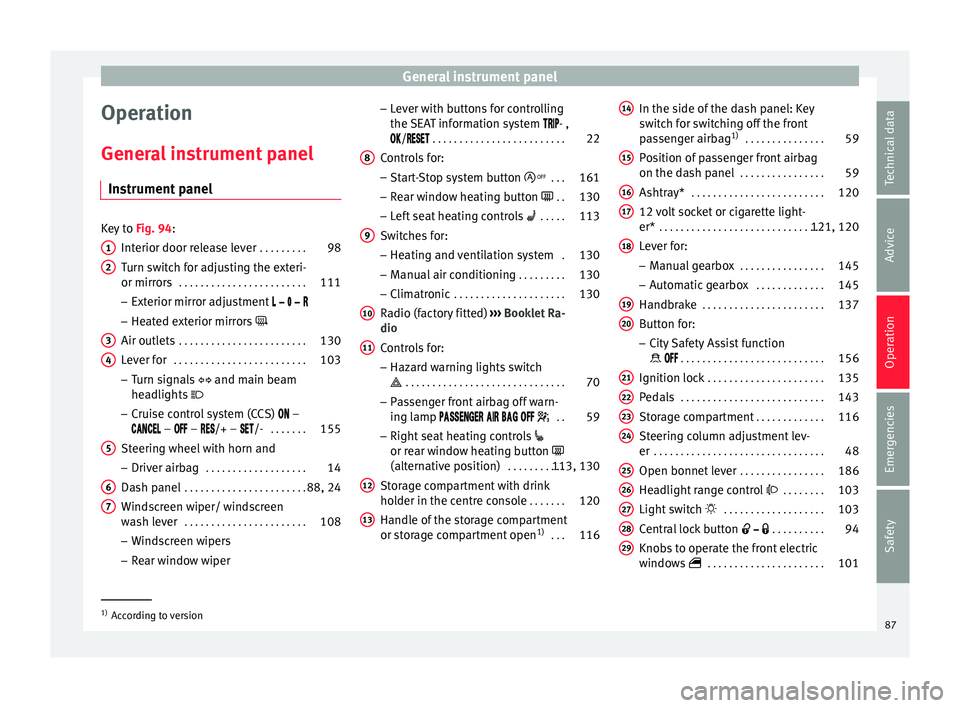
instrument panel
Instrument panel Key to
Fig. 94:
Interior door r el
ease lever . . . . . . . . . 98
Turn switch for adjusting the exteri-
or mirrors . . . . . . . . . . . . . . . . . . . . . . . . 111
– Exterior mirr or a
djustment
– Heated exterior mirrors
Air outlets . . . . . . . . . . . . . . . . . . . . . . . . 130
Lever for . . . . . . . . . . . . . . . . . . . . . . . . . 103
– Turn sign
als and main beam
headlights
– Cruise control system (CCS) –
– – /+ – /- . . . . . . .155
Steering wheel with horn and – Driver airb ag . . . . . . . . . . . . . . . . . . . 14
Da
sh panel . . . . . . . . . . . . . . . . . . . . . . . 88, 24
Windscreen wiper/ windscreen
wash l
ever . . . . . . . . . . . . . . . . . . . . . . . 108
– Wind s
creen wipers
– Rear window wiper
1 2
3
4
5
6
7 –
Lev
er w
ith buttons for controlling
the SEAT information system - ,
/ . . . . . . . . . . . . . . . . . . . . . . . . . 22
Controls for:
– Start
-Stop system button . . .161
– Rear w
indow heating button . .130
– Left
seat heating controls . . . . . 113
Switches for: – Heating and
ventilation system .130
– Manual air c
onditioning . . . . . . . . . 130
– Clim atr
onic . . . . . . . . . . . . . . . . . . . . . 130
Radio (factory fitted) ›››
Booklet Ra-
dio
Controls for:
– Hazard warning lights switch
. . . . . . . . . . . . . . . . . . . . . . . . . . . . . . 70
– Pa s
senger front airbag off warn-
ing lamp . .59
– Right seat
heating controls
or rear window heating button
(alternative position) . . . . . . . . . . .113, 130
Storage compartment with drink
hol der in the c
entre console . . . . . . .120
Handle of the storage compartment
or stor
age compartment open 1)
. . . 116
8 9
10
11
12
13 In the side of the dash panel: Key
sw
it
c
h for switching off the front
passenger airbag 1)
. . . . . . . . . . . . . . . 59
Position of passenger front airbag
on the dash p
anel . . . . . . . . . . . . . . . . 59
Ashtray* . . . . . . . . . . . . . . . . . . . . . . . . . 120
12 volt socket or cigarette light-
er* . . . . . . . . . . . . . . . . . . . . . . . . . . . . . . . 121, 120
Lever for:
– Manual g
earbox . . . . . . . . . . . . . . . . 145
– Autom atic
gearbox . . . . . . . . . . . . . 145
Handbrake . . . . . . . . . . . . . . . . . . . . . . . 137
Button for:
– City
Safety Assist function
. . . . . . . . . . . . . . . . . . . . . . . . . . . 156
Ignition lock . . . . . . . . . . . . . . . . . . . . . . 135
Pedals . . . . . . . . . . . . . . . . . . . . . . . . . . . 143
Storage compartment . . . . . . . . . . . . .116
Steering column adjustment lev-
er . . . . . . . . . . . . . . . . . . . . . . . . . . . . . . . . 48
Open bonnet lever . . . . . . . . . . . . . . . . 186
Headlight range control . . . . . . . . 103
Light switch . . . . . . . . . . . . . . . . . . . 103
Central lock button . . . . . . . . . .94
Knobs to operate the front electric
window
s . . . . . . . . . . . . . . . . . . . . . . 101 14
15
16
17
18
19
20
21
22
23
24
25
26
27
28
29
1)
According to version
87
Technical data
Advice
Operation
Emergencies
Safety
Page 91 of 232
General instrument panel
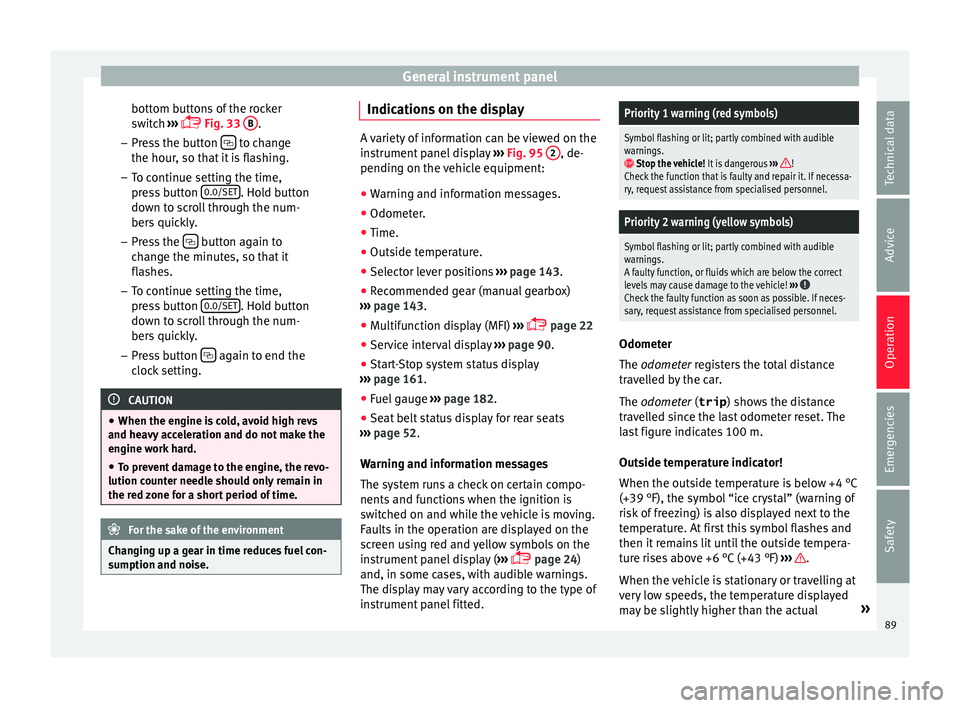
bottom buttons of the rocker
sw it
c
h ›››
Fig. 33
B .
– Pr e
s
s the button to change
the hour , so th
at
it is flashing.
– To continue setting the time,
press button 0.0/SET . Hold button
do wn t
o s
croll through the num-
bers quickly.
– Press the button again to
c h
an
ge the minutes, so that it
flashes.
– To continue setting the time,
press button 0.0/SET . Hold button
do wn t
o s
croll through the num-
bers quickly.
– Press button again to end the
c loc
k
setting. CAUTION
● When the engine i s
cold, avoid high revs
and heavy acceleration and do not make the
engine work hard.
● To prevent damage to the engine, the revo-
lution count
er needle should only remain in
the red zone for a short period of time. For the sake of the environment
Changing up a gear in time reduces fuel con-
sumption and noi se. Indications on the display
A variety of information can be viewed on the
ins
trument
panel display ››› Fig. 95 2 , de-
pending on the v
ehicle equipment:
● Warning and information messages.
● Odometer.
● Time.
● Outside temperature.
● Selector lever positions ›››
page 143.
● Recommended gear (manual gearbox)
›› ›
page 143.
● Multifunction display (MFI) ›››
page 22
● Service interval display ›››
page 90 .
● Start-Stop system status display
›››
page 161.
● Fuel gauge ›››
page 182.
● Seat belt status display for rear seats
›››
page 52.
Warning and information messages
The system runs a check on certain compo-
nents and functions when the ignition is
switched on and while the vehicle is moving.
Faults in the operation are displayed on the
screen using red and yellow symbols on the
instrument panel display ( ›››
page 24)
and, in some cases, with audible warnings.
The display may vary according to the type of
instrument panel fitted.
Priority 1 warning (red symbols)
Symbol flashing or lit; partly combined with audible
warnings.
Stop the vehicle! It is dangerous ››› !
Check the function that is faulty and repair it. If necessa-
ry, request assistance from specialised personnel.
Priority 2 warning (yellow symbols)
Symbol flashing or lit; partly combined with audible
warnings.
A faulty function, or fluids which are below the correct
levels may cause damage to the vehicle! ›››
Check the faulty function as soon as possible. If neces-
sary, request assistance from specialised personnel. Odometer
The odomet
er
r
egisters the total distance
travelled by the car.
The odometer (trip ) shows the distance
travelled since the last odometer reset. The
last figure indicates 100 m.
Outside temperature indicator!
When the outside temperature is below +4 °C
(+39 °F), the symbol “ice crystal” (warning of
risk of freezing) is also displayed next to the
temperature. At first this symbol flashes and
then it remains lit until the outside tempera-
ture rises above +6 °C (+43 °F) ››› .
When the v
ehic
le is stationary or travelling at
very low speeds, the temperature displayed
may be slightly higher than the actual »
89
Technical data
Advice
Operation
Emergencies
Safety
Page 95 of 232
Opening and closing
of frequencies (for example, radio
tran
smitt
ers, mobile telephones).
● Obstacles between the remote control and
the vehic
le, bad weather conditions and
draining batteries can considerably reduce
the range of the remote control.
● If the buttons of the vehicle key are press-
ed ›››
Fig. 96 or one of the central locking but-
tons ››› page 94 is pressed repeatedly in
quick succession, the central locking briefly
disconnects as protection against overload-
ing. The vehicle is then unlocked. Lock it if necessary. Mechanical vehicle key
Fig. 97
Vehicle mechanical key The vehicle key set may include a mechanical
k
ey
›
›› Fig. 97. Duplicate keys
To obt
ain a spare key and other vehicle keys,
the vehicle chassis number is required.
Each new key must contain a microchip and
be coded with the data from the vehicle elec-
tronic immobiliser. A vehicle key will not work
if it does not contain a microchip or the mi-
crochip has not been encoded. This is also
true for keys cut for the vehicle.
The vehicle keys or new spare keys can be
obtained from a SEAT dealership, a special-
ised workshop or an approved locksmith
qualified to create them.
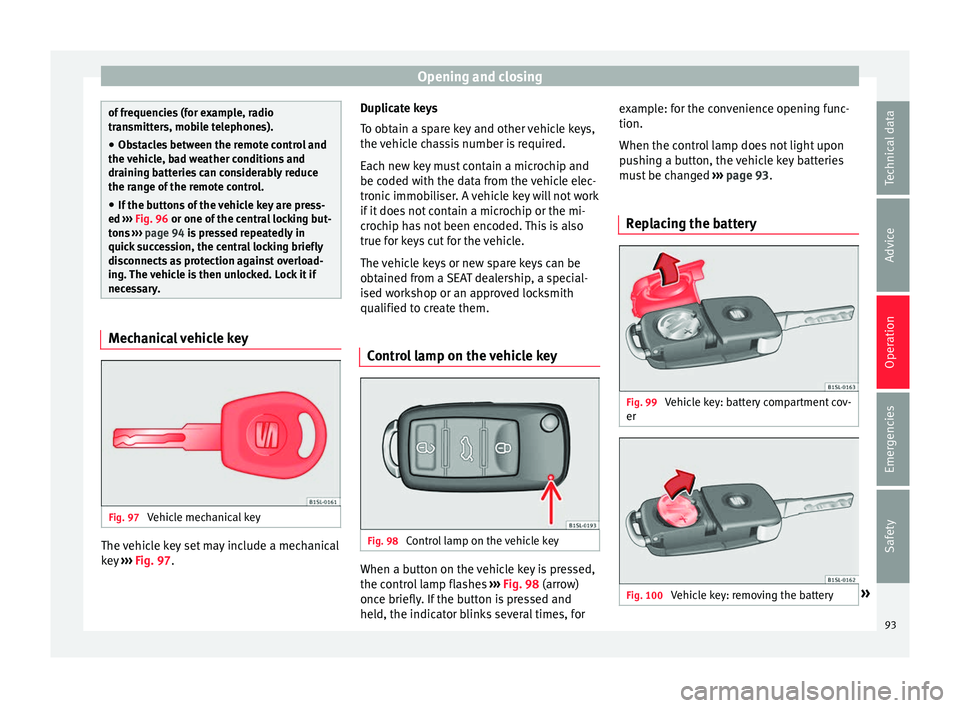
Control lamp on the vehicle key Fig. 98
Control lamp on the vehicle key When a button on the vehicle key is pressed,
the c
ontr
o
l lamp flashes ››› Fig. 98 (arrow)
once briefly. If the button is pressed and
held, the indicator blinks several times, for example: for the convenience opening func-
tion.
When the contro
l lamp does not light upon
pushing a button, the vehicle key batteries
must be changed ››› page 93.
Replacing the battery Fig. 99
Vehicle key: battery compartment cov-
er Fig. 100
Vehicle key: removing the battery » 93
Technical data
Advice
Operation
Emergencies
Safety
Page 99 of 232
Opening and closing
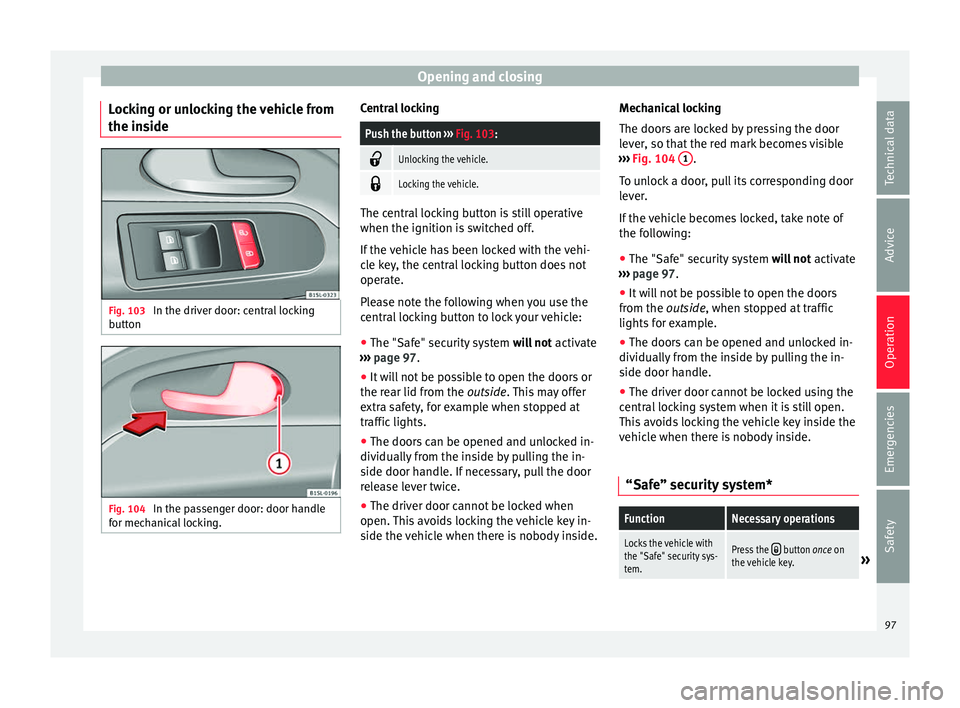
Locking or unlocking the vehicle from
the in s
ide Fig. 103
In the driver door: central locking
b utt
on Fig. 104
In the passenger door: door handle
f or mec
h
anical locking. Central locking
Push the button
››› Fig. 103:
Unlocking the vehicle.
Locking the vehicle.
The central locking button is still operative
when the ignition is
sw
itched off.
If the vehicle has been locked with the vehi-
cle key, the central locking button does not
operate.
Please note the following when you use the
central locking button to lock your vehicle:
● The "Safe" security system wil
l not activate
››› page 97.
● It will not be possible to open the doors or
the rear lid fr
om the outside. This may offer
extra safety, for example when stopped at
traffic lights.
● The doors can be opened and unlocked in-
dividually
from the inside by pulling the in-
side door handle. If necessary, pull the door
release lever twice.
● The driver door cannot be locked when
open. This
avoids locking the vehicle key in-
side the vehicle when there is nobody inside. Mechanical locking
The doors ar
e locked by pressing the door
lever, so that the red mark becomes visible
››› Fig. 104 1 .
T o u
n
lock a door, pull its corresponding door
lever.
If the vehicle becomes locked, take note of
the following:
● The "Safe" security system wil
l not activate
››› page 97.
● It will not be possible to open the doors
from the out
side, when stopped at traffic
lights for example.
● The doors can be opened and unlocked in-
dividually
from the inside by pulling the in-
side door handle.
● The driver door cannot be locked using the
central
locking system when it is still open.
This avoids locking the vehicle key inside the
vehicle when there is nobody inside.
“Safe” security system*
FunctionNecessary operations
Locks the vehicle with
the "Safe" security sys-
tem.Press the button once on
the vehicle key.» 97
Technical data
Advice
Operation
Emergencies
Safety
Page 100 of 232
OperationFunctionNecessary operations
Locks the vehicle with-
out the "Safe" security
system.
Press the button twice on
the vehicle key.
Press the central locking but-
ton on the driver door
once. When the vehicle is locked, the "Safe" securi-
ty sy
s
tem deactivates the door handles, mak-
ing the vehicle difficult to open. The doors
cannot be opened from inside ››› .
Upon sw it
ching off the ignition, the instru-
ment panel display will show that the “dead-
lock” is activated or (SAFELOCK or SAFE-
LOCK ).
When the deadlock is switched off: ● The vehicle can be opened and unlocked
from the in s
ide using an inside door handle.
Control lamp on the driver door
When the vehicle is
locked:Meaning
The red LED flashes for ap-
proximately 2 seconds at
short intervals and then more
slowly.The "Safe" security
system is switched on.
The red LED flashes for about
two seconds then turns off. Af-
ter 30 seconds, the LED flash-
es again.The "Safe" security
system is switched off.
When the vehicle is
locked:Meaning
The red LED flashes for about
two seconds at short inter-
vals. Subsequently, the light
will remain switched on for
about. 30 seconds.There is a fault in the
locking system. Con-
tact a specialised
workshop. WARNING
Careless use of the "Safe" security system
can c au
se serious injury.
● Never leave anybody inside the vehicle if it
has
been locked using the key. When the
"Safe" security system is activated, doors
cannot be opened from the inside!
● When the doors are locked, it is difficult to
get t
o passengers in the vehicle interior in
case of an emergency. Passengers could re-
main trapped inside and unable to unlock the
doors in case of an emergency. Doors
Intr oduction WARNING
If a door is not correctly closed, it could open
une xpect
edly when driving and cause serious
injuries. ●
Alw a
ys stop immediately and close the
door.
● When closing, ensure that the door has
closed c
orrectly. A closed door should be
flush with the corresponding parts of the
bodywork.
● Open and close doors only when nobody is
in the way
of the door. WARNING
A door held open by its retainer could be
b lo wn c
losed by the wind or close if the vehi-
cle is on a hill, causing injury.
● When opening and closing doors, always
use the door handl
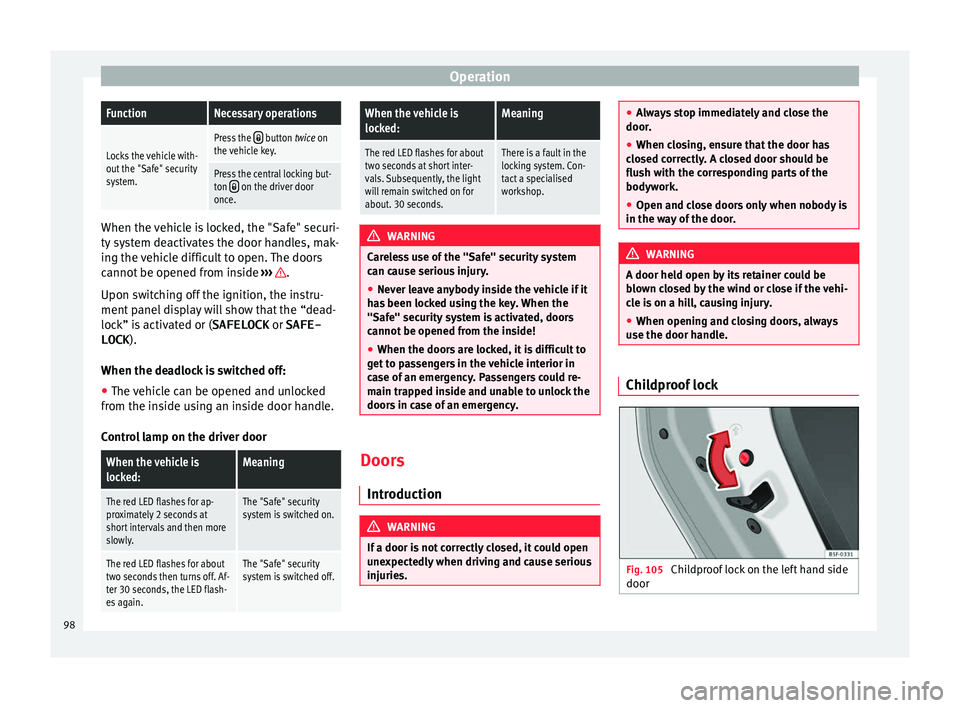
e. Childproof lock
Fig. 105
Childproof lock on the left hand side
door 98
Page 105 of 232
Lights and visibility
Closing the sliding/tilting electric panoramic
s u
nr
oof without the anti-trap function
● Within about 5 seconds of activating the
anti-trap fu
nction, pull knob ›››
Fig. 12
5 until the sliding/tilting sunroof is fully
c lo
sed.
● As
such, the sliding/tilting sunroof will
close w
ithout the anti-trap function!
● If the sunroof still cannot be closed, visit a
speci
alised workshop.
If the knob is released during the closing op-
eration, the sliding/tilting electric panoramic
sunroof opens automatically. WARNING
Closing the sliding/tilting electric panoramic
su nr
oof without the anti-trap function can re-
sult in serious injury.
● The sliding/tilting sunroof should always
be closed c
arefully.
● No person should ever remain in the way of
the sliding/ti
lting sunroof, especially when
closing without the anti-trap function.
● The anti-trap function does not prevent fin-
gers
or other parts of the body from becom-
ing trapped against the roof frame and inju-
ries occurring. Lights and visibility
Light s
C ontr
ol lamps
It lights up
Rear fog light switched on
››› page 21.
It lights up
Front fog lights switched on
››› page 21.
It lights up
Left or right turn signal.
The control lamp flickers twice as fast when a vehicle
turn signal is intermittent. If necessary, check the vehi-
cle's lights.
It lights up
Main beam on or flasher on
››› page 105. Several warning and control lamps light up
f
or a f
ew sec
onds when the ignition is switch-
ed on, signalling that the function is being
verified. They will switch off after a few sec-
onds. WARNING
Observe the safety warnings ›››
in On the
ins trument
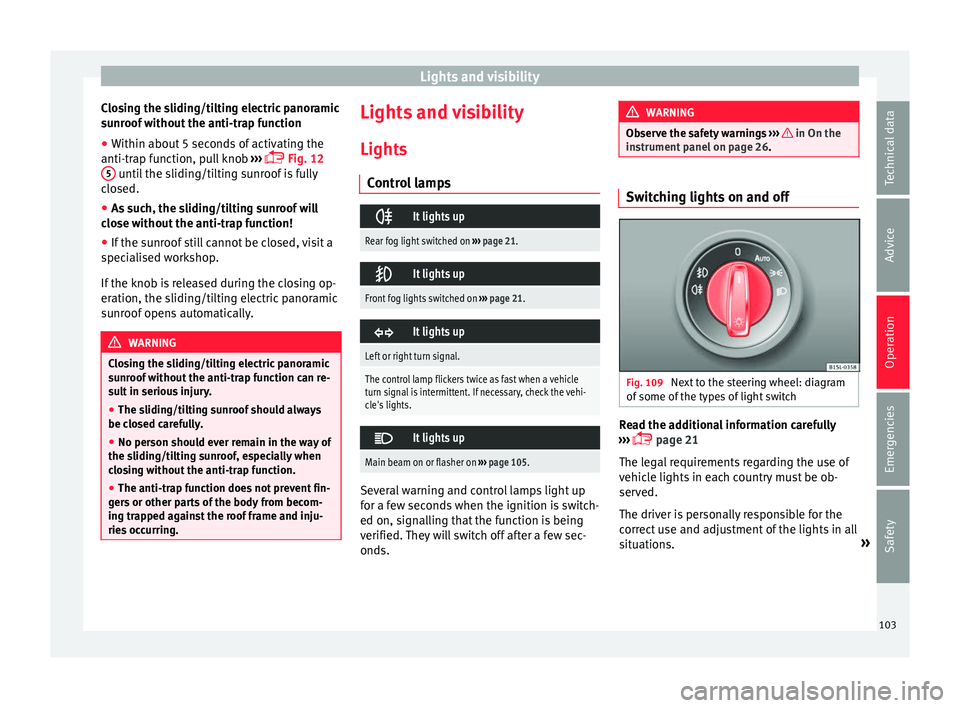
panel on page 26. Switching lights on and off
Fig. 109
Next to the steering wheel: diagram
of some of
the type
s of light switch Read the additional information carefully
› ›
›
page 21
The legal requirements regarding the use of
vehicle lights in each country must be ob-
served.
The driver is personally responsible for the
correct use and adjustment of the lights in all
situations. »
103
Technical data
Advice
Operation
Emergencies
Safety
Page 106 of 232
Operation
Audible warnings to advise the driver that
the light s
h
ave not been switched off
If the key is not in the ignition and the driver
door is open, an audible warning signal is
heard in the following cases: this is a remind-
er to turn off the lights.
● When the light switch is in position .
● When the light switch is in position .WARNING
The side lights or daytime running lights are
not bright enough t
o illuminate the road
ahead and to ensure that other road users are
able to see you.
● Always use your dipped beam head lights if
it is
raining or if visibility is poor. WARNING
If the headlights are set too high and not
used c orr
ectly, there is a risk of dazzling or
distracting other road users. This could result
in a serious accident.
● Always make sure that the headlights are
correctly
adjusted. Lights and visibility: functions
Parking light remains on both sides
If
when sw
it
ching off the ignition, the light
control remains in the position and the ve- hicle is closed from outside, both headlights,
in addition t
o the side lights and the rear
lights will light up.
Daytime running lights
The daytime driving light consists of individu-
al lights in the front headlamps.
When the daytime driving light is switched
on, only the individual lights come on ››› .
The d a
ytime lights
are turned on each time
the ignition is connected if the light switch
is in position o. . WARNING
If the road is not well-lit and the vehicle is
not c l
early visible to other drivers, an acci-
dent may occur.
● Never use the daytime driving light if the
roa
d is not well-lit as a result of the weather
conditions and poor visibility. The daytime
driving lights are not bright enough to illumi-
nate the road ahead and to ensure that other
road users are able to see you.
● The rear lights do not come on with the
daytime driv
ing light. A vehicle which does
not have the rear lights on may not be visible
to other drivers in the darkness, if it is rain-
ing or in conditions of poor visibility. Note
The headlights, rear lights and turn signals
ma y
mist up temporarily on the inside in cool or damp weather. This is normal and in no
wa
y
effects the useful life of the vehicle light-
ing system. Automatic dipped beam control
* The automatic dipped beam control is merely
intended a
s
an aid and is not able to recog-
nise all driving situations.
When the light switch is in position , the
vehicle lights and the instrument panel and
switch lighting switch on and off automatical-
ly in the following situations ››› in Lights
and v
i
sibility: functions on page 104:
Automatic switching
onAutomatic switching
off
The photo sensor detects
darkness, for example,
when driving through a
tunnel.When adequate lighting is
detected.
The rain sensor detects
rain and activates the
windscreen wipers.When the windscreen wip-
ers have been inactive for
a few minutes. WARNING
If the road is not well lit and other road users
cannot see the
vehicle well enough or at all,
accidents may occur.
● The automatic dipped beam control ( )
only sw
itches on the dipped beam when104
Page 107 of 232
Lights and visibility
there are no changes in brightness, and not,
for e
x
ample when it is foggy. “Coming Home” and “Leaving Home”
fu
nction (e
xterior guidance lights)“Coming Home” and “Leaving Home” Func-
tion lights up the c
lo
sest environment to the
vehicle when increasing and lowering the en-
vironment in case of darkness.
The “Coming Home” function should be con-
nected manually. The “Leaving Home” func-
tion is automatically controlled by a rain and
light sensor.
Activating the “Coming Home function”
● Switch the ignition off.
● Operate the headlight flashers for approxi-
mat ely
1 second ›››
page 21.
When the driver’s car door is opened, the
“Coming Home” lighting is connected. The
delay in disconnecting the headlights starts
when the last door or rear lid is closed.
Deactivating the “Coming Home function”
● It is automatically disconnected once the
time set for the del
ay in disconnecting the
lights has lapsed.
● OR: it is automatically disconnected if,
30 second
s after having activated the func- tion, even if any vehicle door or the rear lid is
stil
l open.
● OR: turn the light switch to the position .
● OR: c
onnect the ignition.
Activ
ating the “Leaving Home function”
● Unlock the vehicle (the light switch has to
be in the position
and the rain and light
sensor to detect darkness).
Deactivating the “Leaving Home function”
● It is automatically disconnected once the
set time for the del
ay in disconnecting the
lights has lapsed.
● OR: block the vehicle.
● OR: t
urn the light switch to the position .
● OR: c
onnect the ignition.
Turn s
ignal and main beam lever Read the additional information carefully
› ›
›
page 21
Convenience turn signals
For the convenience turn signals, move the
lever as far as possible upwards or down-
wards and release the lever. The turn signal
will flash 3 times.
The convenience indicators can be deactiva-
ted at a Specialised workshop. WARNING
Improper or lack of use of the turn signals, or
for g
etting to deactivate them can confuse
other road users. This could result in a seri-
ous accident.
● Always give warning when you are going to
chan
ge lane, overtake or when turning, acti-
vating the turn signal in good time.
● As soon as you have finished changing
lane, ov
ertaking or turning, switch the turn
signal off. WARNING
Incorrect use of the headlights may cause ac-
cident s
and serious injury, as the main beam
may distract or dazzle other drivers. Note
● If the c on
venience turn signals are operat-
ing (three flashes) and the other convenience
turn signals are switched on, the active part
stops flashing and only flashes once in the
new part selected.
● The turn signal only works when the igni-
tion is sw
itched on. The hazard warning
lights also work when the ignition is switch-
ed off ››› page 70.
● If any of both turn signals fails, the warning
lamp wi
ll start flashing twice faster than nor-
mal. » 105
Technical data
Advice
Operation
Emergencies
Safety
Page 108 of 232
Operation
●
The main beam he adligh
ts can only be
switched on if the dipped beam headlights
are already on. Hazard warning lights
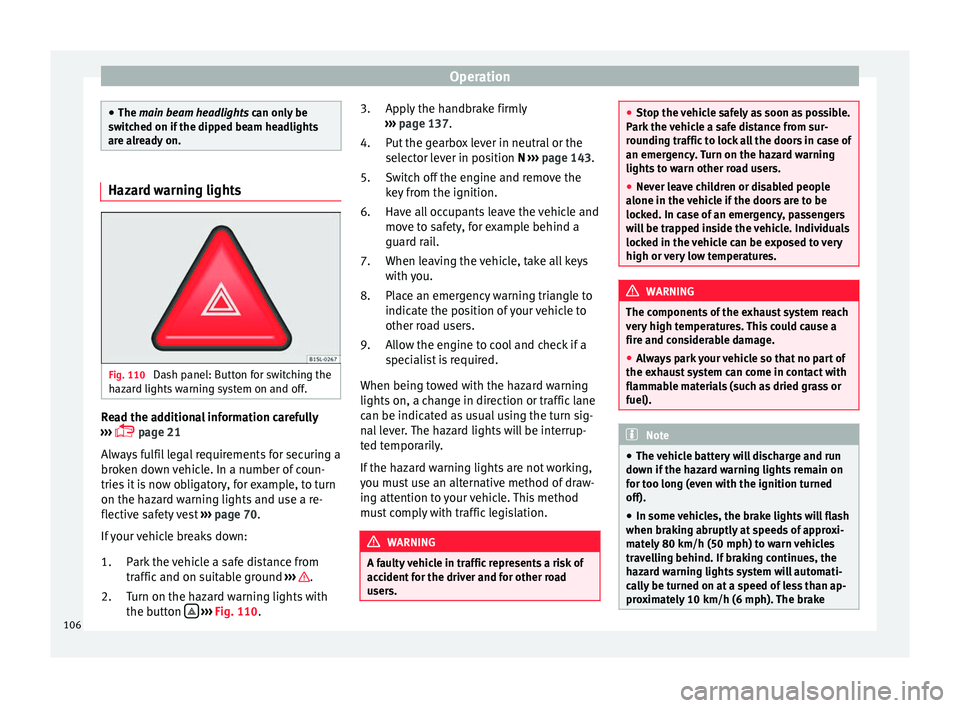
Fig. 110
Dash panel: Button for switching the
h az
ar
d lights warning system on and off. Read the additional information carefully
› ›
›
page 21
Always fulfil legal requirements for securing a
broken down vehicle. In a number of coun-
tries it is now obligatory, for example, to turn
on the hazard warning lights and use a re-
flective safety vest ››› page 70.
If your vehicle breaks down:
Park the vehicle a safe distance from
traffic and on suitable ground ››› .
T urn on the h
az
ard warning lights with
the button
› ›
› Fig. 110
.
1.
2. Apply the handbrake firmly
›››
page 137.
Put the gearbox lever in neutral or the
selector lever in position N ››› page 143.
Switch off the engine and remove the
key from the ignition.
Have all occupants leave the vehicle and
move to safety, for example behind a
guard rail.
When leaving the vehicle, take all keys
with you.
Place an emergency warning triangle to
indicate the position of your vehicle to
other road users.
Allow the engine to cool and check if a
specialist is required.
When being towed with the hazard warning
lights on, a change in direction or traffic lane
can be indicated as usual using the turn sig-
nal lever. The hazard lights will be interrup-
ted temporarily.
If the hazard warning lights are not working,
you must use an alternative method of draw-
ing attention to your vehicle. This method
must comply with traffic legislation. WARNING
A faulty vehicle in traffic represents a risk of
acc ident
for the driver and for other road
users. 3.
4.
5.
6.
7.
8.
9.
●
Stop the v
ehicle safely as soon as possible.
Park the vehicle a safe distance from sur-
rounding traffic to lock all the doors in case of
an emergency. Turn on the hazard warning
lights to warn other road users.
● Never leave children or disabled people
alone in the v
ehicle if the doors are to be
locked. In case of an emergency, passengers
will be trapped inside the vehicle. Individuals
locked in the vehicle can be exposed to very
high or very low temperatures. WARNING
The components of the exhaust system reach
ver y
high temperatures. This could cause a
fire and considerable damage.
● Always park your vehicle so that no part of
the exhau
st system can come in contact with
flammable materials (such as dried grass or
fuel). Note
● The v ehic
le battery will discharge and run
down if the hazard warning lights remain on
for too long (even with the ignition turned
off).
● In some vehicles, the brake lights will flash
when brakin
g abruptly at speeds of approxi-
mately 80 km/h (50 mph) to warn vehicles
travelling behind. If braking continues, the
hazard warning lights system will automati-
cally be turned on at a speed of less than ap-
proximately 10 km/h (6 mph). The brake 106
Page 109 of 232
Lights and visibility
lights remain lit. Upon accelerating, the haz-
ard w
arnin
g lights will be automatically
turned off. Adjusting the headlights
In those countries where vehicles drive on
the other side of
the r
oad to the home coun-
try, the asymmetric dipped beam may dazzle
drivers of oncoming vehicles.
For this reason, stickers may be needed to
cover the headlights when driving abroad.
For further information, please refer to a spe-
cialised workshop. SEAT recommends visiting
a technical service. Note
The use of stickers to cover headlights is only
permitted o v
er a short period. To modify the
direction of the headlamps more permanent-
ly, please take the vehicle to a specialised
workshop. SEAT recommends taking your car
in for technical service. Headlight range control, lighting of
the in
s
trument
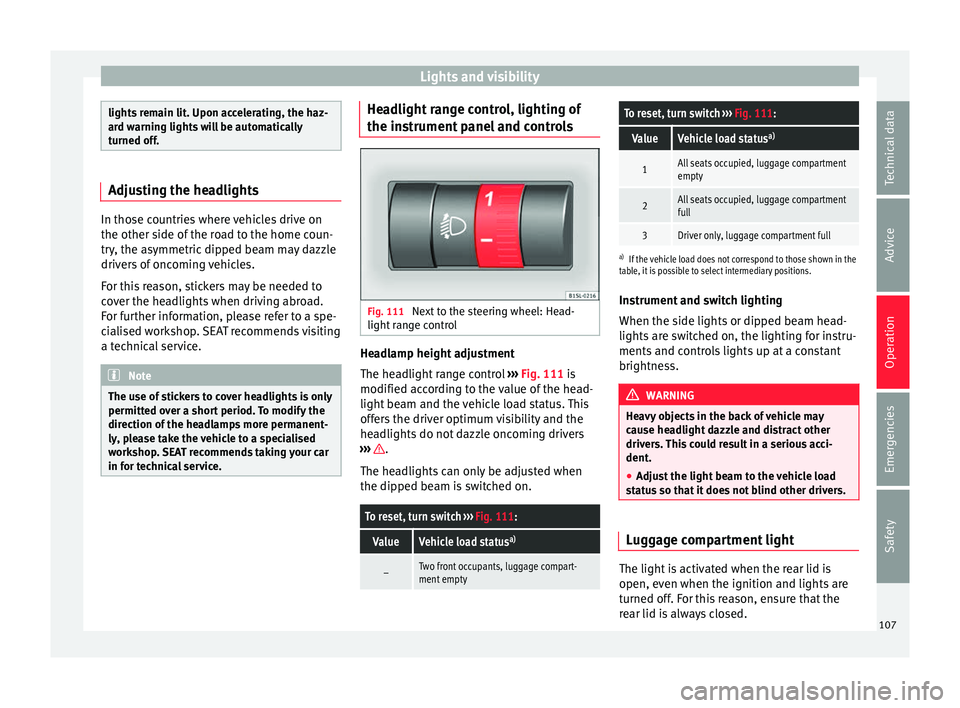
panel and controls Fig. 111
Next to the steering wheel: Head-
light r
an
ge control Headlamp height adjustment
The he
a
dlight
range control ››› Fig. 111 is
modified according to the value of the head-
light beam and the vehicle load status. This
offers the driver optimum visibility and the
headlights do not dazzle oncoming drivers
››› .
The he a
dlights
can only be adjusted when
the dipped beam is switched on.
To reset, turn switch ››› Fig. 111:
ValueVehicle load status a)
–Two front occupants, luggage compart-
ment empty
To reset, turn switch
››› Fig. 111:
ValueVehicle load status a)
1All seats occupied, luggage compartment
empty
2All seats occupied, luggage compartment
full
3Driver only, luggage compartment full
a)
If the vehicle load does not correspond to those shown in the
table, it is possible to select intermediary positions.
Instrument and switch lighting
When the side lights or dipped beam head-
lights are switched on, the lighting for instru-
ments and controls lights up at a constant
brightness. WARNING
Heavy objects in the back of vehicle may
cau se he
adlight dazzle and distract other
drivers. This could result in a serious acci-
dent.
● Adjust the light beam to the vehicle load
stat
us so that it does not blind other drivers. Luggage compartment light
The light is activated when the rear lid is
open, ev
en when the ignition and lights
ar
e
turned off. For this reason, ensure that the
rear lid is always closed. 107
Technical data
Advice
Operation
Emergencies
Safety