ESP Seat Mii 2017 Service Manual
[x] Cancel search | Manufacturer: SEAT, Model Year: 2017, Model line: Mii, Model: Seat Mii 2017Pages: 232, PDF Size: 4.91 MB
Page 116 of 232
Operation
Transport and practical
equipment T r
an
sporting objects
Introduction Always transport heavy loads in the luggage
comp
ar
tment and place the seat backs in a
vertical position. Never overload the vehicle.
Both the carrying capacity as well as the dis-
tribution of the load in the vehicle affect driv-
ing behaviour and braking ability ››› .
WARNING
Unsecured or incorrectly secured objects can
cau se seriou
s injury in case of a sudden ma-
noeuvring or breaking or in case of an acci-
dent. This is especially true when objects are
struck by a detonating airbag and fired
through the vehicle interior. To reduce the
risks, please note the following:
● Secure all objects in the vehicle. Always
keep equipment and he
avy objects in the lug-
gage compartment.
● Always secure objects with suitable rope or
sling
s so that they cannot enter the deploy-
ment areas around the frontal or side airbags
in case of sudden braking or an accident.
● Always ensure that objects inside the vehi-
cle c
annot move into the deployment area of
the bags while driving. ●
Whil e driv
ing, always keep object compart-
ments closed.
● Remove all objects from the front passen-
ger seat
when it is folded down. When the
seat backrest is folded down, it presses on
small and light objects and these are detec-
ted by the weight sensor on the seat; this
sends false information to the airbag control
unit.
● While the backrest of the front passenger
seat i
s folded, the frontal airbag must remain
disconnected and the PASSENGER AIRBAG
OFF light on.
● Objects secured in the vehicle should never
be plac
ed in such a way as to make passen-
gers sit in an incorrect position.
● If secured objects occupy a seat, this seat
should not
be occupied or used by anyone. WARNING
The driving behaviour and braking ability
ch an
ge when transporting heavy and large
objects.
● Adjust your speed and driving style to visi-
bility
, road, traffic and weather conditions.
● Accelerate gently and carefully.
● Avoid sudden braking and manoeuvres.
● Brake early. Transporting the load
Secure all objects in the vehicle
● Distribute the load throughout the vehicle
and on the roof a
s uniformly as possible.
● Transport heavy objects as far forward as
poss
ible in the luggage compartment and
lock the seat backs in the vertical position.
● Check the headlight adjustment
›››
page 103.
● Use the suitable tyre pressure according to
the load bein
g transported. Read the tyre in-
flation information label ›››
page 200. CAUTION
Objects on the shelf could chafe against the
wir e
s of the heating element in the heated
rear window and cause damage. Note
Please refer to the notes on loading the roof
carrier ››
› page 127. Driving with the rear lid open
Driving with the rear lid open creates an addi-
tion
al
ri
sk. Secure all objects and secure the
rear lid correctly and take all measures possi-
ble to reduce toxic gases from entering the
vehicle.
114
Page 124 of 232
Operation
Portable smartphone holder Fig. 134
Assembling the universal support
and the ho l
din
g arm. Fig. 135
In the centre console: close the com-
p ar
tment
where the infotainment system is
housed. Removing the smartphone
● Grip the smartphone firmly with one hand. ●
Pr e
s
s the release button ››› Fig. 135 5 un-
ti l
the t
op arm of the universal holder disen-
gages.
● Remove the smart phone and, as the case
may
be, unplug any cables.
Inserting a smart phone
● If necessary, install the smartphone hous-
ing ››
› .
● Connect the smartphone.
● Place the smartphone on the bottom
mou ntin
g
s. To adjust the bottom mountings,
press button ››› Fig. 135 4 .
● Press the top arm of the universal holder
u nti
l
the smartphone is securely held in
place.
Disassembling the housing
● If necessary, remove the smartphone.
● Grip the universal holder ›››
Fig. 134 3 and
pr e
s
s the release button ››› Fig. 134 4 .
● Push the universal holder to the right (anti-
c loc
k
wise) and remove it.
● Grip the holder arm and ›››
Fig. 135 1 and
pr e
s
s the release button ››› Fig. 135 4 in the
dir ection of
the arr
ow.
● Remove the holder from the dash panel up-
ward
s. Install the housing
●
Insert the universal holder ›››
Fig. 134 3 into the slots
2 on the holder
1 .
● Move the universal holder to the side in the
loc k
in
g direction 4 until it engages audi-
b ly
›
›
› .
● Place the holder arm ››
›
Fig. 135 1 in the
anc horin
g p
late ››› Fig. 135 3 from above
and pr e
s
s down on it until you hear it en-
gage ››› .
WARNING
If a smartphone is not secured or is incorrect-
ly sec ur
ed in the vehicle, it could be flung
though the interior during a sudden driving
or braking manoeuvre or in the event of an
accident, and could cause injuries.
● The infotainment system holder must be
properly sec
ured in the corresponding gap in
the dash panel.
● The infotainment system must always be
properly sec
ured in its holder or stored safely
in the vehicle. CAUTION
If tilt and angle of visibility are not properly
adju s
ted the smart phone could be damaged.
● When adjusting the smartphone, move it
with car
e and never beyond its limits.122
Page 125 of 232
Transport and practical equipment
CAUTION
At very high or very low temperatures the
smar tphone might
not operate properly, or
the actual device could get damaged.
● Take your smart phone with you when you
get out
of the vehicle to protect it from very
high or very low temperatures, and from in-
tense solar radiation. CAUTION
Humidity can damage the electrical contacts
for the sm ar
tphone on the instrument panel.
● Do not wet the smartphone’s housing when
cle
aning it. Use only a dry cloth. Note
SEAT recommends that you always take your
smar t
phone with you when you get out of
the vehicle to avoid possible thefts. Luggage compartment
Intr oduction Always transport heavy loads in the luggage
c
omp
ar
tment and place the seat backs in a
vertical position. Never overload the vehicle.
Both the carrying capacity as well as the dis-
tribution of the load in the vehicle have ef- fects on the driving behaviour and braking
ability
››› .
WARNING
When the vehicle is not in use or being
wat c
hed, always lock the doors and the rear
lid to reduce the risk of serious injury or
death.
● Do not leave children unwatched, especial-
ly when the boot i
s open. Children could
climb into the luggage compartment, close
the rear lid from inside and be unable to es-
cape themselves. This could lead to serious
injury or death.
● Never allow children to play in or around
the vehic
le.
● Never transport people in the luggage com-
partment
. WARNING
Unsecured or incorrectly secured objects can
cau se seriou
s injury in case of a sudden ma-
noeuvring or breaking or in case of an acci-
dent. This is especially true when objects are
struck by a detonating airbag and fired
through the vehicle interior. To reduce the
risks, please note the following:
● Secure all objects in the vehicle. Always
plac
e equipment and heavy objects in the
boot.
● Always secure objects to the fastening
rings
with suitable rope or straps to prevent
them from being thrown around the interior and moving to the airbag deployment area in
the event
of
sudden movements or accidents.
● While driving, always keep object compart-
ments c
losed.
● Do not place hard, heavy or sharp objects
inside the
vehicle interior, in open storage
compartments, the rear shelf or on the dash
panel.
● Remove hard, heavy and sharp objects from
clothes
and pockets inside the vehicle and
store securely. WARNING
The transport of heavy object changes vehi-
cl e h
andling and increases braking distance.
Heavy loads that have not been stored or se-
cured correctly could cause loss of control
and result in serious injury.
● Vehicle handling changes when transport-
ing heavy
objects due to a change in the cen-
tre of gravity.
● Distribute the load as uniformly and as low
down on the v
ehicle as possible.
● Store heavy objects in the luggage com-
partment
as far from the rear axle as possi-
ble. CAUTION
Hard objects on the rear shelf could chafe
again s
t the wires of the heating element in
the heated rear window and cause damage. » 123
Technical data
Advice
Operation
Emergencies
Safety
Page 144 of 232
Operation
braking distance or even result in the total
fai
lur
e of the brake system.
● Reduce speed or change down a gear when
faced w
ith steep and long slopes. This allows
you to use the engine braking effect and to
reduce the strain on the brake system. Other-
wise, the brakes may overheat and fail. Only
use the brakes to reduce speed or to stop. Note
Make use, when having the front brake pads
c hec k
ed, and have the rear pads checked al-
so. The thickness of the brake pads should be
checked visually and regularly, by looking
through the openings in the wheel rims or
from underneath the vehicle. If necessary, re-
move the wheels to check them thoroughly.
SEAT recommends taking your car in for tech-
nical service. Changing gear
Intr oduction When reverse gear is engaged and the igni-
tion i
s
sw
itched on the following takes place:
● Reverse lights light up.
● The rear wiper blade performs one move-
ment when the wind
screen wiper is activa-
ted. ●
If nece
ssary, connect the parking distance
warning system. WARNING
Rapid acceleration can cause loss of traction
and skid din
g, especially on slippery ground.
This could cause loss of control of the vehicle
resulting in an accident and considerable
damage.
● Use rapid acceleration only when visibility,
weather
, road conditions and traffic permit. WARNING
Do not allow the brakes to “rub” for a pro-
long ed period of
time, or brake frequently or
for long periods of time. Continuous braking
heats up the brakes. This could significantly
reduce braking power, increase braking dis-
tance or even result in the total failure of the
brake system. Control and warning lamps
It lights up red
Fault in the auto-
matic gearbox.
Do not drive on!
Seek professional advice. Failure to
do so could result in considerable
damage to the transmission
››› page 146.
It lights up yellow
In the automatic
gearbox the
gears can en-
gage incorrectly.Switch the ignition on and off.
When the control lamp does not
light up, find the nearest special-
ised workshop and have the auto-
matic gearbox checked.
The automatic
gearbox over-
heats temporari-
ly.Let the transmission cool with the
gearbox lever in the position .
When the control lamp does not
light up, find the nearest special-
ised workshop and have the auto-
matic gearbox checked.
It lights up
Place the automatic
gearbox lever in the
position
and do not
press the brake pedal.
Press the brake pedal to select
a gear range.
Together with the yel-
low control lamp for
the temperature of the
transmission
: the
automatic gearbox
overheats.
Press brake pedal and let the
transmission cool. Avoid
pressing the accelerator. When
the control lamp does not light
up, find the nearest special-
ised workshop and have the
automatic gearbox checked.
Together with the turn
signal display in the
instrument panel dis-
play: the automatic
gearbox lever is not in
the position
, indica-
tion to start the en-
gine.
Move the gearbox lever to the
position and start the en-
gine. 142
Page 147 of 232
Driving
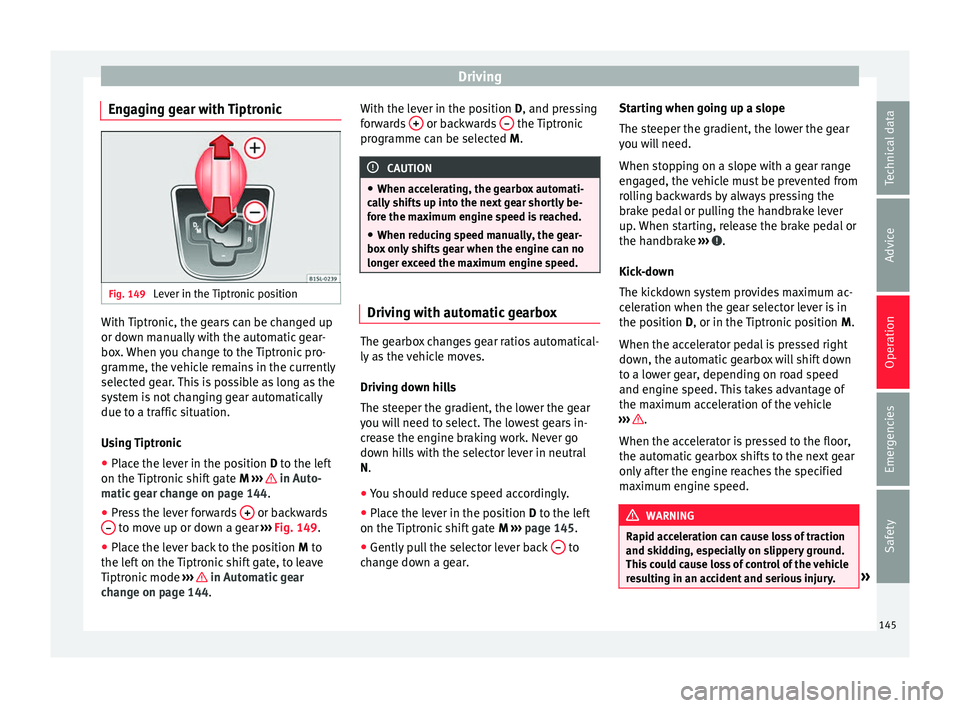
Engaging gear with Tiptronic Fig. 149
Lever in the Tiptronic position With Tiptronic, the gears can be changed up
or do
wn m
anual
ly with the automatic gear-
box. When you change to the Tiptronic pro-
gramme, the vehicle remains in the currently
selected gear. This is possible as long as the
system is not changing gear automatically
due to a traffic situation.
Using Tiptronic
● Place the lever in the position D to the lef
t
on the Tiptronic shift gate M ››› in Auto-
m atic
g
ear change on page 144.
● Press the lever forwards + or backwards
– to move up or down a gear
››
›
Fig. 149.
● Place the lever back to the position M to
the lef
t on the Tiptronic shift gate, to leave
Tiptronic mode ››› in Automatic gear
c h
an
ge on page 144. With the lever in the position D, and pres
sing
forwards + or backwards
– the Tiptronic
pr ogr
amme c
an be selected M. CAUTION
● When acc el
erating, the gearbox automati-
cally shifts up into the next gear shortly be-
fore the maximum engine speed is reached.
● When reducing speed manually, the gear-
box on
ly shifts gear when the engine can no
longer exceed the maximum engine speed. Driving with automatic gearbox
The gearbox changes gear ratios automatical-
ly
a
s
the vehicle moves.
Driving down hills
The steeper the gradient, the lower the gear
you will need to select. The lowest gears in-
crease the engine braking work. Never go
down hills with the selector lever in neutral
N.
● You should reduce speed accordingly.
● Place the lever in the position D to the lef
t
on the Tiptronic shift gate M ›››
page 145.
● Gently pull the selector lever back – to
c h
an
ge down a gear. Starting when going up a slope
The steeper the gr
adient, the lower the gear
you will need.
When stopping on a slope with a gear range
engaged, the vehicle must be prevented from
rolling backwards by always pressing the
brake pedal or pulling the handbrake lever
up. When starting, release the brake pedal or
the handbrake ››› .
Kic k
-do
wn
The kickdown system provides maximum ac-
celeration when the gear selector lever is in
the position D, or in the Tiptronic position M.
When the accelerator pedal is pressed right
down, the automatic gearbox will shift down
to a lower gear, depending on road speed
and engine speed. This takes advantage of
the maximum acceleration of the vehicle
››› .
When the ac c
el
erator is pressed to the floor,
the automatic gearbox shifts to the next gear
only after the engine reaches the specified
maximum engine speed. WARNING
Rapid acceleration can cause loss of traction
and skid din
g, especially on slippery ground.
This could cause loss of control of the vehicle
resulting in an accident and serious injury. » 145
Technical data
Advice
Operation
Emergencies
Safety
Page 148 of 232

Operation
●
Alw a
ys adapt your driving style to suit the
flow of traffic.
● Only use the kick-down function or rapid
accel
eration if visibility, weather, road and
traffic conditions so permit.
● Never put other road users in danger by ac-
celer
ating or with your driving style. CAUTION
If you stop on a hill with a gear range engag-
ed, do not try
to prevent the vehicle from roll-
ing back by pressing on the accelerator. Oth-
erwise, the automatic gearbox may overheat
causing damage. Automatic gearbox malfunction
Back-up programme
When aut
om
atic
gearbox warning and indica-
tion lamps light up on the instrument panel,
there may be a system malfunction
››› page 142. In the event of some faults the
automatic gearbox functions using a backup
programme. When the programme is activa-
ted, it is possible to drive the vehicle, howev-
er, at low speeds and within a selected range
of gears.
With the manual gearbox, in some cases it is
not possible to drive with all the gears .
In all cases the automatic gearbox must be
checked at a specialised workshop. Automatic gearbox overheating
The automatic
gearbox can overheat with a
prolonged start up, or when stopping and
starting continuously. This overheating is dis-
played with a warning lamp in the instru-
ment panel. Additionally, an audible warning
can be heard. Stop and let the gearbox cool
››› .
The v
ehic
le moves forward or back despite
having selected a gear range
When the vehicle does not move in the re-
quired direction, the system may not have
the gear range correctly engaged. Press the
brake pedal and engage the gear range
again. If the vehicle still does not move in the
required direction, there is a system malfunc-
tion. Seek specialist assistance and have the
system checked. CAUTION
● When the ge arbo
x is displayed as overheat-
ing for the first time, the vehicle must be
parked safely or must be driven at a speed of
more than 20 km/h (12 mph).
● When the warning lamp lights up and the
audible w
arning is heard, the vehicle must be
parked safely and the engine switched off.
Let the gearbox cool down.
● To prevent damage to the gearbox, driving
must
only be continued when the warning
lamps are no longer lit up. While the gearbox is overheated, starting up and driving, even
at a s
lo
w speed should be avoided. Recommended gear display
In some vehicles, the recommended gear for
reduc
in
g fuel consumption is displayed on
the instrument panel:
DisplayMeaning
Optimum gear.
Recommendation to change up a gear.
Recommendation to change down a
gear.
WARNING
The recommended gear display is intended as
a guideline only; it shou
ld never replace the
driver's attention to driving carefully.
● Responsibility for selecting the correct gear
for eac
h situation continues to lie with the
driver, for example when overtaking or climb-
ing a hill. For the sake of the environment
Selecting the most appropriate gear for the
sit uation w
ill help you to save fuel.146
Page 150 of 232
Operation
Information on the steering To prevent theft, we recommend you lock the
st
eerin
g before leaving the vehicle.
Steering column mechanical lock
Lock the steering column by removing the
key from the ignition when the vehicle is
stopped.
Please engage steer-
ing lockUnlocking the steering
Parking the vehicle
››› page 135.Insert the key in the igni-
tion lock.
Remove the key from the
ignition.Turn the steering wheel
slightly to release the
steering lock.
Turn the steering wheel
slightly until you hear the
steering lock.Hold the steering wheel in
this position and switch
on the ignition. Electromechanical power steering
W
ith the po
w
er steering system, the assisted
steering function automatically adjusts ac-
cording to the vehicle speed, the steering tor-
que and the wheel turning angle. The power
steering only works when the engine is run-
ning.
You should remember that you will need con-
siderably more power than normal to steer
the vehicle if the power steering is not work-
ing correctly or not at all. Run-in and economical driving
Runnin
g in Please observe the instructions for running-in
new components.
R u
nning-in the engine
The engine needs to be run in over the first
1,500 km. During its first few hours of run-
ning, the internal friction in the engine is
greater than later on when all the moving
parts have bedded down.
How the vehicle is driven for the first 1,500
km influences the future engine perform-
ance. Throughout the life of the vehicle, it
should be driven at a moderate speed, espe-
cially when the engine is cold, as this will re-
duce engine wear and increase its useful life.
Never drive at extremely low engine speeds.
Change down to a lower gear when the en-
gine no longer runs “smoothly”. Up to 1,000
kilometres the following instructions apply:
● Do not use full throttle.
● Do not force the engine above two thirds of
its m ax
imum speed.
Between 1,000 and 1,500 kilometres, gradu-
ally increase power until reaching the maxi-
mum speed and high engine speeds. Running in new tyres and brake pads
●
Replacement of wheel rims and new tyres
›››
page 200
● Notes on the brakes ›››
page 135 For the sake of the environment
If the engine is run in gently, the life of the
engine w i
ll be increased and the engine oil
consumption reduced. Environmental compatibility
Environmental protection is a top priority in
the de
s
ign, c
hoice of materials and manufac-
ture of your new SEAT.
Constructive measures to encourage recy-
cling
● Joints and connections designed for easy
dismantlin
g.
● Modular construction to facilitate disman-
tling.
● Incr
eased use of single-grade materials.
● Plastic parts and elastomers are marked in
accor
dance with ISO 1043, ISO 11469 and
ISO 1629.
Choice of materials
● Use of recycled materials.
148
Page 152 of 232
Operation
ahead as you drive and keep a safe distance
fr om the
v
ehicle in front, it is possible to slow
down by simply lifting your foot off the accel-
erator. This eliminates the need for constant
braking and acceleration.
Calm and steady driving
Constancy is more important than speed: The
more you drive at a constant speed, the lower
the fuel consumption.
When driving on the motorway, it is more effi-
cient to drive at a constant and more moder-
ate speed than to be continuously accelerat-
ing and braking. As a general rule, you will
reach your destination just as quickly when
you drive at a constant speed.
The cruise control function helps you to ach-
ieve a constant style of driving.
Moderate use of additional devices
It is important to travel in comfort, but con-
venience systems should be used ecological-
ly.
Some equipment, when connected, increase
fuel consumption considerably, for example:
● Air conditioning cooling system: If the air
conditioning sy
stem is required to cool to
significantly lower temperatures than the true
outside temperature, it will require a large
amount of energy from the engine. Therefore,
we recommend that the selected temperature for the vehicle is not too different to the out-
side temper
ature. It is a good idea to air the
vehicle before starting your journey and to
drive a short distance with the windows
open. Then you can close the windows and
switch on the air conditioning. Keep windows
closed when travelling at high speeds. Driv-
ing with the windows open increases fuel
consumption.
● Switch off the seat heating when the seats
have w
armed up.
● Switch off the heated rear window when it
is not
moist or covered in ice.
Avoid short journeys
Fuel consumption is much higher when the
engine is cold, immediately after it has been
started. It takes a few kilometres of driving
for the engine to warm up and to normalise
consumption.
The engine and catalytic converter need to
reach their proper working temperature in or-
der to minimise fuel consumption and emis-
sions. The ambient temperature has a deci-
sive influence.
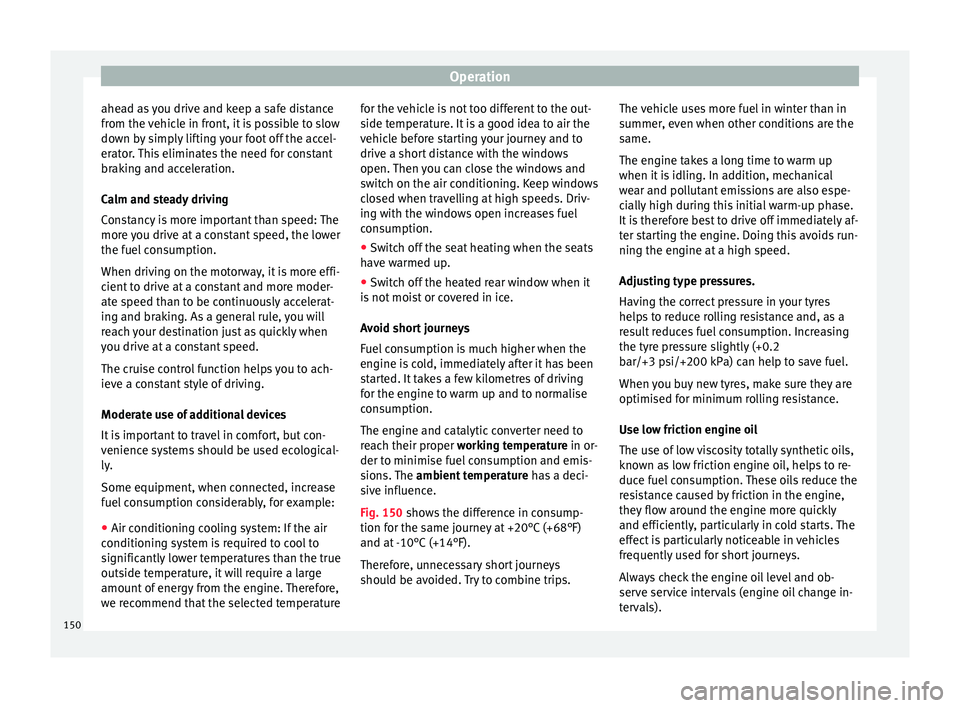
Fig. 150 shows the difference in consump-
tion for the same journey at +20°C (+68°F)
and at -10°C (+14°F).
Therefore, unnecessary short journeys
should be avoided. Try to combine trips. The vehicle uses more fuel in winter than in
summer, ev
en when other conditions are the
same.
The engine takes a long time to warm up
when it is idling. In addition, mechanical
wear and pollutant emissions are also espe-
cially high during this initial warm-up phase.
It is therefore best to drive off immediately af-
ter starting the engine. Doing this avoids run-
ning the engine at a high speed.
Adjusting type pressures.
Having the correct pressure in your tyres
helps to reduce rolling resistance and, as a
result reduces fuel consumption. Increasing
the tyre pressure slightly (+0.2
bar/+3 psi/+200 kPa) can help to save fuel.
When you buy new tyres, make sure they are
optimised for minimum rolling resistance.
Use low friction engine oil
The use of low viscosity totally synthetic oils,
known as low friction engine oil, helps to re-
duce fuel consumption. These oils reduce the
resistance caused by friction in the engine,
they flow around the engine more quickly
and efficiently, particularly in cold starts. The
effect is particularly noticeable in vehicles
frequently used for short journeys.
Always check the engine oil level and ob-
serve service intervals (engine oil change in-
tervals).
150
Page 153 of 232
Driving
When purchasing engine oil, always observe
l e
g
al requirements and ensure that the oil is
approved by SEAT.
Avoid carrying unnecessary loads
The lighter the vehicle, the more economical
and ecological the driving style. For example,
an additional weight of 100 kg will increase
fuel consumption up to 0.3 l/100 km.
Remove any unnecessary objects or loads
from the vehicle.
Remove optional equipment and unnecessa-
ry accessories
The more aerodynamic the vehicle, the lower
the fuel consumption. Optional equipment
and accessories (such as roof racks or bike
carriers) reduce the aerodynamic benefits of
the vehicle.
Therefore, we recommend you remove all op-
tional and unnecessary equipment and racks,
especially if you intend to drive at high
speeds.
Other factors which increase fuel consump-
tion (examples):
● Fault in engine management.
● Driving on hills. WARNING
Always adapt your speed and the distance to
the v ehic
les ahead in line with visibility,
weather conditions, the condition of the road
and the traffic situation. Engine management and ex-
hau
s
t gas purification system
Introduction WARNING
The components of the exhaust system reach
ver y
high temperatures. This could cause a
fire.
● Always park your vehicle so that no part of
the exhau
st system can come in contact with
flammable materials (such as dried grass).
● Never apply additional underseal or anti-
corro
sion coatings to the exhaust pipes, cata-
lytic converter or the heat shields on the ex-
haust system. Control and warning lamps
It lights up
fault in the pet-
rol engine man-
agement.Take the vehicle to a specialised
workshop as soon as possible and
have the engine checked.
It lights up
Fault in the
emission control
system.Reduce speed and drive carefully to
the nearest specialised workshop to
have the engine checked.
Flashes
Combustion
fault which could
damage the cat-
alytic converter.Reduce speed and drive carefully to
the nearest specialised workshop to
have the engine checked.
Several warning and control lamps light up
f
or a f
ew sec
onds when the ignition is switch-
ed on, signalling that the function is being
verified. They will switch off after a few sec-
onds. CAUTION
Always pay attention to any lit control lamps
and to the c orr
esponding descriptions and in-
structions to avoid damage to the vehicle. Note
While the or c
ontrol lamps remain lit,
the engine may have faults, there will be
higher fuel consumption and a possible loss
of engine power. 151
Technical data
Advice
Operation
Emergencies
Safety
Page 158 of 232
Operation
● If the g
e
ar is changed with the manual
gearbox.
● If the airbag is triggered. WARNING
Use of the cruise control could cause acci-
dents and sev
ere injuries if it is not possible
to drive at a constant speed maintaining the
safety distance.
● Do not use the cruise control in heavy traf-
fic, if the dis
tance from the vehicle in front is
insufficient, on steep roads, with several
bends or in slippery circumstances (snow,
ice, rain or loose gravel), or on flooded roads.
● Never use the CCS when driving off-road or
on unpav
ed roads.
● Always adapt your speed and the distance
to the v
ehicles ahead in line with visibility,
weather conditions, the condition of the road
and the traffic situation.
● To avoid unexpected operation of the cruise
contro
l system, turn it off every time you fin-
ish using it.
● It is dangerous to use a set speed which is
too high for the pr
evailing road, traffic or
weather conditions.
● When travelling down hills, the CCS cannot
maintain a c
onstant speed. The vehicle tends
to accelerate under its own weight. Select a
lower gear or use the foot brake to slow the
vehicle. Safety Assist* (City Safety As-
s
i
s
t function)
Introduction The City Safety Assist function covers driving
sit
uation
s at a distance of about 10 metres in
front of the vehicle, in a speed range of ap-
proximately 5-30 km/h (3-19 mph).
When the system detects a possible collision
with a vehicle in front, the vehicle prepares
for a possible emergency braking ››› .
If the driv
er doe
s not react to an imminent
collision, the system can automatically brake
the vehicle in order to reduce speed faced
with a possible collision. The system can
help to reduce the consequences of an acci-
dent.
If the City Safety Assist function determines
that the driver has braked insufficiently when
faced with an imminent collision, the system
can increase the brake force in order to re-
duce speed. The system can help to reduce
the consequences of an accident. WARNING
The smart technology in the City Safety As-
si s
t system cannot change the limits imposed
by the laws of physics and by the system it-
self. The increased convenience offered by
the City Safety Assist system should never
prompt you to take risks. The driver always assumes the responsibility of braking in
time.
●
The City Safety Assist function cannot pre-
vent ac
cidents or serious injury by itself.
● The City Safety Assist system may carry out
unw
anted brake interventions in complex
driving situations e.g. when a vehicle crosses
at a short distance. WARNING
Relying on the City Safety Assist system in
c ity driv
ing as part of one's driving behaviour
may cause accidents and serious injury. The
system is not a replacement for driver aware-
ness.
● Always adapt your speed and the distance
to the v
ehicles ahead in line with visibility,
weather conditions, the condition of the road
and the traffic situation.
● The City Safety Assist function does not re-
act to peop
le, animals or vehicles that cross
or move in the opposite direction in the same
lane.
● If after switching on the City Safety Assist
function the
vehicle begins to move, slow the
vehicle with the foot brake. CAUTION
If you suspect that the City Safety Assist la-
ser sensor i s
damaged, switch it off. This will
avoid additional damage. 156