ECU Seat Mii 2017 Owner's manual
[x] Cancel search | Manufacturer: SEAT, Model Year: 2017, Model line: Mii, Model: Seat Mii 2017Pages: 232, PDF Size: 4.91 MB
Page 12 of 232
The essentials
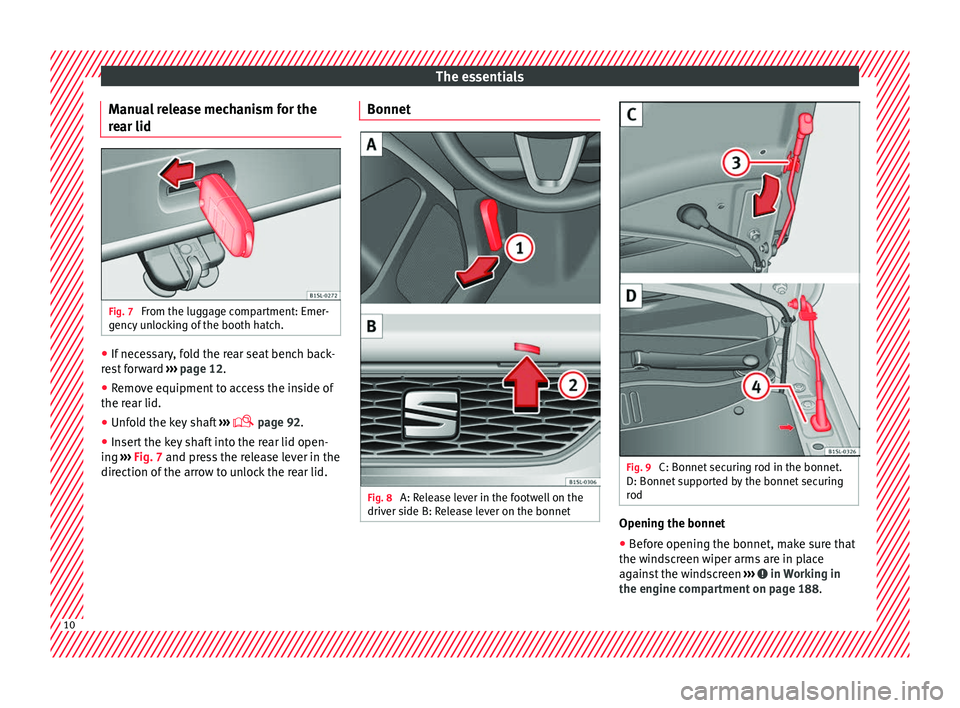
Manual release mechanism for the
r e
ar lid Fig. 7
From the luggage compartment: Emer-
g ency
u
nlocking of the booth hatch. ●
If necessary, fold the rear seat bench back-
r e
s
t forward ››› page 12.
● Remove equipment to access the inside of
the rear lid.
● Unf
old the key shaft ›››
page 92.
● Insert the key shaft into the rear lid open-
ing ››
› Fig. 7 and press the release lever in the
direction of the arrow to unlock the rear lid. Bonnet
Fig. 8
A: Release lever in the footwell on the
driv er side B: R
elease lever on the bonnet Fig. 9
C: Bonnet securing rod in the bonnet.
D: Bonnet s
up
ported by the bonnet securing
rod Opening the bonnet
● Before opening the bonnet, make sure that
the w ind
s
creen wiper arms are in place
against the windscreen ››› in Working in
the en gine c
omp
artment on page 188. 10
Page 19 of 232
The essentials
A sticker with important information about
the p a
s
senger airbag is located on the pas- senger's sun visor and/or on the passenger
side door frame.
››› in Important information regarding
the front passenger's airbag on page 65
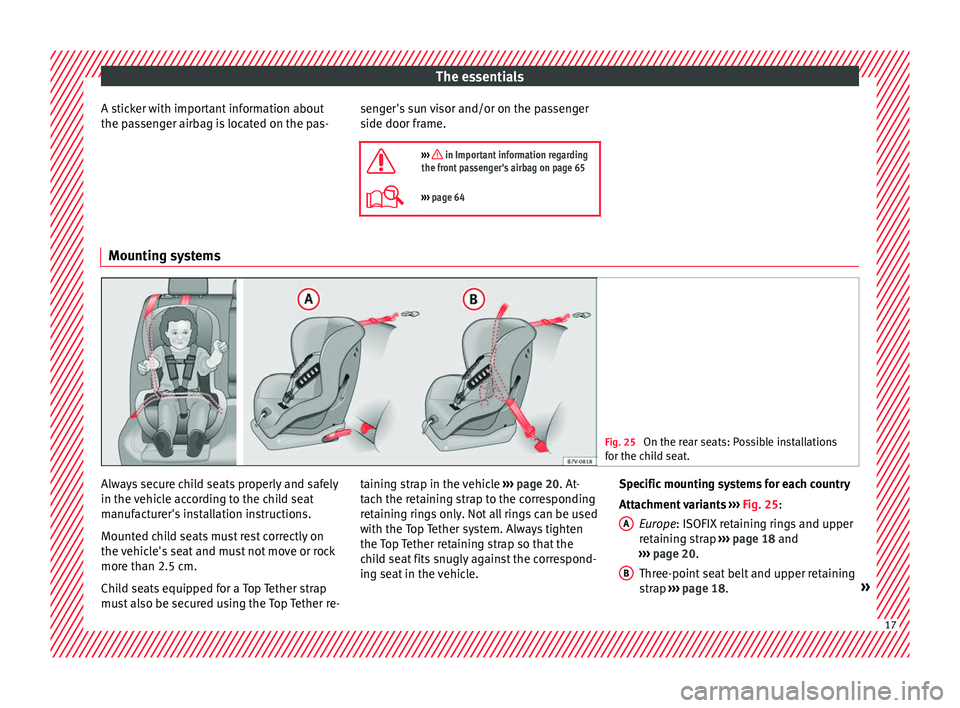
››› page 64 Mounting systems
Fig. 25
On the rear seats: Possible installations
for the c hi
ld seat. Always secure child seats properly and safely
in the
v
ehic
le according to the child seat
manufacturer's installation instructions.
Mounted child seats must rest correctly on
the vehicle's seat and must not move or rock
more than 2.5 cm.
Child seats equipped for a Top Tether strap
must also be secured using the Top Tether re- taining strap in the vehicle
››› page 20. At-
tach the retaining strap to the corresponding
retaining rings only. Not all rings can be used
with the Top Tether system. Always tighten
the Top Tether retaining strap so that the
child seat fits snugly against the correspond-
ing seat in the vehicle. Specific mounting systems for each country
Attachment
variants ››› Fig. 25:
Europe: ISOFIX retaining rings and upper
retaining strap ››› page 18 and
››› page 20.
Three-point seat belt and upper retaining
strap ››› page 18. »
A B
17
Page 20 of 232
The essentials
The systems include the child restraint sys-
t em mou
ntin
g with an upper retaining strap
(Top Tether) and lower anchoring points on
the seat.
Securing child seats with the seat belt The seat belt may be used to secure child
seats
w
ith the universal marking (on the or-
ange label) to the vehicle seats marked with
a u in the table below.
CategoryFront passen- gera)Rear seats
Group 0
Up to 10 kguu
Category 0+ Up to 13 kguu
Group 1
9 to 18 kguu
Group 2
15 to 25 kguu
Group 3
22 to 36 kguu
a) Compliance with current national legislation and the manu-
facturer's instructions is required when using or installing child
seats.
Securing the child seat using the seat belt
● Please read and observe the child seat
manufact
urer's handling instructions.
● Move the front passenger seat, or the rear
seat benc
h back as far as possible and, in
the case of an adjustable backrest, set it in
the upright position ›››
page 48.
● Positioning the child seat on the seat ac-
cordin
g to the manufacturer's instructions.
● Fasten the seat belt or pass it around the
chil
d seat structure in the manner described
in the manufacturer's instructions.
● Make sure the seat belt is not twisted.
● Insert the latch plate into the buckle for the
appropri
ate seat and push it down until it is
securely locked with an audible click.
● Ensure that the upper belt web lies tightly
on the chil
d seat.
● Pull the belt (it must be no longer possible
to pu
ll the lower belt webbing out).
Removing the child seat
The seat belt must not be unfastened until
the vehicle has come to a standstill.
● Press the red button on the buckle. The
latc
h plate is released from the buckle.
● Guide the belt back by hand so that it rolls
up eas
ily and the trim will not be damaged.
● Remove the child seat from the vehicle.
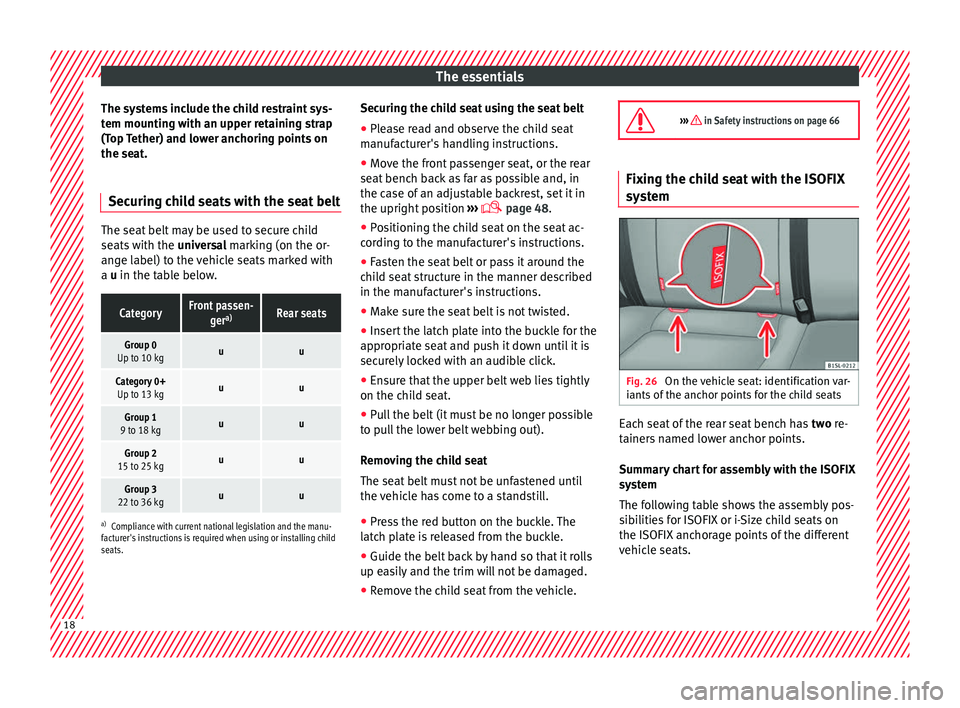
››› in Safety instructions on page 66 Fixing the child seat with the ISOFIX
syst
em Fig. 26
On the vehicle seat: identification var-
i ants
of
the anchor points for the child seats Each seat of the rear seat bench has
two
r
e-
tainers named lower anchor points.
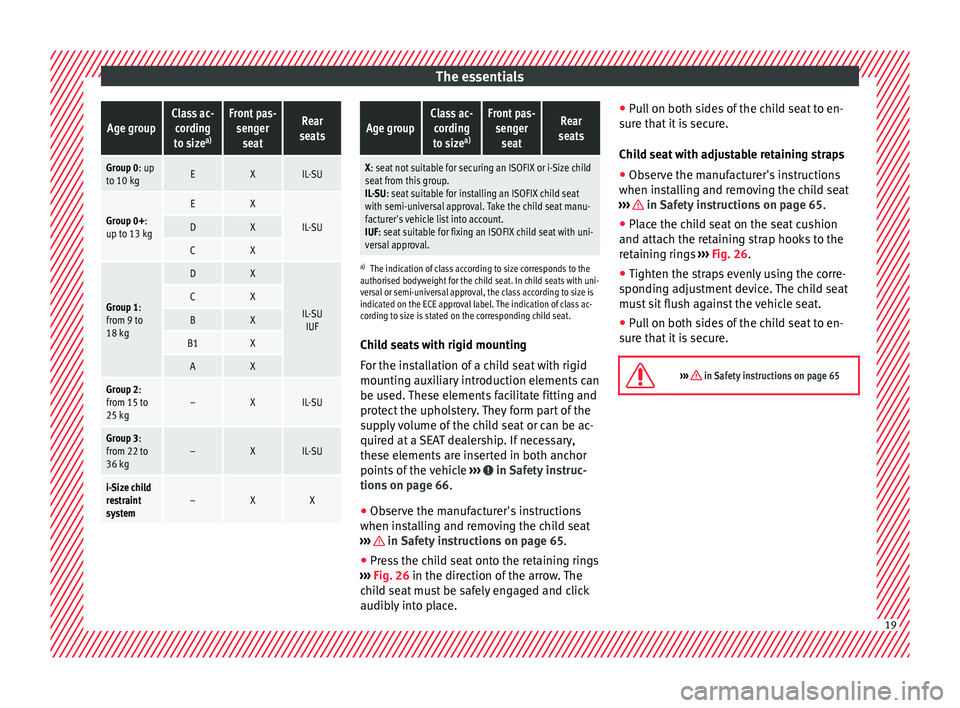
Summary chart for assembly with the ISOFIX
system
The following table shows the assembly pos-
sibilities for ISOFIX or i-Size child seats on
the ISOFIX anchorage points of the different
vehicle seats. 18
Page 21 of 232
The essentialsAge groupClass ac-
cording
to size a)Front pas-
sengerseatRear
seats
Group 0: up to 10 kgEXIL-SU
Group 0+:
up to 13 kgEX
IL-SUDX
CX
Group 1:
from 9 to
18 kg
DX
IL-SU IUFCX
BX
B1X
AX
Group 2:
from 15 to
25 kg–XIL-SU
Group 3:
from 22 to
36 kg–XIL-SU
i-Size child
restraint
system–XX
Age groupClass ac-
cording
to size a)Front pas-
sengerseatRear
seats
X: seat not suitable for securing an ISOFIX or i-Size child seat from this group.
IL-SU: seat suitable for installing an ISOFIX child seat
with semi-universal approval. Take the child seat manu-
facturer's vehicle list into account.
IUF: seat suitable for fixing an ISOFIX child seat with uni-
versal approval.
a) The indication of class according to size corresponds to the
authorised bodyweight for the child seat. In child seats with uni-
versal or semi-universal approval, the class according to size is
indicated on the ECE approval label. The indication of class ac-
cording to size is stated on the corresponding child seat.
Child seats with rigid mounting
For the installation of a child seat with rigid
mounting auxiliary introduction elements can
be used. These elements facilitate fitting and
protect the upholstery. They form part of the
supply volume of the child seat or can be ac-
quired at a SEAT dealership. If necessary,
these elements are inserted in both anchor
points of the vehicle ››› in Safety instruc-
tion s on p
ag
e 66.
● Observe the manufacturer's instructions
when inst
alling and removing the child seat
››› in Safety instructions on page 65.
● Press the child seat onto the retaining rings
› ›
›
Fig. 26 in the direction of the arrow. The
child seat must be safely engaged and click
audibly into place. ●
Pul
l on both sides of the child seat to en-
sure that it is secure.
Child seat with adjustable retaining straps
● Observe the manufacturer's instructions
when inst
alling and removing the child seat
››› in Safety instructions on page 65.
● Place the child seat on the seat cushion
and att ac
h the r
etaining strap hooks to the
retaining rings ››› Fig. 26.
● Tighten the straps evenly using the corre-
sponding a
djustment device. The child seat
must sit flush against the vehicle seat.
● Pull on both sides of the child seat to en-
sure th
at it is secure.
››› in Safety instructions on page 65 19
Page 22 of 232
The essentials
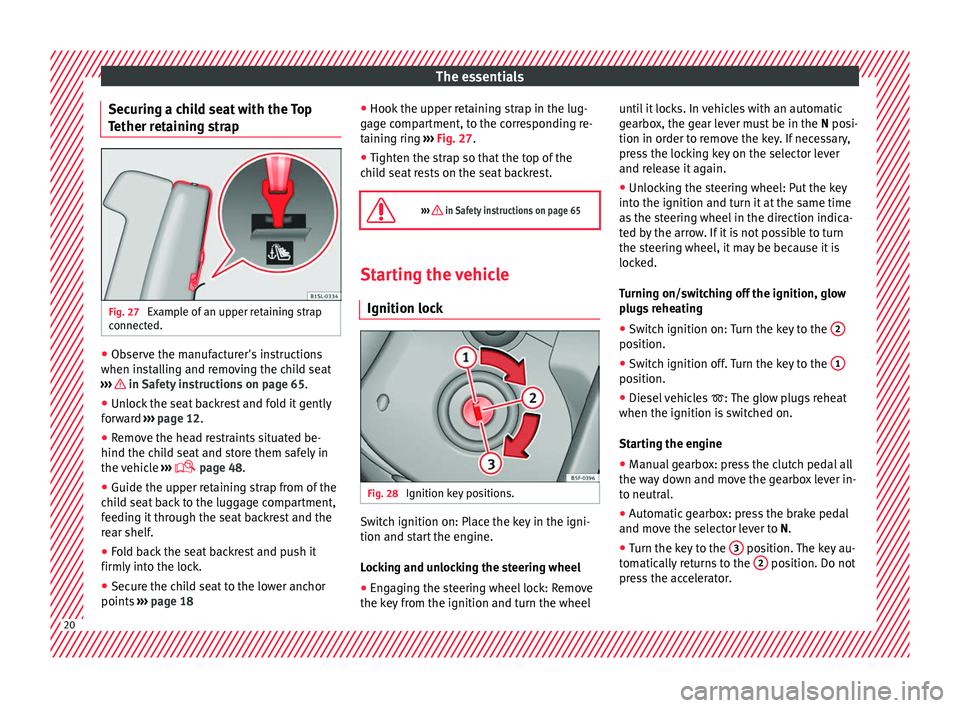
Securing a child seat with the Top
T ether r
et
aining strapFig. 27
Example of an upper retaining strap
c onnect
ed. ●
Observe the manufacturer's instructions
when in s
t
alling and removing the child seat
››› in Safety instructions on page 65.
● Unlock the seat backrest and fold it gently
f or
w
ard ››› page 12.
● Remove the head restraints situated be-
hind the chil
d seat and store them safely in
the vehicle ›››
page 48.
● Guide the upper retaining strap from of the
chil
d seat back to the luggage compartment,
feeding it through the seat backrest and the
rear shelf.
● Fold back the seat backrest and push it
firmly int
o the lock.
● Secure the child seat to the lower anchor
points ››
› page 18 ●
Hook the upper r
etaining strap in the lug-
gage compartment, to the corresponding re-
taining ring ››› Fig. 27.
● Tighten the strap so that the top of the
chil
d seat rests on the seat backrest.
››› in Safety instructions on page 65 Starting the vehicle
Ignition lock Fig. 28
Ignition key positions. Switch ignition on: Place the key in the igni-
tion and s
t
ar
t the engine.
Locking and unlocking the steering wheel
● Engaging the steering wheel lock: Remove
the key fr
om the ignition and turn the wheel until it locks. In vehicles with an automatic
gearbo
x, the gear lever must be in the N posi-
tion in order to remove the key. If necessary,
press the locking key on the selector lever
and release it again.
● Unlocking the steering wheel: Put the key
into the ignition and turn it
at the same time
as the steering wheel in the direction indica-
ted by the arrow. If it is not possible to turn
the steering wheel, it may be because it is
locked.
Turning on/switching off the ignition, glow
plugs reheating
● Switch ignition on: Turn the key to the 2 position.
●
Switch ignition off. Turn the key to the 1 position.
●
Diesel vehicles : The glo
w p
lugs reheat
when the ignition is switched on.
Starting the engine
● Manual gearbox: press the clutch pedal all
the way
down and move the gearbox lever in-
to neutral.
● Automatic gearbox: press the brake pedal
and move the sel
ector lever to N.
● Turn the key to the 3 position. The key au-
t om
atic
ally returns to the 2 position. Do not
pr e
s
s the accelerator. 20
Page 25 of 232

The essentialsMore the lever to the required position:
7
Automatic wipe for cleaning rear win-
dows with the lever pressed.
›››
page 108
››› page 45 SEAT information system
Intr oduction With the ignition switched on it is possible to
ac
c
e
ss different messages via the display on
the instrument panel display.
The number of messages displayed on the in-
strument panel display will vary according to
the vehicle electronics and equipment.
A specialised workshop will be able to pro-
gramme or modify additional functions, ac-
cording to the vehicle equipment. SEAT rec-
ommends taking your car in for technical
service. WARNING
Any distraction may lead to an accident, with
the risk of
injury. ●
Do not c on
sult the messages on the instru-
ment panel screen when driving. Management of indications on the
dis
p
lay Fig. 33
Windscreen wiper lever: control but-
t on
s. Calling up options
● Switch the ignition on.
● If a message or vehicle symbol is dis-
p l
a
yed, press OK/RESET (
››
› Fig. 33 A ).
● Press the top or bottom part of the rocker
sw it
c
h ››› Fig. 33 B until the desired option
ap pe
ar
s. Multifunction display (MFI) The multifunction display (MFD) has two au-
tom
atic
memories: 1 - Partial memory and 2 -
Total memory . The selected memory will be
shown in the lower right-hand corner of the
display.
With the ignition switched on, and memory 1 or
2 displayed, briefly press OK to change from
one memory to another.
Trip memory
(for a single journey).
The memory stores the values for the
journey and the consumption from the
moment the ignition is switched on until
it is switched off again.
If the journey is broken for more than 2
hours, the memory is automatically
erased. If the journey is continued in
less than 2 hours after the ignition is
switched off, the new data is added to
the data already stored in the memory.
Total memo-
ry (for all
journeys).
The memory stores the values of any
number of journeys, until it counts a to-
tal of 19 hours and 59 minutes of driv-
ing, or 1999.9 km or miles of driving,
depending on the type of instrument
panel fitted. On reaching either of these
limits, the memory is automatically
erased and starts to count from 0 again. Possible displays
MenuFunction
TimeCurrent time in hours (h) and mi-
nutes (min).»
23
Page 40 of 232
The essentials
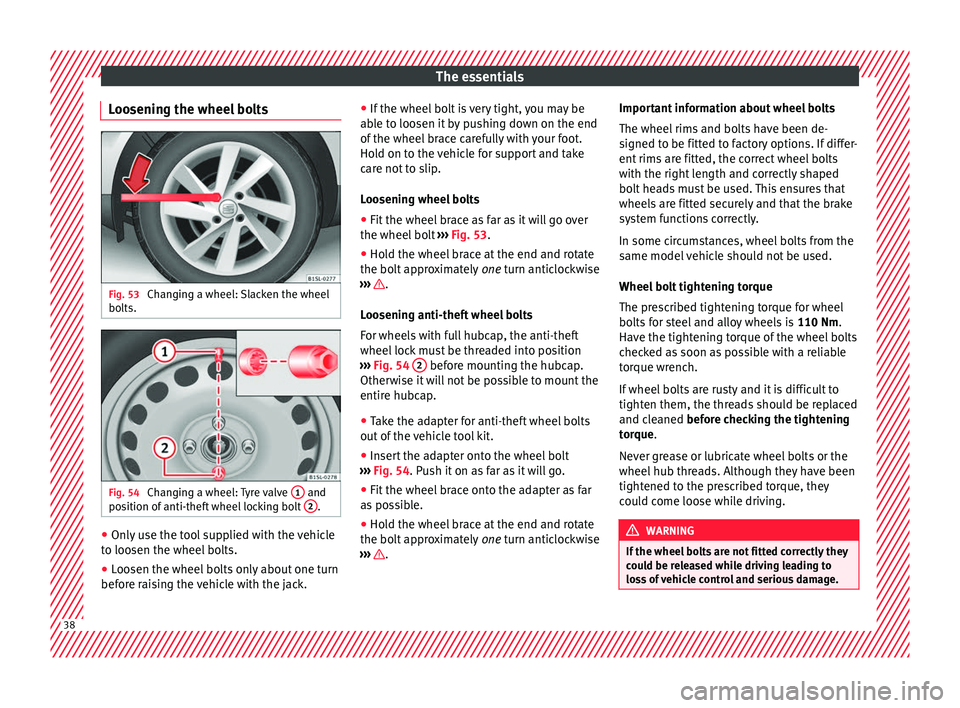
Loosening the wheel bolts Fig. 53
Changing a wheel: Slacken the wheel
bo lts. Fig. 54
Changing a wheel: Tyre valve 1 and
po s
ition of
anti-theft wheel locking bolt 2 .
●
Only use the tool supplied with the vehicle
t o loo
sen the wheel
bolts.
● Loosen the wheel bolts only about one turn
before r
aising the vehicle with the jack. ●
If the wheel bo
lt is very tight, you may be
able to loosen it by pushing down on the end
of the wheel brace carefully with your foot.
Hold on to the vehicle for support and take
care not to slip.
Loosening wheel bolts
● Fit the wheel brace as far as it will go over
the wheel bolt
››› Fig. 53.
● Hold the wheel brace at the end and rotate
the bolt ap
proximately one turn anticlockwise
››› .
L oo
senin
g anti-theft wheel bolts
For wheels with full hubcap, the anti-theft
wheel lock must be threaded into position
››› Fig. 54 2 before mounting the hubcap.
Other w
i
se it will not be possible to mount the
entire hubcap.
● Take the adapter for anti-theft wheel bolts
out of the
vehicle tool kit.
● Insert the adapter onto the wheel bolt
›››
Fig. 54. Push it on as far as it will go.
● Fit the wheel brace onto the adapter as far
as po
ssible.
● Hold the wheel brace at the end and rotate
the bolt ap
proximately one turn anticlockwise
››› .Important information about wheel bolts
The wheel
rims and bo
lts have been de-
signed to be fitted to factory options. If differ-
ent rims are fitted, the correct wheel bolts
with the right length and correctly shaped
bolt heads must be used. This ensures that
wheels are fitted securely and that the brake
system functions correctly.
In some circumstances, wheel bolts from the
same model vehicle should not be used.
Wheel bolt tightening torque
The prescribed tightening torque for wheel
bolts for steel and alloy wheels is 110 Nm.
Have the tightening torque of the wheel bolts
checked as soon as possible with a reliable
torque wrench.
If wheel bolts are rusty and it is difficult to
tighten them, the threads should be replaced
and cleaned before checking the tightening
torque.
Never grease or lubricate wheel bolts or the
wheel hub threads. Although they have been
tightened to the prescribed torque, they
could come loose while driving. WARNING
If the wheel bolts are not fitted correctly they
cou l
d be released while driving leading to
loss of vehicle control and serious damage. 38
Page 43 of 232
The essentials
Tyres with compulsory direction of ro-
t ation A directional tread pattern can be identified
by
the arr
ows on the sidewall that point in
the direction of rotation. Always observe the
direction of rotation indicated when fitting
the wheel to guarantee optimum properties
of this type of tyres with regard to grip,
noises, wear and aquaplaning.
If it is absolutely necessary to fit the spare
tyre* against the direction of rotation, drive
with care as this means the tyre does not of-
fer optimum driving properties. This is of par-
ticular importance when the road surface is
wet.
To return to directional tread tires, replace
the punctured tyre as soon as possible and
restore the obligatory direction of rotation of
all tyres.
After the wheel change ●
Clean the vehicle tools, if necessary and
p ut
them a
way in the luggage compartment
foam holder ›››
page 70.
● Store the spare wheel, the temporary spare
wheel or the ch
anged wheel securely in the
luggage compartment. ●
Have the tightenin
g torque of the wheel
bolts checked as soon as possible with a tor-
que wrench ››› page 38.
● Have the flat tyre replaced as quickly as
poss
ible.
Snow chains Use When using snow chains, applicable local
l
e
gi
slation and maximum permitted speed
limits must be observed.
In winter weather, snow chains not only help
to improve grip but also improve the braking
capacity.
The fitting of chains is permitted only on
front wheels and with the following combi-
nations of wheel trims and tyres :
Tyre sizeWheel rim
165/70 R145 J x 14 offset of 35175/65 R14 SEAT recommends you ask a technical serv-
ic
e f
or f
urther information on wheel, tyre and
chain sizes.
Wherever possible use fine-link chains meas-
uring less than 15 mm including the lock. Remove wheel hub covers and trim rings be-
fore fittin
g snow chains ››› . The wheel bolts
shou l
d be c
overed with caps for safety rea-
sons. These are available from technical serv-
ices.
Temporary spare wheel
For technical reasons, snow chains must not
be used on the compact temporary spare
wheel ›››
page 207.
If it is necessary to fit chains with the tempo-
rary spare wheel in use, install the wheel on
the rear axle in the event of a fault in a front
wheel. Then, fit the rear wheel that is free, in-
stead of the damaged front wheel. In this sit-
uation, observe the rotating direction of the
wheels. SEAT recommends attaching the
snow chains before fitting the wheel. WARNING
The use of unsuitable or incorrectly fitted
ch ain
s could lead to serious accidents and
damage.
● Always the appropriate snow chains.
● Observe the fitting instructions provided by
the snow c
hain manufacturer.
● Never exceed the maximum permitted
speeds
when driving with snow chains. » 41
Page 44 of 232
The essentials
CAUTION
● Remo v
e the snow chains to drive on roads
without snow. Otherwise they will impair
vehicle handling, damage the tyres and wear
out very quickly.
● Wheel rims may be damaged or scratched if
the chain
s come into direct contact with
them. SEAT recommends the use of covered
snow chains. Note
Snow chains are available in different sizes
acc or
ding to the vehicle type. Emergency towing of the vehi-
c
l
e
T
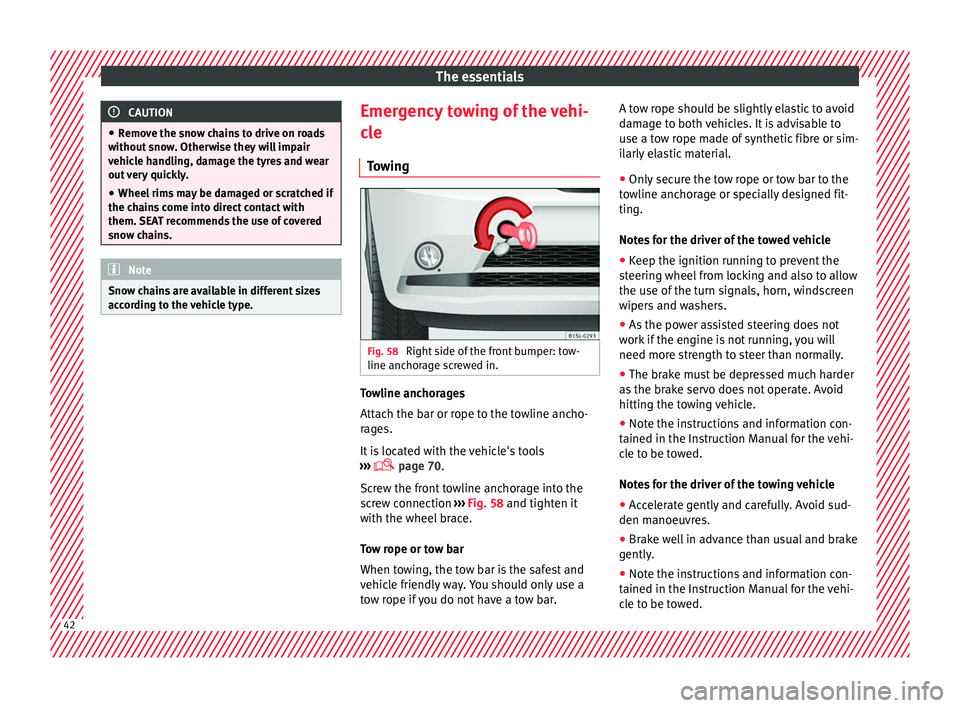
owing Fig. 58
Right side of the front bumper: tow-
line anc hor
ag
e screwed in. Towline anchorages
Att
ac
h the b
ar or rope to the towline ancho-
rages.
It is located with the vehicle's tools
››› page 70.
Screw the front towline anchorage into the
screw connection ››› Fig. 58 and tighten it
with the wheel brace.
Tow rope or tow bar
When towing, the tow bar is the safest and
vehicle friendly way. You should only use a
tow rope if you do not have a tow bar. A tow rope should be slightly elastic to avoid
damag
e to both vehicles. It is advisable to
use a tow rope made of synthetic fibre or sim-
ilarly elastic material.
● Only secure the tow rope or tow bar to the
towline anc
horage or specially designed fit-
ting.
Notes for the driver of the towed vehicle
● Keep the ignition running to prevent the
steerin
g wheel from locking and also to allow
the use of the turn signals, horn, windscreen
wipers and washers.
● As the power assisted steering does not
work if
the engine is not running, you will
need more strength to steer than normally.
● The brake must be depressed much harder
as the br
ake servo does not operate. Avoid
hitting the towing vehicle.
● Note the instructions and information con-
tained in the Ins
truction Manual for the vehi-
cle to be towed.
Notes for the driver of the towing vehicle
● Accelerate gently and carefully. Avoid sud-
den manoeuvr
es.
● Brake well in advance than usual and brake
gently.
● Not
e the instructions and information con-
tained in the In s
truction Manual for the vehi-
cle to be towed. 42
Page 49 of 232
Safe driving
Safety
Saf e driv
in
g
Safety first! WARNING
● This m
anual contains important informa-
tion about the operation of the vehicle, both
for the driver and the passengers. The other
sections of the on-board documentation also
contain further information that you should
be aware of for your own safety and for the
safety of your passengers.
● Ensure that the on-board documentation is
kept in the
vehicle at all times. This is espe-
cially important when lending or selling the
vehicle to another person. WARNING
Driving under the influence of alcohol, drugs,
medication or n ar
cotics may result in severe
accidents and even loss of life.
● Alcohol, drugs, medication and narcotics
may
significantly alter perception, affect re-
action times and safety while driving, which
could result in the loss of control of the vehi-
cle. Driving advice
B ef
or
e driving For your own safety and the safety of your
pa
s
sengers, always note the following points
before every trip:
– Make sure that the vehicle's lights and turn
signal
s are working properly.
– Check tyre pressure.
– Ensure that all windows provide a clear and
good v
iew of the surroundings.
– Make sure all luggage is secured
›› ›
page 114.
– Make sure that no objects can interfere
with the pedal
s.
– Adjust front seat, head restraint and mir-
rors
properly according to your size.
– Ensure that the passengers in the rear
seats alw
ays have the head restraints in
the in-use position ›››
page 51.
– Instruct passengers to adjust the head re-
straints
according to their height.
– Protect children with appropriate child
seats and pr
operly applied seat belts
››› page 64.
– Assume the correct sitting position. Instruct
your pa
ssengers also to assume a proper
sitting position ›››
page 48. –
Fas
ten your seat belt securely. Instruct your
passengers also to fasten their seat belts
properly ››› page 52.
What affects driving safety? As a driver, you are responsible for yourself
and y
our p
assengers. When your concentra-
tion or driving safety is affected by any cir-
cumstance, you endanger yourself as well as
others on the road ››› , for this reason:
– Always pay attention to traffic and do not
g et di
stracted by passengers or telephone
calls.
– Never drive when your driving ability is im-
paired (e.
g. by medication, alcohol, drugs).
– Observe traffic laws and speed limits.
– Always reduce your speed as appropriate
for ro
ad, traffic and weather conditions.
– When travelling long distances, take
break
s regularly - at least every two hours.
– If possible, avoid driving when you are tired
or stre
ssed. WARNING
When driving safety is impaired during a trip,
the risk of
injury and accidents increases. 47
Technical data
Advice
Operation
Emergencies
Safety