window Seat Toledo 2013 User Guide
[x] Cancel search | Manufacturer: SEAT, Model Year: 2013, Model line: Toledo, Model: Seat Toledo 2013Pages: 258, PDF Size: 3.94 MB
Page 84 of 258
82Communication
The MDI input is composed of the USB and AUX-IN inputs.
The purpose of the MDI input is to connect external devices (i.e. iPod ®
, mp3
players or USB memories) in order to play music using the audio system or
the navigation system.
In order to connect Apple multimedia devices (such as an iPod ®
/iPhone ®
…)
the corresponding adaptor from the SEAT Original Accessories catalogue is
required.
Voice control
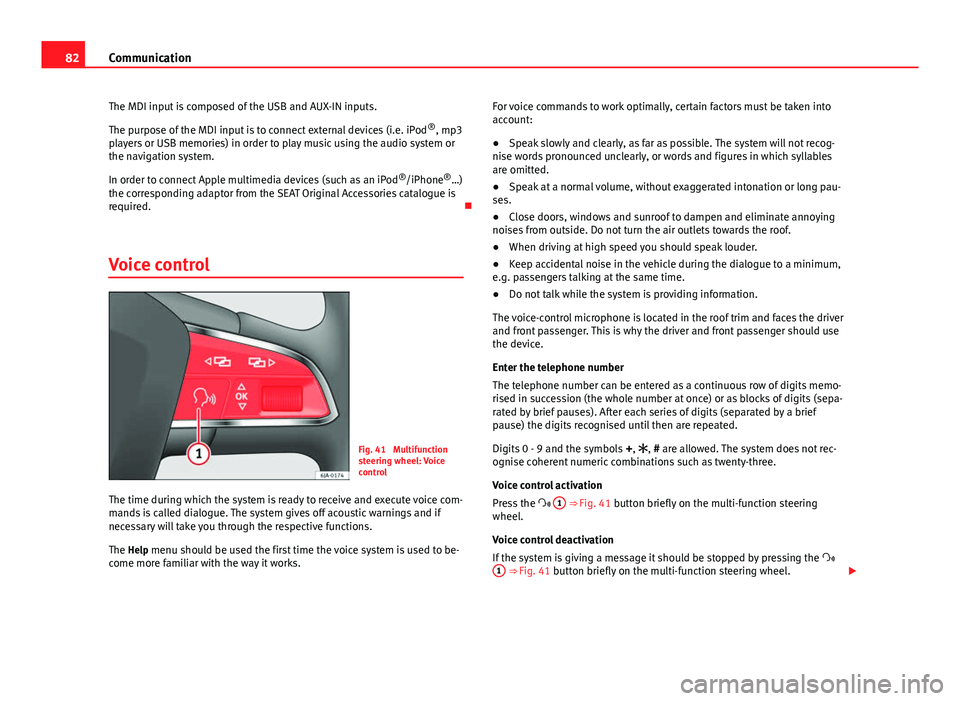
Fig. 41 Multifunction
steering wheel: Voice
control
The time during which the system is ready to receive and execute voice com-
mands is called dialogue. The system gives off acoustic warnings and if
necessary will take you through the respective functions.
The Help menu should be used the first time the voice system is used to be-
come more familiar with the way it works. For voice commands to work optimally, certain factors must be taken into
account:
●
Speak slowly and clearly, as far as possible. The system will not recog-
nise words pronounced unclearly, or words and figures in which syllables
are omitted.
● Speak at a normal volume, without exaggerated intonation or long pau-
ses.
● Close doors, windows and sunroof to dampen and eliminate annoying
noises from outside. Do not turn the air outlets towards the roof.
● When driving at high speed you should speak louder.
● Keep accidental noise in the vehicle during the dialogue to a minimum,
e.g. passengers talking at the same time.
● Do not talk while the system is providing information.
The voice-control microphone is located in the roof trim and faces the driver
and front passenger. This is why the driver and front passenger should use
the device.
Enter the telephone number
The telephone number can be entered as a continuous row of digits memo-
rised in succession (the whole number at once) or as blocks of digits (sepa-
rated by brief pauses). After each series of digits (separated by a brief
pause) the digits recognised until then are repeated.
Digits 0 - 9 and the symbols +, , # are allowed. The system does not rec-
ognise coherent numeric combinations such as twenty-three.
Voice control activation
Press the 1
⇒ Fig. 41 button briefly on the multi-function steering
wheel.
Voice control deactivation
If the system is giving a message it should be stopped by pressing the
1
⇒ Fig. 41 button briefly on the multi-function steering wheel.
Page 86 of 258
84Opening and closing
Opening and closing
Keys
General notes
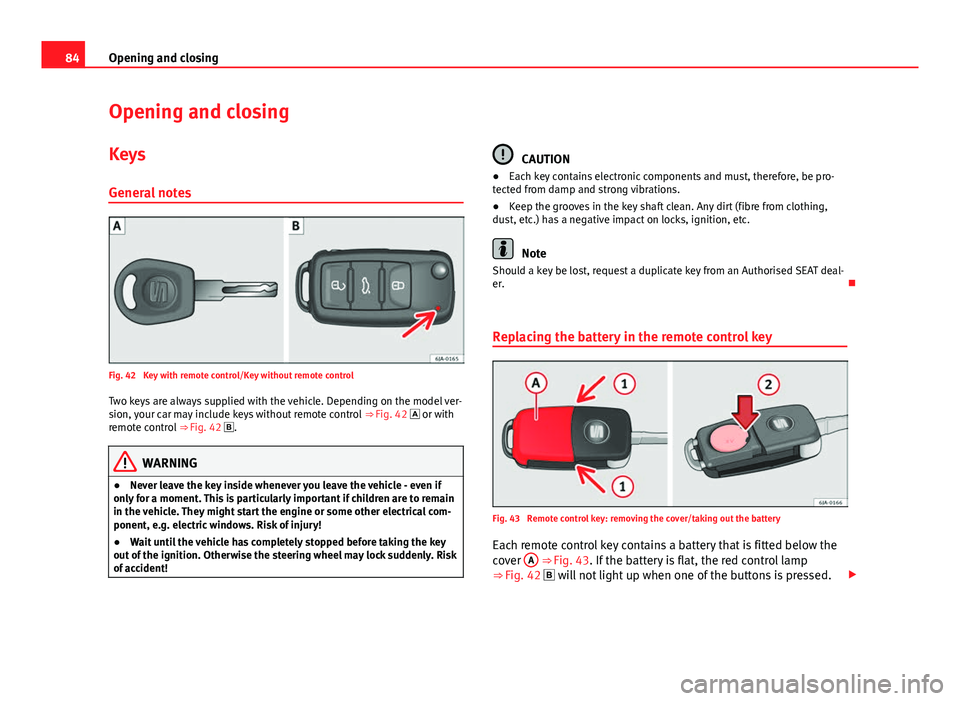
Fig. 42 Key with remote control/Key without remote control Two keys are always supplied with the vehicle. Depending on the model ver-
sion, your car may include keys without remote control ⇒ Fig. 42 or with
remote control ⇒ Fig. 42 .
WARNING
● Never leave the key inside whenever you leave the vehicle - even if
only for a moment. This is particularly important if children are to remain
in the vehicle. They might start the engine or some other electrical com-
ponent, e.g. electric windows. Risk of injury!
● Wait until the vehicle has completely stopped before taking the key
out of the ignition. Otherwise the steering wheel may lock suddenly. Risk
of accident!
CAUTION
● Each key contains electronic components and must, therefore, be pro-
tected from damp and strong vibrations.
● Keep the grooves in the key shaft clean. Any dirt (fibre from clothing,
dust, etc.) has a negative impact on locks, ignition, etc.
Note
Should a key be lost, request a duplicate key from an Authorised SEAT deal-
er.
Replacing the battery in the remote control key
Fig. 43 Remote control key: removing the cover/taking out the battery
Each remote control key contains a battery that is fitted below the
cover A
⇒ Fig. 43. If the battery is flat, the red control lamp
⇒ Fig. 42 will not light up when one of the buttons is pressed.
Page 89 of 258
87
Opening and closing
If the Safe lock is out of service, the control lamp on the driver door will
flash quickly for 2 seconds before switching off for 30 seconds and then
flashing at a slower rate.
The Safe lock is re-activated on unlocking and locking the vehicle again.
If the vehicle is locked and the Safe lock is deactivated, the vehicle can be
opened from inside by pulling on the door handle.
WARNING
Do not leave people or animals in locked vehicles with the Safe lock acti-
vated: the doors and windows cannot then be opened from the inside.
Doors locked in this manner could delay assistance in an emergency.
Risk of death!
Note
● The anti-theft alarm switches on automatically when the vehicle is
locked, even if the Safe lock is deactivated. The Vehicle interior monitoring,
however, is not activated.
● Given that the Safe function will be activated on locking the vehicle,
CHECK DEADLOCK will be shown on the general instrument panel display. On
vehicles equipped with an informative display, Caution SAFE! On-board docu-
mentation! will be indicated. Unlocking the vehicle with the key
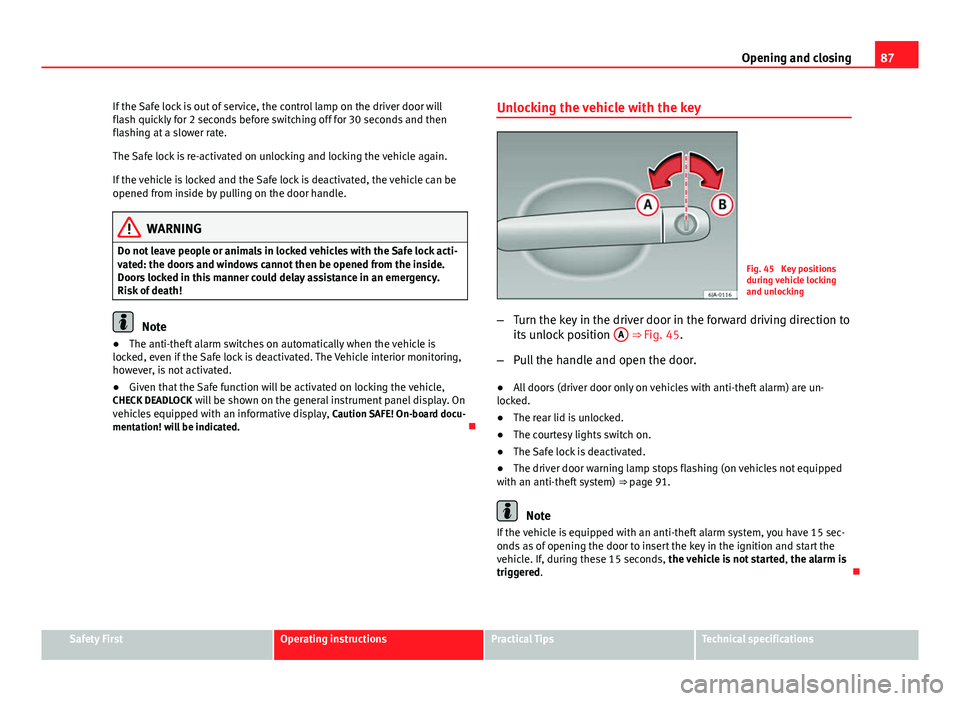
Fig. 45 Key positions
during vehicle locking
and unlocking
– Turn the key in the driver door in the forward driving direction to
its unlock position A
⇒ Fig. 45.
– Pull the handle and open the door.
● All doors (driver door only on vehicles with anti-theft alarm) are un-
locked.
● The rear lid is unlocked.
● The courtesy lights switch on.
● The Safe lock is deactivated.
● The driver door warning lamp stops flashing (on vehicles not equipped
with an anti-theft system) ⇒ page 91.
Note
If the vehicle is equipped with an anti-theft alarm system, you have 15 sec-
onds as of opening the door to insert the key in the ignition and start the
vehicle. If, during these 15 seconds, the vehicle is not started , the alarm is
triggered.
Safety FirstOperating instructionsPractical TipsTechnical specifications
Page 92 of 258
90Opening and closing
Unlocking and locking the vehicle
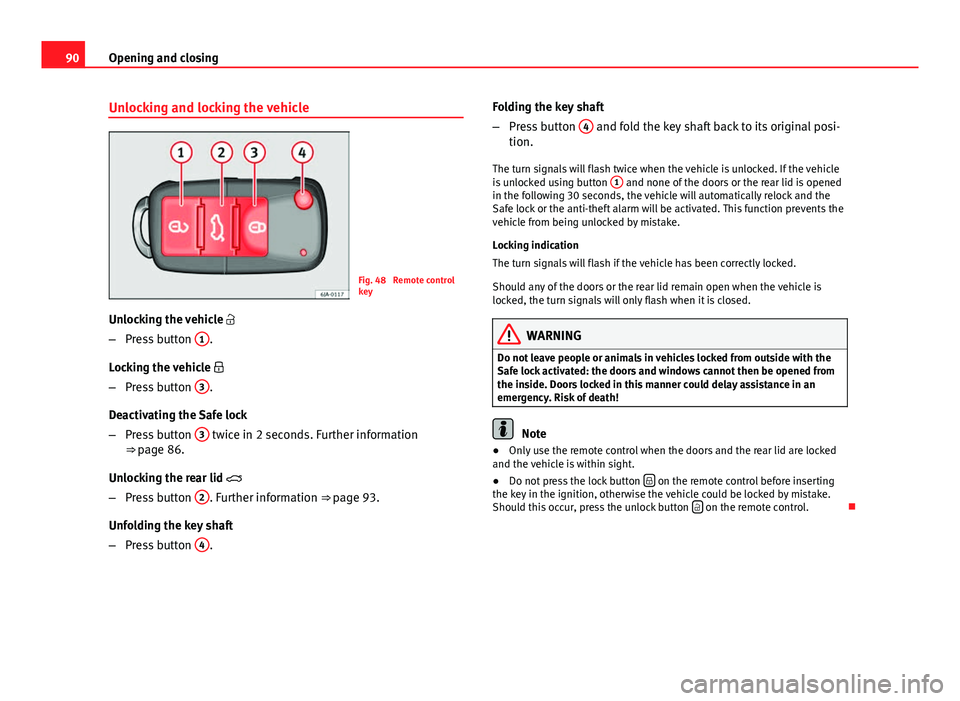
Fig. 48 Remote control
key
Unlocking the vehicle
– Press button 1
.
Locking the vehicle
– Press button 3
.
Deactivating the Safe lock
– Press button 3
twice in 2 seconds. Further information
⇒ page 86.
Unlocking the rear lid
– Press button 2
. Further information ⇒ page 93.
Unfolding the key shaft
– Press button 4
. Folding the key shaft
–
Press button 4
and fold the key shaft back to its original posi-
tion.
The turn signals will flash twice when the vehicle is unlocked. If the vehicle
is unlocked using button 1
and none of the doors or the rear lid is opened
in the following 30 seconds, the vehicle will automatically relock and the
Safe lock or the anti-theft alarm will be activated. This function prevents the
vehicle from being unlocked by mistake.
Locking indication
The turn signals will flash if the vehicle has been correctly locked.
Should any of the doors or the rear lid remain open when the vehicle is
locked, the turn signals will only flash when it is closed.
WARNING
Do not leave people or animals in vehicles locked from outside with the
Safe lock activated: the doors and windows cannot then be opened from
the inside. Doors locked in this manner could delay assistance in an
emergency. Risk of death!
Note
● Only use the remote control when the doors and the rear lid are locked
and the vehicle is within sight.
● Do not press the lock button
on the remote control before inserting
the key in the ignition, otherwise the vehicle could be locked by mistake.
Should this occur, press the unlock button
on the remote control.
Page 93 of 258
91
Opening and closing
Remote control synchronisation
If the vehicle cannot be locked or unlocked using the remote control, the
code of the key might not match that of the control unit. This can occur
when the remote control buttons are frequently pressed outside the range
of the system or if the remote control battery has been replaced.
In this case, it must be synchronised as follows:
● Press any key on the remote control key.
● Open the door using the key within the next minute.
Anti-theft alarm system* General notes
The anti-theft alarm system increases vehicle protection from intruders. If
the anti-theft alarm system senses interference with the vehicle it triggers
an audible and visible alarm.
Activating the alarm system
The anti-theft alarm switches on automatically when the vehicle is locked
using the remote control key or inserting the key in the driver door. The
alarm is activated around 30 seconds after the vehicle is locked.
Deactivating the alarm system
The anti-theft alarm system is deactivated when the remote control unlock
button is pressed. If the vehicle is not opened within 30 seconds after emit-
ting the radiofrequency signal, the system will be reactivated.
If the vehicle is unlocked using by inserting the key in the driver door, the
ignition must be switched on within 15 seconds. This deactivates the alarm system. If, during these 15 seconds, the vehicle is not started
, the alarm is
triggered.
When does the system trigger an alarm?
The following areas of the vehicle are monitored:
● Bonnet
● Rear lid
● Doors
● Ignition
● Tilt angle ⇒ page 92, Vehicle interior monitoring and tow-away protec-
tion system
● The interior ⇒ page 92, Vehicle interior monitoring and tow-away pro-
tection system
● Drop in voltage in the car systems
● The factory-fitted towing bracket
The alarm is triggered immediately if one of the battery cables is disconnec-
ted while the alarm system is active.
How to turn off the alarm
To deactivate the alarm, press the unlock button on the remote control key
or switch on the ignition.
Note
● The alarm horn power supply has a 5-year useful life. Contact an Official
Service for more detailed information.
● To make sure that the anti-theft alarm is fully operative when leaving the
vehicle, check that all the doors and windows are closed.
● Remote control and receiver unit coding means that the remote control
cannot be used on other vehicles.
Safety FirstOperating instructionsPractical TipsTechnical specifications
Page 94 of 258
92Opening and closing
Vehicle interior monitoring and tow-away
protection system
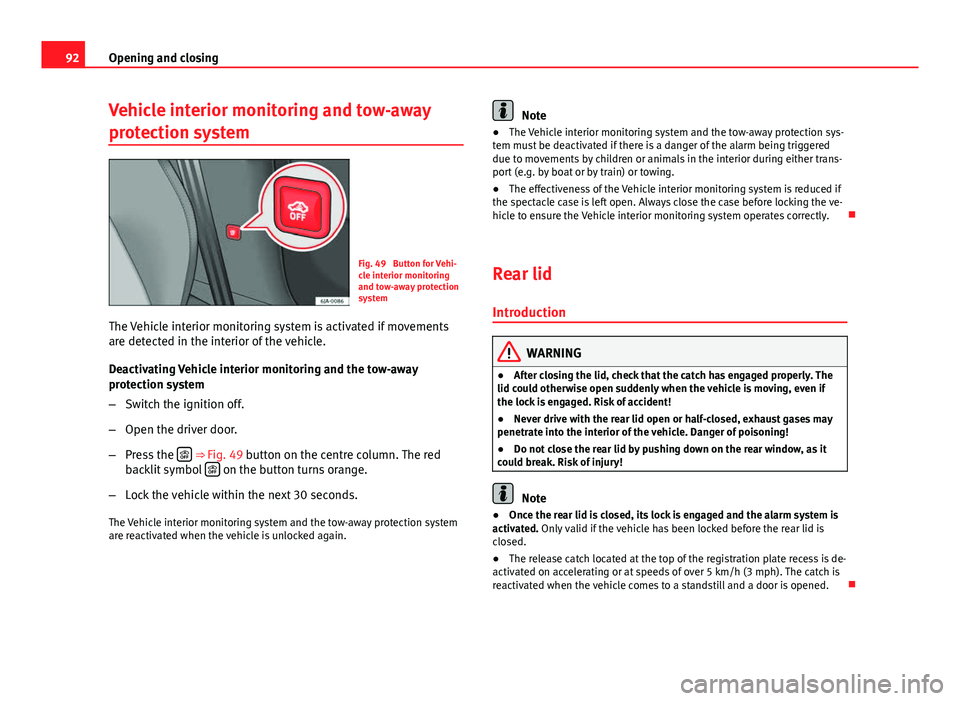
Fig. 49 Button for Vehi-
cle interior monitoring
and tow-away protection
system
The Vehicle interior monitoring system is activated if movements
are detected in the interior of the vehicle.
Deactivating Vehicle interior monitoring and the tow-away
protection system
– Switch the ignition off.
– Open the driver door.
– Press the
⇒ Fig. 49 button on the centre column. The red
backlit symbol on the button turns orange.
– Lock the vehicle within the next 30 seconds.
The Vehicle interior monitoring system and the tow-away protection system
are reactivated when the vehicle is unlocked again.
Note
● The Vehicle interior monitoring system and the tow-away protection sys-
tem must be deactivated if there is a danger of the alarm being triggered
due to movements by children or animals in the interior during either trans-
port (e.g. by boat or by train) or towing.
● The effectiveness of the Vehicle interior monitoring system is reduced if
the spectacle case is left open. Always close the case before locking the ve-
hicle to ensure the Vehicle interior monitoring system operates correctly.
Rear lid
Introduction
WARNING
● After closing the lid, check that the catch has engaged properly. The
lid could otherwise open suddenly when the vehicle is moving, even if
the lock is engaged. Risk of accident!
● Never drive with the rear lid open or half-closed, exhaust gases may
penetrate into the interior of the vehicle. Danger of poisoning!
● Do not close the rear lid by pushing down on the rear window, as it
could break. Risk of injury!
Note
● Once the rear lid is closed, its lock is engaged and the alarm system is
activated. Only valid if the vehicle has been locked before the rear lid is
closed.
● The release catch located at the top of the registration plate recess is de-
activated on accelerating or at speeds of over 5 km/h (3 mph). The catch is
reactivated when the vehicle comes to a standstill and a door is opened.
Page 96 of 258
94Opening and closing
Opening the rear lid
–Pull on the release lever and lift the rear lid ⇒ Fig. 50. The rear
lid will automatically open.
Closing the rear lid
– Hold the rear lid by one of the two handles on the interior lining
and close it, pushing slightly.
This system may or may not be operative, depending on the situation of the
vehicle.
If the rear lid is locked then it cannot be opened, however if it is unlocked
then the opening system is operative and the rear lid may be opened.
To lock/unlock, press the button
or the button
1 on the remote control
key.
A warning appears on the instrument panel display if the rear lid is open or
not properly closed.* An audible warning is also given if the rear lid is
opened while the vehicle is moving faster than 6 km/h (4 mph).*
WARNING
● Always close the rear lid properly. Risk of accident or injury.
● The rear lid must not be opened when the reverse or rear fog lights
are lit. This may damage the tail lights
● Do not close the rear lid by pushing it down with your hand on the
rear window. The glass could smash. Risk of injury!
● Ensure the rear lid is locked after closing it. If not, it may open unex-
pectedly while driving.
WARNING (Continued)
● Never allow children to play in or around the vehicle. A locked vehicle
can be subjected to extremely high and low temperatures, depending on
the time of year, thus causing serious injuries/illness. It could even have
fatal consequences. Close and lock both the rear lid and all the other
doors when you are not using the vehicle.
● Closing the rear lid without observing and ensuring it is clear could
cause serious injury to you and to third parties. Make sure that no one is
in the path of the rear lid.
● Never drive with the rear lid open or half-closed, exhaust gases may
penetrate into the interior of the vehicle. Danger of poisoning!
● If you only open the rear lid, do not leave the key inside. The vehicle
will not be opened if the key is left inside.
Manual release of the rear lid
Fig. 52 Manual release
of the rear lid
In the event of a fault in the central locking system, the rear lid can
be released manually.
Page 97 of 258
95
Opening and closing
Release
– Fold down the backrest of the rear seat ⇒ page 113.
– Insert the car key in the opening in the mat.
– Move it towards the arrow to release the rear lid.
– Open the rear lid.
Opening and closing electric windows Introduction
WARNING
● When locking the vehicle from the outside, make sure that nobody is
inside the vehicle, as the windows cannot be opened from the inside in
an emergency.
● For safety reasons, use the safety button S
⇒ Fig. 53 that deacti-
vates the window switches in the rear doors when children are travelling
in the rear seats.
CAUTION
● Keep the windows clean to ensure the system operates correctly.
● Defrost ⇒ page 175, Windows and exterior mirrors any frozen windows
before use. Risk of damaging the electric window riser mechanism.
● Always make sure all of the windows are closed on leaving the locked
vehicle.
Note
● The vehicle heating and ventilation system should be used to ventilate
the interior while driving. Leaving the windows open could allow dust and
other dirt to enter the vehicle and cause unpleasant noises at certain
speeds.
● Do not leave the side windows open at high speeds, as this will overly
increase fuel consumption.
Electric window function
Fig. 53 Controls on the driver door/on the rear doors
The electric window opening and closing system only works when
the ignition is switched on.
Opening
– Press gently on the respective button on the door to open the
window. The process will stop when the button is released.
Safety FirstOperating instructionsPractical TipsTechnical specifications
Page 98 of 258
96Opening and closing
–The driver door window can also be automatically opened by
pressing the button as far as it will go (fully open). Press the
button again to immediately stop it.
Closing
– Press the respective button gently to close the window. The
process will stop when the button is released.
Window control buttons Window button on the driver's door
Window button on the passenger door
Window button on the right rear door
Window button on the left rear door
Safety switch
Safety button
Press the safety button S
⇒ Fig. 53 to deactivate the controls on the rear
doors. Pressing the safety button S again will reactivate the controls on
the rear doors.
If the rear door controls are deactivated, the warning lamp on the safety
button S
will light up.
Note
The electric window opening mechanism is equipped with a thermostat
switch. This may overheat if the window is opened and closed repeatedly.
This causes the window to lock temporarily. Once the thermostat switch has
cooled down the window can be operated once again.
A
BCDS
Roll-back function on the electric windows
The electric windows are equipped with a roll-back system that reduces risk
of injury when closing windows.
If an obstacle is present, the closing mechanism will stop and the window
will roll back a few centimetres.
If an obstacle prevents closing for the next 10 seconds, the closing mecha-
nism will once again stop and the window will roll back another few centi-
metres.
If in the next 10 seconds you attempt to close the window after it has rolled
back the second time, only the closing mechanism will be stopped even if
the obstacle is still present. The roll-back function is still connected.
The roll-back function will only be disconnected if you once again attempt to
close the window in the following 10 seconds. In this case, the window will
close at full force
.
If you wait for a further 10 seconds, the roll-back function will be once again
connected.
Page 106 of 258

104Lights and visibility
Visibility
Heated rear window
Fig. 62 Heated rear win-
dow switch
– Switch the heated rear window on or off by pressing the button
⇒ Fig. 62, the warning lamp in the button will come on or go
off respectively.
The heated rear window only works when the engine is running.
After approx. 7 minutes, the rear window heating device switches off auto-
matically.
For the sake of the environment
The heated rear window should be switched off as soon as the glass is dem-
isted. By saving electrical power you can also save fuel ⇒ page 160, Save
electrical energy.
Note
In the event of a drop in voltage in the onboard systems, the heated rear
window switches off automatically to ensure enough power to control the
engine ⇒ page 194, Automatic disconnection of electrical equipment. Sun visors
Fig. 63 Driver sun visor
Fig. 64 Front passenger
sun visor
The sun visors for the driver and the front passenger can be pulled out of
their central supports and turned towards the doors in the direction of arrow 1
⇒ Fig. 63 and 2
⇒ Fig. 64 respectively.
The strip A
is to store small objects such as notepaper, etc.
The front passenger sun visor includes a vanity mirror B
with a cover. The
cover is opened by sliding it in the direction indicated by arrow 3
⇒
Fig. 64.