audio Seat Toledo 2013 Owner's manual
[x] Cancel search | Manufacturer: SEAT, Model Year: 2013, Model line: Toledo, Model: Seat Toledo 2013Pages: 258, PDF Size: 3.94 MB
Page 57 of 258
55
Controls and displays
Operating instructions Controls and displays
Overview
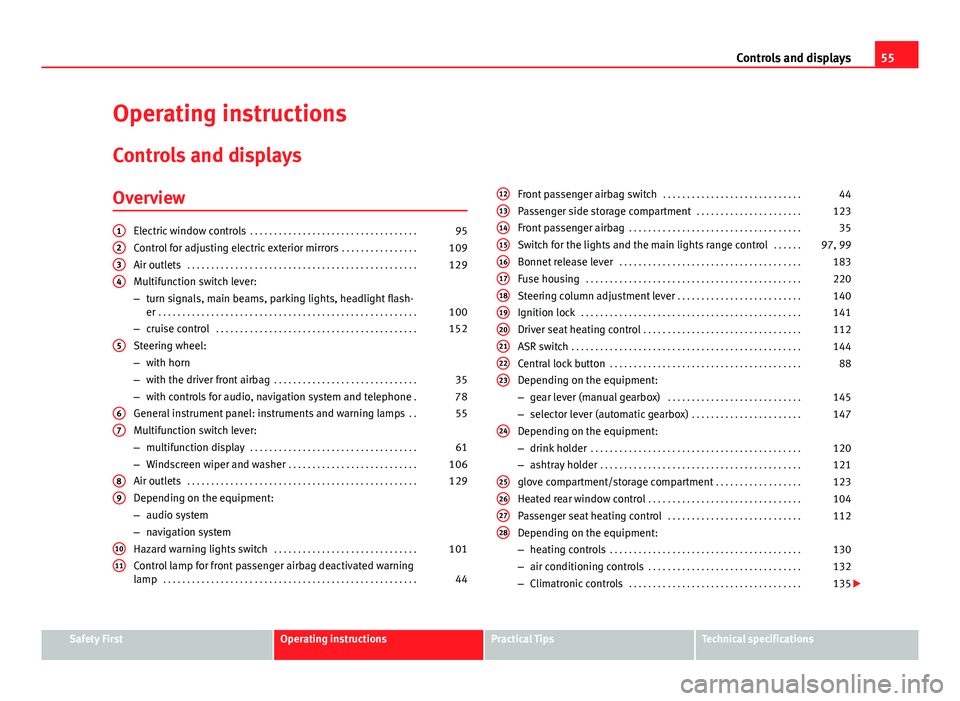
Electric window controls . . . . . . . . . . . . . . . . . . . . . . . . . . . . . . . . . . . 95
Control for adjusting electric exterior mirrors . . . . . . . . . . . . . . . .109
Air outlets . . . . . . . . . . . . . . . . . . . . . . . . . . . . . . . . . . . . . . . . . . . . . . . . 129
Multifunction switch lever:
– turn signals, main beams, parking lights, headlight flash-
er . . . . . . . . . . . . . . . . . . . . . . . . . . . . . . . . . . . . . . . . . . . . . . . . . . . . . . 100
– cruise control . . . . . . . . . . . . . . . . . . . . . . . . . . . . . . . . . . . . . . . . . . 152
Steering wheel:
– with horn
– with the driver front airbag . . . . . . . . . . . . . . . . . . . . . . . . . . . . . . 35
– with controls for audio, navigation system and telephone .78
General instrument panel: instruments and warning lamps . .55
Multifunction switch lever:
– multifunction display . . . . . . . . . . . . . . . . . . . . . . . . . . . . . . . . . . . 61
– Windscreen wiper and washer . . . . . . . . . . . . . . . . . . . . . . . . . . . 106
Air outlets . . . . . . . . . . . . . . . . . . . . . . . . . . . . . . . . . . . . . . . . . . . . . . . . 129
Depending on the equipment:
– audio system
– navigation system
Hazard warning lights switch . . . . . . . . . . . . . . . . . . . . . . . . . . . . . . 101
Control lamp for front passenger airbag deactivated warning
lamp . . . . . . . . . . . . . . . . . . . . . . . . . . . . . . . . . . . . . . . . . . . . . . . . . . . . . 44
1234
5
67
89
1011
Front passenger airbag switch
. . . . . . . . . . . . . . . . . . . . . . . . . . . . . 44
Passenger side storage compartment . . . . . . . . . . . . . . . . . . . . . .123
Front passenger airbag . . . . . . . . . . . . . . . . . . . . . . . . . . . . . . . . . . . . 35
Switch for the lights and the main lights range control . . . . . .97, 99
Bonnet release lever . . . . . . . . . . . . . . . . . . . . . . . . . . . . . . . . . . . . . . 183
Fuse housing . . . . . . . . . . . . . . . . . . . . . . . . . . . . . . . . . . . . . . . . . . . . . 220
Steering column adjustment lever . . . . . . . . . . . . . . . . . . . . . . . . . . 140
Ignition lock . . . . . . . . . . . . . . . . . . . . . . . . . . . . . . . . . . . . . . . . . . . . . . 141
Driver seat heating control . . . . . . . . . . . . . . . . . . . . . . . . . . . . . . . . . 112
ASR switch . . . . . . . . . . . . . . . . . . . . . . . . . . . . . . . . . . . . . . . . . . . . . . . . 144
Central lock button . . . . . . . . . . . . . . . . . . . . . . . . . . . . . . . . . . . . . . . . 88
Depending on the equipment:
– gear lever (manual gearbox) . . . . . . . . . . . . . . . . . . . . . . . . . . . . 145
– selector lever (automatic gearbox) . . . . . . . . . . . . . . . . . . . . . . .147
Depending on the equipment:
– drink holder . . . . . . . . . . . . . . . . . . . . . . . . . . . . . . . . . . . . . . . . . . . . 120
– ashtray holder . . . . . . . . . . . . . . . . . . . . . . . . . . . . . . . . . . . . . . . . . . 121
glove compartment/storage compartment . . . . . . . . . . . . . . . . . .123
Heated rear window control . . . . . . . . . . . . . . . . . . . . . . . . . . . . . . . . 104
Passenger seat heating control . . . . . . . . . . . . . . . . . . . . . . . . . . . . 112
Depending on the equipment:
– heating controls . . . . . . . . . . . . . . . . . . . . . . . . . . . . . . . . . . . . . . . . 130
– air conditioning controls . . . . . . . . . . . . . . . . . . . . . . . . . . . . . . . . 132
– Climatronic controls . . . . . . . . . . . . . . . . . . . . . . . . . . . . . . . . . . . . 135
121314151617181920212223
24
25262728
Safety FirstOperating instructionsPractical TipsTechnical specifications
Page 68 of 258
66Controls and displays
MAXI DOT* (Informative display)
Introduction
The informative display informs about the current operational status of your
vehicle. Additionally, the screen also displays the information for the radio,
the multifunction display, the telephone, the navigation system, the devices
connected to the MDI input and the automatic gearbox ⇒ page 146.
WARNING
Always keep your attention on driving! As the driver, you have the full re-
sponsibility for the safety of traffic.
Main menu
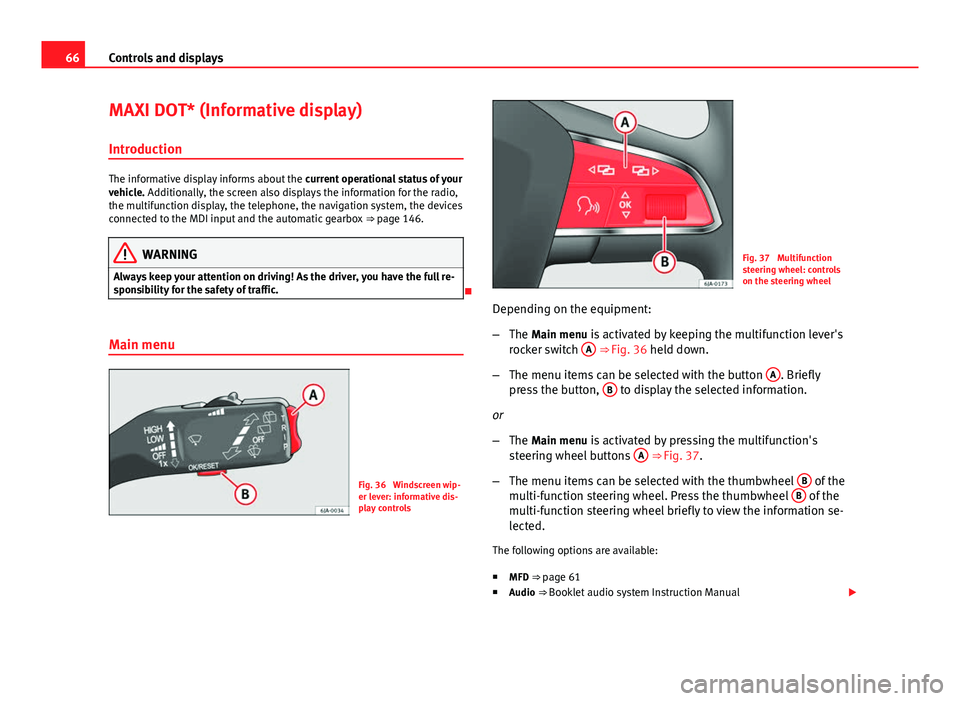
Fig. 36 Windscreen wip-
er lever: informative dis-
play controls
Fig. 37 Multifunction
steering wheel: controls
on the steering wheel
Depending on the equipment:
– The Main menu is activated by keeping the multifunction lever's
rocker switch A
⇒ Fig. 36 held down.
– The menu items can be selected with the button A
. Briefly
press the button, B to display the selected information.
or
– The Main menu is activated by pressing the multifunction's
steering wheel buttons A
⇒ Fig. 37.
– The menu items can be selected with the thumbwheel B
of the
multi-function steering wheel. Press the thumbwheel B of the
multi-function steering wheel briefly to view the information se-
lected.
The following options are available:
■ MFD ⇒ page 61
■ Audio ⇒ Booklet audio system Instruction Manual
Page 69 of 258
67
Controls and displays
■ Navigation ⇒ Booklet Navigation system Instruction Manual
■ Telephone ⇒ Booklet Bluetooth system Instruction Manual
■ Vehicle status ⇒ page 68
■ Settings ⇒ page 67
The Audio and Navigation options are only displayed when these factory-fit-
ted systems are switched on.
Note
● If the multifunction display is not operated during 10 seconds, the menu
automatically returns to one of the superior levels.
Settings
You can make certain adjustments using the informative display. The cur-
rent values are displayed directly in their respective places above or below
the line.
The following items can be selected: ■ Language
■ MFD data
■ Time
■ Winter tyres
■ Units
■ Second speed
■ Inspec. Service
■ Factory settings
■ Back
Select the option Back to return to the superior menu level. Language
Here the language used to display the warning and information texts can be
selected.
MFD data
Here certain data shown on the multifunction display can be switched on or
off.
Time
In this menu you can set, the time, the display format (24 or 12 hours) and
changes from winter to summer time.
Winter tyres
The speed at which an audible warning is given can be adjusted here. This
function can be used with winter tyres, whose maximum permitted speed is
lower than the maximum speed of the vehicle.
When exceeding the maximum speed the following is shown on the display:
Winter tyres max speed … km/h … (mph)
Units
The units of measure for temperature, consumption and journey distances
can be set here.
Second speed
The second speed can be activated/deactivated in mph or km/h respective-
ly here.
Inspection Service
Here you can choose to display the kilometres (miles) and days remaining
until the next service, and reset the service interval display.
Factory settings
Select Factory setting to reset the values of the informative display to their
factory settings.
Safety FirstOperating instructionsPractical TipsTechnical specifications
Page 80 of 258
78Communication
Communication
Steering wheel controls* General information
The vehicle includes a multifunction module from where it is possible to
control the audio, telephone and radio/navigation functions without need-
ing to distract the driver.
There are two versions of the multifunction module:
● Audio version, to control the available audio functions from the steering
wheel (Radio, CD audio, MP3 CD, iPod ®1)
, USB 1)
).
● Audio version + telephone, to control the available audio functions from
the steering wheel (Radio, CD audio, MP3 CD, iPod ®1)
, USB 1)
, SD 1)
) and the
Bluetooth system.
1)
Depending on the vehicle equipment.
Page 81 of 258

79
Communication
Audio system adjustment
Fig. 38 Controls on the steering wheel
ButtonRadioMedia (except AUX)AUXA TurnIncrease/lower volumeIncrease/lower volumeIncrease/lower volumeA PressNo functionNo functionNo functionBMutePauseMute
CSearch for last stationShort press: Switch to previous song
Long press: RewindNo function
DSearch for next stationShort press: Change to next song
Long press: Fast forwardNo function
EPrevious presetPrevious folderNo functionFNext presetNext folderNo functionGChange sourceChange sourceChange sourceH TurnSwitch MFA functionSwitch MFA functionSwitch MFA functionH PressOperates on MFAOperates on MFAOperates on MFA
Safety FirstOperating instructionsPractical TipsTechnical specifications
Page 82 of 258
80Communication
Audio + Telephone system operation
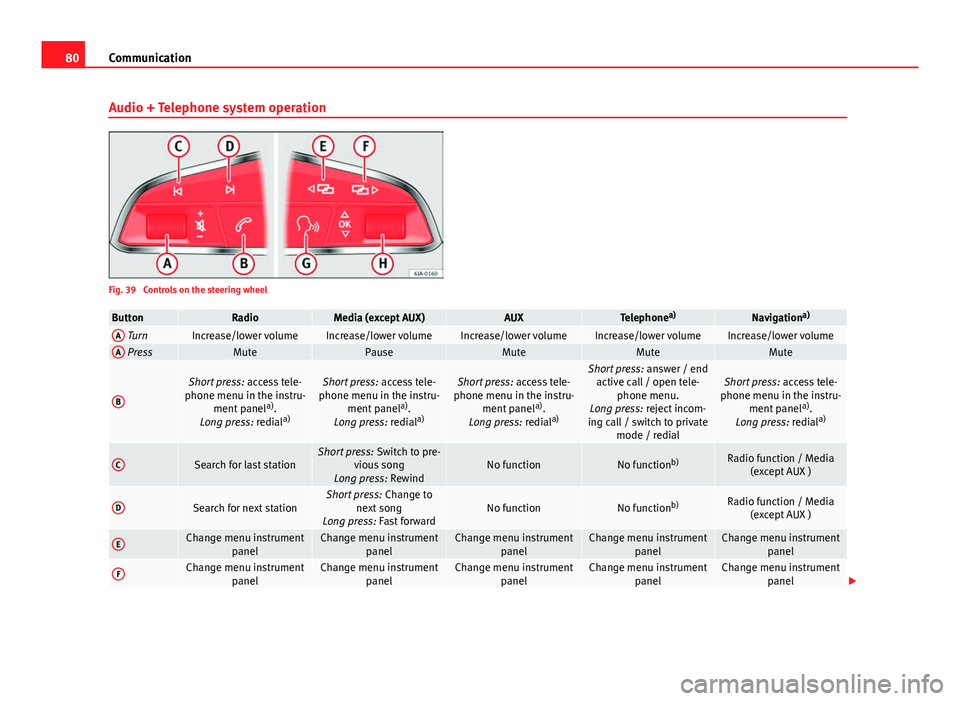
Fig. 39 Controls on the steering wheel
ButtonRadioMedia (except AUX)AUXTelephone a)Navigation a)A TurnIncrease/lower volumeIncrease/lower volumeIncrease/lower volumeIncrease/lower volumeIncrease/lower volumeA PressMutePauseMuteMuteMute
B
Short press:
access tele-
phone menu in the instru- ment panel a)
.
Long press: redial a)Short press:
access tele-
phone menu in the instru- ment panel a)
.
Long press: redial a)Short press:
access tele-
phone menu in the instru- ment panel a)
.
Long press: redial a)Short press:
answer / end
active call / open tele- phone menu.
Long press: reject incom-
ing call / switch to private mode / redialShort press: access tele-
phone menu in the instru- ment panel a)
.
Long press: redial a)
CSearch for last stationShort press:
Switch to pre-
vious song
Long press: RewindNo functionNo function b)Radio function / Media
(except AUX )
DSearch for next stationShort press: Change to
next song
Long press: Fast forwardNo functionNo function b)Radio function / Media
(except AUX )
EChange menu instrument panelChange menu instrumentpanelChange menu instrumentpanelChange menu instrumentpanelChange menu instrumentpanel
FChange menu instrument panelChange menu instrumentpanelChange menu instrumentpanelChange menu instrumentpanelChange menu instrumentpanel
Page 83 of 258

81
Communication
ButtonRadioMedia (except AUX)AUXTelephone a)Navigation a)
GActivating/deactivating
voice control a)Activating/deactivating
voice control a)Activating/deactivating
voice control a)No functionb)Activating/deactivating
voice control
H TurnNext / previous preset c)Next / previous presetc)Operates on the instrument
panel menu you are inOperates on the instru-
ment panel menu you are inOperates on the instru-
ment panel menu you are in
H Press
Operates on the MFA or
confirms instrument panel
menu option depending on the menu optionOperates on the MFA or
confirms instrument panel
menu option depending on the menu optionOperates on the MFA or
confirms instrument panel
menu option depending on the menu optionOperates on the MFA or
confirms instrument panel menu option depending on the menu optionOperates on the MFA or
confirms instrument panel menu option depending on the menu option
a) Depending on the vehicle equipment.
b) In call-in-progress situation, if not Radio/Media function (except AUX).
c) Only if the instrument panel is in the Audio menu.
Multimedia AUX-IN and MDI Inputs
Fig. 40 AUX-IN input/MDI input The operating description is located in the respective Instruction Manuals of
the audio system or the navigation system.
AUX-IN Input
The AUX-IN input is located in one of the following places:
●
in the centre console between the front seats ⇒ Fig. 40 - ;
● above the storage compartment in the front centre console ⇒ Fig. 40 -
;
● in the front panel of the SEAT Media System 2.2 navigation system.
The purpose of the AUX-IN input is to connect external devices in order to
play music (i.e. iPod ®
or an mp3 player) using the factory-fitted audio sys-
tem or the navigation system.
MDI Input
The MDI input is located above the storage compartment in the front centre
console ⇒ Fig. 40 - ;
Safety FirstOperating instructionsPractical TipsTechnical specifications
Page 84 of 258
82Communication
The MDI input is composed of the USB and AUX-IN inputs.
The purpose of the MDI input is to connect external devices (i.e. iPod ®
, mp3
players or USB memories) in order to play music using the audio system or
the navigation system.
In order to connect Apple multimedia devices (such as an iPod ®
/iPhone ®
…)
the corresponding adaptor from the SEAT Original Accessories catalogue is
required.
Voice control
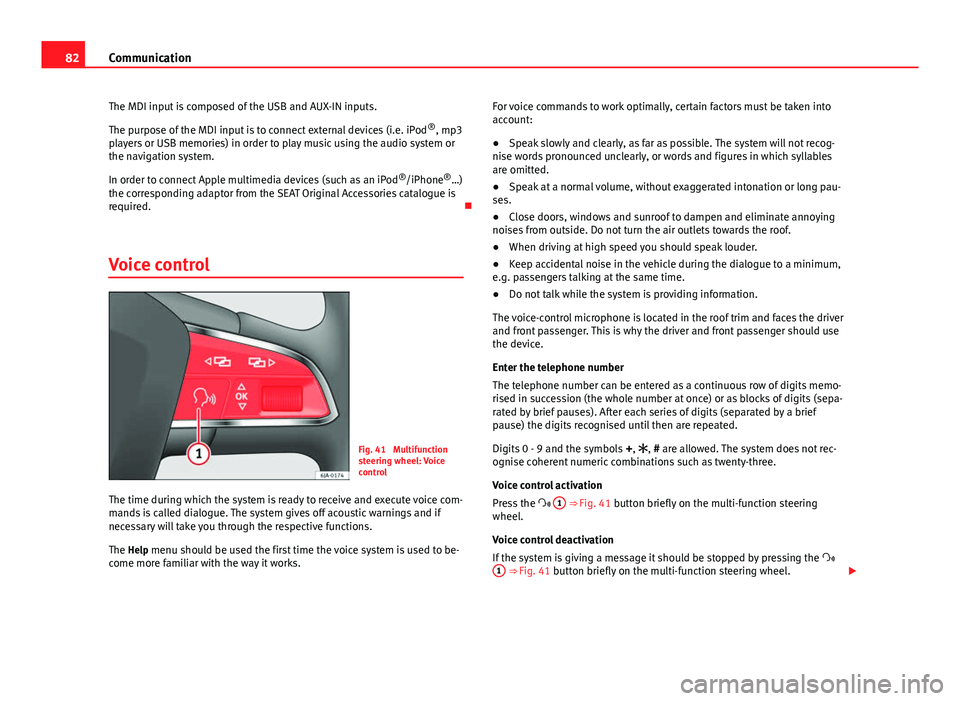
Fig. 41 Multifunction
steering wheel: Voice
control
The time during which the system is ready to receive and execute voice com-
mands is called dialogue. The system gives off acoustic warnings and if
necessary will take you through the respective functions.
The Help menu should be used the first time the voice system is used to be-
come more familiar with the way it works. For voice commands to work optimally, certain factors must be taken into
account:
●
Speak slowly and clearly, as far as possible. The system will not recog-
nise words pronounced unclearly, or words and figures in which syllables
are omitted.
● Speak at a normal volume, without exaggerated intonation or long pau-
ses.
● Close doors, windows and sunroof to dampen and eliminate annoying
noises from outside. Do not turn the air outlets towards the roof.
● When driving at high speed you should speak louder.
● Keep accidental noise in the vehicle during the dialogue to a minimum,
e.g. passengers talking at the same time.
● Do not talk while the system is providing information.
The voice-control microphone is located in the roof trim and faces the driver
and front passenger. This is why the driver and front passenger should use
the device.
Enter the telephone number
The telephone number can be entered as a continuous row of digits memo-
rised in succession (the whole number at once) or as blocks of digits (sepa-
rated by brief pauses). After each series of digits (separated by a brief
pause) the digits recognised until then are repeated.
Digits 0 - 9 and the symbols +, , # are allowed. The system does not rec-
ognise coherent numeric combinations such as twenty-three.
Voice control activation
Press the 1
⇒ Fig. 41 button briefly on the multi-function steering
wheel.
Voice control deactivation
If the system is giving a message it should be stopped by pressing the
1
⇒ Fig. 41 button briefly on the multi-function steering wheel.
Page 153 of 258
151
Driving
– Press the interlock button on the selector lever knob at the
same time and move the selector lever to position N (if the se-
lector lever were to be moved back to position P then it would
lock again).
Foot pedals
Under no circumstances must correct use of the pedals be impaired!
Only a floor mat secured to the two corresponding fastening points may be
used in the driver footwell.
Only use floor mats from the catalogue of SEAT Original Accessories that
fasten at two points.
WARNING
No object must be left in the driver footwell. Risk of preventing or limit-
ing use of the foot pedals!
Parking aid*
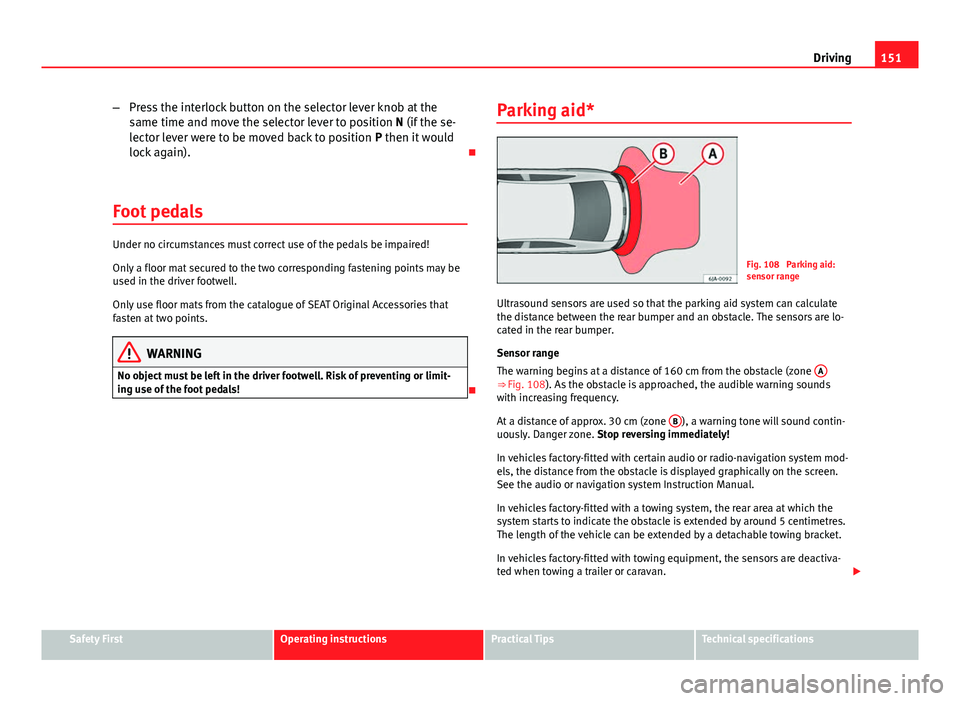
Fig. 108 Parking aid:
sensor range
Ultrasound sensors are used so that the parking aid system can calculate
the distance between the rear bumper and an obstacle. The sensors are lo-
cated in the rear bumper.
Sensor range
The warning begins at a distance of 160 cm from the obstacle (zone A
⇒ Fig. 108). As the obstacle is approached, the audible warning sounds
with increasing frequency.
At a distance of approx. 30 cm (zone B
), a warning tone will sound contin-
uously. Danger zone. Stop reversing immediately!
In vehicles factory-fitted with certain audio or radio-navigation system mod-
els, the distance from the obstacle is displayed graphically on the screen.
See the audio or navigation system Instruction Manual.
In vehicles factory-fitted with a towing system, the rear area at which the
system starts to indicate the obstacle is extended by around 5 centimetres.
The length of the vehicle can be extended by a detachable towing bracket.
In vehicles factory-fitted with towing equipment, the sensors are deactiva-
ted when towing a trailer or caravan.
Safety FirstOperating instructionsPractical TipsTechnical specifications
Page 177 of 258
175
Care of the vehicle and cleaning
Plastic parts
Exterior plastic parts will come clean using a damp cloth. If this is not suffi-
cient, plastic parts can also be treated with special solvent-free plastic
cleaning detergents.
Do not use paint cleaners, polishes or wax on plastic parts.
Windows and exterior mirrors
Remove snow and ice from windows and rear vision mirrors with a plastic
scraper only. To avoid damaging the surface of the glass, the scraper should
only be pushed in one direction and not moved to and fro.
The windows should also be cleaned on the inside at regular intervals.
Use a separate cloth or chamois to dry the windows and rear vision mirrors.
Do not use the chamois used to polish the bodywork to dry the windows.
Waxing and polishing residues could cause smears on the glass and hinder
visibility.
CAUTION
● Never use warm or hot water to remove snow and ice from the windows
and mirrors. Risk of cracking glass!
● Make sure you do not damage the paintwork on the vehicle on removing
snow and ice from the windows and rear vision mirrors.
● Do not remove the snow or ice from windows and mirrors that are dirty
with thick particles, e.g. gravel, sand or road salt. Risk of damage to surface
of glass and windows. Radio reception and aerial
In vehicles factory-fitted with an audio and navigation system, the aerial
may be installed in different places:
●
Inside the rear window next to the heating elements
● on the roof of the vehicle.
Headlights
Use soap and clean, hot water to clean the front headlights.
CAUTION
● Never rub the headlights dry and do not use sharp objects to clean the
plastic glass material. These could damage the protective paint and cause
the headlights to crack.
● Do not use aggressive cleaning products or chemical solvents to clean
the glass. This could damage the headlights.
Care of rubber seals
The weatherstrips on doors and windows will remain pliable and last longer
if they are occasionally treated with a suitable rubber care product. This will
prevent premature ageing and leaks. If they are correctly cared for, the seals
will be less likely to freeze up in the winter.
Door lock cylinder
Special products must be used to defrost lock cylinders.
Safety FirstOperating instructionsPractical TipsTechnical specifications