brake Seat Toledo 2014 Owner's Guide
[x] Cancel search | Manufacturer: SEAT, Model Year: 2014, Model line: Toledo, Model: Seat Toledo 2014Pages: 200, PDF Size: 4.37 MB
Page 111 of 200

Driver assistance systems
The
warning lamp on the general instru-
ment
panel starts flashing when the system
is working.
The
stability (ESC) system includes the fol-
lowing systems:
● Anti-lock brake system (ABS),
● Traction control system (TCS),
● Electronic differential lock (EDL),
● Hydraulic brake assist system (HBA),
● Hill hold control (HHC).
The ESC system cannot be switched on. The
››› Fig. 95 button can only be used to
sw it
ch off the TCS system. The warning
lamp lights up on the general instrument
panel if the TCS system is switched off.
The ASR should be switched on at all times.
Only under certain circumstances should the
system be switched off, e.g.
● driving with chains,
● driving in deep snow or on very soft surfa-
ces,
● During the “swinging movement” required
to remove a stuck vehicle
Switch the ASR back on as soon as possible. Brake assist system (HBA)*
The HBA system is activated when you press
down on the brake pedal suddenly. It increa-
ses braking power, helping to reduce braking
distances. To reduce braking distance as
much as possible, keep the brake pedal
pressed down firmly until the vehicle comes
to a standstill.
With the help of this system, the ABS is acti-
vated more quickly and more efficiently.
The brake assist function is deactivated auto-
matically when the brake pedal is released.
Hill hold control (HHC)*
The HHC system makes it easier to start the
vehicle on hills. The system maintains the
brake pressure created by pressing down on
the brake pedal for 2 seconds after it has
been released. Your foot can be removed
from the brake pedal and you can use the ac-
celerator pedal and move away on a hill with-
out having to use the handbrake. The brake
pressure drops as the accelerator pedal is
pressed. If the vehicle cannot be started, it
will start to move backwards after 2 seconds.
The HHC is activated on gradients of over
5%, if the driver door is closed. It only works
for starting on hills, moving both forward and
in reverse. It is not activated during start-up
down hill.
Anti-lock system (ABS) The ABS system prevents the wheels locking
during braking. This helps the driver keep
control of the vehicle.
The driver is made aware of ABS assistance
by the pulsating of the brake pedal
and a
characteristic noise.
Keep the brake pedal pressed down while the
ABS is working. The ABS will switch off when
the brake pedal is released. Never brake in-
termittently while the ABS is working!
Traction control system (ASR) If the wheels start to slip, the TCS adapts the
engine speed to the driving conditions. Par-
ticularly in unfavourable conditions, the TCS
helps starting, accelerating and hill starts.
The TCS
1)
warning lamp on the general
dash panel flashes when the system is work-
ing. 1)
Valid for vehicles not fitted with the stability con-
trol system (ESC). 109
Technical specifications
Advice
Operation
Safety
Page 112 of 200
Operation
Electronic differential lock If one of the wheels starts to skid, the EDL
brakes that wheel, transmitting the driving
force to the other wheels. This increases ve-
hicle stability and improves driving stability.
To prevent the disc brake of the braking
wheel from overheating, the EDL cuts out au-
tomatically if subjected to excessive loads.
The vehicle will continue to function normally
without EDL. The EDL will switch on again au-
tomatically when the brake has cooled down.
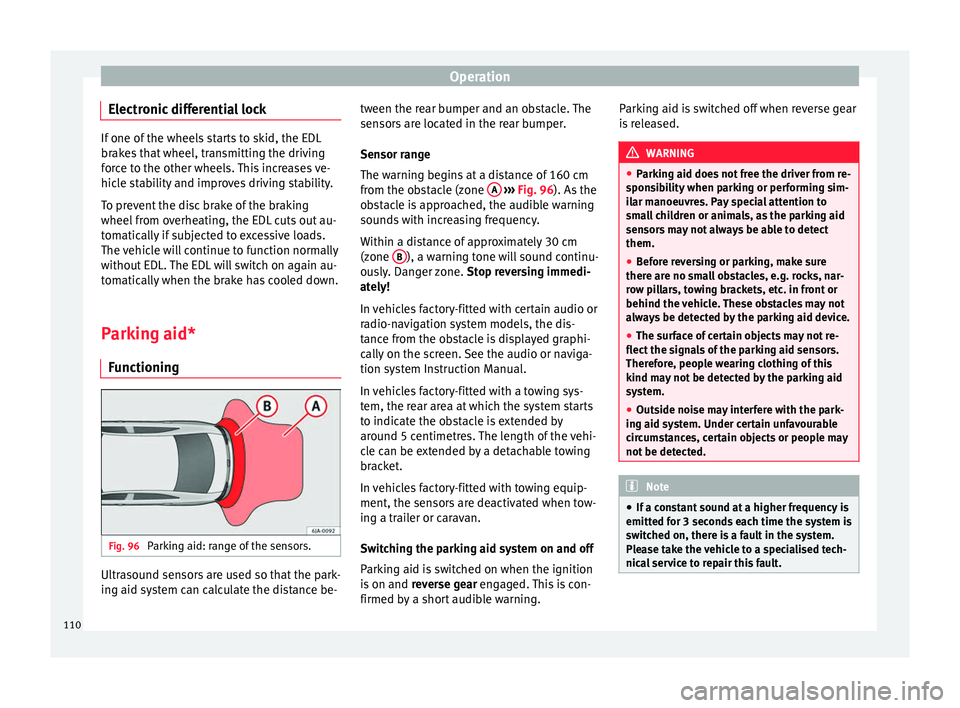
Parking aid* Functioning Fig. 96
Parking aid: range of the sensors. Ultrasound sensors are used so that the park-
ing aid system can calculate the distance be- tween the rear bumper and an obstacle. The
sensors are located in the rear bumper.
Sensor range
The warning begins at a distance of 160 cm
from the obstacle (zone
A
››› Fig. 96 ). As the
o b
stacle is approached, the audible warning
sounds with increasing frequency.
Within a distance of approximately 30 cm
(zone B ), a warning tone will sound continu-
ously. Danger zone. Stop reversing immedi-
ately!
In vehicles factory-fitted with certain audio or
radio-navigation system models, the dis-
tance from the obstacle is displayed graphi-
cally on the screen. See the audio or naviga-
tion system Instruction Manual.
In vehicles factory-fitted with a towing sys-
tem, the rear area at which the system starts
to indicate the obstacle is extended by
around 5 centimetres. The length of the vehi-
cle can be extended by a detachable towing
bracket.
In vehicles factory-fitted with towing equip-
ment, the sensors are deactivated when tow-
ing a trailer or caravan.
Switching the parking aid system on and off
Parking aid is switched on when the ignition
is on and reverse gear engaged. This is con-
firmed by a short audible warning. Parking aid is switched off when reverse gear
is released. WARNING
● Parking aid does not free the driver from re-
sponsibility when parking or performing sim-
ilar manoeuvres. Pay special attention to
small children or animals, as the parking aid
sensors may not always be able to detect
them.
● Before reversing or parking, make sure
there are no small obstacles, e.g. rocks, nar-
row pillars, towing brackets, etc. in front or
behind the vehicle. These obstacles may not
always be detected by the parking aid device.
● The surface of certain objects may not re-
flect the signals of the parking aid sensors.
Therefore, people wearing clothing of this
kind may not be detected by the parking aid
system.
● Outside noise may interfere with the park-
ing aid system. Under certain unfavourable
circumstances, certain objects or people may
not be detected. Note
● If a constant sound at a higher frequency is
emitted for 3 seconds each time the system is
switched on, there is a fault in the system.
Please take the vehicle to a specialised tech-
nical service to repair this fault. 110
Page 113 of 200

Driver assistance systems
●
To ensure that the parking aid system
works properly, the sensors must be kept
clean (e.g. free of ice).
● If the parking aid system is switched on
when the automatic gearbox selector lever is
in position P, the acoustic signal will be inter-
rupted (the car cannot be moved). Cruise control*
Introduction The cruise control system allows you to drive
at a constant speed of 30 km/h (19 mph) or
higher without having to press the accelera-
tor. However, the speed is only maintained
within the margin permitted by the engine
power and the braking effect of the engine.
The
warning lamp lights up on the general
instrument panel if cruise control is switched
on. WARNING
● For safety reasons the cruise control sys-
tem must not be used in dense traffic or
where roads conditions are poor (e.g. due to
ice, aquaplaning, loose grit, snow). – Risk of
accident!
● The programmed speed can only be re-es-
tablished if it is not too high for current traf-
fic conditions. ●
Always switch the cruise control system off
after using it in order to avoid involuntary
use. CAUTION
● The cruise control cannot maintain a con-
stant speed when the vehicle is moving
downhill. The vehicle tends to accelerate un-
der its own weight. Therefore, shift down or
use the brake pedal in good time to slow the
vehicle. Note
● In vehicles with an automatic gearbox, the
cruise control system cannot be switched on
if the selector lever is in position P, N or R.
● In vehicles with a manual gearbox, the
cruise control cannot be switched on if first
gear or reverse gear is engaged. Setting speed
Fig. 97
Turn signal and main beam headlight
lever: cruise control buttons. Setting speed
– Move knob A
››› Fig. 97 to the ON posi-
tion.
– Briefly press rocker switch B in
SET
posi-
tion when
you have reached the speed you
wish to set.
On releasing rocker switch B in
SET
, the cur-
r
ent speed is stored and will remain constant
without having to press the accelerator ped-
al.
111
Technical specifications
Advice
Operation
Safety
Page 114 of 200
Operation
Adjusting set speed Increasing speed by pressing the accelerator
pedal
–
Press the accelerator to increase the speed
of the vehicle.
– Release the accelerator and the previously
programmed speed will be resumed.
If, when pressing the accelerator, the vehicle
exceeds the programmed speed by more
than 10 km/h (6 mph) for more than 3 mi-
nutes, the set speed will be deleted. The
speed will have to be stored again.
Increasing speed by pressing switch B–
Press rocker switch B
›››
Fig. 97
››› page 111 in
RES.
– If the button is held down in the RES posi-
tion, the speed inc
reases continuously. Re-
lease the switch when the required speed
is reached. The speed is stored.
Setting a lower speed
– The set speed can be reduced by pressing
swit
ch B
›››
Fig. 97 ›
› ›
page 111 in SET.
– If the button is held down in the SET posi-
tion, the speed dec
reases continuously. Re-
lease the switch when the required speed
is reached. The speed is stored.
– On releasing the switch at speeds of less
than 30 km/h (19 mph), no speed will be set and the memory will be deleted. The ve-
hicle must be moving at a speed of over
30 km/h (19 mph) and switch
B pressed
again to SET
for it to be set.
The s
peed can be reduced by pressing the
brake pedal, which temporarily switches off
the cruise control.
Switching off cruise control
temporarily Cruise control
is switched off temporarily by
pressing switch A
››› Fig. 97
›
›› p
age 111 in
CANCEL or by pressing the brake or clutch
pedal.
The set speed is stored.
To
recover the set speed, briefly press switch
B in
RES
once you have released the brake
or c
lutch pedal.
Switching off cruise control
completely –
Move knob A
›››
Fig. 97 ›››
page 111 to
OFF . St
ar
t-Stop* System
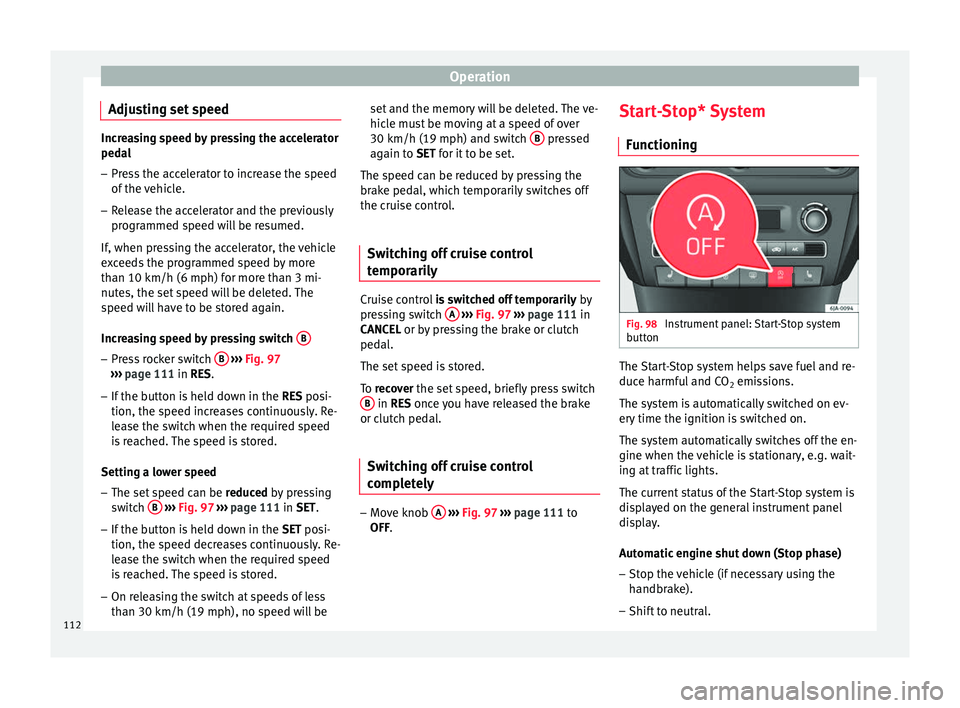
Functioning Fig. 98
Instrument panel: Start-Stop system
button The Start-Stop system helps save fuel and re-
duce harmful and CO
2 emissions.
The system is automatically switched on ev-
ery time the ignition is switched on.
The system automatically switches off the en-
gine when the vehicle is stationary, e.g. wait-
ing at traffic lights.
The current status of the Start-Stop system is
displayed on the general instrument panel
display.
Automatic engine shut down (Stop phase)
– Stop the vehicle (if necessary using the
handbrake).
– Shift to neutral.
112
Page 115 of 200

Driver assistance systems
– Release the clutch pedal.
Automatic engine start up (Start phase)
– Press the clutch.
Switching the Start-Stop system on and off
The Start-Stop system can be switched on
and off by pressing the
››› Fig. 98 button.
The w arnin
g lamp in the button will light up
when the system is switched off.
If the vehicle is in Stop phase when the but-
ton is pressed, the engine will start immedi-
ately.
The Start-Stop system works under complex
driving conditions that are difficult to detect
without specialist technology. The set of nec-
essary conditions for the correct operating of
the Start-Stop system are indicated below.
Conditions for automatic engine shut down
(Stop phase)
● Selector lever in neutral.
● Clutch pedal not pressed.
● Driver with seat belt fastened.
● Driver door closed.
● The bonnet closed.
● Vehicle stationary.
● The factory-fitted towing bracket is not elec-
trically connected to a trailer. ●
Engine at operating temperature.
● Vehicle's battery sufficiently charged.
● Vehicle not on a very steep slope
● Engine speed below 1,200 rpm.
● Vehicle battery temperature is neither too
high nor too low.
● Sufficient brake system pressure.
● Difference between outside temperature
and set interior temperature not too great
● Vehicle speed since the last time the en-
gine started was above 3 km/h (2 mph).
● Particulate filter not being cleaned
››› page 37.
● Front
wheels not overly turned (steering
wheel turned less than three quarters of a
turn)
Conditions for engine start up (Start phase)
● Clutch pedal pressed.
● Max./min. temperature set.
● Windscreen defrost function switched on.
● High blower speed.
● Start-Stop button pressed.
Conditions for automatic engine start up
without driver involvement
● Vehicle moving at a speed of over 3 km/h
(2 mph). ●
Difference between outside temperature
and interior temperature is too great
● Vehicle's battery insufficiently charged.
● Insufficient brake system pressure.
If the driver seat belt is unfastened for more
than 30 seconds in Stop phase, the engine
must be started using the ignition key.
Please observe the messages on the general
instrument panel display.
Warnings on the instrument panel display
(valid for vehicles not fitted with an
informative display)FAULT: Start-StopFault in the Start-Stop sys-
tem
START-STOP IMPOSSIBLEEngine cannot be auto-
matically shut down
START-STOP ACTIVEAutomatic engine shut
down (Stop phase)
SWITCH OFF IGNITIONSwitch the ignition off
START MANUALLYStart the engine manually WARNING
● If the engine is switched off, neither the
brake servo nor the power steering will work.
● Do not move the vehicle when the engine is
switched off. » 113
Technical specifications
Advice
Operation
Safety
Page 117 of 200

Towing bracket device
altitude, this also reduces climbing ability,
which requires a reduction of the weight of
the vehicle with a trailer by 10% for every
1000 m increase in altitude. The weight of
the assembly is calculated by adding the ve-
hicle weight (loaded) to the trailer weight
(loaded). Always drive with special care when
towing a trailer.
The towed load and support load information
that is displayed on the towing bracket man-
ufacturers label are only values for the verifi-
cation of the device. The correct figures for
your specific vehicle, which are usually lower
than these figures, are given in the documen-
tation of your vehicle. WARNING
● Exceeding the maximum established load
per axle and the maximum towing bracket
load in addition to the maximum permitted
load or the load of the vehicle + trailer as-
sembly can cause accidents and serious inju-
ries.
● A sliding load can considerably affect the
stability and safety of the vehicle + trailer as-
sembly, resulting in accidents and serious in-
juries. Towing a trailer
Exterior mirrors
Check whether you can see enough of the
road behind the trailer with the standard rear
vision mirrors. If this is not the case, you
should have additional exterior mirrors fitted.
Observe the relevant statutory requirements
of the country you are in.
Headlights
Before starting a journey, also check the
headlight beam settings with the trailer
hitched up. Adjust the headlight range set-
tings if necessary
›››
page 62, Range control
of main lights .
Driving speed
For your own safety do not drive faster than
the maximum permitted speed indicated on
the trailer.
At all times, immediately reduce speed if you
detect the slightest swaying movement of the
trailer. Never try to “return the trailer to a
straight position” by accelerating.
Brakes
Brake in due course! If the trailer has an over-
run brake , apply the brakes gently at first and
then, firm ly
. This will prevent the jerking that
can be caused by locking of trailer wheels.
Change to a lower gear in good time before descending a slope in order to take advant-
age of the engine brake.
The trailer is incorporated into the vehicle's
anti-theft alarm system:
● When the vehicle has a factory-fitted anti-
theft alarm and a towing bracket.
● When the trailer is electrically connected to
the vehicle via the towing bracket socket.
● When the vehicle electrical device and the
towing bracket are operational.
● When the vehicle is locked and the vehi-
cle's anti-theft alarm device is activated.
Once the electrical connection is interrupted
with the vehicle trailer locked, the alarm
sounds.
Always switch off the vehicle anti-theft alarm
device before connecting or disconnecting a
trailer. The vehicle anti-theft alarm device
could cause the alarm to sound ››› page 57,
Anti-theft alarm system*.
Engine overheating
In the event that the coolant temperature
gauge needle moves to the right section of
the scale or to the red area, immediately re-
duce speed. If the control lamp flashes on
the general instrument panel, stop the vehi-
cle and switch off the engine. Wait several
minutes and check the coolant level in the
tank ››› page 138
.
»
115
Technical specifications
Advice
Operation
Safety
Page 118 of 200
Operation
Please observe the following indications
››› page 35, Coolant level and temperature
.
The coolant temperature can be reduced by
switching on the heating. WARNING
● Adjust your speed to suit the road and traf-
fic conditions.
● An electrical installation that is connected
incorrectly or by non-specialised personnel
can prevent the connection of the current to
the trailer and cause faults in the operation of
the electrical system throughout the entire
vehicle, leading to accidents and serious in-
jury.
● All electrical work must be carried out only
by specialised services.
● Never directly connect the trailer electrical
device to the electrical sockets of the reverse
driving lights or other sources of electrical
current. CAUTION
● Avoid corners, and sudden and sharp brak-
ing.
● Once the trailing arm has been removed,
place the corresponding cover on the hole of
the fastening point. This prevents dirt from
entering the hole – see the trailer system as-
sembly manual. Note
● In the event of frequent journeys with a
trailer, we recommend also having the vehi-
cle inspected in between the service inter-
vals.
● When connecting and disconnecting the
trailer, the handbrake must be applied.
● For technical reasons, trailers with LED re-
verse lights cannot be incorporated into the
vehicle anti-theft alarm system. Towing bracket device
Introduction If the vehicle is equipped with a towing
bracket device from the factory or is a genu-
ine SEAT accessory, it meets all national tech-
nical and legal requirements for towing.
Your vehicle is fitted with a 13-pin power
socket for the electrical connection between
the trailer and the vehicle. If the towing
bracket is equipped with a
7-pin connector,
y ou c
an use the corresponding available
adaptor that is a genuine SEAT accessory.
The towing device has a maximum vertical
load of 50 kg
. WARNING
● Before driving with the ball-headed bar fit-
ted, verify its correct assembly and place-
ment in the clamping bush.
● Do not use the ball-headed bar if it is not
correctly placed and fixed in the clamping
bush.
● Do not use the towing device for towing if it
is damaged or has missing parts.
● Do not modify or adapt the towing device
connection.
● Never disengage the ball-headed bar with
the trailer still hitched. CAUTION
Be careful not to damage the paint on the
bumper when handling the ball-headed bar. 116
Page 125 of 200

Care and maintenance
●
The modification of the suspension of the
vehicle wheels, including the use of non-per-
mitted combinations of tyres and rims can al-
ter the operation of the airbag system and in-
crease the risk of serious or fatal injuries in
an accident.
● During all jobs on the airbag system, in ad-
dition to the removal and fitting of parts of
the system in the course of other repair jobs,
parts of the airbag system can be damaged.
Therefore in the event of an accident, this
may cause the airbags to activate incorrectly
or not activate at all. Care and cleaning
Introduction Regular and suitable care helps to
maintain
the useful life of your vehicle. This may also
be one of the requirements for upholding any
warranty claims in the event of corrosion or
paint defects.
We recommend you use cleaning products
from the SEAT Original Accessories pro-
gramme available in SEAT dealers. Please fol-
low the instructions for use on the packag-
ing. WARNING
● Cleaning products and other materials used
for car care can damage the health if mis-
used.
● Always keep car care materials in a safe
place out of the reach of children. Risk of poi-
soning!
● When washing the car during the winter
season: Moisture and ice on the brakes may
affect braking efficiency. Risk of accident!
● The ignition must always be switched off
when the car is washed. Risk of accident!
● Do not clean the underside of the car or in-
side the wheel arches without protecting your
hands and arms. You may cut yourself on
sharp metal parts!
● Perfumes and air fresheners inside the ve-
hicle may be harmful to health at high tem-
peratures in the interior. CAUTION
● Check the colour-fastness of your clothing
to avoid damaging or visibly staining the fab-
ric (leather), upholstery and fabric trim.
● Cleaning products containing solvents may
damage the material being cleaned.
● Do not wash the vehicle in direct sunlight.
Risk of damage to paintwork.
● If washing the vehicle with a hose in win-
ter, do not direct the jet of water directly at
the locks or at the door seals or bonnet. Risk
of freezing. ●
Do not use sponges for removing insects or
abrasive household sponges, etc. on painted
surfaces. Risk of damage to the painted sur-
face!
● Do not put stickers on the inner side of the
rear window in areas where heating elements
or the aerial are located. This could cause
damage and, in the case of the aerial, radio
and navigation system reception faults.
● Do not clean the inside of the window with
sharp objects or corrosive or acidic cleaning
products. Risk of damaging the heating ele-
ments or the aerial.
● Do not attach any fragrance or air freshener
to the dash panel. Risk of damage to the
dash panel!
● To avoid damaging the parking aid system
sensors, spray them only briefly at a mini-
mum distance of 10 cm when cleaning the ve-
hicle with a high-pressure or steam cleaner.
● Do not clean the roof panel with a brush.
Risk of damage to the panel surface! For the sake of the environment
● The packaging of the product used to care
for your vehicle is hazardous waste. It must
be disposed of according to current local law.
● Only wash the car in special wash bays.
» 123Technical specifications
Advice
Operation
Safety
Page 128 of 200

Advice
●
Make sure you do not damage the paint-
work on the vehicle on removing snow and
ice from the windows and rear vision mirrors.
● Do not remove the snow or ice dirty with
thick particles, e.g. gravel, sand or road salt,
from windows and mirrors. Risk of damage to
the glass and mirror surfaces. Radio reception and aerial
In vehicles factory-fitted with an audio or
navigation system, the aerial may be instal-
led in different places:
● inside the rear window next to the heating
elements,
● on the roof of the vehicle.
Headlights Use soap and clean, hot water to clean the
front headlights.
CAUTION
● Never rub the headlights to dry them and
do not use sharp objects to clean the plastic
glass material. These could damage the pro-
tective paint and cause the headlights to
crack. ●
Do not use aggressive cleaning products or
chemical solvents to clean the glass. This
could damage the headlights. Care of rubber seals
The weatherstrips on doors and windows will
remain pliable and last longer if they are oc-
casionally treated with a suitable rubber care
product. This will prevent premature ageing
and leaks. If they are properly cared for, the
seals will be less likely to freeze up in the
winter.
Door lock cylinder Special products must be used to defrost
lock cylinders.
Note
● Make sure, when washing the vehicle, that
the least amount of water possible enters the
lock cylinders.
● We recommend the use of products from
the selection of SEAT Original Accessories to
care for the door lock cylinder. Wheels
Wheel trims
If you wash the vehicle regularly, you should
also thoroughly wash the wheel trim. Regu-
larly remove any brake dust and road salt
from the wheels, otherwise the wheel materi-
al could be damaged. Repair any damage to
the wheel paintwork immediately.
Alloy wheels
After thorough washing, treat the wheels
with a protective product for alloy wheels. Do
not use abrasive products to care for the
wheels.
WARNING
Moisture, ice and road salt may affect braking
efficiency. Risk of accident! CAUTION
Heavy dirt on the wheels could lead to their
misalignment. This could result in vibrations
being transmitted to the steering wheel that
under certain conditions may cause prema-
ture steering wear. This dirt must be re-
moved. Note
We recommend you leave paint damage re-
pairs to a SEAT Authorised Service. 126
Page 134 of 200

Advice
serious damage to the engine! Contact an au-
thorised SEAT dealer to clean the engine fuel
system.
● Water allowed to collect in the fuel filter
can cause engine faults.
● Your vehicle is not prepared for use of bio-
fuel (RME) and, therefore, this fuel must not
be used for refuelling or driving. The use of
biofuel (RME) could cause serious damage to
the engine or the fuel system. Engine compartment
Introduction Always be aware of the danger of injury and
scalding as well as the risk of accident or fire
when working in the engine compartment,
e.g. when checking and refilling fluids.
Therefore, always observe the warnings and
follow all general safety precautions. The en-
gine compartment is a dangerous area
.WARNING
● Never open the bonnet if you see steam,
smoke or coolant escaping from the engine
compartment. Risk of scalding! Wait until no
steam or coolant can be seen before opening
the bonnet.
● Switch off the engine and remove the key
from the ignition. ●
Engage neutral in vehicles with manual
gearbox and move the selector lever to posi-
tion P in vehicles with automatic gearbox.
● Apply the handbrake firmly.
● Wait for the engine to cool down.
● For safety reasons, the bonnet must always
be closed when the vehicle is moving. There-
fore, after closing the bonnet always check
that it is properly secured.
● Should you notice that the bonnet is not
safely secured when the vehicle is moving,
stop the vehicle immediately and close the
bonnet properly. Risk of accident!
● Keep children away from the engine com-
partment.
● Do not touch hot engine parts. Risk of
burns!
● Never spill fluids on hot engine compart-
ments. These fluids can cause a fire (e.g. anti-
freeze in coolant)!
● Take care not to cause short circuits in the
electrical system, especially when working
on the battery.
● Never touch the radiator fan when the en-
gine is hot. The fan may start running sud-
denly!
● Never cover the engine with additional in-
sulating materials such as a blanket. Risk of
fire!
● Do not unscrew the cap on the coolant ex-
pansion tank when the engine is hot. The
cooling system is under pressure! ●
Protect face, hands and arms from any hot
steam or hot coolant released by covering the
cap with a large, thick rag when opening the
expansion tank.
● Do not leave any objects, such as cloths or
tools, in the engine compartment.
● When working underneath the vehicle, se-
cure it so that it cannot roll away and support
it safely on suitable supports. The hydraulic
jack is not sufficient for this purpose. Risk of
injuries!
● If any tests have to be performed with the
engine running, there is an extra safety risk
from rotating parts, such as the drive belt, al-
ternator and radiator fan, etc., and from the
high-voltage ignition system. You should also
note the following:
– Never touch the electrical wiring of the
ignition system.
– Keep away from moving engine parts
when wearing jewellery, loose clothing or
long hair. Risk of fatal injuries! All jewel- lery must be removed, hair tied back and
close-fitting clothing worn.
● Observe the following additional warnings
if work on the fuel system or the electrical
system is necessary.
–Always disconnect the battery from the
on-board network.
– Do not smoke.
– Never work near naked flames.
– Always keep an approved fire extinguish-
er immediately available. 132