warning light Seat Toledo 2014 Owner's Guide
[x] Cancel search | Manufacturer: SEAT, Model Year: 2014, Model line: Toledo, Model: Seat Toledo 2014Pages: 200, PDF Size: 4.37 MB
Page 61 of 200

Opening and closing
Boot hatch Fig. 42
Rear lid: opening from the outside. Fig. 43
Close-up of the inside trim of the rear
lid: hand grip The rear lid opening system operates electri-
cally. It is activated by using the handle on
the boot lid. Opening the rear lid
– Pull on the release lever and lift the rear lid
››› Fig. 42 . The rear lid will automatically
open.
C lo
sing the rear lid
– Hold the rear lid by one of the two handles
on the interior lining and close it, pushing
slightly.
This system may or may not be operative, de-
pending on the situation of the vehicle.
If the rear lid is locked then it cannot be
opened, however if it is unlocked then the
opening system is operative and the rear lid
may be opened.
To lock/unlock, press the button or the
button 1 on the remote control key.
A warning appears on the instrument panel
display if the boot lid is open or not properly
closed.* An audible warning is also given if
the boot lid is opened while the vehicle is
moving faster than 6 km/h (4 mph)*. WARNING
● Always close the rear lid properly. Risk of
accident or injury.
● Do not close the rear lid by pushing it down
with your hand on the rear window. The glass
could smash. Risk of injury! ●
Ensure the rear lid is locked after closing it.
If not, it may open unexpectedly while driv-
ing.
● Never allow children to play in or around
the vehicle. A locked vehicle can be subjected
to extremely high and low temperatures, de-
pending on the time of year, thus causing se-
rious injuries/illness. It could even have fatal
consequences. Close and lock both the rear
lid and all the other doors when you are not
using the vehicle.
● Closing the rear lid without observing and
ensuring it is clear could cause serious injury
to you and to third parties. Make sure that no
one is in the path of the rear lid.
● Never drive with the rear lid open or half-
closed, exhaust gases may penetrate into the
interior of the vehicle. Danger of poisoning!
● If you only open the rear lid, do not leave
the key inside. The vehicle will not be opened
if the key is left inside. Note
● Once the rear lid is closed, its lock is en-
gaged and the alarm system is activated. On-
ly valid if the vehicle has been locked before
the rear lid is closed.
● The release catch located at the top of the
registration plate recess is deactivated on ac-
celerating or at speeds of over 5 km/h (3
mph). The catch is reactivated when the vehi-
cle comes to a standstill and a door is
opened. 59
Technical specifications
Advice
Operation
Safety
Page 62 of 200

Operation
Electric window opening and
closing Introduction WARNING
● When locking the vehicle from the outside,
make sure that nobody is inside the vehicle,
as the windows cannot be opened from the
inside in an emergency.
● For safety reasons, use safety button 5›››
Fig. 44 that deactivates the window
sw it
ches on the rear doors when children are
travelling in the rear seats. CAUTION
● Keep the windows clean to ensure the sys-
tem operates correctly.
● Defrost ››› page 125, Windows and exterior
mirrors any frozen windows before use. Oth-
er w
ise you run the risk of damaging the elec-
tric window riser mechanism.
● Always make sure all of the windows are
closed on leaving the locked vehicle. Note
● The vehicle heating and ventilation system
should be used to ventilate the interior while
driving. Leaving the windows open could al-
low dust and other dirt to enter the vehicle and cause unpleasant noises at certain
speeds.
● Do not leave the side windows open at high
speeds, as this will overly increase fuel con-
sumption. Using electric window switches
Fig. 44
Detail of the driver door: controls for
the windows. The electric window opening and closing sys-
tem only works when the ignition is switched
on.
Opening
– Press gently on the respective button on
the door to open the window. The process
will stop when the button is released.
– The driver door window can also be auto-
matically opened by pressing the button as far as it will go (fully open). Press the but-
ton again to immediately stop it.
Closing
– Press the respective button gently to close
the window. The process will stop when the
button is released.
Window control buttons Button for window in front left door
Button for window in front right door
Button for window in rear left door
Button for window in rear right door
Safety switch for deactivating the electric
window buttons in the rear doors
Safety button
Press the safety button 5
››› Fig. 44 to deac-
tiv at
e the controls on the rear doors. Pressing
the safety button 5 again will reactivate the
controls on the rear doors.
If the rear door controls are deactivated, the
warning lamp on the safety button 5 will
light up. Note
The electric window opening mechanism is
equipped with a thermostat switch. This may
overheat if the window is opened and closed
repeatedly. This causes the window to lock
temporarily. Once the thermostat switch has 1
2
3
4
5
60
Page 63 of 200

Lights and visibility
cooled down, the window can be operated
once again.
Roll-back function on electric
windows
The electric windows are equipped with a
roll-back system that reduces risk of injury
when closing windows.
If an obstacle is present, the closing mecha-
nism will stop and the window will roll back a
few centimetres.
If an obstacle prevents closing for the next
10 seconds, the closing mechanism will once
again stop and the window will roll back an-
other few centimetres.
If in the next 10 seconds you attempt to close
the window after it has rolled back the sec-
ond time, only the closing mechanism will be
stopped even if the obstacle is still present.
The roll-back function is still connected.
The roll-back function will only be disconnec-
ted if you once again attempt to close the
window in the following 10 seconds. In this
case, the window will close at full force
.
If you wait for a further 10 seconds, the roll-
back function will be once again connected. Lights and visibility
Lights Introduction The location of the controls of
right-hand
drive cars differs slightly from the location
sho wn her
e ››› Fig. 45 ››› page 61. However,
the symbols indicating the respective posi-
tions of the controls remain the same. WARNING
Never drive with only the side lights on! The
side lights are not bright enough to illumi-
nate the road ahead and to ensure that other
road users are able to see you. Always use
your dipped beam headlights if it is dark or if
visibility is poor. CAUTION
● Use the lights in line with local law.
● However, drivers always remain responsi-
ble for correctly adjusting and using the
lights. Note
● An audible warning will be heard when the
light control is set to and you remove the
ignition k ey
and open the door. Once the
driver door is closed (ignition off), the audi-
ble warning will stop, whereas the side lights will remain on to light up the stationary vehi-
cle in case this is necessary.
● Depending on weather conditions (cold or
wet), the lights may mist up temporarily on
the inside. This is particularly the case in the
event of a difference in temperature between
the inside and in front of the light. By switch-
ing on the lights, the area through which the
beam of light is projected will quickly be
demisted, although the edges may remain
misted. The real lights and turn signals can
mist up. This has no influence on the useful
life of the lighting system. Sidelight and headlight
Fig. 45
Instrument panel: light control. Switching on side lights
– Turn the light switch ››› Fig. 45 to position
. »
61
Technical specifications
Advice
Operation
Safety
Page 64 of 200
Operation
Switching on dipped beam – Turn the light switch ››› Fig. 45 to position
.
Sw it
ching off lights (except daytime driving
lights)
– Turn the light switch ››› Fig. 45 to position
0.
Ran
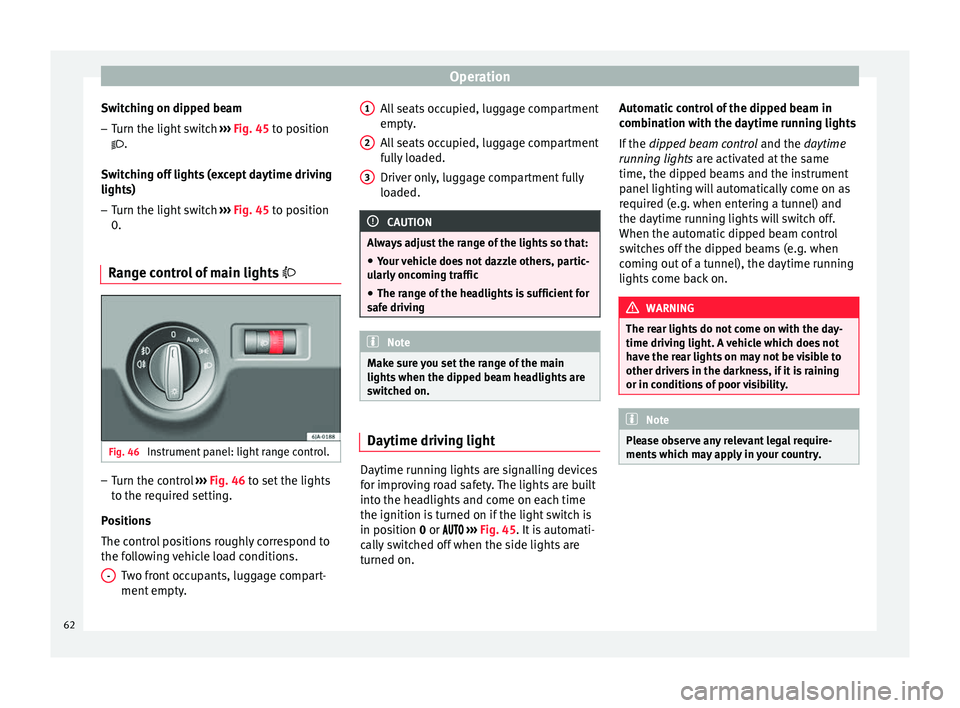
ge control of main lights Fig. 46
Instrument panel: light range control. –
Turn the control ››› Fig. 46 to set the lights
t o the r
equired setting.
Positions
The control positions roughly correspond to
the following vehicle load conditions. Two front occupants, luggage compart-
ment empty.
- All seats occupied, luggage compartment
empty.
All seats occupied, luggage compartment
fully loaded.
Driver only, luggage compartment fully
loaded.
CAUTION
Always adjust the range of the lights so that:
● Your vehicle does not dazzle others, partic-
ularly oncoming traffic
● The range of the headlights is sufficient for
safe driving Note
Make sure you set the range of the main
lights when the dipped beam headlights are
switched on. Daytime driving light
Daytime running lights are signalling devices
for improving road safety. The lights are built
into the headlights and come on each time
the ignition is turned on if the light switch is
in position
0
or ›
››
Fig. 45. It is automati-
cally switched off when the side lights are
turned on. 1 2
3 Automatic control of the dipped beam in
combination with the daytime running lights
If the
dipped beam control and the
daytime
r
unning lights are activated at the same
time, the dipped beams and the instrument
panel lighting will automatically come on as
required (e.g. when entering a tunnel) and
the daytime running lights will switch off.
When the automatic dipped beam control
switches off the dipped beams (e.g. when
coming out of a tunnel), the daytime running
lights come back on. WARNING
The rear lights do not come on with the day-
time driving light. A vehicle which does not
have the rear lights on may not be visible to
other drivers in the darkness, if it is raining
or in conditions of poor visibility. Note
Please observe any relevant legal require-
ments which may apply in your country. 62
Page 66 of 200

Operation
CAUTION
Do not cover the windscreen light sensor with
stickers or similar objects; this could impair
operation. Front fog lights*
Fig. 48
Instrument panel: light switch. Switching on front fog lights
– First turn the light switch ›››
Fig. 48 to posi-
tion , or
.
– Pull on the light switch to position 1 .
The ›››
page 32 warning lamp lights up on
the g ener
al instrument panel if the front fog
lights are switched on. Front fog lights with cornering
function* 3 Not valid for vehicles fitted with Full-LED lights
Fr ont
fog lights with cornering function pro-
vide better lighting of the area around the car
when driving through a corner or parking,
etc.
Front fog lights with cornering function
switch on depending on how far you turn the
steering wheel or whether or not the turn sig-
nals 1)
are switched on, if the following condi-
tions are met:
● The vehicle is stationary, the ignition is
switched on or you are moving at a speed of
less than 40 km/h (25 mph);
● The daytime driving light is switched off
● The dipped beam is switched on
● The fog lights are switched off
● Reverse gear is not engaged Rear fog light Switching on the rear fog light
– First turn the light switch ››› Fig. 48
››› page 64 to position
, or .
– Pull on the light switch to position 2 .
If the vehicle is not equipped with front fog
lights ››› page 64, the rear fog light is switch-
ed on b y
turning the switch to position or
and pulling it to position 2 . This type of
switch only has one position.
The ››› page 32
warning lamp lights up on
the g ener
al instrument panel if the rear fog
lights are switched on.
If you are towing a trailer or caravan equip-
ped with a rear fog light on a vehicle with a
factory-fitted towing bracket or one installed
using parts from the original SEAT parts
catalogue
, only the rear fog light on the trail-
er or caravan will light up. 1)
In the event of a conflict between both functions,
i.e. if you turn the steering wheel to the left while the
right-hand turn signal is on, the turn signals will take
priority.
64
Page 67 of 200

Lights and visibility
“Coming Home”/“Leaving Home”*
function This function makes it possible, under poor
visibility conditions, to automatically turn on
the lights for a brief period of time after the
vehicle has been parked or when approach-
ing the vehicle.
The function is automatically turned on if the
following conditions are met:
● The light switch is in position
››› page 63
.
● The v
isibility around the vehicle is reduced.
● The ignition is switched off.
To turn on this function, switch on the head-
light flasher prior to exiting the vehicle.
The light is adjusted according to the data re-
corded by the light sensor that is installed
between the windscreen and the inside rear
view mirror.
The function automatically turns on the side
lights and headlights, the lighting for the en-
try area on the exterior mirrors and the num-
ber plate light.
“Coming Home” function
The light is automatically switched on when
the driver door is opened (for 60 seconds af-
ter the ignition is switched off). The lights is switched off when all the doors
and the boot lid are closed.
If a door or the boot lid remains open, the
light will switch off after 60 seconds.
“Leaving Home” function
The light is automatically switched on when
the vehicle is unlocked using the remote con-
trol.
The light is switched off after 10 seconds or
when the vehicle is locked.
Hazard warning light switch Fig. 49
Instrument panel: switch for hazard
warning lights. –
Press the button ››› Fig. 49 to switch the
h az
ard warning lights on or off.
The warning lamps on the instrument panel
and the warning lamp on the switch will flash at the same time as the turn signals when
the hazard warning lights are switched on.
The hazard warning lights also work when
the ignition is switched off.
The hazard warning lights come on automati-
cally in the event of an accident in which an
airbag is triggered.
Note
Switch on the hazard warning lights to warn
other road users, for example:
● When reaching the tail end of a traffic jam
● if the vehicle has a technical fault or you
are involved in an emergency situation. Parking lights*
Parking lights
– Switch the ignition off.
– Move the turn signal lever ›››
Fig. 47
››› page 63 up or down to turn on the right
or l ef
t-hand parking lights respectively.
Parking light on both sides – Turn the light switch ›››
Fig. 45
››
› page 61 to position and eng age the
steering lock. »
65
Technical specifications
Advice
Operation
Safety
Page 72 of 200

Operation
Switching off the wipers – Move the lever to position 0
››› Fig. 56 . WARNING
The rain sensor may not detect enough rain
to switch on the wipers.
● If necessary, switch on the wipers manually
when water on the windscreen obstructs visi-
bility. Note
Do not put stickers on the windscreen in front
of the rain sensor*. This may cause sensor
disruption or faults. Headlight washer system*
The headlight washers operate briefly if the
dipped headlights or headlights are on and
the lever is moved to position
5
›››
Fig. 56 .
The he a
dlight washer system also operates
every 10 windscreen wash cycles.
Clean off stubborn dirt (insects, etc.) from the
headlights at regular intervals, for instance
when filling the fuel tank. Please observe the
following indications ›››
page 126, Head-
lights.
To en
sure the system works properly in win-
ter, keep the nozzle holders free of snow and
remove any ice with a de-icer spray. CAUTION
Never pull on the nozzle holders. Risk of
damage to the system! Rear vision mirrors
Interior rear vision mirror with manual
anti-dazzle adjustment Basic settings
– Push the lever at the bottom of the mirror
forward.
Rear vision mirror anti-dazzle setting – Pull the lever at the bottom of the mirror to-
wards you.
Exterior mirrors Fig. 57
Door interior: adjuster knob. Before beginning any journey, adjust the rear
view mirrors for a good rear visibility.
Heated rear vision mirrors*
–
Turn the knob to position
›
›› Fig. 57
.
Electrical adjustment of the left-hand
exterior mirror*
– Turn the knob to position ›
›› Fig. 57. The
mirror movements are the same as those of
the knob.
Electrical adjustment of the right-hand
exterior mirror*
– Turn the knob to position ››› Fig. 57. The
mirror mo
vements are the same as those of
the knob. WARNING
● Convex (wide-angle) rear vision mirrors give
a larger field of vision. However, they make
objects appear smaller and further away than
they really are. For this reason, you should
not rely on these rear vision mirrors for judg-
ing the distance of vehicle behind.
● If possible, use the interior rear vision mir-
ror to estimate distances to vehicles behind
you. Note
● Exterior mirrors are only heated when the
engine is running. 70
Page 73 of 200

Seats and head restraints
●
Do not touch the exterior mirrors when the
heating system is running.
● If the electrical adjustment should ever fail
to operate, the rear vision mirrors can be ad-
justed by hand by pressing the edge of the
mirror glass.
● Visit the technical service in the event of a
fault in the electrical rear vision mirror ad-
justment system. Seats and head restraints
Adjusting seats and head
restraints
Introduction Set the driver seat in such a way that the
pedals can be fully depressed with your legs
slightly bent.
Set the driver seat backrest so that you can
reach the upper point of the steering wheel
with your arms slightly bent.
The correct seat position is very important
for:
●
reaching all of the controls safely and
quickly,
● a relaxed posture that will not produce fati-
gue,
● maximum protection from the seat belts
and airbag system WARNING
● Adjust the driver seat only when the vehi-
cle is stationary. Risk of accident!
● Be careful when adjusting the front seats!
Careless and uncontrolled adjustment can
cause injuries. ●
The backrests must not be reclined too far
back while driving. This could limit the effect
of the seat belts and the airbag system. Risk
of injury!
● Never transport more than the permitted
amount of people in your vehicle.
● Every occupant in the vehicle must properly
fasten and wear the seat belt belonging to
his or her seat. Children must be protected
with an appropriate child restraint system
››› page 24, Transporting children safety.
● The front seats, head restraints and seat
belts must always be adjusted to the size of
the vehicle occupant to provide you and your
passengers with the greatest possible protec-
tion.
● Your feet should remain in the footwell
while the vehicle is moving; never rest them
on the dash panel, on the window or on the
seat! This also applies to passengers. An in-
correct sitting position exposes you to an in-
creased risk of injury in case of a sudden
braking or an accident. If the airbag is trig-
gered, you could sustain severe injuries due
to an incorrect sitting position!
● It is important for the driver and front pas-
senger to keep a distance of at least 25 cm
from the steering wheel and dash panel. Fail-
ure to respect the minimum distance means
that the airbag will not protect you. Risk of
fatal injury if triggered!
● Objects must not be placed in the footwell,
as they could move to the area of the pedals
in the event of a braking manoeuvre or
change of direction. This would prevent the » 71Technical specifications
Advice
Operation
Safety
Page 80 of 200
Operation
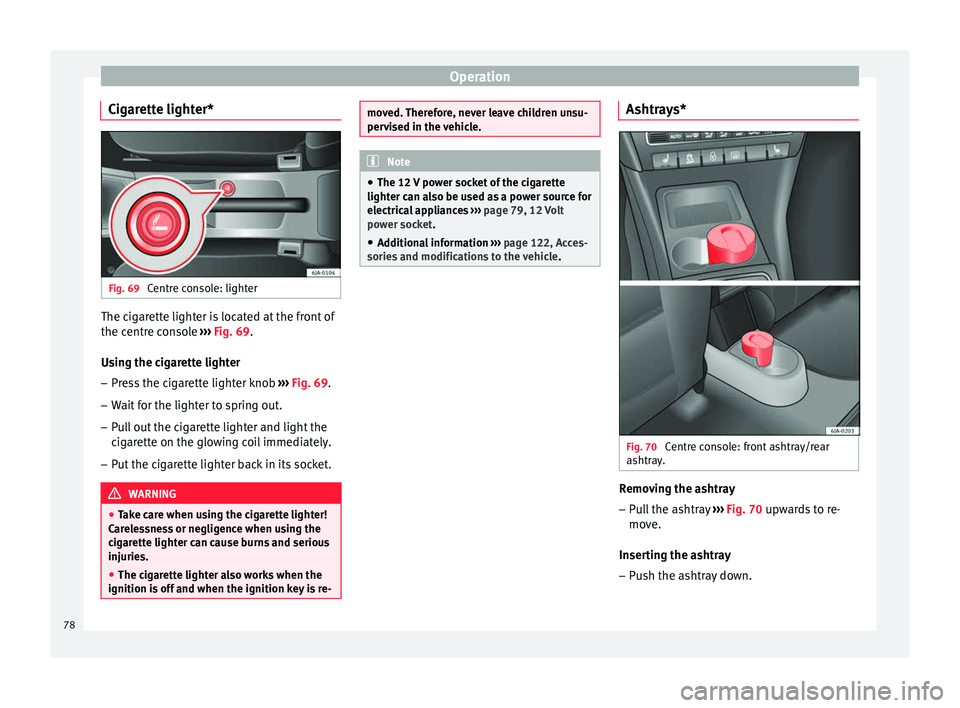
Cigarette lighter* Fig. 69
Centre console: lighter The cigarette lighter is located at the front of
the centre console
››› Fig. 69 .
U s
ing the cigarette lighter
– Press the cigarette lighter knob ››› Fig. 69.
– Wait
for the lighter to spring out.
– Pull out the cigarette lighter and light the
cigarette on the glowing coil immediately.
– Put the cigarette lighter back in its socket. WARNING
● Take care when using the cigarette lighter!
Carelessness or negligence when using the
cigarette lighter can cause burns and serious
injuries.
● The cigarette lighter also works when the
ignition is off and when the ignition key is re- moved. Therefore, never leave children unsu-
pervised in the vehicle.
Note
● The 12 V power socket of the cigarette
lighter can also be used as a power source for
electrical appliances ››› page 79, 12 Volt
power socket .
● Ad dition
al information ››› page 122, Acces-
sories and modifications to the vehicle . Ashtrays*
Fig. 70
Centre console: front ashtray/rear
ashtray. Removing the ashtray
– Pull the ashtray ››› Fig. 70 upwards to re-
mo v
e.
Inserting the ashtray
– Push the ashtray down.
78
Page 81 of 200

Transport and practical equipment
WARNING
Never put flammable materials in the ashtray.
Risk of fire! CAUTION
Never hold onto the ashtray by the lid when
removing it. Risk of breaking the lid. 12 Volt power socket
Fig. 71
Centre console: 12 V power socket. The 12 V power socket is located at the front
of the centre console
›››
Fig. 71 .
U s
ing the power socket
– Open the cover or remove the cigarette
lighter concealing the socket.
– Insert the plug of the electrical appliance
into the socket. Additional information
››› page 122, Acces-
sories and modifications to the vehicle . WARNING
● Improper use of the sockets or electrical
appliances can cause a fire and lead to burns
and other serious injuries.
● Never leave children unsupervised in the
vehicle. The 12 V power socket is also func-
tional when the ignition is switched off and
the key is removed.
● Should the connected appliance overheat,
immediately switch it off and disconnect it
from the socket. CAUTION
● The 12 V power socket can only be used to
power appliances with a power rating of up to
120 watts.
● Never exceed the maximum permitted pow-
er, as this could cause damage to the vehicle
electrical installation.
● With the engine switched off, however, the
vehicle battery will drain. Risk of discharging
the battery!
● Only use suitable plugs so as not to dam-
age the power socket.
● Only use appliances that have been tested
for electromagnetic compatibility in compli-
ance with current regulations.
● Before switching the ignition on or off, un-
plug the appliances from the power socket to protect them from any damage caused by
fluctuations in voltage.
● Follow the instructions for use of connected
appliances! Multimedia compartment
Fig. 72
Front centre console: multimedia
compartment. The multimedia compartment is in the stor-
age compartment of the front centre console
››› Fig. 72 .
The c omp
artment can be used to hold mobile
phones, mp3 players or similar devices. WARNING
Never use the multimedia compartment as an
ashtray or to store flammable materials. Risk
of fire! 79
Technical specifications
Advice
Operation
Safety