brake light Seat Toledo 2015 User Guide
[x] Cancel search | Manufacturer: SEAT, Model Year: 2015, Model line: Toledo, Model: Seat Toledo 2015Pages: 248, PDF Size: 5.06 MB
Page 85 of 248
Fuses and bulbs
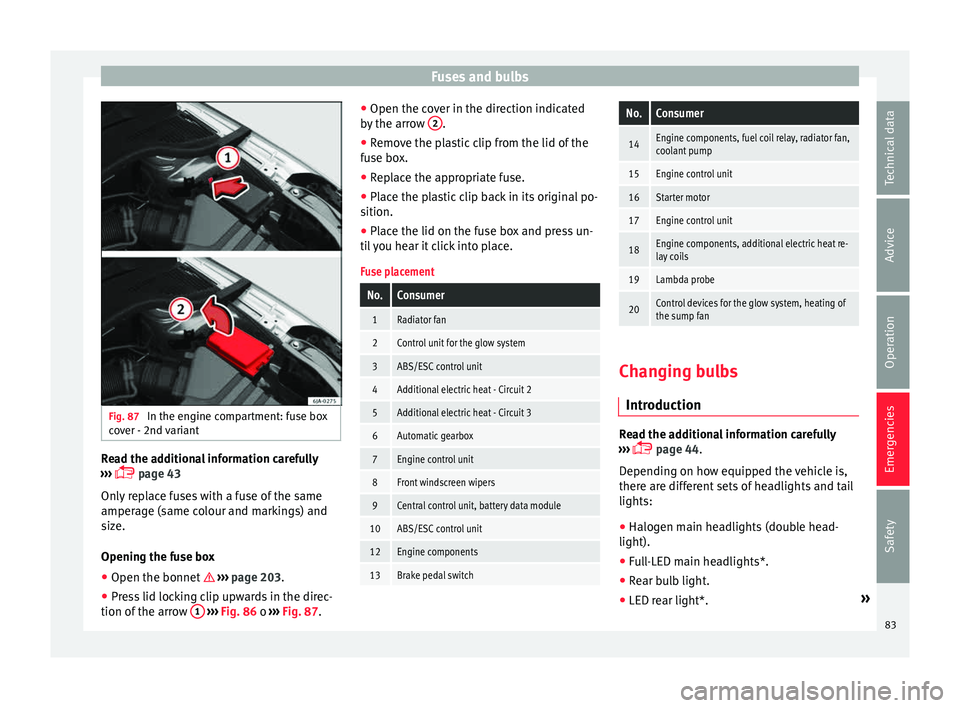
Fig. 87
In the engine compartment: fuse box
c o
v
er - 2nd variant Read the additional information carefully
› ›
›
page 43
Only replace fuses with a fuse of the same
amperage (same colour and markings) and
size.
Opening the fuse box ● Open the bonnet ›››
page 203.
● Press lid locking clip upwards in the direc-
tion of the arro
w 1
› ›
› Fig. 86 o ››› Fig. 87. ●
Open the cov
er in the direction indicated
by the arrow 2 .
● Remove the plastic clip from the lid of the
f u
se bo
x.
● Replace the appropriate fuse.
● Place the plastic clip back in its original po-
sition.
● Plac
e the lid on the fuse box and press un-
til
you hear it click into place.
Fuse placement
No.Consumer
1Radiator fan
2Control unit for the glow system
3ABS/ESC control unit
4Additional electric heat - Circuit 2
5Additional electric heat - Circuit 3
6Automatic gearbox
7Engine control unit
8Front windscreen wipers
9Central control unit, battery data module
10ABS/ESC control unit
12Engine components
13Brake pedal switch
No.Consumer
14Engine components, fuel coil relay, radiator fan,
coolant pump
15Engine control unit
16Starter motor
17Engine control unit
18Engine components, additional electric heat re-
lay coils
19Lambda probe
20Control devices for the glow system, heating of
the sump fan Changing bulbs
Intr oduction Read the additional information carefully
› ›
›
page 44.
Depending on how equipped the vehicle is,
there are different sets of headlights and tail
lights:
● Halogen main headlights (double head-
light).
● Full-LED main headlights*.
● Rear bulb light.
● LED rear light*. »
83
Technical data
Advice
Operation
Emergencies
Safety
Page 90 of 248
Emergencies
– Pu
l
l the rear light unit backward ( ››› Fig. 98
2 ) to remove the light from its housing.
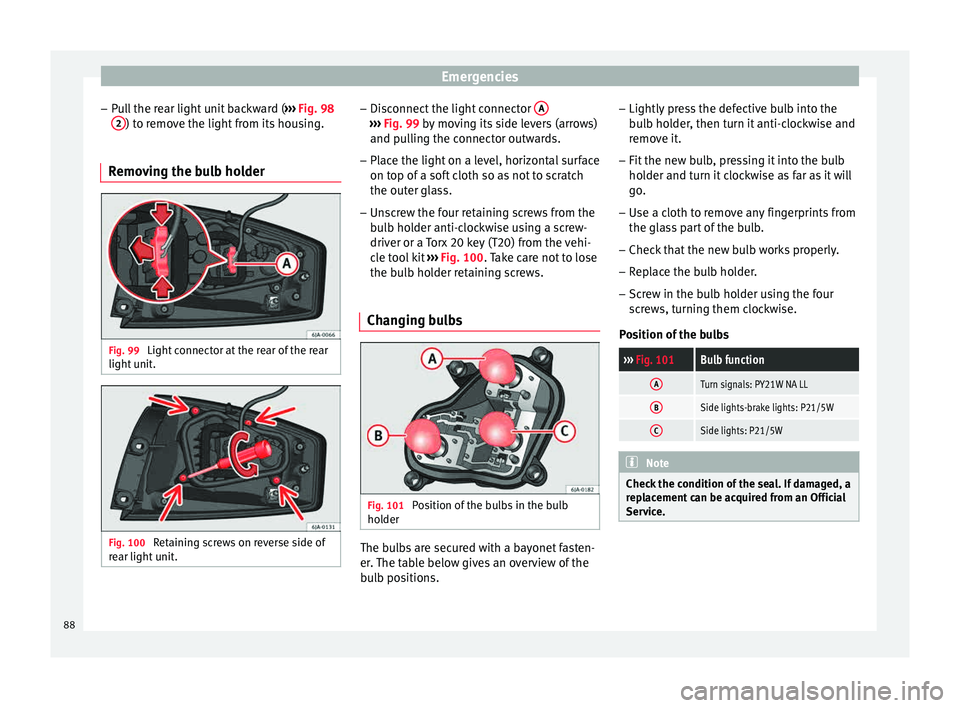
Removing the bulb holder Fig. 99
Light connector at the rear of the rear
light u
nit
. Fig. 100
Retaining screws on reverse side of
r e
ar light
unit. –
Di s
c
onnect the light connector A ›››
Fig. 99 b y moving its side levers (arrows)
and p u
lling the connector outwards.
– Place the light on a level, horizontal surface
on top of a sof
t cloth so as not to scratch
the outer glass.
– Unscrew the four retaining screws from the
bul
b holder anti-clockwise using a screw-
driver or a Torx 20 key (T20) from the vehi-
cle tool kit ››› Fig. 100. Take care not to lose
the bulb holder retaining screws.
Changing bulbs Fig. 101
Position of the bulbs in the bulb
ho l
der The bulbs are secured with a bayonet fasten-
er
.
The t
able below gives an overview of the
bulb positions. –
Lightly pre
ss the defective bulb into the
bulb holder, then turn it anti-clockwise and
remove it.
– Fit the new bulb, pressing it into the bulb
holder and t
urn it clockwise as far as it will
go.
– Use a cloth to remove any fingerprints from
the glas
s part of the bulb.
– Check that the new bulb works properly.
– Replace the bulb holder.
– Screw in the bulb holder using the four
scr
ews, turning them clockwise.
Position of the bulbs
››› Fig. 101Bulb function
ATurn signals: PY21W NA LL
BSide lights-brake lights: P21/5W
CSide lights: P21/5W Note
Check the condition of the seal. If damaged, a
rep l
acement can be acquired from an Official
Service. 88
Page 101 of 248
Instruments and warning lamps
CAUTION
Failure to heed the control lamps and text
mes s
ages when they appear may result in
faults in the vehicle. Hand brake
If the
warning lamp lights up, the hand-
br ak
e is applied. Additionally, driving the ve-
hicle at speeds exceeding 6 km/h (4 mph) for
at least 3 seconds produces an audible warn-
ing.
The informative display indicates:
Release the handbrake!
Brake system The warning lamp i
l
lumin
ates if the brake
fluid level is too low or if there is a fault in the
ABS system.
The informative display indicates:
Brake fluid Instruction Manual!
Stop the vehicle, switch off the engine and
check the level of the brake fluid
››› page 209 WARNING
● The fo l
lowing indications must be taken in-
to account when opening the engine com-
partment to check the brake fluid
››› page 203, Engine compartment.
● If the warning lamp illumin
ates together
with the warning lamp ››› page 101, Anti-
lock brake system (ABS) , , stop the ve-
hicle! Go to a technical service.
● A fault in the brake system or in the Anti-
lock br
ake system (ABS) can lead to longer
braking distances – Risk of accident! Fastening the seat belt
After switching on the ignition, the warning
l
amp i
l
luminates to instruct the driver or
front passenger to fasten their seat belt. The
warning lamp switches off when the driver or
front passenger fastens their seat belt
››› page 61.
Alternator If the
control lamp is illuminated while the
en gine i
s running, the battery is not charg-
ing.
Go to a technical service. Have the car's elec-
trical equipment inspected. CAUTION
Additionally, if the warning lamp lights up
whi
le driving, the warning lamp also lights
up (cooling system fault). Stop the vehicle
and switch off the engine – Risk of engine
damage! Door open
If the control lamp,
lights up , one of
the
doors, the rear lid or the bonnet is open.
Engine oil The control lamp
fla
she
s red (oil pressure
low)
The informative display indicates:
Oil pressure. Switch off the en-
gine! Instruction Manual!
Stop the vehicle, switch off the engine and
check the engine oil level ›››
page 207
If the symbol flashes although the oil level is
correct, do not drive on . Do not even run
the engine at idle speed!
Go to a technical service.
The control lamp lights up yellow (insuf-
ficient oil level)
The informative display indicates: »
99
Technical data
Advice
Operation
Emergencies
Safety
Page 103 of 248
Instruments and warning lamps
Report No.: electronic stability
control (ESC)
or Report No.: Traction control
system (ASR)
Go t o a t
ec
hnical service.
Further information ››› page 167, Electronic
stability control (ESC) .Note
If the battery is disconnected and connected
again, the y
ellow warning lamp lights up
when the ignition is switched on. This warn-
ing lamp must switch off after covering a
short distance. Traction control system (ASR)*
If the control lamp
fla
she
s, the ASR is
working.
If the warning lamp illuminates on igni-
tion, the TCS system may have switched off
due to technical reasons. Turn off the ignition
and turn it on again. Upon switching on the
ignition again, if the warning lamp has
switched off, this means the TCS is function-
ing correctly again.
If the warning lamp remains illuminated,
there is a fault in the TCS.
The informative display indicates: Report No.: Traction control
system (ASR)
Go to a tec
hnical service.
Further information ››› page 168, Traction
control system (ASR) .
Anti-lock brake system (ABS) If the
warning lamp is illuminated, there is
a f au
lt in the ABS.
The informative display indicates: ABS fault
The brake system alone is operational in the
vehicle, without ABS.
Go to a technical service. WARNING
● If the w
arning lamp illuminates together
with the ››› page 99 warning lamp, ,
stop the vehicle! Go to a technical service.
● A fault in the Anti-lock brake system (ABS)
can le
ad to longer braking distances – Risk of
accident! Rear fog light
The control lamp
lights up when the r
e
ar
fog light is switched on ›››
page 125. Bulb fault
The control lamp
lights up when ther e i
s a
fault in a bulb:
● for several seconds after switching on the
ignition,
● When connecting a faulty bulb
This i
s indicated on the informative display,
e.g.:
Check the front right dipped
beam headlight! Note
The rear side lights and number plate light
cont ain sev
eral bulbs. The control lamp
lights up only when there is a fault in all the
number plate bulbs or side light bulbs (of a
combined tail light). Therefore it is advisable
to regularly check the bulb operation. Emission control system
If the warning lamp
is
lit
up, there is a
fault in the emission system. The engine con-
trol unit allows driving to continue in an
emergency program.
Go to a technical service.
101
Technical data
Advice
Operation
Emergencies
Safety
Page 155 of 248

Driving
It is possible, however, to set the blower
s peed t
o s
uit requirements.
● Turn control 10
› ››
Fig. 171
c
ounter-clock-
wise (to lower the speed) or clockwise (to in-
crease the speed).
Climatronic will switch off when the blower
switches off. WARNING
Read and observe the safety warnings ›››
in
Genera l
notes on page 146. Windscreen defrost
Switching on windscreen defrosting
●
Press the button
12
› ›
›
Fig. 171.
Switching off windscreen defrosting
● Press button
12
› ›
›
Fig. 171 several
times or press the AUTO button.
The t emper
at
ure is regulated automatically.
The air output is increased from vents 1
››› page 147 and 2. Driving
St ar
tin
g and stopping the en-
gine
Introduction Read the additional information carefully
›› ›
page 17 WARNING
● When mov in
g with the engine switched off,
the ignition key must always remain in posi-
tion 2
››› Fig. 172 ›
›› page 154 (ignition on).
The control lamps will light up in this posi-
tion. Otherwise, the steering lock could en-
gage suddenly. Risk of accident!
● Do not remove the key from the ignition un-
til the
vehicle has come to a standstill and is
secure (e.g. the handbrake is engaged). Oth-
erwise, the steering lock could suddenly en-
gage. Risk of accident!
● Always take the ignition key with you when
you le
ave the vehicle. This is particularly im-
portant if you leave children in the vehicle.
Children could, for example, start the engine
with the subsequent risk of accident.
● Never leave the engine running in unventi-
lated or c
losed rooms. The exhaust gases
contain carbon monoxide, an odourless and
colourless poisonous gas. Risk of fatal acci-
dents! Carbon monoxide can cause people to
lose consciousness and can cause death. ●
Never l e
ave the vehicle unattended if the
engine is running.
● Never switch the engine off until the vehi-
cle h
as come to a complete stop. Risk of acci-
dent! CAUTION
● Turnin g the s
teering wheel fully in either
direction when the vehicle is stationary and
the engine is in gear puts the power steering
under great stress. This could lead to noise.
Never leave the steering wheel turned fully in
either direction for more than 15 seconds.
Risk of damage to the power steering system!
● The starter motor may only be used (key
position 3
››› Fig. 172 ›
›› page 154 in the ig-
nition) if the engine is off. Using the starter
motor when the engine is running could dam-
age it.
● Immediately release the ignition key when
the engine st
arts, otherwise damage could be
caused to the starter motor.
● When the engine is cold, you should avoid
high engine speed
s, driving at full throttle
and over-loading the engine before it reaches
operating temperature. Risk of engine dam-
age!
● Do not tow-start the engine. Risk of engine
damag
e! In vehicles with a catalytic convert-
er, fuel that has not been burned could reach
the catalytic converter and catch fire in it.
This would lead to a fault in the catalytic con-
verter. You may use the battery from another » 153
Technical data
Advice
Operation
Emergencies
Safety
Page 157 of 248
Driving
If the steering lock is engaged
and it
i s diffi-
cult or impossible to turn the key to position 2 , release the lock by turning the steering
wheel s
lightly
in both directions.
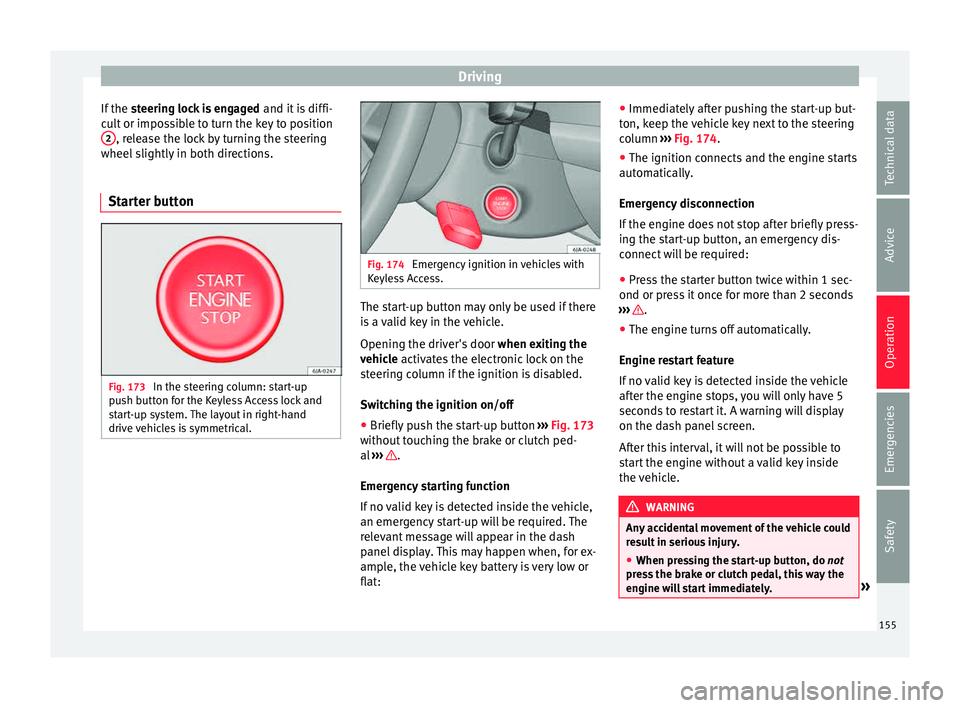
Starter button Fig. 173
In the steering column: start-up
p u
sh b
utton for the Keyless Access lock and
start-up system. The layout in right-hand
drive vehicles is symmetrical. Fig. 174
Emergency ignition in vehicles with
Keyl e
ss Access. The start-up button may only be used if there
i
s
a
valid key in the vehicle.
Opening the driver's door when exiting the
vehicle activates the electronic lock on the
steering column if the ignition is disabled.
Switching the ignition on/off
● Briefly push the start-up button ›››
Fig. 173
without touching the brake or clutch ped-
al ››› .
Emer g
ency
starting function
If no valid key is detected inside the vehicle,
an emergency start-up will be required. The
relevant message will appear in the dash
panel display. This may happen when, for ex-
ample, the vehicle key battery is very low or
flat: ●
Immediately
after pushing the start-up but-
ton, keep the vehicle key next to the steering
column ››› Fig. 174.
● The ignition connects and the engine starts
automatic
ally.
Emergency disconnection
If the engine does not stop after briefly press-
ing the start-up button, an emergency dis-
connect will be required:
● Press the starter button twice within 1 sec-
ond or pres
s it once for more than 2 seconds
››› .
● The engine turns off automatically.
En gine r
e
start feature
If no valid key is detected inside the vehicle
after the engine stops, you will only have 5
seconds to restart it. A warning will display
on the dash panel screen.
After this interval, it will not be possible to
start the engine without a valid key inside
the vehicle. WARNING
Any accidental movement of the vehicle could
re s
ult in serious injury.
● When pressing the start-up button, do not
pre
ss the brake or clutch pedal, this way the
engine will start immediately. » 155
Technical data
Advice
Operation
Emergencies
Safety
Page 158 of 248
Operation
WARNING
If vehicle keys are used negligently or with-
out due c ar
e, this may cause accidents and
serious injury.
● Never leave any key inside the vehicle
when exitin
g. Otherwise, a child or unauthor-
ised person could lock the vehicle, start the
engine or connect the ignition and, in this
way, operate electronic equipment (e.g. the
windows). Note
In diesel vehicles with the Keyless Access
sys t
em, there may be a delay in the engine
starting if it requires preheating. Starting the engine
Vehicles with a
diesel
en
gine are equipped
with a glow plug system. When you switch on
the ignition, the glow plug warning lamp
will light up. The engine can be started
straight away when the lamp switches off.
Do not connect electrical appliances during
preheating so as not the drain the vehicle
battery unnecessarily.
Starting the engine
● Move the gearbox lever into neutral or
move the sel
ector lever to position P or N and
pull firmly on the handbrake. ●
Pres
s the clutch pedal all the way down
and start the engine 3
› ››
Fig. 172
› ›
› page 154, without pressing the accelera-
tor. Keep the clutch pedal pressed down until
the engine starts.
● Release the ignition key as soon as the en-
gine star
ts. The key returns to position 2 .
● If the engine does not start after 10 sec-
ond s, t
urn the k
ey back to position 1 . Re-
pe at
the action af
ter 30 seconds.
● Release the handbrake before moving off.
Switching off the engine with the key Stop the engine by turning the ignition key to
po
s
ition 1
› ›
› Fig. 172
››› page 154.
Brakes and brake servo sys-
tems Introduction WARNING
● The brak e ser
vo only works when the en-
gine is running. Braking when the engine is
switched off requires applying more strength
to the brake pedal. Risk of accident!
● Press down on the clutch pedal when stop-
ping and brak
ing with a manual gearbox, pet- rol engine vehicle at low speed. Otherwise,
the brak
e ser
vo might not work properly. Risk
of accident!
● In the event of damage to the standard
front s
poiler or where a different front spoil-
er, wheel trims, etc. are subsequently fitted,
make sure the air vent to the brakes on the
front wheels is not blocked. Otherwise, brak-
ing operations may be impaired. Risk of acci-
dent!
● Always fully release the handbrake. If it is
only p
artially released, this will cause over-
heating of the rear brakes, which can impair
the function of the brake system. Risk of acci-
dent!
● Never leave children unsupervised in the
vehicl
e. They could release the handbrake or
move the gear lever. The vehicle could start
moving. Risk of accident!
● Insufficient fuel can cause the engine to run
irregu
larly or to switch off. Brake assist sys-
tems could be impaired. Risk of accident!
● Always adjust your driving style to suit visi-
bility
, the weather and road and traffic condi-
tions. The best vehicle safety offered by
brake assist systems must never encourage
you to run greater risks. Risk of accident! CAUTION
● Ob ser
ve the information concerning new
brake pads ››› page 163.156
Page 159 of 248

Driving
●
Where br ak
ing is not necessary, do not
wear down the brake pads by pressing down
gently on the brake pedal. This causes the
brakes to overheat, increasing their wear and
increasing braking distances.
● To ensure the brake assist systems work
properly, a
ll wheels must be fitted with tyres
approved by the manufacturer. Note
● If y
ou brake suddenly and the brake system
control unit regards the situation as hazard-
ous for the drivers behind you, the brake
lights will begin to flash automatically. After
reducing speed to approximately 10 km/h (6
mph) or stopping the vehicle, the brake lights
will stop flashing and the hazard warning
lights will switch on. The hazard warning
lights are automatically switched off when
you accelerate or restart the vehicle.
● On long, steep gradients, reduce your
speed and ch
ange to a lower gear (manual
gearbox) or move the selector lever to a lower
gear position (automatic gearbox). This uses
the force of the engine and the brakes do not
suffer as much. If you still have to brake, do
so intermittently, pressing down repeatedly
on the brake pedal.
● Vehicle modifications (e.g. to the engine,
brake
s, frame or a combination of wheels and
tyres) could impair the brake assist systems
››› page 193, Accessories and modifications
to the vehicle . ●
In the event of
a fault in the ABS system,
the ESC, TCS and EDL are switched off auto-
matically. A fault in the ABS is indicated by
the ››› page 101 warning lamp. Brakes
Wear
The rat
e of
wear of the brake pads depends
on the driving style and on the way in which
the vehicle is used. The brake pads will wear
more quickly if you use your vehicle frequent-
ly in urban traffic and short trips or drive in a
sporty style. Under these demanding condi-
tions, visit your specialised service, even be-
fore the scheduled service date, so that the
thickness of the brake pads can be meas-
ured.
Wet roads or road salt
If brakes are wet or frozen, or if you are driv-
ing on roads which have been gritted with
salt, braking power may set in later than nor-
mal. Dry the brakes as soon as possible by
braking repeatedly.
Corrosion
Long periods of inactivity and little use can
lead to rust on the brake discs and dirt on the
brake pads. Where the brake system is sub-
jected to light stress or in the case of corro- sion, clean the brake discs by braking fully
sever
al
times at a high speed.
Brake system fault
If you notice that the braking distance sud-
denly increases and the brake pedal can be
pressed down more fully, there may be a fault
in the brake system. Visit a specialised serv-
ice immediately and adjust your driving style
to the extent of the damage and to limit the
effect of the brakes.
Low brake fluid level
Insufficient brake fluid could cause faults in
the brake system. The brake fluid level is con-
trolled electronically ››› page 99, Brake sys-
tem .
Brake servo
The brake servo supplements the pressure
you exert on the brake pedal. The brake servo
only works when the engine is running.
157
Technical data
Advice
Operation
Emergencies
Safety
Page 160 of 248
Operation
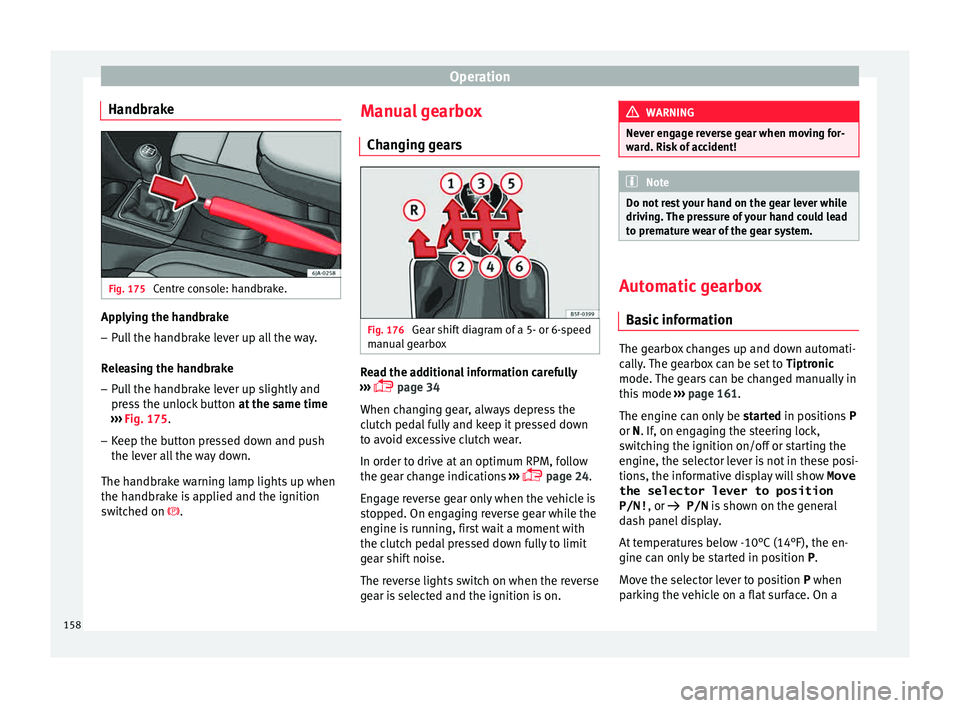
Handbrake Fig. 175
Centre console: handbrake. Applying the handbrake
– Pull the handbrake lever up all the way.
R el
e
asing the handbrake
– Pull the handbrake lever up slightly and
pres
s the unlock button at the same time
››› Fig. 175.
– Keep the button pressed down and push
the lever al
l the way down.
The handbrake warning lamp lights up when
the handbrake is applied and the ignition
switched on . Manual gearbox
Changin
g gears Fig. 176
Gear shift diagram of a 5- or 6-speed
m anual
g
earbox Read the additional information carefully
› ›
›
page 34
When changing gear, always depress the
clutch pedal fully and keep it pressed down
to avoid excessive clutch wear.
In order to drive at an optimum RPM, follow
the gear change indications ›››
page 24.
Engage reverse gear only when the vehicle is
stopped. On engaging reverse gear while the
engine is running, first wait a moment with
the clutch pedal pressed down fully to limit
gear shift noise.
The reverse lights switch on when the reverse
gear is selected and the ignition is on. WARNING
Never engage reverse gear when moving for-
war d. Ri
sk of accident! Note
Do not rest your hand on the gear lever while
drivin g.
The pressure of your hand could lead
to premature wear of the gear system. Automatic gearbox
Ba s
ic information The gearbox changes up and down automati-
c
al
ly
. The gearbox can be set to Tiptronic
mode. The gears can be changed manually in
this mode ›››
page 161.
The engine can only be started in positions P
or N. If, on engaging the steering lock,
switching the ignition on/off or starting the
engine, the selector lever is not in these posi-
tions, the informative display will show Move
the selector lever to position
P/N! , or
P/N is shown on the general
dash panel display.
At temperatures below -10°C (14°F), the en-
gine can only be started in position P.
Move the selector lever to position P when
parking the vehicle on a flat surface. On a
158
Page 161 of 248
Driving
slope, the handbrake should be firmly ap-
p lied bef
or
e moving the selector lever to the
park position. This reduces the load on the
lock mechanism while making it easier to
move the selector lever from position P.
If, while the vehicle is moving, the selector
lever is accidentally moved to position N, re-
lease the accelerator and wait for the engine
to idle before moving it back into position. WARNING
● Never pr e
ss the accelerator when selecting
the automatic gearbox operating mode when
the vehicle is stationary. Risk of accident!
● Never move the selector lever to positions
R or P when driving. Ri
sk of accident!
● If the vehicle is to be stopped with a gear
selected and the en
gine idling (e.g. waiting
or moving slowly at traffic lights), press down
on the brake pedal because the transmission
is not entirely interrupted when the engine is
idling and the vehicle will tend to start mov-
ing.
● Apply the handbrake firmly and put the se-
lector l
ever in position P before opening the
bonnet and working on the vehicle with the
engine running. Risk of accident! Strictly fol-
low the safety instructions ››› page 203, En-
gine compartment.
● When stopping on a slope (hill), try not to
stop the
vehicle from moving by pressing the
“accelerator” with a gear selected. This could
overheat the clutch. If the clutch risks being burnt due to this force, it would switch off
and the v
ehic
le could move backwards. Risk
of accident!
● If you have to stop on a hill, press down on
the brake ped
al to stop the vehicle from mov-
ing.
● The drive wheels could lose traction on a
slipper
y road surface when the kick-down
function is activated. Risk of sliding! CAUTION
● In D SG aut om
atic gearboxes, the double
clutch is protected from overloads. If the hill
hold control is used, the clutches are subjec-
ted to greater force if the vehicle is at a
standstill on a slope or suddenly accelerating
on a slope.
● Should the clutches overheat, the sym-
bol i
s shown on the informative display with
a warning message Gear overheated.
Stop! Instruction Manual! An audible
warning is also heard. Stop the vehicle in this
case, stop the engine and wait until the sym-
bol has switched off. Danger of damage to
the gearbox! You can continue driving once
the symbol is switched off. Starting and driving
Starting
– Press and hold the brake pedal. –
Pr e
s
s and hold the interlock button on the
selector lever knob and move the selector
lever to position ››› page 160 before releas-
ing the interlock button.
– Release the brake and press the accelera-
tor.
St
opping
– The selector lever does not have to be
moved t
o position N if the vehicle is stop-
ped for a short period, e.g. at intersections.
Applying the brake is enough. However, the
engine must remain idling.
Parking
– Press the brake pedal.
– Apply the handbrake.
– Press the interlock button, move the selec-
tor lev
er to position P and release the but-
ton.
Kick-down feature
The kick-down feature allows maximum ac-
celeration to be reached.
In any gear programme, press down fully on
the accelerator for the automatic gearbox to
activate the kick-down feature. This function
takes priority over the gear programmes with-
out taking into account the position of the se-
lector lever (D, S or Tiptronic) and is used to
reach maximum acceleration, using full »
159
Technical data
Advice
Operation
Emergencies
Safety