lock Seat Toledo 2015 Owner's Guide
[x] Cancel search | Manufacturer: SEAT, Model Year: 2015, Model line: Toledo, Model: Seat Toledo 2015Pages: 248, PDF Size: 5.06 MB
Page 83 of 248
Fuses and bulbs
●
Prot ect
the fuse boxes when open to pre-
vent the entry of dust or humidity as they can
damage the electrical system.
● Always carefully remove the fuse box cov-
ers and r
efit them correctly to avoid problems
with your vehicle. Note
● One c omponent m
ay have more than one
fuse.
● Several components may run on a single
fuse.
● In the
vehicle, there are more fuses than
those indicat
ed in this chapter. These should
only be changed by a specialised workshop.
● Positions not containing a fuse do not ap-
pear in the fo
llowing tables.
● Some of the equipment listed in the tables
below pert
ain only to certain versions of the
model or are optional extras.
● Please note that the above lists, while cor-
rect at
the time of printing, are subject to
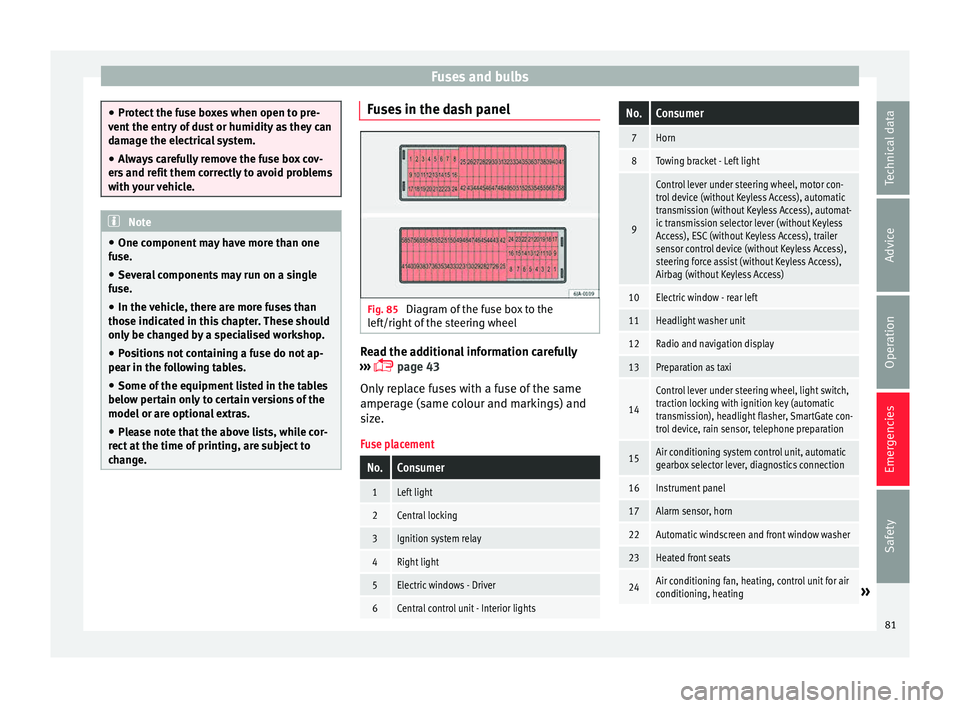
change. Fuses in the dash panel
Fig. 85
Diagram of the fuse box to the
l ef
t/right
of the steering wheel Read the additional information carefully
› ›
›
page 43
Only replace fuses with a fuse of the same
amperage (same colour and markings) and
size.
Fuse placement
No.Consumer
1Left light
2Central locking
3Ignition system relay
4Right light
5Electric windows - Driver
6Central control unit - Interior lights
No.Consumer
7Horn
8Towing bracket - Left light
9
Control lever under steering wheel, motor con-
trol device (without Keyless Access), automatic
transmission (without Keyless Access), automat-
ic transmission selector lever (without Keyless
Access), ESC (without Keyless Access), trailer
sensor control device (without Keyless Access),
steering force assist (without Keyless Access),
Airbag (without Keyless Access)
10Electric window - rear left
11Headlight washer unit
12Radio and navigation display
13Preparation as taxi
14
Control lever under steering wheel, light switch,
traction locking with ignition key (automatic
transmission), headlight flasher, SmartGate con-
trol device, rain sensor, telephone preparation
15Air conditioning system control unit, automatic
gearbox selector lever, diagnostics connection
16Instrument panel
17Alarm sensor, horn
22Automatic windscreen and front window washer
23Heated front seats
24Air conditioning fan, heating, control unit for air
conditioning, heating» 81
Technical data
Advice
Operation
Emergencies
Safety
Page 84 of 248
EmergenciesNo.Consumer
26Front seat heating switch.
27Rear window wiper
29Airbag (Keyless Access)
30
Electric windows, headlight switch, reversing
light switch, air conditioning control unit, park-
ing aid control unit, exterior mirror, feed for mid-
dle button bar, feed for the side button bar, inte-
rior mirror, telephone preparation
31Fuel pump, radiator fan control unit, cruise con-
trol, relay coil for the windscreen and rear win-
dow washer system
32Diagnostics socket, headlight range regulator,
control lever under the steering wheel
33Ignition relay coil, clutch pedal switch
34Heated windscreen washer jets
37Radar
39Additional electric heating
41Rear window heater
42Electric windows - passenger
43Towing bracket - Connector contact
44Lighter, 12 volt socket
45Electric window - rear right
46Windshield and front window washing system,
control lever under the steering wheel
No.Consumer
47Towing bracket - Connector contact
48Towing bracket - Right hand light
49Fuel pump control unit
50Radio
51Heat for exterior mirrors
52Keyless Access
53Steering block seized (Keyless Access)
54ABS/ESC control unit
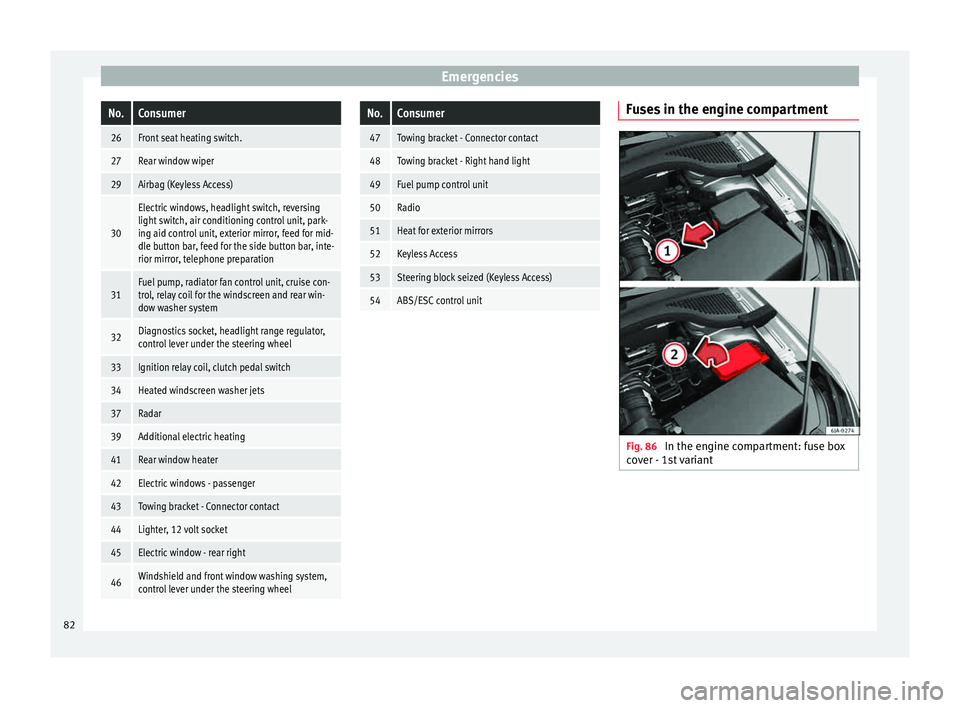
Fuses in the engine compartment
Fig. 86
In the engine compartment: fuse box
c o
v
er - 1st variant 82
Page 85 of 248
Fuses and bulbs
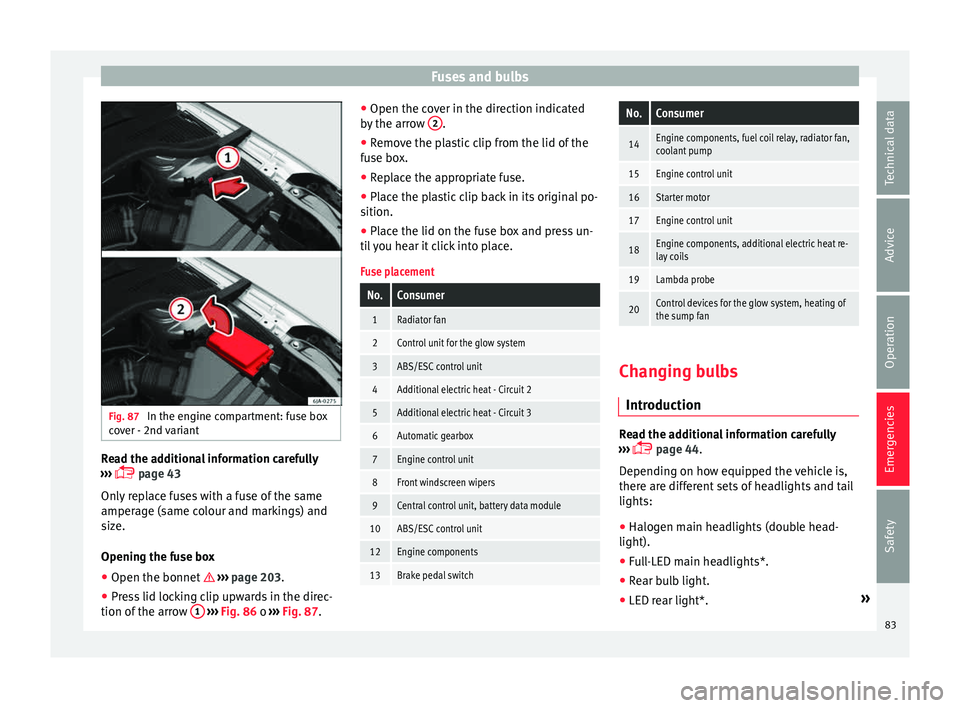
Fig. 87
In the engine compartment: fuse box
c o
v
er - 2nd variant Read the additional information carefully
› ›
›
page 43
Only replace fuses with a fuse of the same
amperage (same colour and markings) and
size.
Opening the fuse box ● Open the bonnet ›››
page 203.
● Press lid locking clip upwards in the direc-
tion of the arro
w 1
› ›
› Fig. 86 o ››› Fig. 87. ●
Open the cov
er in the direction indicated
by the arrow 2 .
● Remove the plastic clip from the lid of the
f u
se bo
x.
● Replace the appropriate fuse.
● Place the plastic clip back in its original po-
sition.
● Plac
e the lid on the fuse box and press un-
til
you hear it click into place.
Fuse placement
No.Consumer
1Radiator fan
2Control unit for the glow system
3ABS/ESC control unit
4Additional electric heat - Circuit 2
5Additional electric heat - Circuit 3
6Automatic gearbox
7Engine control unit
8Front windscreen wipers
9Central control unit, battery data module
10ABS/ESC control unit
12Engine components
13Brake pedal switch
No.Consumer
14Engine components, fuel coil relay, radiator fan,
coolant pump
15Engine control unit
16Starter motor
17Engine control unit
18Engine components, additional electric heat re-
lay coils
19Lambda probe
20Control devices for the glow system, heating of
the sump fan Changing bulbs
Intr oduction Read the additional information carefully
› ›
›
page 44.
Depending on how equipped the vehicle is,
there are different sets of headlights and tail
lights:
● Halogen main headlights (double head-
light).
● Full-LED main headlights*.
● Rear bulb light.
● LED rear light*. »
83
Technical data
Advice
Operation
Emergencies
Safety
Page 88 of 248
Emergencies
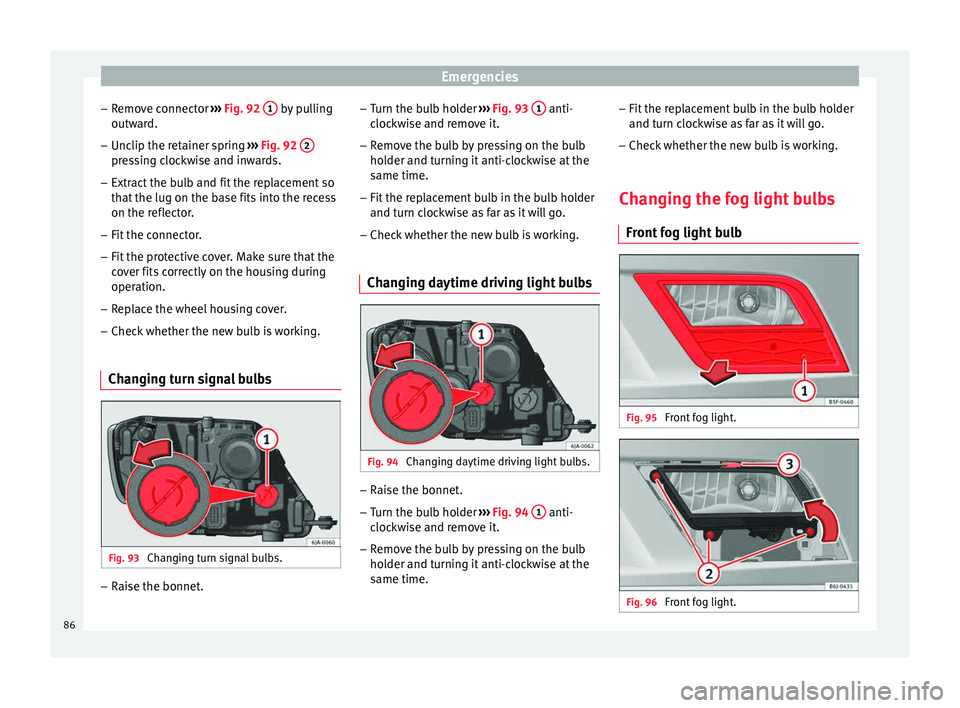
– Remo
v
e connector ››› Fig. 92 1 by pulling
outw ar
d.
– Unc
lip the retainer spring ›››
Fig. 92 2 pressing clockwise and inwards.
– Extract the bulb and fit the replacement so
th at
the lug on the b
ase fits into the recess
on the reflector.
– Fit the connector.
– Fit the protective cover. Make sure that the
cov
er fits correctly on the housing during
operation.
– Replace the wheel housing cover.
– Check whether the new bulb is working.
Changing turn signal bulbs Fig. 93
Changing turn signal bulbs. –
Raise the bonnet. –
Turn the b
u
lb holder ››› Fig. 93 1 anti-
c loc
k
wise and remove it.
– Remove the bulb by pressing on the bulb
holder and t
urning it anti-clockwise at the
same time.
– Fit the replacement bulb in the bulb holder
and turn cloc
kwise as far as it will go.
– Check whether the new bulb is working.
Changing daytime driving light bulbs Fig. 94
Changing daytime driving light bulbs. –
Raise the bonnet.
– Turn the bulb holder ›
››
Fig. 94 1 anti-
c loc
k
wise and remove it.
– Remove the bulb by pressing on the bulb
holder and t
urning it anti-clockwise at the
same time. –
Fit the rep
lacement bulb in the bulb holder
and turn clockwise as far as it will go.
– Check whether the new bulb is working.
Changing the fog light bulbs Front f
og light bulb Fig. 95
Front fog light. Fig. 96
Front fog light.86
Page 89 of 248
Fuses and bulbs
– Remo
v
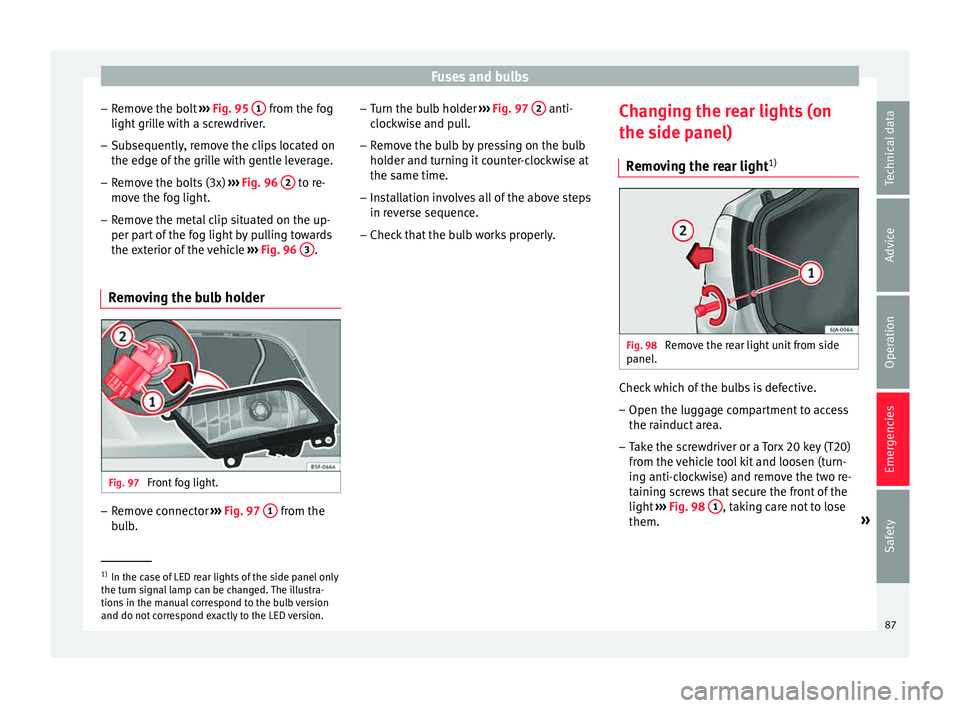
e the bolt ››› Fig. 95 1 from the fog
light gri
l
le with a screwdriver.
– Subsequently, remove the clips located on
the edge of the gri
lle with gentle leverage.
– Remove the bolts (3x) ›››
Fig. 96 2 to re-
mo v
e the f
og light.
– Remove the metal clip situated on the up-
per part
of the fog light by pulling towards
the exterior of the vehicle ››› Fig. 96 3 .
Removing the bulb holder Fig. 97
Front fog light. –
Remove connector ››
›
Fig. 97 1 from the
b u
l
b. –
Turn the bu
lb holder ››› Fig. 97 2 anti-
c loc
k
wise and pull.
– Remove the bulb by pressing on the bulb
holder and t
urning it counter-clockwise at
the same time.
– Installation involves all of the above steps
in rever
se sequence.
– Check that the bulb works properly. Changing the rear lights (on
the side panel)
R
emoving the rear light 1) Fig. 98
Remove the rear light unit from side
p anel
. Check which of the bulbs is defective.
– Open the luggage compartment to access
the r ainduct
ar
ea.
– Take the screwdriver or a Torx 20 key (T20)
from the v
ehicle tool kit and loosen (turn-
ing anti-clockwise) and remove the two re-
taining screws that secure the front of the
light ›››
Fig. 98 1 , taking care not to lose
them. »1)
In the case of LED rear lights of the side panel only
the turn s ign
al lamp can be changed. The illustra-
tions in the manual correspond to the bulb version
and do not correspond exactly to the LED version. 87
Technical data
Advice
Operation
Emergencies
Safety
Page 90 of 248
Emergencies
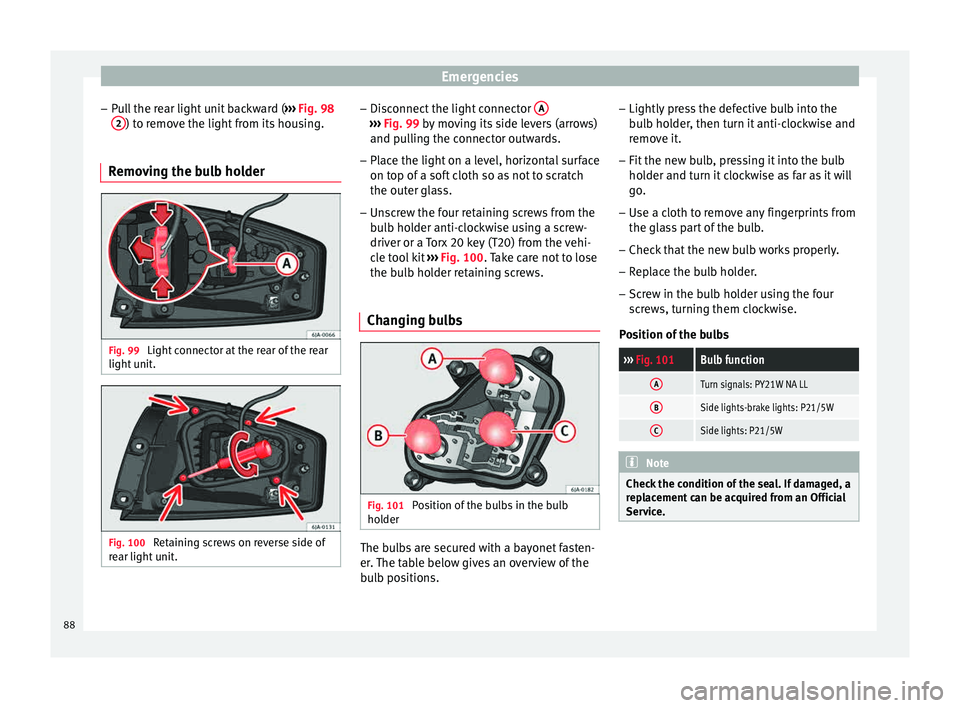
– Pu
l
l the rear light unit backward ( ››› Fig. 98
2 ) to remove the light from its housing.
Removing the bulb holder Fig. 99
Light connector at the rear of the rear
light u
nit
. Fig. 100
Retaining screws on reverse side of
r e
ar light
unit. –
Di s
c
onnect the light connector A ›››
Fig. 99 b y moving its side levers (arrows)
and p u
lling the connector outwards.
– Place the light on a level, horizontal surface
on top of a sof
t cloth so as not to scratch
the outer glass.
– Unscrew the four retaining screws from the
bul
b holder anti-clockwise using a screw-
driver or a Torx 20 key (T20) from the vehi-
cle tool kit ››› Fig. 100. Take care not to lose
the bulb holder retaining screws.
Changing bulbs Fig. 101
Position of the bulbs in the bulb
ho l
der The bulbs are secured with a bayonet fasten-
er
.
The t
able below gives an overview of the
bulb positions. –
Lightly pre
ss the defective bulb into the
bulb holder, then turn it anti-clockwise and
remove it.
– Fit the new bulb, pressing it into the bulb
holder and t
urn it clockwise as far as it will
go.
– Use a cloth to remove any fingerprints from
the glas
s part of the bulb.
– Check that the new bulb works properly.
– Replace the bulb holder.
– Screw in the bulb holder using the four
scr
ews, turning them clockwise.
Position of the bulbs
››› Fig. 101Bulb function
ATurn signals: PY21W NA LL
BSide lights-brake lights: P21/5W
CSide lights: P21/5W Note
Check the condition of the seal. If damaged, a
rep l
acement can be acquired from an Official
Service. 88
Page 91 of 248
Fuses and bulbs
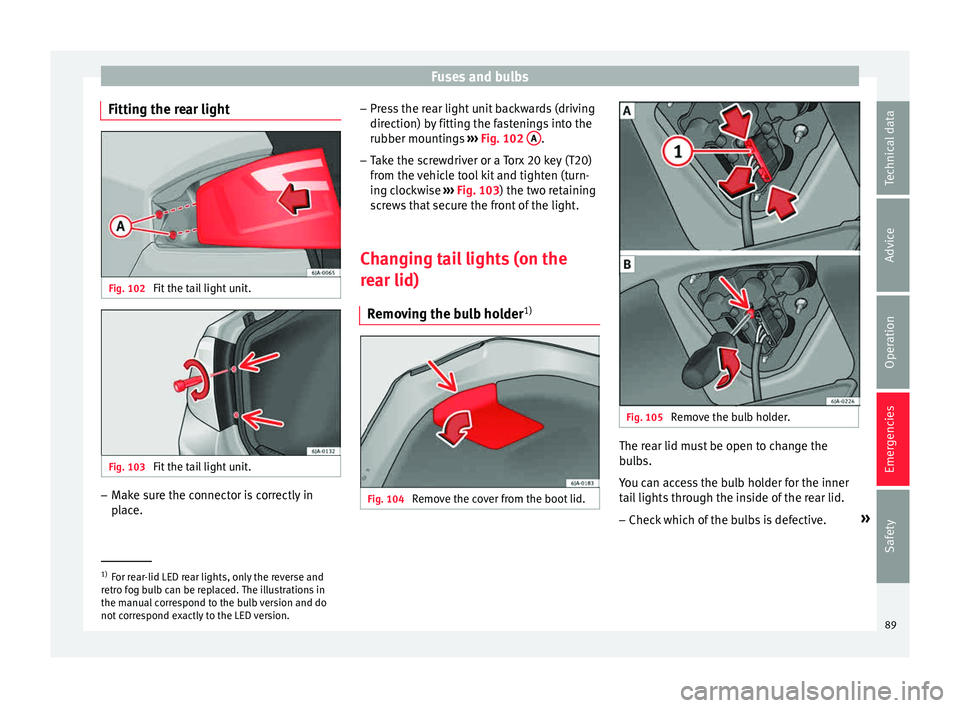
Fitting the rear light Fig. 102
Fit the tail light unit. Fig. 103
Fit the tail light unit. –
Make sure the connector is correctly in
pl
ac
e. –
Pres
s the rear light unit backwards (driving
direction) by fitting the fastenings into the
rubber mountings ››› Fig. 102 A .
– Take the screwdriver or a Torx 20 key (T20)
from the
v
ehicle tool kit and tighten (turn-
ing clockwise ››› Fig. 103) the two retaining
screws that secure the front of the light.
Changing tail lights (on the
rear lid) R
emoving the bulb holder 1) Fig. 104
Remove the cover from the boot lid. Fig. 105
Remove the bulb holder. The rear lid must be open to change the
b
u
l
bs.
You can access the bulb holder for the inner
tail lights through the inside of the rear lid.
– Check which of the bulbs is defective. »1)
For rear-lid LED rear lights, only the reverse and
retr o f
og bulb can be replaced. The illustrations in
the manual correspond to the bulb version and do
not correspond exactly to the LED version. 89
Technical data
Advice
Operation
Emergencies
Safety
Page 92 of 248
Emergencies
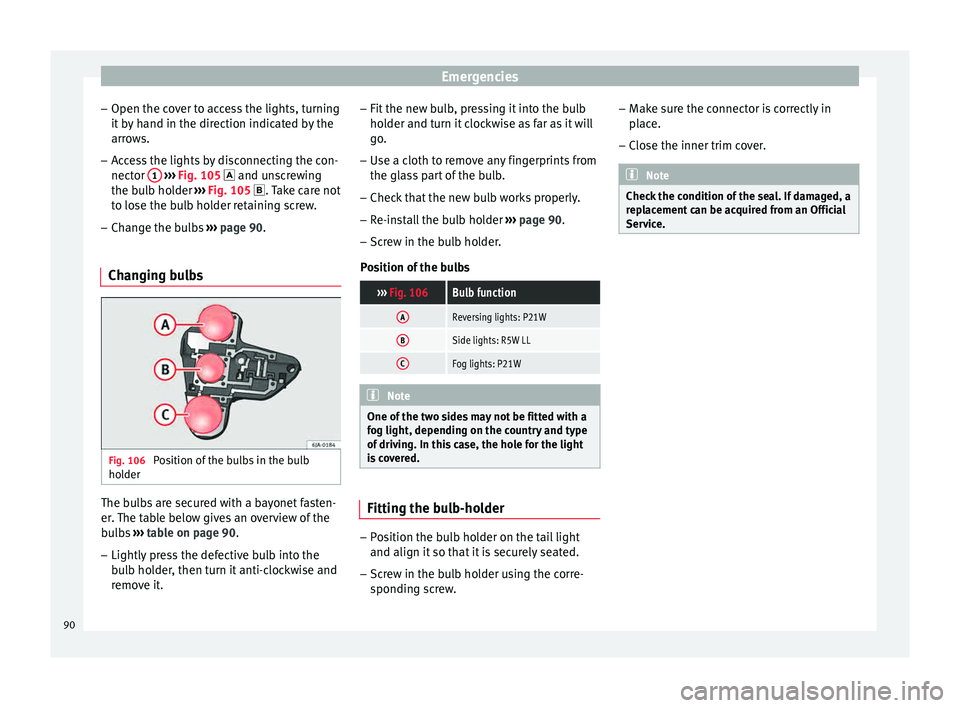
– Open the c o
v
er to access the lights, turning
it by hand in the direction indicated by the
arrows.
– Access the lights by disconnecting the con-
nector 1
› ››
Fig. 105
and unscrewing
the bulb holder ››› Fig. 105 . Take care not
to lose the bulb holder retaining screw.
– Change the bulbs ›››
page 90.
Changing bulbs Fig. 106
Position of the bulbs in the bulb
ho l
der The bulbs are secured with a bayonet fasten-
er
.
The t
able below gives an overview of the
bulbs ››› table on page 90.
– Lightly press the defective bulb into the
bul
b holder, then turn it anti-clockwise and
remove it. –
Fit the new bu
lb, pressing it into the bulb
holder and turn it clockwise as far as it will
go.
– Use a cloth to remove any fingerprints from
the glas
s part of the bulb.
– Check that the new bulb works properly.
– Re-install the bulb holder ›››
page 90.
– Screw in the bulb holder.
Pos
ition of the bulbs
››› Fig. 106Bulb function
AReversing lights: P21W
BSide lights: R5W LL
CFog lights: P21W Note
One of the two sides may not be fitted with a
fog light, dependin g on the c
ountry and type
of driving. In this case, the hole for the light
is covered. Fitting the bulb-holder
–
Position the bulb holder on the tail light
and align it so th
at
it is securely seated.
– Screw in the bulb holder using the corre-
sponding s
crew. –
Make s
ure the connector is correctly in
place.
– Close the inner trim cover. Note
Check the condition of the seal. If damaged, a
rep l
acement can be acquired from an Official
Service. 90
Page 95 of 248
Controls and displays
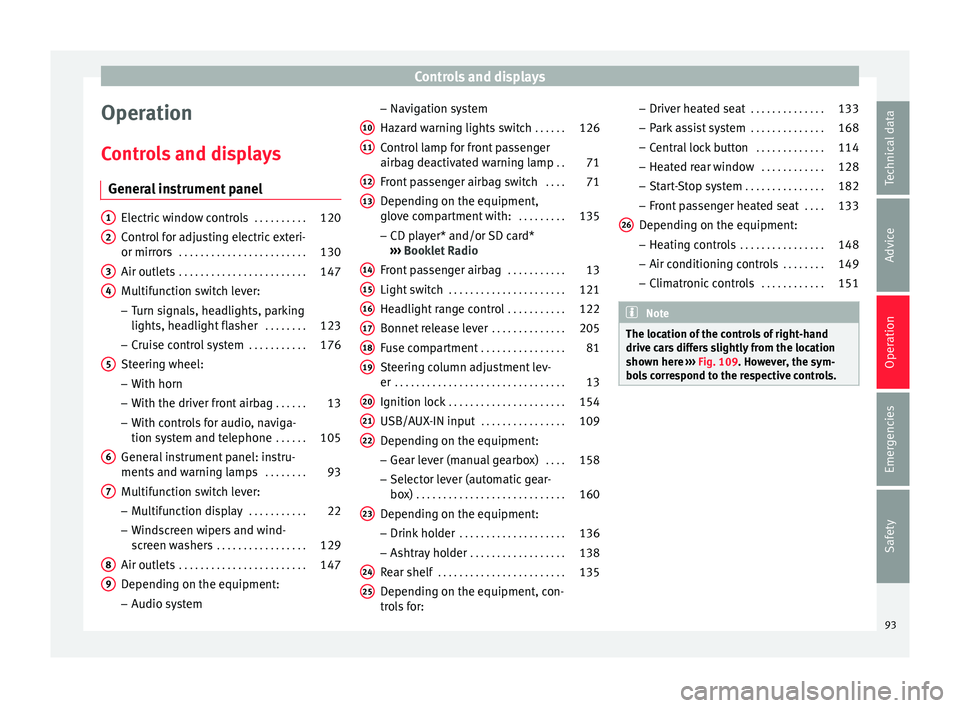
Operation
C ontr
o
ls and displays
General instrument panel Electric window controls
. . . . . . . . . .120
Control for adjusting electric exteri-
or mirror s . . . . . . . . . . . . . . . . . . . . . . . . 130
Air outl
ets . . . . . . . . . . . . . . . . . . . . . . . . 147
Multifunction switch lever:
– Turn s ign
als, headlights, parking
lights, headlight flasher . . . . . . . .123
– Crui se c
ontrol system . . . . . . . . . . .176
Steering wheel:
– With horn
– With the driv
er front airbag . . . . . .13
– With c ontr
ols for audio, naviga-
tion system and telephone . . . . . .105
General instrument panel: instru-
ments and w arnin
g lamps . . . . . . . . 93
Multifunction switch lever:
– Multif
unction display . . . . . . . . . . .22
– Wind s
creen wipers and wind-
screen washers . . . . . . . . . . . . . . . . . 129
Air outlets . . . . . . . . . . . . . . . . . . . . . . . . 147
Depending on the equipment:
– Audio sy st
em
1 2
3
4
5
6
7
8
9 –
Nav ig
ation sy
stem
Hazard warning lights switch . . . . . .126
Control lamp for front passenger
airbag deactiv
ated warning lamp . .71
Front passenger airbag switch . . . .71
Depending on the equipment,
glove c
ompartment with: . . . . . . . . .135
– CD pla
yer* and/or SD card*
››› Booklet Radio
Front passenger airbag . . . . . . . . . . .13
Light switch . . . . . . . . . . . . . . . . . . . . . . 121
Headlight range control . . . . . . . . . . .122
Bonnet release lever . . . . . . . . . . . . . .205
Fuse compartment . . . . . . . . . . . . . . . . 81
Steering column adjustment lev-
er . . . . . . . . . . . . . . . . . . . . . . . . . . . . . . . . 13
Ignition lock . . . . . . . . . . . . . . . . . . . . . . 154
USB/AUX-IN input . . . . . . . . . . . . . . . . 109
Depending on the equipment: – Gear lev
er (manual gearbox) . . . .158
– Select or l
ever (automatic gear-
box) . . . . . . . . . . . . . . . . . . . . . . . . . . . . 160
Depending on the equipment:
– Drink ho l
der . . . . . . . . . . . . . . . . . . . . 136
– Ashtra y
holder . . . . . . . . . . . . . . . . . . 138
Rear shelf . . . . . . . . . . . . . . . . . . . . . . . . 135
Depending on the equipment, con-
tro l
s for:
10 11
12
13
14
15
16
17
18
19
20
21
22
23
24
25 –
Driv er he
at
ed seat . . . . . . . . . . . . . . 133
– Park a
ssist system . . . . . . . . . . . . . . 168
– Central
lock button . . . . . . . . . . . . . 114
– Heated r
ear window . . . . . . . . . . . . 128
– Start
-Stop system . . . . . . . . . . . . . . . 182
– Front p
assenger heated seat . . . .133
Depending on the equipment: – Heating c
ontrols . . . . . . . . . . . . . . . . 148
– Air conditioning c
ontrols . . . . . . . . 149
– Climatr
onic controls . . . . . . . . . . . . 151 Note
The location of the controls of right-hand
drive c ar
s differs slightly from the location
shown here ››› Fig. 109. However, the sym-
bols correspond to the respective controls. 26
93
Technical data
Advice
Operation
Emergencies
Safety
Page 101 of 248
Instruments and warning lamps
CAUTION
Failure to heed the control lamps and text
mes s
ages when they appear may result in
faults in the vehicle. Hand brake
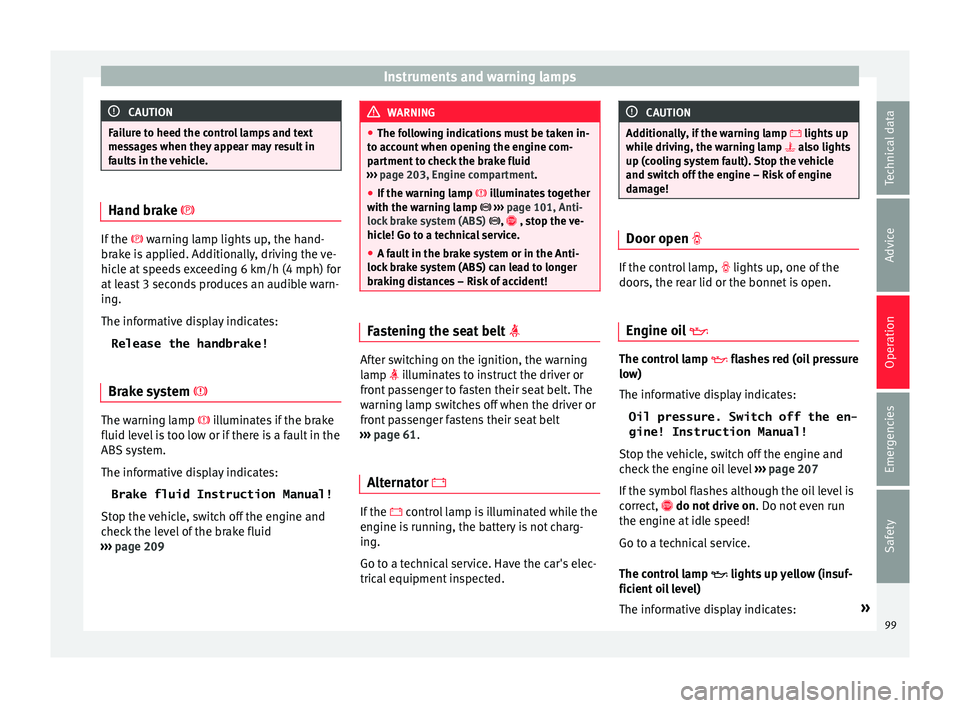
If the
warning lamp lights up, the hand-
br ak
e is applied. Additionally, driving the ve-
hicle at speeds exceeding 6 km/h (4 mph) for
at least 3 seconds produces an audible warn-
ing.
The informative display indicates:
Release the handbrake!
Brake system The warning lamp i
l
lumin
ates if the brake
fluid level is too low or if there is a fault in the
ABS system.
The informative display indicates:
Brake fluid Instruction Manual!
Stop the vehicle, switch off the engine and
check the level of the brake fluid
››› page 209 WARNING
● The fo l
lowing indications must be taken in-
to account when opening the engine com-
partment to check the brake fluid
››› page 203, Engine compartment.
● If the warning lamp illumin
ates together
with the warning lamp ››› page 101, Anti-
lock brake system (ABS) , , stop the ve-
hicle! Go to a technical service.
● A fault in the brake system or in the Anti-
lock br
ake system (ABS) can lead to longer
braking distances – Risk of accident! Fastening the seat belt
After switching on the ignition, the warning
l
amp i
l
luminates to instruct the driver or
front passenger to fasten their seat belt. The
warning lamp switches off when the driver or
front passenger fastens their seat belt
››› page 61.
Alternator If the
control lamp is illuminated while the
en gine i
s running, the battery is not charg-
ing.
Go to a technical service. Have the car's elec-
trical equipment inspected. CAUTION
Additionally, if the warning lamp lights up
whi
le driving, the warning lamp also lights
up (cooling system fault). Stop the vehicle
and switch off the engine – Risk of engine
damage! Door open
If the control lamp,
lights up , one of
the
doors, the rear lid or the bonnet is open.
Engine oil The control lamp
fla
she
s red (oil pressure
low)
The informative display indicates:
Oil pressure. Switch off the en-
gine! Instruction Manual!
Stop the vehicle, switch off the engine and
check the engine oil level ›››
page 207
If the symbol flashes although the oil level is
correct, do not drive on . Do not even run
the engine at idle speed!
Go to a technical service.
The control lamp lights up yellow (insuf-
ficient oil level)
The informative display indicates: »
99
Technical data
Advice
Operation
Emergencies
Safety