lock Seat Toledo 2015 Repair Manual
[x] Cancel search | Manufacturer: SEAT, Model Year: 2015, Model line: Toledo, Model: Seat Toledo 2015Pages: 248, PDF Size: 5.06 MB
Page 150 of 248
Operation
Closing air vents 3 and 4
– Turn the vertical circular control down-
war
d
s.
Changing the direction of air delivery from
air vents 3 and 4
– The air circulation height can be varied by
chan
ging the position of the sliding adjust-
er upwards or downwards ››› Fig. 168 .
– The air circulation direction can be varied
by c
hanging the position of the sliding ad-
juster to the right or to the left.
The flow of air from the vents is controlled us-
ing control C
› ›
› Fig. 169
. Vents 3 ››› Fig. 168
and 4 can be opened and closed individually.
Depending on the position of the adjusters
and on the weather, open vents can provide
air which is either heated, unheated or
cooled. Heating and fresh air
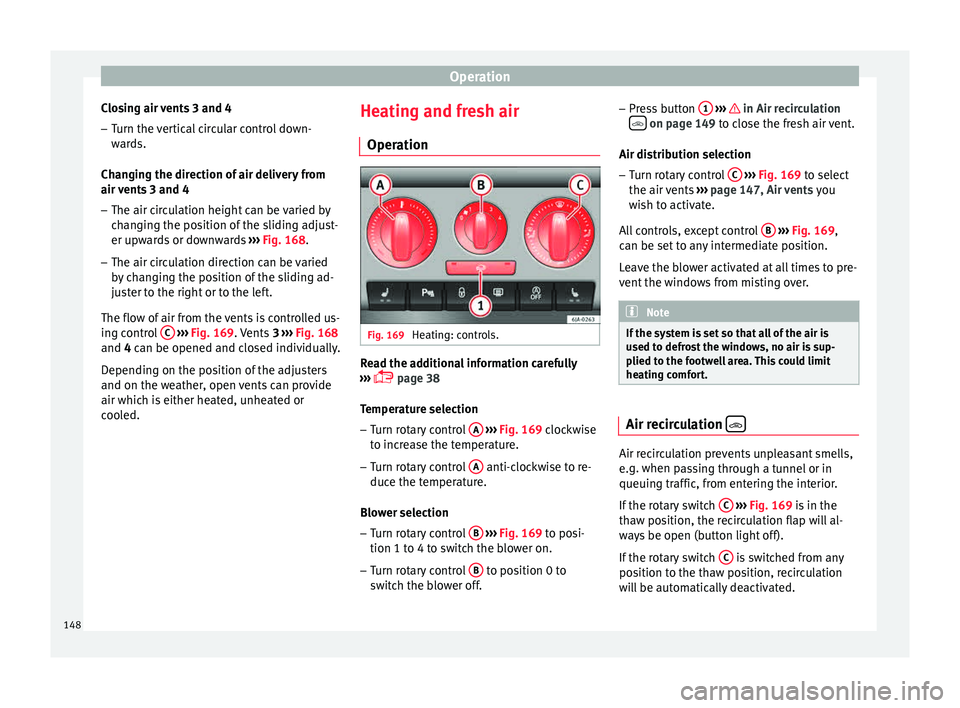
Operation Fig. 169
Heating: controls. Read the additional information carefully
› ›
›
page 38
Temperature selection
– Turn rotary control A
› ›
› Fig. 169
clockwise
to increase the temperature.
– Turn rotary control A anti-clockwise to re-
duc e the t
emper
ature.
Blower selection
– Turn rotary control B
› ›
› Fig. 169
to posi-
tion 1 to 4 to switch the blower on.
– Turn rotary control B to position 0 to
sw it
c
h the blower off. –
Pres
s button 1
› ›› in Air recirculation
on page 149 t
o c
lo se the fresh air vent.
Air distribution selection – Turn rotary control C
› ››
Fig. 169
t
o select
the air vents ››› page 147, Air vents you
wish to activate.
All controls, except control B
› ››
Fig. 169
,
c
an be set to any intermediate position.
Leave the blower activated at all times to pre-
vent the windows from misting over. Note
If the system is set so that all of the air is
used t o defr
ost the windows, no air is sup-
plied to the footwell area. This could limit
heating comfort. Air recirculation
Air recirculation prevents unpleasant smells,
e.
g. when p
a
ssing through a tunnel or in
queuing traffic, from entering the interior.
If the rotary switch C
› ›
›
Fig. 169 is in the
thaw position, the recirculation flap will al-
ways be open (button light off).
If the rotary switch C is switched from any
po sition t
o the thaw position, recirculation
will be automatically deactivated.
148
Page 151 of 248
Air conditioning
Connecting the recirculation
In an y
po
sition of rotary switch C except
th a
w:
● Pr
ess button 1
› ››
Fig. 169
, the sw
itch's
lamp will light up, indicating that air recircu-
lation inside the vehicle has been activated.
Disconnecting the recirculation
In any position of rotary switch C except
th a
w:
● Pr
ess button 1 again and the button's
l amp w
i
ll go off, indicating that air recircula-
tion from the outside has been activated.
In the thaw position of rotary switch C , the
entr y
of
air into the vehicle interior is always
from the outside. WARNING
Read and observe the safety warnings ›››
in
Genera l
notes on page 146. Air conditioning (manual)*
Gener a
l
notesThe air cooling system only works if
A/C but-
t on 2
› ›
›
Fig. 170 ›››
page 149 is pressed
and under following conditions:
● The engine is running, ●
The outside temper
ature is above +2°C
(+36°F),
● The blower control is in position 1–4.
When the coolin
g system is on and under cer-
tain conditions, air can be blown from the
vents at a temperature of approximately +5°C
(+41°F). In the event of prolonged, irregular
distribution of the air flow from the outlets
and significant differences in temperature,
e.g. on leaving the vehicle, sensitive people
may catch cold. Note
A visit to the specialised service once a year
is r
ecommended to clean the air conditioning
system. Manual operation
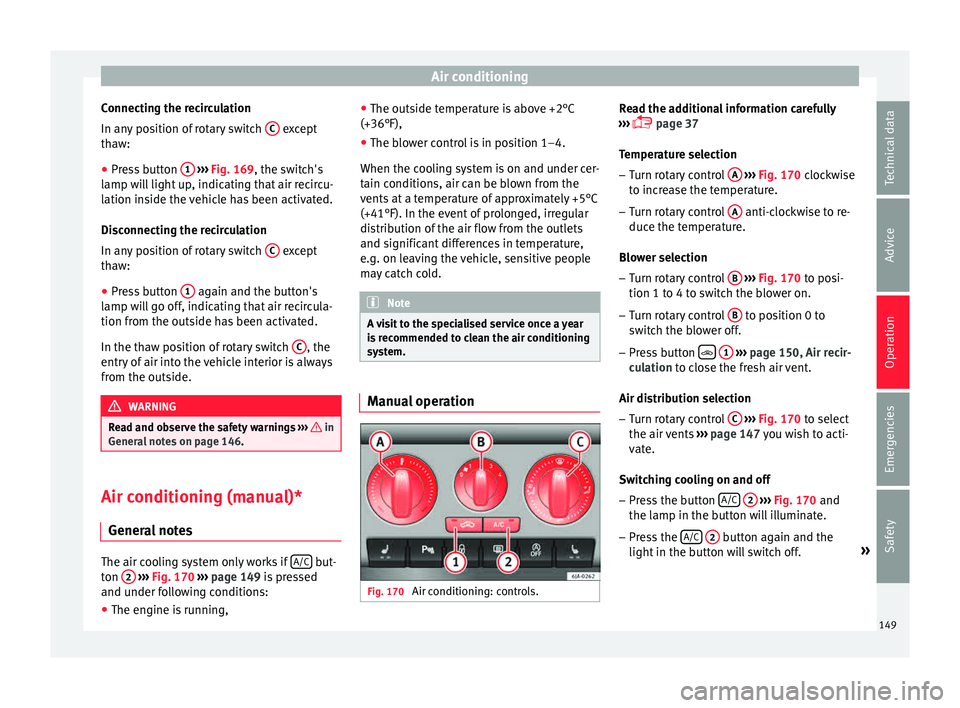
Fig. 170
Air conditioning: controls. Read the additional information carefully
› ›
›
page 37
Temperature selection – Turn rotary control A
› ››
Fig. 170
c
lockwise
to increase the temperature.
– Turn rotary control A anti-clockwise to re-
duc e the t
emper
ature.
Blower selection
– Turn rotary control B
› ››
Fig. 170
t
o posi-
tion 1 to 4 to switch the blower on.
– Turn rotary control B to position 0 to
sw it
c
h the blower off.
– Press button
1
› ›
› p
age 150, Air recir-
culation to close the fresh air vent.
Air distribution selection – Turn rotary control C
› ›
› Fig. 170
to select
the air vents ››› page 147 you wish to acti-
vate.
Switching cooling on and off
– Press the button A/C
2
› ›
› Fig. 170
and
the lamp in the button will illuminate.
– Press the A/C
2 button again and the
light in the b
utt
on will switch off. »
149
Technical data
Advice
Operation
Emergencies
Safety
Page 155 of 248

Driving
It is possible, however, to set the blower
s peed t
o s
uit requirements.
● Turn control 10
› ››
Fig. 171
c
ounter-clock-
wise (to lower the speed) or clockwise (to in-
crease the speed).
Climatronic will switch off when the blower
switches off. WARNING
Read and observe the safety warnings ›››
in
Genera l
notes on page 146. Windscreen defrost
Switching on windscreen defrosting
●
Press the button
12
› ›
›
Fig. 171.
Switching off windscreen defrosting
● Press button
12
› ›
›
Fig. 171 several
times or press the AUTO button.
The t emper
at
ure is regulated automatically.
The air output is increased from vents 1
››› page 147 and 2. Driving
St ar
tin
g and stopping the en-
gine
Introduction Read the additional information carefully
›› ›
page 17 WARNING
● When mov in
g with the engine switched off,
the ignition key must always remain in posi-
tion 2
››› Fig. 172 ›
›› page 154 (ignition on).
The control lamps will light up in this posi-
tion. Otherwise, the steering lock could en-
gage suddenly. Risk of accident!
● Do not remove the key from the ignition un-
til the
vehicle has come to a standstill and is
secure (e.g. the handbrake is engaged). Oth-
erwise, the steering lock could suddenly en-
gage. Risk of accident!
● Always take the ignition key with you when
you le
ave the vehicle. This is particularly im-
portant if you leave children in the vehicle.
Children could, for example, start the engine
with the subsequent risk of accident.
● Never leave the engine running in unventi-
lated or c
losed rooms. The exhaust gases
contain carbon monoxide, an odourless and
colourless poisonous gas. Risk of fatal acci-
dents! Carbon monoxide can cause people to
lose consciousness and can cause death. ●
Never l e
ave the vehicle unattended if the
engine is running.
● Never switch the engine off until the vehi-
cle h
as come to a complete stop. Risk of acci-
dent! CAUTION
● Turnin g the s
teering wheel fully in either
direction when the vehicle is stationary and
the engine is in gear puts the power steering
under great stress. This could lead to noise.
Never leave the steering wheel turned fully in
either direction for more than 15 seconds.
Risk of damage to the power steering system!
● The starter motor may only be used (key
position 3
››› Fig. 172 ›
›› page 154 in the ig-
nition) if the engine is off. Using the starter
motor when the engine is running could dam-
age it.
● Immediately release the ignition key when
the engine st
arts, otherwise damage could be
caused to the starter motor.
● When the engine is cold, you should avoid
high engine speed
s, driving at full throttle
and over-loading the engine before it reaches
operating temperature. Risk of engine dam-
age!
● Do not tow-start the engine. Risk of engine
damag
e! In vehicles with a catalytic convert-
er, fuel that has not been burned could reach
the catalytic converter and catch fire in it.
This would lead to a fault in the catalytic con-
verter. You may use the battery from another » 153
Technical data
Advice
Operation
Emergencies
Safety
Page 156 of 248
Operation
vehicle to help you start your engine
›› ›
page 51.
● After prolonged and demanding operation
of the engine, when the j
ourney has ended,
do not stop the engine immediately. Let the
engine run at idle for about one more minute.
This will stop the engine from overheating. For the sake of the environment
Do not warm up the engine when the vehicle
i s s
tationary. If possible, move off immediate-
ly after starting the engine. This will help the
engine reach operating temperature more
quickly, reducing the quantity of emissions. Note
● The engine c an on
ly be started with the
original SEAT key.
● Loud running noises may be heard briefly
after c
old-starting the engine. This is normal
and is no cause for concern.
● After the engine has been stopped and the
ignition switc
hed off, the radiator fan may
continue running for around 10 minutes.
● If the engine still does not start after a sec-
ond attempt, the fuel
pump fuse might have
blown. Check it and replace if necessary
››› page 80 or contact your Specialised Serv-
ice.
● You should always engage the steering lock
when you e
xit the vehicle. This will hinder
any attempts at theft. Power steering
The power steering allows you to turn the
st
eerin
g wheel more easily.
If the power steering fails or the engine is off
(towing), it is still possible to turn the vehi-
cle's steering wheel fully. However, you need
more strength to steer the vehicle.
Start-up lock security system (immo-
bili
ser) There is an electronic chip in the key. The
el
ectr
onic
immobiliser is deactivated when
the key is inserted into the ignition. The elec-
tronic immobiliser is automatically activated
when the key is removed from the ignition.
The engine will not start if an unauthorised
key is used.
The informative display indicates:
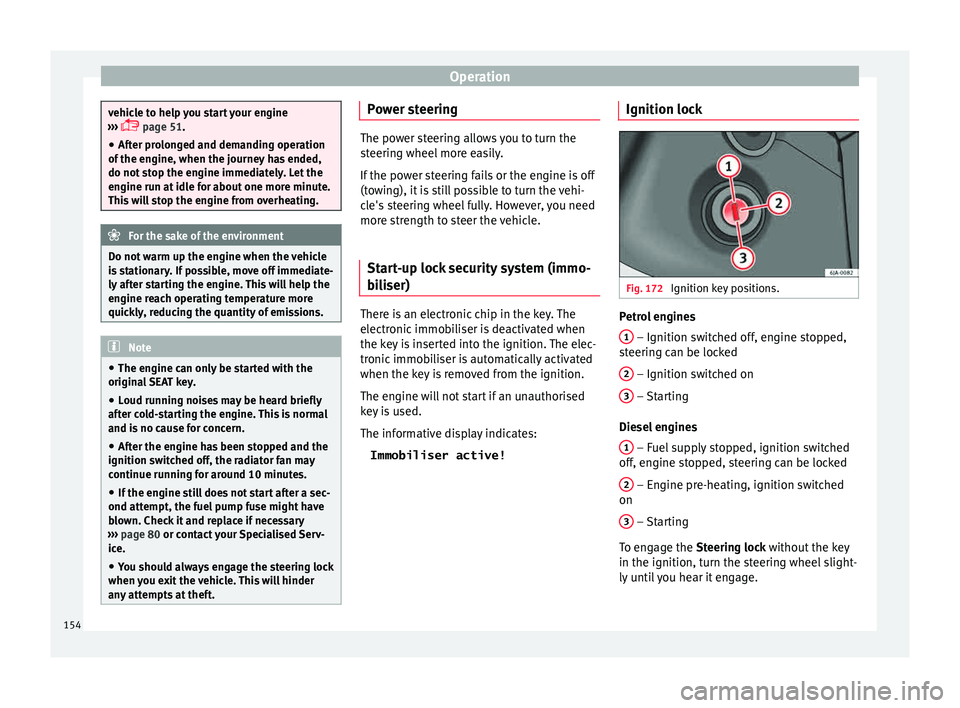
Immobiliser active! Ignition lock Fig. 172
Ignition key positions. Petrol engines
1 – Ignition switched off, engine stopped,
s t
eerin
g can be locked
2 – Ignition switched on
3 – Starting
Die sel
en
gines
1 – Fuel supply stopped, ignition switched
off , en
gine s
topped, steering can be locked
2 – Engine pre-heating, ignition switched
on
3 – Starting
T o en
g
age the Steering lock without the key
in the ignition, turn the steering wheel slight-
ly until you hear it engage.
154
Page 157 of 248
Driving
If the steering lock is engaged
and it
i s diffi-
cult or impossible to turn the key to position 2 , release the lock by turning the steering
wheel s
lightly
in both directions.
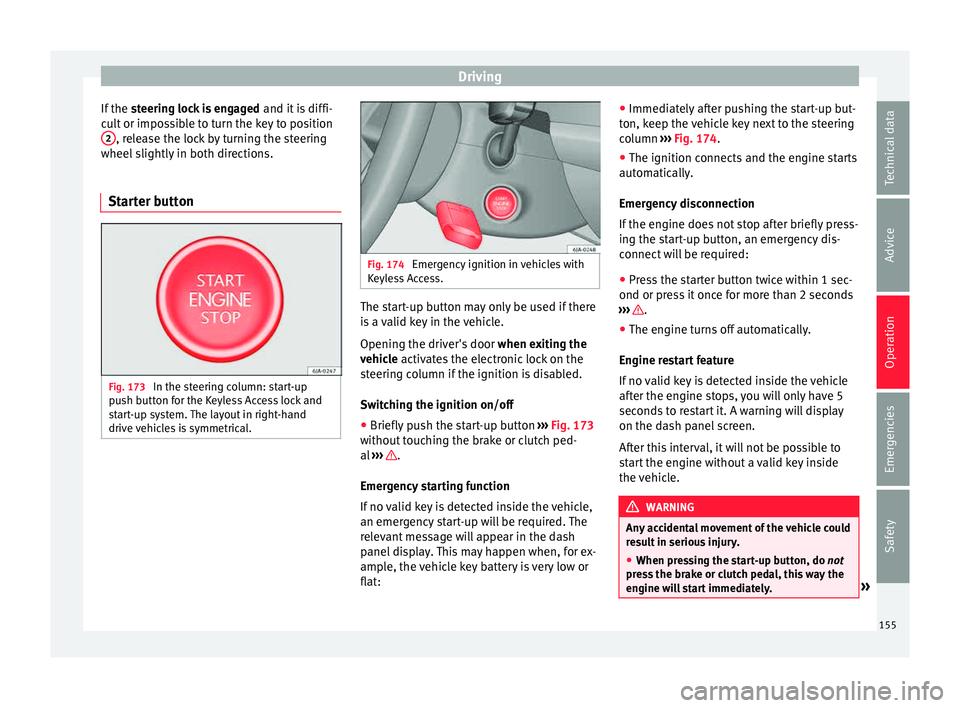
Starter button Fig. 173
In the steering column: start-up
p u
sh b
utton for the Keyless Access lock and
start-up system. The layout in right-hand
drive vehicles is symmetrical. Fig. 174
Emergency ignition in vehicles with
Keyl e
ss Access. The start-up button may only be used if there
i
s
a
valid key in the vehicle.
Opening the driver's door when exiting the
vehicle activates the electronic lock on the
steering column if the ignition is disabled.
Switching the ignition on/off
● Briefly push the start-up button ›››
Fig. 173
without touching the brake or clutch ped-
al ››› .
Emer g
ency
starting function
If no valid key is detected inside the vehicle,
an emergency start-up will be required. The
relevant message will appear in the dash
panel display. This may happen when, for ex-
ample, the vehicle key battery is very low or
flat: ●
Immediately
after pushing the start-up but-
ton, keep the vehicle key next to the steering
column ››› Fig. 174.
● The ignition connects and the engine starts
automatic
ally.
Emergency disconnection
If the engine does not stop after briefly press-
ing the start-up button, an emergency dis-
connect will be required:
● Press the starter button twice within 1 sec-
ond or pres
s it once for more than 2 seconds
››› .
● The engine turns off automatically.
En gine r
e
start feature
If no valid key is detected inside the vehicle
after the engine stops, you will only have 5
seconds to restart it. A warning will display
on the dash panel screen.
After this interval, it will not be possible to
start the engine without a valid key inside
the vehicle. WARNING
Any accidental movement of the vehicle could
re s
ult in serious injury.
● When pressing the start-up button, do not
pre
ss the brake or clutch pedal, this way the
engine will start immediately. » 155
Technical data
Advice
Operation
Emergencies
Safety
Page 158 of 248
Operation
WARNING
If vehicle keys are used negligently or with-
out due c ar
e, this may cause accidents and
serious injury.
● Never leave any key inside the vehicle
when exitin
g. Otherwise, a child or unauthor-
ised person could lock the vehicle, start the
engine or connect the ignition and, in this
way, operate electronic equipment (e.g. the
windows). Note
In diesel vehicles with the Keyless Access
sys t
em, there may be a delay in the engine
starting if it requires preheating. Starting the engine
Vehicles with a
diesel
en
gine are equipped
with a glow plug system. When you switch on
the ignition, the glow plug warning lamp
will light up. The engine can be started
straight away when the lamp switches off.
Do not connect electrical appliances during
preheating so as not the drain the vehicle
battery unnecessarily.
Starting the engine
● Move the gearbox lever into neutral or
move the sel
ector lever to position P or N and
pull firmly on the handbrake. ●
Pres
s the clutch pedal all the way down
and start the engine 3
› ››
Fig. 172
› ›
› page 154, without pressing the accelera-
tor. Keep the clutch pedal pressed down until
the engine starts.
● Release the ignition key as soon as the en-
gine star
ts. The key returns to position 2 .
● If the engine does not start after 10 sec-
ond s, t
urn the k
ey back to position 1 . Re-
pe at
the action af
ter 30 seconds.
● Release the handbrake before moving off.
Switching off the engine with the key Stop the engine by turning the ignition key to
po
s
ition 1
› ›
› Fig. 172
››› page 154.
Brakes and brake servo sys-
tems Introduction WARNING
● The brak e ser
vo only works when the en-
gine is running. Braking when the engine is
switched off requires applying more strength
to the brake pedal. Risk of accident!
● Press down on the clutch pedal when stop-
ping and brak
ing with a manual gearbox, pet- rol engine vehicle at low speed. Otherwise,
the brak
e ser
vo might not work properly. Risk
of accident!
● In the event of damage to the standard
front s
poiler or where a different front spoil-
er, wheel trims, etc. are subsequently fitted,
make sure the air vent to the brakes on the
front wheels is not blocked. Otherwise, brak-
ing operations may be impaired. Risk of acci-
dent!
● Always fully release the handbrake. If it is
only p
artially released, this will cause over-
heating of the rear brakes, which can impair
the function of the brake system. Risk of acci-
dent!
● Never leave children unsupervised in the
vehicl
e. They could release the handbrake or
move the gear lever. The vehicle could start
moving. Risk of accident!
● Insufficient fuel can cause the engine to run
irregu
larly or to switch off. Brake assist sys-
tems could be impaired. Risk of accident!
● Always adjust your driving style to suit visi-
bility
, the weather and road and traffic condi-
tions. The best vehicle safety offered by
brake assist systems must never encourage
you to run greater risks. Risk of accident! CAUTION
● Ob ser
ve the information concerning new
brake pads ››› page 163.156
Page 160 of 248
Operation
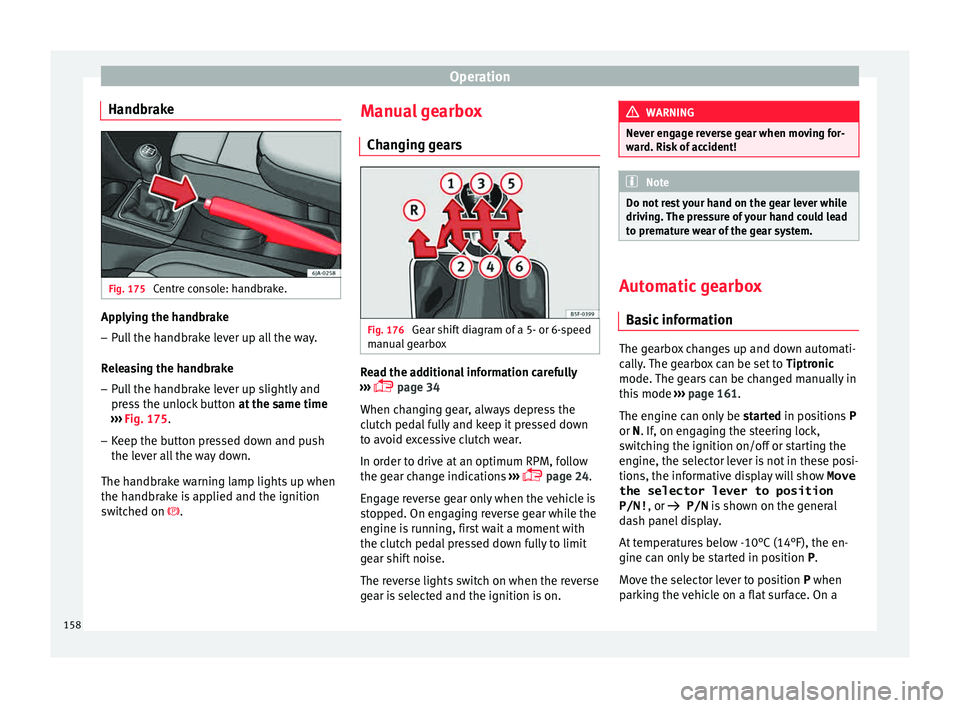
Handbrake Fig. 175
Centre console: handbrake. Applying the handbrake
– Pull the handbrake lever up all the way.
R el
e
asing the handbrake
– Pull the handbrake lever up slightly and
pres
s the unlock button at the same time
››› Fig. 175.
– Keep the button pressed down and push
the lever al
l the way down.
The handbrake warning lamp lights up when
the handbrake is applied and the ignition
switched on . Manual gearbox
Changin
g gears Fig. 176
Gear shift diagram of a 5- or 6-speed
m anual
g
earbox Read the additional information carefully
› ›
›
page 34
When changing gear, always depress the
clutch pedal fully and keep it pressed down
to avoid excessive clutch wear.
In order to drive at an optimum RPM, follow
the gear change indications ›››
page 24.
Engage reverse gear only when the vehicle is
stopped. On engaging reverse gear while the
engine is running, first wait a moment with
the clutch pedal pressed down fully to limit
gear shift noise.
The reverse lights switch on when the reverse
gear is selected and the ignition is on. WARNING
Never engage reverse gear when moving for-
war d. Ri
sk of accident! Note
Do not rest your hand on the gear lever while
drivin g.
The pressure of your hand could lead
to premature wear of the gear system. Automatic gearbox
Ba s
ic information The gearbox changes up and down automati-
c
al
ly
. The gearbox can be set to Tiptronic
mode. The gears can be changed manually in
this mode ›››
page 161.
The engine can only be started in positions P
or N. If, on engaging the steering lock,
switching the ignition on/off or starting the
engine, the selector lever is not in these posi-
tions, the informative display will show Move
the selector lever to position
P/N! , or
P/N is shown on the general
dash panel display.
At temperatures below -10°C (14°F), the en-
gine can only be started in position P.
Move the selector lever to position P when
parking the vehicle on a flat surface. On a
158
Page 161 of 248
Driving
slope, the handbrake should be firmly ap-
p lied bef
or
e moving the selector lever to the
park position. This reduces the load on the
lock mechanism while making it easier to
move the selector lever from position P.
If, while the vehicle is moving, the selector
lever is accidentally moved to position N, re-
lease the accelerator and wait for the engine
to idle before moving it back into position. WARNING
● Never pr e
ss the accelerator when selecting
the automatic gearbox operating mode when
the vehicle is stationary. Risk of accident!
● Never move the selector lever to positions
R or P when driving. Ri
sk of accident!
● If the vehicle is to be stopped with a gear
selected and the en
gine idling (e.g. waiting
or moving slowly at traffic lights), press down
on the brake pedal because the transmission
is not entirely interrupted when the engine is
idling and the vehicle will tend to start mov-
ing.
● Apply the handbrake firmly and put the se-
lector l
ever in position P before opening the
bonnet and working on the vehicle with the
engine running. Risk of accident! Strictly fol-
low the safety instructions ››› page 203, En-
gine compartment.
● When stopping on a slope (hill), try not to
stop the
vehicle from moving by pressing the
“accelerator” with a gear selected. This could
overheat the clutch. If the clutch risks being burnt due to this force, it would switch off
and the v
ehic
le could move backwards. Risk
of accident!
● If you have to stop on a hill, press down on
the brake ped
al to stop the vehicle from mov-
ing.
● The drive wheels could lose traction on a
slipper
y road surface when the kick-down
function is activated. Risk of sliding! CAUTION
● In D SG aut om
atic gearboxes, the double
clutch is protected from overloads. If the hill
hold control is used, the clutches are subjec-
ted to greater force if the vehicle is at a
standstill on a slope or suddenly accelerating
on a slope.
● Should the clutches overheat, the sym-
bol i
s shown on the informative display with
a warning message Gear overheated.
Stop! Instruction Manual! An audible
warning is also heard. Stop the vehicle in this
case, stop the engine and wait until the sym-
bol has switched off. Danger of damage to
the gearbox! You can continue driving once
the symbol is switched off. Starting and driving
Starting
– Press and hold the brake pedal. –
Pr e
s
s and hold the interlock button on the
selector lever knob and move the selector
lever to position ››› page 160 before releas-
ing the interlock button.
– Release the brake and press the accelera-
tor.
St
opping
– The selector lever does not have to be
moved t
o position N if the vehicle is stop-
ped for a short period, e.g. at intersections.
Applying the brake is enough. However, the
engine must remain idling.
Parking
– Press the brake pedal.
– Apply the handbrake.
– Press the interlock button, move the selec-
tor lev
er to position P and release the but-
ton.
Kick-down feature
The kick-down feature allows maximum ac-
celeration to be reached.
In any gear programme, press down fully on
the accelerator for the automatic gearbox to
activate the kick-down feature. This function
takes priority over the gear programmes with-
out taking into account the position of the se-
lector lever (D, S or Tiptronic) and is used to
reach maximum acceleration, using full »
159
Technical data
Advice
Operation
Emergencies
Safety
Page 162 of 248
Operation
engine power. Depending on the road speed
and en gine s
peed, the aut
omatic gearbox
shifts down and the vehicle accelerates. It
only shifts up after the maximum engine
speed has been reached.
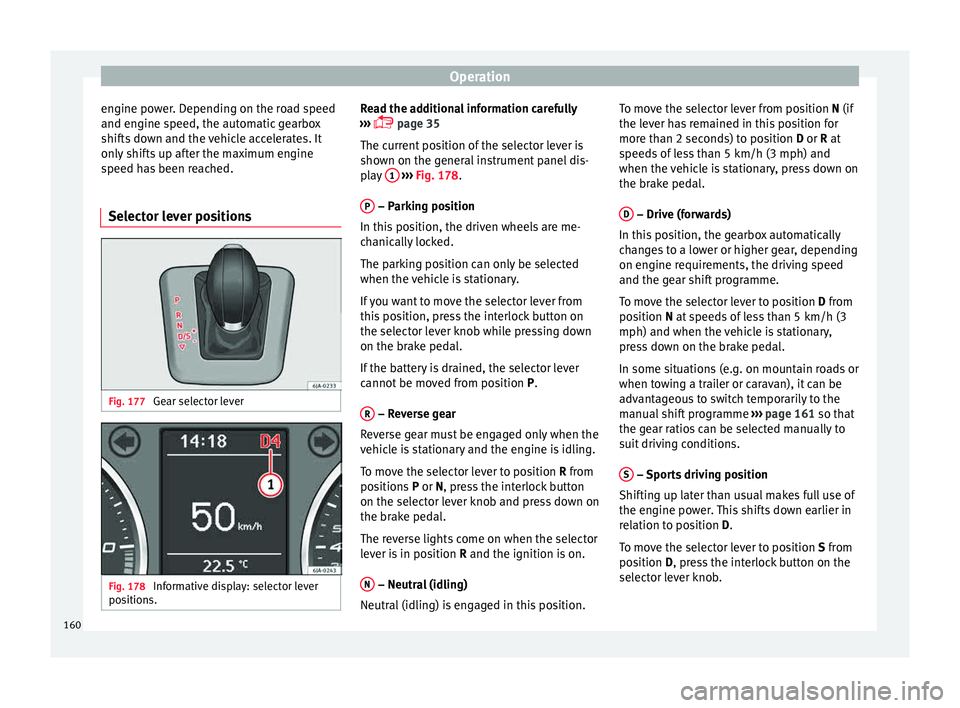
Selector lever positions Fig. 177
Gear selector lever Fig. 178
Informative display: selector lever
po sition
s. Read the additional information carefully
› ›
›
page 35
The current position of the selector lever is
shown on the general instrument panel dis-
play 1
› ››
Fig. 178
.
P – Parking position
In thi s
po
sition, the driven wheels are me-
chanically locked.
The parking position can only be selected
when the vehicle is stationary.
If you want to move the selector lever from
this position, press the interlock button on
the selector lever knob while pressing down
on the brake pedal.
If the battery is drained, the selector lever
cannot be moved from position P.
R – Reverse gear
R ev
er
se gear must be engaged only when the
vehicle is stationary and the engine is idling.
To move the selector lever to position R from
positions P or N, press the interlock button
on the selector lever knob and press down on
the brake pedal.
The reverse lights come on when the selector
lever is in position R and the ignition is on.
N – Neutral (idling)
Neutr al
(idlin
g) is engaged in this position. To move the selector lever from position N (if
the lever h
as remained in this position for
more than 2 seconds) to position D or R at
speeds of less than 5 km/h (3 mph) and
when the vehicle is stationary, press down on
the brake pedal.
D – Drive (forwards)
In thi s
po
sition, the gearbox automatically
changes to a lower or higher gear, depending
on engine requirements, the driving speed
and the gear shift programme.
To move the selector lever to position D from
position N at speeds of less than 5 km/h (3
mph) and when the vehicle is stationary,
press down on the brake pedal.
In some situations (e.g. on mountain roads or
when towing a trailer or caravan), it can be
advantageous to switch temporarily to the
manual shift programme ››› page 161 so that
the gear ratios can be selected manually to
suit driving conditions.
S – Sports driving position
Shif tin
g up l
ater than usual makes full use of
the engine power. This shifts down earlier in
relation to position D.
To move the selector lever to position S from
position D, press the interlock button on the
selector lever knob.
160
Page 163 of 248

Driving
Tiptronic Fig. 179
Selector lever: Tiptronic. The Tiptronic gearbox allows the driver to
c
h
an
ge gears manually using the selector
lever.
Activating the manual gearbox
– From position D, push the sel
ector lever to
the right. The selected position of the se-
lector lever is shown on the general instru-
ment panel display together with the gear
engaged 1
› ›
› Fig. 178
.
Shifting up – Push the selector lever gently forwards +›››
Fig. 179. Shifting down
– Push the selector lever gently backwards
-
› ››
Fig. 179
.
The m
anual gearbox can be activated when
the vehicle is either moving or stationary.
When accelerating, the gearbox automatical-
ly shifts up shortly before the maximum en-
gine speed is reached.
On shifting up, the gear is only engaged
when there is no risk of engine damage.
When the accelerator pedal is pressed down
to the kick-down zone, the gearbox will shift
down in line with the road speed and engine
speed. Note
The kick-down function is also available in
manua l
shift mode. Selector lever lock
Automatic selector lever lock
The sel ect
or l
ever is locked in the positions P
and N when the ignition is on. Press down on
the brake to unlock it. Remember, if the se-
lector lever is in positions P and N then thewarning lamp will light up on the general in-
strument p
anel ››› page 104.
When the selector lever merely moves
through position N (e.g. when moved from R
to D), the lever lock is not applied. This
makes it possible, for example, to rock a
stuck vehicle backwards and forwards. The
lock is only applied if the brake is not press-
ed and the selector lever is moved to position
N for more than 2 seconds.
The selector lever only locks when the is vehi-
cle stationary or driving at a speed lower
than 5 km/h (3 mph). At a higher speed, it
automatically disconnects in the N position.
Interlock button
The interlock button on the selector lever
knob prevents the driver from inadvertently
engaging a gear. Press the button to unlock
the selector lever.
Safety interlock for ignition key 1)
After switching off the ignition, you can only
remove the ignition key if the selector lever is
in position P. When the ignition key is re-
moved, the selector lever is locked in posi-
tion P. 1)
Valid only for certain countries.
161
Technical data
Advice
Operation
Emergencies
Safety