air condition Seat Toledo 2016 User Guide
[x] Cancel search | Manufacturer: SEAT, Model Year: 2016, Model line: Toledo, Model: Seat Toledo 2016Pages: 248, PDF Size: 5.82 MB
Page 84 of 248
EmergenciesNo.Consumer
24Air conditioning fan, heating, control unit for air
conditioning, heating
26Front seat heating switch.
27Rear window wiper
29Airbag
30
Electric windows, reversing light switch, air con-
ditioning control unit, Park Assist control unit,
exterior mirror, power supply for middle button
bar, power supply for the side button bar, interi-
or mirror
31Fuel pump, radiator fan control unit, cruise con-
trol, relay coil for the windscreen and rear win-
dow washer system, switch for the lights
32Diagnostics socket, headlight range regulator,
control lever under the steering wheel, ambient
lighting regulator
33Ignition relay coil, clutch pedal switch
34Heatable washer jets of windscreen washer
36USB charging socket
37Radar
39Additional electric heating
41Rear window heater
42Electric windows - passenger
43Towing bracket - Connector contact
No.Consumer
4412 V connection in the interior, 12 V connection
in the boot
45Rear right window
46Windshield and front window washing system,
control lever under the steering wheel
47Towing bracket - Connector contact
48Towing bracket - Right hand light
49Fuel pump control unit
50Radio
51Heat for exterior mirrors
52Keyless Access
53Steering lock (Keyless Access)
54ABS/ESC control unit
56Diagnosis
59Full LED
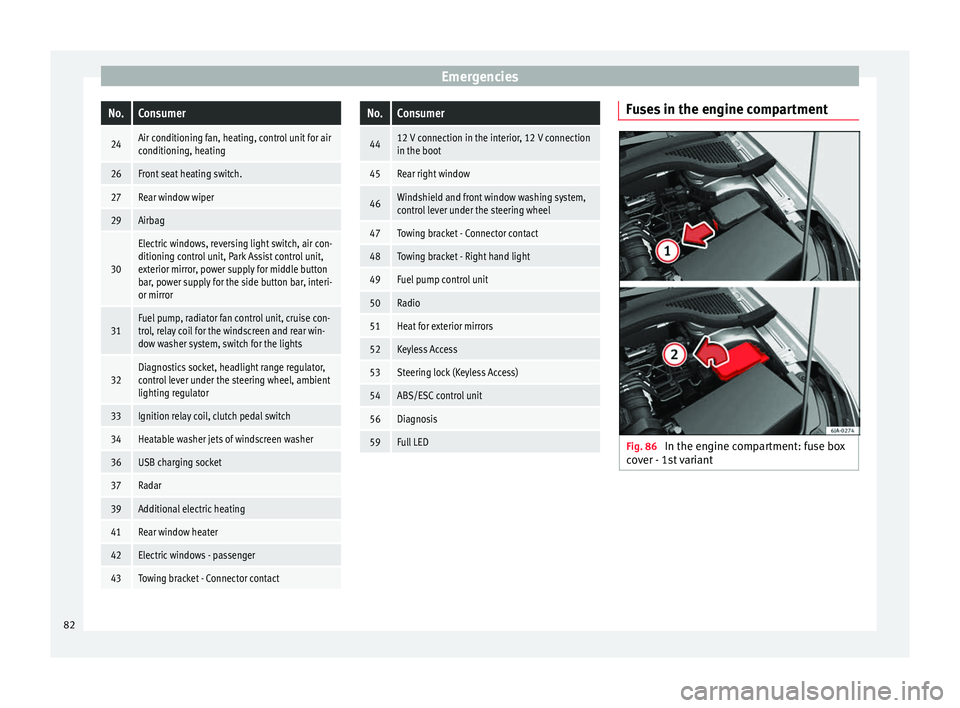
Fuses in the engine compartment
Fig. 86
In the engine compartment: fuse box
c o
v
er - 1st variant 82
Page 95 of 248
Controls and displays
Operation
C ontr
o
ls and displays
General instrument panel Electric window controls
. . . . . . . . . .115
Control for adjusting electric exteri-
or mirror s . . . . . . . . . . . . . . . . . . . . . . . . 126
Air outl
ets . . . . . . . . . . . . . . . . . . . . . . . . 143
Multifunction switch lever:
– Turn s ign
als, headlights, parking
lights, headlight flasher . . . . . . . .118
– Crui se c
ontrol system . . . . . . . . . . .174
Steering wheel:
– With horn
– With the driv
er front airbag . . . . . .14
– With c ontr
ols for audio, naviga-
tion system and telephone . . . . . .100
General instrument panel: instru-
ments and w arnin
g lamps . . . . . . . . 93
Multifunction switch lever:
– Multif
unction display . . . . . . . . . . .23
– Wind s
creen wipers and wind-
screen washers . . . . . . . . . . . . . . . . . 125
Air outlets . . . . . . . . . . . . . . . . . . . . . . . . 143
Depending on the equipment:
– Audio sy st
em
1 2
3
4
5
6
7
8
9 –
Nav ig
ation sy
stem
Hazard warning lights switch . . . . . .121
Control lamp for front passenger
airbag deactiv
ated warning lamp . .71
Front passenger airbag switch . . . .71
Depending on the equipment,
glove c
ompartment with: . . . . . . . . .131
– CD pla
yer* and/or SD card*
››› Booklet Radio
Front passenger airbag . . . . . . . . . . .14
Light switch . . . . . . . . . . . . . . . . . . . . . . 117
Headlight range control . . . . . . . . . . .117
Bonnet release lever . . . . . . . . . . . . . .203
Fuse compartment . . . . . . . . . . . . . . . . 81
Steering column adjustment lev-
er . . . . . . . . . . . . . . . . . . . . . . . . . . . . . . . . 13
Ignition lock . . . . . . . . . . . . . . . . . . . . . . 151
USB/AUX-IN input . . . . . . . . . . . . . . . . 104
Depending on the equipment: – Gear lev
er (manual gearbox) . . . .156
– Select or l
ever (automatic gear-
box) . . . . . . . . . . . . . . . . . . . . . . . . . . . . 158
Depending on the equipment:
– Drink ho l
der . . . . . . . . . . . . . . . . . . . . 132
– Ashtra y
holder . . . . . . . . . . . . . . . . . . 134
Rear shelf . . . . . . . . . . . . . . . . . . . . . . . . 131
Depending on the equipment, con-
tro l
s for:
10 11
12
13
14
15
16
17
18
19
20
21
22
23
24
25 –
Driv er he
at
ed seat . . . . . . . . . . . . . . 128
– Park a
ssist system . . . . . . . . . . . . . . 167
– Central
lock button . . . . . . . . . . . . . 109
– Heated r
ear window . . . . . . . . . . . . 123
– Start
-Stop system . . . . . . . . . . . . . . . 181
– Front p
assenger heated seat . . . .128
Depending on the equipment: – Heating c
ontrols . . . . . . . . . . . . . . . . 144
– Air conditioning c
ontrols . . . . . . . . 145
– Climatr
onic controls . . . . . . . . . . . . 147 Note
The location of the controls of right-hand
drive c ar
s differs slightly from the location
shown here ››› Fig. 109. However, the sym-
bols correspond to the respective controls. 26
93
Technical data
Advice
Operation
Emergencies
Safety
Page 123 of 248

Lights and visibility
Function “Coming Home”/“Leaving
Home”* This function makes it possible, under poor
vi
s
ibility conditions, to automatically turn on
the lights for a brief period of time after the
vehicle has been parked or when approach-
ing the vehicle.
The function is automatically turned on if the
following conditions are met:
● The light switch is in position
››
› page 119.
● The visibility around the vehicle is reduced.
● The ignition is switched off.
To t urn on thi
s function, switch on the head-
light flasher prior to exiting the vehicle.
The light is adjusted according to the data re-
corded by the light sensor that is installed
between the windscreen and the inside rear
view mirror.
The function automatically turns on the side
lights and headlights, the lighting for the en-
try area on the exterior mirrors and the num-
ber plate light.
“Coming Home” function
The light is automatically switched on when
the driver door is opened (for 60 seconds af-
ter the ignition is switched off). The lights is switched off when all the doors
and the boot lid are c
losed.
If a door or the boot lid remains open, the
light will switch off after 60 seconds.
“Leaving Home” function
The light is automatically switched on when
the vehicle is unlocked using the remote con-
trol.
The light is switched off after 10 seconds or
when the vehicle is locked.
Hazard warning lights switch Fig. 133
Instrument panel: switch for hazard
w arnin
g lights. –
Press the button ›
››
Fig. 133 to switch
the hazard warning lights on or off.
The warning lamps on the instrument panel
and the warning lamp on the switch will flash at the same time as the turn signals when
the hazar
d warning lights are switched on.
The hazard warning lights also work when
the ignition is switched off.
The hazard warning lights come on automati-
cally in the event of an accident in which an
airbag is triggered. Note
Switch on the hazard warning lights to warn
other ro a
d users, for example:
● When reaching the tail end of a traffic jam
● if the vehicle has a technical fault or you
are inv
olved in an emergency situation. Parking lights*
Parking lights
– Switch the ignition off.
– Move the turn signal lever ››
›
Fig. 131
››› page 118 up or down to turn on the right
or left-hand parking lights respectively.
Parking light on both sides
– Turn the light switch ›››
Fig. 129
››› page 117 to position and engage the
steering lock. »
121
Technical data
Advice
Operation
Emergencies
Safety
Page 126 of 248
Operation
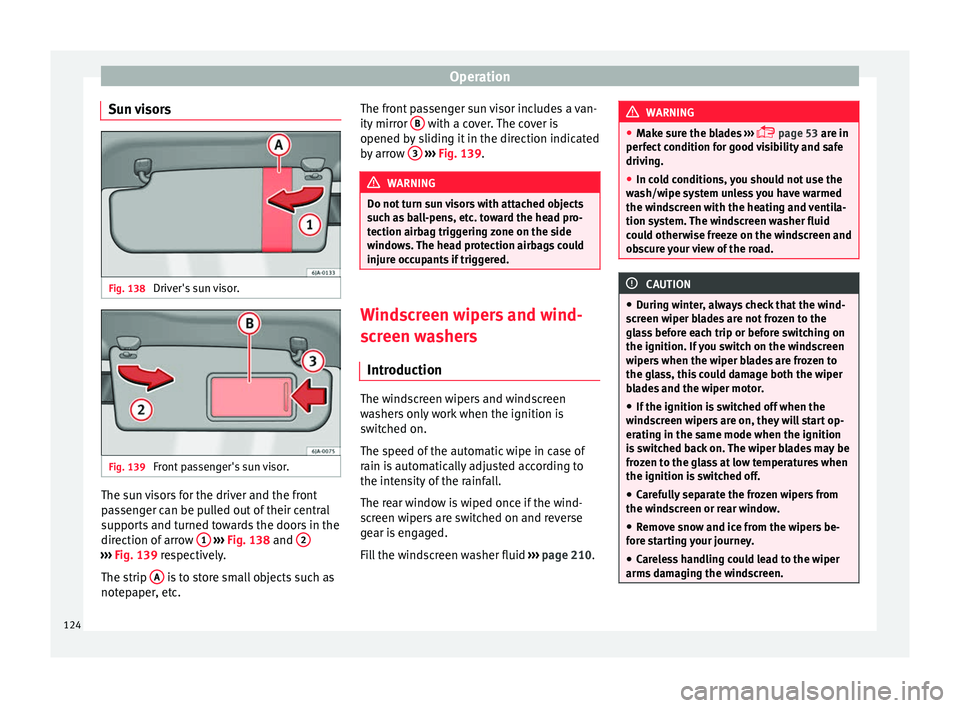
Sun visors Fig. 138
Driver's sun visor. Fig. 139
Front passenger's sun visor. The sun visors for the driver and the front
p
a
s
senger can be pulled out of their central
supports and turned towards the doors in the
direction of arrow 1
› ›
› Fig. 138
and 2 ›››
Fig. 139 re s pectively.
The strip A is to store small objects such as
not ep
aper
, etc. The front passenger sun visor includes a van-
ity mirror
B with a cover. The cover is
opened b y
s
liding it in the direction indicated
by arrow 3
› ››
Fig. 139
. WARNING
Do not turn sun visors with attached objects
suc h a
s ball-pens, etc. toward the head pro-
tection airbag triggering zone on the side
windows. The head protection airbags could
injure occupants if triggered. Windscreen wipers and wind-
s
c
r
een washers
Introduction The windscreen wipers and windscreen
w
a
sher
s only work when the ignition is
switched on.
The speed of the automatic wipe in case of
rain is automatically adjusted according to
the intensity of the rainfall.
The rear window is wiped once if the wind-
screen wipers are switched on and reverse
gear is engaged.
Fill the windscreen washer fluid ›››
page 210. WARNING
● Mak e s
ure the blades ›››
page 53 are in
perfect condition for good visibility and safe
driving.
● In cold conditions, you should not use the
wash/w
ipe system unless you have warmed
the windscreen with the heating and ventila-
tion system. The windscreen washer fluid
could otherwise freeze on the windscreen and
obscure your view of the road. CAUTION
● Durin g w
inter, always check that the wind-
screen wiper blades are not frozen to the
glass before each trip or before switching on
the ignition. If you switch on the windscreen
wipers when the wiper blades are frozen to
the glass, this could damage both the wiper
blades and the wiper motor.
● If the ignition is switched off when the
winds
creen wipers are on, they will start op-
erating in the same mode when the ignition
is switched back on. The wiper blades may be
frozen to the glass at low temperatures when
the ignition is switched off.
● Carefully separate the frozen wipers from
the winds
creen or rear window.
● Remove snow and ice from the wipers be-
fore s
tarting your journey.
● Careless handling could lead to the wiper
arms dam
aging the windscreen.124
Page 133 of 248
Transport and practical equipment
CAUTION
Take care when handling the rear backrests
so as not
to damage the seat belts. The seat
belt must never be left behind the lifted back-
rest. Transport and practical
equipment
Pr actic
a
l equipment
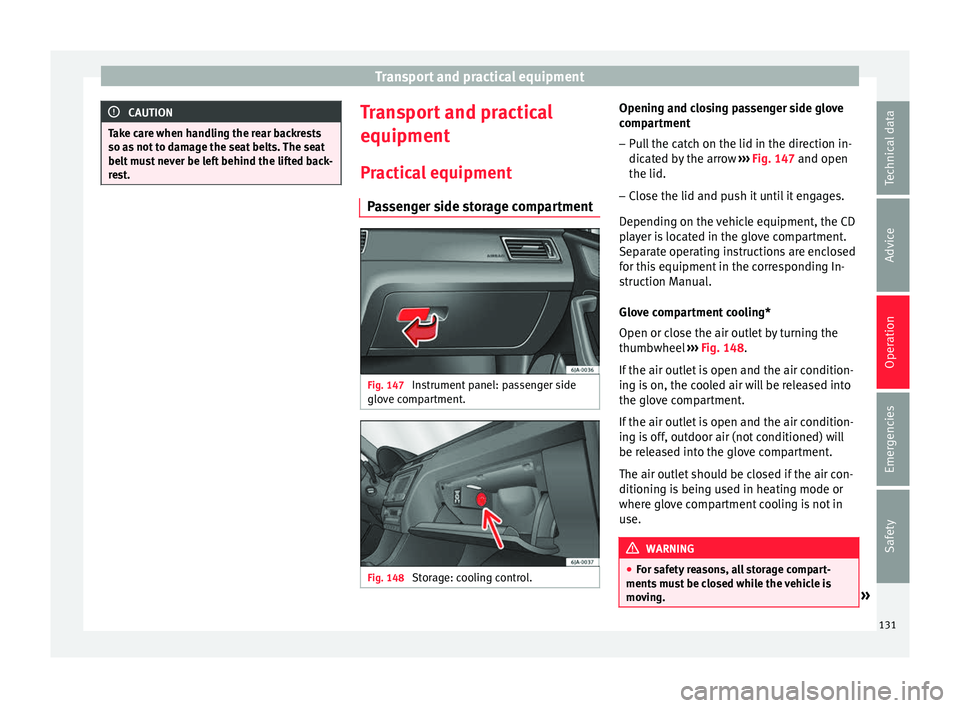
Passenger side storage compartment Fig. 147
Instrument panel: passenger side
glo v
e c
ompartment. Fig. 148
Storage: cooling control. Opening and closing passenger side glove
c
omp ar
tment
– Pull the catch on the lid in the direction in-
dicated b
y the arrow ››› Fig. 147 and open
the lid.
– Close the lid and push it until it engages.
Depending on the
vehicle equipment, the CD
player is located in the glove compartment.
Separate operating instructions are enclosed
for this equipment in the corresponding In-
struction Manual.
Glove compartment cooling*
Open or close the air outlet by turning the
thumbwheel ››› Fig. 148.
If the air outlet is open and the air condition-
ing is on, the cooled air will be released into
the glove compartment.
If the air outlet is open and the air condition-
ing is off, outdoor air (not conditioned) will
be released into the glove compartment.
The air outlet should be closed if the air con-
ditioning is being used in heating mode or
where glove compartment cooling is not in
use. WARNING
● For s af
ety reasons, all storage compart-
ments must be closed while the vehicle is
moving. » 131
Technical data
Advice
Operation
Emergencies
Safety
Page 144 of 248
Operation
CAUTION
Follow the instructions given in the manual. Roof load
The maximum permissible roof load (includ-
ing the s
up
port system) of 75 kg and the to-
tal authorised weight of the vehicle must not
be exceeded.
It will not be possible to carry the full maxi-
mum load if the roof carrier you are using is
rated for a load which is less than this figure.
In this case, you can only load the roof carrier
to the maximum load permitted in your in-
stallation manual. Air conditioning
He atin
g and air c
onditioning
General notes The power of the heating depends on the
temper
at
ure of the coolant. Therefore, maxi-
mum power is only obtained when the en-
gine has reached operating temperature.
The temperature and humidity of the air in-
side the vehicle decrease when the cooling
system is turned on. This therefore increases
the comfort of all vehicle occupants when
outside temperatures and humidity are high.
It also helps prevent the windows from mist-
ing over during cold periods of the year.
The air recirculation system can be switched
on temporarily to increase the cooling effect.
Keep the air intake slots in front of the wind-
screen clear of ice, snow or leaves to ensure
unimpaired heating and cooling.
When the air conditioning is on, condensa-
tion can drip from the evaporator in the air
cooling system and form a pool underneath
the vehicle. This is normal and does not indi-
cate a leak! WARNING
● All
windows must be clear of ice, snow and
condensation for driving safety. Therefore, make sure you familiarise yourself with the
corr
ect
use of heating and ventilation, win-
dow demisting and defrosting and cooling.
● Never use the air recirculation system for
too long, a
s it prevents fresh air from enter-
ing the vehicle and used air can cause tired-
ness, reduce your attention span and cause
the windows to mist over. This increases the
risk of an accident. Switch off the air recircu-
lation system as soon as the windows begin
to mist over. WARNING
Do not switch off Climatronic for longer than
nece s
sary.
● Switch Climatronic back on as soon as the
window
s begin to mist over. Note
● Used air e s
capes through ventilation slots
in the rear of the luggage compartment.
● Smoking is not recommended while the air
recir
culation system is in use, as the smoke
drawn from the interior of the vehicle settles
in the evaporator of the air conditioning sys-
tem. This causes a persistent, unpleasant
smell while the system is running that is
time-consuming and expensive (evaporator
replacement) to eliminate.
● To guarantee proper operation, never cover
the air outlets
in the luggage compartment.142
Page 145 of 248
Air conditioning
Economic use of the air-conditioning
sy s
t
em When the air conditioning is switched on, the
compr
e
ssor consumes engine power and has
influence on fuel consumption.
If the vehicle interior has overheated due to
excessive solar radiation, it is best to open
the windows or doors to allow the hot air to
escape.
While in motion, the air conditioning should
not be switched on if the windows are open. If the interior temperature can be reached
without
sw
itching on the air conditioning, the
fresh air mode should be used. For the sake of the environment
Saving fuel reduces emissions. Faults
If the air conditioning does not work at out-
side t
emper
atures above +5°C (+41°F) then the system is faulty. This may be due to one
of the f
o
llowing reasons:
● One of the fuses has blown. Check the fuse
and repl
ace if necessary ››› page 80.
● The air conditioning compressor has
switc
hed off temporarily because of in-
creased engine coolant temperature
››› page 97.
If you cannot repair the fault yourself or
where cooling power continues to drop,
switch off the system. Contact a specialised
service.
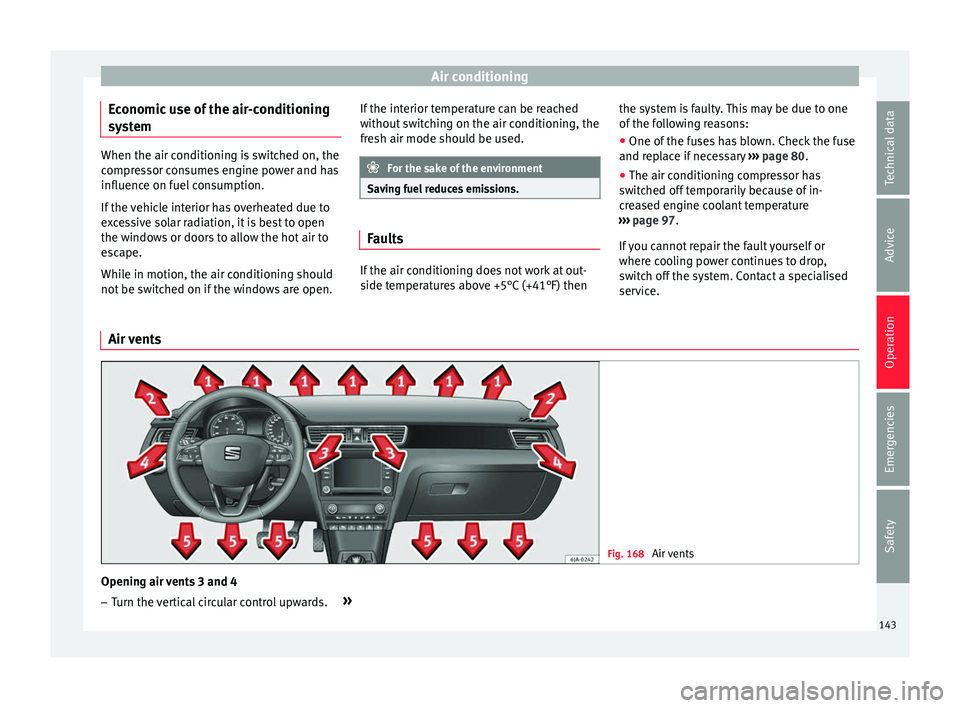
Air vents Fig. 168
Air vents Opening air vents 3 and 4
– Turn the vertical circular control upwards. »
143Technical data
Advice
Operation
Emergencies
Safety
Page 147 of 248
Air conditioning
Connecting the recirculation
In an y
po
sition of rotary switch C except
th a
w:
● Pr
ess button 1
› ››
Fig. 169
, the sw
itch's
lamp will light up, indicating that air recircu-
lation inside the vehicle has been activated.
Disconnecting the recirculation
In any position of rotary switch C except
th a
w:
● Pr
ess button 1 again and the button's
l amp w
i
ll go off, indicating that air recircula-
tion from the outside has been activated.
In the thaw position of rotary switch C , the
entr y
of
air into the vehicle interior is always
from the outside. WARNING
Read and observe the safety warnings ›››
in
Genera l
notes on page 142. Air conditioning (manual)*
Gener a
l
notesThe air cooling system only works if
A/C but-
t on 2
› ›
›
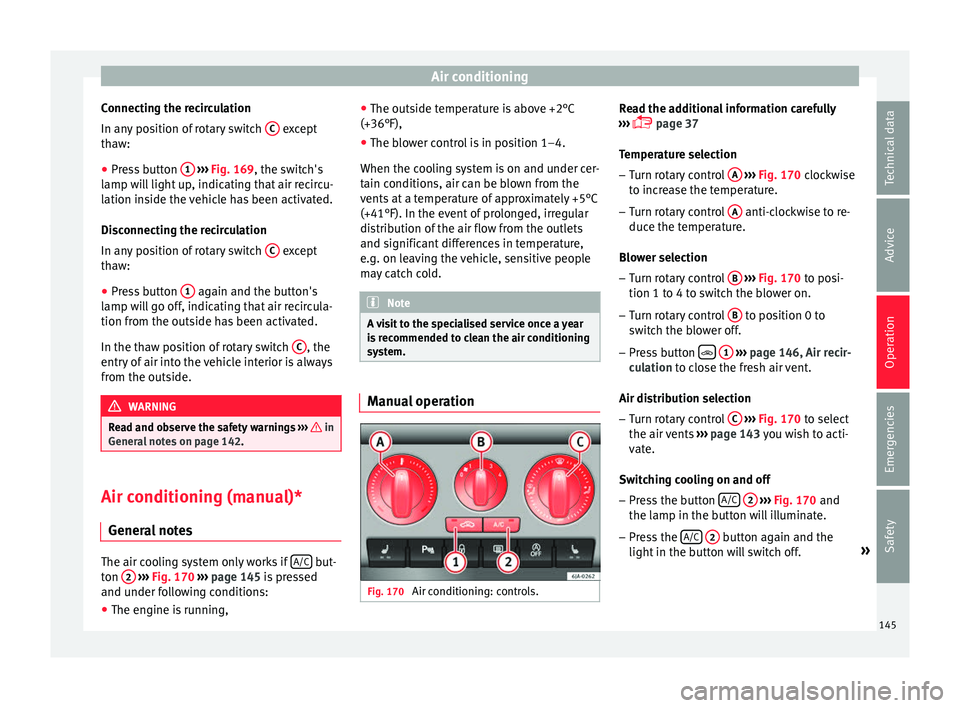
Fig. 170 ›››
page 145 is pressed
and under following conditions:
● The engine is running, ●
The outside temper
ature is above +2°C
(+36°F),
● The blower control is in position 1–4.
When the coolin
g system is on and under cer-
tain conditions, air can be blown from the
vents at a temperature of approximately +5°C
(+41°F). In the event of prolonged, irregular
distribution of the air flow from the outlets
and significant differences in temperature,
e.g. on leaving the vehicle, sensitive people
may catch cold. Note
A visit to the specialised service once a year
is r
ecommended to clean the air conditioning
system. Manual operation
Fig. 170
Air conditioning: controls. Read the additional information carefully
› ›
›
page 37
Temperature selection – Turn rotary control A
› ››
Fig. 170
c
lockwise
to increase the temperature.
– Turn rotary control A anti-clockwise to re-
duc e the t
emper
ature.
Blower selection
– Turn rotary control B
› ››
Fig. 170
t
o posi-
tion 1 to 4 to switch the blower on.
– Turn rotary control B to position 0 to
sw it
c
h the blower off.
– Press button
1
› ›
› p
age 146, Air recir-
culation to close the fresh air vent.
Air distribution selection – Turn rotary control C
› ›
› Fig. 170
to select
the air vents ››› page 143 you wish to acti-
vate.
Switching cooling on and off
– Press the button A/C
2
› ›
› Fig. 170
and
the lamp in the button will illuminate.
– Press the A/C
2 button again and the
light in the b
utt
on will switch off. »
145
Technical data
Advice
Operation
Emergencies
Safety
Page 148 of 248
Operation
Coldest setting – On turning control A to the coldest setting
(b lue indic
at
or), buttons 1
and
2 A/C
, light up
– The recirculation function is activated auto-
matic
al
ly in order to cool faster. Note
● If the air di s
tribution is directed towards
the windows, all, of the heating power is
used to defrost the windscreen. No warm air
is directed to the footwell area. This could
limit heating comfort.
● The AC button lamp will illuminate after
the sys t
em has been switched on, even if not
all of the conditions for cooling system oper-
ations are met. Cooling is indicated as availa- ble once all of the conditions are met
›› ›
page 145, General notes . Air recirculation
Air recirculation prevents unpleasant smells,
e.g. when p
a
ssing through a tunnel or in
queuing traffic, from entering the interior.
If the rotary switch C
››› Fig. 170 i
s in the
thaw position, the recirculation flap will al-
ways be open (button light off).
If the rotary switch C is switched from any
po s
ition t
o the thaw position, recirculation
will be automatically deactivated.
Connecting the recirculation
In any position of rotary switch C except
th a
w: ●
Pr
es
s button 1
› ››
Fig. 170
, the sw itch's
lamp will light up, indicating that air recircu-
lation inside the vehicle has been activated.
Disconnecting the recirculation
In any position of rotary switch C except
th a
w:
● Pr
ess button 1 again and the button's
l amp w
i
ll go off, indicating that air recircula-
tion from the outside has been activated.
In the thaw position of rotary switch C , the
entr y
of
air into the vehicle interior is always
from the outside. WARNING
Read and observe the safety warnings ›››
in
Genera l
notes on page 142. 146
Page 149 of 248

Air conditioning
Climatronic* (automatic air conditioning) Gener a
l
notes Fig. 171
Climatronic: controls. Read the additional information carefully
› ›
›
page 36
Climatronic automatically maintains a com-
fortable temperature. To do so, it automati-
cally regulates the supplied air temperature
and the blower and air distribution levels.
The system also allows for the effect of sun-
light, so there is no need for manual adjust-
ment. It also has a humidity sensor that
helps to automatically demist the wind-
screen.
Automatic operations ››› page 148 guaran-
tee maximum comfort any time of year. Climatronic description
Coolin
g only works if the following conditions
are met:
● The engine is running
● the outside temperature is above +2°C
(+36°F);
● A/C
18
› ››
Fig. 171
sw
itched on.
Starting the Climatronic
The corresponding function will be switched
on when a button is pressed, turning on the
air conditioning if it was switched off, with
the exception of button 17
›
› ›
Fig. 171
(recir-
culation). Switching off the Climatronic
●
Turn control 10 to the left until the seg-
ments of
c
olumn 9
› ››
Fig. 171
sw itch off.
● After 1 second has elapsed, turn the control
again t
o switch off the display.
In order to ensure engines subject to heavy
loads are cooled, the air conditioning com-
pressor is switched off in the event of high
coolant temperatures.
Recommended setting for all seasons of the
year
● Set the required temperature. We recom-
mend +22°C (72°F). »
147
Technical data
Advice
Operation
Emergencies
Safety