change time Seat Toledo 2016 User Guide
[x] Cancel search | Manufacturer: SEAT, Model Year: 2016, Model line: Toledo, Model: Seat Toledo 2016Pages: 248, PDF Size: 5.82 MB
Page 97 of 248

Instruments and warning lamps
CAUTION
● To pr ev
ent damage to the engine, the rev
counter needle should only remain in the red
zone for a short period of time.
● When the engine is cold, avoid high revs
and heavy ac
celeration and do not make the
engine work hard. For the sake of the environment
Changing up a gear in time reduces fuel con-
sumption and noi se.Rev counter
The rev counter indicates the number of en-
gine r
ev
o
lutions per minute ›››
Fig. 110 1 .
T og
ether w
ith the gear-change indicator, the
rev counter offers you the possibility of using
the engine of your vehicle at a suitable
speed.
The start of the red zone on the dial indicates
the maximum engine speed which may be
used briefly when the engine is warm and af-
ter it has been run in properly. Before reach-
ing this range, you should change to a higher
gear for vehicles with a manual gearbox or for
automatic gearboxes put the selector lever in
“D” or take your foot off the accelerator ped-
al. We recommend that you avoid high revs and
that
you follow the recommendations on the
gear-change indicator. Consult the additional
information in ›››
page 25. CAUTION
Never allow the rev counter needle 1 ›››
Fig. 110 to g o int
o the red zone on the
scale for more than a very brief period, other-
wise there is a risk of engine damage. For the sake of the environment
Changing up a gear early will help you to save
fuel and minimi
se emissions and engine
noise. Indications on the display
A variety of information can be viewed on the
in
s
trument
panel display ›››
Fig. 110 3 de-
pendin g on the
v
ehicle equipment:
● Bonnet, rear lid and doors open
›››
page 25.
● Information and warning texts.
● Mileage.
● Time.
● Navigation instructions.
● Outside temperature.
● Compass. ●
Shift l
ever position ››› page 158.
● Recommended gear (manual gearbox)
›››
page 25.
● Multifunction display (MFD) and menus
with differ
ent setting options ›››
page 23.
● Service interval display ›››
page 30.
● Second speed display ›››
page 26.
● Speed warning function ›››
page 29.
● Start-Stop system status display
›››
page 181.
● Low consumption driving status (ECO)
›››
page 96
● Identifying letters on engine (MKB).
Dist
ance travelled
The odometer registers the total distance
travelled by the car.
The odometer (trip ) shows the distance
travelled since the last odometer reset. The
last digit of the trip recorder indicates distan-
ces of 100 metres or one tenths of a mile.
● Briefly press the button ›››
Fig. 110 4 to re-
set the trip r
ec
order to 0.
● Keep the button 4 pressed for about 3
sec ond
s
and the previous value will be dis-
played. »
95
Technical data
Advice
Operation
Emergencies
Safety
Page 99 of 248
Instruments and warning lamps
●
Dependin g on the equipment, some set
-
tings and instructions can also be carried out
in the Easy Connect system.
● When several warnings are active at the
same time, the symbol
s are shown succes-
sively for a few seconds and will stay on until
the fault is rectified. Odometer
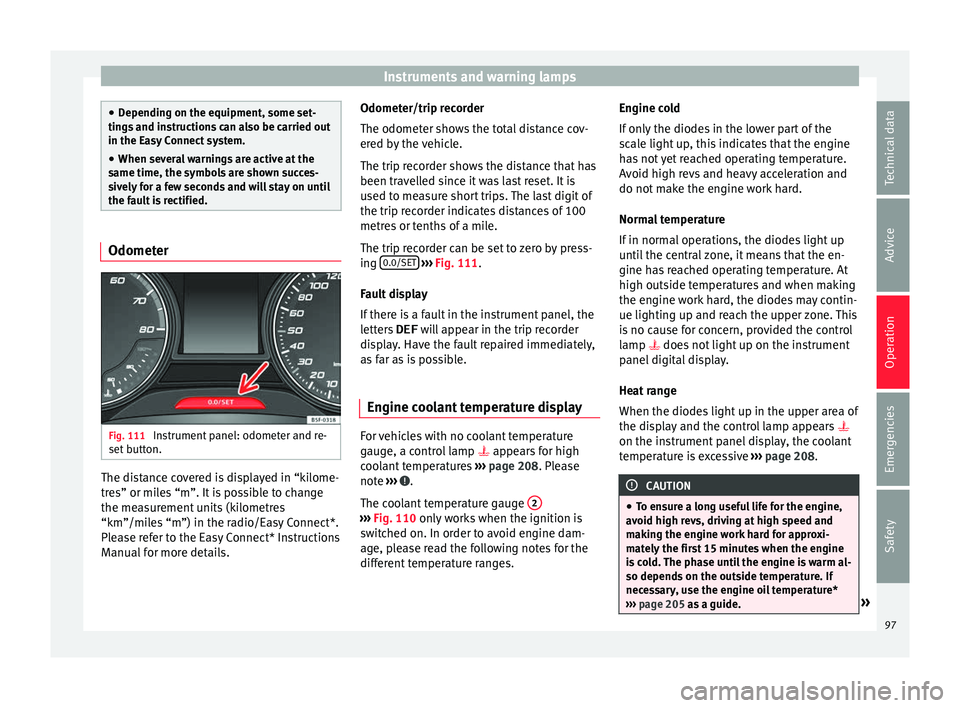
Fig. 111
Instrument panel: odometer and re-
set b
utt
on. The distance covered is displayed in “kilome-
tr
e
s” or mi
les “m”. It is possible to change
the measurement units (kilometres
“km”/miles “m”) in the radio/Easy Connect*.
Please refer to the Easy Connect* Instructions
Manual for more details. Odometer/trip recorder
The odometer show
s the total distance cov-
ered by the vehicle.
The trip recorder shows the distance that has
been travelled since it was last reset. It is
used to measure short trips. The last digit of
the trip recorder indicates distances of 100
metres or tenths of a mile.
The trip recorder can be set to zero by press-
ing 0.0/SET
› ››
Fig. 111
.
F
ault display
If there is a fault in the instrument panel, the
letters DEF will appear in the trip recorder
display. Have the fault repaired immediately,
as far as is possible.
Engine coolant temperature display For vehicles with no coolant temperature
g
aug
e, a c
ontrol lamp appears for high
coolant temperatures ›››
page 208. Please
note ››› .
The c oo
l
ant temperature gauge 2 ›››
Fig. 110 only w
orks when the ignition is
switched on. In order to avoid engine dam-
age, please read the following notes for the
different temperature ranges. Engine cold
If on
ly
the diodes in the lower part of the
scale light up, this indicates that the engine
has not yet reached operating temperature.
Avoid high revs and heavy acceleration and
do not make the engine work hard.
Normal temperature
If in normal operations, the diodes light up
until the central zone, it means that the en-
gine has reached operating temperature. At
high outside temperatures and when making
the engine work hard, the diodes may contin-
ue lighting up and reach the upper zone. This
is no cause for concern, provided the control
lamp does not light up on the instrument
panel digital display.
Heat range
When the diodes light up in the upper area of
the display and the control lamp appears
on the instrument panel display, the coolant
temperature is excessive ››› page 208. CAUTION
● To en s
ure a long useful life for the engine,
avoid high revs, driving at high speed and
making the engine work hard for approxi-
mately the first 15 minutes when the engine
is cold. The phase until the engine is warm al-
so depends on the outside temperature. If
necessary, use the engine oil temperature*
››› page 205 as a guide. » 97
Technical data
Advice
Operation
Emergencies
Safety
Page 101 of 248

Introduction to the Easy Connect system*
●
Bef or
e opening the bonnet, switch off the
engine and allow it to cool.
● In any vehicle, the engine compartment is a
hazar
dous area and could cause severe inju-
ries ››› page 202. CAUTION
Failure to heed the control lamps and text
me ss
ages when they appear may result in
faults in the vehicle. Introduction to the Easy
C
onnect
sy
stem*
System settings (CAR)* CAR menu (Setup) Read the additional information carefully
›› ›
page 21
To select the settings menus, press the Easy
Connect button and the
Set
up function
b utt
on.
The act
ual number of menus available and
the name of the various options in these me-
nus will depend on the vehicle’s electronics
and equipment.
Pressing the menu button will always take
you to the last menu used.
When the function button check box is activa-
ted , the function is active.
Pressing the menu button will always take
y ou t
o the l
ast menu used.
Any changes made using the settings menus
are automatically saved on closing those me-
nus.
Function buttons in the vehicle settings
menuPage
ESC system››› page 154
Tyres››› page 219
Driver assistance››› table on page 21
Parking and manoeuvring››› page 167
Vehicle lights››› table on page 21
Mirrors and windscreen wipers››› table on page 21
Opening and closing››› table on page 21
Multifunction display››› table on page 21
Date and time››› table on page 21
Units››› table on page 21
Service››› page 30
Factory settings››› table on page 21 WARNING
Any distraction may lead to an accident, with
the risk of
injury. Operating the Easy Connect
system while driving could distract you from
traffic. 99
Technical data
Advice
Operation
Emergencies
Safety
Page 103 of 248
Communications and multimedia
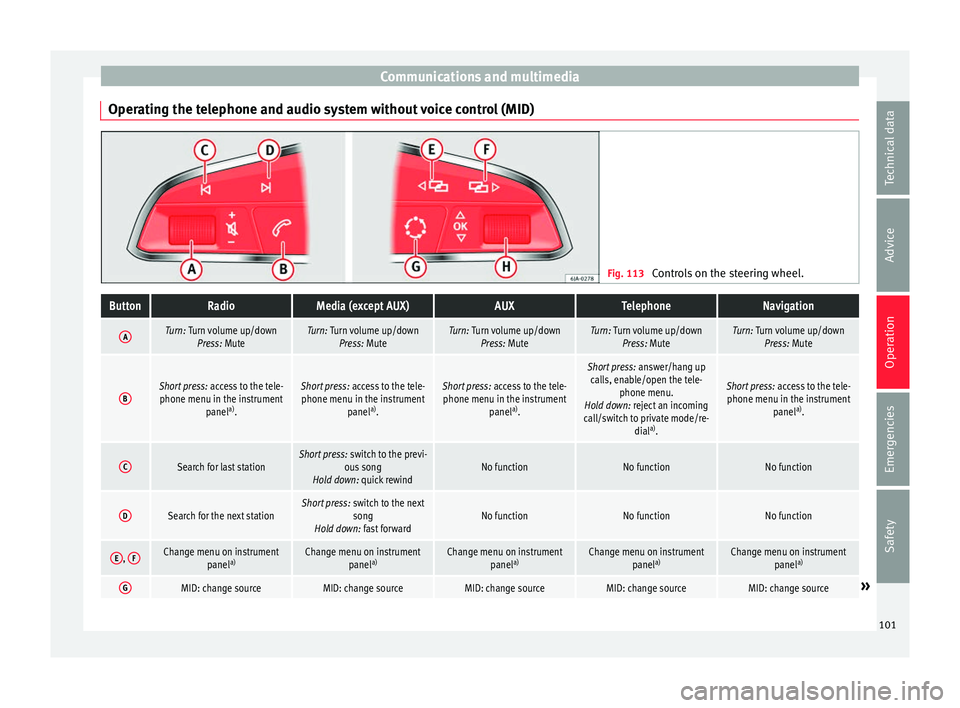
Operating the telephone and audio system without voice control (MID) Fig. 113
Controls on the steering wheel.ButtonRadioMedia (except AUX)AUXTelephoneNavigation
ATurn: Turn volume up/down
Press: MuteTurn: Turn volume up/downPress: MuteTurn: Turn volume up/downPress: MuteTurn: Turn volume up/downPress: MuteTurn: Turn volume up/downPress: Mute
BShort press: access to the tele-
phone menu in the instrument panela)
.Short press: access to the tele-
phone menu in the instrument panela)
.Short press: access to the tele-
phone menu in the instrument panela)
.
Short press: answer/hang up
calls, enable/open the tele- phone menu.
Hold down: reject an incoming
call/switch to private mode/re- diala)
.
Short press: access to the tele-
phone menu in the instrument panela)
.
CSearch for last stationShort press: switch to the previ-
ous song
Hold down: quick rewindNo functionNo functionNo function
DSearch for the next stationShort press: switch to the next
song
Hold down: fast forwardNo functionNo functionNo function
E, FChange menu on instrument
panela)Change menu on instrument
panela)Change menu on instrument
panela)Change menu on instrument
panela)Change menu on instrument
panela)
GMID: change sourceMID: change sourceMID: change sourceMID: change sourceMID: change source» 101
Technical data
Advice
Operation
Emergencies
Safety
Page 105 of 248
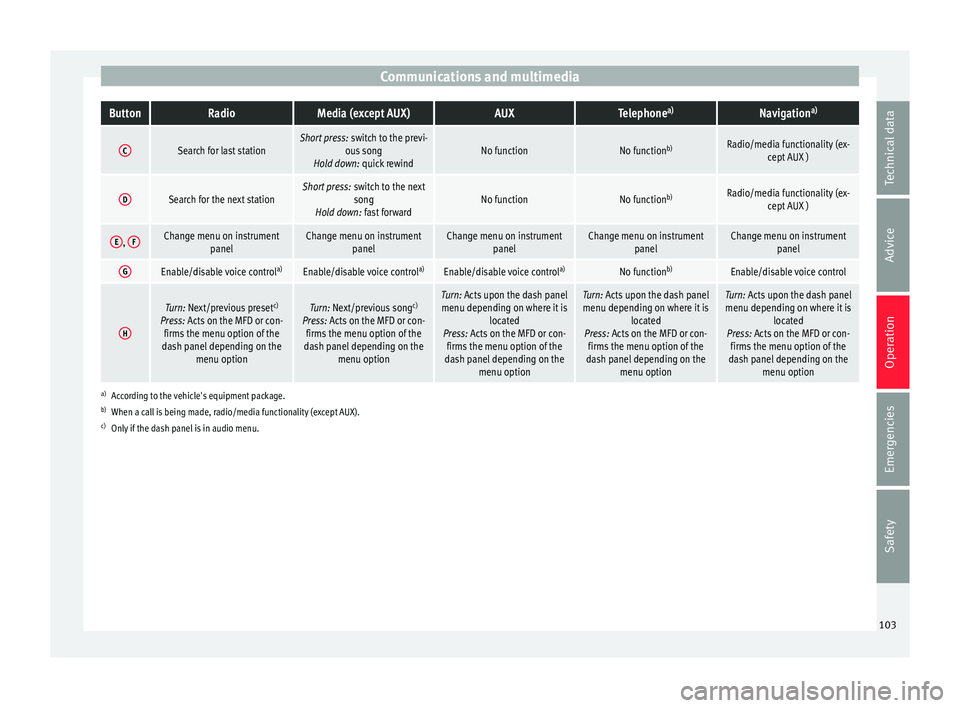
Communications and multimediaButtonRadioMedia (except AUX)AUXTelephone
a)Navigation a)
CSearch for last stationShort press:
switch to the previ-
ous song
Hold down: quick rewindNo functionNo function b)Radio/media functionality (ex-
cept AUX )
DSearch for the next stationShort press: switch to the next
song
Hold down: fast forwardNo functionNo function b)Radio/media functionality (ex-
cept AUX )
E, FChange menu on instrument
panelChange menu on instrumentpanelChange menu on instrumentpanelChange menu on instrumentpanelChange menu on instrumentpanel
GEnable/disable voice control a)Enable/disable voice controla)Enable/disable voice controla)No functionb)Enable/disable voice control
H
Turn: Next/previous preset c)
Press: Acts on the MFD or con- firms the menu option of the
dash panel depending on the menu optionTurn: Next/previous song c)
Press: Acts on the MFD or con- firms the menu option of the
dash panel depending on the menu optionTurn: Acts upon the dash panelmenu depending on where it is located
Press: Acts on the MFD or con- firms the menu option of the
dash panel depending on the menu optionTurn: Acts upon the dash panelmenu depending on where it is located
Press: Acts on the MFD or con- firms the menu option of the
dash panel depending on the menu optionTurn: Acts upon the dash panelmenu depending on where it is located
Press: Acts on the MFD or con- firms the menu option of the
dash panel depending on the menu option
a)According to the vehicle's equipment package.
b) When a call is being made, radio/media functionality (except AUX).
c) Only if the dash panel is in audio menu.
103
Technical data
Advice
Operation
Emergencies
Safety
Page 106 of 248
Operation
Multimedia USB/A UX
-IN inp
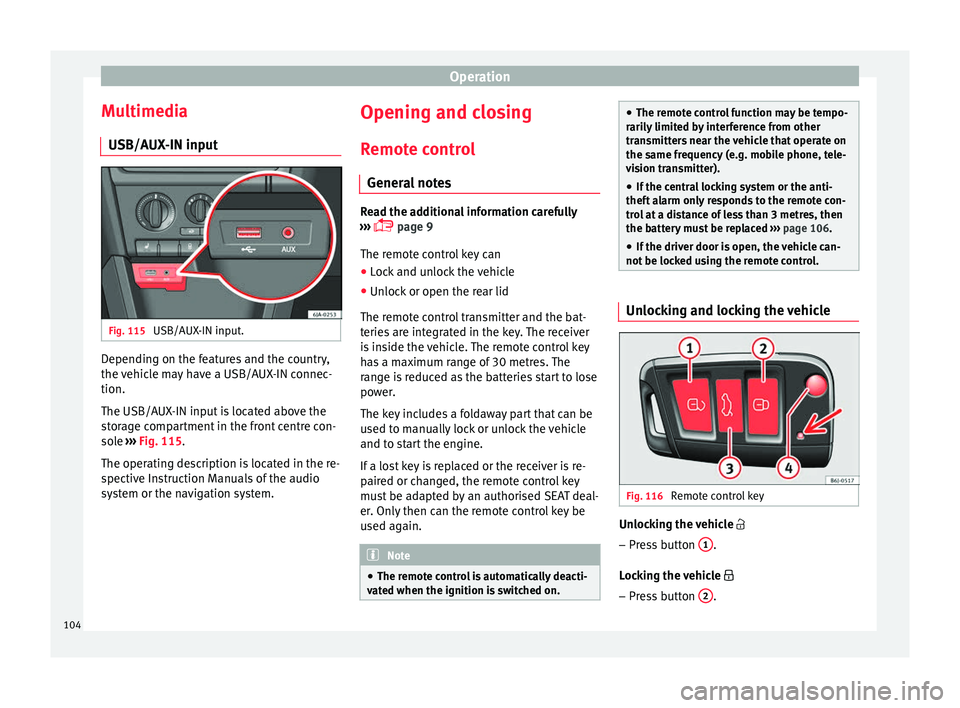
utFig. 115
USB/AUX-IN input. Depending on the features and the country,
the
v
ehic
le may have a USB/AUX-IN connec-
tion.
The USB/AUX-IN input is located above the
storage compartment in the front centre con-
sole ››› Fig. 115.
The operating description is located in the re-
spective Instruction Manuals of the audio
system or the navigation system. Opening and closing
R emot
e c
ontrol
General notes Read the additional information carefully
›› ›
page 9
The remote control key can
● Lock and unlock the vehicle
● Unlock or open the rear lid
The remot e c
ontrol transmitter and the bat-
teries are integrated in the key. The receiver
is inside the vehicle. The remote control key
has a maximum range of 30 metres. The
range is reduced as the batteries start to lose
power.
The key includes a foldaway part that can be
used to manually lock or unlock the vehicle
and to start the engine.
If a lost key is replaced or the receiver is re-
paired or changed, the remote control key
must be adapted by an authorised SEAT deal-
er. Only then can the remote control key be
used again. Note
● The remot e c
ontrol is automatically deacti-
vated when the ignition is switched on. ●
The remot e c
ontrol function may be tempo-
rarily limited by interference from other
transmitters near the vehicle that operate on
the same frequency (e.g. mobile phone, tele-
vision transmitter).
● If the central locking system or the anti-
theft a
larm only responds to the remote con-
trol at a distance of less than 3 metres, then
the battery must be replaced ››› page 106.
● If the driver door is open, the vehicle can-
not be lock
ed using the remote control. Unlocking and locking the vehicle
Fig. 116
Remote control key Unlocking the vehicle
– Press button 1 .
L oc
k
ing the vehicle
– Press button 2 .
104
Page 116 of 248
Operation
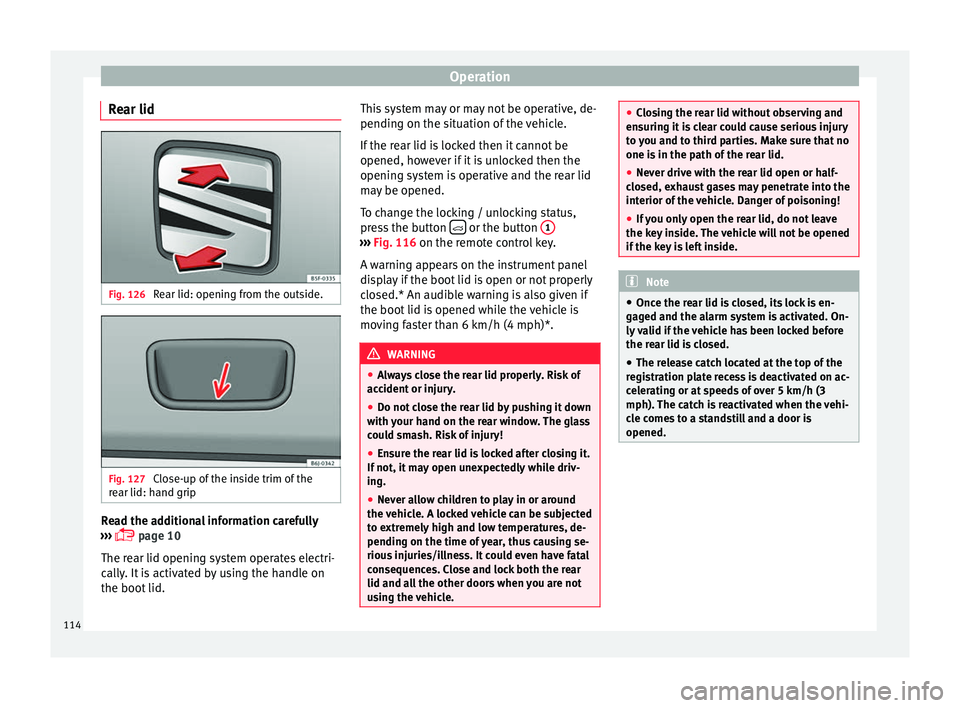
Rear lid Fig. 126
Rear lid: opening from the outside. Fig. 127
Close-up of the inside trim of the
r e
ar lid: h
and grip Read the additional information carefully
› ›
›
page 10
The rear lid opening system operates electri-
cally. It is activated by using the handle on
the boot lid. This system may or may not be operative, de-
pending on the sit
uation of the vehicle.
If the rear lid is locked then it cannot be
opened, however if it is unlocked then the
opening system is operative and the rear lid
may be opened.
To change the locking / unlocking status,
press the button or the button
1 ›››
Fig. 116 on the r emot
e c
ontrol key.
A warning appears on the instrument panel
display if the boot lid is open or not properly
closed.* An audible warning is also given if
the boot lid is opened while the vehicle is
moving faster than 6 km/h (4 mph)*. WARNING
● Alw a
ys close the rear lid properly. Risk of
accident or injury.
● Do not close the rear lid by pushing it down
with y
our hand on the rear window. The glass
could smash. Risk of injury!
● Ensure the rear lid is locked after closing it.
If not, it m
ay open unexpectedly while driv-
ing.
● Never allow children to play in or around
the vehic
le. A locked vehicle can be subjected
to extremely high and low temperatures, de-
pending on the time of year, thus causing se-
rious injuries/illness. It could even have fatal
consequences. Close and lock both the rear
lid and all the other doors when you are not
using the vehicle. ●
Clo s
ing the rear lid without observing and
ensuring it is clear could cause serious injury
to you and to third parties. Make sure that no
one is in the path of the rear lid.
● Never drive with the rear lid open or half-
closed, e
xhaust gases may penetrate into the
interior of the vehicle. Danger of poisoning!
● If you only open the rear lid, do not leave
the key in
side. The vehicle will not be opened
if the key is left inside. Note
● Onc e the r e
ar lid is closed, its lock is en-
gaged and the alarm system is activated. On-
ly valid if the vehicle has been locked before
the rear lid is closed.
● The release catch located at the top of the
regi
stration plate recess is deactivated on ac-
celerating or at speeds of over 5 km/h (3
mph). The catch is reactivated when the vehi-
cle comes to a standstill and a door is
opened. 114
Page 127 of 248

Lights and visibility
●
For s af
ety reasons, the wiper blades should
be changed once or twice a year. They can be
purchased at a SEAT Authorised Service.
● The ignition cannot be switched on while
the winds
creen wiper arms are in a raised po-
sition. Otherwise, the windscreen wipers
would return to their original position and
could damage the paintwork on the bonnet. Note
Keep the wipers clean. The wipers can be
soi led w
ith remains of wax solutions from car
washes ››› page 194.
● On vehicles equipped with windscreen
washer j
ets, these are heated once the en-
gine is running. Operating windscreen wipers and
w
a
sher
s Fig. 140
Window wiper lever. Short wipe
– Give the windscreen a brief w ipe by
moving
the lever down to position 4
› ››
Fig. 140
.
W
ipe intervals/automatic wipe in case of rain
rain sensor*
– Push the lever up to position 1 ›››
Fig. 140.
– With switch A , adjust the wipe interval or
r ain sen
sor sen
sitivity.
Switch A has 4 positions.
The r ain sen
sor* i
s part of the intermittent
wipe function.
The rain sensor* controls the frequency of
the windscreen wiper intervals, depending
on the amount of rain.
Slow wipe
– Push the lever up to position 2 ›››
Fig. 140.
Continuou s
wipe
– Push the lever up to position 3 ›››
Fig. 140.
Autom atic
windscreen wash and wipe
– Pull the lever towards the steering wheel,
pos ition 5
› ›
› Fig. 140
, and the windscreen
washer and wipers are switched on. –
Rele
ase the lever. The washer will stop and
the windscreen wipers will keep running for
1-3 wipes (depending on the windscreen
washer operating time).
Rear window wiper*
– Press the lever forward to position 6 ›››
Fig. 140 and the r e
ar w
indow wiper will
run every 6 seconds.
Automatic rear window wash and wipe* – Press the lever fully forward to position 7 ›››
Fig. 140 and the re ar w
indow wiper and
washer switch on at the same time.
– Release the lever. The rear window washer
wi l
l stop and the rear window wipers will
keep running for 1-3 wipes (depending on
the jet operating time). When released, the
lever remains in position 6 .
Sw it
c
hing off the wipers
– Move the lever to position 0
› ›
› Fig. 140
. WARNING
The rain sensor may not detect enough rain
to sw it
ch on the wipers.
● If necessary, switch on the wipers manually
when water on the w
indscreen obstructs visi-
bility. » 125
Technical data
Advice
Operation
Emergencies
Safety
Page 129 of 248
Seats and head restraints
Seats and head restraints
Adju s
tin
g seats and head re-
straints
Introduction Read the additional information carefully
›› ›
page 11
Set the driver seat in such a way that the
pedals can be fully depressed with your legs
slightly bent.
Set the driver seat backrest so that you can
reach the upper point of the steering wheel
with your arms slightly bent.
The correct seat position is very important
for:
● reaching all of the controls safely and
quick ly
,
● a relaxed posture that will not produce fati-
gue,
● maximum protection from the seat belts
and airbag sys
tem WARNING
● Adjus t
the driver seat only when the vehi-
cle is stationary. Risk of accident!
● Be careful when adjusting the front seats!
Carel
ess and uncontrolled adjustment can
cause injuries. ●
The bac k
rests must not be reclined too far
back while driving. This could limit the effect
of the seat belts and the airbag system. Risk
of injury!
● Never transport more than the permitted
amount of
people in your vehicle.
● Every occupant in the vehicle must properly
fas
ten and wear the seat belt belonging to
his or her seat. Children must be protected
with an appropriate child restraint system
››› page 72, Transporting children safely.
● The front seats, head restraints and seat
belts mu
st always be adjusted to the size of
the vehicle occupant to provide you and your
passengers with the greatest possible protec-
tion.
● Your feet should remain in the footwell
while the
vehicle is moving; never rest them
on the dash panel, on the window or on the
seat! This also applies to passengers. An in-
correct sitting position exposes you to an in-
creased risk of injury in case of a sudden
braking or an accident. If the airbag is trig-
gered, you could sustain severe injuries due
to an incorrect sitting position!
● It is important for the driver and front pas-
senger t
o keep a distance of at least 25 cm
from the steering wheel and dash panel. Fail-
ure to respect the minimum distance means
that the airbag will not protect you. Risk of
fatal injury if triggered!
● Objects must not be placed in the footwell,
as they
could move to the area of the pedals
in the event of a braking manoeuvre or
change of direction. This would prevent the clutch, brake or accelerator from being press-
ed.
●
Do not place any items on the front passen-
ger se at
other than those allowed (e.g. child
seat). Risk of accident! Note
After a certain time, the backrest angle ad-
ju stment
mechanism may gain a certain
amount of play. 127
Technical data
Advice
Operation
Emergencies
Safety
Page 140 of 248
Operation
object generates a force corresponding to 20
time s
its
weight. That means that the effec-
tive weight of the object increases to approxi-
mately 90 kg. You can imagine the severity of
the injuries which might be sustained if this
“object” strikes an occupant as it flies
through the interior of the vehicle. This in-
creased risk of injury will be further increased
if a loose object is struck by an inflating air-
bag. WARNING
● If piec e
s of baggage or other objects are se-
cured to the fastening rings with inappropri-
ate or damaged retaining cords, injuries
could result in the event of braking manoeu-
vres or accidents.
● Never secure a child seat on the fastening
rings. Luggage compartment
Intr oduction Please observe the following points to ensure
the
v
ehic
le handles well at all times:
– Distribute the load as evenly as possible.
– Place heavy objects as far forward in the
luggag
e compartment as possible.
– Secure luggage using the fastening rings or
retainin
g net ›››
page 139. During an accident, even small and light ob-
jects c
an have so much kinetic energy that
they can cause very severe injuries. The
amount of kinetic energy depends on the
speed of the vehicle and the weight of the
object. However, the speed of the vehicle is
the most important factor.
Example: An unsecured object weighing 4.5
kg produces energy corresponding to 20
times its weight in a frontal collision at 50
km/h (31 mph). This means that its weight
reaches around 90 kg. You can imagine the
severity of the injuries that might be sus-
tained if this “projectile” strikes an occupant
as it flies through the vehicle interior. WARNING
● Stor e o
bjects in the luggage compartment
and secure to the fastening points.
● In an accident or sudden manoeuvre, loose
obj
ects in the interior can be flung forward
and possibly injure vehicle occupants or oth-
ers. This risk is even greater if the flying ob-
jects hit a triggering airbag. In this case, any
rebounding objects could injure vehicle occu-
pants. Risk of fatal injuries!
● Take into account that transporting heavy
obj
ects changes the centre of gravity that
could also cause changes in vehicle handling.
Risk of accident! Therefore, always adjust
your speed and driving style to suit these cir-
cumstances. ●
Securin g the lo
ad to the rings using unsuit-
able or damaged straps could lead to injuries
in the event of an accident or sudden braking
manoeuvre. Secure suitable straps safely to
the rings to ensure this does not happen.
● Position the load so it cannot move forward
during a sud
den braking manoeuvre. Risk of
injuries!
● If transporting sharp or dangerous objects
in the spac
e provided when the rear seats are
folded, ensure the safety of the occupant of
the remaining rear seat ››› page 58.
● If the rear seat located alongside a folded
seat i
s occupied, ensure safety, for example,
by placing the load so that it stops the seat
from folding backward in the event of being
hit from behind.
● Never drive with the rear lid open or half-
closed, e
xhaust gases may penetrate into the
interior of the vehicle. Danger of poisoning!
● Never exceed the allowed axle loads or al-
lowed m
aximum weight. Risk of accident!
● Never transport passengers in the luggage
compar
tment! CAUTION
Make sure sharp objects stored in the boot
cannot not
damage the rear window heating
filaments. 138