radio Seat Toledo 2016 User Guide
[x] Cancel search | Manufacturer: SEAT, Model Year: 2016, Model line: Toledo, Model: Seat Toledo 2016Pages: 248, PDF Size: 5.82 MB
Page 103 of 248
Communications and multimedia
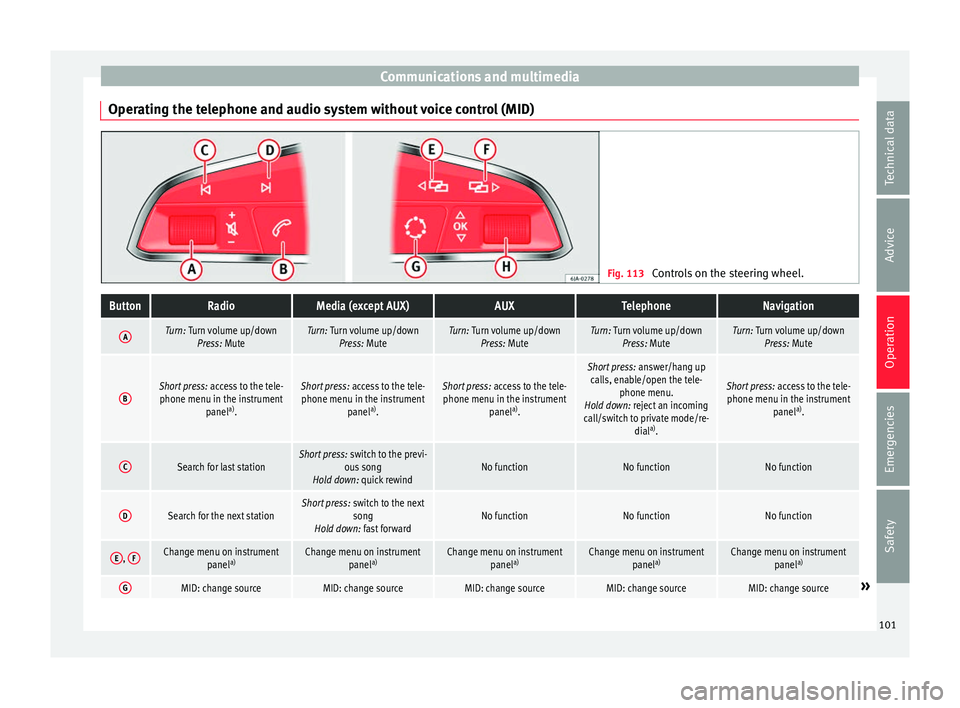
Operating the telephone and audio system without voice control (MID) Fig. 113
Controls on the steering wheel.ButtonRadioMedia (except AUX)AUXTelephoneNavigation
ATurn: Turn volume up/down
Press: MuteTurn: Turn volume up/downPress: MuteTurn: Turn volume up/downPress: MuteTurn: Turn volume up/downPress: MuteTurn: Turn volume up/downPress: Mute
BShort press: access to the tele-
phone menu in the instrument panela)
.Short press: access to the tele-
phone menu in the instrument panela)
.Short press: access to the tele-
phone menu in the instrument panela)
.
Short press: answer/hang up
calls, enable/open the tele- phone menu.
Hold down: reject an incoming
call/switch to private mode/re- diala)
.
Short press: access to the tele-
phone menu in the instrument panela)
.
CSearch for last stationShort press: switch to the previ-
ous song
Hold down: quick rewindNo functionNo functionNo function
DSearch for the next stationShort press: switch to the next
song
Hold down: fast forwardNo functionNo functionNo function
E, FChange menu on instrument
panela)Change menu on instrument
panela)Change menu on instrument
panela)Change menu on instrument
panela)Change menu on instrument
panela)
GMID: change sourceMID: change sourceMID: change sourceMID: change sourceMID: change source» 101
Technical data
Advice
Operation
Emergencies
Safety
Page 104 of 248
OperationButtonRadioMedia (except AUX)AUXTelephoneNavigation
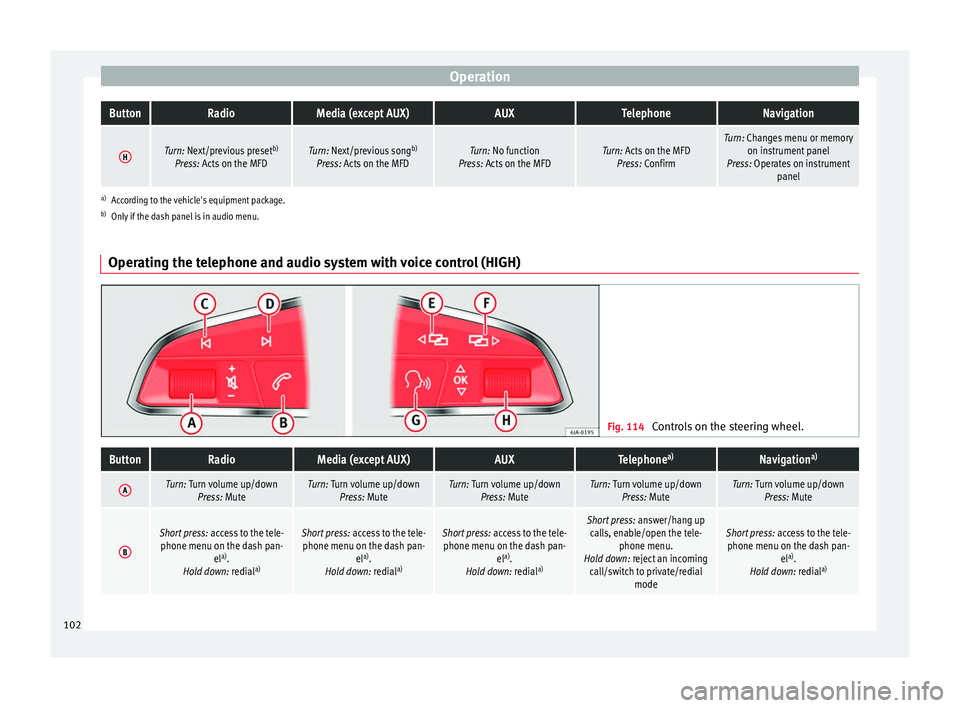
HTurn: Next/previous preset
b)
Press: Acts on the MFDTurn: Next/previous song b)
Press: Acts on the MFDTurn: No function
Press: Acts on the MFDTurn: Acts on the MFD Press: ConfirmTurn: Changes menu or memory on instrument panel
Press: Operates on instrument panel
a)According to the vehicle's equipment package.
b) Only if the dash panel is in audio menu.
Operating the telephone and audio system with voice control (HIGH) Fig. 114
Controls on the steering wheel.
ButtonRadioMedia (except AUX)AUXTelephone a)Navigation a)
ATurn: Turn volume up/down
Press: MuteTurn: Turn volume up/downPress: MuteTurn: Turn volume up/downPress: MuteTurn: Turn volume up/downPress: MuteTurn: Turn volume up/downPress: Mute
B
Short press: access to the tele-
phone menu on the dash pan- ela)
.
Hold down: redial a)Short press:
access to the tele-
phone menu on the dash pan- ela)
.
Hold down: redial a)Short press:
access to the tele-
phone menu on the dash pan- ela)
.
Hold down: redial a)Short press:
answer/hang up
calls, enable/open the tele- phone menu.
Hold down: reject an incoming call/switch to private/redial modeShort press: access to the tele-
phone menu on the dash pan- ela)
.
Hold down: redial a)102
Page 105 of 248
Communications and multimediaButtonRadioMedia (except AUX)AUXTelephone
a)Navigation a)
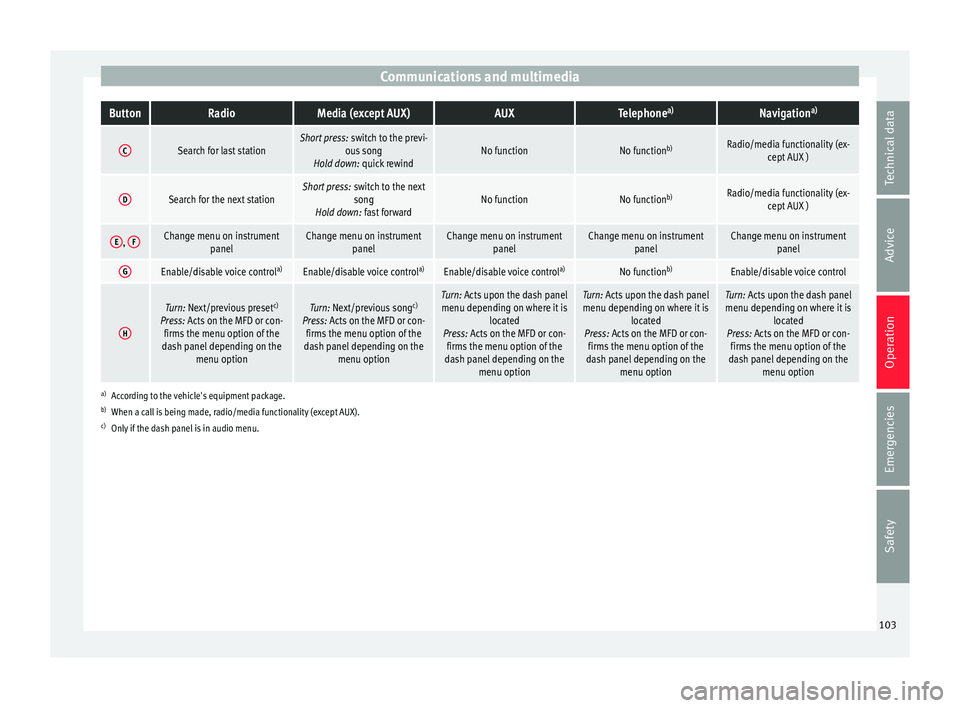
CSearch for last stationShort press:
switch to the previ-
ous song
Hold down: quick rewindNo functionNo function b)Radio/media functionality (ex-
cept AUX )
DSearch for the next stationShort press: switch to the next
song
Hold down: fast forwardNo functionNo function b)Radio/media functionality (ex-
cept AUX )
E, FChange menu on instrument
panelChange menu on instrumentpanelChange menu on instrumentpanelChange menu on instrumentpanelChange menu on instrumentpanel
GEnable/disable voice control a)Enable/disable voice controla)Enable/disable voice controla)No functionb)Enable/disable voice control
H
Turn: Next/previous preset c)
Press: Acts on the MFD or con- firms the menu option of the
dash panel depending on the menu optionTurn: Next/previous song c)
Press: Acts on the MFD or con- firms the menu option of the
dash panel depending on the menu optionTurn: Acts upon the dash panelmenu depending on where it is located
Press: Acts on the MFD or con- firms the menu option of the
dash panel depending on the menu optionTurn: Acts upon the dash panelmenu depending on where it is located
Press: Acts on the MFD or con- firms the menu option of the
dash panel depending on the menu optionTurn: Acts upon the dash panelmenu depending on where it is located
Press: Acts on the MFD or con- firms the menu option of the
dash panel depending on the menu option
a)According to the vehicle's equipment package.
b) When a call is being made, radio/media functionality (except AUX).
c) Only if the dash panel is in audio menu.
103
Technical data
Advice
Operation
Emergencies
Safety
Page 113 of 248

Opening and closing
Unlocking and locking the boot hatch
When the v
ehic
le is locked, the hatch auto-
matically unlocks on opening if ››› Fig. 122
there is a valid vehicle key in the proximity.
Open or close the hatch normally
››› page 113.
After closing, the hatch locks automatically.
In the following instances, the rear lid does
not lock automatically after closing:
● If the entire vehicle is unlocked.
● If the key used last is inside the vehicle. All
vehicl
e indicator lights flash four times. The
vehicle will lock again after a few seconds if
no door or boot hatch are opened.
Locking the vehicle with a second key
If there is a vehicle key inside the vehicle and
it is locked from the outside with a second
vehicle key, the key inside the vehicle is
blocked for engine ignition ››› page 149. In
order to enable engine ignition, the button on the key inside the vehicle needs to be
pr
e
s
sed ››› page 104.
Automatically disabling sensors
If the vehicle is not locked or unlocked for a
long period of time, the proximity sensor on
the passenger door is automatically disa-
bled.
If the exterior sensor on the door handle is
often activated unusually with the vehicle locked (e.g. by the branches of a bush rub-
bing ag
ainst it), all proximity sensors are dis-
abled for a time. If this only happens with the
exterior sensor on the driver's door, only this
sensor is disabled.
Sensors will again be enabled:
● After a time.
● OR: if the vehicle is unlocked with the but-
ton on the key.
● OR: if the boot is opened.
C on
venience functions
To close all electric windows, the sun roof
and electric tilting panoramic roof with the
convenience feature, keep your finger for a
few seconds on the lock sensor surface
››› Fig. 123 B located on the exterior part of
the driv er or p
a
ssenger door handle until the
windows and roof close.
Opening the doors by touching the sensor
surface on the handle takes place in accord-
ance with the settings activated on the menu
Configuration - Convenience . CAUTION
The sensor surfaces on the door handles
cou l
d engage if hit with a water jet or high
pressure steam if there is a valid vehicle key
in the nearby area. If at least one of the win-
dows is open and the sensor surface B on
one of the h andl
e permanently activates, all windows will close. If the water jet or steam
is
briefly
moved away from the sensor sur-
face A on one of the handles and then poin-
ted at it
again, all the windows will probably
open ››› page 111, Convenience functions. Note
● If the v
ehicle battery has little or no charge,
or the vehicle key battery is almost or entire-
ly out of charge, it is likely that the vehicle
will not be able to be lock or unlocked with
the Keyless Access system. The vehicle can
be unlocked or locked manually
››› page 9.
● If there is no valid key inside the vehicle or
the syst
em fails to detect one, a warning will
display on the dash panel screen. This could
happen if any other radio frequency signal in-
terferes with the key signal (e.g. from a mo-
bile device accessory) or if the key is covered
by another object (e.g. an aluminium case).
● If the sensors are very dirty, e.g. have a lay-
er of sa
lt, how the sensors on the door han-
dles operate may be affected. If this is the
case, wash the vehicle ››› page 193.
● If the vehicle is equipped with an automatic
gearbo
x, it may only be locked in the gear
stick is in position P. 111
Technical data
Advice
Operation
Emergencies
Safety
Page 114 of 248
Operation
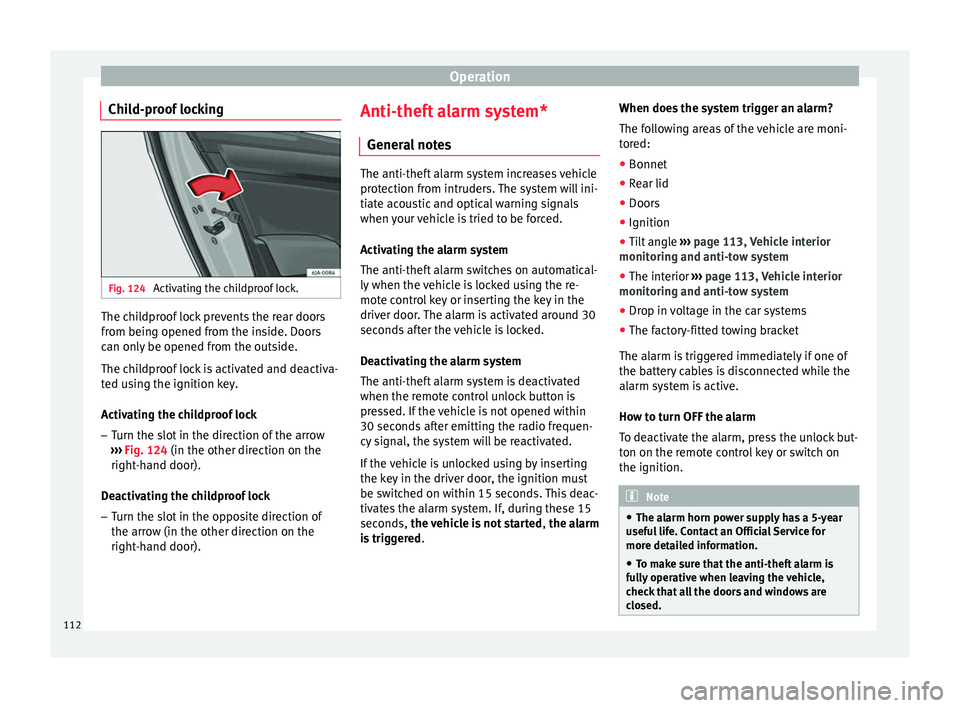
Child-proof locking Fig. 124
Activating the childproof lock. The childproof lock prevents the rear doors
fr
om bein
g opened fr
om the inside. Doors
can only be opened from the outside.
The childproof lock is activated and deactiva-
ted using the ignition key.
Activating the childproof lock
– Turn the slot in the direction of the arrow
›››
Fig. 124 (in the other direction on the
right-hand door).
Deactivating the childproof lock – Turn the slot in the opposite direction of
the arrow (in the other dir
ection on the
right-hand door). Anti-theft alarm system*
General
notes The anti-theft alarm system increases vehicle
prot
ection fr
om intruders. The system will ini-
tiate acoustic and optical warning signals
when your vehicle is tried to be forced.
Activating the alarm system
The anti-theft alarm switches on automatical-
ly when the vehicle is locked using the re-
mote control key or inserting the key in the
driver door. The alarm is activated around 30
seconds after the vehicle is locked.
Deactivating the alarm system
The anti-theft alarm system is deactivated
when the remote control unlock button is
pressed. If the vehicle is not opened within
30 seconds after emitting the radio frequen-
cy signal, the system will be reactivated.
If the vehicle is unlocked using by inserting
the key in the driver door, the ignition must
be switched on within 15 seconds. This deac-
tivates the alarm system. If, during these 15
seconds, the vehicle is not started , the alarm
is triggered . When does the system trigger an alarm?
The fo
l
lowing areas of the vehicle are moni-
tored:
● Bonnet
● Rear lid
● Doors
● Ignition
● Tilt angle ››› pag
e 113, Vehicle interior
monitoring and anti-tow system
● The interior ››› pag
e 113, Vehicle interior
monitoring and anti-tow system
● Drop in voltage in the car systems
● The factory-fitted towing bracket
The alarm is
triggered immediately if one of
the battery cables is disconnected while the
alarm system is active.
How to turn OFF the alarm
To deactivate the alarm, press the unlock but-
ton on the remote control key or switch on
the ignition. Note
● The al arm horn po
wer supply has a 5-year
useful life. Contact an Official Service for
more detailed information.
● To make sure that the anti-theft alarm is
ful
ly operative when leaving the vehicle,
check that all the doors and windows are
closed. 112
Page 172 of 248
Operation
be displayed and the segments will be
sho wn on the l
ef
t side of the screen
››› Fig. 183.
Automatic activation occurs when slowly ap-
proaching an obstacle located in front of the
vehicle. It only operates every time the speed
is reduced below approximately 10 km/h (6
mph) for the first time.
If the parking aid is switched off using the
button, the following actions must be carried
out in order for it to automatically switch on:
● Switch off the ignition and switch it on
again.
● OR: ac
celerate above 10 km/h (6 mph) be-
for
e reducing speed below this number
again.
● OR: place the selector lever in position P
and then mov
e it from this position.
● OR: switch on and off the automatic activa-
tion in the Ea
sy Connect system menu.
The automatic activation with parking aid
miniature indication can be switched on and
off from the Easy Connect system menu
››› page 21:
● Switch the ignition on.
● Select: CAR button > Settings
> Parking
and manoeuvring .
● Select the Automatic activation op-
tion. When the f
u
nction button check box is
activated , the function is on. If the system has been activated automatical-
ly, an audibl
e sound warning will only be giv-
en when obstacles in front are at a distance
of less than 50 cm. CAUTION
The automatic connection of the Parking Aid
only w
orks when you are driving slowly. If
driving style is not adapted to the circum-
stances, an accident and serious injury or
damage may be caused. Segments of the visual indication
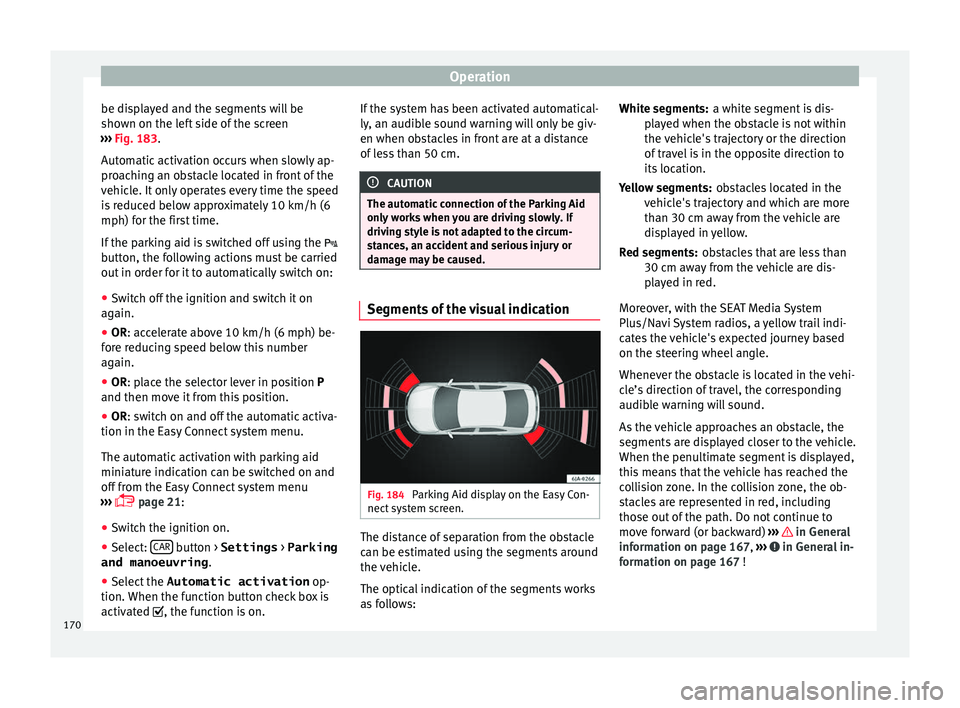
Fig. 184
Parking Aid display on the Easy Con-
nect sy
s
tem screen. The distance of separation from the obstacle
c
an be e
s
timated using the segments around
the vehicle.
The optical indication of the segments works
as follows: a white segment is dis-
pla
yed when the obstacle is not within
the vehicle's trajectory or the direction
of travel is in the opposite direction to
its location.
obstacles located in the
vehicle's trajectory and which are more
than 30 cm away from the vehicle are
displayed in yellow.
obstacles that are less than
30 cm away from the vehicle are dis-
played in red.
Moreover, with the SEAT Media System
Plus/Navi System radios, a yellow trail indi-
cates the vehicle's expected journey based
on the steering wheel angle.
Whenever the obstacle is located in the vehi-
cle’s direction of travel, the corresponding
audible warning will sound.
As the vehicle approaches an obstacle, the
segments are displayed closer to the vehicle.
When the penultimate segment is displayed,
this means that the vehicle has reached the
collision zone. In the collision zone, the ob-
stacles are represented in red, including
those out of the path. Do not continue to
move forward (or backward) ››› in General
inf orm
ation on p
age 167, ››› in General in-
f orm
ation on p
age 167 !
White segments:
Yellow segments:
Red segments:
170
Page 195 of 248
Care and maintenance
●
The modification of the s
uspension of the
vehicle wheels, including the use of non-per-
mitted combinations of tyres and rims can al-
ter the operation of the airbag system and in-
crease the risk of serious or fatal injuries in
an accident.
● During all jobs on the airbag system, in ad-
dition to the remo
val and fitting of parts of
the system in the course of other repair jobs,
parts of the airbag system can be damaged.
Therefore in the event of an accident, this
may cause the airbags to activate incorrectly
or not activate at all. Radio and aerial reception
In vehicles factory-fitted with an audio or
n
av
ig
ation system, the aerial may be instal-
led in different places:
● inside the rear window next to the heating
elements,
● on the roof
of the vehicle.
Care and cleaning Introduction Regular and suitable care helps to
m
aint ain
the u
seful life of your vehicle. This may also
be one of the requirements for upholding any warranty claims in the event of corrosion or
paint def
ects.
We recommend you use cleaning products
from the SEAT Original Accessories pro-
gramme available in SEAT dealers. Please fol-
low the instructions for use on the packag-
ing. WARNING
● Cle
aning products and other materials used
for car care can damage the health if mis-
used.
● Always keep car care materials in a safe
plac
e out of the reach of children. Risk of poi-
soning!
● When washing the car during the winter
season: Moi
sture and ice on the brakes may
affect braking efficiency. Risk of accident!
● The ignition must always be switched off
when the car is
washed. Risk of accident!
● Do not clean the underside of the car or in-
side the wheel ar
ches without protecting your
hands and arms. You may cut yourself on
sharp metal parts!
● Perfumes and air fresheners inside the ve-
hicle m
ay be harmful to health at high tem-
peratures in the interior. CAUTION
● Check the c
olour-fastness of your clothing
to avoid damaging or visibly staining the fab-
ric (leather), upholstery and fabric trim. ●
Cle
aning products containing solvents may
damage the material being cleaned.
● Do not wash the vehicle in direct sunlight.
Risk of
damage to paintwork.
● If washing the vehicle with a hose in win-
ter, do not
direct the jet of water directly at
the locks or at the door seals or bonnet. Risk
of freezing.
● Do not use sponges for removing insects or
abras
ive household sponges, etc. on painted
surfaces. Risk of damage to the painted sur-
face!
● Do not put stickers on the inner side of the
rear w
indow in areas where heating elements
or the aerial are located. This could cause
damage and, in the case of the aerial, radio
and navigation system reception faults.
● Do not clean the inside of the window with
sharp ob
jects or corrosive or acidic cleaning
products. Risk of damaging the heating ele-
ments or the aerial.
● Do not attach any fragrance or air freshener
to the da
sh panel. Risk of damage to the
dash panel!
● To avoid damaging the parking aid system
sensors, s
pray them only briefly at a mini-
mum distance of 10 cm when cleaning the ve-
hicle with a high-pressure or steam cleaner.
● Do not clean the roof panel with a brush.
Risk of
damage to the panel surface! » 193
Technical data
Advice
Operation
Emergencies
Safety
Page 196 of 248
Advice
For the sake of the environment
● The pac k
aging of the product used to care
for your vehicle is hazardous waste. It must
be disposed of according to current local law.
● Only wash the car in special wash bays. Note
● Remo v
e stains from fresh ball-pen and oth-
er inks, lipstick, shoe cream and similar
stains on the fabric (leather), upholstery and
fabric trim as soon as possible.
● We recommend that you visit an authorised
SEAT de
aler to clean and care for the interior
of your vehicle, due to the problems that may
arise when cleaning and caring for the interi-
or of your vehicle and to the utensils and
knowledge required. Washing the vehicle
The best protection of the vehicle from the
h
armf
u
l influences of the environment in-
volves frequent washing and waxing. The fre-
quency with which the vehicle is washed de-
pends on many different factors, such as:
● Frequency of use
● Type of parking (garage, underneath trees,
etc.)
● Time of
year
● Weather conditions ●
Envir
onmental conditions
The longer substances such as insects, bird
droppings, resinous tree sap, road dirt, in-
dustrial deposits, tar, soot or road salt and
other aggressive materials remain on the
paintwork, the more damage they do. High
temperatures (for instance in strong sunlight)
further intensify the corrosive effect.
After the winter season, it is important to
have the underside of the vehicle washed
thoroughly.
car washes Your vehicle can be washed in an automatic
c
ar w
a
sh.
Before going through an automatic car wash,
be sure to take the usual precautions such as
closing the windows, etc.
If the vehicle has special accessories such as
spoilers or a roof rack or two-way radio aerial,
etc., it is advisable to consult the car wash
operator beforehand.
The windscreen wiper rubbers must be de-
greased after going after the car wash and
waxing. Washing by hand When washing the car by hand, use plenty of
wat
er t
o soften the dirt first and rinse off as
well as possible.
Then clean the vehicle with a sponge, glove
or brush. Start on the roof and work down.
Use only slight pressure when cleaning the
painted surfaces of the vehicle. A car sham-
poo should only be used for very persistent
dirt.
Rinse the sponge or glove thoroughly and of-
ten.
Wheels, sills and underside should be
cleaned last. Use a second sponge for this.
After washing, rinse the vehicle thoroughly
and then dry with a chamois.
Washing with high-pressure cleaners When cleaning the vehicle with a high-pres-
s
ur
e c
leaner, always follow the operating in-
structions for the equipment. This particular-
ly applies to the operating pressure and the
distance of the spray from the surface of the
vehicle. Do not hold the spray nozzle too
close to the parking aid system sensors and
soft materials, such as rubber hoses or insu-
lating material.
194
Page 237 of 248
Index
Coming Home and Leaving Home Function . . . . 121
C ontr
o
l and warning lamps
alternator . . . . . . . . . . . . . . . . . . . . . . . . . . . . . 212
brakes . . . . . . . . . . . . . . . . . . . . . . . . . . . . . . . . 153
diesel particulate filter . . . . . . . . . . . . . . . . . . . 164
emission control . . . . . . . . . . . . . . . . . . . . . . . . 165
engine oil . . . . . . . . . . . . . . . . . . . . . . . . . . . . . 206
instrument panel . . . . . . . . . . . . . . . . . . . . . . . . 34
lights . . . . . . . . . . . . . . . . . . . . . . . . . . . . . . . . . 116
Controls and displays general instrument panel . . . . . . . . . . . . . . . . . . 93
Controls on the steering wheel operating the audio system . . . . . . . . . . . . . . . 101
operating the telephone and audio system . . 102
Cooling system checking coolant . . . . . . . . . . . . . . . . . . . . . . . 208
engine coolant temperature display . . . . . . . . . 97
topping up coolant . . . . . . . . . . . . . . . . . . . . . . 208
Correct position . . . . . . . . . . . . . . . . . . . . . . . . . . . 56
Correct sitting position front passenger . . . . . . . . . . . . . . . . . . . . . . . . . 57
rear seat passengers . . . . . . . . . . . . . . . . . . . . . 58
Cruise control . . . . . . . . . . . . . . . . . . . . . . . . 31, 174 adjusting the stored speed . . . . . . . . . . . . . . . 175
setting the speed . . . . . . . . . . . . . . . . . . . . . . . 175
temporary deactivation . . . . . . . . . . . . . . . . . . 175
turning off the cruise control system . . . . . . . 176
D Damage to the vehicle . . . . . . . . . . . . . . . . . . . . . 166
Dash panel . . . . . . . . . . . . . . . . . . . . . . . . . . . . . . . 32
Data sticker . . . . . . . . . . . . . . . . . . . . . . . . . . . . . . 221
Deactivating the front passenger front airbag . . . 14
Deactivation of front airbag . . . . . . . . . . . . . . . 68, 71
Defrosting rear window . . . . . . . . . . . . . . . . . . . . 123
Diesel diesel particulate filter . . . . . . . . . . . . . . . . . . . 164 engine oil . . . . . . . . . . . . . . . . . . . . . . . . . . . . . 205
preheatin
g . . . . . . . . . . . . . . . . . . . . . . . . . . . . 149
refuelling . . . . . . . . . . . . . . . . . . . . . . . . . . . . . . 201
Diesel particulate filter malfunction . . . . . . . . . . . . . . . . . . . . . . . . . . . . 164
Digital clock . . . . . . . . . . . . . . . . . . . . . . . . . . . . . . 94
Dimensions . . . . . . . . . . . . . . . . . . . . . . . . . . . . . . 231
Direction of rotation tyres . . . . . . . . . . . . . . . . . . . . . . . . . . . . . . . . . . . 49
Display . . . . . . . . . . . . . . . . . . . . . . . . . . . . . . . 94, 95
Disposal seat belt tensioners . . . . . . . . . . . . . . . . . . . . . . 66
Door cylinder . . . . . . . . . . . . . . . . . . . . . . . . . . . . . . 9
Door handle . . . . . . . . . . . . . . . . . . . . . . . . . . . . . . . 9
Door lock . . . . . . . . . . . . . . . . . . . . . . . . . . . . . . . . . . 9
Doors child-proof locking . . . . . . . . . . . . . . . . . . . . . . 112
opening and closing . . . . . . . . . . . . . . . . . . . . . . 9
Drink holder centre console . . . . . . . . . . . . . . . . . . . . . . . . . 132
rear seat armrest . . . . . . . . . . . . . . . . . . . . . . . 133
Driver see Correct sitting position . . . . . . . . . 56, 57, 58
Driver information system CD/radio indication . . . . . . . . . . . . . . . . . . . . . . 23
engine oil temperature display . . . . . . . . . . . . . 28
operation with the windscreen wiper lever . . . . 23
Driving abroad headlights . . . . . . . . . . . . . . . . . . . . . . . . . . . . . 122
Driving data . . . . . . . . . . . . . . . . . . . . . . . . . . . . . . 23 data summary . . . . . . . . . . . . . . . . . . . . . . . . . . . 27
memory . . . . . . . . . . . . . . . . . . . . . . . . . . . . . . . . 26
Driving through water . . . . . . . . . . . . . . . . . . . . . 166
Driving with a trailer . . . . . . . . . . . . . . . . . . 184, 223
Dynamic headlight range control . . . . . . . . . . . . 117 E
E10
see
Ethanol (fuel) . . . . . . . . . . . . . . . . . . . . . . . 200
Easy Connect . . . . . . . . . . . . . . . . . . . . . . . . . . 21, 99
Economical driving . . . . . . . . . . . . . . . . . . . . . . . . . . . . . . . . 162
EDL see Electronic differential lock . . . . . . . . 154, 156
Efficiency programme additional electrical appliances . . . . . . . . . . . . 28
saving tips . . . . . . . . . . . . . . . . . . . . . . . . . . . . . . 28
Electric windows . . . . . . . . . . . . . . . . . . . . . . 11, 115
Electronic differential lock . . . . . . . . . . . . . 154, 156
Electronic immobiliser . . . . . . . . . . . . . . . . . . . 9, 150
Electronic Stability Control (ESC) . . . . . . . . . . . . 154
Emergencies . . . . . . . . . . . . . . . . . . . . . . . . . . . . . . 75 automatic gearbox backup programme . . . . . 160
bulbs . . . . . . . . . . . . . . . . . . . . . . . . . . . . . . . . . . 44
changing a wheel . . . . . . . . . . . . . . . . . . . . . 46, 75
emergency towing of the vehicle . . . . . . . . . . . . 50
hazard warning lights . . . . . . . . . . . . . . . . . . . 121
jump leads . . . . . . . . . . . . . . . . . . . . . . . . . . . . . 51
puncture . . . . . . . . . . . . . . . . . . . . . . . . . . . . . . . 44
replacing a blown fuse . . . . . . . . . . . . . . . . . . . . 43
Emergency fuses . . . . . . . . . . . . . . . . . . . . . . . . . . . . . . . . . . 43
Emergency operation front passenger door . . . . . . . . . . . . . . . . . . . . . 10
selector lever . . . . . . . . . . . . . . . . . . . . . . . . . . . 35
Emission control system control lamp . . . . . . . . . . . . . . . . . . . . . . . . . . . 165
Emissions data . . . . . . . . . . . . . . . . . . . . . . . . . . . 221
Engine assisted starting . . . . . . . . . . . . . . . . . . . . . . . . . 51
preheating . . . . . . . . . . . . . . . . . . . . . . . . . . . . 149
run-in . . . . . . . . . . . . . . . . . . . . . . . . . . . . . . . . . 161
Start-Stop system . . . . . . . . . . . . . . . . . . . . . . . 181
235