trailer Seat Toledo 2016 User Guide
[x] Cancel search | Manufacturer: SEAT, Model Year: 2016, Model line: Toledo, Model: Seat Toledo 2016Pages: 248, PDF Size: 5.82 MB
Page 173 of 248

Driver assistance systems
Adjusting the display and audible
w arnin
g
s The settings for the display and audible
warnin
g
s are controlled via the Easy Con-
nect*.
Automatic activation
on – activates the Automatic activa-
tion option ››› page 169.
off – deactivates the Automatic ac-
tivation option ››› page 169.
Front volume*
Volume in the front and rear area.
Front sound settings/sharpness*
Frequency (tone) of the sound in the front
area.
Rear volume*
Volume in the rear area.
Rear sound settings/sharpness*
Frequency (tone) of the sound in the rear
area.
Adjust volume
With the parking aid switched on, the active
audio/video source volume will be reduced
to the intensity of the selected setting. Error messages When the Parking Aid is activated or when it
is
sw
itched on, if a continuous warning can
be heard for several seconds (additionally, in
the case of Parking system Plus, the LED of
the button flashes), there is a fault in the
system.
Parking System Plus*
If there is a fault in a sensor, the symbol is
displayed on the Easy Connect display in
front of/behind the vehicle. If a rear sensor is
faulty, only the obstacles in the areas A and
B are displayed
››
›
Fig. 181. If a front sensor
is faulty, only the obstacles in the areas C and
D are displayed.
Hav e the f
au
lt corrected by a specialised
workshop without delay.
Towing bracket In vehicles equipped with a towing bracket
dev
ic
e fr
om the factory, when the trailer is
connected electrically, the Parking Aid rear
sensors will not be activated when reverse
gear is engaged, when the selector lever is
turned to position R or when the button is
pressed. Parking System Plus
The dist
ance to possible obstacles at the rear
of the vehicle will not be displayed on the
screen and nor will it be indicated by means
of audible sound signals.
The Easy Connect system screen will only dis-
play objects detected at the front, and the ve-
hicle's trajectory will be hidden.
Rear Assist “Rear View Cam-
era”*
Operatin
g and safety warnings WARNING
● The Re ar As
sist does not make it possible
to precisely calculate the distance from ob-
stacles (people, vehicles, etc.) and nor can it
overcome the system's own limits, hence us-
ing it may cause serious accidents and inju-
ries if used negligently or without due care.
The driver should be aware of his/her sur-
roundings at all times to ensure safe driving.
● The camera lens expands and distorts the
field of
vision and displays the objects on the
screen in a different, vague manner. The per-
ception of distances is also distorted by this
effect. » 171
Technical data
Advice
Operation
Emergencies
Safety
Page 181 of 248

Driver assistance systems
● OR: sw it
c
h the system on or off in the Easy
Connect system with the button and the
f u
nction b
uttons and
Driv
er As
s ist›››
p
age 21.
When the Fr ont
Assist monitoring system is
switched off, the instrument panel will inform
that it has been switched off with the follow-
ing indicator ››› Fig. 190.
Switching the advance warning function on
or off
The pre-warning function can be switched on
or off in the Easy Connect system with the
button and the function buttons
and
Driv er As
s
ist
› ›
›
page 21.
The system will store the setting for the next
time the ignition is switched on.
SEAT recommends keeping the advance
warning function switched on at all times.
Switching distance warning on and off
If the safe distance with regard to the vehicle
in front is exceeded, the relevant warning will
appear on the instrument panel display
. In this case, increase the safe dis-
tance.
The distance warning function can be activa-
ted or deactivated in the Easy Connect sys-
tem with the button and the function but-
t on
s
and
Driv
er As
s ist
› ›
›
page 21. The system will store the setting for the next
time the ignition is sw
itched on.
SEAT recommends keeping the distance
warning switched on at all times.
Switching the Front Assist Monitoring
Sys
tem off in the following situations In the following situations the Front Assist
Monitorin
g
System should be deactivated
due to the system's limitations ››› :
● When the vehicle is to be towed.
● If the vehicle is on a test bed.
● When the radar sensor is damaged.
● If the radar sensor takes a heavy knock, for
e xamp
le in a rear collision.
● If it intervenes several times unnecessarily.
● If the radar sensor is covered temporarily
with some kind of
accessory, such as an ad-
ditional headlight or the like.
● When the vehicle is to be loaded on a lorry,
ferry
or train. WARNING
If the Front Assist is not switched off in the
sit uation
s described, serious accidents and
injuries may occur.
● Switch off the Front Assist in critical situa-
tions. System limitations
The Front Assist Monitoring System has cer-
tain ph
y
sical limitations inherent in the sys-
tem. Thus, in certain circumstances some of
the system's reactions may be inopportune
or be delayed from the driver's standpoint.
So pay attention in order to intervene if nec-
essary.
The following conditions may cause the Front
Assist Monitoring System not to react or do
so too late:
● On taking tight bends.
● Pressing the accelerator all the way down.
● If the Front Assist is switched off or dam-
aged.
● If the ASR h
as been manually disconnec-
ted.
● If the E
SC is controlling.
● If several brake lights of the vehicle or elec-
trically
connected trailer are damaged.
● If the radar sensor is dirty or covered.
● If there are metal objects, e.g. rails on the
roa
d or sheets used in road works.
● If the vehicle is reversing.
● If the vehicle over-accelerates.
● In case of snow or heavy rain.
● In case of narrow vehicles, such as motor-
bike
s. »
179
Technical data
Advice
Operation
Emergencies
Safety
Page 183 of 248
Driver assistance systems
interrupted by pressing the clutch, accelera-
tor or mo
v
ing the wheel.
● The City Emergency braking function can
brake the
vehicle until it stops completely.
However, the brake system does not halt the
vehicle permanently. Use the foot brake!
● If several inopportune intervenes occur,
switc
h off the Front Assist and with it the City
Emergency braking function. Take it to a spe-
cialised workshop, SEAT recommends visiting
a SEAT dealership.
● If numerous unnecessary interventions oc-
cur, the C
ity Emergency braking function may
switch off automatically. Start-Stop System*
Oper atin
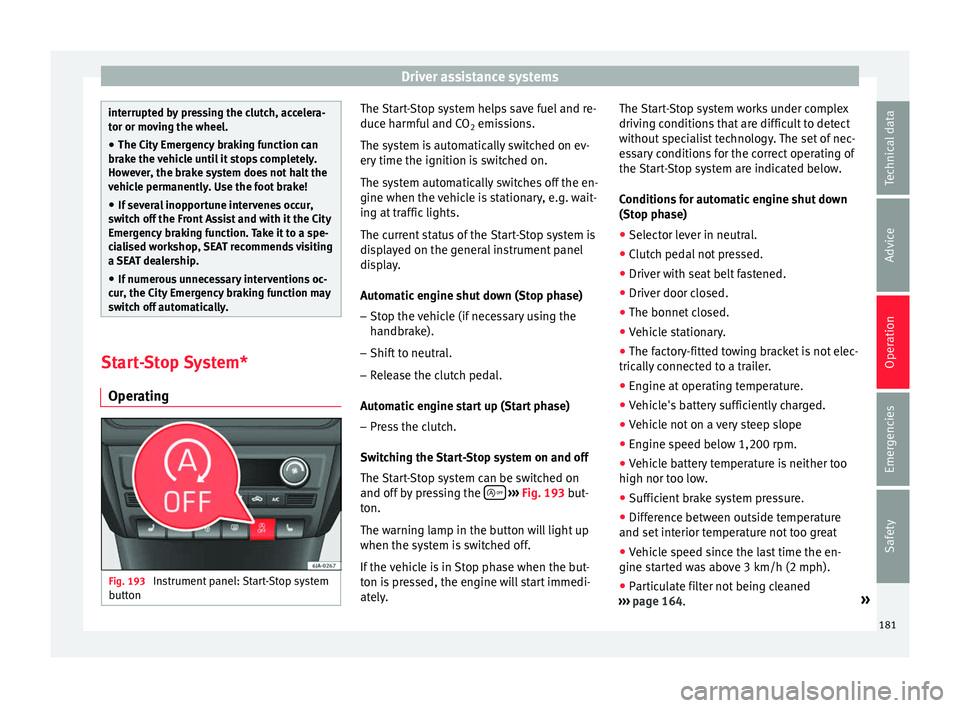
g Fig. 193
Instrument panel: Start-Stop system
b utt
on The Start-Stop system helps save fuel and re-
duc
e h
armf
ul and CO2 emissions.
The system is automatically switched on ev-
ery time the ignition is switched on.
The system automatically switches off the en-
gine when the vehicle is stationary, e.g. wait-
ing at traffic lights.
The current status of the Start-Stop system is
displayed on the general instrument panel
display.
Automatic engine shut down (Stop phase)
– Stop the vehicle (if necessary using the
handbrak
e).
– Shift to neutral.
– Release the clutch pedal.
Automatic
engine start up (Start phase)
– Press the clutch.
Switc
hing the Start-Stop system on and off
The Start-Stop system can be switched on
and off by pressing the
› ›
› Fig. 193
but-
ton.
The warning lamp in the button will light up
when the system is switched off.
If the vehicle is in Stop phase when the but-
ton is pressed, the engine will start immedi-
ately. The Start-Stop system works under complex
driving c
onditions that are difficult to detect
without specialist technology. The set of nec-
essary conditions for the correct operating of
the Start-Stop system are indicated below.
Conditions for automatic engine shut down
(Stop phase)
● Selector lever in neutral.
● Clutch pedal not pressed.
● Driver with seat belt fastened.
● Driver door closed.
● The bonnet closed.
● Vehicle stationary.
● The factory-fitted towing bracket is not elec-
trically
connected to a trailer.
● Engine at operating temperature.
● Vehicle's battery sufficiently charged.
● Vehicle not on a very steep slope
● Engine speed below 1,200 rpm.
● Vehicle battery temperature is neither too
high nor too low
.
● Sufficient brake system pressure.
● Difference between outside temperature
and set interior t
emperature not too great
● Vehicle speed since the last time the en-
gine star
ted was above 3 km/h (2 mph).
● Particulate filter not being cleaned
›››
page 164. »
181
Technical data
Advice
Operation
Emergencies
Safety
Page 186 of 248
Operation
Towing bracket device
Driv in
g w
ith a trailer
Technical requirements If your vehicle has a factory-fitted towing
brac
k
et or is equipped with a selection of
SEAT Original Accessories, it meets all the rel-
evant technical and legal requirements.
In vehicles with a towing bracket it is possi-
ble to remove the ball joint, situated (togeth-
er with the special assembly instructions) in
the housing for the spare wheel in the vehi-
cle luggage compartment ›››
page 75, Vehicle
tool kit*.
Your vehicle is fitted with a 13-pole power
socket for the electrical connection between
the trailer and the vehicle. If the trailer you
are going to use has a 7-pin connector, the
corresponding adaptor, acquired from the
SEAT Original Accessories Catalogue, can be
used.
If a towing bracket is to be retro-fitted to the
car, it must be done according to the instruc-
tions of the towing bracket manufacturer. Note
Any queries that may arise can be directed to
an authorised S EA
T dealer. Trailer weight
Trailer weight
The comb
ined
vehicle and trailer must be
balanced. To do so use the maximum permit-
ted towing bracket load. An insufficient
weight exerted by the trailer drawbar on the
ball joint of the towing bracket will have a
negative impact upon the response of the ve-
hicle-trailer assembly on the road.
Weight distribution
Distribute loads in the trailer so that heavy
objects are as near to the axle as possible.
Ensure that the objects do not move.
If the towing vehicle is empty and the trailer
loaded then the load distribution is incorrect.
However, if these conditions cannot be avoi-
ded, drive very slowly.
Tyre pressure values
Correct the tyre pressure in your vehicle to
“total load” ›››
page 216, Useful life of tyres .
Trailer weight
Never exceed the authorised trailer weight
under any circumstances ›››
page 221, Tech-
nical specifications .
The trailer weights listed are only applicable
for altitudes up to 1000 m above sea level.
Due to lower air density, engine power de-
creases depending on the increase in alti- tude, this also reduces climbing ability,
which r
equir
es a reduction of the weight of
the vehicle with a trailer by 10% for every
1000 m increase in altitude. The weight of
the assembly is calculated by adding the ve-
hicle weight (loaded) to the trailer weight
(loaded). Always drive with special care when
towing a trailer.
The towed load and support load information
that is displayed on the towing bracket man-
ufacturers label are only values for the verifi-
cation of the device. The correct figures for
your specific vehicle, which are usually lower
than these figures, are given in the documen-
tation of your vehicle. WARNING
● Exc eedin
g the maximum established load
per axle and the maximum towing bracket
load in addition to the maximum permitted
load or the load of the vehicle + trailer as-
sembly can cause accidents and serious inju-
ries.
● A sliding load can considerably affect the
stab
ility and safety of the vehicle + trailer as-
sembly, resulting in accidents and serious in-
juries. 184
Page 187 of 248

Towing bracket device
Driving with a trailer Exterior mirrors
Check
whether
you can see enough of the
road behind the trailer with the standard rear
vision mirrors. If this is not the case, you
should have additional exterior mirrors fitted.
Observe the relevant statutory requirements
of the country you are in.
Headlights
Before starting a journey, also check the
headlight beam settings with the trailer
hitched up. Adjust the headlight range set-
tings if necessary ›››
page 117, Main light
range control .
Driving speed
For your own safety do not drive faster than
the maximum permitted speed indicated on
the trailer.
At all times, immediately reduce speed if you
detect the slightest swaying movement of the
trailer. Never try to “return the trailer to a
straight position” by accelerating.
Brakes
Brake in due course! If the trailer has an over-
run brake, apply the brakes gently at first and
then, firmly. This will prevent the jerking that
can be caused by locking of trailer wheels.
Change to a lower gear in good time before descending a slope in order to take advant-
age of
the en
gine brake.
The trailer is incorporated into the vehicle's
anti-theft alarm system:
● When the vehicle has a factory-fitted anti-
theft al
arm and a towing bracket.
● When the trailer is electrically connected to
the vehic
le via the towing bracket socket.
● When the vehicle electrical device and the
tow
ing bracket are operational.
● When the vehicle is locked and the vehi-
cle's
anti-theft alarm device is activated.
Once the electrical connection is interrupted
with the vehicle trailer locked, the alarm
sounds.
Always switch off the vehicle anti-theft alarm
device before connecting or disconnecting a
trailer. The vehicle anti-theft alarm device
could cause the alarm to sound ››› page 112,
Anti-theft alarm system*.
Engine overheating
In the event that the coolant temperature
gauge needle moves to the right section of
the scale or to the red area, immediately re-
duce speed. If the control lamp flashes on
the general instrument panel, stop the vehi-
cle and switch off the engine. Wait several
minutes and check the coolant level in the
tank ››› page 208. Please observe the following indications
›››
page 208, Control lamp .
The coolant temperature can be reduced by
switching on the heating. WARNING
● Adjus t
your speed to suit the road and traf-
fic conditions.
● An electrical installation that is connected
incorrectly
or by non-specialised personnel
can prevent the connection of the current to
the trailer and cause faults in the operation of
the electrical system throughout the entire
vehicle, leading to accidents and serious in-
jury.
● All electrical work must be carried out only
by s
pecialised services.
● Never directly connect the trailer electrical
device t
o the electrical sockets of the reverse
driving lights or other sources of electrical
current. CAUTION
● Av oid c
orners, and sudden and sharp brak-
ing.
● Once the trailing arm has been removed,
plac
e the corresponding cover on the hole of
the fastening point. This prevents dirt from
entering the hole – see the trailer system as-
sembly manual. » 185
Technical data
Advice
Operation
Emergencies
Safety
Page 188 of 248
Operation
Note
● In the event of
frequent journeys with a
trailer, we recommend also having the vehi-
cle inspected in between the service inter-
vals.
● When connecting and disconnecting the
trail
er, the handbrake must be applied.
● For technical reasons, trailers with LED re-
verse light
s cannot be incorporated into the
vehicle anti-theft alarm system. Towing bracket device for trail-
er
Intr oduction If the vehicle is equipped with a towing
br
ac
k
et device from the factory or is a genu-
ine SEAT accessory, it meets all national tech-
nical and legal requirements for towing.
Your vehicle is fitted with a 13-pin power
socket for the electrical connection between
the trailer and the vehicle. If the towing
bracket is equipped with a 7-pin connector,
you can use the corresponding available
adaptor that is a genuine SEAT accessory.
The towing device has a maximum vertical
load of 50 kg. WARNING
● Bef or
e driving with the ball-headed bar fit-
ted, verify its correct assembly and place-
ment in the clamping bush.
● Do not use the ball-headed bar if it is not
correctly
placed and fixed in the clamping
bush.
● Do not use the towing device for towing if it
is d
amaged or has missing parts.
● Do not modify or adapt the towing device
connection.
● Never di
sengage the ball-headed bar with
the trail
er still hitched. CAUTION
Be careful not to damage the paint on the
bumper when h andlin
g the ball-headed bar. Description
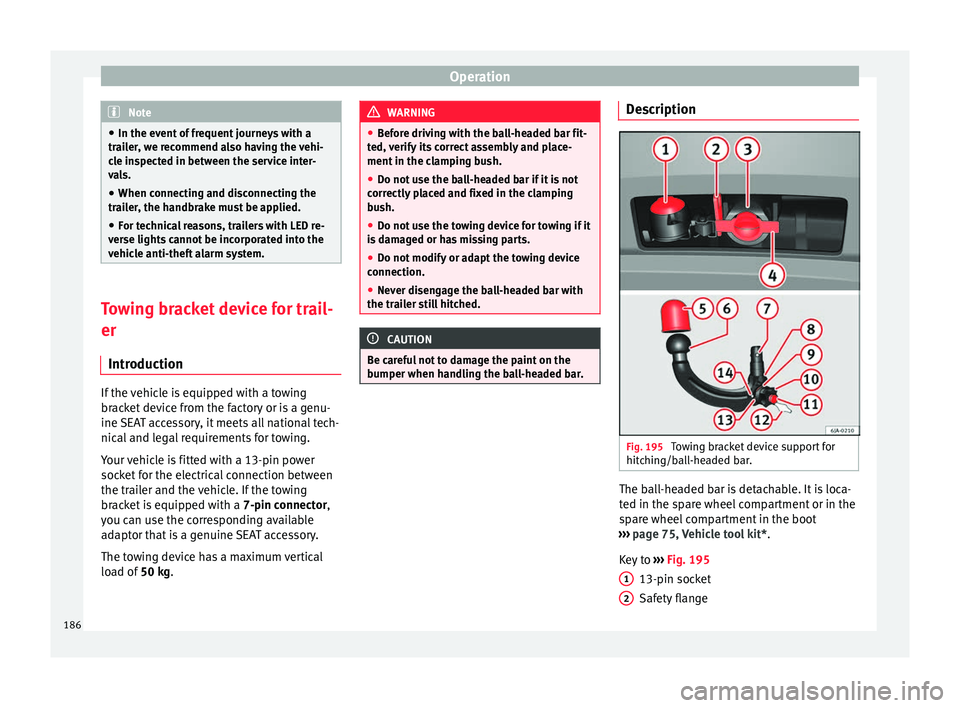
Fig. 195
Towing bracket device support for
hit c
hin
g/ball-headed bar. The ball-headed bar is detachable. It is loca-
t
ed in the s
p
are wheel compartment or in the
spare wheel compartment in the boot
››› page 75, Vehicle tool kit*.
Key to ››› Fig. 195
13-pin socket
Safety flange
1 2
186
Page 193 of 248
Towing bracket device
●
Cle
an the ball-headed bar thoroughly be-
fore returning it to the on-board toolbox. Use and maintenance
Cover the clamping bush with the cap to pre-
vent
dir
t from entering.
Before hooking on the trailer, check the ball
head and, if necessary, lubricate it with ade-
quate lubricant.
Place the protective cover over the ball head
when storing the bar. This way, you will avoid
getting the boot dirty.
If it gets dirty, clean and dry the clamping
bush thoroughly with an appropriate prod-
uct. CAUTION
The top part of the clamping bush opening is
lubricat ed. B
e careful not to remove this lu-
brication. 191
Technical data
Advice
Operation
Emergencies
Safety
Page 221 of 248
Wheels and tyres
CAUTION
Follow the instructions given on the tempora-
ry s
pare wheel label. Note
The tyre pressure of the spare wheel must al-
wa y
s correspond to the highest pressure pre-
scribed for the model of vehicle in question. Tyre monitoring systems
Ty r
e pressure* The tyre pressure monitoring system uses
ABS
sen
sor
s to compare the revolutions and
the circumference of each wheel. Should the
circumference of any wheel change, the
warning lamp on the general instrument
panel will light up and an audible warning
will be heard.
Tyre circumference may change if:
● Tyre pressure is too low
● Tyre structure is damaged
● Vehicle load not evenly distributed
● wheels on one axle are subjected to greater
load, (e.
g. driving with trailer, uphill, down-
hill);
● Snow chains are fitted
● The temporary spare wheel is fitted ●
One wheel on the axl
e has been changed
Basic system settings
Should the tyre pressure change or if one or
more wheels are changed or the position of
the wheel on the vehicle is changed, e.g.
changing round the front and rear wheels, or
where a warning lamp lights up when driv-
ing, the system must be adjusted as follows: ● Inflate all tyres to the prescribed pressures
›››
page 216.
● Switch the ignition on.
● Store the new tyre pressure in the Easy
Connect sy
stem with the button and the
f u
nction b
utton Setup
› ›
›
page 21.
The warning lamp lights up
If the pressure on at least one tyre is signifi-
cantly lower than the pressure set by the driv-
er, the warning lamp will light up ››› .
The w arnin
g l
amp flashes
If the warning lamp flashes, there is a fault in
the system. Contact a specialised service to
have it fixed. WARNING
● If the w arnin
g lamp lights up, slow down
immediately and avoid any severe braking or
steering manoeuvres. Stop and check the
tyres and their pressure as soon as possible. ●
Under cer t
ain conditions (e.g. sporty driv-
ing style, driving on loose surfaces or in win-
ter) the warning lamp may take a while to
light up or may remain switched off.
● Despite the tyre pressure monitoring sys-
tem, the driver r
emains responsible for main-
taining the correct tyre pressure. You must
therefore check the tyre pressure often. Note
● The ty re pr
essure monitoring system is not
a replacement for regularly checking the tyre
pressure, as it is unable to recognise an even
drop in pressure.
● The tyre pressure monitoring system is un-
able t
o warn of a sudden drop in tyre pres-
sure, e.g. a puncture. In this case, try to stop
the vehicle carefully with no severe braking
or steering manoeuvres.
● To ensure the tyre pressure monitoring sys-
tem work
s correctly, the basic setting must
be performed every 10 000 km (6000 miles)
or once a year.
● If the battery is disconnected the warning
lamp lights
up when the ignition is switch-
ed on. This warning lamp must switch off af-
ter covering a short distance. 219
Technical data
Advice
Operation
Emergencies
Safety
Page 225 of 248
Technical specifications
The values relating to fuel consumption and
C O
2 emi
s
sions can be found in the documen-
tation provided to the purchaser of the vehi-
cle at the time of purchase.
Fuel consumption and CO 2 emissions depend
on the equipment/features of each individual
vehicle, as well as on the driving style, road
conditions, traffic conditions, environmental
conditions, load or number of passengers. Note
In practice, and considering all the factors
mentioned here, c on
sumption values can dif-
fer from those calculated in the current Euro-
pean regulations. Weights
Kerb weight refers to the basic model with a
f
uel
t
ank filled to 90% capacity and without
optional extras. The figure quoted includes
75 kg to allow for the weight of the driver.
Special versions, optional equipment fittings
or retro-fitting accessories will increase the
weight of the vehicle ››› .
WARNING
● Ple a
se note that the centre of gravity may
shift when transporting heavy objects; this
may affect vehicle handling and lead to an ac-
cident. Always adjust your speed and driving style to suit road conditions and require-
ments.
●
Nev er e
xceed the gross axle weight rating
or the gros
s vehicle weight rating. If the per-
missible axle load or the permissible total
weight is exceeded, the driving characteris-
tics of the vehicle may change, which could
lead to accidents, injuries and damage to the
vehicle. Driving with a trailer
Tr ai
ler weights Trailer weight
The tr
ai
l
er weights and drawbar loads ap-
proved are selected in intensive trials accord-
ing to precisely defined criteria. The ap-
proved trailer weights are valid for vehicles in
the EU for maximum speeds of 80 km/h (50
mph) (in certain circumstances up to 100
km/h (62 mph)). The figures may be different
in other countries. All data in the official vehi-
cle documentation takes precedence over
these data at all times ››› .
Dr a
wb
ar loads
The maximum permitted drawbar load on the
ball joint of the towing bracket must not ex-
ceed 50 kg. In the interest of road safety, we recommend
that
you always tow approaching the maxi-
mum drawbar load. The response of the trail-
er on the road will be poor, if the drawbar
load is too small.
If the maximum permissible drawbar load
cannot be met (e.g. with small, empty and
light-weight single axle trailers or tandem
axle trailers with a wheelbase of less than 1
metre), a minimum of 4% of the actual trailer
weight is legally required for the drawbar
load. WARNING
● For s af
ety reasons, you should not drive at
speeds above 80 km/h (50 mph) when towing
a trailer. This also applies in countries where
higher speeds are permitted.
● Never exceed the maximum trailer weights
or the drawb
ar load. If the permissible axle
load or the permissible total weight is excee-
ded, the driving characteristics of the vehicle
may change, leading to accidents, injuries
and damage to the vehicle. 223
Technical data
Advice
Operation
Emergencies
Safety
Page 227 of 248
Technical specifications
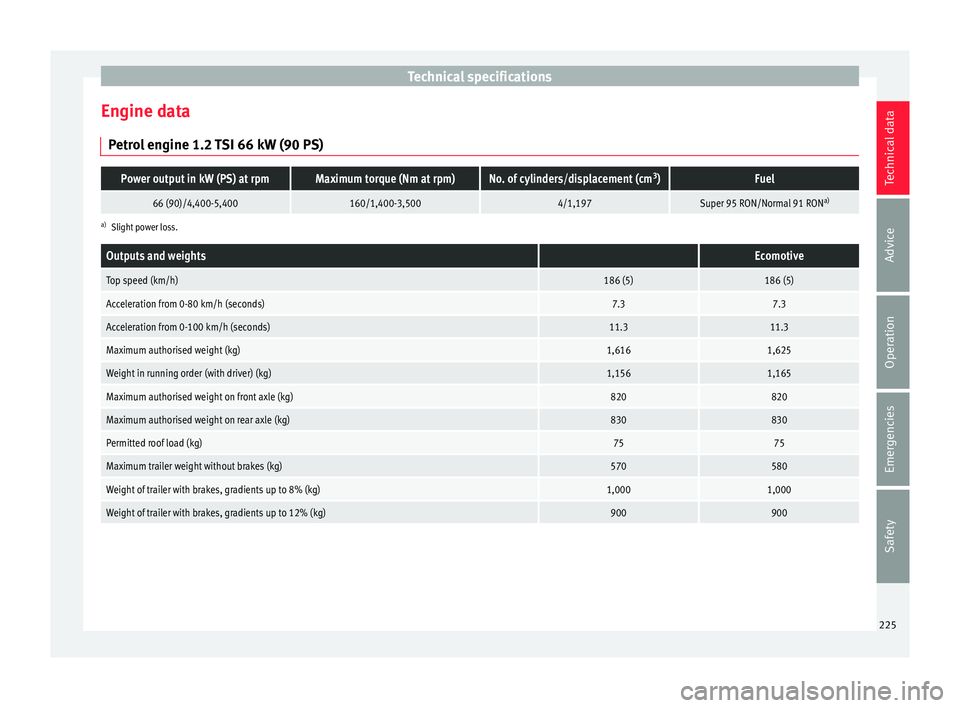
Engine data P etr
o
l engine 1.2 TSI 66 kW (90 PS)
Power output in kW (PS) at rpmMaximum torque (Nm at rpm)No. of cylinders/displacement (cm 3
)Fuel
66 (90)/4,400-5,400160/1,400-3,5004/1,197Super 95 RON/Normal 91 RON a)
a)
Slight power loss.
Outputs and weights Ecomotive
Top speed (km/h)186 (5)186 (5)
Acceleration from 0-80 km/h (seconds)7.37.3
Acceleration from 0-100 km/h (seconds)11.311.3
Maximum authorised weight (kg)1,6161,625
Weight in running order (with driver) (kg)1,1561,165
Maximum authorised weight on front axle (kg)820820
Maximum authorised weight on rear axle (kg)830830
Permitted roof load (kg)7575
Maximum trailer weight without brakes (kg)570580
Weight of trailer with brakes, gradients up to 8% (kg)1,0001,000
Weight of trailer with brakes, gradients up to 12% (kg)900900 225
Technical data
Advice
Operation
Emergencies
Safety