headlights Seat Toledo 2016 Owner's manual
[x] Cancel search | Manufacturer: SEAT, Model Year: 2016, Model line: Toledo, Model: Seat Toledo 2016Pages: 248, PDF Size: 5.82 MB
Page 46 of 248

The essentials
To replace a fuse
● Remove the fuse.
● Replace the blown fuse by one with an
iden tic
a
l amperage rating (same colour and
markings) and identical size.
● Replace the cover again or close the fuse
box lid.
B
ulbs
Bul
bs (12 V) Full-LED headlights are designed to last the
lif
etime of
the c
ar and cannot be replaced. If
the headlight becomes damaged, go to a
specialised workshop.
Below, the light source used for all functions
is broken down.
Halogen headlightsType
Daytime running light/side
lightP21W SLL
Dipped beam headlightsH7 LL
Main beam headlightsH7 LL
Turn signalPY21W
Full-LED main headlightsType
No bulbs may be replaced. All functions are with LEDs
Front fog lightType
Fog/cornering lights*H8
Rear bulb lightType
Brake light/tail lightP21/5W
Side lightsP21/5W (side panel)
R5W (rear lid)
Turn signalPY21W
Retro fog lightP21W
Reverse lightsP21W
LED rear lightsType
Turn signalPY21W
Retro fog lightP21W
Reverse lightsP21W
The remaining functions work with LEDs Action in the event of a punc-
t
ur
e
Wh
at to do first ●
Park the vehicle on a horizontal surface
and in a s af
e p
lace as far away from traffic as
possible. ●
Apply
the handbrake.
● Switch on the hazard warning lights.
● Manual gearbox: select the 1s
t gear.
● Automatic gearbox: Move the sel
ector lever
to position P.
● If you are towing a trailer, unhitch it from
your v
ehicle.
● Have the vehicle tool kit* ›››
page 75
and the spare wheel ›››
page 218 ready.
● Observe the applicable legislation for each
countr
y (reflective vest, warning triangles,
etc.).
● All occupants should leave the vehicle and
wait in a s
afe place (for instance behind the
roadside crash barrier). WARNING
● Alw a
ys observe the above steps and pro-
tect yourself and other road users.
● If you change the wheel on a slope, block
the wheel on the oppo
site side of the car with
a stone or similar to prevent the vehicle from
moving. 44
Page 55 of 248
The essentials
Starting
7. Start the engine of the vehicle with the boo s
tin
g battery and let it run at idling
speed.
8. Start the engine of the vehicle with the flat batter
y and wait for 2 or 3 minutes until
the engine is running.
Removing the jump leads
9. Before you remove the jump leads, switch off the dipped be
am headlights if they are
switched on.
10.
Turn on the heater blower and heated rear
window in the vehicle with the flat battery.
This helps minimise voltage peaks which
are generated when the leads are discon-
nected.
11.When the engine is running, disconnect the lea
ds in reverse order to the details
given above.
Make sure the battery clamps have sufficient
metal-to-metal contact with the battery termi-
nals.
If the engine fails to start, switch off the start-
er after about 10 seconds and try again after
about 1 minute. WARNING
● Ple a
se note the safety warnings referring to
working in the engine compartment
››› page 202.
● The battery providing assistance must have
the same v
oltage as the flat battery (12V) and
approximately the same capacity (see imprint
on battery). Failure to comply could result in
an explosion.
● Never use jump leads when one of the bat-
teries
is frozen. Danger of explosion! Even af-
ter the battery has thawed, battery acid could
leak and cause chemical burns. If a battery
freezes, it should be replaced.
● Keep sparks, flames and lighted cigarettes
awa
y from batteries, danger of explosion.
Failure to comply could result in an explo-
sion.
● Observe the instructions provided by the
manufact
urer of the jump leads.
● Do not connect the negative cable from the
other vehic
le directly to the negative terminal
of the flat battery. The gas emitted from the
battery could be ignited by sparks. Danger of
explosion.
● Do not attach the negative cable from the
other vehic
le to parts of the fuel system or to
the brake line.
● The non-insulated parts of the battery
clamp
s must not be allowed to touch. The
jump lead attached to the positive battery
terminal must not touch metal parts of the ve-
hicle, this can cause a short circuit. ●
Po s
ition the leads in such a way that they
cannot come into contact with any moving
parts in the engine compartment.
● Do not lean on the batteries. This could re-
sult
in chemical burns. Note
The vehicles must not touch each other, oth-
er wi
se electricity could flow as soon as the
positive terminals are connected. Changing the windscreen wiper
b
l
a
des
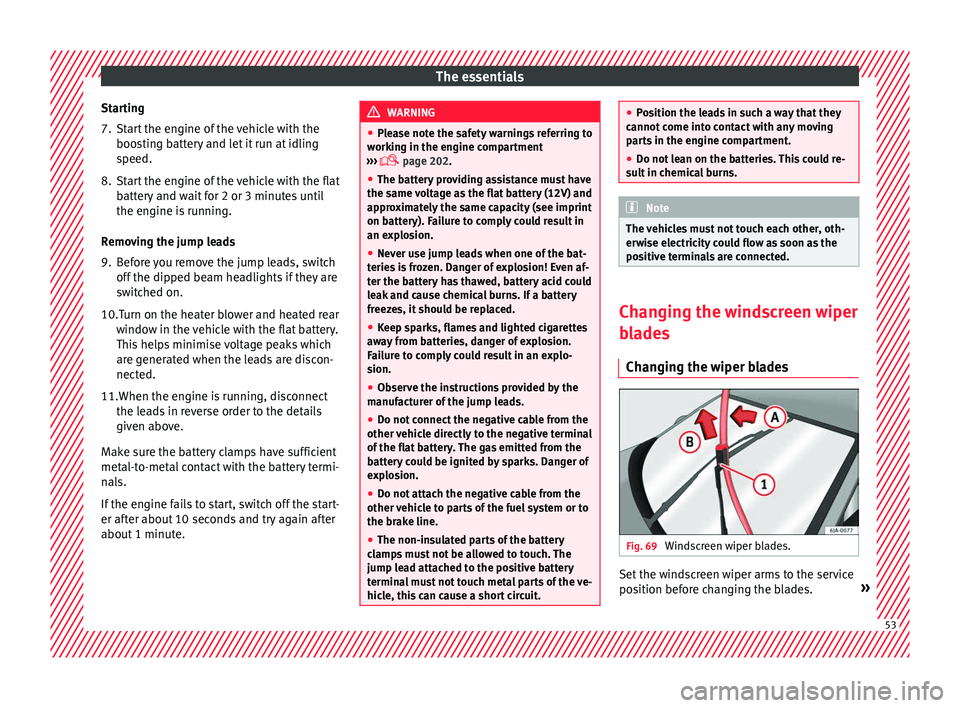
Changing the wiper blades Fig. 69
Windscreen wiper blades. Set the windscreen wiper arms to the service
po
s
ition bef
ore changing the blades. » 53
Page 85 of 248

Fuses and bulbs
Fig. 87
In the engine compartment: fuse box
c o
v
er - 2nd variant Read the additional information carefully
› ›
›
page 43
Only replace fuses with a fuse of the same
amperage (same colour and markings) and
size.
Opening the fuse box ● Open the bonnet ›››
page 202.
● Press lid locking clip upwards in the direc-
tion of the arro
w 1
› ›
› Fig. 86 o ››› Fig. 87. ●
Open the cov
er in the direction indicated
by the arrow 2 .
● Remove the plastic clip from the lid of the
f u
se bo
x.
● Replace the appropriate fuse.
● Place the plastic clip back in its original po-
sition.
● Plac
e the lid on the fuse box and press un-
til
you hear it click into place.
Fuse placement
No.Consumer
1Radiator fan
2Control unit for the glow system
3ABS/ESC control unit
4Additional electric heat - Circuit 2
5Additional electric heat - Circuit 3
6Automatic gearbox
7Engine control unit
8Front windscreen wipers
9Central control unit, battery data module
10ABS/ESC control unit
12Engine components
13Brake pedal switch
No.Consumer
14Engine components, fuel coil relay, radiator fan,
coolant pump
15Engine control unit
16Starter motor
17Engine control unit
18Engine components, additional electric heat re-
lay coils
19Lambda probe
20Control devices for the glow system, heating of
the sump fan Changing bulbs
Intr oduction Read the additional information carefully
› ›
›
page 44.
Depending on how equipped the vehicle is,
there are different sets of headlights and tail
lights:
● Halogen main headlights (double head-
light).
● Full-LED main headlights*.
● Rear bulb light.
● LED rear light*. »
83
Technical data
Advice
Operation
Emergencies
Safety
Page 86 of 248

Emergencies
Full-LED headlight system*
F u
l
l-LED headlights handle all light functions
(daylight, side light, turn signal, dipped
beam and route light) with light emitting di-
odes (LEDs) as a light source.
Full-LED headlights are designed to last the
lifetime of the car and light bulbs cannot be
replaced. In case of headlight failure, go to
an authorised workshop to have it replaced.
Double headlight bulb change
Changing bulbs requires a certain degree of
practical skill. If in doubt, we recommend you
have defective bulbs changed by a special-
ised service or, in case of an emergency,
seek professional assistance.
● Switch off the ignition and all of the lights
before c
hanging a bulb.
● Do not touch the glass part of the bulb with
your bar
e hands. The fingerprints left on the
glass will vaporise as a result of the heat gen-
erated by the bulb, reducing bulb life and
causing condensation on the reflector sur-
face, thus reducing effectiveness.
● A bulb must only be replaced by one of the
same type. The type i
s indicated on the bulb,
either on the glass part or on the base.
● There is a storage area for the bulb box in
the spar
e wheel well or below the carpet in
the luggage compartment. WARNING
● Tak e p
articular care when working on com-
ponents in the engine compartment if the en-
gine is warm. Risk of burns.
● Bulbs are highly sensitive to pressure. The
glas
s can break when you touch the bulb,
causing injury.
● When changing bulbs, please take care not
to injure
yourself on sharp parts in the head-
light housing. CAUTION
● Remo v
e the ignition key before working on
the electric system. Otherwise, a short circuit
could occur.
● Switch off the lights and the parking light
before c
hanging a bulb. For the sake of the environment
Please ask your specialist retailer how to dis-
pose of u
sed bulbs in the proper manner. Note
● Dependin g on w
eather conditions (cold or
wet), the front lights, the fog lights, the rear
lights and the turn signals may be temporari-
ly misted. This has no influence on the useful
life of the lighting system. By switching on
the lights, the area through which the beam
of light is projected will quickly be demisted.
However, the edges may continue to be mis-
ted. ●
Ple a
se check at regular intervals that all
lighting (especially the exterior lighting) on
your vehicle is functioning properly. This is
not only in the interest of your own safety,
but also that of all other road users.
● Before changing a bulb, make sure you
have the c
orrect new bulb.
● Do not touch the glass part of the bulb with
your bar
e hands, use a cloth or paper towel
instead. Otherwise, the fingerprints left on
the glass will vaporise as a result of the heat
generated by the bulb, they will be deposited
on the reflector and damage its surface. Double headlight bulbs
Fig. 88
Main headlight bulbs. Installation position of double headlight
b
u
l
bs
Side lights
Main beam headlights
A B
84
Page 87 of 248
Fuses and bulbs
Dipped beam headlights
T urn s
ign
al lights
Daylight
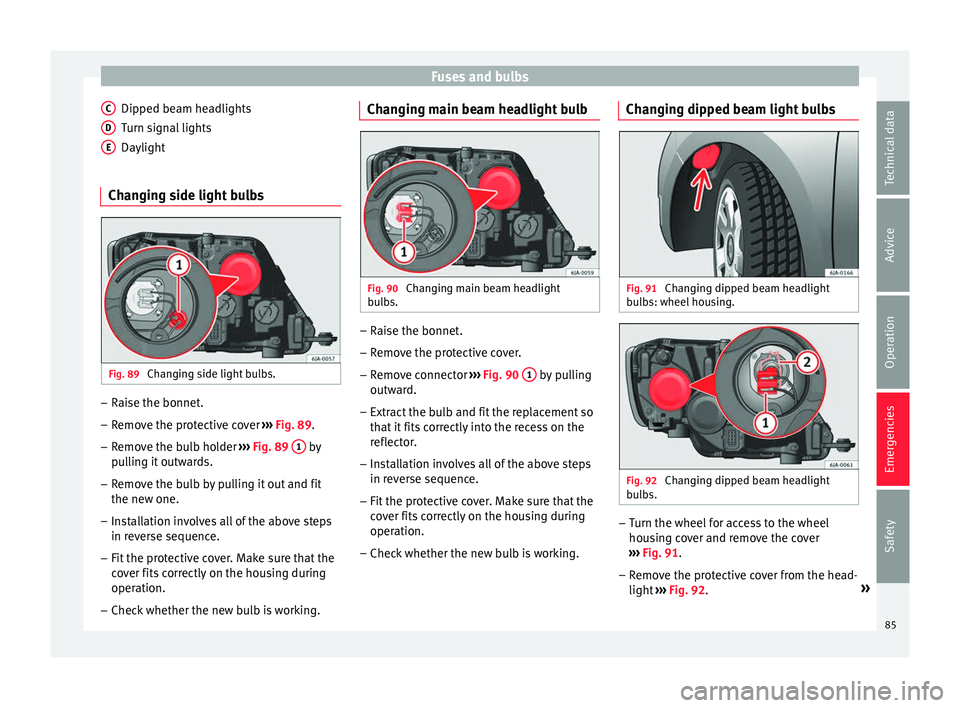
Changing side light bulbs Fig. 89
Changing side light bulbs. –
Raise the bonnet.
– Remove the protective cover ›
› ›
Fig. 89.
– Remove the bulb holder ›››
Fig. 89 1 by
p u
l
ling it outwards.
– Remove the bulb by pulling it out and fit
the new one.
– Installation involves all of the above steps
in rever
se sequence.
– Fit the protective cover. Make sure that the
cov
er fits correctly on the housing during
operation.
– Check whether the new bulb is working.
C D
E Changing main beam headlight bulb
Fig. 90
Changing main beam headlight
b u
l
bs. –
Raise the bonnet.
– Remove the protective cover.
– Remove connector ››
›
Fig. 90 1 by pulling
outw ar
d.
– Extr
act the bulb and fit the replacement so
that it
fits correctly into the recess on the
reflector.
– Installation involves all of the above steps
in rever
se sequence.
– Fit the protective cover. Make sure that the
cov
er fits correctly on the housing during
operation.
– Check whether the new bulb is working. Changing dipped beam light bulbs
Fig. 91
Changing dipped beam headlight
b u
l
bs: wheel housing. Fig. 92
Changing dipped beam headlight
b u
l
bs. –
Turn the wheel for access to the wheel
hou s
in
g cover and remove the cover
››› Fig. 91.
– Remove the protective cover from the head-
light ››
› Fig. 92. »
85
Technical data
Advice
Operation
Emergencies
Safety
Page 95 of 248
Controls and displays
Operation
C ontr
o
ls and displays
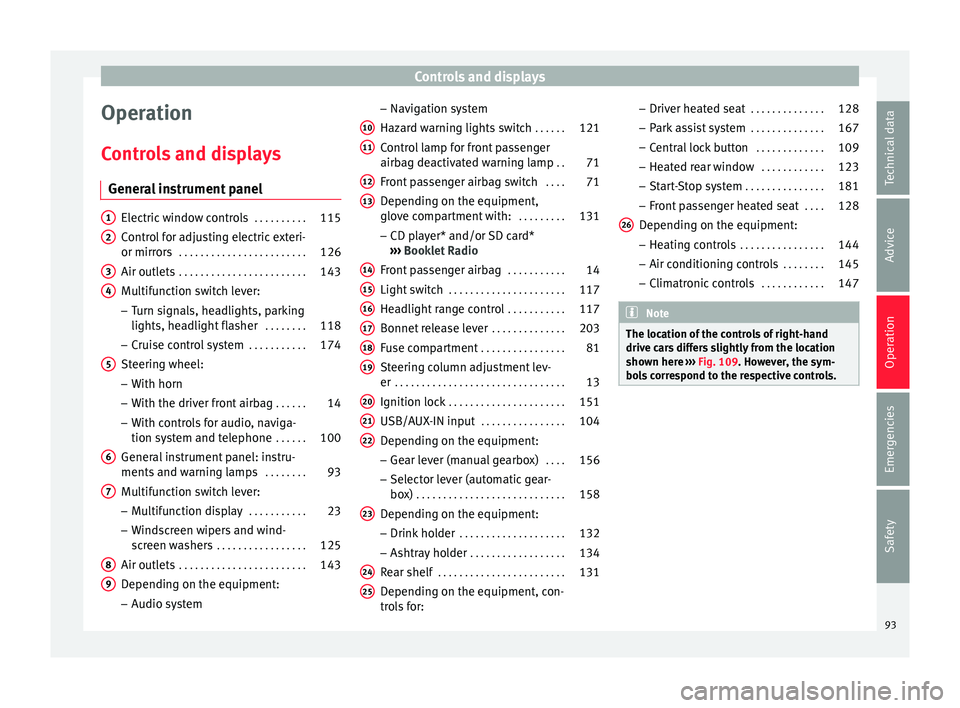
General instrument panel Electric window controls
. . . . . . . . . .115
Control for adjusting electric exteri-
or mirror s . . . . . . . . . . . . . . . . . . . . . . . . 126
Air outl
ets . . . . . . . . . . . . . . . . . . . . . . . . 143
Multifunction switch lever:
– Turn s ign
als, headlights, parking
lights, headlight flasher . . . . . . . .118
– Crui se c
ontrol system . . . . . . . . . . .174
Steering wheel:
– With horn
– With the driv
er front airbag . . . . . .14
– With c ontr
ols for audio, naviga-
tion system and telephone . . . . . .100
General instrument panel: instru-
ments and w arnin
g lamps . . . . . . . . 93
Multifunction switch lever:
– Multif
unction display . . . . . . . . . . .23
– Wind s
creen wipers and wind-
screen washers . . . . . . . . . . . . . . . . . 125
Air outlets . . . . . . . . . . . . . . . . . . . . . . . . 143
Depending on the equipment:
– Audio sy st
em
1 2
3
4
5
6
7
8
9 –
Nav ig
ation sy
stem
Hazard warning lights switch . . . . . .121
Control lamp for front passenger
airbag deactiv
ated warning lamp . .71
Front passenger airbag switch . . . .71
Depending on the equipment,
glove c
ompartment with: . . . . . . . . .131
– CD pla
yer* and/or SD card*
››› Booklet Radio
Front passenger airbag . . . . . . . . . . .14
Light switch . . . . . . . . . . . . . . . . . . . . . . 117
Headlight range control . . . . . . . . . . .117
Bonnet release lever . . . . . . . . . . . . . .203
Fuse compartment . . . . . . . . . . . . . . . . 81
Steering column adjustment lev-
er . . . . . . . . . . . . . . . . . . . . . . . . . . . . . . . . 13
Ignition lock . . . . . . . . . . . . . . . . . . . . . . 151
USB/AUX-IN input . . . . . . . . . . . . . . . . 104
Depending on the equipment: – Gear lev
er (manual gearbox) . . . .156
– Select or l
ever (automatic gear-
box) . . . . . . . . . . . . . . . . . . . . . . . . . . . . 158
Depending on the equipment:
– Drink ho l
der . . . . . . . . . . . . . . . . . . . . 132
– Ashtra y
holder . . . . . . . . . . . . . . . . . . 134
Rear shelf . . . . . . . . . . . . . . . . . . . . . . . . 131
Depending on the equipment, con-
tro l
s for:
10 11
12
13
14
15
16
17
18
19
20
21
22
23
24
25 –
Driv er he
at
ed seat . . . . . . . . . . . . . . 128
– Park a
ssist system . . . . . . . . . . . . . . 167
– Central
lock button . . . . . . . . . . . . . 109
– Heated r
ear window . . . . . . . . . . . . 123
– Start
-Stop system . . . . . . . . . . . . . . . 181
– Front p
assenger heated seat . . . .128
Depending on the equipment: – Heating c
ontrols . . . . . . . . . . . . . . . . 144
– Air conditioning c
ontrols . . . . . . . . 145
– Climatr
onic controls . . . . . . . . . . . . 147 Note
The location of the controls of right-hand
drive c ar
s differs slightly from the location
shown here ››› Fig. 109. However, the sym-
bols correspond to the respective controls. 26
93
Technical data
Advice
Operation
Emergencies
Safety
Page 118 of 248
Operation
If an obstacle is present, the closing mecha-
ni sm w
i
ll stop and the window will roll back a
few centimetres.
If an obstacle prevents closing for the next
10 seconds, the closing mechanism will once
again stop and the window will roll back an-
other few centimetres.
If in the next 10 seconds you attempt to close
the window after it has rolled back the sec-
ond time, only the closing mechanism will be
stopped even if the obstacle is still present.
The roll-back function is still connected.
The roll-back function will only be disconnec-
ted if you once again attempt to close the
window in the following 10 seconds. In this
case, the window will close at full force .
If you wait for a further 10 seconds, the roll-
back function will be once again connected. Lights and visibility
Light s
Intr oduction Read the additional information carefully
›› ›
page 18
The location of the controls of right-hand
drive cars differs slightly from the location
shown here ››› Fig. 129 ››› page 117. Howev-
er, the symbols indicating the respective po-
sitions of the controls remain the same. WARNING
Never drive with only the side lights on! The
side light s
are not bright enough to illumi-
nate the road ahead and to ensure that other
road users are able to see you. Always use
your dipped beam headlights if it is dark or if
visibility is poor. CAUTION
● Use the light s
in line with local law.
● However, drivers always remain responsi-
ble f
or correctly adjusting and using the
lights. Note
● An audibl e w
arning will be heard when the
light control is set to and you remove the ignition key and open the door. Once the
driver door i
s
closed (ignition off), the audi-
ble warning will stop, whereas the side lights
will remain on to light up the stationary vehi-
cle in case this is necessary.
● Depending on weather conditions (cold or
wet), the lights
may mist up temporarily on
the inside. This is particularly the case in the
event of a difference in temperature between
the inside and in front of the light. By switch-
ing on the lights, the area through which the
beam of light is projected will quickly be
demisted, although the edges may remain
misted. The real lights and turn signals can
mist up. This has no influence on the useful
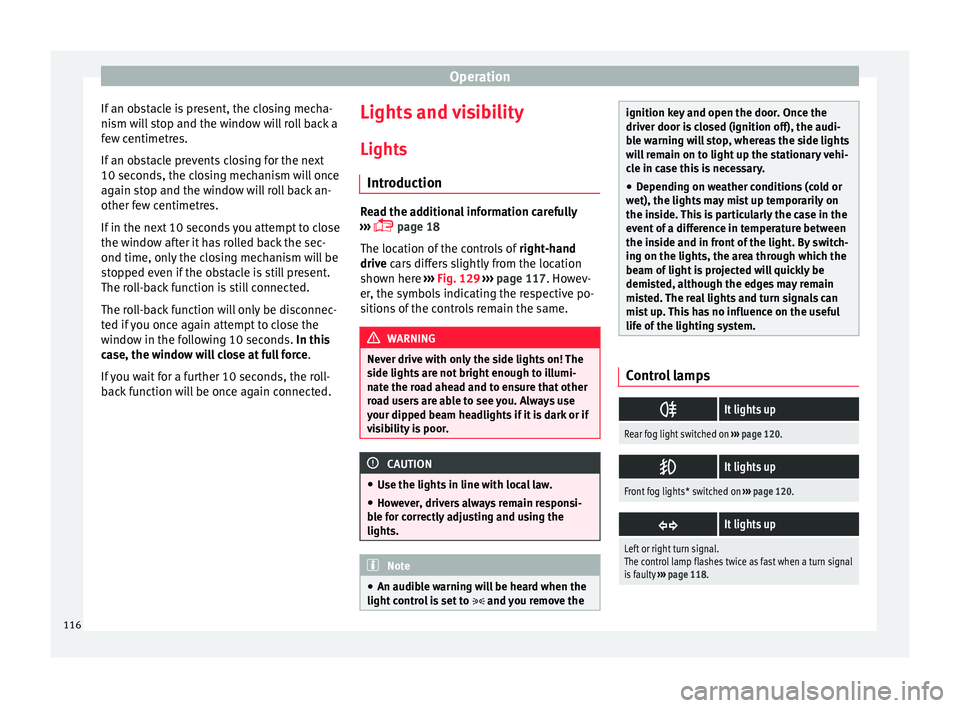
life of the lighting system. Control lamps
It lights up
Rear fog light switched on
››› page 120.
It lights up
Front fog lights* switched on
››› page 120.
It lights up
Left or right turn signal.
The control lamp flashes twice as fast when a turn signal
is faulty
››› page 118. 116
Page 120 of 248
Operation
●
Your v
ehicle does not dazzle others, partic-
ularly oncoming traffic
● The range of the headlights is sufficient for
safe driv
ing Note
Make sure you set the range of the main
light s when the dip
ped beam headlights are
switched on. Daytime running lights
Daytime running lights are signalling devices
f
or impr
o
ving road safety. The lights are built
into the headlights and come on each time
the ignition is turned on if the light switch is
in position 0 or ››› Fig. 129. It is automat-
ically switched off when the side lights are
turned on.
Switching the daytime driving lights on
● Remove the key from the ignition, move the
turn sign
al lever upward (right turn signal),
press it back to flash position and hold it
there.
● Insert the key and switch on the ignition,
holdin
g it in this position for 3 seconds.
Then, switch off the ignition. The daytime
running light is now activated and the corre-
sponding lights can come on. Switching the daytime running light off
●
Remove the key from the ignition, press the
turn sign
al lever down (left turn signal), press
it back to flash position and hold it here.
● Insert the key and switch on the ignition,
holdin
g it in this position for 3 seconds.
Then, switch off the ignition. The daytime
running light is now deactivated and the cor-
responding lights cannot come on.
OR: activate and deactivate the daytime
lights using the Easy Connect system
››› page 21.
Automatic control of the dipped beam in
combination with the daytime running lights
If the dipped beam control and the daytime
running lights are activated at the same
time, the dipped beams and the instrument
panel lighting will automatically come on as
required (e.g. when entering a tunnel) and
the daytime running lights will switch off.
When the automatic dipped beam control
switches off the dipped beams (e.g. when
coming out of a tunnel), the daytime running
lights come back on. WARNING
The rear lights do not come on with the day-
time drivin g light
. A vehicle which does not
have the rear lights on may not be visible to
other drivers in the darkness, if it is raining
or in conditions of poor visibility. Note
Please observe any relevant legal require-
ments whic
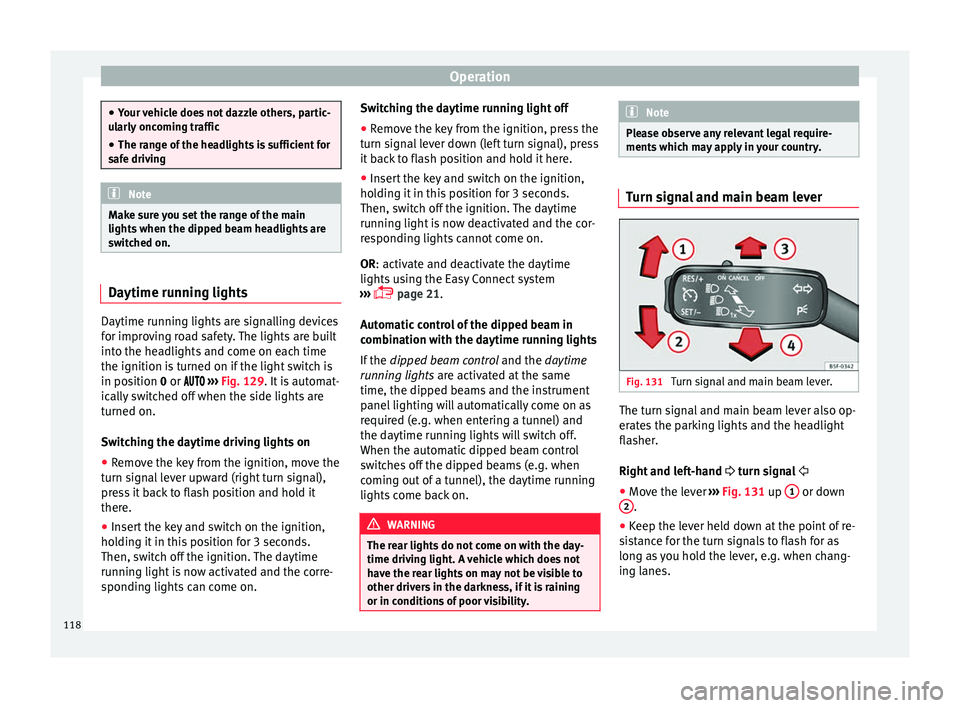
h may apply in your country. Turn signal and main beam lever
Fig. 131
Turn signal and main beam lever. The turn signal and main beam lever also op-
er
at
e
s the parking lights and the headlight
flasher.
Right and left-hand turn signal
● Move the lever ›››
Fig. 131 up 1 or down
2 .
● Keep the lever held down at the point of re-
s i
s
tance for the turn signals to flash for as
long as you hold the lever, e.g. when chang-
ing lanes.
118
Page 121 of 248

Lights and visibility
Convenience turn signals
F or the c
on
venience turn signals, move the
lever as far as possible upwards or down-
wards and release the lever. The turn signal
will flash three times.
The convenience turn signals are activated
and deactivated in the Easy Connect system
via the key and the
Set
up function button
› ›
›
page 99.
In vehicles that do not have the correspond-
ing menu, this function can be deactivated in
a specialised workshop.
Main beams
● Switch on the dipped beam ›››
page 117.
● Press the lever ›››
Fig. 131 forward in the di-
rection indicated by arrow 3 .
● Pull the lever back to its original position in
the dir ection indic
at
ed by arrow 4 to switch
the m ain be
am off
.
Headlight flasher
● Pull the lever ›››
Fig. 131 towards the steer-
ing wheel (point of resistance) in the direc-
tion indicated by arrow 4 .
P ark
in
g lights
● Instructions for use ›››
page 121. CAUTION
Never use the main beam headlights or the
hea dlight
flasher if they could dazzle other
drivers. Note
● If the c on
venience turn signals are operat-
ing (three flashes) and the other convenience
turn signals are switched on, the active part
stops flashing and only flashes once in the
new part selected.
● The turn signals only work when the igni-
tion is sw
itched on. The corresponding warn-
ing lamp or flashes in the general instru-
ment panel.
● The turn signals switch off automatically
when the steerin
g wheel is returned to the
straight-ahead position.
● If a turn signal bulb is defective, the control
lamp fla
shes at double speed. Automatic dipped beam control
If the light switch is in this position
› ›
› Fig. 129, the side lights, headlights and
the number plate lights will turn on or off au-
tomatically.
The light is adjusted according to the data re-
corded by the light sensor that is installed
between the windscreen and the inside rear
view mirror. If the light switch is in position
, the sym-
bol
located next to the light switch will il-
luminate. If the light illuminates automatical-
ly, symbol located next to the light switch
will also illuminate.
Automatic headlights in case of rain
If the light switch is in position and is
connected to the automatic wipe in case of
rain for more than 10 seconds or wipe (posi-
tion 2 or
3 ) for longer than 15 seconds,
› ›
›
page 125 then the side lights and head-
lights will automatically switch on.
The light automatically switches off if more
than 4 minutes have elapsed and the auto-
matic wipe or wipe (position 2 or
3 ) have
not been sw
it
ched on. CAUTION
Do not cover the windscreen light sensor with
stic k
ers or similar objects; this could impair
operation. 119
Technical data
Advice
Operation
Emergencies
Safety
Page 123 of 248

Lights and visibility
Function “Coming Home”/“Leaving
Home”* This function makes it possible, under poor
vi
s
ibility conditions, to automatically turn on
the lights for a brief period of time after the
vehicle has been parked or when approach-
ing the vehicle.
The function is automatically turned on if the
following conditions are met:
● The light switch is in position
››
› page 119.
● The visibility around the vehicle is reduced.
● The ignition is switched off.
To t urn on thi
s function, switch on the head-
light flasher prior to exiting the vehicle.
The light is adjusted according to the data re-
corded by the light sensor that is installed
between the windscreen and the inside rear
view mirror.
The function automatically turns on the side
lights and headlights, the lighting for the en-
try area on the exterior mirrors and the num-
ber plate light.
“Coming Home” function
The light is automatically switched on when
the driver door is opened (for 60 seconds af-
ter the ignition is switched off). The lights is switched off when all the doors
and the boot lid are c
losed.
If a door or the boot lid remains open, the
light will switch off after 60 seconds.
“Leaving Home” function
The light is automatically switched on when
the vehicle is unlocked using the remote con-
trol.
The light is switched off after 10 seconds or
when the vehicle is locked.
Hazard warning lights switch Fig. 133
Instrument panel: switch for hazard
w arnin
g lights. –
Press the button ›
››
Fig. 133 to switch
the hazard warning lights on or off.
The warning lamps on the instrument panel
and the warning lamp on the switch will flash at the same time as the turn signals when
the hazar
d warning lights are switched on.
The hazard warning lights also work when
the ignition is switched off.
The hazard warning lights come on automati-
cally in the event of an accident in which an
airbag is triggered. Note
Switch on the hazard warning lights to warn
other ro a
d users, for example:
● When reaching the tail end of a traffic jam
● if the vehicle has a technical fault or you
are inv
olved in an emergency situation. Parking lights*
Parking lights
– Switch the ignition off.
– Move the turn signal lever ››
›
Fig. 131
››› page 118 up or down to turn on the right
or left-hand parking lights respectively.
Parking light on both sides
– Turn the light switch ›››
Fig. 129
››› page 117 to position and engage the
steering lock. »
121
Technical data
Advice
Operation
Emergencies
Safety