tow Seat Toledo 2017 Owner's Guide
[x] Cancel search | Manufacturer: SEAT, Model Year: 2017, Model line: Toledo, Model: Seat Toledo 2017Pages: 248, PDF Size: 5.86 MB
Page 119 of 248
Opening and closing
When does the system trigger an alarm?
The f o
l
lowing areas of the vehicle are moni-
tored:
● Bonnet
● rear lid;
● Doors
● Ignition
● Tilt angle ››› pag
e 117, Vehicle interior
monitoring and anti-tow system
● The interior ››› pag
e 117, Vehicle interior
monitoring and anti-tow system
● Drop in voltage in the car systems
● The factory-fitted towing bracket
The alarm is
triggered immediately if one of
the battery cables is disconnected while the
alarm system is active.
How to turn OFF the alarm
To deactivate the alarm, press the unlock but-
ton on the remote control key or switch on
the ignition. Note
● The al arm horn po
wer supply has a 5-year
useful life. Contact an Official Service for
more detailed information.
● To make sure that the anti-theft alarm is
ful
ly operative when leaving the vehicle,
check that all the doors and windows are
closed. ●
Remot e c
ontrol and receiver unit coding
means that the remote control cannot be
used on other vehicles. Vehicle interior monitoring and anti-
to
w sy
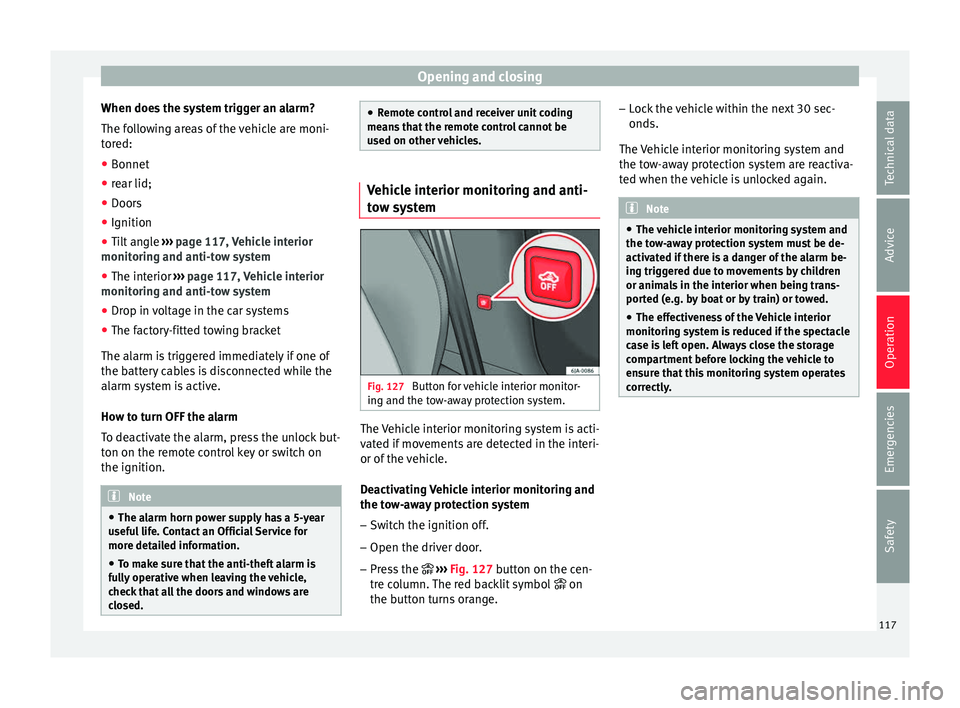
stem Fig. 127
Button for vehicle interior monitor-
in g and the t
o
w-away protection system. The Vehicle interior monitoring system is acti-
v
at
ed if
movements are detected in the interi-
or of the vehicle.
Deactivating Vehicle interior monitoring and
the tow-away protection system
– Switch the ignition off.
– Open the driver door.
– Press the ››› Fig. 127
button on the cen-
tre column. The red backlit symbol on
the button turns orange. –
Lock
the vehicle within the next 30 sec-
onds.
The Vehicle interior monitoring system and
the tow-away protection system are reactiva-
ted when the vehicle is unlocked again. Note
● The v ehic
le interior monitoring system and
the tow-away protection system must be de-
activated if there is a danger of the alarm be-
ing triggered due to movements by children
or animals in the interior when being trans-
ported (e.g. by boat or by train) or towed.
● The effectiveness of the Vehicle interior
monitoring sy
stem is reduced if the spectacle
case is left open. Always close the storage
compartment before locking the vehicle to
ensure that this monitoring system operates
correctly. 117
Technical data
Advice
Operation
Emergencies
Safety
Page 125 of 248
Lights and visibility
Note
Please observe any relevant legal require-
ments whic
h may apply in your country. Turn signal and main beam headlights
lev
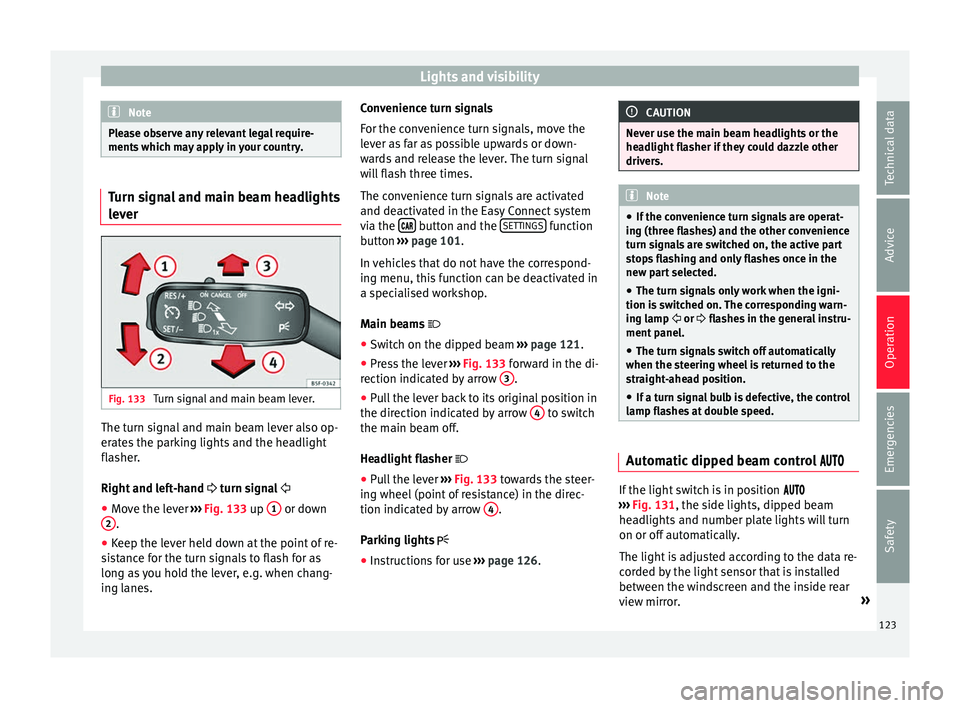
er Fig. 133
Turn signal and main beam lever. The turn signal and main beam lever also op-
er
at
e
s the parking lights and the headlight
flasher.
Right and left-hand turn signal
● Move the lever ›››
Fig. 133 up 1 or down
2 .
● Keep the lever held down at the point of re-
s i
s
tance for the turn signals to flash for as
long as you hold the lever, e.g. when chang-
ing lanes. Convenience turn signals
For the con
venience turn signals, move the
lever as far as possible upwards or down-
wards and release the lever. The turn signal
will flash three times.
The convenience turn signals are activated
and deactivated in the Easy Connect system
via the button and the
S
ET
TINGS function
b utt
on ›
›› page 101.
In vehicles that do not have the correspond-
ing menu, this function can be deactivated in
a specialised workshop.
Main beams
● Switch on the dipped beam ›››
page 121.
● Press the lever ›››
Fig. 133 forward in the di-
rection indicated by arrow 3 .
● Pull the lever back to its original position in
the dir ection indic
at
ed by arrow 4 to switch
the m ain be
am off
.
Headlight flasher
● Pull the lever ›››
Fig. 133 towards the steer-
ing wheel (point of resistance) in the direc-
tion indicated by arrow 4 .
P ark
in
g lights
● Instructions for use ›››
page 126. CAUTION
Never use the main beam headlights or the
hea dlight
flasher if they could dazzle other
drivers. Note
● If the c on
venience turn signals are operat-
ing (three flashes) and the other convenience
turn signals are switched on, the active part
stops flashing and only flashes once in the
new part selected.
● The turn signals only work when the igni-
tion is sw
itched on. The corresponding warn-
ing lamp or flashes in the general instru-
ment panel.
● The turn signals switch off automatically
when the steerin
g wheel is returned to the
straight-ahead position.
● If a turn signal bulb is defective, the control
lamp fla
shes at double speed. Automatic dipped beam control
If the light switch is in position
› ›
› Fig. 131, the side lights, dipped beam
headlights and number plate lights will turn
on or off automatically.
The light is adjusted according to the data re-
corded by the light sensor that is installed
between the windscreen and the inside rear
view mirror. »
123
Technical data
Advice
Operation
Emergencies
Safety
Page 127 of 248

Lights and visibility
Rear fog light Switching on the rear fog light
– First turn the light switch ››› Fig. 134
››› page 124 to position , or .
– Pull on the light switch to position 2 .
If the v
ehicle is not equipped with front fog
lights ››› page 124, the rear fog light is
switched on by turning the switch to position
or and pulling it to position 2 . This
type of sw it
ch only has one position.
The ››› page 100 warning lamp lights up on
the general instrument panel if the rear fog
lights are switched on.
If you are towing a trailer or caravan equip-
ped with a rear fog light on a vehicle with a
factory-fitted towing bracket or one installed
using parts from the original SEAT parts
catalogue, only the rear fog light on the trail-
er or caravan will light up.
Function “Coming Home”/“Leaving
Home”* This function makes it possible, under poor
v
i
s
ibility conditions, to automatically turn on
the lights for a brief period of time after the
vehicle has been parked or when approach-
ing the vehicle. The function is automatically turned on if the
fol
lowing conditions are met:
● The light switch is in position
››
› page 123.
● The visibility around the vehicle is reduced.
● The ignition is switched off.
To turn on thi
s function, switch on the head-
light flasher prior to exiting the vehicle.
The light is adjusted according to the data re-
corded by the light sensor that is installed
between the windscreen and the inside rear
view mirror.
The function automatically turns on the side
lights and headlights, the lighting for the en-
try area on the exterior mirrors and the num-
ber plate light.
“Coming Home” function
The light is automatically switched on when
the driver door is opened (for 60 seconds af-
ter the ignition is switched off).
The light is switched off when all the doors
and the rear lid are closed.
If a door or the rear lid remains open, the
light will switch off after 60 seconds.
“Leaving Home” function
The light is automatically switched on when
the vehicle is unlocked using the remote con-
trol. The light is switched off after 10 seconds or
when the vehic
le is locked.
Hazard warning lights switch Fig. 135
Instrument panel: switch for hazard
w arnin
g lights. –
Press the button ››
›
Fig. 135 to switch
the hazard warning lights on or off.
The warning lamps on the instrument panel
and the warning lamp on the switch will flash
at the same time as the turn signals when
the hazard warning lights are switched on.
The hazard warning lights also work when
the ignition is switched off.
The hazard warning lights come on automati-
cally in the event of an accident in which an
airbag is triggered. »
125
Technical data
Advice
Operation
Emergencies
Safety
Page 130 of 248
Operation
After approximately 7 minutes, the heating
dev ic
e of
the rear window switches off auto-
matically. For the sake of the environment
The heated rear window should be switched
off a s
soon as the glass is demisted. By sav-
ing electrical power you can also save fuel
››› page 166. Note
In the event of a drop in voltage in the on-
boar d sy
stems, the heated rear window
switches off automatically to ensure enough
power to control the engine ››› page 216, Au-
tomatic disconnection of electrical equip-
ment. Sun visors
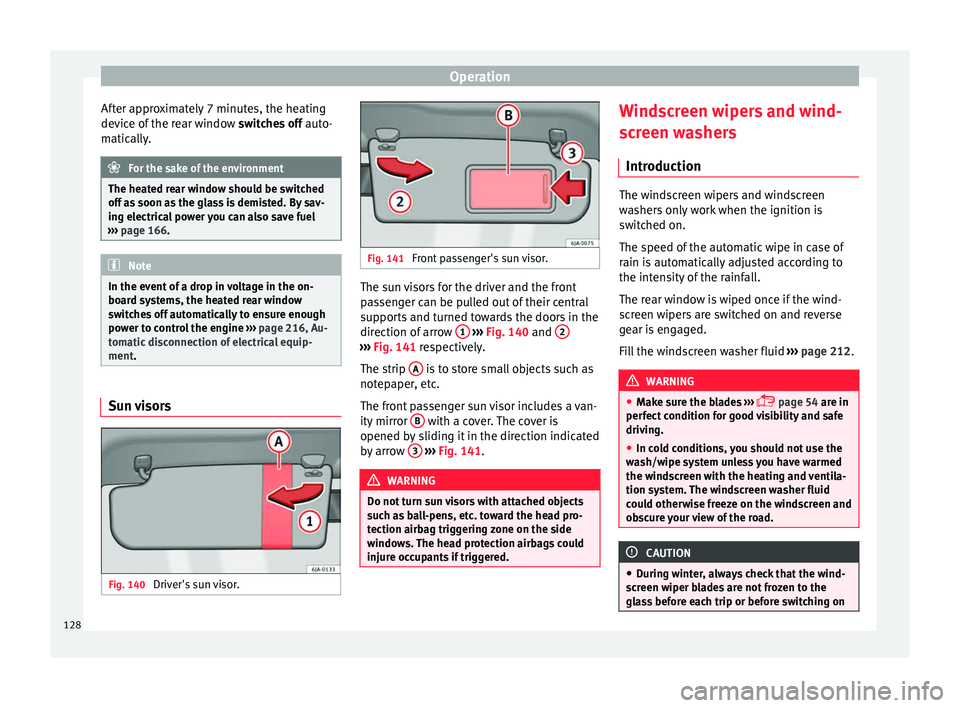
Fig. 140
Driver's sun visor. Fig. 141
Front passenger's sun visor. The sun visors for the driver and the front
p
a
s
senger can be pulled out of their central
supports and turned towards the doors in the
direction of arrow 1
› ›
› Fig. 140
and 2 ›››
Fig. 141 re s pectively.
The strip A is to store small objects such as
not ep
aper
, etc.
The front passenger sun visor includes a van-
ity mirror B with a cover. The cover is
opened b y
s
liding it in the direction indicated
by arrow 3
› ›
› Fig. 141
. WARNING
Do not turn sun visors with attached objects
suc h a
s ball-pens, etc. toward the head pro-
tection airbag triggering zone on the side
windows. The head protection airbags could
injure occupants if triggered. Windscreen wipers and wind-
s
c
r
een washers
Introduction The windscreen wipers and windscreen
wa
sher
s only work when the ignition is
switched on.
The speed of the automatic wipe in case of
rain is automatically adjusted according to
the intensity of the rainfall.
The rear window is wiped once if the wind-
screen wipers are switched on and reverse
gear is engaged.
Fill the windscreen washer fluid ›››
page 212. WARNING
● Mak e s
ure the blades ›››
page 54 are in
perfect condition for good visibility and safe
driving.
● In cold conditions, you should not use the
wash/w
ipe system unless you have warmed
the windscreen with the heating and ventila-
tion system. The windscreen washer fluid
could otherwise freeze on the windscreen and
obscure your view of the road. CAUTION
● Durin g w
inter, always check that the wind-
screen wiper blades are not frozen to the
glass before each trip or before switching on 128
Page 131 of 248
Lights and visibility
the ignition. If you switch on the windscreen
wiper
s
when the wiper blades are frozen to
the glass, this could damage both the wiper
blades and the wiper motor.
● If the ignition is switched off when the
winds
creen wipers are on, they will start op-
erating in the same mode when the ignition
is switched back on. The wiper blades may be
frozen to the glass at low temperatures when
the ignition is switched off.
● Carefully separate the frozen wipers from
the winds
creen or rear window.
● Remove snow and ice from the wipers be-
fore s
tarting your journey.
● Careless handling could lead to the wiper
arms dam
aging the windscreen.
● For safety reasons, the wiper blades should
be chan
ged once or twice a year. They can be
purchased at a SEAT Authorised Service.
● The ignition cannot be switched on while
the winds
creen wiper arms are in a raised po-
sition. Otherwise, the windscreen wipers
would return to their original position and
could damage the paintwork on the bonnet. Note
Keep the wipers clean. The wipers can be
soil ed w
ith remains of wax solutions from car
washes ››› page 196.
● On vehicles equipped with windscreen
washer j
ets, these are heated once the en-
gine is running. Operating windscreen wipers and
w
a
sher
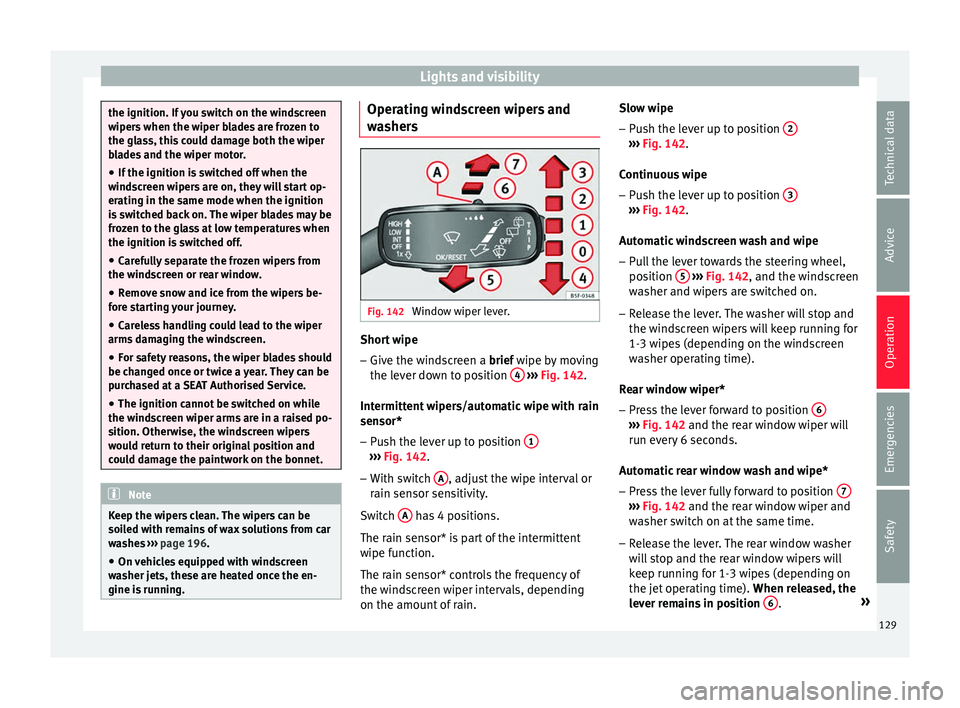
s Fig. 142
Window wiper lever. Short wipe
– Give the windscreen a brief w ipe b
y
moving
the lever down to position 4
› ›
› Fig. 142 .
Intermittent wipers/automatic wipe with rain
sensor* – Push the lever up to position 1 ›››
Fig. 142.
– With switch A , adjust the wipe interval or
r ain sen
sor sen
sitivity.
Switch A has 4 positions.
The r ain sen
sor* i
s part of the intermittent
wipe function.
The rain sensor* controls the frequency of
the windscreen wiper intervals, depending
on the amount of rain. Slow wipe
–
Push the lever up to position 2 ›››
Fig. 142.
C ontinuou
s
wipe
– Push the lever up to position 3 ›››
Fig. 142.
Aut om
atic
windscreen wash and wipe
– Pull the lever towards the steering wheel,
position 5
› ››
Fig. 142
, and the w
indscreen
washer and wipers are switched on.
– Release the lever. The washer will stop and
the winds
creen wipers will keep running for
1-3 wipes (depending on the windscreen
washer operating time).
Rear window wiper*
– Press the lever forward to position 6 ›››
Fig. 142 and the re ar w
indow wiper will
run every 6 seconds.
Automatic rear window wash and wipe* – Press the lever fully forward to position 7 ›››
Fig. 142 and the re ar w
indow wiper and
washer switch on at the same time.
– Release the lever. The rear window washer
wi l
l stop and the rear window wipers will
keep running for 1-3 wipes (depending on
the jet operating time). When released, the
lever remains in position 6 .
»
129
Technical data
Advice
Operation
Emergencies
Safety
Page 143 of 248
Transport and practical equipment
●
Alw a
ys stow objects in the luggage com-
partment and secure them on the fastening
rings.
● Use suitable straps to secure heavy ob-
jects.
● D
uring sudden manoeuvres or accidents,
loose ob
jects can be thrown forward, injuring
vehicle occupants or passers-by. This in-
creased risk of injury will be further increased
if a loose object is struck by an inflating air-
bag. If this happens, objects may shoot out-
ward like a missile. Risk of fatal injury.
● Please note that the centre of gravity may
shift when tr
ansporting heavy objects; this
may affect vehicle handling and lead to an ac-
cident. Therefore, it is essential to adjust
your speed and driving style accordingly, to
avoid accidents.
● Never exceed the allowed axle weights or
allo
wed maximum weight. If said weights are
exceeded, the driving characteristics of the
vehicle may change, leading to accidents, in-
juries and damage to the vehicle.
● Never leave your vehicle unattended, espe-
cia
lly when the rear lid is open. Children
could climb into the luggage compartment,
closing the door behind them; they will be
trapped and run the risk of death.
● Never allow children to play in or around
the vehic
le. Close and lock all the doors and
the rear lid when you leave the vehicle. Be-
fore you lock the vehicle, make sure that
there are no adults or children in the vehicle. Note
● Air cir c
ulation in the vehicle helps reduce
fogging of the windows. Used air escapes
through ventilation slits in the side trim of
the luggage compartment. Ensure that the
ventilation slots are never covered.
● Straps for securing the load to the fasten-
ing ring
s are commercially available. Fastening rings*
There can be four fastening rings in the lug-
g
ag
e c
ompartment for fastening luggage and
other objects.
– Always use suitable and undamaged straps
to secur
e luggage and other objects to the
fastening rings ››› in Loading the lug-
g ag
e c
ompartment on page 140.
– Pull up the fastening rings to attach the
strap
s.
During a collision or an accident, even small
and light objects can build up so much ener-
gy that they can cause very severe injuries.
The amount of kinetic “energy” depends on
the speed of the vehicle and the weight of
the object. The most significant factor, how-
ever, is the speed of the vehicle.
Example: An object weighing 4.5 kg is lying
unsecured in the vehicle. During a frontal col-
lision at a speed of 50 km/h (31 mph), this object generates a force corresponding to 20
times its
weight. That means that the effec-
tive weight of the object increases to approxi-
mately 90 kg. You can imagine the severity of
the injuries which might be sustained if this
“object” strikes an occupant as it flies
through the interior of the vehicle. This in-
creased risk of injury will be further increased
if a loose object is struck by an inflating air-
bag. WARNING
● If piec e
s of baggage or other objects are se-
cured to the fastening rings with inappropri-
ate or damaged retaining cords, injuries
could result in the event of braking manoeu-
vres or accidents.
● Never secure a child seat on the fastening
rings. Luggage compartment
Intr oduction Please observe the following points to ensure
the
v
ehic
le handles well at all times:
– Distribute the load as evenly as possible.
– Place heavy objects as far forward in the
luggag
e compartment as possible.
– Secure luggage using the fastening rings or
retainin
g net ›››
page 142. »
141
Technical data
Advice
Operation
Emergencies
Safety
Page 151 of 248
Air conditioning
● The outs ide t
emper
ature is above +2°C
(+36°F),
● The blower control is in position 1–4.
When the coolin
g system is on and under cer-
tain conditions, air can be blown from the
vents at a temperature of approximately +5°C
(+41°F). In the event of prolonged, irregular
distribution of the air flow from the outlets
and significant differences in temperature,
e.g. on leaving the vehicle, sensitive people
may catch cold. Note
A visit to the specialised service once a year
is r
ecommended to clean the air conditioning
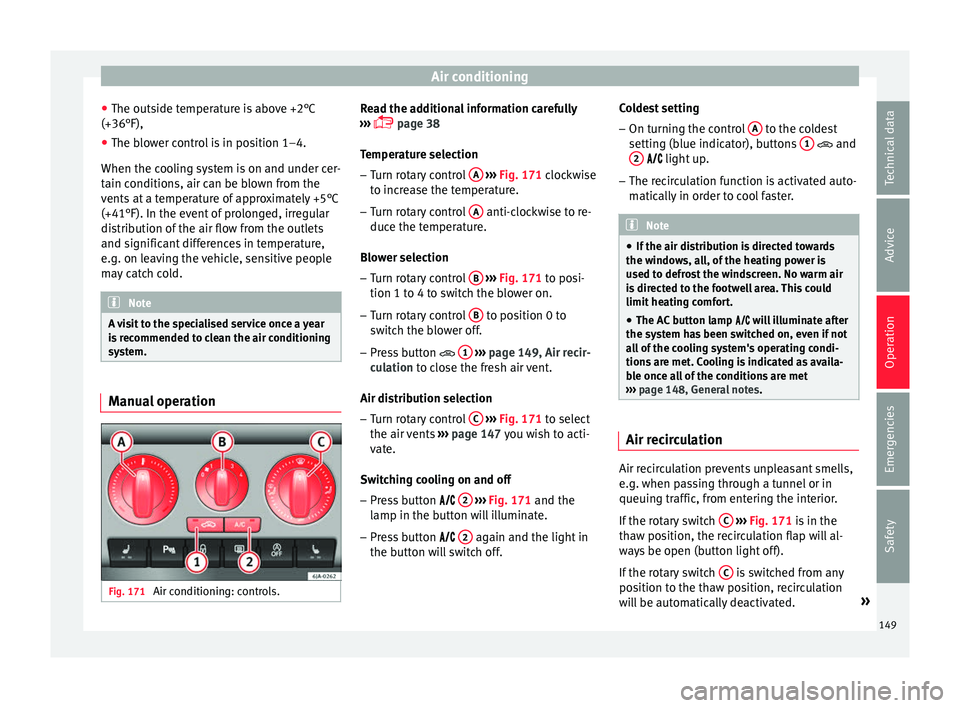
system. Manual operation
Fig. 171
Air conditioning: controls. Read the additional information carefully
› ›
›
page 38
Temperature selection – Turn rotary control A
› ››
Fig. 171
c
lockwise
to increase the temperature.
– Turn rotary control A anti-clockwise to re-
duc e the t
emper
ature.
Blower selection
– Turn rotary control B
› ››
Fig. 171
t
o posi-
tion 1 to 4 to switch the blower on.
– Turn rotary control B to position 0 to
sw it
c
h the blower off.
– Press button 1
› ›
› p
age 149, Air recir-
culation to close the fresh air vent.
Air distribution selection – Turn rotary control C
› ›
› Fig. 171
to select
the air vents ››› page 147 you wish to acti-
vate.
Switching cooling on and off
– Press button 2
› ›
› Fig. 171
and the
lamp in the button will illuminate.
– Press button 2 again and the light in
the b utt
on w
ill switch off. Coldest setting
– On turning the control A to the coldest
settin g (b
lue indic
ator), buttons 1 and
2
light up.
– The r ec
irculation function is activated auto-
matical
ly in order to cool faster. Note
● If the air di s
tribution is directed towards
the windows, all, of the heating power is
used to defrost the windscreen. No warm air
is directed to the footwell area. This could
limit heating comfort.
● The AC button lamp w
ill illuminate after
the system has been switched on, even if not
all of the cooling system's operating condi-
tions are met. Cooling is indicated as availa-
ble once all of the conditions are met
››› page 148, General notes . Air recirculation
Air recirculation prevents unpleasant smells,
e.
g. when p
a
ssing through a tunnel or in
queuing traffic, from entering the interior.
If the rotary switch C
› ›
›
Fig. 171 is in the
thaw position, the recirculation flap will al-
ways be open (button light off).
If the rotary switch C is switched from any
po sition t
o the thaw position, recirculation
will be automatically deactivated. »
149
Technical data
Advice
Operation
Emergencies
Safety
Page 155 of 248
Driving
●
Never l e
ave the vehicle unattended if the
engine is running.
● Never switch the engine off until the vehi-
cle h
as come to a complete stop. Risk of acci-
dent! CAUTION
● Turnin g the s
teering wheel fully in either
direction when the vehicle is stationary and
the engine is in gear puts the power steering
under great stress. This could lead to noise.
Never leave the steering wheel turned fully in
either direction for more than 15 seconds.
Risk of damage to the power steering system!
● The starter motor may only be used (key
position 3
››› Fig. 173 ›
›› page 154 in the ig-
nition) if the engine is off. Using the starter
motor when the engine is running could dam-
age it.
● Immediately release the ignition key when
the engine st
arts, otherwise damage could be
caused to the starter motor.
● When the engine is cold, you should avoid
high engine speed
s, driving at full throttle
and over-loading the engine before it reaches
operating temperature. Risk of engine dam-
age!
● Do not tow-start the engine. Risk of engine
damag
e! In vehicles with a catalytic convert-
er, fuel that has not been burned could reach
the catalytic converter and catch fire in it.
This would lead to a fault in the catalytic con-
verter. You may use the battery from another vehicle to help you start your engine
›› ›
page 52.
● After prolonged and demanding operation
of the engine, when the j
ourney has ended,
do not stop the engine immediately. Let the
engine run at idle for about one more minute.
This will stop the engine from overheating. For the sake of the environment
Do not warm up the engine when the vehicle
i s s
tationary. If possible, move off immediate-
ly after starting the engine. This will help the
engine reach operating temperature more
quickly, reducing the quantity of emissions. Note
● The engine c an on
ly be started with the
original SEAT key.
● Loud running noises may be heard briefly
after c
old-starting the engine. This is normal
and is no cause for concern.
● After the engine has been stopped and the
ignition switc
hed off, the radiator fan may
continue running for around 10 minutes.
● If the engine still does not start after a sec-
ond attempt, the fuel
pump fuse might have
blown. Check it and replace if necessary
››› page 81 or contact your Specialised Serv-
ice.
● You should always engage the steering lock
when you e
xit the vehicle. This will hinder
any attempts at theft. Power steering
The power steering allows you to turn the
st
eerin
g wheel more easily.
If the power steering fails or the engine is off
(towing), it is still possible to turn the vehi-
cle's steering wheel fully. However, you need
more strength to steer the vehicle.
Driver control lamps and warnings (in red) Faulty steering! To
park the vehicle
If the warning lamp remains on and the driver
indication appears, the power steering could
be faulty.
Do not continue driving. Seek specialist as-
sistance. (in yellow) Steering: System
fault! You may continue driving.
If the warning lamp comes on, the steering
could react with more difficultly or more sen-
sitivity than normal. In addition, when driving
in a straight line the steering wheel may be
off-centre.
Drive slowly to a specialised workshop and
have the fault repaired. (in yellow) Steering lock:
fault! Go to an Official Service
The electronic steering lock is malfunction-
ing. »
153
Technical data
Advice
Operation
Emergencies
Safety
Page 164 of 248
Operation
engine power. Depending on the road speed
and en gine s
peed, the aut
omatic gearbox
shifts down and the vehicle accelerates. It
only shifts up after the maximum engine
speed has been reached.
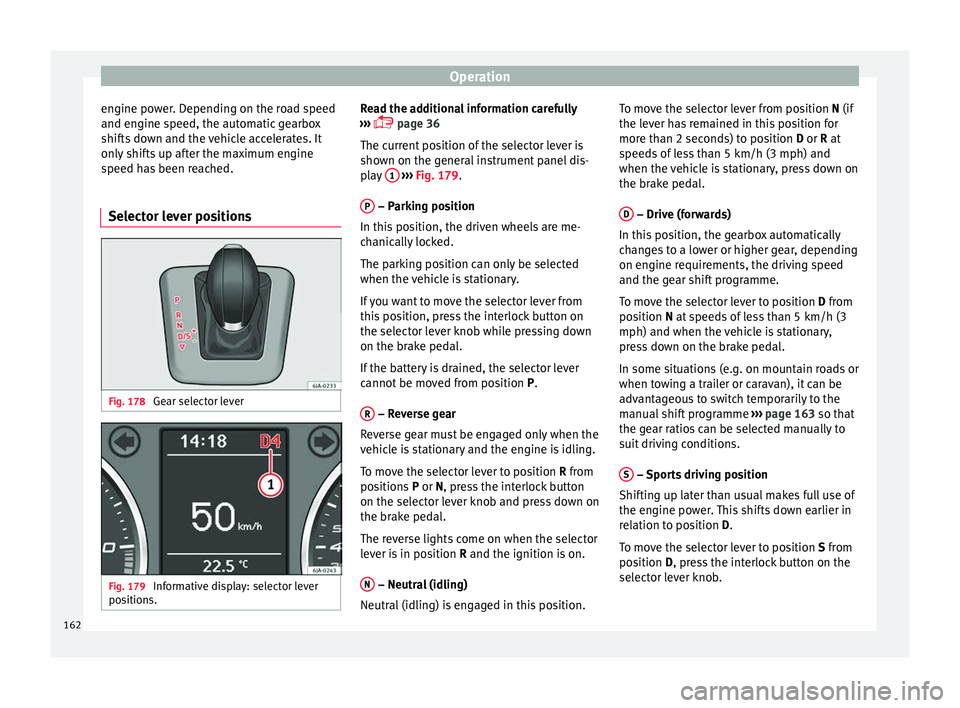
Selector lever positions Fig. 178
Gear selector lever Fig. 179
Informative display: selector lever
po sition
s. Read the additional information carefully
› ›
›
page 36
The current position of the selector lever is
shown on the general instrument panel dis-
play 1
› ››
Fig. 179
.
P – Parking position
In thi s
po
sition, the driven wheels are me-
chanically locked.
The parking position can only be selected
when the vehicle is stationary.
If you want to move the selector lever from
this position, press the interlock button on
the selector lever knob while pressing down
on the brake pedal.
If the battery is drained, the selector lever
cannot be moved from position P.
R – Reverse gear
R ev
er
se gear must be engaged only when the
vehicle is stationary and the engine is idling.
To move the selector lever to position R from
positions P or N, press the interlock button
on the selector lever knob and press down on
the brake pedal.
The reverse lights come on when the selector
lever is in position R and the ignition is on.
N – Neutral (idling)
Neutr al
(idlin
g) is engaged in this position. To move the selector lever from position N (if
the lever h
as remained in this position for
more than 2 seconds) to position D or R at
speeds of less than 5 km/h (3 mph) and
when the vehicle is stationary, press down on
the brake pedal.
D – Drive (forwards)
In thi s
po
sition, the gearbox automatically
changes to a lower or higher gear, depending
on engine requirements, the driving speed
and the gear shift programme.
To move the selector lever to position D from
position N at speeds of less than 5 km/h (3
mph) and when the vehicle is stationary,
press down on the brake pedal.
In some situations (e.g. on mountain roads or
when towing a trailer or caravan), it can be
advantageous to switch temporarily to the
manual shift programme ››› page 163 so that
the gear ratios can be selected manually to
suit driving conditions.
S – Sports driving position
Shif tin
g up l
ater than usual makes full use of
the engine power. This shifts down earlier in
relation to position D.
To move the selector lever to position S from
position D, press the interlock button on the
selector lever knob.
162
Page 167 of 248
Driving
displayed when the gearbox has cooled
ag ain.
R u
n-in and economical driving
The first
1,500 kmOver the first 1,500 kilometres the engine
mus
t
be run in.
Up to 1000 kilometres
– Do not drive at more than 3/4 of the maxi-
mum speed c orr
esponding to the engaged
gear, i.e. up to 3/4 of the maximum permit-
ted engine speed.
– Do not drive at full speed.
– Avoid high engine speeds.
– Do not tow a trailer.
From 1000 to 1500 k
ilometres (600 to 900
miles)
– Slowly increase the engine speed until
re
aching the maximum permitted speed of
the engaged gear, i.e. the maximum per-
mitted engine speed.
During its first few hours of running, the in-
ternal friction in the engine is greater than
later on, when all the moving parts have bed-
ded in. How the vehicle is driven over approx-
imately the first 1,500 kilometres (900 miles), determines the success of the proc-
ess
of running in the engine.
Even after running in, the vehicle should not
be unnecessarily driven at high engine
speeds. The maximum permitted engine
speed is marked at the start of the red zone
on the rev counter dial. The gear must be
changed up when the red area is reached in
vehicles with a manual gearbox. Extremely
high engine speeds when accelerating are
automatically limited, however the engine is
not protected against high engine speeds
produced by incorrectly changing to a lower
gear, which could cause the engine to run at
revs above the maximum permitted amount,
and consequently result in damage to the en-
gine.
Additionally, vehicles with a manual gearbox
must also bear the following in mind: do not
drive with the engine speed too low. Change
down to a lower gear when the engine no
longer runs smoothly. Observe the recom-
mendations for changing gear
››› page 29.
New tyres
New tyres must be submitted to “running in”,
given that initially their grip is not yet at the
maximum level. During the first 500 km (120
miles) drive very carefully. New brake pads
New brake p
ads do not yet provide maximum
friction capacity. First they must be “run in”.
During the first 200 km (120 miles) drive very
carefully. CAUTION
All the information for speed and engine
speed r ef
ers to an engine that operates at op-
erating temperature. Do not run the engine at
high engine speeds, neither when stopped or
while driving. For the sake of the environment
Do not drive at unnecessarily high engine
speed s; c
hanging to a higher gear sooner
contributes to saving fuel, reduces operating
noise and protects the environment. Environmental compatibility
Environmental protection is a top priority in
the de
s
ign, c
hoice of materials and manufac-
ture of your new SEAT.
Constructive measures to encourage recy-
cling
● Joints and connections designed for easy
dismantlin
g.
● Modular construction to facilitate disman-
tling. »
165
Technical data
Advice
Operation
Emergencies
Safety