ignition SKODA CITIGO 2012 1.G Owner's Guide
[x] Cancel search | Manufacturer: SKODA, Model Year: 2012, Model line: CITIGO, Model: SKODA CITIGO 2012 1.GPages: 157, PDF Size: 3.9 MB
Page 48 of 157
Cigarette lighter, 12-volt power socket
Cigarette lighter
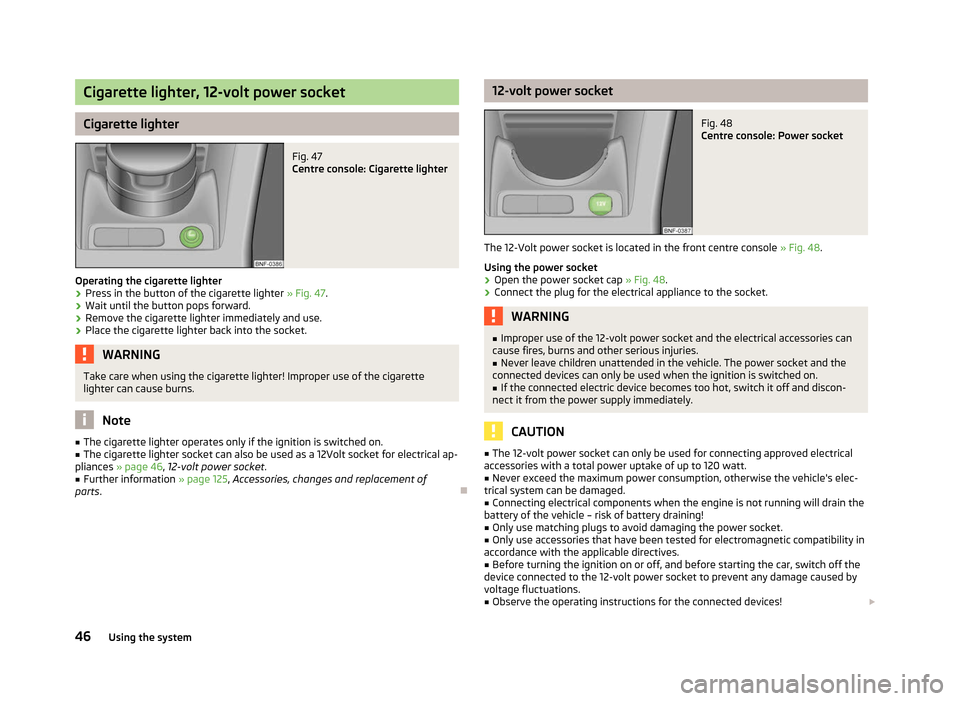
Fig. 47
Centre console: Cigarette lighter
Operating the cigarette lighter › Press in the button of the cigarette lighter
» Fig. 47.
› Wait until the button pops forward.
› Remove the cigarette lighter immediately and use.
› Place the cigarette lighter back into the socket. WARNING
Take care when using the cigarette lighter! Improper use of the cigarette
lighter can cause burns. Note
■ The cigarette lighter operates only if the ignition is switched on.
■ The cigarette lighter socket can also be used as a 12Volt socket for electrical ap-
pliances » page 46 , 12-volt power socket.
■ Further information » page 125, Accessories, changes and replacement of
parts. Ð 12-volt power socket
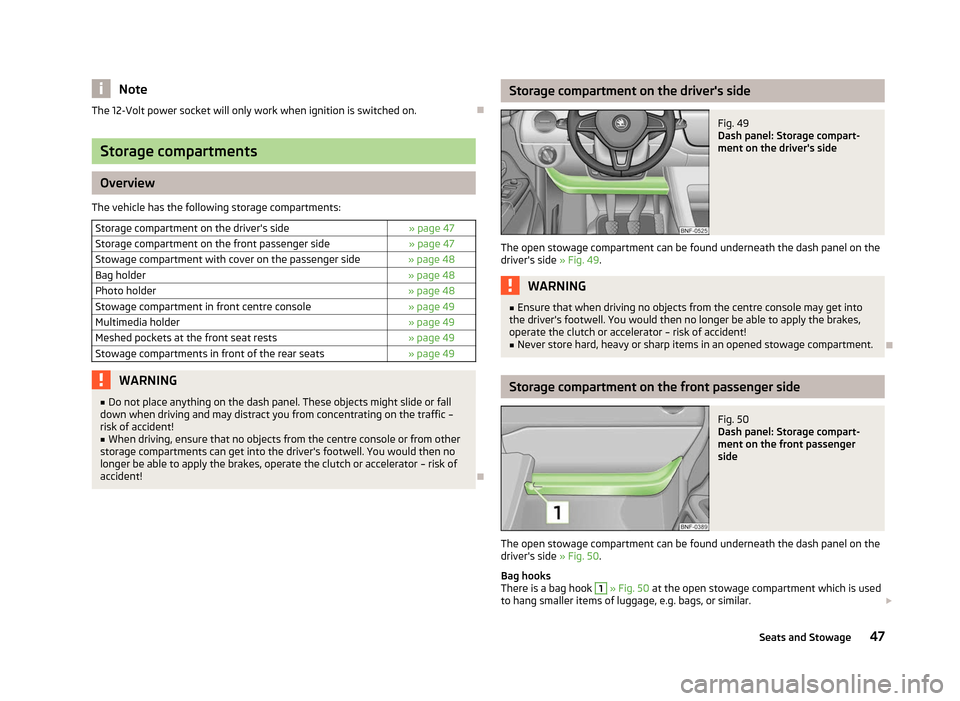
Fig. 48
Centre console: Power socket
The 12-Volt power socket is located in the front centre console » Fig. 48.
Using the power socket
› Open the power socket cap
» Fig. 48.
› Connect the plug for the electrical appliance to the socket. WARNING
■ Improper use of the 12-volt power socket and the electrical accessories can
cause fires, burns and other serious injuries.
■ Never leave children unattended in the vehicle. The power socket and the
connected devices can only be used when the ignition is switched on.
■ If the connected electric device becomes too hot, switch it off and discon-
nect it from the power supply immediately. CAUTION
■ The 12-volt power socket can only be used for connecting approved electrical
accessories with a total power uptake of up to 120
watt.
■ Never exceed the maximum power consumption, otherwise the vehicle's elec-
trical system can be damaged.
■ Connecting electrical components when the engine is not running will drain the
battery of the vehicle – risk of battery draining!
■ Only use matching plugs to avoid damaging the power socket.
■ Only use accessories that have been tested for electromagnetic compatibility in
accordance with the applicable directives. ■ Before turning the ignition on or off, and before starting the car, switch off the
device connected to the 12-volt power socket to prevent any damage caused by
voltage fluctuations.
■ Observe the operating instructions for the connected devices! £
46 Using the system
Page 49 of 157
Note
The 12-Volt power socket will only work when ignition is switched on. ÐStorage compartments
Overview
The vehicle has the following storage compartments: Storage compartment on the driver's side » page 47
Storage compartment on the front passenger side » page 47
Stowage compartment with cover on the passenger side » page 48
Bag holder » page 48
Photo holder » page 48
Stowage compartment in front centre console » page 49
Multimedia holder » page 49
Meshed pockets at the front seat rests » page 49
Stowage compartments in front of the rear seats » page 49WARNING
■ Do not place anything on the dash panel. These objects might slide or fall
down when driving and may distract you from concentrating on the traffic –
risk of accident!
■ When driving, ensure that no objects from the centre console or from other
storage compartments can get into the driver's footwell. You would then no
longer be able to apply the brakes, operate the clutch or accelerator – risk of
accident! Ð Storage compartment on the driver's side
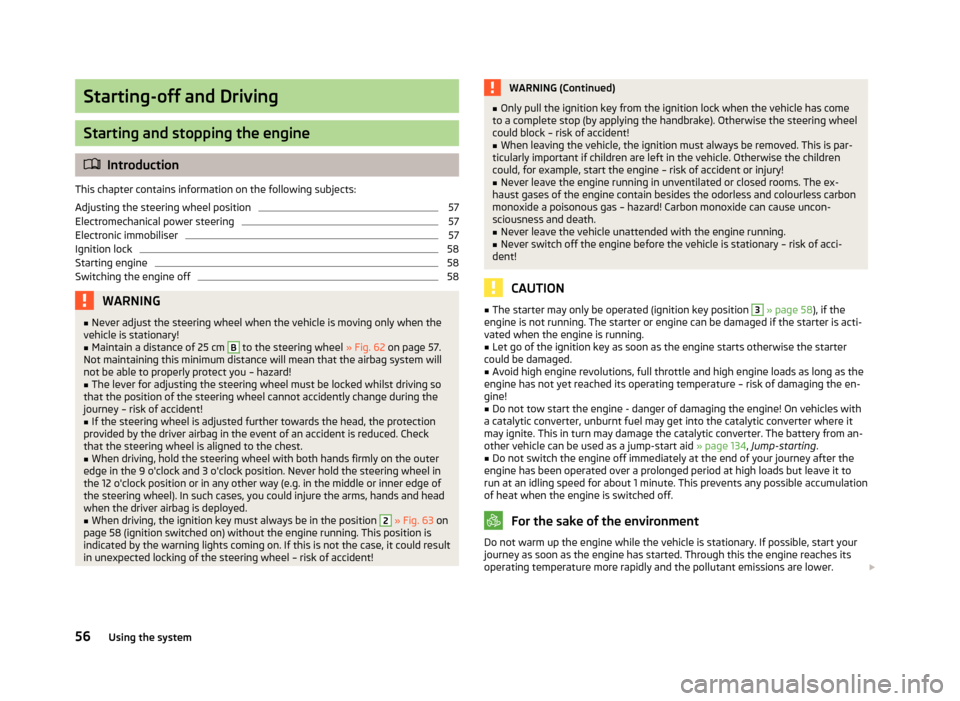
Fig. 49
Dash panel: Storage compart-
ment on the driver's side
The open stowage compartment can be found underneath the dash panel on the
driver's side » Fig. 49. WARNING
■ Ensure that when driving no objects from the centre console may get into
the driver's footwell. You would then no longer be able to apply the brakes,
operate the clutch or accelerator – risk of accident!
■ Never store hard, heavy or sharp items in an opened stowage compartment. Ð Storage compartment on the front passenger side
Fig. 50
Dash panel: Storage compart-
ment on the front passenger
side
The open stowage compartment can be found underneath the dash panel on the
driver's side » Fig. 50.
Bag hooks
There is a bag hook 1
» Fig. 50 at the open stowage compartment which is used
to hang smaller items of luggage, e.g. bags, or similar. £
47
Seats and Stowage
Page 58 of 157
Starting-off and Driving
Starting and stopping the engine
ä
Introduction
This chapter contains information on the following subjects:
Adjusting the steering wheel position 57
Electromechanical power steering 57
Electronic immobiliser 57
Ignition lock 58
Starting engine 58
Switching the engine off 58
WARNING
■ Never adjust the steering wheel when the vehicle is moving only when the
vehicle is stationary!
■ Maintain a distance of 25 cm B
to the steering wheel
» Fig. 62 on page 57.
Not maintaining this minimum distance will mean that the airbag system will
not be able to properly protect you – hazard! ■ The lever for adjusting the steering wheel must be locked whilst driving so
that the position of the steering wheel cannot accidently change during the
journey – risk of accident! ■ If the steering wheel is adjusted further towards the head, the protection
provided by the driver airbag in the event of an accident is reduced. Check
that the steering wheel is aligned to the chest. ■ When driving, hold the steering wheel with both hands firmly on the outer
edge in the 9
o'clock and 3 o'clock position. Never hold the steering wheel in
the 12 o'clock position or in any other way (e.g. in the middle or inner edge of
the steering wheel). In such cases, you could injure the arms, hands and head
when the driver airbag is deployed. ■ When driving, the ignition key must always be in the position 2
» Fig. 63 on
page 58
(ignition switched on) without the engine running. This position is
indicated by the warning lights coming on. If this is not the case, it could result
in unexpected locking of the steering wheel – risk of accident! WARNING (Continued)
■ Only pull the ignition key from the ignition lock when the vehicle has come
to a complete stop (by applying the handbrake). Otherwise the steering wheel
could block – risk of accident!
■ When leaving the vehicle, the ignition must always be removed. This is par-
ticularly important if children are left in the vehicle. Otherwise the children
could, for example, start the engine – risk of accident or injury!
■ Never leave the engine running in unventilated or closed rooms. The ex-
haust gases of the engine contain besides the odorless and colourless carbon
monoxide a poisonous gas – hazard! Carbon monoxide can cause uncon-
sciousness and death. ■ Never leave the vehicle unattended with the engine running.
■ Never switch off the engine before the vehicle is stationary – risk of acci-
dent! CAUTION
■ The starter may only be operated (ignition key position 3
» page 58), if the
engine is not running. The starter or engine can be damaged if the starter is acti-
vated when the engine is running. ■ Let go of the ignition key as soon as the engine starts otherwise the starter
could be damaged. ■ Avoid high engine revolutions, full throttle and high engine loads as long as the
engine has not yet reached its operating temperature – risk of damaging the en-
gine!
■ Do not tow start the engine - danger of damaging the engine! On vehicles with
a catalytic converter, unburnt fuel may get into the catalytic converter where it
may ignite. This in turn may damage the catalytic converter. The battery from an-
other vehicle can be used as a jump-start aid » page 134, Jump-starting .
■ Do not switch the engine off immediately at the end of your journey after the
engine has been operated over a prolonged period at high loads but leave it to
run at an idling speed for about 1
minute. This prevents any possible accumulation
of heat when the engine is switched off. For the sake of the environment
Do not warm up the engine while the vehicle is stationary. If possible, start your
journey as soon as the engine has started. Through this the engine reaches its
operating temperature more rapidly and the pollutant emissions are lower. £
56 Using the system
Page 59 of 157
Note
■ The engine can only be started with a genuine ŠKODA key with the matching
code. ■ The engine running noises may louder at first be louder for a short time after
starting the cold engine. This is quite normal and is not an operating problem. ■ After switching off the ignition, the radiator fan can intermittently continue to
operate for approx. 10
minutes.
■ If the engine does not start up after a second attempt, the fuse for the fuel
pump may have a fault. Check the fuse and replace, if necessary » page 138,
Fuses on the underside of the dash panel or seek assistance from a ŠKODA
spe-
cialist garage.
■ We recommend locking the steering wheel whenever leaving the vehicle. This
acts as a deterrent against the attempted theft of your car. ÐAdjusting the steering wheel position
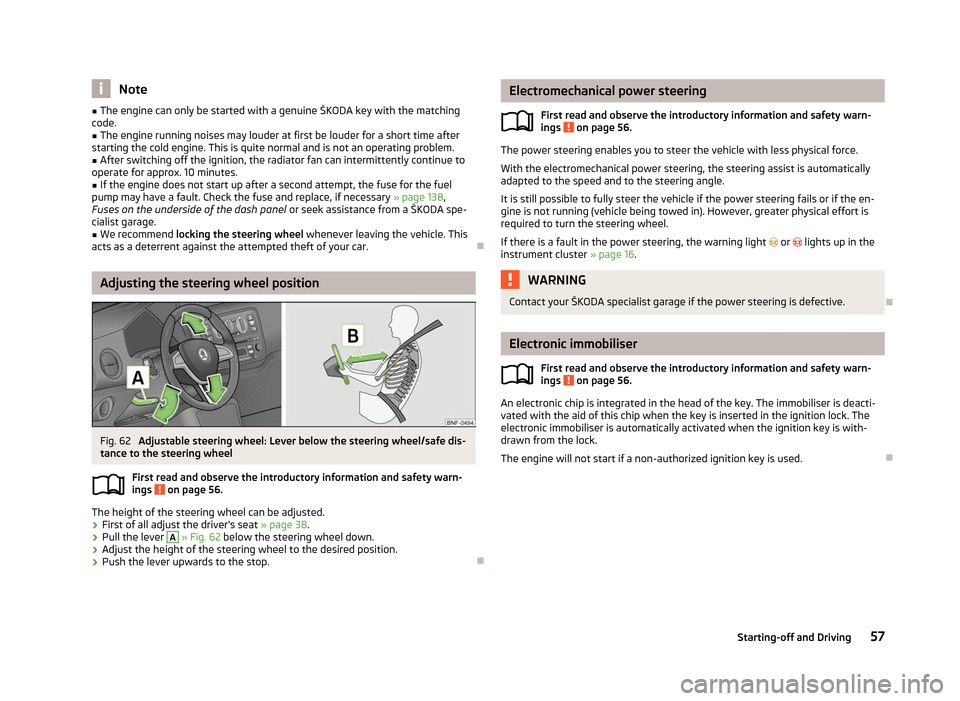
Fig. 62
Adjustable steering wheel: Lever below the steering wheel/safe dis-
tance to the steering wheel
First read and observe the introductory information and safety warn-
ings on page 56.
The height of the steering wheel can be adjusted.
› First of all adjust the driver's seat
» page 38.
› Pull the lever A
» Fig. 62 below the steering wheel down.
› Adjust the height of the steering wheel to the desired position.
› Push the lever upwards to the stop. Ð
ä Electromechanical power steering
First read and observe the introductory information and safety warn-
ings on page 56.
The power steering enables you to steer the vehicle with less physical force.
With the electromechanical power steering, the steering assist is automatically
adapted to the speed and to the steering angle.
It is still possible to fully steer the vehicle if the power steering fails or if the en-
gine is not running (vehicle being towed in). However, greater physical effort is
required to turn the steering wheel.
If there is a fault in the power steering, the warning light or lights up in the
instrument cluster » page 16. WARNING
Contact your ŠKODA specialist garage if the power steering is defective. Ð Electronic immobiliser
First read and observe the introductory information and safety warn-
ings on page 56.
An electronic chip is integrated in the head of the key. The immobiliser is deacti-
vated with the aid of this chip when the key is inserted in the ignition lock. The
electronic immobiliser is automatically activated when the ignition key is with-
drawn from the lock.
The engine will not start if a non-authorized ignition key is used. Ð
ä
ä
57
Starting-off and Driving
Page 60 of 157
Ignition lock
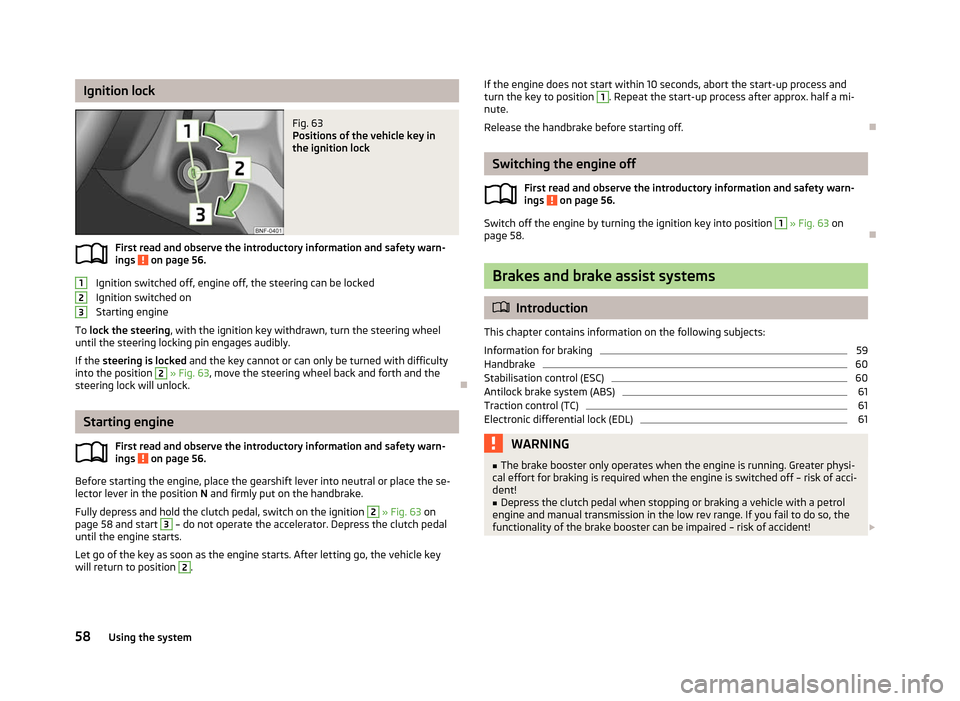
Fig. 63
Positions of the vehicle key in
the ignition lock
First read and observe the introductory information and safety warn-
ings on page 56.
Ignition switched off, engine off, the steering can be locked
Ignition switched on
Starting engine
To lock the steering , with the ignition key withdrawn, turn the steering wheel
until the steering locking pin engages audibly.
If the steering is locked and the key cannot or can only be turned with difficulty
into the position 2
» Fig. 63, move the steering wheel back and forth and the
steering lock will unlock. ÐStarting engine
First read and observe the introductory information and safety warn-
ings on page 56.
Before starting the engine, place the gearshift lever into neutral or place the se-
lector lever in the position N and firmly put on the handbrake.
Fully depress and hold the clutch pedal, switch on the ignition 2
» Fig. 63 on
page 58
and start 3
– do not operate the accelerator. Depress the clutch pedal
until the engine starts.
Let go of the key as soon as the engine starts. After letting go, the vehicle key
will return to position 2
.
ä 1
2
3
ä If the engine does not start within 10 seconds, abort the start-up process and
turn the key to position 1
. Repeat the start-up process after approx. half a mi-
nute.
Release the handbrake before starting off. Ð Switching the engine off
First read and observe the introductory information and safety warn-
ings on page 56.
Switch off the engine by turning the ignition key into position 1
» Fig. 63 on
page 58
. Ð Brakes and brake assist systems
ä
Introduction
This chapter contains information on the following subjects:
Information for braking 59
Handbrake 60
Stabilisation control (ESC) 60
Antilock brake system (ABS) 61
Traction control (TC) 61
Electronic differential lock (EDL) 61
WARNING
■ The brake booster only operates when the engine is running. Greater physi-
cal effort for braking is required when the engine is switched off – risk of acci-
dent!
■ Depress the clutch pedal when stopping or braking a vehicle with a petrol
engine and manual transmission in the low rev range. If you fail to do so, the
functionality of the brake booster can be impaired – risk of accident! £
ä
58 Using the system
Page 62 of 157
Faults in the brake surface
If it is found that the braking distance has suddenly become longer and that the
brake pedal can be depressed further, the brake system may be faulty. Visit a
ŠKODA specialist garage immediately and adjust your style of driving appropriate-
ly as you will not know how great the damage is.
Low brake fluid level
An insufficient level of brake fluid may result in problems in the brake system. The
level of the brake fluid is monitored electronically
» page 15, Brake system .
Brake booster
The brake booster increases the pressure generated with the brake pedal. The
brake booster only operates when the engine is running. ÐHandbrake
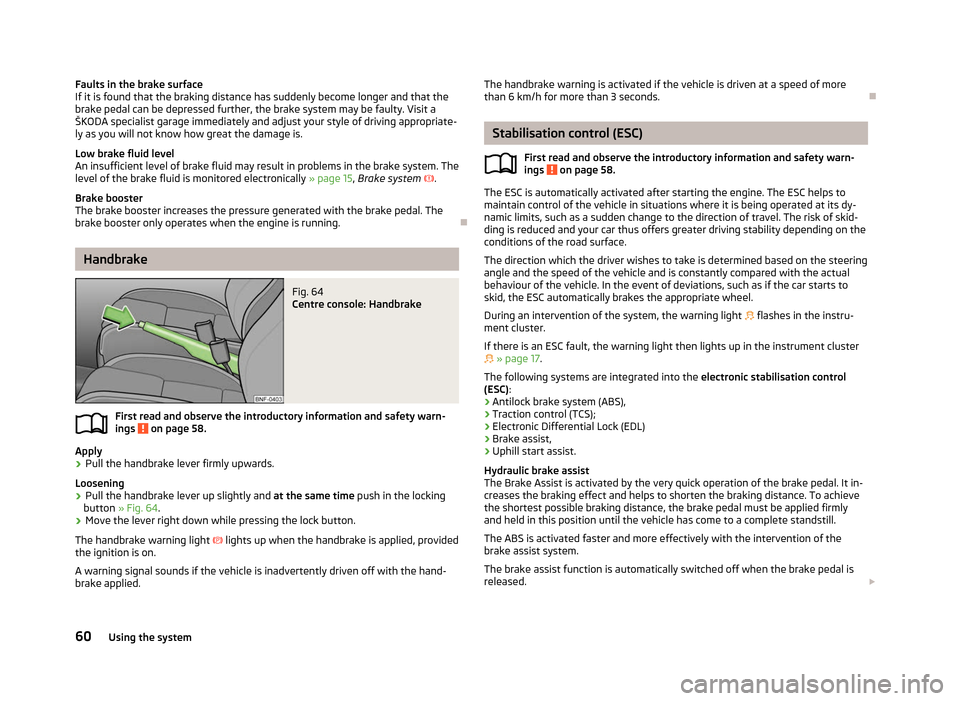
Fig. 64
Centre console: Handbrake
First read and observe the introductory information and safety warn-
ings on page 58.
Apply
› Pull the handbrake lever firmly upwards.
Loosening
› Pull the handbrake lever up slightly and
at the same time push in the locking
button » Fig. 64 .
› Move the lever right down while pressing the lock button.
The handbrake warning light lights up when the handbrake is applied, provided
the ignition is on.
A warning signal sounds if the vehicle is inadvertently driven off with the hand-
brake applied.
ä The handbrake warning is activated if the vehicle is driven at a speed of more
than 6 km/h for more than 3
seconds. Ð Stabilisation control (ESC)
First read and observe the introductory information and safety warn-
ings on page 58.
The ESC is automatically activated after starting the engine. The ESC helps to
maintain control of the vehicle in situations where it is being operated at its dy-
namic limits, such as a sudden change to the direction of travel. The risk of skid-
ding is reduced and your car thus offers greater driving stability depending on the
conditions of the road surface.
The direction which the driver wishes to take is determined based on the steering
angle and the speed of the vehicle and is constantly compared with the actual
behaviour of the vehicle. In the event of deviations, such as if the car starts to
skid, the ESC automatically brakes the appropriate wheel.
During an intervention of the system, the warning light flashes in the instru-
ment cluster.
If there is an ESC fault, the warning light then lights up in the instrument cluster
» page 17.
The following systems are integrated into the electronic stabilisation control
(ESC):
› Antilock brake system (ABS),
› Traction control (TCS);
› Electronic Differential Lock (EDL)
› Brake assist,
› Uphill start assist.
Hydraulic brake assist
The Brake Assist is activated by the very quick operation of the brake pedal. It in-
creases the braking effect and helps to shorten the braking distance. To achieve
the shortest possible braking distance, the brake pedal must be applied firmly
and held in this position until the vehicle has come to a complete standstill.
The ABS is activated faster and more effectively with the intervention of the
brake assist system.
The brake assist function is automatically switched off when the brake pedal is
released. £
ä
60 Using the system
Page 64 of 157
Note
If not in the process of changing gear, do not leave your hand on the gearshift
lever while driving. The pressure from the hand can cause the gearshift mecha-
nism to wear excessively. Ðpedals
The operation of the pedals must not be hindered under any circumstances!
In the driver's footwell, only a footmat, which is attached to the two correspond-
ing attachment points, may be used.
Only use footmats from the range of
ŠKODA Original Accessories, which are fitted
to two attachment points. WARNING
No objects are allowed in the driver's footwell – risk of obstruction or limita-
tion in operating the pedal! ÐParking aid
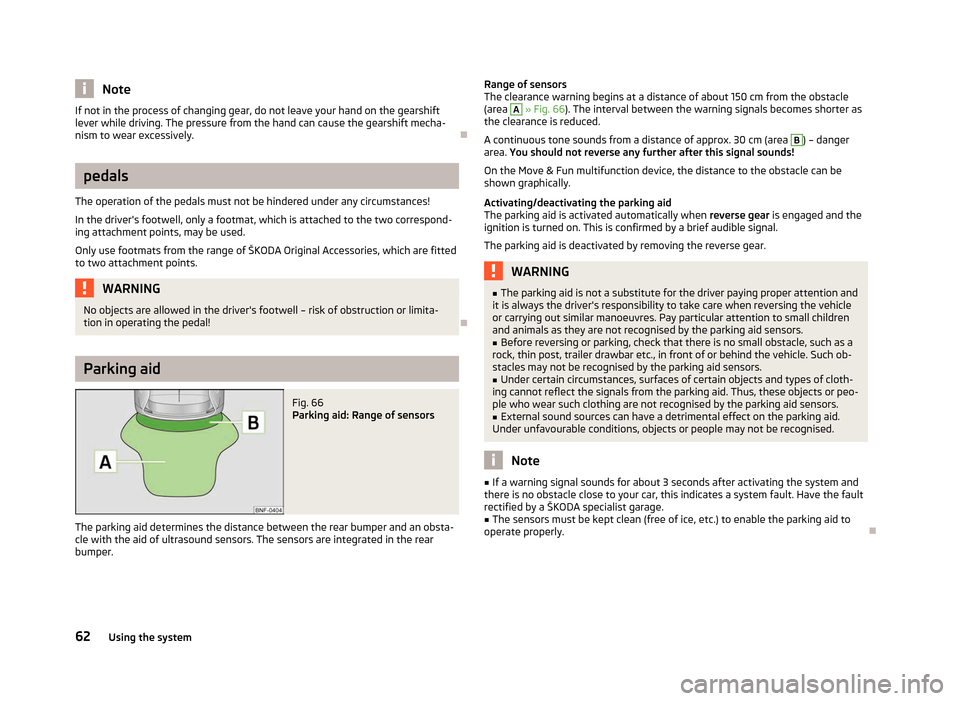
Fig. 66
Parking aid: Range of sensors
The parking aid determines the distance between the rear bumper and an obsta-
cle with the aid of ultrasound sensors. The sensors are integrated in the rear
bumper. Range of sensors
The clearance warning begins at a distance of about 150
cm from the obstacle
(area A
» Fig. 66
). The interval between the warning signals becomes shorter as
the clearance is reduced.
A continuous tone sounds from a distance of approx. 30
cm (area B
) – danger
area. You should not reverse any further after this signal sounds!
On the Move & Fun multifunction device, the distance to the obstacle can be
shown graphically.
Activating/deactivating the parking aid
The parking aid is activated automatically when reverse gear is engaged and the
ignition is turned on. This is confirmed by a brief audible signal.
The parking aid is deactivated by removing the reverse gear. WARNING
■ The parking aid is not a substitute for the driver paying proper attention and
it is always the driver's responsibility to take care when reversing the vehicle
or carrying out similar manoeuvres. Pay particular attention to small children
and animals as they are not recognised by the parking aid sensors.
■ Before reversing or parking, check that there is no small obstacle, such as a
rock, thin post, trailer drawbar etc., in front of or behind the vehicle. Such ob-
stacles may not be recognised by the parking aid sensors.
■ Under certain circumstances, surfaces of certain objects and types of cloth-
ing cannot reflect the signals from the parking aid. Thus, these objects or peo-
ple who wear such clothing are not recognised by the parking aid sensors.
■ External sound sources can have a detrimental effect on the parking aid.
Under unfavourable conditions, objects or people may not be recognised. Note
■ If a warning signal sounds for about 3
seconds after activating the system and
there is no obstacle close to your car, this indicates a system fault. Have the fault
rectified by a ŠKODA specialist garage. ■ The sensors must be kept clean (free of ice, etc.) to enable the parking aid to
operate properly. Ð
62 Using the system
Page 65 of 157
Visual parking system
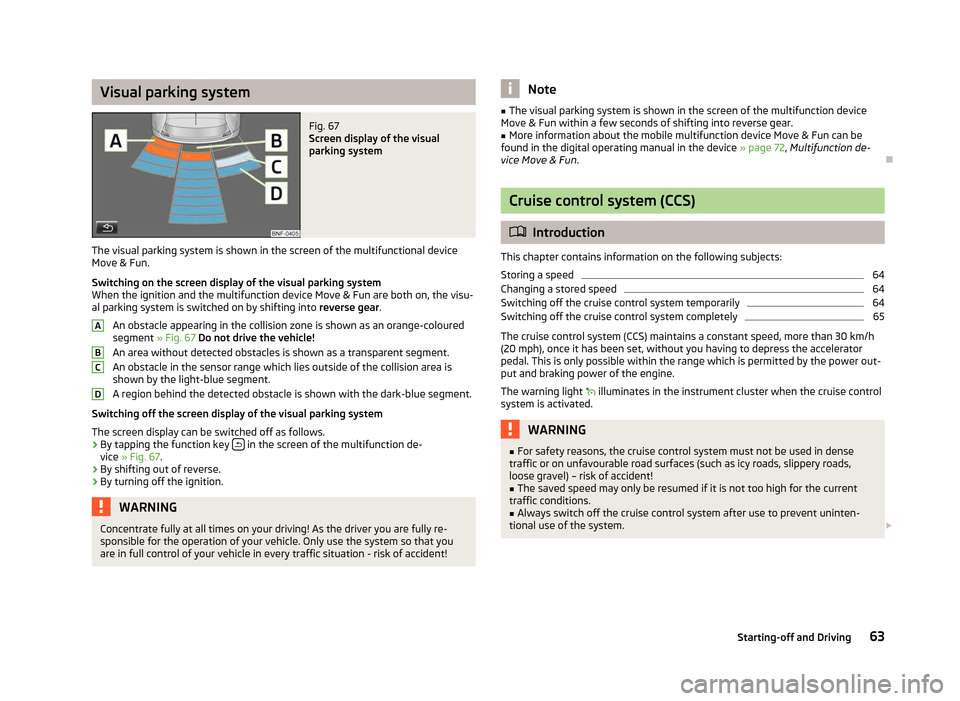
Fig. 67
Screen display of the visual
parking system
The visual parking system is shown in the screen of the multifunctional device
Move & Fun .
Switching on the screen display of the visual parking system
When the ignition and the multifunction device Move & Fun are both on, the visu-
al parking system is switched on by shifting into reverse gear.
An obstacle appearing in the collision zone is shown as an orange-coloured
segment » Fig. 67 Do not drive the vehicle!
An area without detected obstacles is shown as a transparent segment.
An obstacle in the sensor range which lies outside of the collision area is
shown by the light-blue segment.
A region behind the detected obstacle is shown with the dark-blue segment.
Switching off the screen display of the visual parking system
The screen display can be switched off as follows.
› By tapping the function key
in the screen of the multifunction de-
vice » Fig. 67.
› By shifting out of reverse.
› By turning off the ignition. WARNING
Concentrate fully at all times on your driving! As the driver you are fully re-
sponsible for the operation of your vehicle. Only use the system so that you
are in full control of your vehicle in every traffic situation - risk of accident! A
B
C
D Note
■ The visual parking system is shown in the screen of the multifunction device
Move & Fun
within a few seconds of shifting into reverse gear.
■ More information about the mobile multifunction device Move & Fun can be
found in the digital operating manual in the device » page 72, Multifunction de-
vice Move & Fun. Ð Cruise control system (CCS)
ä
Introduction
This chapter contains information on the following subjects:
Storing a speed 64
Changing a stored speed 64
Switching off the cruise control system temporarily 64
Switching off the cruise control system completely 65
The cruise control system (CCS) maintains a constant speed, more than 30 km/h
(20
mph), once it has been set, without you having to depress the accelerator
pedal. This is only possible within the range which is permitted by the power out-
put and braking power of the engine.
The warning light illuminates in the instrument cluster when the cruise control
system is activated. WARNING
■ For safety reasons, the cruise control system must not be used in dense
traffic or on unfavourable road surfaces (such as icy roads, slippery roads,
loose gravel) – risk of accident! ■ The saved speed may only be resumed if it is not too high for the current
traffic conditions. ■ Always switch off the cruise control system after use to prevent uninten-
tional use of the system. £
63
Starting-off and Driving
Page 67 of 157
Briefly press the rocker button B
into the position RES
to resume the stored
speed after the clutch or brake pedal is released. ÐSwitching off the cruise control system completely
First read and observe the introductory information and safety warn-
ings on page 63.
›
Turn the switch A
» Fig. 68
on page 64 » page 64 into the OFF position. ÐSTART/STOP
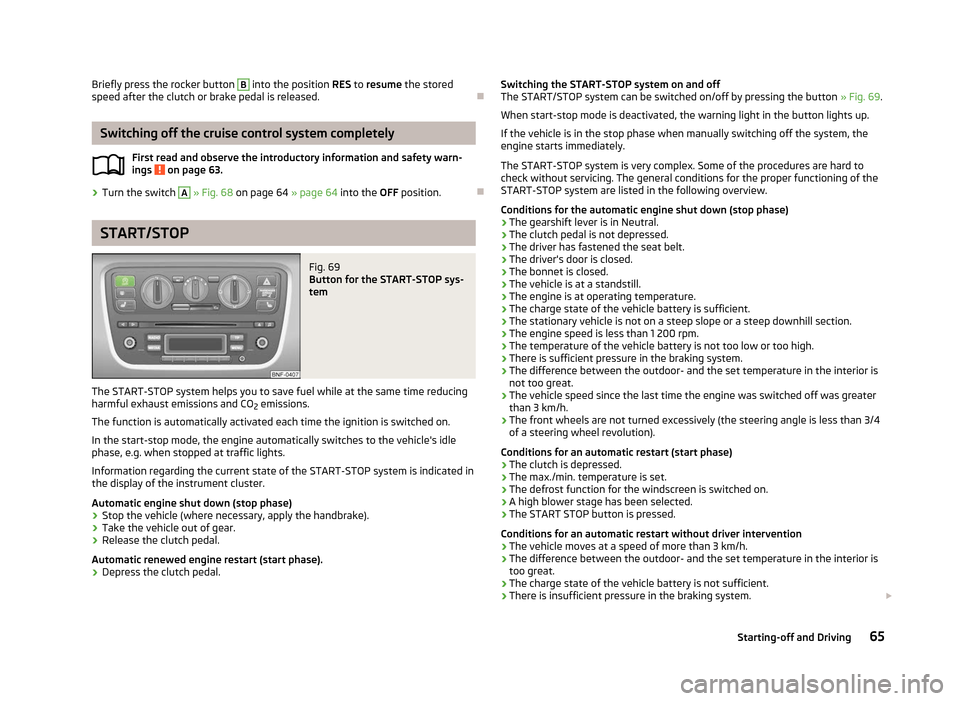
Fig. 69
Button for the START-STOP sys-
tem
The START-STOP system helps you to save fuel while at the same time reducing
harmful exhaust emissions and CO 2 emissions.
The function is automatically activated each time the ignition is switched on.
In the start-stop mode, the engine automatically switches to the vehicle's idle
phase, e.g. when stopped at traffic lights.
Information regarding the current state of the
START-STOP system is indicated in
the display of the instrument cluster.
Automatic engine shut down (stop phase)
› Stop the vehicle (where necessary, apply the handbrake).
› Take the vehicle out of gear.
› Release the clutch pedal.
Automatic renewed engine restart (start phase).
› Depress the clutch pedal.
ä
Switching the START-STOP system on and off
The START/STOP
system can be switched on/off by pressing the button » Fig. 69.
When start-stop mode is deactivated, the warning light in the button lights up.
If the vehicle is in the stop phase when manually switching off the system, the
engine starts immediately.
The START-STOP system is very complex. Some of the procedures are hard to
check without servicing. The general conditions for the proper functioning of the
START-STOP system are listed in the following overview.
Conditions for the automatic engine shut down (stop phase)
› The gearshift lever is in Neutral.
› The clutch pedal is not depressed.
› The driver has fastened the seat belt.
› The driver's door is closed.
› The bonnet is closed.
› The vehicle is at a standstill.
› The engine is at operating temperature.
› The charge state of the vehicle battery is sufficient.
› The stationary vehicle is not on a steep slope or a steep downhill section.
› The engine speed is less than 1 200 rpm.
› The temperature of the vehicle battery is not too low or too high.
› There is sufficient pressure in the braking system.
› The difference between the outdoor- and the set temperature in the interior is
not too great.
› The vehicle speed since the last time the engine was switched off was greater
than 3 km/h.
› The front wheels are not turned excessively (the steering angle is less than 3/4
of a steering wheel revolution).
Conditions for an automatic restart (start phase)
› The clutch is depressed.
› The max./min. temperature is set.
› The defrost function for the windscreen is switched on.
› A high blower stage has been selected.
› The START STOP button is pressed.
Conditions for an automatic restart without driver intervention
› The vehicle moves at a speed of more than 3 km/h.
› The difference between the outdoor- and the set temperature in the interior is
too great.
› The charge state of the vehicle battery is not sufficient.
› There is insufficient pressure in the braking system.
£
65
Starting-off and Driving
Page 72 of 157
›
Move the selector lever to the right in the direction of the arrow
» Fig. 74 on
page 70 into position N. ÐSelector lever positions
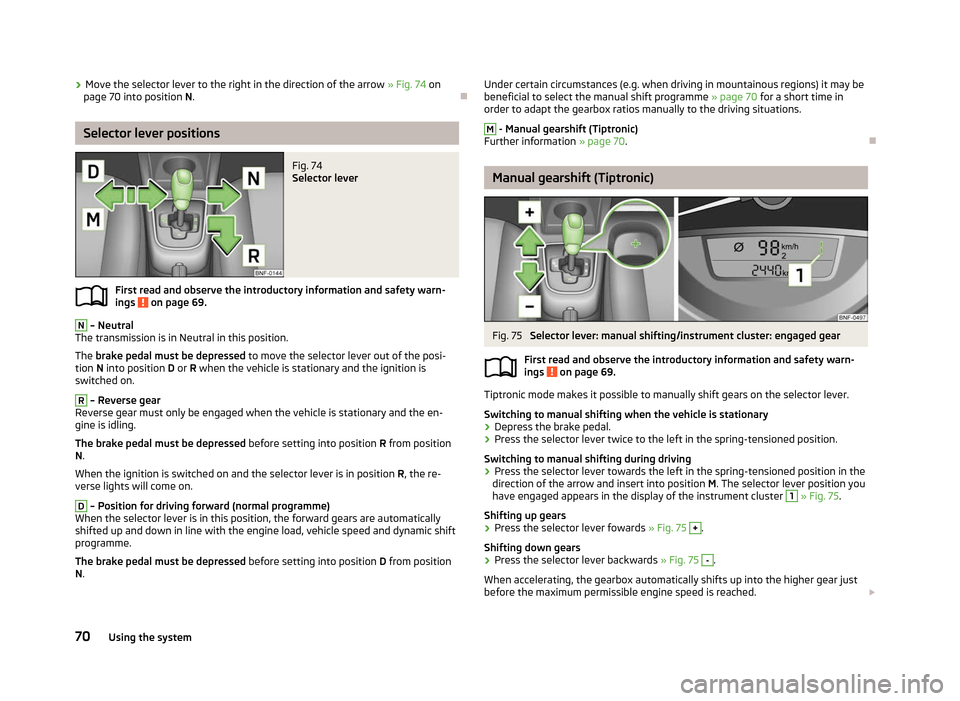
Fig. 74
Selector lever
First read and observe the introductory information and safety warn-
ings on page 69.
N
– Neutral
The transmission is in Neutral in this position.
The brake pedal must be depressed to move the selector lever out of the posi-
tion N into position D or R when the vehicle is stationary and the ignition is
switched on. R
– Reverse gear
Reverse gear must only be engaged when the vehicle is stationary and the en-
gine is idling.
The brake pedal must be depressed before setting into position R from position
N.
When the ignition is switched on and the selector lever is in position R, the re-
verse lights will come on. D
– Position for driving forward (normal programme)
When the selector lever is in this position, the forward gears are automatically
shifted up and down in line with the engine load, vehicle speed and dynamic shift
programme.
The brake pedal must be depressed before setting into position D from position
N.
ä
Under certain circumstances (e.g. when driving in mountainous regions) it may be
beneficial to select the manual shift programme » page 70 for a short time in
order to adapt the gearbox ratios manually to the driving situations. M
- Manual gearshift (Tiptronic)
Further information » page 70. Ð Manual gearshift (Tiptronic)
Fig. 75
Selector lever: manual shifting/instrument cluster: engaged gear
First read and observe the introductory information and safety warn-
ings on page 69.
Tiptronic mode makes it possible to manually shift gears on the selector lever.
Switching to manual shifting when the vehicle is stationary
›
Depress the brake pedal.
› Press the selector lever twice to the left in the spring-tensioned position.
Switching to manual shifting during driving
› Press the selector lever towards the left in the spring-tensioned position in the
direction of the arrow and insert into position M. The selector lever position you
have engaged appears in the display of the instrument cluster 1
» Fig. 75
.
Shifting up gears
› Press the selector lever fowards
» Fig. 75 +
.
Shifting down gears
› Press the selector lever backwards
» Fig. 75 -
.
When accelerating, the gearbox automatically shifts up into the higher gear just
before the maximum permissible engine speed is reached. £
ä
70 Using the system