bonnet SKODA CITIGO 2012 1.G Owner's Manual
[x] Cancel search | Manufacturer: SKODA, Model Year: 2012, Model line: CITIGO, Model: SKODA CITIGO 2012 1.GPages: 157, PDF Size: 3.9 MB
Page 9 of 157
Using the system
Cockpit
Overview
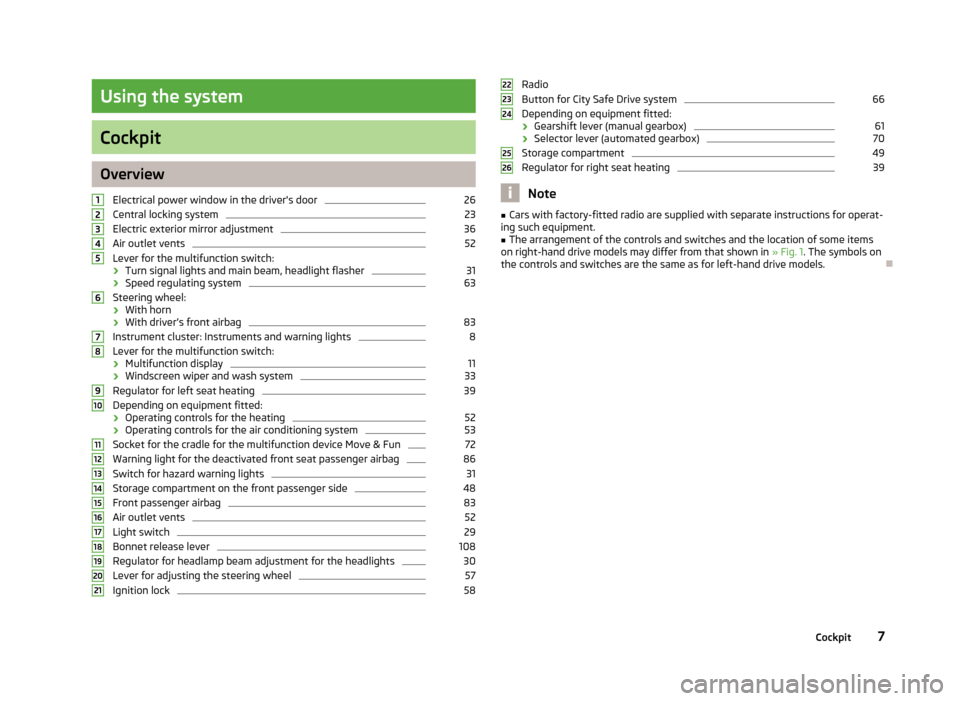
Electrical power window in the driver's door 26
Central locking system 23
Electric exterior mirror adjustment 36
Air outlet vents 52
Lever for the multifunction switch:
› Turn signal lights and main beam, headlight flasher 31
› Speed regulating system 63
Steering wheel:
› With horn
› With driver’s front airbag 83
Instrument cluster: Instruments and warning lights 8
Lever for the multifunction switch:
› Multifunction display 11
› Windscreen wiper and wash system 33
Regulator for left seat heating 39
Depending on equipment fitted:
› Operating controls for the heating 52
› Operating controls for the air conditioning system 53
Socket for the cradle for the multifunction device Move & Fun 72
Warning light for the deactivated front seat passenger airbag 86
Switch for hazard warning lights 31
Storage compartment on the front passenger side 48
Front passenger airbag 83
Air outlet vents 52
Light switch 29
Bonnet release lever 108
Regulator for headlamp beam adjustment for the headlights 30
Lever for adjusting the steering wheel 57
Ignition lock 581
2
3
4
5
6
7
8
9
10
11
12
13
14
15
16
17
18
19
20
21 Radio
Button for
City Safe Drive system 66
Depending on equipment fitted:
› Gearshift lever (manual gearbox) 61
› Selector lever (automated gearbox) 70
Storage compartment 49
Regulator for right seat heating 39
Note
■ Cars with factory-fitted radio are supplied with separate instructions for operat-
ing such equipment. ■ The arrangement of the controls and switches and the location of some items
on right-hand drive models may differ from that shown in » Fig. 1. The symbols on
the controls and switches are the same as for left-hand drive models. Ð 22
23
24
25
26
7
Cockpit
Page 17 of 157
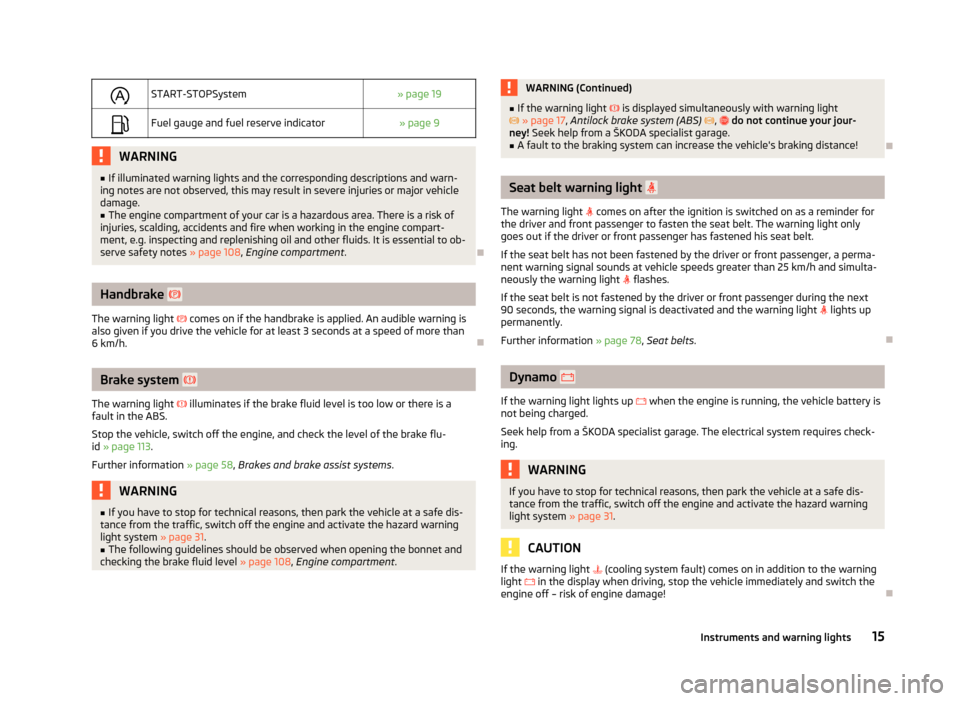
START-STOPSystem
» page 19
Fuel gauge and fuel reserve indicator
» page 9WARNING
■ If illuminated warning lights and the corresponding descriptions and warn-
ing notes are not observed, this may result in severe injuries or major vehicle
damage.
■ The engine compartment of your car is a hazardous area. There is a risk of
injuries, scalding, accidents and fire when working in the engine compart-
ment, e.g. inspecting and replenishing oil and other fluids. It is essential to ob-
serve safety notes »
page 108, Engine compartment . ÐHandbrake
The warning light comes on if the handbrake is applied. An audible warning is
also given if you drive the vehicle for at least 3
seconds at a speed of more than
6 km/h. ÐBrake system
The warning light illuminates if the brake fluid level is too low or there is a
fault in the ABS.
Stop the vehicle, switch off the engine, and check the level of the brake flu-
id » page 113.
Further information » page 58, Brakes and brake assist systems. WARNING
■ If you have to stop for technical reasons, then park the vehicle at a safe dis-
tance from the traffic, switch off the engine and activate the hazard warning
light system » page 31.
■ The following guidelines should be observed when opening the bonnet and
checking the brake fluid level » page 108, Engine compartment . WARNING (Continued)
■ If the warning light is displayed simultaneously with warning light
» page 17, Antilock brake system (ABS) , do not continue your jour-
ney! Seek help from a
ŠKODA specialist garage.
■ A fault to the braking system can increase the vehicle's braking distance! Ð Seat belt warning light
The warning light comes on after the ignition is switched on as a reminder for
the driver and front passenger to fasten the seat belt. The warning light only
goes out if the driver or front passenger has fastened his seat belt.
If the seat belt has not been fastened by the driver or front passenger, a perma-
nent warning signal sounds at vehicle speeds greater than 25
km/h and simulta-
neously the warning light flashes.
If the seat belt is not fastened by the driver or front passenger during the next
90 seconds, the warning signal is deactivated and the warning light lights up
permanently.
Further information » page 78, Seat belts. Ð Dynamo
If the warning light lights up when the engine is running, the vehicle battery is
not being charged.
Seek help from a ŠKODA
specialist garage. The electrical system requires check-
ing. WARNING
If you have to stop for technical reasons, then park the vehicle at a safe dis-
tance from the traffic, switch off the engine and activate the hazard warning
light system » page 31. CAUTION
If the warning light (cooling system fault) comes on in addition to the warning
light in the display when driving, stop the vehicle immediately and switch the
engine off – risk of engine damage! Ð
15
Instruments and warning lights
Page 19 of 157
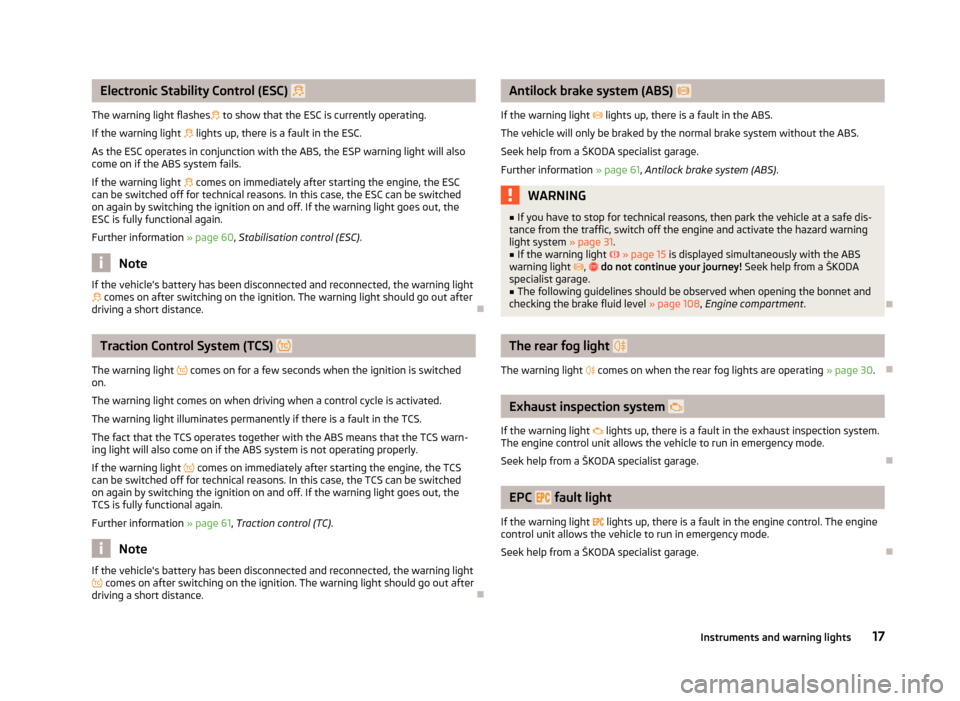
Electronic Stability Control (ESC)
The warning light flashes to show that the ESC is currently operating.
If the warning light lights up, there is a fault in the ESC.
As the ESC operates in conjunction with the ABS, the ESP warning light will also
come on if the ABS system fails.
If the warning light comes on immediately after starting the engine, the ESC
can be switched off for technical reasons. In this case, the ESC can be switched
on again by switching the ignition on and off. If the warning light goes out, the
ESC is fully functional again.
Further information » page 60, Stabilisation control (ESC) .Note
If the vehicle's battery has been disconnected and reconnected, the warning light comes on after switching on the ignition. The warning light should go out after
driving a short distance. ÐTraction Control System (TCS)
The warning light comes on for a few seconds when the ignition is switched
on.
The warning light comes on when driving when a control cycle is activated.
The warning light illuminates permanently if there is a fault in the TCS.
The fact that the TCS operates together with the ABS means that the TCS warn-
ing light will also come on if the ABS system is not operating properly.
If the warning light
comes on immediately after starting the engine, the TCS
can be switched off for technical reasons. In this case, the TCS can be switched
on again by switching the ignition on and off. If the warning light goes out, the
TCS is fully functional again.
Further information » page 61, Traction control (TC) .Note
If the vehicle's battery has been disconnected and reconnected, the warning light comes on after switching on the ignition. The warning light should go out after
driving a short distance. Ð Antilock brake system (ABS)
If the warning light lights up, there is a fault in the ABS.
The vehicle will only be braked by the normal brake system without the ABS.
Seek help from a
ŠKODA specialist garage.
Further information » page 61, Antilock brake system (ABS) . WARNING
■ If you have to stop for technical reasons, then park the vehicle at a safe dis-
tance from the traffic, switch off the engine and activate the hazard warning
light system » page 31.
■ If the warning light » page 15 is displayed simultaneously with the ABS
warning light , do not continue your journey! Seek help from a
ŠKODA
specialist garage. ■ The following guidelines should be observed when opening the bonnet and
checking the brake fluid level » page 108, Engine compartment .Ð The rear fog light
The warning light comes on when the rear fog lights are operating » page 30.Ð Exhaust inspection system
If the warning light lights up, there is a fault in the exhaust inspection system.
The engine control unit allows the vehicle to run in emergency mode.
Seek help from a
ŠKODA specialist garage. Ð EPC
fault light
If the warning light
lights up, there is a fault in the engine control. The engine
control unit allows the vehicle to run in emergency mode.
Seek help from a ŠKODA specialist garage. Ð
17
Instruments and warning lights
Page 36 of 157
WARNING
■ Properly maintained windscreen wiper blades are essential for clear visibility
and safe driving » page 35.
■ Do not use the windscreen washer system at low temperatures, without
heating the windscreen beforehand. Otherwise the window cleaner could
freeze on the windscreen and restrict the view to the front. CAUTION
■ In cold temperatures and during the winter, check before the journey or before
switching on the ignition that the wiper blades are not frozen to the windscreen.
If the windscreen wipers are switched on when the blades are frozen to the
windscreen, this may damage both the blades and windscreen wiper motor!
■ If the ignition is switched off while the windscreen wipers are switched on, the
windscreen wipers will continue wiping in the same mode after the ignition is
turned back on. The windscreen wipers could freeze up in cold temperatures be-
tween the time the ignition was turned off and when it was turned back on again.
■ Carefully detach frozen wiper blades from the front or rear window.
■ Remove snow and ice from the windscreen wipers before driving.
■ If the windscreen wipers are handled carelessly, there is a risk of damage to the
windscreen.
■ Replace the windscreen wiper blades once or twice a year for safety reasons.
These can be purchased from a ŠKODA Service Partner.
■ The ignition must not be switched on if the front windscreen wiper arms are fol-
ded out. The wiper blades would move back into their rest position and while do-
ing so damage the paintwork of the bonnet. Note
■ Periodic wiping is dependent on the driving speed. The faster the driver is go-
ing, the more frequent the wiper action. ■ If there is an obstacle on the windscreen, the wiper will try to push away the
obstacle. If the wiper is blocked by an obstruction, the wiper will remain station-
ary. Remove the the obstacle and switch the wiper on again. ■ The capacity of the windscreen washer fluid reservoir is approximately 3 litres.
■ The wiper blades should be cleaned on a regular basis with a windscreen clean-
er to avoid any smears. The wiper blades should be cleaned with a sponge or
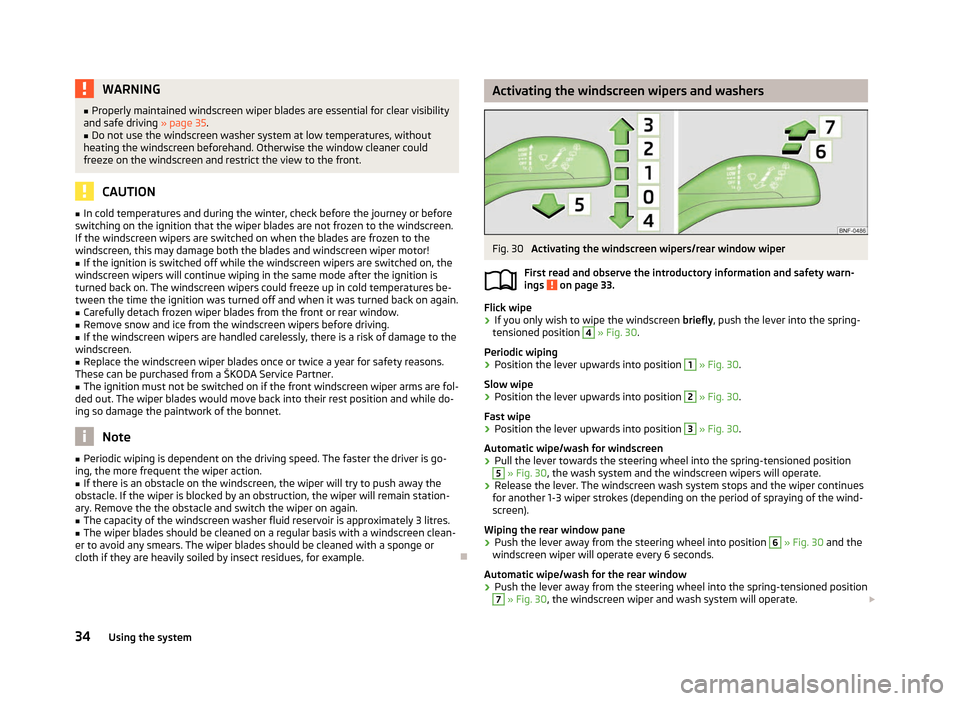
cloth if they are heavily soiled by insect residues, for example. Ð Activating the windscreen wipers and washers
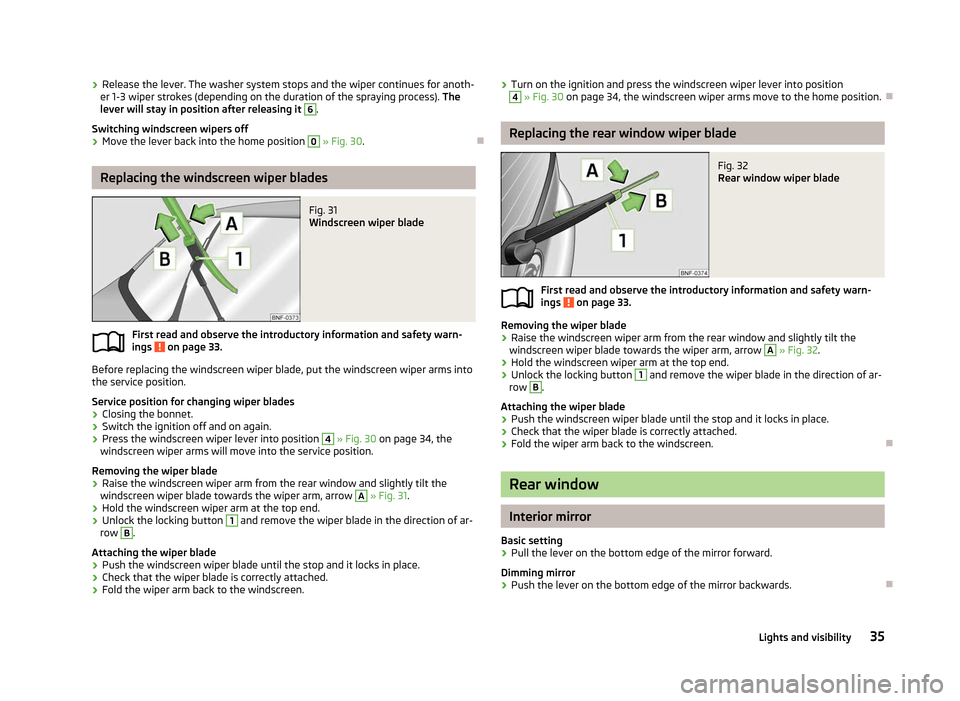
Fig. 30
Activating the windscreen wipers/rear window wiper
First read and observe the introductory information and safety warn-
ings on page 33.
Flick wipe
›
If you only wish to wipe the windscreen
briefly, push the lever into the spring-
tensioned position 4
» Fig. 30.
Periodic wiping
› Position the lever upwards into position 1
» Fig. 30.
Slow wipe
› Position the lever upwards into position 2
» Fig. 30.
Fast wipe
› Position the lever upwards into position 3
» Fig. 30.
Automatic wipe/wash for windscreen
› Pull the lever towards the steering wheel into the spring-tensioned position 5
» Fig. 30, the wash system and the windscreen wipers will operate.
› Release the lever. The windscreen wash system stops and the wiper continues
for another 1-3 wiper strokes (depending on the period of spraying of the wind-
screen).
Wiping the rear window pane
› Push the lever away from the steering wheel into position 6
» Fig. 30 and the
windscreen wiper will operate every 6
seconds.
Automatic wipe/wash for the rear window
› Push the lever away from the steering wheel into the spring-tensioned position 7
» Fig. 30, the windscreen wiper and wash system will operate.
£
ä
34 Using the system
Page 37 of 157
›
Release the lever. The washer system stops and the wiper continues for anoth-
er 1-3 wiper strokes (depending on the duration of the spraying process). The
lever will stay in position after releasing it 6
.
Switching windscreen wipers off
› Move the lever back into the home position 0
» Fig. 30.
ÐReplacing the windscreen wiper blades
Fig. 31
Windscreen wiper blade
First read and observe the introductory information and safety warn-
ings on page 33.
Before replacing the windscreen wiper blade, put the windscreen wiper arms into
the service position.
Service position for changing wiper blades
›
Closing the bonnet.
› Switch the ignition off and on again.
› Press the windscreen wiper lever into position 4
» Fig. 30 on page 34, the
windscreen wiper arms will move into the service position.
Removing the wiper blade
› Raise the windscreen wiper arm from the rear window and slightly tilt the
windscreen wiper blade towards the wiper arm, arrow A
»
Fig. 31.
› Hold the windscreen wiper arm at the top end.
› Unlock the locking button 1
and remove the wiper blade in the direction of ar-
row B
.
Attaching the wiper blade
› Push the windscreen wiper blade until the stop and it locks in place.
› Check that the wiper blade is correctly attached.
› Fold the wiper arm back to the windscreen.
ä ›
Turn on the ignition and press the windscreen wiper lever into position 4
» Fig. 30 on page 34, the windscreen wiper arms move to the home position.
Ð Replacing the rear window wiper blade
Fig. 32
Rear window wiper blade
First read and observe the introductory information and safety warn-
ings on page 33.
Removing the wiper blade
›
Raise the windscreen wiper arm from the rear window and slightly tilt the
windscreen wiper blade towards the wiper arm, arrow A
»
Fig. 32.
› Hold the windscreen wiper arm at the top end.
› Unlock the locking button 1
and remove the wiper blade in the direction of ar-
row B
.
Attaching the wiper blade
› Push the windscreen wiper blade until the stop and it locks in place.
› Check that the wiper blade is correctly attached.
› Fold the wiper arm back to the windscreen. Ð Rear window
Interior mirror
Basic setting
› Pull the lever on the bottom edge of the mirror forward.
Dimming mirror
› Push the lever on the bottom edge of the mirror backwards. Ð
ä
35
Lights and visibility
Page 67 of 157
Briefly press the rocker button B
into the position RES
to resume the stored
speed after the clutch or brake pedal is released. ÐSwitching off the cruise control system completely
First read and observe the introductory information and safety warn-
ings on page 63.
›
Turn the switch A
» Fig. 68
on page 64 » page 64 into the OFF position. ÐSTART/STOP
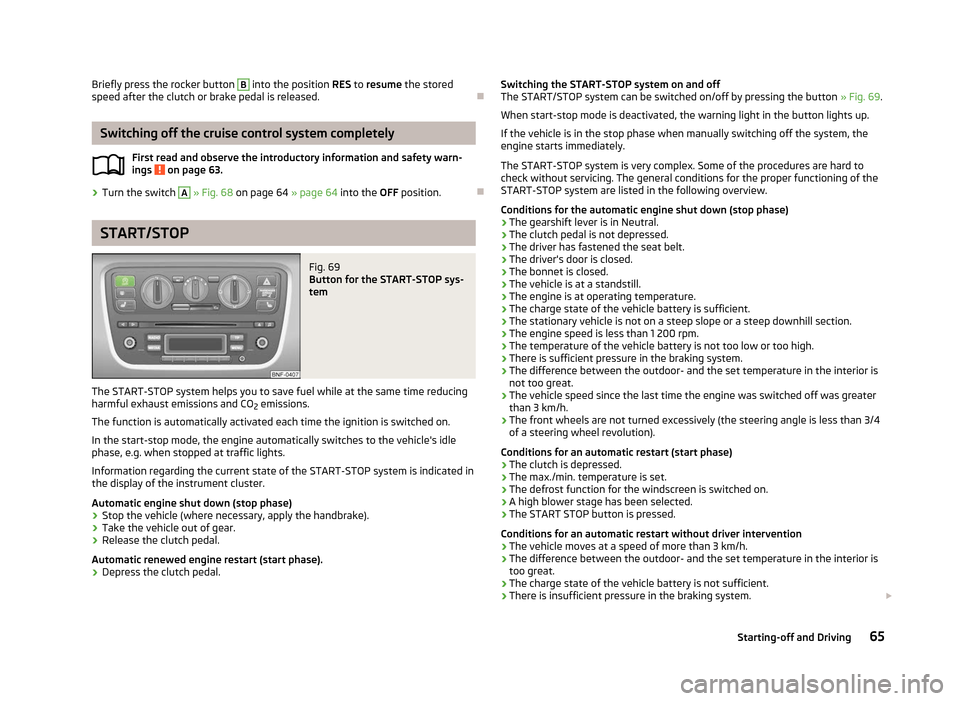
Fig. 69
Button for the START-STOP sys-
tem
The START-STOP system helps you to save fuel while at the same time reducing
harmful exhaust emissions and CO 2 emissions.
The function is automatically activated each time the ignition is switched on.
In the start-stop mode, the engine automatically switches to the vehicle's idle
phase, e.g. when stopped at traffic lights.
Information regarding the current state of the
START-STOP system is indicated in
the display of the instrument cluster.
Automatic engine shut down (stop phase)
› Stop the vehicle (where necessary, apply the handbrake).
› Take the vehicle out of gear.
› Release the clutch pedal.
Automatic renewed engine restart (start phase).
› Depress the clutch pedal.
ä
Switching the START-STOP system on and off
The START/STOP
system can be switched on/off by pressing the button » Fig. 69.
When start-stop mode is deactivated, the warning light in the button lights up.
If the vehicle is in the stop phase when manually switching off the system, the
engine starts immediately.
The START-STOP system is very complex. Some of the procedures are hard to
check without servicing. The general conditions for the proper functioning of the
START-STOP system are listed in the following overview.
Conditions for the automatic engine shut down (stop phase)
› The gearshift lever is in Neutral.
› The clutch pedal is not depressed.
› The driver has fastened the seat belt.
› The driver's door is closed.
› The bonnet is closed.
› The vehicle is at a standstill.
› The engine is at operating temperature.
› The charge state of the vehicle battery is sufficient.
› The stationary vehicle is not on a steep slope or a steep downhill section.
› The engine speed is less than 1 200 rpm.
› The temperature of the vehicle battery is not too low or too high.
› There is sufficient pressure in the braking system.
› The difference between the outdoor- and the set temperature in the interior is
not too great.
› The vehicle speed since the last time the engine was switched off was greater
than 3 km/h.
› The front wheels are not turned excessively (the steering angle is less than 3/4
of a steering wheel revolution).
Conditions for an automatic restart (start phase)
› The clutch is depressed.
› The max./min. temperature is set.
› The defrost function for the windscreen is switched on.
› A high blower stage has been selected.
› The START STOP button is pressed.
Conditions for an automatic restart without driver intervention
› The vehicle moves at a speed of more than 3 km/h.
› The difference between the outdoor- and the set temperature in the interior is
too great.
› The charge state of the vehicle battery is not sufficient.
› There is insufficient pressure in the braking system.
£
65
Starting-off and Driving
Page 70 of 157
›
When objects are extending into the area above the bonnet, e.g. when a rood
load sticks out far ahead.
› When the windscreen is damaged in the region of the laser sensor. ÐLaser sensor
First read and observe the introductory information and safety warn-
ings on page 66.
Possible impairment of the laser sensor
If the functioning of the laser sensor is impaired by e.g. heavy rain, snow or slush,
the
City Safe Drivesystem will temporarily shut down. The warning light flashes
slowly in the instrument cluster display.
If the laser sensor is no longer impaired, the City Safe Drive system will automati-
cally switch back to ready. The warning light goes out. ÐSpecial driving situations
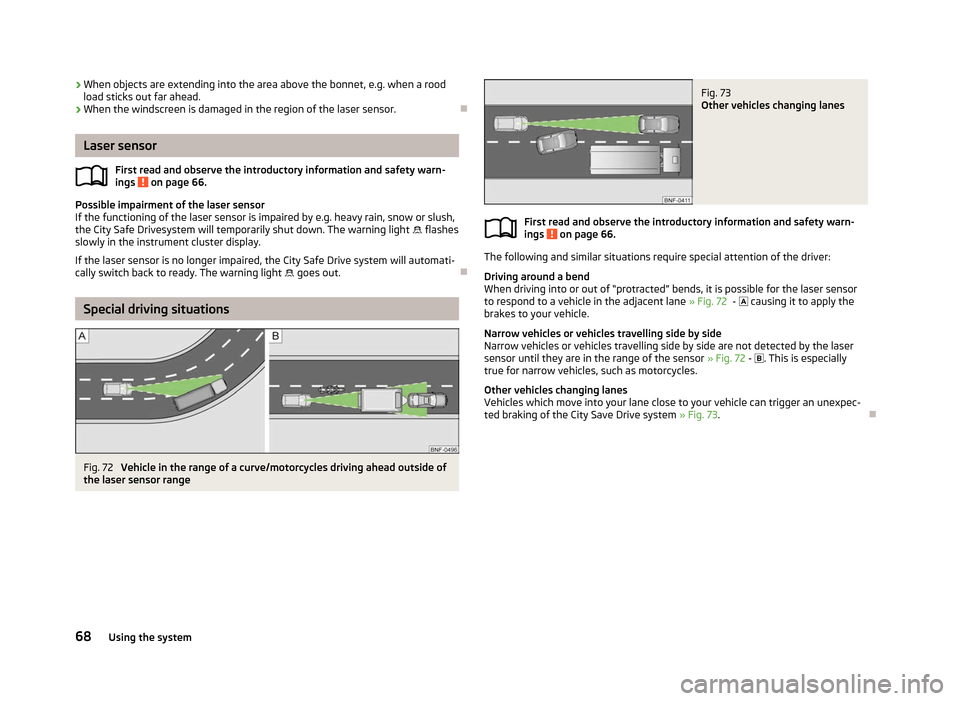
Fig. 72
Vehicle in the range of a curve/motorcycles driving ahead outside of
the laser sensor range
ä Fig. 73
Other vehicles changing lanes
First read and observe the introductory information and safety warn-
ings on page 66.
The following and similar situations require special attention of the driver:
Driving around a bend
When driving into or out of
“protracted” bends, it is possible for the laser sensor
to respond to a vehicle in the adjacent lane » Fig. 72 - causing it to apply the
brakes to your vehicle.
Narrow vehicles or vehicles travelling side by side
Narrow vehicles or vehicles travelling side by side are not detected by the laser
sensor until they are in the range of the sensor » Fig. 72 - . This is especially
true for narrow vehicles, such as motorcycles.
Other vehicles changing lanes
Vehicles which move into your lane close to your vehicle can trigger an unexpec-
ted braking of the City Save Drive system » Fig. 73 .Ð ä
68 Using the system
Page 71 of 157
Automatic gearbox
Automatic gearbox AGB
ä
Introduction
This chapter contains information on the following subjects:
Introductory information 69
Starting-off and driving 69
Selector lever positions 70
Manual gearshift (Tiptronic) 70
Kickdown function 71
Dynamic shift programme 71
Operational faults 71
WARNING
■ Do not depress the accelerator if changing the position of the selector lever
when the vehicle is stationary and the engine is running – risk of accident!
■ Never move the selector lever into position R or when driving - risk of an ac-
cident!
■ When the engine is running and the vehicle is stationary, it is necessary to
hold the car with the brake pedal in all the positions of the selector lever (ex-
cept P and N) since the power transmission is never completely interrupted,
also not when the engine is idling – the vehicle creeps.
■ The selector lever must be placed into position N and the handbrake firmly
applied before the bonnet can be opened and work on the running engine can
be completed - risk of accident! The safety guidelines must always be ob-
served » page 108 , Engine compartment .
■ If stopping on a hill (downhill gradient), never try to maintain the vehicle sta-
tionary with the gear engaged by means of the
“accelerator pedal”, i.e. by let-
ting the clutch slip. This can lead to overheating of the clutch, and subse-
quently to the clutch burning out. The vehicle can roll backward - risk of acci-
dent!
■ If you have to stop on a slope, depress and hold the brake pedal to prevent
the vehicle from rolling back.
■ On a smooth or slippery road surface using the kickdown function can cause
the driven wheels to spin – risk of skidding!
■ Always firmly apply the handbrake before leaving the vehicle! Ð Introductory information
First read and observe the introductory information and safety warn-
ings on page 69.
Shifting up and down through the gears is performed automatically. However, the
gearbox can also be switched into Tiptronic mode M. This mode makes it possible
for you to also shift gears manually » page 70.
The engine can only be left on in position N, when the brake pedal is depressed
.
When parking on a level road surface, it suffices to engage selector lever position
N. When parking on a slope, the handbrake should be applied firmly before the
park position N is selected.
If the selector lever position N is accidentally selected while driving, it is first nec-
essary to release pressure on the accelerator pedal and wait for the idling speed
of the engine to be reached before the selector lever can be engaged in the drive
position. Note
If the N symbol flashes next to the selector lever, engage the selector lever posi-
tion N. Ð Starting-off and driving
First read and observe the introductory information and safety warn-
ings on page 69.
Starting off
›
Firmly depress and hold the brake pedal.
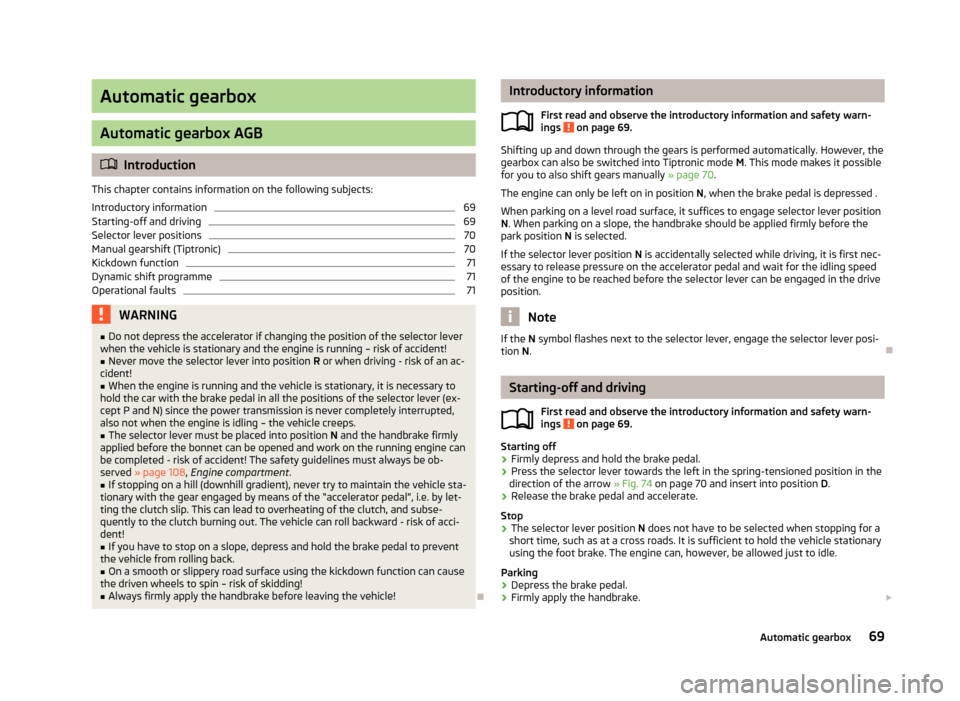
› Press the selector lever towards the left in the spring-tensioned position in the
direction of the arrow » Fig. 74 on page 70 and insert into position D.
› Release the brake pedal and accelerate.
Stop
› The selector lever position
N does not have to be selected when stopping for a
short time, such as at a cross roads. It is sufficient to hold the vehicle stationary
using the foot brake. The engine can, however, be allowed just to idle.
Parking
› Depress the brake pedal.
› Firmly apply the handbrake.
£
ä
ä
69
Automatic gearbox
Page 75 of 157
Installing the cradle for the navigation unit
›
Place the cradle into the opening of the centre section of the dash panel from
above, press it down until it latches » .
Installing the multifunctional device
› Firstly, place the multifunction device into the top holder B
» Fig. 77 and press
it on the underside of the cradle until it latches » .
Setting the tilt of the multifunction device
› You can set the tilt to the required position by moving the multifunction device
in the direction of the arrows » Fig. 77 » .
Removing the multifunction device
› With one hand, secure the multifunction device on the upper and lower edge.
› Using the other hand, press the release button C
» Fig. 77 and remove the de-
vice.
› Store the multifunction device in a safe place to avoid damaging it.
Removing the cradle on the multifunction device
› Grab hold of the cradle with one hand.
› With the other hand, press the release button A
» Fig. 77
.
› Remove the cradle from the dash panel from above.
› Seal the opening for the cradle in the dash panel with the cover
» Fig. 76.
Loading the user manual
› Switch on the multifunction device by pressing button D
» Fig. 77
.
› Press the button
more on the screen.
› Press the button
Manual on the screen.
› Call up the required chapter by pressing the appropriate button.
Functions of the multifunction device
› Navigation.
› Operating the radio using multimedia devices connected via Bluetooth ®
.
› Displaying information from the MFD, rev counter and coolant tempera-
ture » page 8.
› Hands-free device for mobile phones coupled with the multifunction device via
Bluetooth ®
.
› Indicator for opened bonnet, doors and luggage compartment lid.
› Display from the visual parking system (OPS).
› Image viewer. WARNING
■ Concentrate fully at all times on your driving! As the driver you are fully re-
sponsible for the operation of your vehicle. Only use the system so that you
are in full control of your vehicle in every traffic situation - risk of accident!
■ The multifunction device must always slot securely into the cradle or be
safely stored in the vehicle.
■ Unsecured or incorrectly secured multifunction devices may be thrown
through the interior of the vehicle and cause injuries in a sudden driving or
braking manoeuvre or accident. ■ Adjust the volume to ensure that acoustic signals from outside, e.g. sirens
from vehicles which have the right of way, such as police, ambulance and fire
brigade vehicles, can be heard at all time. ■ High volumes can cause hearing damage. CAUTION
■ Improper tilt settings can damage both the multifunction device and the cradle.
■ Always take the multifunction device with you when leaving the vehicle to pro-
tect it from extreme temperatures and strong sunlight. Extreme ambient temper-
atures can impair the functioning of the multifunction device and may damage
the device.
■ Moisture can damage the electrical contacts in the dash panel for the portable
multifunction device.
■ Never use water when cleaning the navigation unit cradle. Always use a dry
cloth instead. ■ Install/remove the multifunction device cradle without the multifunction device
in it.
■ Do not install/remove the multifunction device until the cradle for the multi-
function device has been installed into the dash panel. Note
The range of the Bluetooth ®
connection to the hands-free system is restricted to
the vehicle interior. The range is dependent on local factors, e.g. obstacles be-
tween the devices and mutual interferences with other devices. If your mobile
phone is e.g. in a jacket pocket, this can lead to difficulties when establishing the
Bluetooth ®
connection with the hands-free system or the data transfer. Ð
73
Communication
Page 110 of 157
Regular inspections of gas systems
First read and observe the introductory information and safety warn-
ings on page 106.
Every two years, the following inspections must be carried out:
› Check solenoid valves on the gas tanks for proper function.
› Check natural gas tank and lines for leaks and fixing, if necessary look for dam-
ages.
› Check the condition of fuel filler cap, filler tube and sealing ring, clean sealing
ring if necessary. ÐSafe natural gas
First read and observe the introductory information and safety warn-
ings on page 106.
The safety concept of the natural gas system ensures safe operation. It is equip-
ped with the following security features.
› At each natural gas tank, there is a solenoid valve that closes automatically af-
ter turning off the ignition or when running in petrol mode.
› A thermal fuse prevents uncontrolled rise in pressure in the natural gas tank in
case of fire.
› A flow limiter prevents sudden emptying of the natural gas tank in case the
pressure system is damaged.
› All the attachment points and materials are designed for maximum safety. ÐNatural gas quality and consumption
First read and observe the introductory information and safety warn-
ings on page 106.
Natural gas is divided into quality groups H-gas and L-gas. The two types of gas
are subdivided according to their calorific value and nitrogen and carbon dioxide
contents. H-gas has a higher calorific value and lower nitrogen or carbon dioxide
content than L-gas.ä
ä
ä The higher the calorific value of natural gas, the lower is the consumption. How-
ever, the calorific value and the nitrogen and carbon dioxide contents can vary
within a quality group. Therefore, the consumption of the vehicle may even vary
when driving with only one natural gas quality (either only H-gas or L-gas).
The engine control of your vehicle automatically adjusts to the different natural
gas qualities. Therefore both natural gas qualities can be mixed in the fuel tank. It
is therefore not necessary to run the natural gas tank completely empty to fill up
another quality. Ð Engine compartment
ä
Introduction
This chapter contains information on the following subjects:
Opening and closing the bonnet 110
Engine compartment overview 110
Checking the engine oil level 111
Replenishing the engine oil 111
Changing engine oil 112
Coolant 112
Checking the coolant level 112
Replenishing the coolant 113
Radiator fan 113
Checking the brake fluid 113
Changing the brake fluid 114
Windscreen washer system 114
There is a risk of injuries, scalding, accidents and fire when working in the en-
gine compartment, e.g. inspecting and replenishing oil and other fluids. For this
reason, it is essential to comply with the warning instructions stated below and
with the general applicable rules of safety. The vehicle's engine compartment is
a hazardous area . £
108 General Maintenance