warning light SKODA CITIGO 2013 1.G User Guide
[x] Cancel search | Manufacturer: SKODA, Model Year: 2013, Model line: CITIGO, Model: SKODA CITIGO 2013 1.GPages: 176, PDF Size: 10.54 MB
Page 23 of 176
Airbag systemFirst read and observe the introductory information and safety warn-ings
on page 16.
Monitoring the airbag system
The warning light comes on for a few seconds when the ignition is switched
on.
There is a fault in the system if the warning light does not go out or flashes while
driving »
. This also applies if the warning light does not come on when the ig-
nition is switched on.
The operational capability of the airbag system is monitored electronically, includ-
ing when one of the airbags is switched off.
The following situation applies if the front or side airbag or belt tensioner have
been switched off using the vehicle system tester:
› The warning light
lights up for around 4 seconds after switching on the igni-
tion and then flashes approximately another 12 seconds in 2 second intervals.
The following situation applies if the airbag has been switched off using the key switch for the airbag in the front passenger storage compartment:
› The warning light
comes on for a few seconds when the ignition is switched
on;
› The deactivated airbag is indicated by the illumination of the warning light
in the middle of the dash panel » page 102, Deactivating
the front passenger airbag .
WARNINGIf there is a fault, have the airbag system checked immediately by a specialist
garage. Otherwise, there is a risk that the airbag will not be deployed in the event of an accident.
Automated transmission
First read and observe the introductory information and safety warn-
ings
on page 16.
Warning light
Do not continue your journey if the warning light
lights up and an acoustic sig-
nal sounds. Switch off the engine and seek assistance from a specialist garage.
Warning light
If the warning light lights up and no gear can be selected, switch the ignition
on and off. If the warning light lights up after you switch on the ignition, seek as- sistance from a specialist garage.
If the warning light or warning light lights up and an acoustic signal sounds,
this means that the automatic gearbox has overheated. Stop and allow the trans-
mission to cool down or drive more quickly than 20 km/h (12 mph).
If the warning light lights up again, switch off the vehicle, shut off the engine
and allow the gearbox to cool down.
Warning light
If the warning light lights up, operate the brake pedal.
Warning light
If the warning light lights up, operate the handbrake.
Further information » page 71, Automated transmission .WARNINGIf you have to stop for technical reasons, then park the vehicle at a safe dis-
tance from the traffic, switch off the engine and activate the hazard warning
lights » page 36 .
Turn signal system
First read and observe the introductory information and safety warn-ings
on page 16.
Either the left
or right
warning light flashes depending on the position of the
turn signal lever.
If a turn signal light fails, the warning light flashes at twice its normal rate.
Switching off the hazard warning light system is switched on will cause all of the turn signal lights as well as both warning lights to flash.
Further information » page 34, Turn signal and main beam .
20Using the system
Page 24 of 176
Cruise control systemFirst read and observe the introductory information and safety warn-
ings
on page 16.
The warning light comes on when the cruise control is operating » page 83.
Main beam
First read and observe the introductory information and safety warn-ings
on page 16.
The warning light
comes on when the main beam or headlight flasher are se-
lected » page 33 .
/ Safety belt (belt status display) - rear seat
First read and observe the introductory information and safety warn-ings
on page 16.
After switching on the ignition, the belt status warning lights up for the rear
seats in the instrument panel display for 30 seconds and indicates whether any
rear seat passengers have fastened their seat belts. The belt status indicator will
then light up when the passenger on the rear seat fastens or unfastens the seat
belt (when the ignition is switched on or during the journey).
If the warning light
, is switched on, the passenger on the rear seat has their
seat belt on.
If the warning light ,
is switched on, the passenger on the rear seat does not
have their seat belt on.
If a seat belt is unfastened on the rear seat during the journey at a speed of more than 25 km/h, an acoustic signal will sound, and the belt status indicator for the
rear seats will flash for around 30 seconds.
Further information » page 94, Seat belts .
City Safe Drive
First read and observe the introductory information and safety warn-
ings
on page 16.
If the City Safe Drive system is currently slowing the vehicle down automatically,
the warning light will flash quickly .
If the City Safe Drive system is not currently available, or if there is a system fault, the warning light will flash slowly .
When the City Safe Drive system is switched off while the vehicle is travelling at a
speed between 5–30 km/h (3-19 mph), the warning light will light up in the
instrument cluster display.
If the City Safe Drive system is switched on, the warning light in the instrument
cluster display
will light up for around 5 seconds.
Further information » page 86, City Safe Drive .
START STOP
First read and observe the introductory information and safety warn-
ings
on page 16.
If the START STOP system is active, the warning light will light up
.
If the START STOP system is active, but automatic engine shut down is not possi-
ble, the warning light will light up
.
When the warning light flashes
the START STOP system will not be available.
Further information » page 85, START-STOP .
21warning lights and instruments
Page 29 of 176
Safe securing systemFirst read and observe the introductory information and safety warn-
ings
on page 25.
The central locking system is equipped with a safe securing system. The door
locks are blocked automatically if the vehicle is locked from the outside. The warning light flashes for around 2 seconds in quick succession, afterwards it be-gins to flash evenly at longer intervals. It is not possible to open the doors withthe door handle either from the inside or from the outside. This acts as an effec-
tive deterrent against attempts to break into your vehicle.
The safe securing system can be deactivated within 2 seconds by double locking
the vehicle.
If the safe securing system is not operating, the warning light in the driver door flashes for about 2 seconds fast, goes out and starts to flash evenly at longer in-
tervals after about 30 seconds.
The safe securing system is activated again the next time the vehicle is unlocked and locked.
If the vehicle is locked and the safe securing system is deactivated, the door can
be opened from the inside by a single pull on opening lever of the respective
door.
WARNINGIf the vehicle is locked from the outside and the safe securing system is acti-
vated, there must not be any person in the vehicle as it is then no longer pos-
sible to open either a door or a window from the inside. The locked doors
make it more difficult for rescuers to get into the vehicle in an emergency – risk to life!
Note
You will be informed that the safe securing system has been activated after the
vehicle has been locked by means of the message on the instrument clus-
ter display.
Unlocking the vehicle using the keyFig. 14
Left side of the vehicle: Turning
the key for unlocking and lock-
ing the vehicle
First read and observe the introductory information and safety warn- ings on page 25.
›
Turn the key in the locking cylinder of the driver's door in the direction of travel
(unlocking position)
A
» Fig. 14 .
›
Pull the door handle and open the door.
› All the doors are unlocked.
› The luggage compartment lid is then unlocked.
› The switched on interior lights come on over the door contact.
› The safe securing system is deactivated.
Locking the vehicle with the key
First read and observe the introductory information and safety warn-
ings
on page 25.
›
Turn the key in the locking cylinder of the driver's door in the opposite direction
of travel (lock position)
B
» Fig. 14 on page 26.
› All the doors and the luggage compartment lid are locked.
› The switched on interior lights will switch off over the door contact.
› The safe securing system is immediately activated.
› The warning light in the driver door begins flashing.
Note
If the driver's door has been opened, the vehicle cannot be locked.
26Using the system
Page 30 of 176
Vehicle locking/unlocking from the insideFig. 15
Central locking button
First read and observe the introductory information and safety warn-ings on page 25.
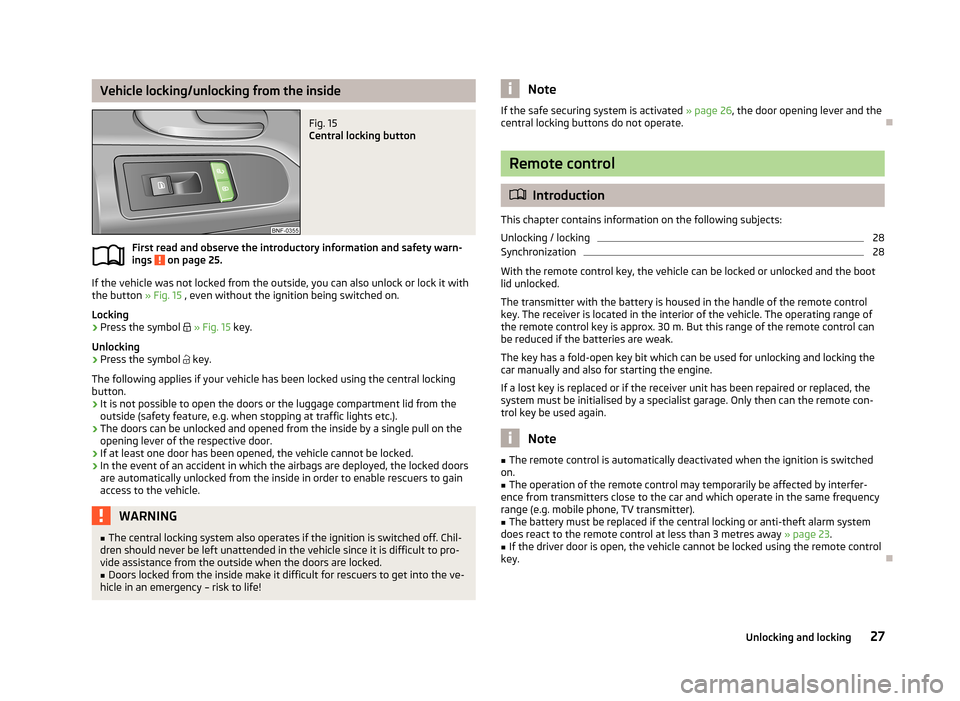
If the vehicle was not locked from the outside, you can also unlock or lock it with
the button » Fig. 15 , even without the ignition being switched on.
Locking
›
Press the symbol
» Fig. 15 key.
Unlocking
›
Press the symbol
key.
The following applies if your vehicle has been locked using the central locking button.
› It is not possible to open the doors or the luggage compartment lid from the
outside (safety feature, e.g. when stopping at traffic lights etc.).
› The doors can be unlocked and opened from the inside by a single pull on the
opening lever of the respective door.
› If at least one door has been opened, the vehicle cannot be locked.
› In the event of an accident in which the airbags are deployed, the locked doors
are automatically unlocked from the inside in order to enable rescuers to gain
access to the vehicle.
WARNING■ The central locking system also operates if the ignition is switched off. Chil-
dren should never be left unattended in the vehicle since it is difficult to pro-
vide assistance from the outside when the doors are locked.■
Doors locked from the inside make it difficult for rescuers to get into the ve-
hicle in an emergency – risk to life!
NoteIf the safe securing system is activated » page 26, the door opening lever and the
central locking buttons do not operate.
Remote control
Introduction
This chapter contains information on the following subjects:
Unlocking / locking
28
Synchronization
28
With the remote control key, the vehicle can be locked or unlocked and the boot
lid unlocked.
The transmitter with the battery is housed in the handle of the remote control
key. The receiver is located in the interior of the vehicle. The operating range of
the remote control key is approx. 30 m. But this range of the remote control can
be reduced if the batteries are weak.
The key has a fold-open key bit which can be used for unlocking and locking the
car manually and also for starting the engine.
If a lost key is replaced or if the receiver unit has been repaired or replaced, thesystem must be initialised by a specialist garage. Only then can the remote con-
trol key be used again.
Note
■ The remote control is automatically deactivated when the ignition is switched
on.■
The operation of the remote control may temporarily be affected by interfer-
ence from transmitters close to the car and which operate in the same frequency
range (e.g. mobile phone, TV transmitter).
■
The battery must be replaced if the central locking or anti-theft alarm system
does react to the remote control at less than 3 metres away » page 23.
■
If the driver door is open, the vehicle cannot be locked using the remote control
key.
27Unlocking and locking
Page 31 of 176
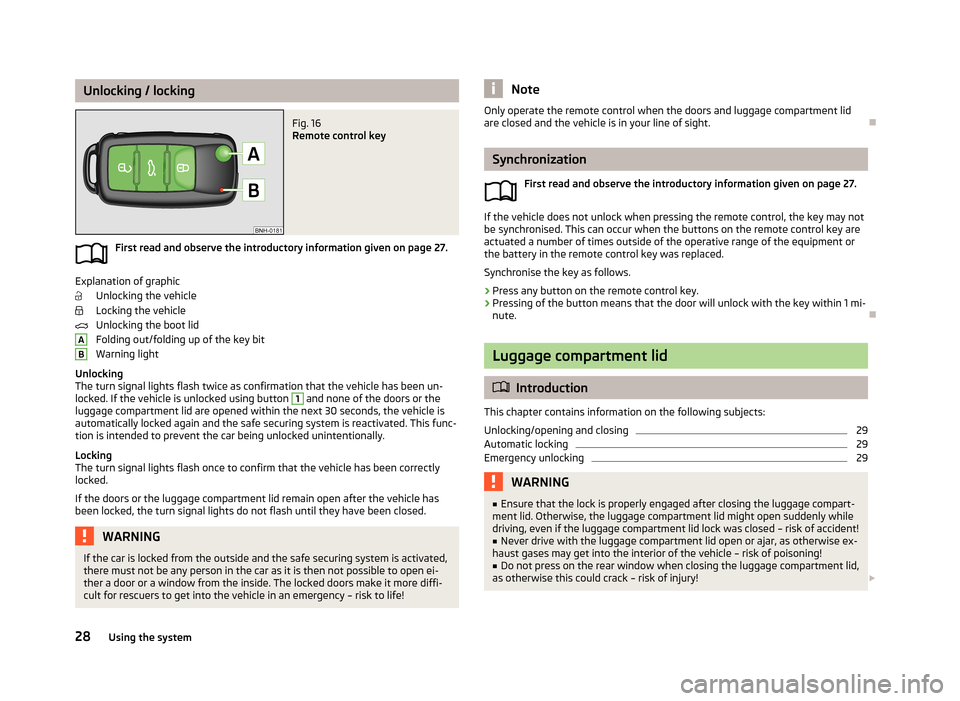
Unlocking / lockingFig. 16
Remote control key
First read and observe the introductory information given on page 27.
Explanation of graphicUnlocking the vehicle
Locking the vehicle
Unlocking the boot lid
Folding out/folding up of the key bit
Warning light
Unlocking
The turn signal lights flash twice as confirmation that the vehicle has been un-
locked. If the vehicle is unlocked using button
1
and none of the doors or the
luggage compartment lid are opened within the next 30 seconds, the vehicle is
automatically locked again and the safe securing system is reactivated. This func-
tion is intended to prevent the car being unlocked unintentionally.
Locking
The turn signal lights flash once to confirm that the vehicle has been correctly
locked.
If the doors or the luggage compartment lid remain open after the vehicle has
been locked, the turn signal lights do not flash until they have been closed.
WARNINGIf the car is locked from the outside and the safe securing system is activated,
there must not be any person in the car as it is then not possible to open ei-
ther a door or a window from the inside. The locked doors make it more diffi-
cult for rescuers to get into the vehicle in an emergency – risk to life!ABNoteOnly operate the remote control when the doors and luggage compartment lid
are closed and the vehicle is in your line of sight.
Synchronization
First read and observe the introductory information given on page 27.
If the vehicle does not unlock when pressing the remote control, the key may notbe synchronised. This can occur when the buttons on the remote control key are
actuated a number of times outside of the operative range of the equipment or
the battery in the remote control key was replaced.
Synchronise the key as follows.
›
Press any button on the remote control key.
›
Pressing of the button means that the door will unlock with the key within 1 mi-
nute.
Luggage compartment lid
Introduction
This chapter contains information on the following subjects:
Unlocking/opening and closing
29
Automatic locking
29
Emergency unlocking
29WARNING■ Ensure that the lock is properly engaged after closing the luggage compart-
ment lid. Otherwise, the luggage compartment lid might open suddenly while
driving, even if the luggage compartment lid lock was closed – risk of accident!■
Never drive with the luggage compartment lid open or ajar, as otherwise ex-
haust gases may get into the interior of the vehicle – risk of poisoning!
■
Do not press on the rear window when closing the luggage compartment lid,
as otherwise this could crack – risk of injury!
28Using the system
Page 33 of 176
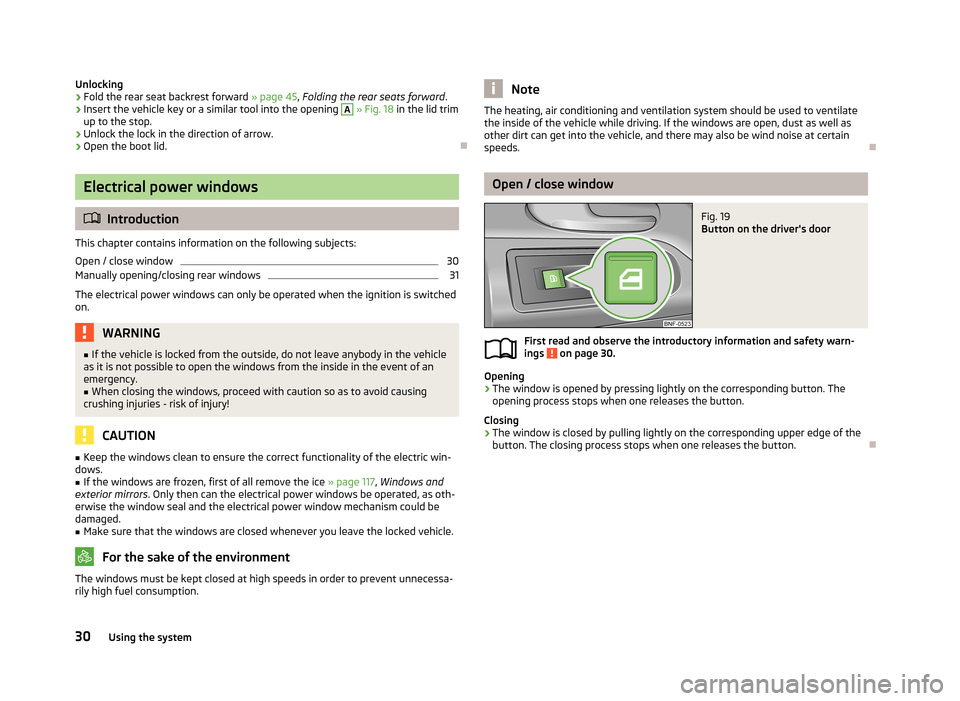
Unlocking›Fold the rear seat backrest forward » page 45, Folding the rear seats forward .›
Insert the vehicle key or a similar tool into the opening
A
» Fig. 18 in the lid trim
up to the stop.
›
Unlock the lock in the direction of arrow.
›
Open the boot lid.
Electrical power windows
Introduction
This chapter contains information on the following subjects:
Open / close window
30
Manually opening/closing rear windows
31
The electrical power windows can only be operated when the ignition is switched
on.
WARNING■ If the vehicle is locked from the outside, do not leave anybody in the vehicle
as it is not possible to open the windows from the inside in the event of an
emergency.■
When closing the windows, proceed with caution so as to avoid causing
crushing injuries - risk of injury!
CAUTION
■ Keep the windows clean to ensure the correct functionality of the electric win-
dows.■
If the windows are frozen, first of all remove the ice » page 117, Windows and
exterior mirrors . Only then can the electrical power windows be operated, as oth-
erwise the window seal and the electrical power window mechanism could be
damaged.
■
Make sure that the windows are closed whenever you leave the locked vehicle.
For the sake of the environment
The windows must be kept closed at high speeds in order to prevent unnecessa-
rily high fuel consumption.NoteThe heating, air conditioning and ventilation system should be used to ventilate
the inside of the vehicle while driving. If the windows are open, dust as well as
other dirt can get into the vehicle, and there may also be wind noise at certain
speeds.
Open / close window
Fig. 19
Button on the driver's door
First read and observe the introductory information and safety warn- ings on page 30.
Opening
›
The window is opened by pressing lightly on the corresponding button. The opening process stops when one releases the button.
Closing
›
The window is closed by pulling lightly on the corresponding upper edge of the
button. The closing process stops when one releases the button.
30Using the system
Page 36 of 176
Lights and visibility
Lights
Introduction
This chapter contains information on the following subjects:
Lights and low beam
33
Headlight beam adjustment
34
Daytime running light (DAY LIGHT)
34
Turn signal and main beam
34
Fog lights
35
Rear fog light
35
Hazard warning light system
36
Parking light
36
Unless otherwise stated, the lights only work when the ignition is on.
On models fitted with right-hand steering the position of the controls differs
from that shown in » Fig. 22 on page 33 . The symbols which mark the positions
of the controls are however identical.
WARNING■ The activation of the lights should only be undertaken in accordance with
national legal requirements.■
The driver is always responsible for the correct settings and use of the
lights.
■
Never drive with only the side lights on! The side lights are not bright
enough to light up the road sufficiently in front of you or to be seen by other oncoming traffic. Therefore always switch on the low beam when it is dark or
if visibility is poor.
Note■ The instruments are also illuminated when the side light or low beam light is
switched on.■
The headlights may mist up temporarily. When the driving lights are switched
on, the light outlet surfaces are free from mist after a short period, although the
headlight lenses may still be misted up in the peripheral areas. This mist has no
influence on the life of the lighting system.
Lights and low beam
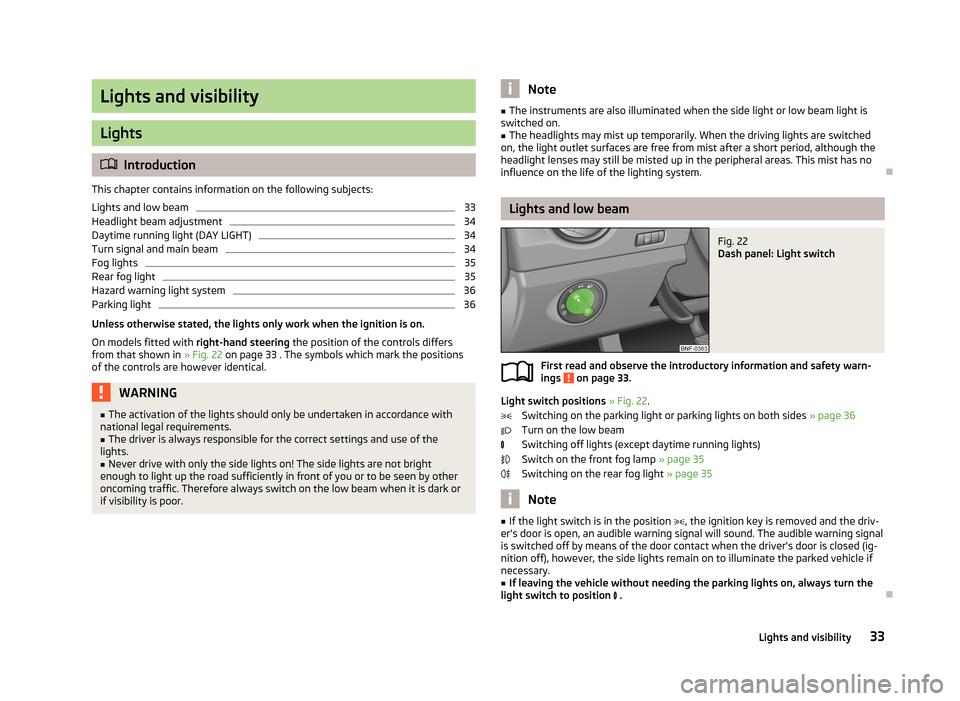
Fig. 22
Dash panel: Light switch
First read and observe the introductory information and safety warn-
ings on page 33.
Light switch positions » Fig. 22 .
Switching on the parking light or parking lights on both sides » page 36
Turn on the low beam
Switching off lights (except daytime running lights)
Switch on the front fog lamp » page 35
Switching on the rear fog light » page 35
Note
■
If the light switch is in the position , the ignition key is removed and the driv-
er's door is open, an audible warning signal will sound. The audible warning signal
is switched off by means of the door contact when the driver's door is closed (ig- nition off), however, the side lights remain on to illuminate the parked vehicle ifnecessary.■
If leaving the vehicle without needing the parking lights on, always turn the
light switch to position .
33Lights and visibility
Page 37 of 176
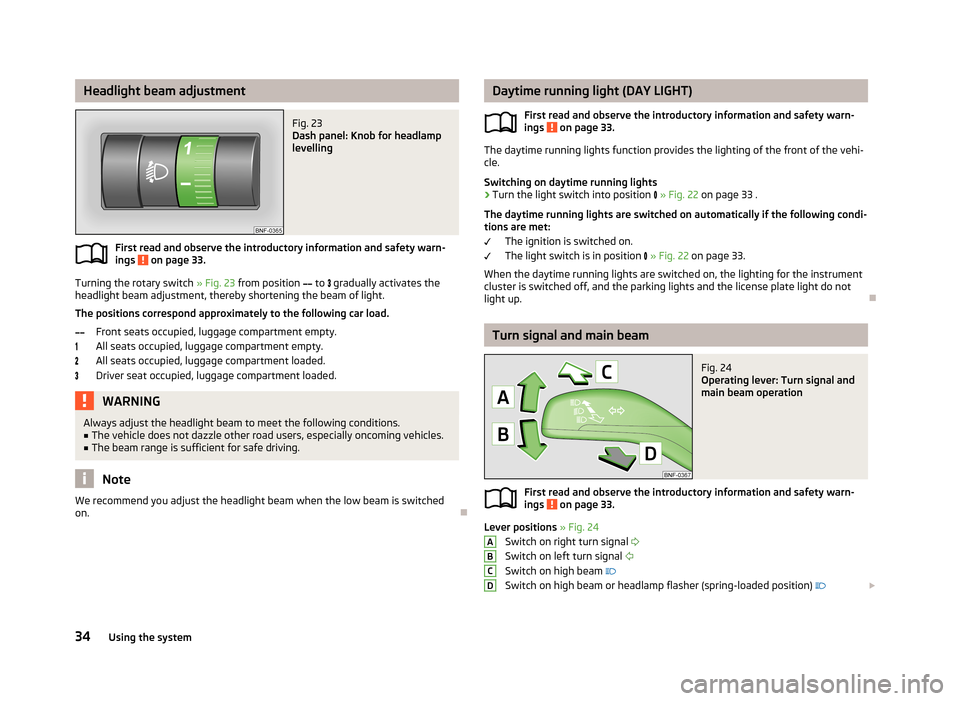
Headlight beam adjustmentFig. 23
Dash panel: Knob for headlamp
levelling
First read and observe the introductory information and safety warn-
ings on page 33.
Turning the rotary switch » Fig. 23 from position
to
gradually activates the
headlight beam adjustment, thereby shortening the beam of light.
The positions correspond approximately to the following car load. Front seats occupied, luggage compartment empty.All seats occupied, luggage compartment empty.All seats occupied, luggage compartment loaded.
Driver seat occupied, luggage compartment loaded.
WARNINGAlways adjust the headlight beam to meet the following conditions.■The vehicle does not dazzle other road users, especially oncoming vehicles.■
The beam range is sufficient for safe driving.
Note
We recommend you adjust the headlight beam when the low beam is switched
on.
Daytime running light (DAY LIGHT)
First read and observe the introductory information and safety warn-ings
on page 33.
The daytime running lights function provides the lighting of the front of the vehi-
cle.
Switching on daytime running lights
›
Turn the light switch into position » Fig. 22 on page 33 .
The daytime running lights are switched on automatically if the following condi- tions are met:
The ignition is switched on.
The light switch is in position
» Fig. 22 on page 33.
When the daytime running lights are switched on, the lighting for the instrument
cluster is switched off, and the parking lights and the license plate light do not light up.
Turn signal and main beam
Fig. 24
Operating lever: Turn signal and
main beam operation
First read and observe the introductory information and safety warn-
ings on page 33.
Lever positions » Fig. 24
Switch on right turn signal
Switch on left turn signal
Switch on high beam
Switch on high beam or headlamp flasher (spring-loaded position)
ABCD34Using the system
Page 38 of 176
When the left or right turn signal is on, the warning light or flashes in the
instrument cluster.
When the high beam or headlight flasher is on, the warning light lights up in
the instrument cluster.
Turn signal for changing lanes - to only flash briefly, only move the lever up or
down to the pressure point and hold it in this position.
Convenience turn signal
If you only wish to flash three times, briefly push the lever to the upper or lower
pressure point and release again.WARNINGOnly turn on the main beam or the headlight flasher if other road users will
not be dazzled.
Note
■ The main beam can only be switched on when the low beam lights are on.■The turn signal only operates if the ignition is switched on.■
The turn signal is automatically cancelled after negotiating a curve.
■
An acoustic warning signal will sound when the driver's door is opened if the
lever is not in the middle position after removing the ignition key from the igni-
tion lock. The acoustic warning signal will stop just as soon as the driver's door is closed.
Fog lights
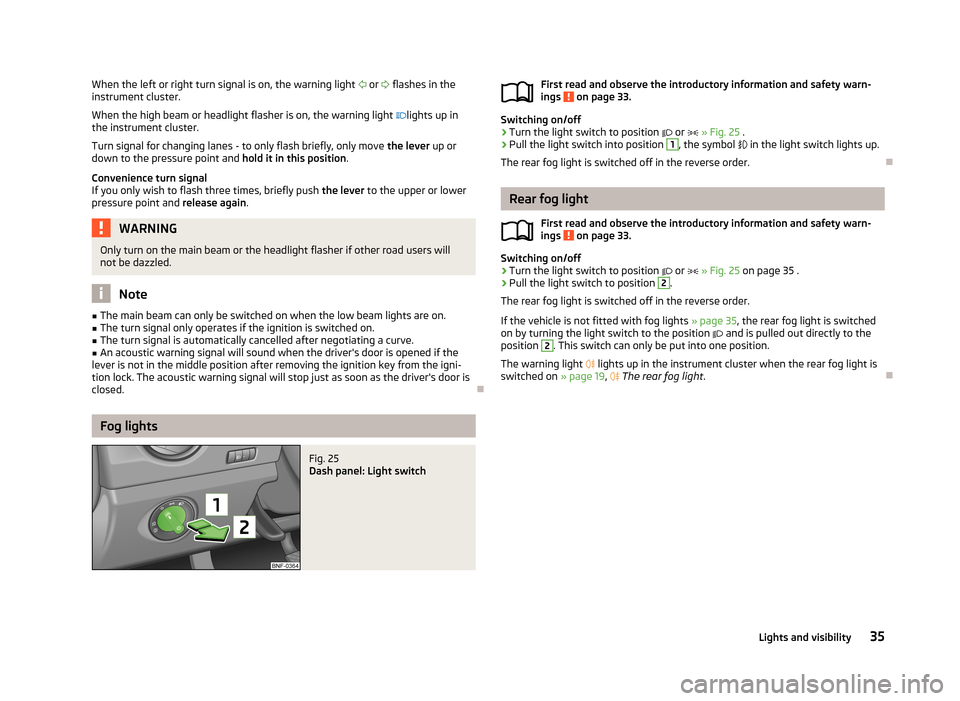
Fig. 25
Dash panel: Light switch
First read and observe the introductory information and safety warn-ings on page 33.
Switching on/off
›
Turn the light switch to position or » Fig. 25 .
›
Pull the light switch into position
1
, the symbol in the light switch lights up.
The rear fog light is switched off in the reverse order.
Rear fog light
First read and observe the introductory information and safety warn-
ings
on page 33.
Switching on/off
›
Turn the light switch to position
or
» Fig. 25 on page 35 .
›
Pull the light switch to position
2
.
The rear fog light is switched off in the reverse order.
If the vehicle is not fitted with fog lights » page 35, the rear fog light is switched
on by turning the light switch to the position
and is pulled out directly to the
position
2
. This switch can only be put into one position.
The warning light
lights up in the instrument cluster when the rear fog light is
switched on » page 19,
The rear fog light .
35Lights and visibility
Page 39 of 176
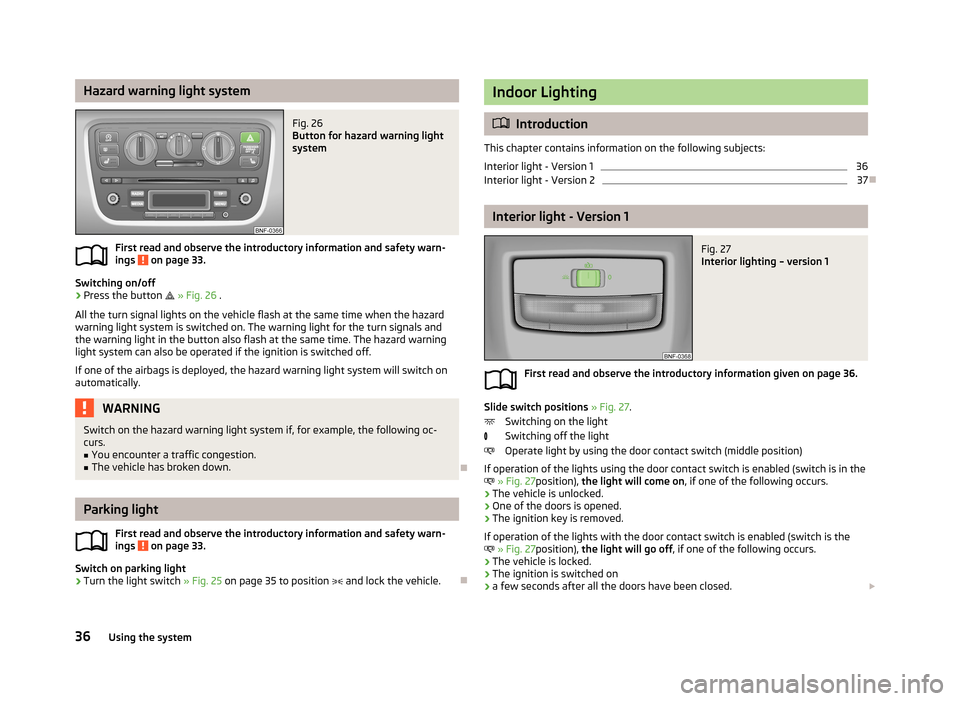
Hazard warning light systemFig. 26
Button for hazard warning light
system
First read and observe the introductory information and safety warn-
ings on page 33.
Switching on/off
›
Press the button
» Fig. 26 .
All the turn signal lights on the vehicle flash at the same time when the hazard
warning light system is switched on. The warning light for the turn signals and
the warning light in the button also flash at the same time. The hazard warning
light system can also be operated if the ignition is switched off.
If one of the airbags is deployed, the hazard warning light system will switch on
automatically.
WARNINGSwitch on the hazard warning light system if, for example, the following oc-
curs.■
You encounter a traffic congestion.
■
The vehicle has broken down.
Parking light
First read and observe the introductory information and safety warn-
ings
on page 33.
Switch on parking light
›
Turn the light switch » Fig. 25 on page 35 to position
and lock the vehicle.
Indoor Lighting
Introduction
This chapter contains information on the following subjects:
Interior light - Version 1
36
Interior light - Version 2
37
Interior light - Version 1
Fig. 27
Interior lighting – version 1
First read and observe the introductory information given on page 36.
Slide switch positions » Fig. 27 .
Switching on the light
Switching off the light
Operate light by using the door contact switch (middle position)
If operation of the lights using the door contact switch is enabled (switch is in the
» Fig. 27 position), the light will come on , if one of the following occurs.
› The vehicle is unlocked.
› One of the doors is opened.
› The ignition key is removed.
If operation of the lights with the door contact switch is enabled (switch is the
» Fig. 27 position), the light will go off , if one of the following occurs.
› The vehicle is locked.
› The ignition is switched on
› a few seconds after all the doors have been closed.
36Using the system