Automatic SKODA CITIGO 2013 1.G Owner's Manual
[x] Cancel search | Manufacturer: SKODA, Model Year: 2013, Model line: CITIGO, Model: SKODA CITIGO 2013 1.GPages: 176, PDF Size: 10.54 MB
Page 14 of 176
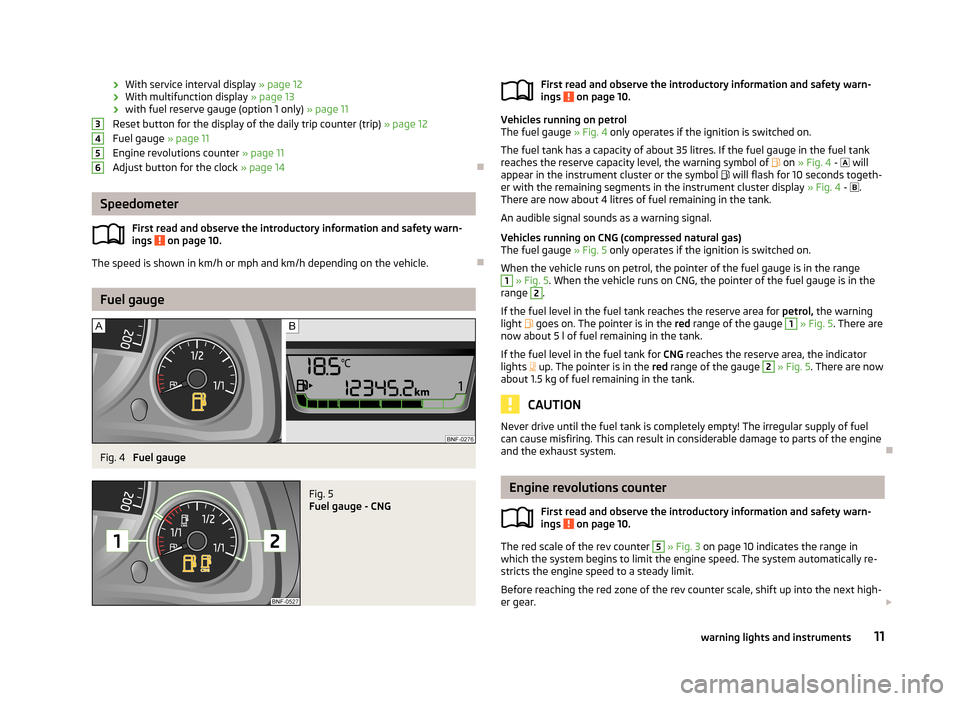
›With service interval display
» page 12
› With multifunction display
» page 13
› with fuel reserve gauge (option 1 only)
» page 11
Reset button for the display of the daily trip counter (trip) » page 12
Fuel gauge » page 11
Engine revolutions counter » page 11
Adjust button for the clock » page 14
Speedometer
First read and observe the introductory information and safety warn-
ings
on page 10.
The speed is shown in km/h or mph and km/h depending on the vehicle.
Fuel gauge
Fig. 4
Fuel gauge
Fig. 5
Fuel gauge - CNG
3456First read and observe the introductory information and safety warn-
ings on page 10.
Vehicles running on petrol
The fuel gauge » Fig. 4 only operates if the ignition is switched on.
The fuel tank has a capacity of about 35 litres. If the fuel gauge in the fuel tank
reaches the reserve capacity level, the warning symbol of on » Fig. 4 - will
appear in the instrument cluster or the symbol will flash for 10 seconds togeth-
er with the remaining segments in the instrument cluster display » Fig. 4 - .
There are now about 4 litres of fuel remaining in the tank.
An audible signal sounds as a warning signal.
Vehicles running on CNG (compressed natural gas)
The fuel gauge » Fig. 5 only operates if the ignition is switched on.
When the vehicle runs on petrol, the pointer of the fuel gauge is in the range
1
» Fig. 5 . When the vehicle runs on CNG, the pointer of the fuel gauge is in the
range
2
.
If the fuel level in the fuel tank reaches the reserve area for petrol, the warning
light
goes on. The pointer is in the red range of the gauge
1
» Fig. 5 . There are
now about 5 l of fuel remaining in the tank.
If the fuel level in the fuel tank for CNG reaches the reserve area, the indicator
lights up. The pointer is in the
red range of the gauge
2
» Fig. 5 . There are now
about 1.5 kg of fuel remaining in the tank.
CAUTION
Never drive until the fuel tank is completely empty! The irregular supply of fuel
can cause misfiring. This can result in considerable damage to parts of the engine
and the exhaust system.
Engine revolutions counter
First read and observe the introductory information and safety warn-ings
on page 10.
The red scale of the rev counter
5
» Fig. 3 on page 10 indicates the range in
which the system begins to limit the engine speed. The system automatically re-
stricts the engine speed to a steady limit.
Before reaching the red zone of the rev counter scale, shift up into the next high-
er gear.
11warning lights and instruments
Page 16 of 176
Multifunction display (MFA)
Introduction
This chapter contains information on the following subjects:
Memory
13
Operation
14
Digital clock
14
Multifunction display details
14
Warning against excessive speeds
15
The driving data is displayed on the multifunction display. The multifunction display can only be operated when the ignition is switched on.
After the ignition is switched on, the function displayed is the one which you last
selected before switching off the ignition.
WARNING■ Concentrate fully at all times on your driving! As the driver you are fully re-
sponsible for the operation of your vehicle.■
Even at temperatures of around +4 °C, black ice may still be on the road sur-
face! You should therefore not only rely on the outside temperature display
for accurate information as to whether there is ice on the road.
Note
In certain national versions the displays appear in the Imperial system of meas-
ures.
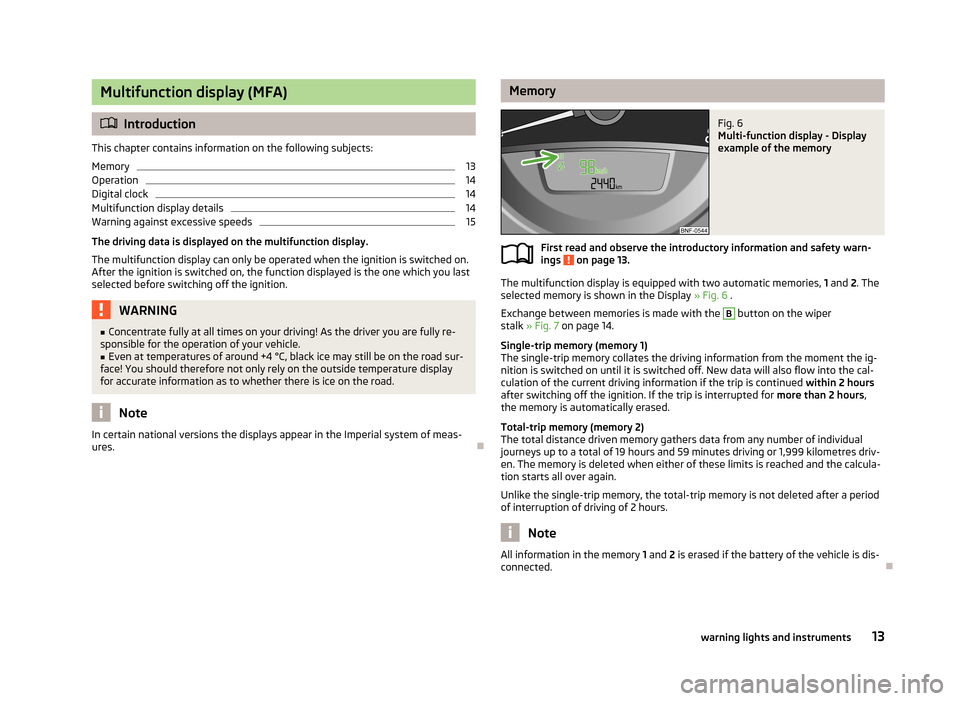
MemoryFig. 6
Multi-function display - Display
example of the memory
First read and observe the introductory information and safety warn-
ings on page 13.
The multifunction display is equipped with two automatic memories, 1 and 2. The
selected memory is shown in the Display » Fig. 6 .
Exchange between memories is made with the
B
button on the wiper
stalk » Fig. 7 on page 14.
Single-trip memory (memory 1)
The single-trip memory collates the driving information from the moment the ig-
nition is switched on until it is switched off. New data will also flow into the cal-
culation of the current driving information if the trip is continued within 2 hours
after switching off the ignition. If the trip is interrupted for more than 2 hours,
the memory is automatically erased.
Total-trip memory (memory 2)
The total distance driven memory gathers data from any number of individual
journeys up to a total of 19 hours and 59 minutes driving or 1,999 kilometres driv-
en. The memory is deleted when either of these limits is reached and the calcula-
tion starts all over again.
Unlike the single-trip memory, the total-trip memory is not deleted after a period of interruption of driving of 2 hours.
Note
All information in the memory 1
and 2 is erased if the battery of the vehicle is dis-
connected.
13warning lights and instruments
Page 17 of 176
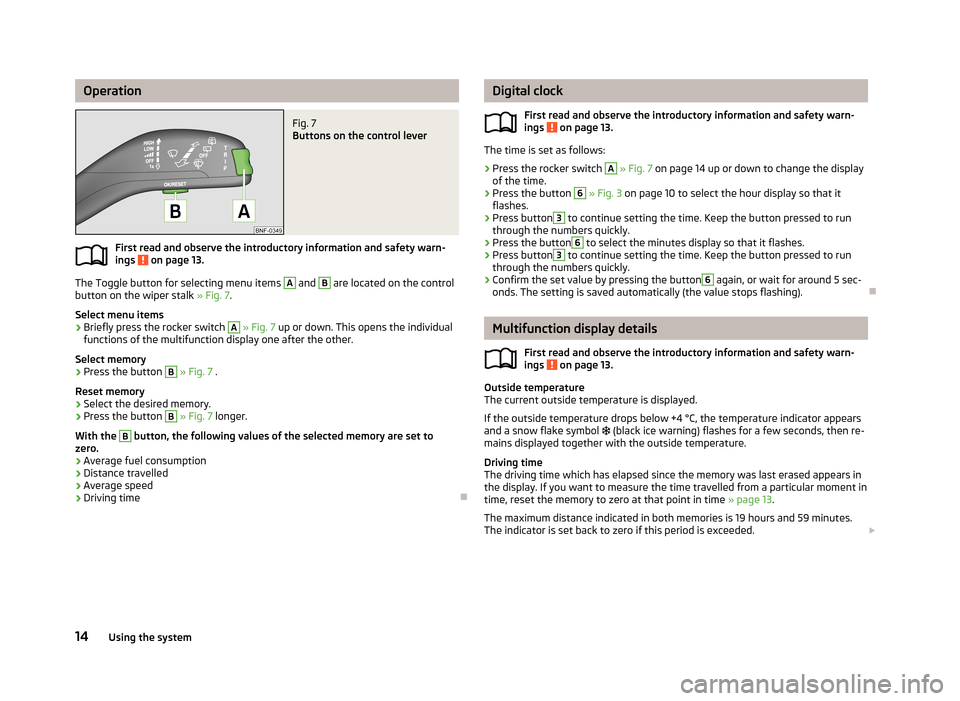
OperationFig. 7
Buttons on the control lever
First read and observe the introductory information and safety warn-ings on page 13.
The Toggle button for selecting menu items
A
and
B
are located on the control
button on the wiper stalk » Fig. 7.
Select menu items
›
Briefly press the rocker switch
A
» Fig. 7 up or down. This opens the individual
functions of the multifunction display one after the other.
Select memory
›
Press the button
B
» Fig. 7 .
Reset memory
›
Select the desired memory.
›
Press the button
B
» Fig. 7 longer.
With the
B
button, the following values of the selected memory are set to
zero.
› Average fuel consumption
› Distance travelled
› Average speed
› Driving time
Digital clock
First read and observe the introductory information and safety warn-ings
on page 13.
The time is set as follows:
›
Press the rocker switch
A
» Fig. 7 on page 14 up or down to change the display
of the time.
›
Press the button
6
» Fig. 3 on page 10 to select the hour display so that it
flashes.
›
Press button
3
to continue setting the time. Keep the button pressed to run
through the numbers quickly.
›
Press the button
6
to select the minutes display so that it flashes.
›
Press button
3
to continue setting the time. Keep the button pressed to run
through the numbers quickly.
›
Confirm the set value by pressing the button
6
again, or wait for around 5 sec-
onds. The setting is saved automatically (the value stops flashing).
Multifunction display details
First read and observe the introductory information and safety warn-
ings
on page 13.
Outside temperature
The current outside temperature is displayed.
If the outside temperature drops below +4 °C, the temperature indicator appears
and a snow flake symbol
(black ice warning) flashes for a few seconds, then re-
mains displayed together with the outside temperature.
Driving time
The driving time which has elapsed since the memory was last erased appears in the display. If you want to measure the time travelled from a particular moment in
time, reset the memory to zero at that point in time » page 13.
The maximum distance indicated in both memories is 19 hours and 59 minutes.
The indicator is set back to zero if this period is exceeded.
14Using the system
Page 18 of 176
Current fuel consumption
The current fuel consumption level is displayed in litres/100 km 1)
. You can use this
information to adapt your driving style to the desired fuel consumption.
The display appears in litres/hour if the vehicle is stationary or driving at a low
speed 2)
.
Average fuel consumption
The average fuel consumption since the memory was last erased is displayed in
litres/100 km 1 )
.
If you wish to determine the average fuel consumption over a certain period of
time, you must set the memory at the start of the new measurement to zero » page 13 . After erasing the memory, no value is displayed until you have
driven approx. 300 m.
The display is updated regularly while you are driving.
Range
The estimated range is displayed in kilometres. It indicates the distance you can still drive with your vehicle based on the level of fuel in the tank and the same
style of driving.
The display is shown in steps of 10 km. After lighting up of the warning light for
the fuel reserve the display is shown in steps of 5 km.
The fuel consumption over the last 50 km is used to calculate the information.The range will increase if you drive in a more economical manner.
Distance travelled
The distance travelled since the memory was last erased is displayed » page 13. If
you want to measure the distance travelled from a particular moment in time, re-
set the memory to zero at that moment in time » page 13.
The maximum distance indicated in both memories is 1 999 km. The indicator is
set back to zero if this period is exceeded.
Average speed
The average speed since the memory was last erased is displayed in km/hour . To determine the average speed over a certain period of time, set the memory to
zero at the start of the measurement » page 13.After erasing this data, no value appears in the display until you have driven ap-
prox. 300 m.
The display is updated regularly while you are driving.
Current speed
The current speed, which is identical to the display of the speedometer 1
» Fig. 3
on page 10 is displayed.
Coolant temperature
The current outside temperature is displayed.
Warning against excessive speeds
The warning that the speed limit is being exceeded can be enabled / disa-
bled » page 15 , Warning against excessive speeds in the display.
Warning against excessive speeds
First read and observe the introductory information and safety warn-ings
on page 13.
Adjust the speed limit while the vehicle is stationary
›
With button
A
» Fig. 7 on page 14 choose the menu point
Warning against
excessive speeds.
›
Press the button
B
to activate the ability to set the speed limit (value flashes).
›
Use the button
A
to set the required speed limit, e.g. 50 km/h.
›
Confirm the speed limit that was set with button
B
, or wait approx. 5 seconds
until the setting is saved automatically (the value stops flashing).
This allows you to set the speed in 5 km/h intervals.
Adjusting the speed limit while the vehicle is moving
›
With button
A
» Fig. 7 on page 14 choose the menu point
Warning against
excessive speeds.
›
Drive at the desired speed, e.g. 50 km/h.
›
Press button
B
to accept the current speed as the speed limit (the value flash-
es).
If you wish to adjust the set speed limit, you can do so in 5 km/h intervals (e.g. the
accepted speed of 47 km/h increases to 50 km/h or decreases to 45 km/h).
1)
On some models in certain countries, the display appears in kilometres/litre.
2)
On some models in certain countries, the display appears in --,- kilometres/litres if the vehicle is sta-
tionary.
15warning lights and instruments
Page 19 of 176
›Confirm the speed limit that was set by pressing button B again, or wait ap-
prox. 5 seconds until the setting is saved automatically (the value stops flash- ing).
Change or delete speed limit›
With button
A
» Fig. 7 on page 14 choose the menu point Warning against
excessive speeds.
›
Pressing button
B
deletes the speed limit.
›
Pressing the button
B
activates the ability to change the speed limit.
If the set speed limit is exceeded, an audible signal will sound as a warning. At
the same time the message (warning against excessive speed) appears on the
display with the set limit value.
The set driving mode remains stored even after switching the ignition on and off.
Warning lights
Introduction
This chapter contains information on the following subjects:
Handbrake
16
Braking system
16
Seat belt warning light
17
Generator
17
Engine oil
17
Coolant
18
Power steering
18
Electronic Stability Control (ESC)
18
Traction Control System (TC)
19
Antilock brake system (ABS)
19
The rear fog light
19
Exhaust inspection system
19
EPC fault light
19
Airbag system
20
Automated transmission
20
Turn signal system
20
Cruise control system
21
Main beam
21/ Safety belt (belt status display) - rear seat21 City Safe Drive21
START STOP
21
The warning lights show certain functions/faults and may be accompanied by
audible signals.
WARNING■ If illuminated warning lights and the corresponding descriptions and warn-
ing notes are not observed, this may result in severe injuries or major vehicle
damage.■
The engine compartment of your car is a hazardous area. There is a risk of
injuries, scalding, accidents and fire when working in the engine compart-
ment, e.g. inspecting and replenishing oil and other fluids. It is essential to ob-
serve safety notes » page 127, Engine compartment .
Handbrake
First read and observe the introductory information and safety warn-
ings
on page 16.
The warning light
comes on if the handbrake is applied. An audible warning is
also given if you drive the vehicle for at least 3 seconds at a speed of more than
6 km/h.
Braking system
First read and observe the introductory information and safety warn-ings
on page 16.
The warning light
illuminates if the brake fluid level is too low or there is a
fault in the ABS.
Stop the vehicle, switch off the engine, and check the level of the brake flu-
id » page 133 .
Further information » page 68.
16Using the system
Page 23 of 176
Airbag systemFirst read and observe the introductory information and safety warn-ings
on page 16.
Monitoring the airbag system
The warning light comes on for a few seconds when the ignition is switched
on.
There is a fault in the system if the warning light does not go out or flashes while
driving »
. This also applies if the warning light does not come on when the ig-
nition is switched on.
The operational capability of the airbag system is monitored electronically, includ-
ing when one of the airbags is switched off.
The following situation applies if the front or side airbag or belt tensioner have
been switched off using the vehicle system tester:
› The warning light
lights up for around 4 seconds after switching on the igni-
tion and then flashes approximately another 12 seconds in 2 second intervals.
The following situation applies if the airbag has been switched off using the key switch for the airbag in the front passenger storage compartment:
› The warning light
comes on for a few seconds when the ignition is switched
on;
› The deactivated airbag is indicated by the illumination of the warning light
in the middle of the dash panel » page 102, Deactivating
the front passenger airbag .
WARNINGIf there is a fault, have the airbag system checked immediately by a specialist
garage. Otherwise, there is a risk that the airbag will not be deployed in the event of an accident.
Automated transmission
First read and observe the introductory information and safety warn-
ings
on page 16.
Warning light
Do not continue your journey if the warning light
lights up and an acoustic sig-
nal sounds. Switch off the engine and seek assistance from a specialist garage.
Warning light
If the warning light lights up and no gear can be selected, switch the ignition
on and off. If the warning light lights up after you switch on the ignition, seek as- sistance from a specialist garage.
If the warning light or warning light lights up and an acoustic signal sounds,
this means that the automatic gearbox has overheated. Stop and allow the trans-
mission to cool down or drive more quickly than 20 km/h (12 mph).
If the warning light lights up again, switch off the vehicle, shut off the engine
and allow the gearbox to cool down.
Warning light
If the warning light lights up, operate the brake pedal.
Warning light
If the warning light lights up, operate the handbrake.
Further information » page 71, Automated transmission .WARNINGIf you have to stop for technical reasons, then park the vehicle at a safe dis-
tance from the traffic, switch off the engine and activate the hazard warning
lights » page 36 .
Turn signal system
First read and observe the introductory information and safety warn-ings
on page 16.
Either the left
or right
warning light flashes depending on the position of the
turn signal lever.
If a turn signal light fails, the warning light flashes at twice its normal rate.
Switching off the hazard warning light system is switched on will cause all of the turn signal lights as well as both warning lights to flash.
Further information » page 34, Turn signal and main beam .
20Using the system
Page 24 of 176
Cruise control systemFirst read and observe the introductory information and safety warn-
ings
on page 16.
The warning light comes on when the cruise control is operating » page 83.
Main beam
First read and observe the introductory information and safety warn-ings
on page 16.
The warning light
comes on when the main beam or headlight flasher are se-
lected » page 33 .
/ Safety belt (belt status display) - rear seat
First read and observe the introductory information and safety warn-ings
on page 16.
After switching on the ignition, the belt status warning lights up for the rear
seats in the instrument panel display for 30 seconds and indicates whether any
rear seat passengers have fastened their seat belts. The belt status indicator will
then light up when the passenger on the rear seat fastens or unfastens the seat
belt (when the ignition is switched on or during the journey).
If the warning light
, is switched on, the passenger on the rear seat has their
seat belt on.
If the warning light ,
is switched on, the passenger on the rear seat does not
have their seat belt on.
If a seat belt is unfastened on the rear seat during the journey at a speed of more than 25 km/h, an acoustic signal will sound, and the belt status indicator for the
rear seats will flash for around 30 seconds.
Further information » page 94, Seat belts .
City Safe Drive
First read and observe the introductory information and safety warn-
ings
on page 16.
If the City Safe Drive system is currently slowing the vehicle down automatically,
the warning light will flash quickly .
If the City Safe Drive system is not currently available, or if there is a system fault, the warning light will flash slowly .
When the City Safe Drive system is switched off while the vehicle is travelling at a
speed between 5–30 km/h (3-19 mph), the warning light will light up in the
instrument cluster display.
If the City Safe Drive system is switched on, the warning light in the instrument
cluster display
will light up for around 5 seconds.
Further information » page 86, City Safe Drive .
START STOP
First read and observe the introductory information and safety warn-
ings
on page 16.
If the START STOP system is active, the warning light will light up
.
If the START STOP system is active, but automatic engine shut down is not possi-
ble, the warning light will light up
.
When the warning light flashes
the START STOP system will not be available.
Further information » page 85, START-STOP .
21warning lights and instruments
Page 27 of 176
Opening/closing a doorFig. 11
Door handle/door opening lever:
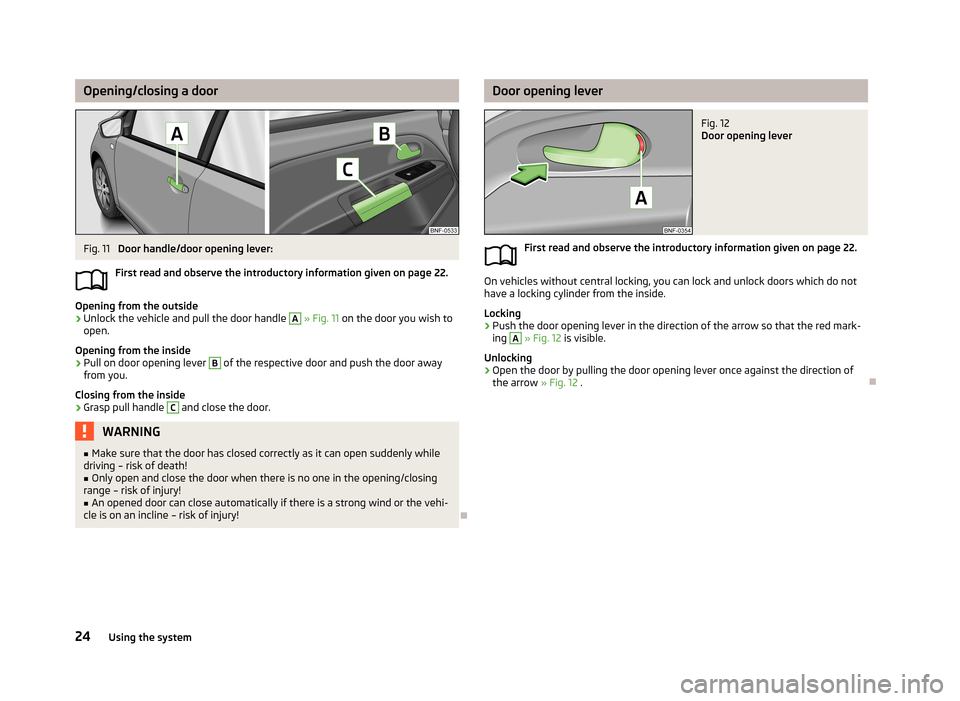
First read and observe the introductory information given on page 22.
Opening from the outside
›
Unlock the vehicle and pull the door handle
A
» Fig. 11 on the door you wish to
open.
Opening from the inside
›
Pull on door opening lever
B
of the respective door and push the door away
from you.
Closing from the inside
›
Grasp pull handle
C
and close the door.
WARNING■ Make sure that the door has closed correctly as it can open suddenly while
driving – risk of death!■
Only open and close the door when there is no one in the opening/closing
range – risk of injury!
■
An opened door can close automatically if there is a strong wind or the vehi-
cle is on an incline – risk of injury!
Door opening leverFig. 12
Door opening lever
First read and observe the introductory information given on page 22.
On vehicles without central locking, you can lock and unlock doors which do not
have a locking cylinder from the inside.
Locking
›
Push the door opening lever in the direction of the arrow so that the red mark-
ing
A
» Fig. 12 is visible.
Unlocking
›
Open the door by pulling the door opening lever once against the direction of the arrow » Fig. 12 .
24Using the system
Page 28 of 176
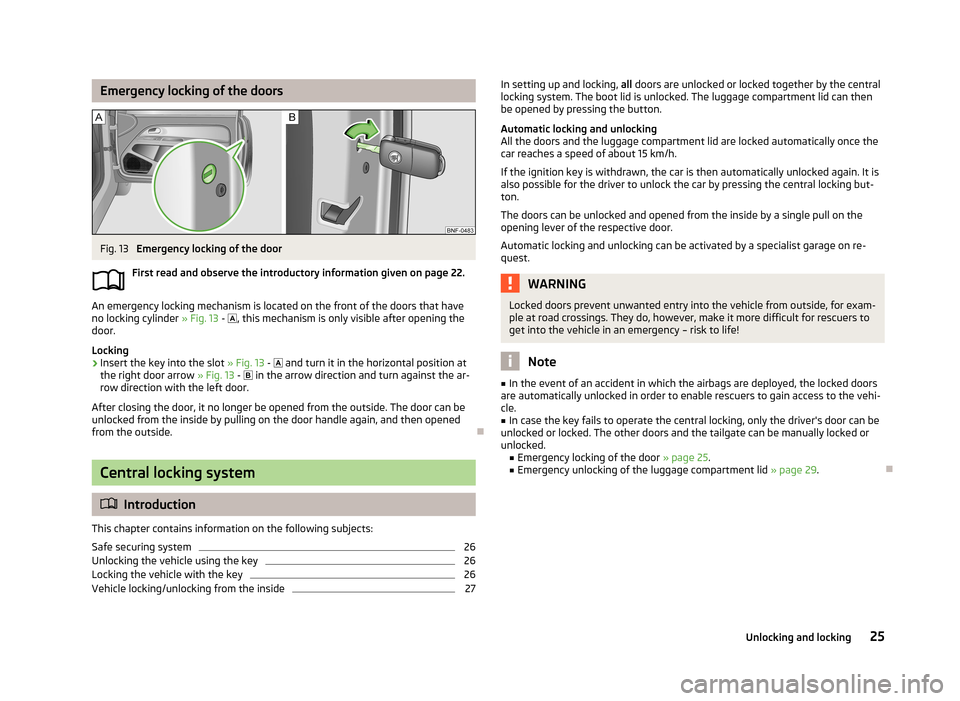
Emergency locking of the doorsFig. 13
Emergency locking of the door
First read and observe the introductory information given on page 22.
An emergency locking mechanism is located on the front of the doors that have
no locking cylinder » Fig. 13 -
, this mechanism is only visible after opening the
door.
Locking
›
Insert the key into the slot » Fig. 13 -
and turn it in the horizontal position at
the right door arrow » Fig. 13 -
in the arrow direction and turn against the ar-
row direction with the left door.
After closing the door, it no longer be opened from the outside. The door can be unlocked from the inside by pulling on the door handle again, and then opened
from the outside.
Central locking system
Introduction
This chapter contains information on the following subjects:
Safe securing system
26
Unlocking the vehicle using the key
26
Locking the vehicle with the key
26
Vehicle locking/unlocking from the inside
27In setting up and locking, all doors are unlocked or locked together by the central
locking system. The boot lid is unlocked. The luggage compartment lid can then
be opened by pressing the button.
Automatic locking and unlocking
All the doors and the luggage compartment lid are locked automatically once the car reaches a speed of about 15 km/h.
If the ignition key is withdrawn, the car is then automatically unlocked again. It is
also possible for the driver to unlock the car by pressing the central locking but-
ton.
The doors can be unlocked and opened from the inside by a single pull on the
opening lever of the respective door.
Automatic locking and unlocking can be activated by a specialist garage on re-
quest.WARNINGLocked doors prevent unwanted entry into the vehicle from outside, for exam-
ple at road crossings. They do, however, make it more difficult for rescuers to
get into the vehicle in an emergency – risk to life!
Note
■ In the event of an accident in which the airbags are deployed, the locked doors
are automatically unlocked in order to enable rescuers to gain access to the vehi- cle.■
In case the key fails to operate the central locking, only the driver's door can be
unlocked or locked. The other doors and the tailgate can be manually locked or
unlocked. ■ Emergency locking of the door » page 25.
■ Emergency unlocking of the luggage compartment lid » page 29.
25Unlocking and locking
Page 29 of 176
Safe securing systemFirst read and observe the introductory information and safety warn-
ings
on page 25.
The central locking system is equipped with a safe securing system. The door
locks are blocked automatically if the vehicle is locked from the outside. The warning light flashes for around 2 seconds in quick succession, afterwards it be-gins to flash evenly at longer intervals. It is not possible to open the doors withthe door handle either from the inside or from the outside. This acts as an effec-
tive deterrent against attempts to break into your vehicle.
The safe securing system can be deactivated within 2 seconds by double locking
the vehicle.
If the safe securing system is not operating, the warning light in the driver door flashes for about 2 seconds fast, goes out and starts to flash evenly at longer in-
tervals after about 30 seconds.
The safe securing system is activated again the next time the vehicle is unlocked and locked.
If the vehicle is locked and the safe securing system is deactivated, the door can
be opened from the inside by a single pull on opening lever of the respective
door.
WARNINGIf the vehicle is locked from the outside and the safe securing system is acti-
vated, there must not be any person in the vehicle as it is then no longer pos-
sible to open either a door or a window from the inside. The locked doors
make it more difficult for rescuers to get into the vehicle in an emergency – risk to life!
Note
You will be informed that the safe securing system has been activated after the
vehicle has been locked by means of the message on the instrument clus-
ter display.
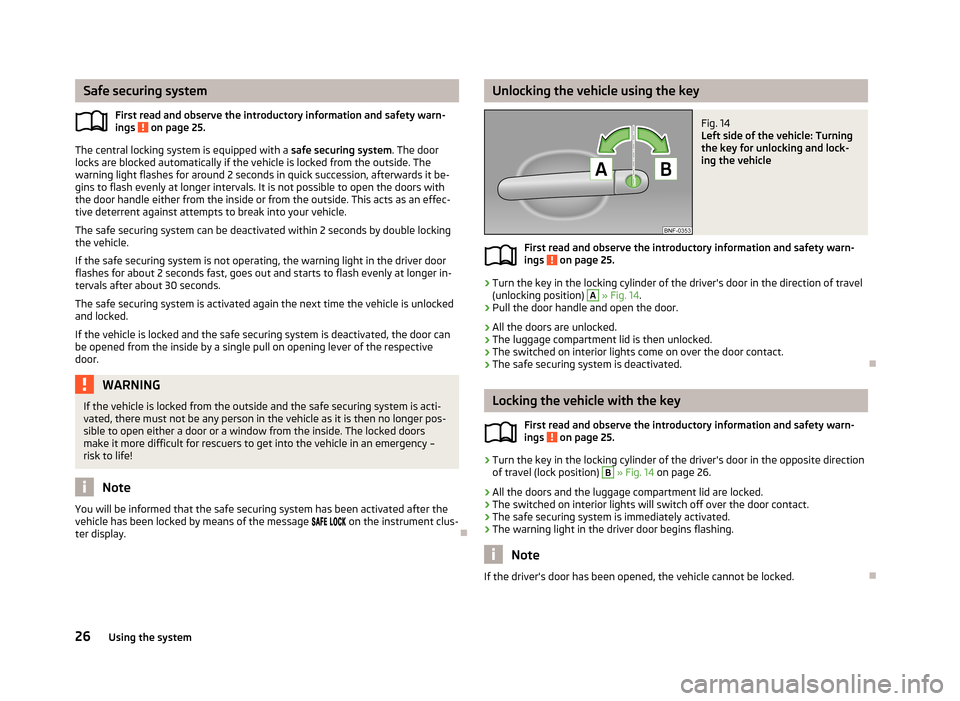
Unlocking the vehicle using the keyFig. 14
Left side of the vehicle: Turning
the key for unlocking and lock-
ing the vehicle
First read and observe the introductory information and safety warn- ings on page 25.
›
Turn the key in the locking cylinder of the driver's door in the direction of travel
(unlocking position)
A
» Fig. 14 .
›
Pull the door handle and open the door.
› All the doors are unlocked.
› The luggage compartment lid is then unlocked.
› The switched on interior lights come on over the door contact.
› The safe securing system is deactivated.
Locking the vehicle with the key
First read and observe the introductory information and safety warn-
ings
on page 25.
›
Turn the key in the locking cylinder of the driver's door in the opposite direction
of travel (lock position)
B
» Fig. 14 on page 26.
› All the doors and the luggage compartment lid are locked.
› The switched on interior lights will switch off over the door contact.
› The safe securing system is immediately activated.
› The warning light in the driver door begins flashing.
Note
If the driver's door has been opened, the vehicle cannot be locked.
26Using the system