light SKODA CITIGO 2014 1.G Owner's Guide
[x] Cancel search | Manufacturer: SKODA, Model Year: 2014, Model line: CITIGO, Model: SKODA CITIGO 2014 1.GPages: 164, PDF Size: 12.08 MB
Page 45 of 164
WARNING■Make sure that the door has closed correctly as it can open suddenly
while driving – risk of death!■
Only open and close the door when there is no one in the opening/closing
range – risk of injury!
■
An opened door can close automatically if there is a strong wind or the
vehicle is on an incline – risk of injury!
■
Never drive with the doors open - there is a risk of death!
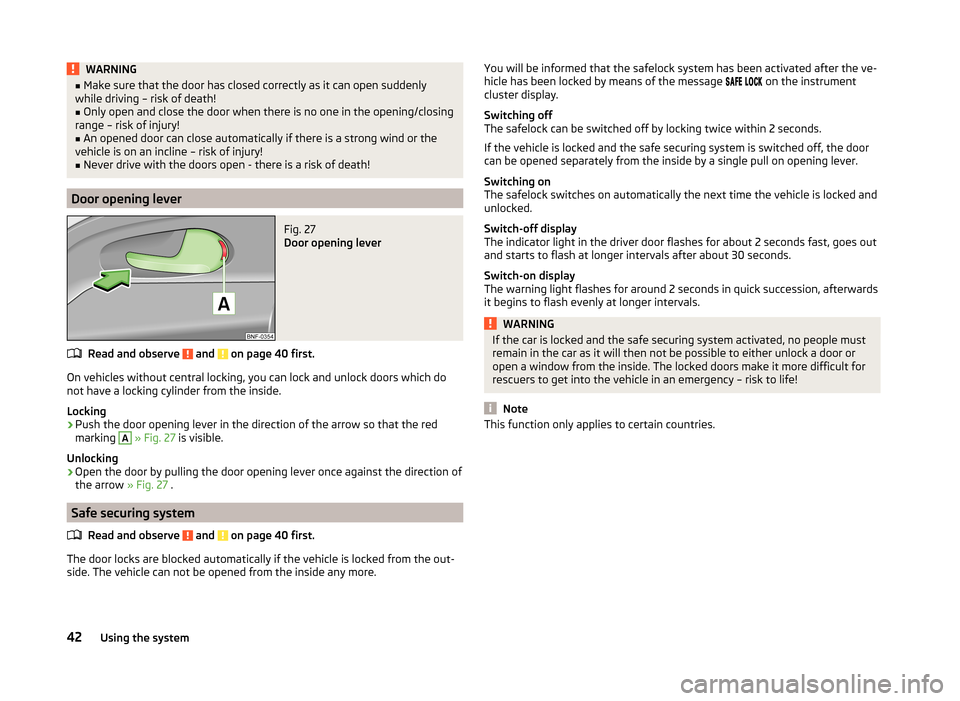
Door opening lever
Fig. 27
Door opening lever
Read and observe and on page 40 first.
On vehicles without central locking, you can lock and unlock doors which do
not have a locking cylinder from the inside.
Locking
›
Push the door opening lever in the direction of the arrow so that the red
marking
A
» Fig. 27 is visible.
Unlocking
›
Open the door by pulling the door opening lever once against the direction of
the arrow » Fig. 27 .
Safe securing system
Read and observe
and on page 40 first.
The door locks are blocked automatically if the vehicle is locked from the out-side. The vehicle can not be opened from the inside any more.
You will be informed that the safelock system has been activated after the ve-
hicle has been locked by means of the message on the instrument
cluster display.
Switching off
The safelock can be switched off by locking twice within 2 seconds.
If the vehicle is locked and the safe securing system is switched off, the door
can be opened separately from the inside by a single pull on opening lever.
Switching on
The safelock switches on automatically the next time the vehicle is locked and
unlocked.
Switch-off display
The indicator light in the driver door flashes for about 2 seconds fast, goes out
and starts to flash at longer intervals after about 30 seconds.
Switch-on display
The warning light flashes for around 2 seconds in quick succession, afterwards
it begins to flash evenly at longer intervals.WARNINGIf the car is locked and the safe securing system activated, no people must
remain in the car as it will then not be possible to either unlock a door or
open a window from the inside. The locked doors make it more difficult for
rescuers to get into the vehicle in an emergency – risk to life!
Note
This function only applies to certain countries.42Using the system
Page 47 of 164
WARNING (Continued)■Do not press on the rear window when closing the luggage compartment
lid, as otherwise this could crack – risk of injury!■
Make sure that when closing the boot lid, no body parts are crushed -
there is danger of injury!
Note
The function of the button in the grip above the licence plate is deactivated
when starting off or at a speed of 9 km/hour or more for vehicles with central
locking. The function is restored after the vehicle stops and the door is
opened.
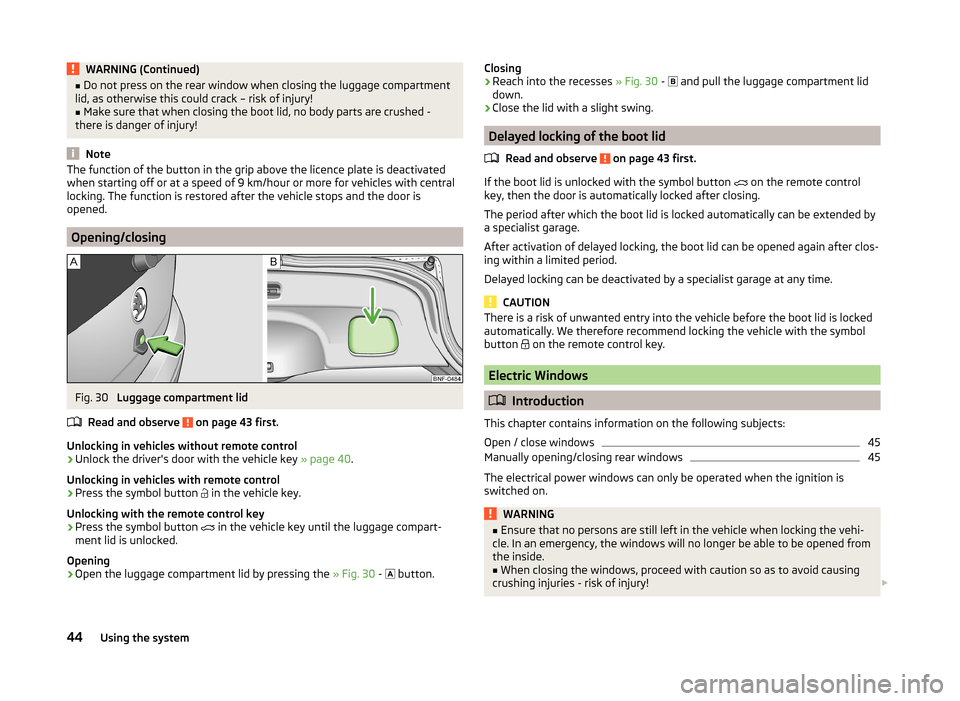
Opening/closing
Fig. 30
Luggage compartment lid
Read and observe
on page 43 first.
Unlocking in vehicles without remote control
›
Unlock the driver's door with the vehicle key » page 40.
Unlocking in vehicles with remote control
›
Press the symbol button
in the vehicle key.
Unlocking with the remote control key
›
Press the symbol button
in the vehicle key until the luggage compart-
ment lid is unlocked.
Opening
›
Open the luggage compartment lid by pressing the » Fig. 30 -
button.
Closing›Reach into the recesses » Fig. 30 - and pull the luggage compartment lid
down.›
Close the lid with a slight swing.
Delayed locking of the boot lid
Read and observe
on page 43 first.
If the boot lid is unlocked with the symbol button
on the remote control
key, then the door is automatically locked after closing.
The period after which the boot lid is locked automatically can be extended by a specialist garage.
After activation of delayed locking, the boot lid can be opened again after clos-
ing within a limited period.
Delayed locking can be deactivated by a specialist garage at any time.
CAUTION
There is a risk of unwanted entry into the vehicle before the boot lid is locked
automatically. We therefore recommend locking the vehicle with the symbol
button
on the remote control key.
Electric Windows
Introduction
This chapter contains information on the following subjects:
Open / close windows
45
Manually opening/closing rear windows
45
The electrical power windows can only be operated when the ignition is
switched on.
WARNING■ Ensure that no persons are still left in the vehicle when locking the vehi-
cle. In an emergency, the windows will no longer be able to be opened from
the inside.■
When closing the windows, proceed with caution so as to avoid causing
crushing injuries - risk of injury!
44Using the system
Page 48 of 164
CAUTION■Keep the windows clean to ensure the correct functionality of the electric
windows.■
If windows are frozen, always remove ice » page 99, Windows and external
mirrors before operating the electrical power windows. The window seals and
the electrical power window mechanism can otherwise be damaged.
■
Always make sure that the windows are closed when you leave the locked
vehicle.
For the sake of the environment
At high speeds you should keep the windows closed to prevent unnecessarily high fuel consumption.
Note
When driving always use the existing heating, air conditioning and ventilation
system for ventilating the interior of the vehicle. With the windows open, dust
and other dirt can get into the vehicle. In addition, wind noises can occur at
certain speeds.
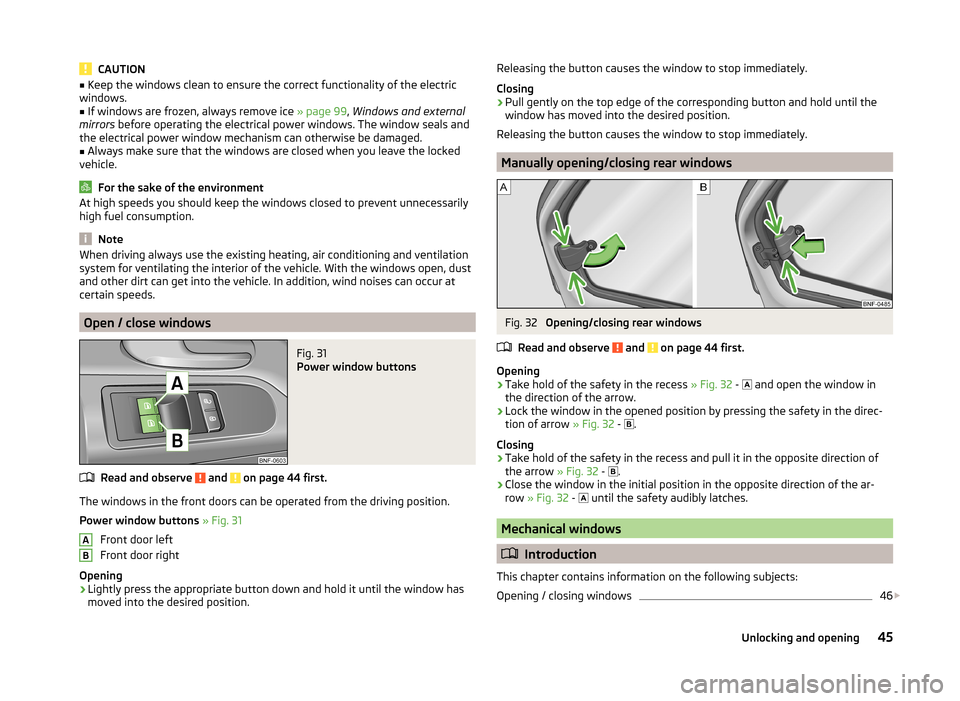
Open / close windows
Fig. 31
Power window buttons
Read and observe and on page 44 first.
The windows in the front doors can be operated from the driving position.
Power window buttons » Fig. 31
Front door left
Front door right
Opening
›
Lightly press the appropriate button down and hold it until the window has
moved into the desired position.
ABReleasing the button causes the window to stop immediately.
Closing›
Pull gently on the top edge of the corresponding button and hold until the
window has moved into the desired position.
Releasing the button causes the window to stop immediately.
Manually opening/closing rear windows
Fig. 32
Opening/closing rear windows
Read and observe
and on page 44 first.
Opening
›
Take hold of the safety in the recess » Fig. 32 -
and open the window in
the direction of the arrow.
›
Lock the window in the opened position by pressing the safety in the direc-
tion of arrow » Fig. 32 -
.
Closing
›
Take hold of the safety in the recess and pull it in the opposite direction of
the arrow » Fig. 32 -
.
›
Close the window in the initial position in the opposite direction of the ar-
row » Fig. 32 -
until the safety audibly latches.
Mechanical windows
Introduction
This chapter contains information on the following subjects:
Opening / closing windows
46
45Unlocking and opening
Page 51 of 164
Lights and visibility
Lights
Introduction
This chapter contains information on the following subjects:
Operation of the light function
48
Daylight running lights (DAY LIGHT)
49
Turn signal and main beam
49
Fog lights
50
Rear fog light
50
Hazard warning light system
50
Parking light
51
Driving abroad
51
Unless otherwise stated, the lights only work when the ignition is on.
The arrangement of the controls right-hand drive models may differ from the layout shown in » Fig. 35 on page 48 . The symbols which mark the positions
of the controls are identical.
WARNING■ The activation of the lights should only be undertaken in accordance with
national legal requirements.■
The driver is always responsible for the correct settings and use of the
lights.
■
Never drive with only the side lights on! The side lights are not bright
enough to light up the road sufficiently in front of you or to be seen by oth-
er oncoming traffic. Therefore always switch on the low beam when it is
dark or if visibility is poor.
Note
■ The instruments are also illuminated when the side light or low beam light is
switched on.■
The headlights may mist up temporarily. When the driving lights are switched
on, the light outlet surfaces are free from mist after a short period, although
the headlight lenses may still be misted up in the peripheral areas. This mist
has no influence on the life of the lighting system.
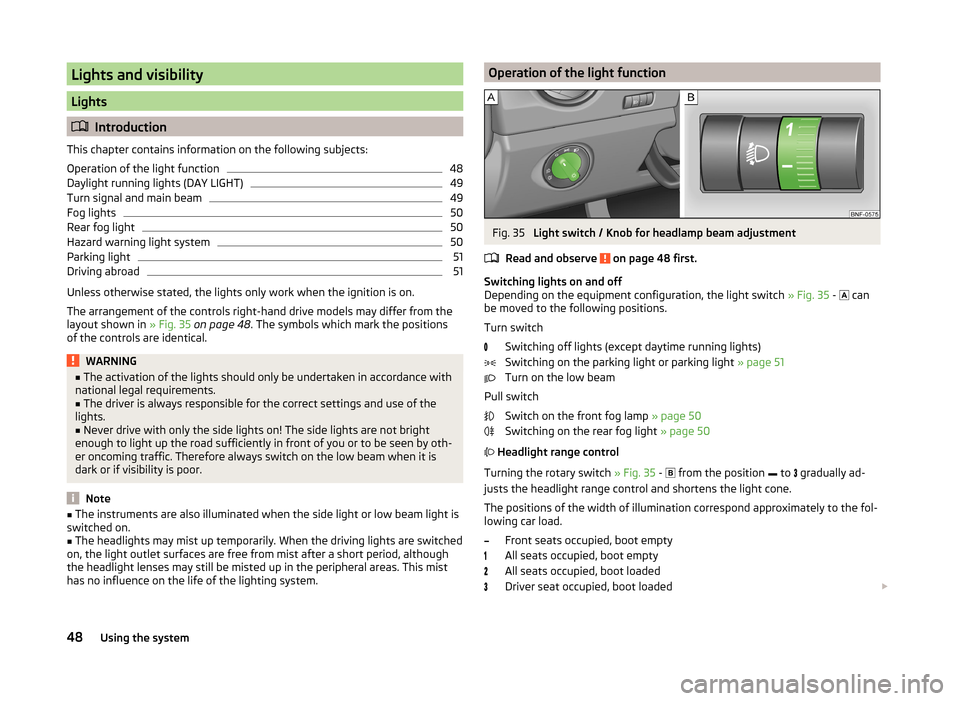
Operation of the light functionFig. 35
Light switch / Knob for headlamp beam adjustment
Read and observe
on page 48 first.
Switching lights on and off
Depending on the equipment configuration, the light switch » Fig. 35 -
can
be moved to the following positions.
Turn switch Switching off lights (except daytime running lights)
Switching on the parking light or parking light » page 51
Turn on the low beam
Pull switch Switch on the front fog lamp » page 50
Switching on the rear fog light » page 50
Headlight range control
Turning the rotary switch » Fig. 35 -
from the position
to
gradually ad-
justs the headlight range control and shortens the light cone.
The positions of the width of illumination correspond approximately to the fol- lowing car load.
Front seats occupied, boot empty
All seats occupied, boot empty
All seats occupied, boot loaded
Driver seat occupied, boot loaded
48Using the system
Page 52 of 164
We recommend you adjust the headlight beam when the low beam is switched
on.WARNINGAlways adjust the headlight beam to meet the following conditions.■The vehicle does not dazzle other road users, especially oncoming vehi-
cles.■
The beam range is sufficient for safe driving.
CAUTION
If leaving the vehicle without wanting to use the parking lights, always turn
the light switch to position .
Note
If the light switch is in the position , the ignition key is removed and the
driver's door is open, an audible warning signal will sound. The audible warning
signal is switched off by means of the door contact when the driver's door is
closed, however the side lights remain on to illuminate the parked vehicle if
necessary.
Daylight running lights (DAY LIGHT)
Read and observe
on page 48 first.
The daytime running lights function provides the lighting of the front area ofthe vehicle.
The daytime running lights are switched on automatically if the following
conditions are met.
The ignition is switched on.
The light switch is in position
» Fig. 35 on page 48 .
When the daytime running lights are switched on, the lighting of the instru-
ment cluster is switched on.
WARNINGWhen the daytime running light is switched on, the side lights (neither at
the front or rear) and the number plate lights are not illuminated. Therefore
always switch on the low beam when the visibility is poor.Turn signal and main beamFig. 36
Operating lever: Turn signal and
main beam operation
Read and observe on page 48 first.
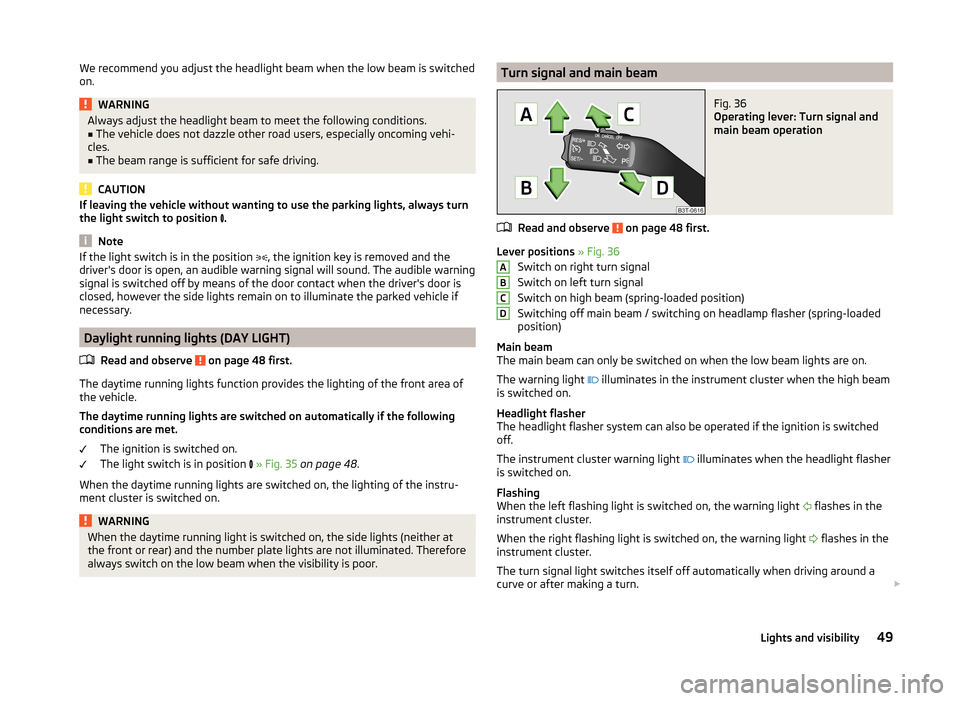
Lever positions » Fig. 36
Switch on right turn signal
Switch on left turn signal
Switch on high beam (spring-loaded position)
Switching off main beam / switching on headlamp flasher (spring-loaded
position)
Main beam
The main beam can only be switched on when the low beam lights are on.
The warning light illuminates in the instrument cluster when the high beam
is switched on.
Headlight flasher
The headlight flasher system can also be operated if the ignition is switched
off.
The instrument cluster warning light illuminates when the headlight flasher
is switched on.
Flashing
When the left flashing light is switched on, the warning light flashes in the
instrument cluster.
When the right flashing light is switched on, the warning light flashes in the
instrument cluster.
The turn signal light switches itself off automatically when driving around a
curve or after making a turn.
ABCD49Lights and visibility
Page 53 of 164
“Convenience turn signal”
If you only wish to flash three times, briefly push the lever to the upper or low-
er pressure point and release again.WARNINGOnly turn on the main beam or the headlight flasher if other road users will
not be dazzled.
Note
An acoustic warning signal will sound when the driver's door is opened if the
lever is not in the middle position after removing the ignition key from the igni-
tion lock. The acoustic warning signal will stop just as soon as the driver's door
is closed.
Fog lights
Fig. 37
Light switch: Turn on front and
rear fog light
Read and observe on page 48 first.
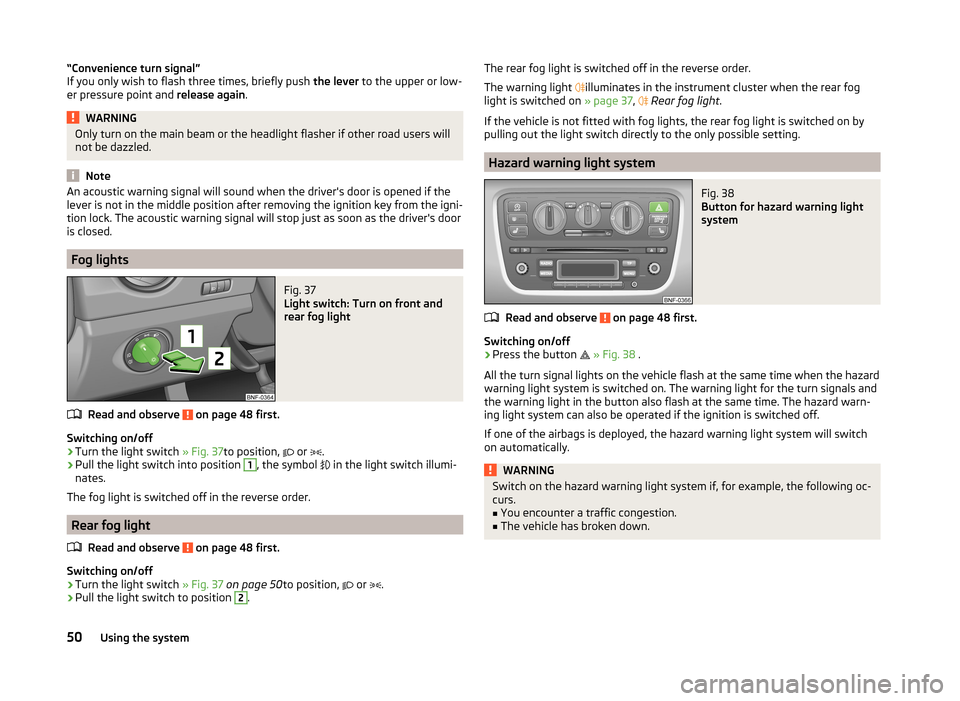
Switching on/off
›
Turn the light switch » Fig. 37to position,
or
.
›
Pull the light switch into position
1
, the symbol
in the light switch illumi-
nates.
The fog light is switched off in the reverse order.
Rear fog light
Read and observe
on page 48 first.
Switching on/off
›
Turn the light switch » Fig. 37 on page 50 to position,
or
.
›
Pull the light switch to position
2
.
The rear fog light is switched off in the reverse order.
The warning light
illuminates in the instrument cluster when the rear fog
light is switched on » page 37,
Rear fog light .
If the vehicle is not fitted with fog lights, the rear fog light is switched on by
pulling out the light switch directly to the only possible setting.
Hazard warning light system
Fig. 38
Button for hazard warning light
system
Read and observe on page 48 first.
Switching on/off
›
Press the button
» Fig. 38 .
All the turn signal lights on the vehicle flash at the same time when the hazard
warning light system is switched on. The warning light for the turn signals and
the warning light in the button also flash at the same time. The hazard warn-
ing light system can also be operated if the ignition is switched off.
If one of the airbags is deployed, the hazard warning light system will switch
on automatically.
WARNINGSwitch on the hazard warning light system if, for example, the following oc-
curs.■
You encounter a traffic congestion.
■
The vehicle has broken down.
50Using the system
Page 54 of 164
Parking lightRead and observe
on page 48 first.
Switching on the side light on one side
›
Switch off the ignition.
›
Place the control lever into position
A
or
B
as far as it can go » Fig. 36 on
page 49 - the parking light on the right/left-hand side of the vehicle is
switched on.
Switching on the side light on both sides
›
Turn the light switch
» Fig. 37 on page 50 to position
and lock the vehicle.
After pulling out the ignition key and opening the driver's door, an audible
warning sounds. After a few seconds or after closing the driver's door, the au-
dible alarm is turned off, but the parking lights will remain switched on.
CAUTION
Turning on the parking light means the battery is heavily loaded, especially
over short distances.
Driving abroad
Read and observe
on page 48 first.
The low beam is set asymmetrically. It illuminates the side of the road on
which the vehicle is being driven to a greater extent.
When driving in countries with opposing traffic system (traffic on the left/
right), asymmetric headlight adjustment can dazzle oncoming traffic. In order
to avoid this, the headlights must be adjusted at a specialist garage.
Note
You can find out more information on adjusting the headlights at a specialist
garage.
Indoor Lighting
Introduction
This chapter contains information on the following subjects:
Interior light
51NoteWith the ignition off, the light turns off automatically after about 10 minutes.
Interior light
Fig. 39
Interior lighting: Version 1/version 2
Position of the light switch
A
» Fig. 39
Switching on
Control with the door contact switch (middle position)
Switching off
Switch for reading lights
B
» Fig. 39
Switching left reading lamp on/off
Switching right reading lamp on/off
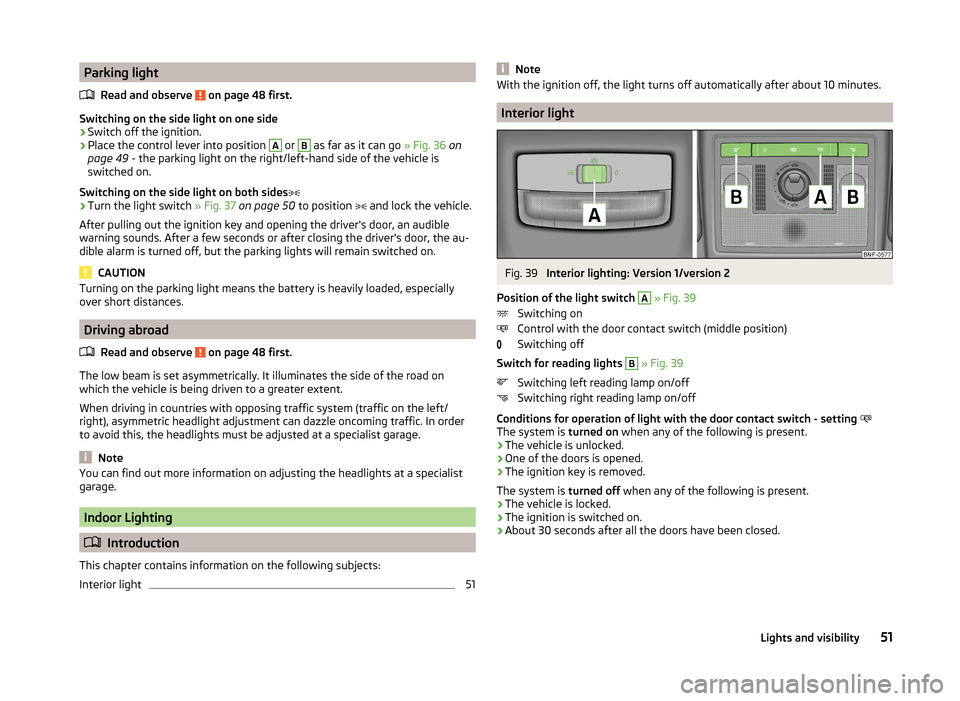
Conditions for operation of light with the door contact switch - setting
The system is turned on when any of the following is present.
› The vehicle is unlocked.
› One of the doors is opened.
› The ignition key is removed.
The system is turned off when any of the following is present.
› The vehicle is locked.
› The ignition is switched on.
› About 30 seconds after all the doors have been closed.
51Lights and visibility
Page 55 of 164
Visibility
Introduction
This chapter contains information on the following subjects:
Rear window heater
52
Sun visors
52
Rear window heater
Fig. 40
Button for rear window heater
Button for the heating in the centre console » Fig. 40
Switching the rear window heater on/off
When the heater is switched on, a lamp illuminates inside the button.
The heating only works when the engine is running.
The heater automatically switches off after approximately 10 minutes.
For the sake of the environment
The heating should be switched off as soon as the window is de-iced or free
from mist. The reduced current consumption will have a favourable effect on
fuel economy.
Note
If the on-board voltage drops, the heater switches off automatically, in order
to provide sufficient electrical energy for the engine control » page 116, Auto-
matic load deactivation .Sun visorsFig. 41
Sun visor: Driver's side/front passenger's side
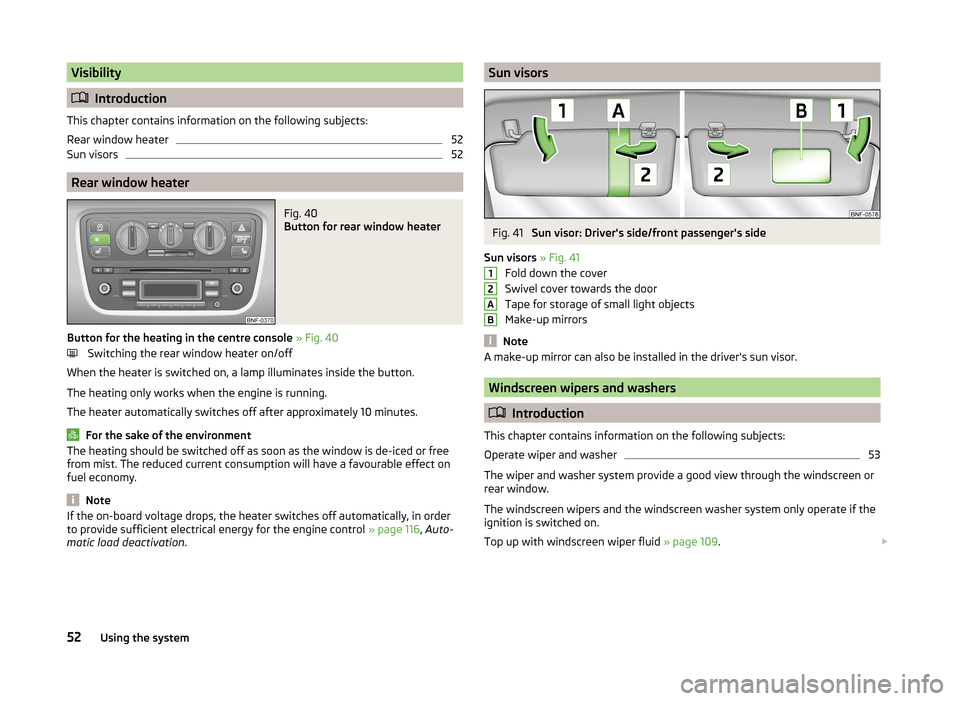
Sun visors » Fig. 41
Fold down the cover
Swivel cover towards the door
Tape for storage of small light objects
Make-up mirrors
Note
A make-up mirror can also be installed in the driver's sun visor.
Windscreen wipers and washers
Introduction
This chapter contains information on the following subjects:
Operate wiper and washer
53
The wiper and washer system provide a good view through the windscreen or
rear window.
The windscreen wipers and the windscreen washer system only operate if the
ignition is switched on.
Top up with windscreen wiper fluid » page 109.
12AB52Using the system
Page 56 of 164
WARNING■Properly maintained windscreen wiper blades are essential for clear visi-
bility and safe driving » page 134.■
Replace the windscreen wiper blades once or twice a year for safety rea-
sons. These can be purchased from a ŠKODA Partner.
■
Do not use the windscreen washer system at low temperatures, without
heating the windscreen beforehand. The window washer fluid could other-
wise freeze on the windscreen and restrict the view to the front.
CAUTION
■ If the ignition is switched off while the windscreen wipers are switched on,
the windscreen wipers will continue wiping in the same mode after the igni-
tion is turned back on. The windscreen wipers could freeze up in cold tempera-
tures between the time the ignition was turned off and when it was turned
back on again.■
In cold temperatures and during the winter, check before the journey or be-
fore switching on the ignition that the wiper blades are not frozen to the
windscreen. If the windscreen wipers are switched on when the blades are fro-
zen to the windscreen, this may damage both the blades and windscreen wip-
er motor!
■
Carefully peel frozen wiper blades off the pane.
■
Remove snow and ice from the windscreen wipers before driving.
■
If the windscreen wipers are handled carelessly, there is a risk of damage to
the windscreen.
■
Do not switch on the ignition if the front wiper arms are retracted. The wiper
arms could damage the paint of the bonnet.
■
If there is an obstacle on the windscreen, the wiper will try to push away the
obstacle. If the obstacle continues to block the wiper, the wiper stops in order
to avoid damaging the wiper. Remove the obstacle and switch the wiper on
again.
Note
To avoid streaking, the wiper blades must be kept clean » page 101.Operate wiper and washerFig. 42
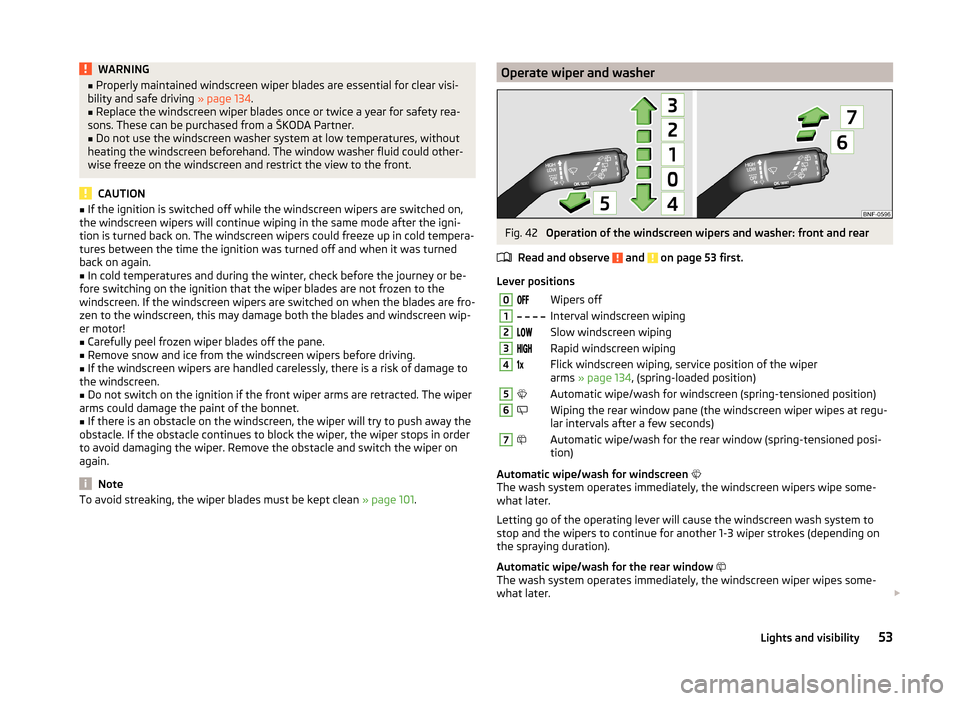
Operation of the windscreen wipers and washer: front and rear
Read and observe
and on page 53 first.
Lever positions
0Wipers off1 Interval windscreen wiping2Slow windscreen wiping3Rapid windscreen wiping4Flick windscreen wiping, service position of the wiper
arms » page 134 , (spring-loaded position)5Automatic wipe/wash for windscreen (spring-tensioned position)6Wiping the rear window pane (the windscreen wiper wipes at regu-
lar intervals after a few seconds)7Automatic wipe/wash for the rear window (spring-tensioned posi-
tion)
Automatic wipe/wash for windscreen
The wash system operates immediately, the windscreen wipers wipe some-
what later.
Letting go of the operating lever will cause the windscreen wash system to
stop and the wipers to continue for another 1-3 wiper strokes (depending on
the spraying duration).
Automatic wipe/wash for the rear window
The wash system operates immediately, the windscreen wiper wipes some-
what later.
53Lights and visibility
Page 58 of 164
WARNINGDo not touch the exterior mirror surfaces, if the exterior mirror heating is
switched on - hazard of burning.
Note
■ The mirror heater only operates when the engine is running and up to an
outside temperature of +35 ℃.■
If the electrical mirror setting fails at any time, the mirrors can be adjusted by
hand by pressing on the edge of the mirror surface.
Seats and head restraints
Seats and head restraints
Introduction
This chapter contains information on the following subjects:
Adjusting the front seats
56
Head restraints - adjusting height
56
Headrests - removing and installing
57
The driver's seat should be adjusted in such a way that the pedals can be fully
pressed to the floor with slightly bent legs.
The seat backrest on the driver's seat should be adjusted in such a way that the upper point of the steering wheel can be easily reached with slightly bent
arms.
Correct adjustment of the seats is particularly important for the following: › Reaching the controls safely and quickly,
› A relaxed and fatigue-free body position.
› Achieving the maximum protection offered by the seat belts and the airbag
system.
WARNING■ Only adjust the driver's seat when the vehicle is stationary – risk of acci-
dent!■
Caution when adjusting the seat! You may suffer injuries or bruises as a
result of adjusting the seat without paying proper attention.
■
Never carry more people than there are number of seats in the vehicle.
■
Do not carry any objects on the front passenger seat except objects de-
signed for this purpose (e.g. child seat) – risk of accident!
Note
After a certain time, play can develop within the adjustment mechanism of the
backrest angle.55Seats and head restraints