warning SKODA CITIGO 2017 Owners Manual
[x] Cancel search | Manufacturer: SKODA, Model Year: 2017, Model line: CITIGO, Model: SKODA CITIGO 2017Pages: 172, PDF Size: 24.54 MB
Page 143 of 172
The maximum towing speed is 50 km/h.
The vehicle must be transported on a special breakdown vehicle or trailer
if it is not possible to tow in the vehicle in the way described or if the tow-
ing distance is greater than 50 km.
Driver of the towed vehicle›
If possible, the vehicle should be towed with the engine running. The brake
booster and power steering only operate if the engine is running, otherwise
much greater force has to be applied to the brake pedal and more power has
to be expended for steering.
›
If it is not possible to start the engine, switch on the ignition so that the
steering wheel does not lock and so that the turn signal lights, windscreen
wipers and windscreen washer system can be used.
›
Take the vehicle out of gear or move the selector lever into position N if the
vehicle is fitted with an automated transmission.
›
Keep the tow rope taut at all times during the towing procedure.
WARNING■ Spiral tow ropes must not be used for towing » Fig. 156- , the towing
eye may unscrew out of the vehicle - risk of accident.■
Ensure tow rope is not twisted - risk of accident.
CAUTION
■ Do not tow-start the engine – risk of damaging the engine! The battery from
another vehicle can be used as a jump-start aid » page 139, Jump-starting .■
For off-road towing manoeuvres, there is a risk to both vehicles that the fas-
teners may become overloaded and damaged.
Note
We recommend that you use a tow rope from ŠKODA Original Accessories.Front towing eyeFig. 157
Remove cap / install towing eye
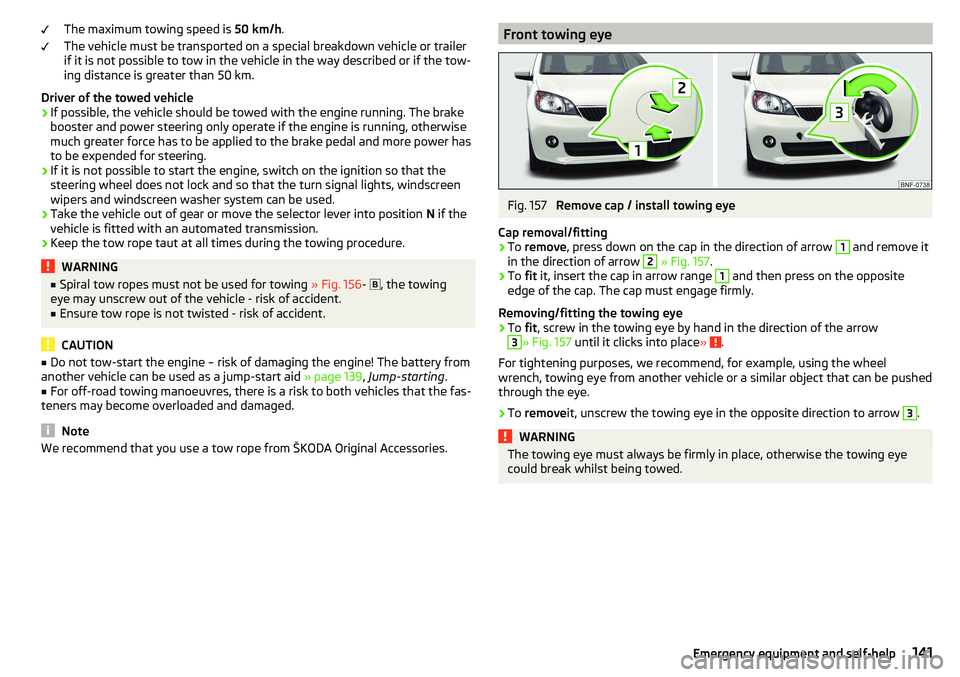
Cap removal/fitting
›
To remove , press down on the cap in the direction of arrow
1
and remove it
in the direction of arrow
2
» Fig. 157 .
›
To fit it, insert the cap in arrow range
1
and then press on the opposite
edge of the cap. The cap must engage firmly.
Removing/fitting the towing eye
›
To fit, screw in the towing eye by hand in the direction of the arrow
3
» Fig. 157 until it clicks into place » .
For tightening purposes, we recommend, for example, using the wheel
wrench, towing eye from another vehicle or a similar object that can be pushed
through the eye.
›
To remove it, unscrew the towing eye in the opposite direction to arrow
3
.
WARNINGThe towing eye must always be firmly in place, otherwise the towing eye
could break whilst being towed.141Emergency equipment and self-help
Page 145 of 172
Replacing windscreen wiper blades
Introduction
This chapter contains information on the following subjects:
Replacing the windscreen wiper blades
143
Replacing the rear window wiper blade
143WARNINGReplace the windscreen wiper blades once or twice a year for safety rea-
sons.
Replacing the windscreen wiper blades
Fig. 161
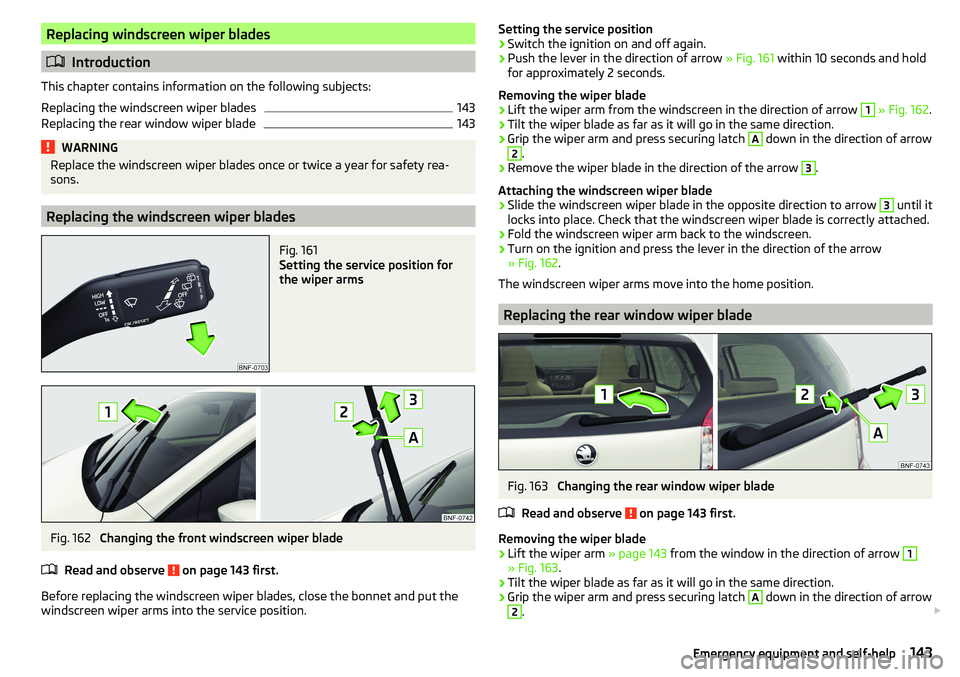
Setting the service position for
the wiper arms
Fig. 162
Changing the front windscreen wiper blade
Read and observe
on page 143 first.
Before replacing the windscreen wiper blades, close the bonnet and put the windscreen wiper arms into the service position.
Setting the service position›Switch the ignition on and off again.›
Push the lever in the direction of arrow » Fig. 161 within 10 seconds and hold
for approximately 2 seconds.
Removing the wiper blade
›
Lift the wiper arm from the windscreen in the direction of arrow
1
» Fig. 162 .
›
Tilt the wiper blade as far as it will go in the same direction.
›
Grip the wiper arm and press securing latch
A
down in the direction of arrow
2
.
›
Remove the wiper blade in the direction of the arrow
3
.
Attaching the windscreen wiper blade
›
Slide the windscreen wiper blade in the opposite direction to arrow
3
until it
locks into place. Check that the windscreen wiper blade is correctly attached.
›
Fold the windscreen wiper arm back to the windscreen.
›
Turn on the ignition and press the lever in the direction of the arrow
» Fig. 162 .
The windscreen wiper arms move into the home position.
Replacing the rear window wiper blade
Fig. 163
Changing the rear window wiper blade
Read and observe
on page 143 first.
Removing the wiper blade
›
Lift the wiper arm » page 143 from the window in the direction of arrow
1
» Fig. 163.
›
Tilt the wiper blade as far as it will go in the same direction.
›
Grip the wiper arm and press securing latch
A
down in the direction of arrow
2
.
143Emergency equipment and self-help
Page 146 of 172
›Remove the wiper blade in the direction of the arrow 3.
Attaching the windscreen wiper blade›
Slide the windscreen wiper blade in the opposite direction to arrow
3
until it
locks into place. Check that the windscreen wiper blade is correctly attached.
›
Fold the windscreen wiper arm back to the windscreen.
Fuses and light bulbs
Fuses
Introduction
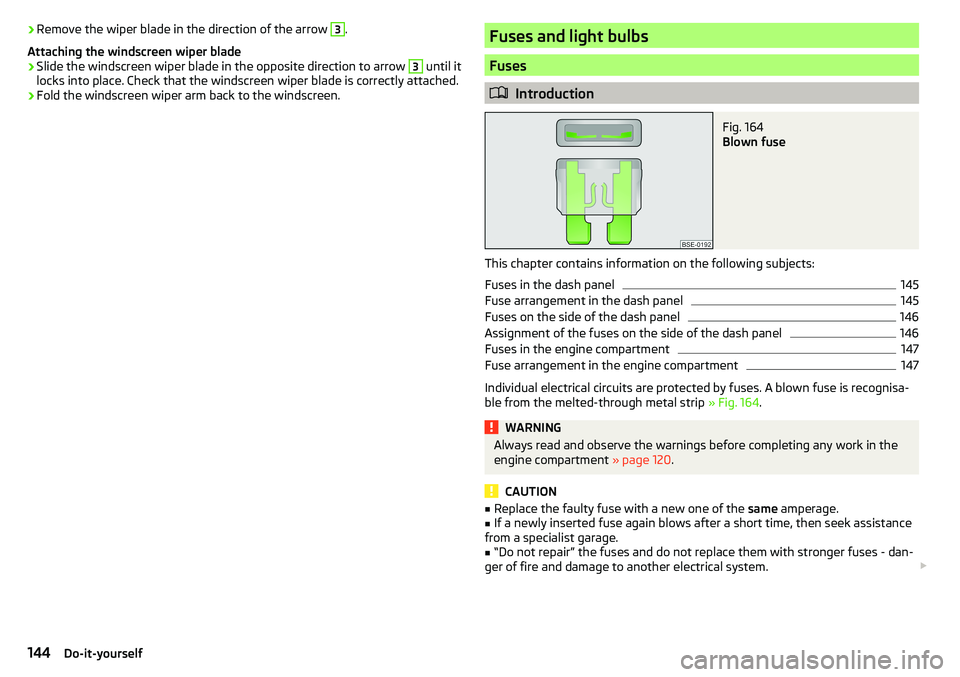
Fig. 164
Blown fuse
This chapter contains information on the following subjects:
Fuses in the dash panel
145
Fuse arrangement in the dash panel
145
Fuses on the side of the dash panel
146
Assignment of the fuses on the side of the dash panel
146
Fuses in the engine compartment
147
Fuse arrangement in the engine compartment
147
Individual electrical circuits are protected by fuses. A blown fuse is recognisa-
ble from the melted-through metal strip » Fig. 164.
WARNINGAlways read and observe the warnings before completing any work in the
engine compartment » page 120.
CAUTION
■
Replace the faulty fuse with a new one of the same amperage.■If a newly inserted fuse again blows after a short time, then seek assistance
from a specialist garage.■
“Do not repair” the fuses and do not replace them with stronger fuses - dan-
ger of fire and damage to another electrical system.
144Do-it-yourself
Page 150 of 172
We recommend having bulbs replaced by a specialist garage or seeking other
expert help in the event of any uncertainties.
▶ Switch off the ignition and all of the lights before replacing a bulb.
▶ Faulty bulbs must only be replaced with the same type of bulbs. The designa-
tion is located on the light socket or the glass bulb.
We recommend having the headlight settings checked by a specialist garage after replacing a bulb in the low or high beam unit or the fog lamp.
Visit a specialist garage if an LED diode is faulty.WARNING■ Always read and observe the warnings before completing any work in the
engine compartment » page 120.■
Accidents can be caused if the road in front of the vehicle is not suffi-
ciently illuminated and the vehicle cannot or can only be seen with difficul-
ty by other road users.
■
Bulbs H4, HB4 and H7 are pressurised and may burst when changed –
There is a risk of injury! We therefore recommended wearing gloves and
safety glasses when changing a bulb.
CAUTION
Do not take hold of the glass bulb with naked fingers (even the smallest
amount of dirt reduces the working life of the light bulb). Use a clean cloth,
napkin, or similar.
Note
■ This Owner's Manual only describes the replacement of bulbs where it is pos-
sible to replace the bulbs on your own without any complications arising. Other
bulbs must be replaced by a specialist garage.■
We recommend that a box of replacement bulbs always be carried in the ve-
hicle.
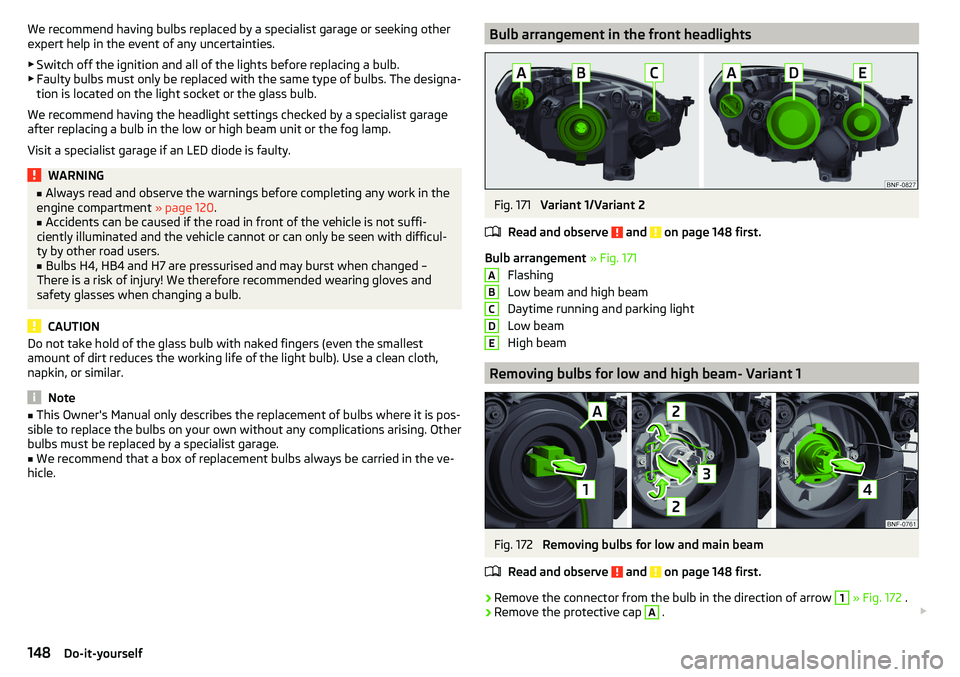
Bulb arrangement in the front headlightsFig. 171
Variant 1/Variant 2
Read and observe
and on page 148 first.
Bulb arrangement » Fig. 171
Flashing
Low beam and high beam
Daytime running and parking light
Low beam
High beam
Removing bulbs for low and high beam- Variant 1
Fig. 172
Removing bulbs for low and main beam
Read and observe
and on page 148 first.
›
Remove the connector from the bulb in the direction of arrow
1
» Fig. 172 .
›
Remove the protective cap
A
.
ABCDE148Do-it-yourself
Page 154 of 172
Technical data
Technical data
Basic vehicle data
Introduction
This chapter contains information on the following subjects:
Vehicle data
152
Operating weight
153
Payload
153
Measurement of fuel consumption and CO 2 emissions according to ECE
Regulations and EU Directives
153
Dimensions
154
Departure angle
155
The details given in the vehicle's technical documentation always take prece-
dence over the details in the Owner's Manual.
The performance values listed were determined without performance-reduc- ing equipment, e.g. air conditioning system.
The values given have been determined in accordance with regulations and in
conditions prescribed by legal or technical provisions for determining the oper-
ating and technical data of vehicles.
The listed values are for the basic model without optional equipment.
Vehicle data
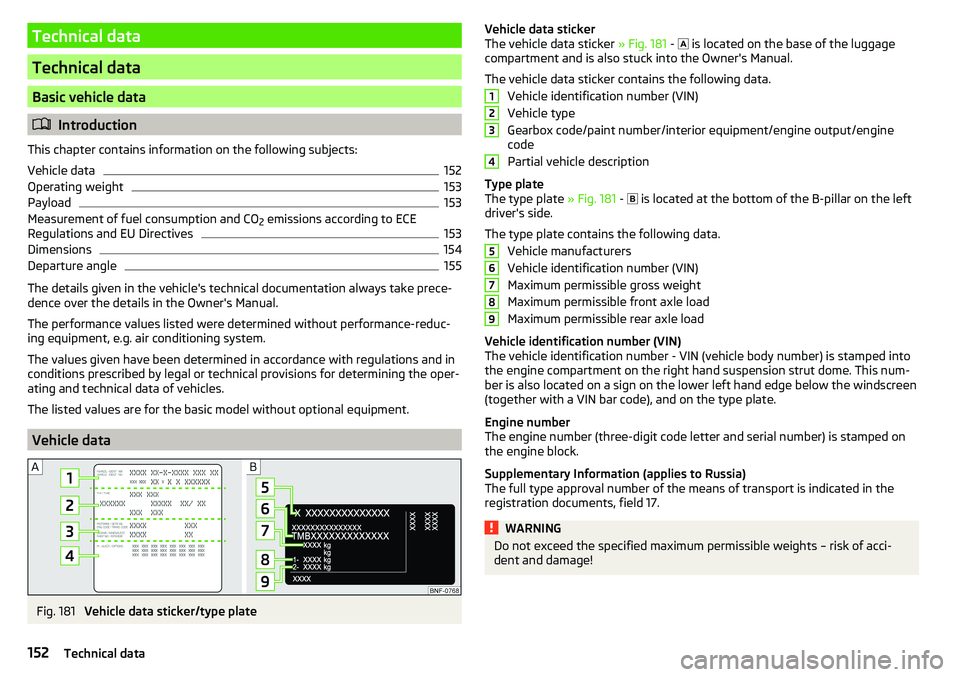
Fig. 181
Vehicle data sticker/type plate
Vehicle data sticker
The vehicle data sticker » Fig. 181 - is located on the base of the luggage
compartment and is also stuck into the Owner's Manual.
The vehicle data sticker contains the following data. Vehicle identification number (VIN)
Vehicle type
Gearbox code/paint number/interior equipment/engine output/engine code
Partial vehicle description
Type plate
The type plate » Fig. 181 -
is located at the bottom of the B-pillar on the left
driver's side.
The type plate contains the following data. Vehicle manufacturers
Vehicle identification number (VIN)
Maximum permissible gross weight
Maximum permissible front axle load
Maximum permissible rear axle load
Vehicle identification number (VIN)
The vehicle identification number - VIN (vehicle body number) is stamped into
the engine compartment on the right hand suspension strut dome. This num-
ber is also located on a sign on the lower left hand edge below the windscreen
(together with a VIN bar code), and on the type plate.
Engine number
The engine number (three-digit code letter and serial number) is stamped on the engine block.
Supplementary Information (applies to Russia)
The full type approval number of the means of transport is indicated in the
registration documents, field 17.WARNINGDo not exceed the specified maximum permissible weights – risk of acci-
dent and damage!123456789152Technical data
Page 159 of 172
Index
A
ABS Operation
104
Warning light34
Acceptance and recycling of used vehicles
112
Accessories110
Adjusting Steering wheel
13
Adjusting the seats12
Adjustment Light range
49
Adjust radio volume77
Advice on tyre/wheel usage128
Air-conditioning system Air outlet vents
74
air bag17
Airbag Adjustments and impairments to the airbagsystem
111
Deactivation20
Deployment18
Warning light35
Airbag system17
air conditioning recirculation
73
Air conditioning71
Climatronic73
Manual air conditioning72
Air outlet vents74
All-year tyres131
Alternator Warning light
32
AM82
Anti-lock braking system (ABS)104
Anti-theft wheel bolts136
Application management93
Connection93
Main menu94
Ashtray62
Assist systems103
Audio source85
Auto check control41
Automated manual transmission Kick-down
101
Tiptronic101
Automated transmission100
Automatically turn off the radio77
Automatic driving light control51
Automatic shutdown of consumers126
Automatic transmission Defect
33
Selector lever100
Starting-off and driving101
Warning light33
Automatic transmission modes100
AUX87
Avoiding damage to your vehicle102
B
Battery Change in key
142
Belts14
Belt tensioners16
Blues radio Device language settings
81
Display settings81
Factory settings81
Media menu84
Media menu settings81
menu settings80
Radio menu81
Radio menu settings80
safe removal of the data source81
Settings80
Sound settings80
Status line77
Blues Radio75
Device description76
Information on the device system81
Blues radio display76
Bluetooth profile93
Bluetooth® player87
Bonnet Closing
122
Opening122
Boot Class N1 vehicles
70
see boot lid46
Boot lid Automatic locking
46
Open/Close46
Brake Assist (HBA)104
Brake booster98
Brake fluid125
Check125
specification125
Brake pads new
98
Brake pedal - automatic transmission warning light
36
Brakes Brake booster
98
Brake fluid125
Braking and stabilisation systems103
Handbrake98
Information on braking98
Warning lights32
Brake system103
Braking Running in
102
Breakdown kit137
Breakdown service90
see Help in an emergency10
157Index
Page 160 of 172
Broadcasting range82
buttons Swing Radio
76
Buttons Blues radio
76
C
Call list Call list
92
Car battery Disconnecting and reconnecting
127
Replacing127
Car care113
Exterior115
Interior116
Car computer see Multifunction display
39
Care and maintenance110
Carrier70
Car wash113
Car washing114
Exterior115
Interior116
washing114
CD86
Central locking42
problems45
Central locking button44
Change battery
142
Changing Windscreen wiper blades
143
Changing a wheel134
Changing134
Changing gear Selector lever
100
Tiptronic101
Changing wheels Wheels
134
Charging a vehicle battery127
Check Brake fluid
125
Engine oil124
Oil level124
Checking Battery condition
127
Coolant125
Checks Statutory checks
110
Children and safety21
Child safety lock45
Child seat21
Classification23
Installation location24, 25
in the passenger seat23
ISOFIX24, 25
on the front passenger seat22
on the passenger seat23
TOP TETHER26
Cigarette lighter62
City Safe Drive107
Disable/Enable108
Warning light36
Climatronic Automatic operation
73
Operating elements73
Clothes hook65
CNG120
Gas gauge31
Gas leaks120
In an accident120
Refuelling119
Regular checks120
Sticker120
cockpit29
Cockpit Lighting
52
Comfort signalling50
COMING HOME51
Compartments59
Compressed natural gas see CNG
120
Computer see Multifunction display
39
Conditions for pairing89
Coolant124
Checking125
Refilling125
Warning light33
Correct routing of seat belt
15
Correct seated position12
Correct seating position14
Cruise control system Warning light
36
Cruise Control System106
Cup holders61
D
DAB
82
DAY LIGHT see Daylight running lights
50
Daylight running lights50
Deactivation Airbag
20
Defrosting rear window53
Delayed locking of the boot lid See boot lid
46
Departure angle155
Digital Clock37
Digital Service Plan113
Dimmed headlights49
Dipstick124
Disclaimer75
Display Cardinal points
37
Fuel31
Fuel level31
158Index
Page 161 of 172
Gear changing38
In the instrument cluster37
Natural gas supply31
Service intervals42
Display MAXI DOT41
Disposal Acceptance and recycling of used vehicles
112
Door Child safety lock
45
Emergency locking142
Opening/Closing45
Door alarm37
Door opening lever Unlock / lock
44
Drive Driving through water
102
Driving Emissions
153
Fuel consumption153
through water102
Top speed156
Trailer operation112
E
Economical driving
102
EDL104
Electric windows46
Buttons in the driver door47
Electronic Differential Lock (EDL)104
Electronic immobiliser95
Emergency Hazard warning light system
52
Jump-starting139, 140
Towing the vehicle140
Tyre repair137
Unlocking / locking the door142
Emergency call90
Emergency equipment Jack133
Reflective vest133
Vehicle tool kit133
Warning triangle133
Emergency spare Removing / stowing
135
Emission control system35
Emissions153
Engine Running in
102
Engine compartment120
Brake fluid125
Coolant124
Engine oil123
Overview122
Vehicle battery126
Windscreen washer fluid123
Engine drag torque control (MSR)104
Engine number152
engine oil specification
123
Engine oil123
Check124
Oil changing123
Refilling124
Warning light33
EPC35
ESC Operation
104
Warning light34
Extended warranty6
External devices75
F
Fasteners
68
file formats media
88
Requirements and Restrictions88
Films115
Flashing50
FM82
Fog lights/rear fog light51
Foldable hook65
Footmats100
see footmats100
Force limiter Sliding/tilting roof
48
Front seats56
fuel Refuelling - natural gas
119
Fuel117
Fuel gauge31
Gas gauge31
refer to Fuel117
Refuelling118
Unleaded petrol118
Warning light35
Fuel consumption153
Fuel reserve35
Fuses144
Assignment of fuses on the side of the dash panel
146
in the dash panel145
in the engine compartment147
G
Gear changing Gear stick
99
Information on the selected gear38
Recommended gear38
Genuine parts111
H
Handbrake
98
Warning light32
Handbrake - automatic transmission Warning light
36
159Index
Page 162 of 172
Hazard warning light system52
HBA104
Headrests57
Heating71, 72
Mirrors55
Rear window53
Seats58
Help in an emergency10
HHC104
Hill Start Assist (HHC)104
Hook68
horn29
I
Ignition lock
96
immobiliser95
Important notes75
Importing phonebook91
In an emergency Changing a wheel
134
Inertia reels16
Information about the towing process140
Information service90
Information system37
Door alarm37
MAXI DOT display41
Service interval display42
Instrument cluster30
See instrument cluster30
Warning lights31
Interior light52
ISOFIX24, 25
J
Jack
133
- fit136
Jump-starting139, 140
K
Key Change battery
142
Lock43
Starting/Stopping the engine95
Unlock43
L
LEAVING HOME
51
lever Turn signal/main beam
50
Lever Cruise control
106
Operating the information system39
Windscreen wipers54
Lever operation100
light Flash
50
Fog lights/rear fog light51
Light Automatic driving light control
51
Cockpit52
COMING HOME / LEAVING HOME51
Dimmed headlights49
Headlight range control49
on and off49
Parking light52
Replacing bulbs147
Sidelights49
Turn signal/main beam50
Light bulbs Replacing
147
Lighting Interior lighting
52
Luggage compartment67
Light on and off49
Lights49
Abroad52
Daylight running50
Hazard warning light system52
Warning lights31
List of available stations
83
of telephone contacts91
With folder / track list84
List of paired Bluetooth devices93
Load153
Loading floor69
Lock Key
43
Locking Central locking button
44
in case of emergency142
Remote control43
locking the steering lock95
Low tyre pressure warning refer to the tyre pressure monitoring
108
Luggage compartment67
Cover69
Fasteners68
Fixing nets68
Hook68
Lighting67
unlock manually142
Unlock the boot lid142
Variable loading floor69
Luggage compartment cover69
Luggage compartment lid46
M
Main beam
50
Warning light36
Main menu Application management
94
Media84
Radio82
Managing paired Bluetooth devices93
160Index
Page 163 of 172
Manual air conditioningControls72
Manual gear changing see gear changing
99
Materials defect liability5
MAXI DOT See MAXI DOT display
41
MAXI DOT display Main menu
41
Menu item Audio41
Service39
Settings41
Mechanical window openers47
media Compatible sources
88
file formats88
Requirements and Restrictions88
Media84
Audio source85
AUX87
Bluetooth® audio87
Browser84
CD86
List84
Main menu84
Playback control85
safe removal of Blues radio data source81
safe removal of the Swing radio data source79
SD-card86
USB87
Memory40
Mirror55
Vanity53
Mobile phone75
mobility warranty6
Modifications and technical alterations110
Trailer operation112
MSR104
Multi-media AUX
87
Multifunction displayData39
Functions39
Memory40
Service39
Multimedia USB
87
Multimedia holder63
N
N1
70
Nameplate152
Nets68
NGVs see CNG
120
O
oil see Engine oil
124
Oil changing Engine oil
123
On-board computer See multifunction display
39
Online Owner's Manual8
Operating weight153
Operation Telephone
90
Operation in winter Vehicle battery
127
Original accessories111
overview cockpit
29
Overview Engine compartment
122
Fuses144
Warning lights31
P
Pairing process
89
Parking99
Parking aid105
Parking aid105
Function105
Parking sensors Display on the radio display
106
Parking the vehicle see Parking
99
Park Pilot105
Parts replacement110
Passive safety Before setting off
12
Driving safety12
Passive Safety12
Pedals100
Footmats100
Petrol118
Phone88
Bluetooth profile93
Breakdown service90
Delete favourite92
Delete paired device93
Dialilng phone number90
Emergency call90
Enter phone number90
Establishing conection89
Establishing connections93
Information service90
Pairing process89
Phone call92
Preferred contacts91
Save favourite91
Select favourites91
Phone bracket66
Phone call92
Phone number90
Pocket holder65
Pockets65
Power limit Tilt / slide sunroof
48
161Index