ad blue SKODA CITIGO 2017 User Guide
[x] Cancel search | Manufacturer: SKODA, Model Year: 2017, Model line: CITIGO, Model: SKODA CITIGO 2017Pages: 172, PDF Size: 24.54 MB
Page 85 of 172
Scan through the stations one after the other (SCAN)
The function scans through all the available stations in the current frequency range in succession, for a few seconds each.›
To start/finish automatic playback of the available stations, press the dial in
the Radio main menu
.
List of available stations
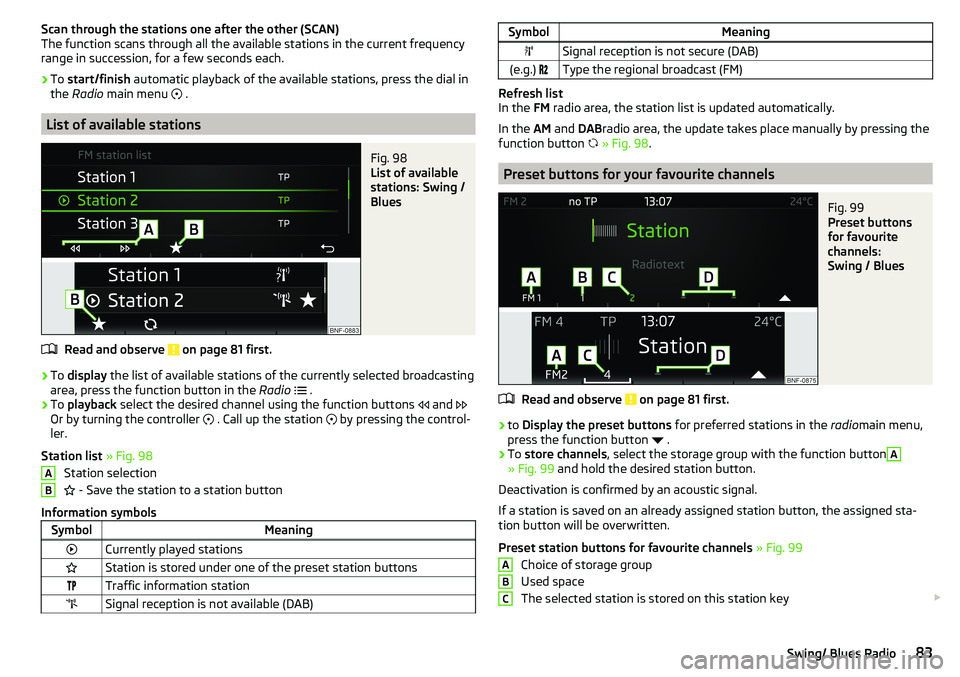
Fig. 98
List of available
stations: Swing /
Blues
Read and observe on page 81 first.
›
To display the list of available stations of the currently selected broadcasting
area, press the function button in the Radio
.
›
To playback select the desired channel using the function buttons
and
Or by turning the controller
. Call up the station
by pressing the control-
ler.
Station list » Fig. 98
Station selection
- Save the station to a station button
Information symbols
SymbolMeaningCurrently played stationsStation is stored under one of the preset station buttonsTraffic information stationSignal reception is not available (DAB)ABSymbolMeaningSignal reception is not secure (DAB)(e.g.) Type the regional broadcast (FM)
Refresh list
In the FM radio area, the station list is updated automatically.
In the AM and DABradio area, the update takes place manually by pressing the
function button
» Fig. 98 .
Preset buttons for your favourite channels
Fig. 99
Preset buttons
for favourite
channels:
Swing / Blues
Read and observe on page 81 first.
›
to Display the preset buttons for preferred stations in the radiomain menu,
press the function button
.
›
To store channels , select the storage group with the function button
A
» Fig. 99 and hold the desired station button.
Deactivation is confirmed by an acoustic signal.
If a station is saved on an already assigned station button, the assigned sta-
tion button will be overwritten.
Preset station buttons for favourite channels » Fig. 99
Choice of storage group
Used space
The selected station is stored on this station key
ABC83Swing/ Blues Radio
Page 86 of 172
Unused space
Return to Radio Main menu
There 12 (applies to swing) Or 9 (applies to blues) Station keys for storing pre-
ferred stations available n each broadcast area respectively, that are split in
three storage groups e.g. FM1, FM2, FM3).
Media
Introduction
This chapter contains information on the following subjects:
Main menu
84
Folder / track list
84
Playback control
85
Play and select audio source
85
SD-card
86
CD
86
USB input
87
AUX - input
87
Bluetooth ®
player
87
Supported audio sources and file formats
88
Main menu
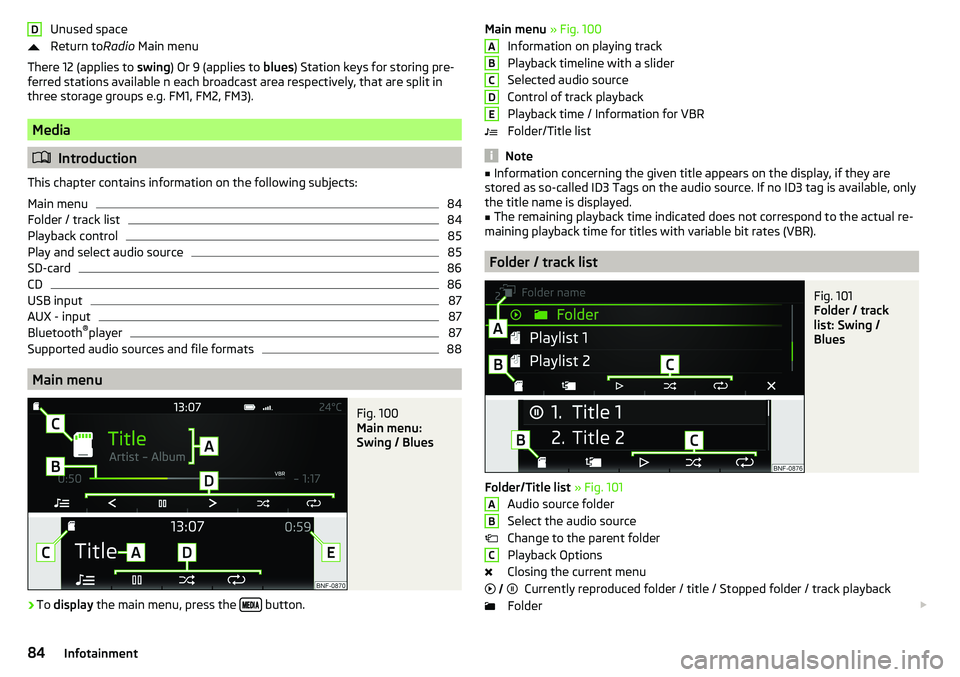
Fig. 100
Main menu:
Swing / Blues
›
To display the main menu, press the button.
DMain menu
» Fig. 100
Information on playing track
Playback timeline with a slider
Selected audio source
Control of track playback
Playback time / Information for VBR
Folder/Title list
Note
■ Information concerning the given title appears on the display, if they are
stored as so-called ID3 Tags on the audio source. If no ID3 tag is available, only the title name is displayed.■
The remaining playback time indicated does not correspond to the actual re-
maining playback time for titles with variable bit rates (VBR).
Folder / track list
Fig. 101
Folder / track
list: Swing /
Blues
Folder/Title list » Fig. 101
Audio source folder
Select the audio source
Change to the parent folder
Playback Options
Closing the current menu Currently reproduced folder / title / Stopped folder / track playback
Folder
ABCDEABC
84Infotainment
Page 87 of 172
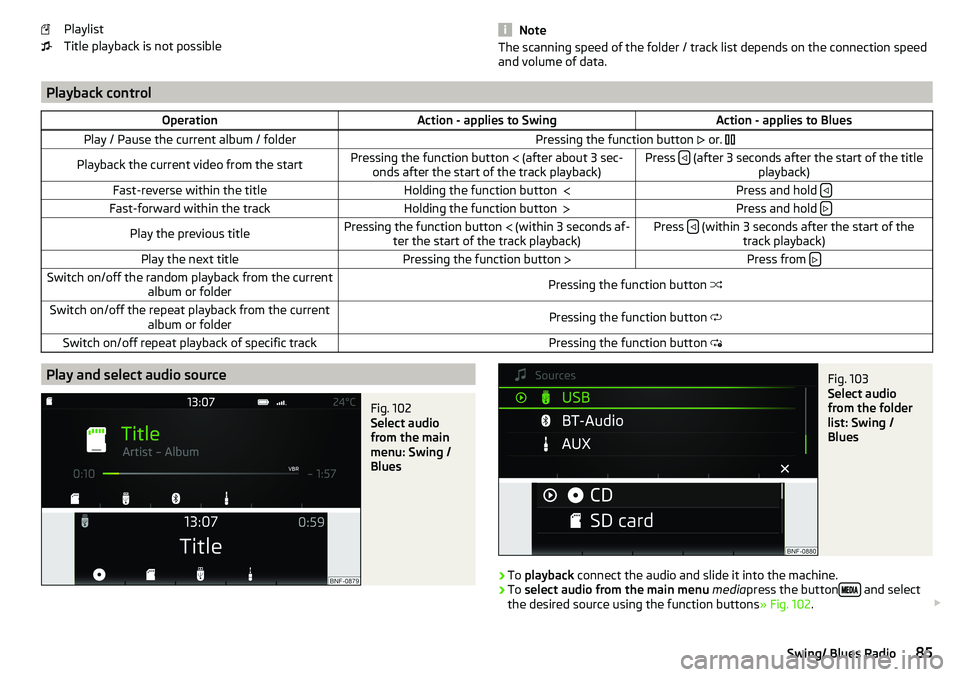
Playlist
Title playback is not possible
NoteThe scanning speed of the folder / track list depends on the connection speed
and volume of data.
Playback controlOperationAction - applies to SwingAction - applies to BluesPlay / Pause the current album / folderPressing the function button or. Playback the current video from the startPressing the function button (after about 3 sec-
onds after the start of the track playback)Press (after 3 seconds after the start of the title
playback)Fast-reverse within the titleHolding the function button Press and hold Fast-forward within the trackHolding the function button
Press and hold Play the previous titlePressing the function button
(within 3 seconds af-
ter the start of the track playback)Press (within 3 seconds after the start of the
track playback)Play the next titlePressing the function button Press from Switch on/off the random playback from the current
album or folderPressing the function button Switch on/off the repeat playback from the current
album or folderPressing the function button Switch on/off repeat playback of specific trackPressing the function button Play and select audio sourceFig. 102
Select audio
from the main
menu: Swing /
Blues
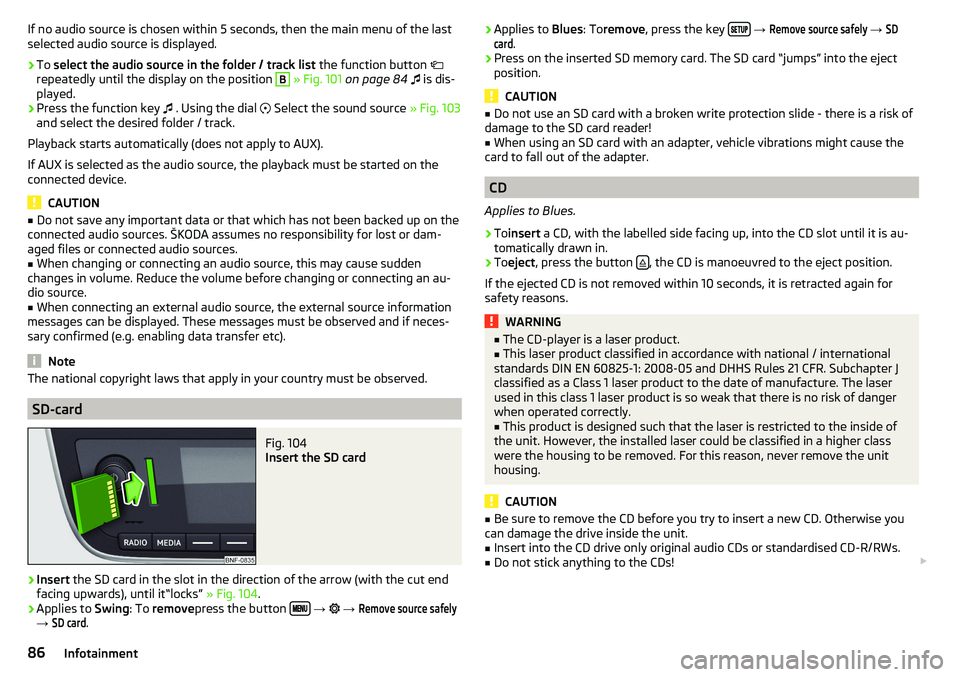
Fig. 103
Select audio
from the folder
list: Swing /
Blues
›
To playback connect the audio and slide it into the machine.
›
To select audio from the main menu media press the button and select
the desired source using the function buttons » Fig. 102.
85Swing/ Blues Radio
Page 88 of 172
If no audio source is chosen within 5 seconds, then the main menu of the last
selected audio source is displayed.›
To select the audio source in the folder / track list the function button
repeatedly until the display on the position
B
» Fig. 101 on page 84
is dis-
played.
›
Press the function key
. Using the dial
Select the sound source » Fig. 103
and select the desired folder / track.
Playback starts automatically (does not apply to AUX).
If AUX is selected as the audio source, the playback must be started on the
connected device.
CAUTION
■ Do not save any important data or that which has not been backed up on the
connected audio sources. ŠKODA assumes no responsibility for lost or dam-
aged files or connected audio sources.■
When changing or connecting an audio source, this may cause sudden
changes in volume. Reduce the volume before changing or connecting an au-
dio source.
■
When connecting an external audio source, the external source information
messages can be displayed. These messages must be observed and if neces-
sary confirmed (e.g. enabling data transfer etc).
Note
The national copyright laws that apply in your country must be observed.
SD-card
Fig. 104
Insert the SD card
›
Insert the SD card in the slot in the direction of the arrow (with the cut end
facing upwards), until it“locks” » Fig. 104.
›
Applies to Swing: To remove press the button
→
→
Remove source safely
→
SD card
.
› Applies to
Blues: Toremove , press the key
→ Remove source safely → SDcard
.›
Press on the inserted SD memory card. The SD card “jumps” into the eject
position.
CAUTION
■ Do not use an SD card with a broken write protection slide - there is a risk of
damage to the SD card reader!■
When using an SD card with an adapter, vehicle vibrations might cause the
card to fall out of the adapter.
CD
Applies to Blues.
›
To insert a CD, with the labelled side facing up, into the CD slot until it is au-
tomatically drawn in.
›
To eject , press the button , the CD is manoeuvred to the eject position.
If the ejected CD is not removed within 10 seconds, it is retracted again for
safety reasons.
WARNING■ The CD-player is a laser product.■This laser product classified in accordance with national / international
standards DIN EN 60825-1: 2008-05 and DHHS Rules 21 CFR. Subchapter J
classified as a Class 1 laser product to the date of manufacture. The laser
used in this class 1 laser product is so weak that there is no risk of danger
when operated correctly.■
This product is designed such that the laser is restricted to the inside of
the unit. However, the installed laser could be classified in a higher class
were the housing to be removed. For this reason, never remove the unit
housing.
CAUTION
■ Be sure to remove the CD before you try to insert a new CD. Otherwise you
can damage the drive inside the unit.■
Insert into the CD drive only original audio CDs or standardised CD-R/RWs.
■
Do not stick anything to the CDs!
86Infotainment
Page 89 of 172
■If the ambient temperature is too high or too low, the CD playback may not
function properly.■
Damp (condensation) may affect the device in cold weather or high humidity.
This can cause the CD to jump or impair the play function. Once the moisture
has dissipated, playback is fully functional again.
Note
■ After pressing the button , there is a delay of a few seconds before the CD
is ejected.■
On uneven or unpaved roads, playback jumps may occur.
■
If the CD is damaged, is not readable or is inserted incorrectly, the following
message is displayed
CD is unreadable
.
■
It is possible that CDs protected by copyright cannot not be played back at all
or only in certain circumstances.
USB input
Fig. 105
USB input: in the front centre console / in the dashboard
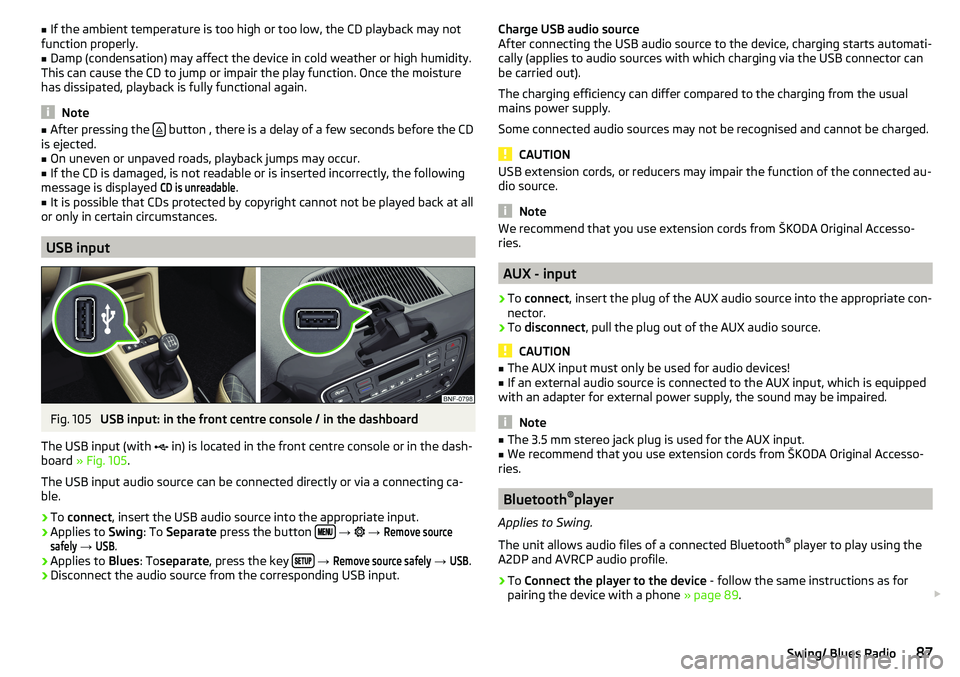
The USB input (with in) is located in the front centre console or in the dash-
board » Fig. 105 .
The USB input audio source can be connected directly or via a connecting ca-
ble.
›
To connect , insert the USB audio source into the appropriate input.
›
Applies to Swing: To Separate press the button
→
→
Remove sourcesafely
→
USB
.
›
Applies to Blues: Toseparate , press the key
→
Remove source safely
→
USB
.
›
Disconnect the audio source from the corresponding USB input.
Charge USB audio source
After connecting the USB audio source to the device, charging starts automati-
cally (applies to audio sources with which charging via the USB connector can
be carried out).
The charging efficiency can differ compared to the charging from the usual
mains power supply.
Some connected audio sources may not be recognised and cannot be charged.
CAUTION
USB extension cords, or reducers may impair the function of the connected au-
dio source.
Note
We recommend that you use extension cords from ŠKODA Original Accesso-
ries.
AUX - input
›
To connect , insert the plug of the AUX audio source into the appropriate con-
nector.
›
To disconnect , pull the plug out of the AUX audio source.
CAUTION
■
The AUX input must only be used for audio devices!■If an external audio source is connected to the AUX input, which is equipped
with an adapter for external power supply, the sound may be impaired.
Note
■ The 3.5 mm stereo jack plug is used for the AUX input.■We recommend that you use extension cords from ŠKODA Original Accesso-
ries.
Bluetooth ®
player
Applies to Swing.
The unit allows audio files of a connected Bluetooth ®
player to play using the
A2DP and AVRCP audio profile.
›
To Connect the player to the device - follow the same instructions as for
pairing the device with a phone » page 89.
87Swing/ Blues Radio
Page 90 of 172
›To
Separate , end the connection by pressing the button
→ → Blue-tooth
→
Bluetooth audio (A2DP / AVRCP)
.
Supported audio sources and file formats
Supported audio sources
SourceInterfaceTypeSpecificationFile sys- temSD cardSD readerStandard sizeSD, SDHC, SDXC
FAT16
FAT32
exFATUSB-
devices
USB 1.x; 2.x and 3.x or
higher with support of USB 2.x
MSC
USB stick;
HDD (without any special software);
The MSC mode sup- ports USB devices
MTP
Devices with the
Android operating
system or Windows mobile (mobilephone, tablet)AppleDevices with the iOS operating system
(iPhone, iPod, iPad)CD
(Applies to blues)CD
-DriveAudio CD (Up to 80 min);
CD-R / RW (Up to 700 MB);ISO9660;
Joliet (Level 1,2,3); UDF 1.x;UDF 2.x
-
Supported audio file formats
Codec type
(File formats)File suffixMax. bit rateMaximum sampling ratePlaylistsWindows Media Audio
9 and 10wma384 kbit / s
48 kHz
m3u pls
wpl
m3u8 asxMPEG-1 and 2 Layer 3mp3320 kbit / s
The audio sources divided into areas using GPT standards (GUID partition ta-
ble) are not supported by the device.
Files that are protected by Digital Rights Management (DRM) technology can-
not be played back by the device.
Phone
Introduction
Applies to Swing.
This chapter contains information on the following subjects:
Conditions for pairing
89
Pairing and connection process
89
Telephone
90
Enter and select phone number
90
List of telephone contacts
91
Preferred contacts (favourites)
91
Call list
92
Phone call
92
Managing paired Bluetooth devices
93
This chapter covers the operation of a Bluetooth ®
device connected to the tel-
ephone.
To pair a telephone with the device using Bluetooth ®
, it is necessary to pair
the two devices.
The range of the connection to the hands-free system is limited to the passen-
ger compartment.
With the device, a phone can be connected. The telephone can also be a Blue-
tooth ®
player at the same time.
Up to 20 external devices can be paired with the device. After reaching the
maximum number, the pairing of the next external device will replace that of
the device that has not been used for the longest period of time.
A connection with a telephone that is already paired does not require pairing. It is enough to find the telephone that has been paired in the list of paired
phones and make the connection.
For phones with multiple SIM cards,calls can be answered using any SIM card
from the connected phone depending on the model of the connected phone.
For outgoing calls, it depends on the type of connected telephone, either only
the primary SIM card or one of the other SIM cards can be selected.
88Infotainment
Page 91 of 172
Information on the compatibility of phones can be found on the following
ŠKODAInternet sites.
http://go.skoda.eu/compatibility
Conditions for pairing
The telephone can be paired with the device under the following conditions. The ignition is switched on.
The Bluetooth ®
function of the device and the telephone is switched on.
The visibility of the device and the telephone is switched on.
The telephone is within range of the Bluetooth ®
signal of the device.
The telephone is compatible with the device.
The telephone is connected to an external Bluetooth ®
device (e.g. “head-
set”).
Pairing and connection process
Fig. 106
No phone con-
nected
Fig. 107
List of Blue-
tooth® devices
found / list of
paired phones
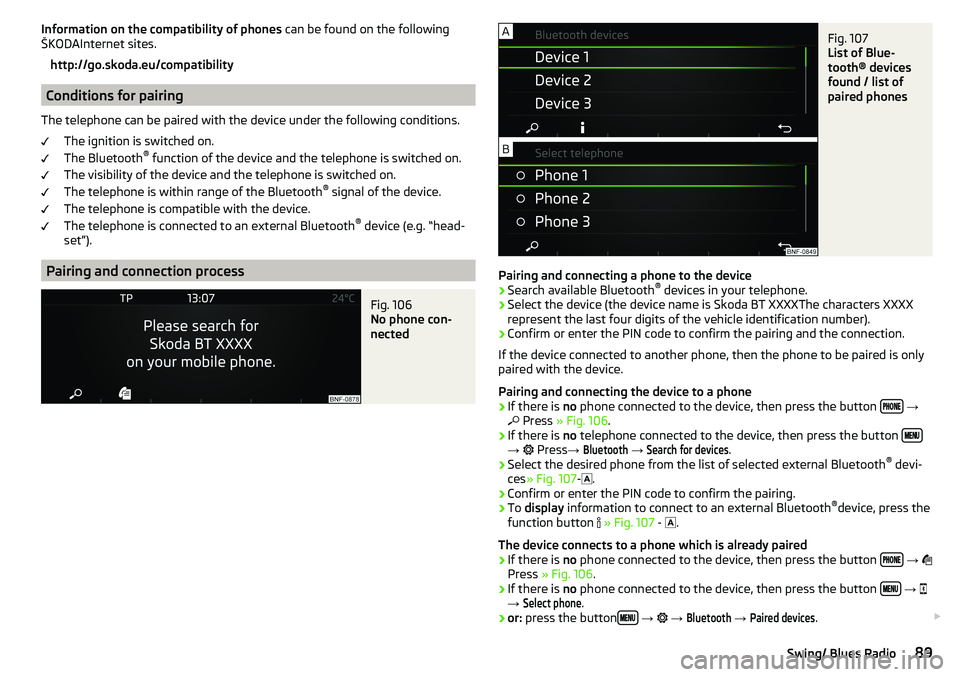
Pairing and connecting a phone to the device
›
Search available Bluetooth ®
devices in your telephone.
›
Select the device (the device name is Skoda BT XXXXThe characters XXXX
represent the last four digits of the vehicle identification number).
›
Confirm or enter the PIN code to confirm the pairing and the connection.
If the device connected to another phone, then the phone to be paired is only
paired with the device.
Pairing and connecting the device to a phone
›
If there is no phone connected to the device, then press the button
→
Press » Fig. 106 .
›
If there is no telephone connected to the device, then press the button →
Press →
Bluetooth
→
Search for devices
.
›
Select the desired phone from the list of selected external Bluetooth ®
devi-
ces » Fig. 107 -
.
›
Confirm or enter the PIN code to confirm the pairing.
›
To display information to connect to an external Bluetooth ®
device, press the
function button
» Fig. 107 -
.
The device connects to a phone which is already paired
›
If there is no phone connected to the device, then press the button
→
Press » Fig. 106 .
›
If there is no phone connected to the device, then press the button
→
→
Select phone
.
›
or: press the button
→
→
Bluetooth
→
Paired devices
.
89Swing/ Blues Radio
Page 92 of 172
›Select the phone
» Fig. 107 - or an external Bluetooth ®
-Device » Fig. 115 on
page 93 - in the list shown.
Telephone
Fig. 108
Main menu
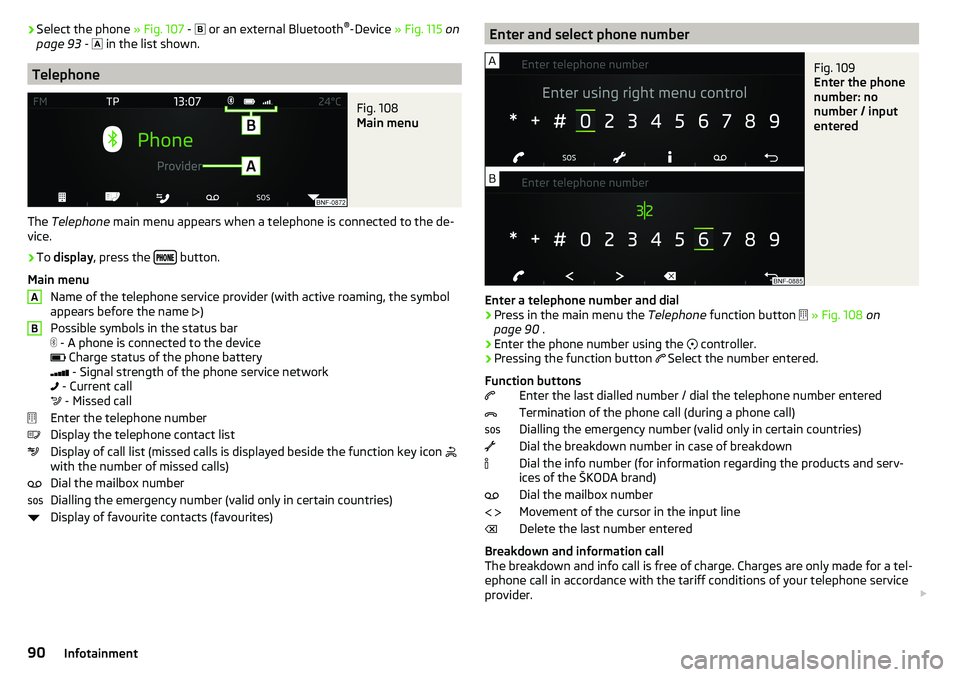
The Telephone main menu appears when a telephone is connected to the de-
vice.
›
To display , press the button.
Main menu Name of the telephone service provider (with active roaming, the symbol
appears before the name )
Possible symbols in the status bar
- A phone is connected to the device
Charge status of the phone battery
- Signal strength of the phone service network
- Current call
- Missed call
Enter the telephone number
Display the telephone contact list
Display of call list (missed calls is displayed beside the function key icon
with the number of missed calls)
Dial the mailbox number
Dialling the emergency number (valid only in certain countries)
Display of favourite contacts (favourites)
ABEnter and select phone numberFig. 109
Enter the phone
number: no
number / input
entered
Enter a telephone number and dial
›
Press in the main menu the Telephone function button
» Fig. 108 on
page 90 .
›
Enter the phone number using the
controller.
›
Pressing the function button
Select the number entered.
Function buttons Enter the last dialled number / dial the telephone number entered
Termination of the phone call (during a phone call)
Dialling the emergency number (valid only in certain countries)
Dial the breakdown number in case of breakdown
Dial the info number (for information regarding the products and serv-
ices of the ŠKODA brand)
Dial the mailbox number
Movement of the cursor in the input line
Delete the last number entered
Breakdown and information call
The breakdown and info call is free of charge. Charges are only made for a tel-
ephone call in accordance with the tariff conditions of your telephone service
provider.
90Infotainment
Page 93 of 172
The phone numbers are already set at the factory. If you want to change the
numbers, then consult a ŠKODA service partner.
If no breakdown or Info calls can be made then consult a ŠKODA service part-
ner.
List of telephone contacts
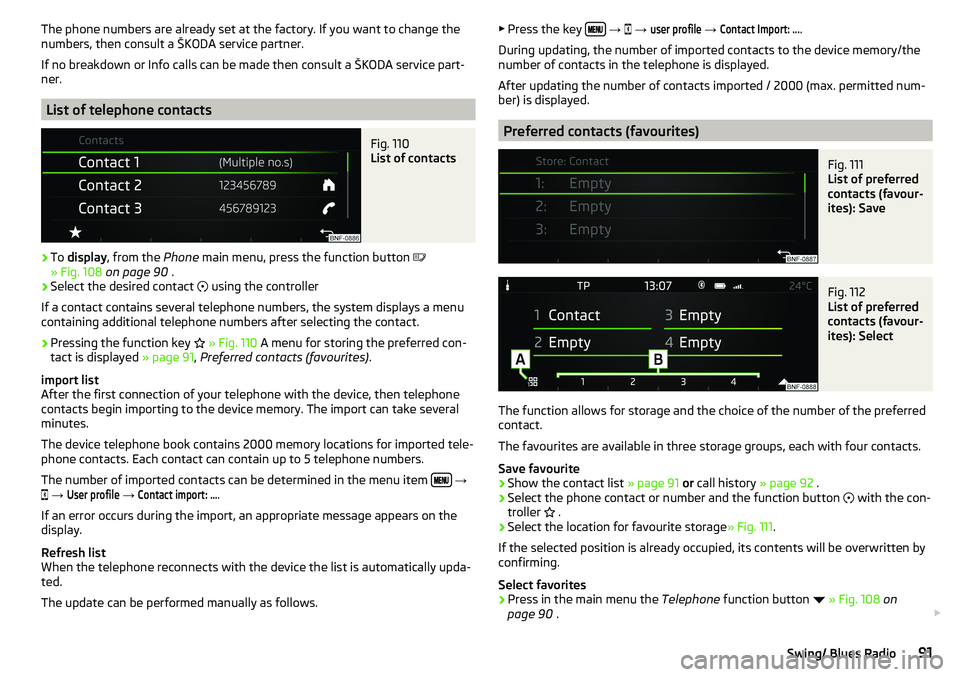
Fig. 110
List of contacts
›
To display , from the Phone main menu, press the function button
» Fig. 108 on page 90 .
›
Select the desired contact
using the controller
If a contact contains several telephone numbers, the system displays a menu
containing additional telephone numbers after selecting the contact.
›
Pressing the function key
» Fig. 110 A menu for storing the preferred con-
tact is displayed » page 91, Preferred contacts (favourites) .
import list
After the first connection of your telephone with the device, then telephone
contacts begin importing to the device memory. The import can take several
minutes.
The device telephone book contains 2000 memory locations for imported tele-
phone contacts. Each contact can contain up to 5 telephone numbers.
The number of imported contacts can be determined in the menu item
→
→
User profile
→
Contact import: ...
.
If an error occurs during the import, an appropriate message appears on the
display.
Refresh list
When the telephone reconnects with the device the list is automatically upda-
ted.
The update can be performed manually as follows.
▶ Press the key
→ → user profile → Contact Import: ....
During updating, the number of imported contacts to the device memory/the
number of contacts in the telephone is displayed.
After updating the number of contacts imported / 2000 (max. permitted num-
ber) is displayed.
Preferred contacts (favourites)
Fig. 111
List of preferred
contacts (favour-
ites): Save
Fig. 112
List of preferred
contacts (favour-
ites): Select
The function allows for storage and the choice of the number of the preferred
contact.
The favourites are available in three storage groups, each with four contacts.
Save favourite
›
Show the contact list » page 91 or call history » page 92 .
›
Select the phone contact or number and the function button
with the con-
troller .
›
Select the location for favourite storage
» Fig. 111.
If the selected position is already occupied, its contents will be overwritten by
confirming.
Select favorites
›
Press in the main menu the Telephone function button
» Fig. 108 on
page 90 .
91Swing/ Blues Radio
Page 95 of 172
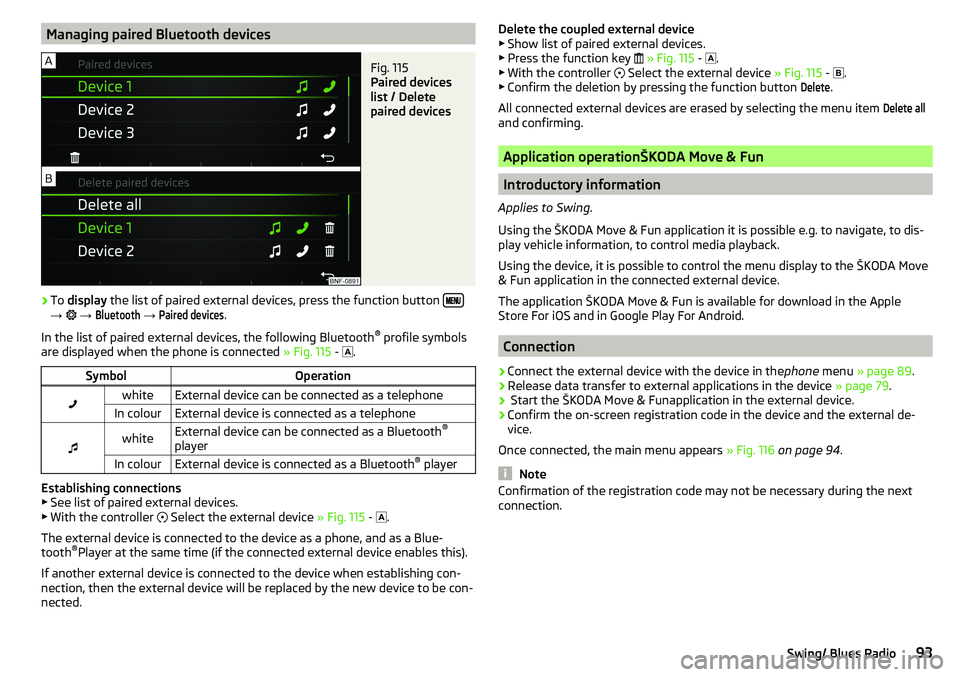
Managing paired Bluetooth devicesFig. 115
Paired devices
list / Delete
paired devices
›
To display the list of paired external devices, press the function button →
→
Bluetooth
→
Paired devices
.
In the list of paired external devices, the following Bluetooth ®
profile symbols
are displayed when the phone is connected » Fig. 115 -
.
SymbolOperationwhiteExternal device can be connected as a telephoneIn colourExternal device is connected as a telephone
whiteExternal device can be connected as a Bluetooth ®
playerIn colourExternal device is connected as a Bluetooth ®
player
Establishing connections
▶ See list of paired external devices.
▶ With the controller
Select the external device » Fig. 115 -
.
The external device is connected to the device as a phone, and as a Blue-
tooth ®
Player at the same time (if the connected external device enables this).
If another external device is connected to the device when establishing con-
nection, then the external device will be replaced by the new device to be con-
nected.
Delete the coupled external device ▶ Show list of paired external devices.
▶ Press the function key
» Fig. 115 -
.
▶ With the controller
Select the external device » Fig. 115 -
.
▶ Confirm the deletion by pressing the function button Delete
.
All connected external devices are erased by selecting the menu item
Delete all
and confirming.
Application operationŠKODA Move & Fun
Introductory information
Applies to Swing.
Using the ŠKODA Move & Fun application it is possible e.g. to navigate, to dis-
play vehicle information, to control media playback.
Using the device, it is possible to control the menu display to the ŠKODA Move
& Fun application in the connected external device.
The application ŠKODA Move & Fun is available for download in the Apple
Store For iOS and in Google Play For Android.
Connection
›
Connect the external device with the device in the phone menu » page 89 .
›
Release data transfer to external applications in the device » page 79.
›
Start the ŠKODA Move & Funapplication in the external device.
›
Confirm the on-screen registration code in the device and the external de-
vice.
Once connected, the main menu appears » Fig. 116 on page 94 .
Note
Confirmation of the registration code may not be necessary during the next
connection.93Swing/ Blues Radio