air condition SKODA CITIGO 2017 User Guide
[x] Cancel search | Manufacturer: SKODA, Model Year: 2017, Model line: CITIGO, Model: SKODA CITIGO 2017Pages: 172, PDF Size: 24.54 MB
Page 76 of 172
›To the
turn on move the slider D into position or press the button in
Climatronic.›
To Turn off move the slider
D
into position
or press the button
in Cli-
matronic.
WARNINGThe recirculation system cannot be switched on for a longer period of time,
because no fresh air is fed through from the outside. “Stale air” may result
in fatigue in the driver and occupants, reduce attention levels and also
cause the windows to mist up. As soon as windows mist up, turn on the re-
circulation system immediately - risk of accident!
CAUTION
We recommend not smoking in the vehicle when the recirculating air operation
is switched on. The smoke sucked from the interior is deposited on the evapo-
rator of the air conditioner. This produces a permanent odour when the air
conditioning system is operating which can only be eliminated through consid-
erable effort and expense (replacement of compressor).
Air outlet vents
Fig. 89
Air outlet vents
Read and observe
on page 72 first.
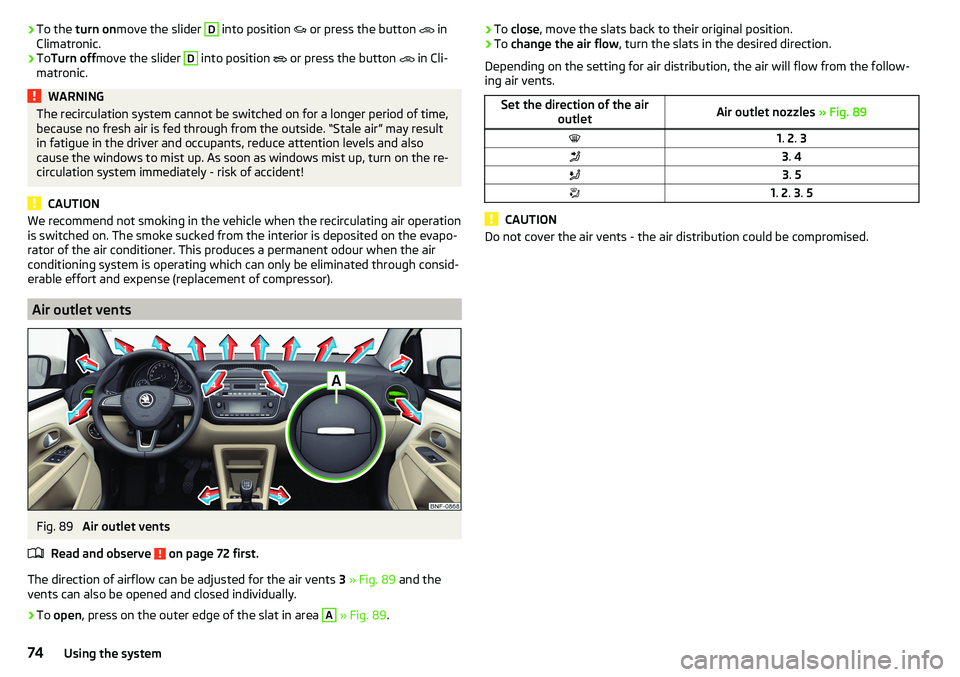
The direction of airflow can be adjusted for the air vents 3 » Fig. 89 and the
vents can also be opened and closed individually.
›
To open , press on the outer edge of the slat in area
A
» Fig. 89 .
›To
close , move the slats back to their original position.›To change the air flow , turn the slats in the desired direction.
Depending on the setting for air distribution, the air will flow from the follow-
ing air vents.Set the direction of the air outletAir outlet nozzles » Fig. 891. 2 . 33 . 43 . 51. 2 . 3 . 5
CAUTION
Do not cover the air vents - the air distribution could be compromised.74Using the system
Page 90 of 172
›To
Separate , end the connection by pressing the button
→ → Blue-tooth
→
Bluetooth audio (A2DP / AVRCP)
.
Supported audio sources and file formats
Supported audio sources
SourceInterfaceTypeSpecificationFile sys- temSD cardSD readerStandard sizeSD, SDHC, SDXC
FAT16
FAT32
exFATUSB-
devices
USB 1.x; 2.x and 3.x or
higher with support of USB 2.x
MSC
USB stick;
HDD (without any special software);
The MSC mode sup- ports USB devices
MTP
Devices with the
Android operating
system or Windows mobile (mobilephone, tablet)AppleDevices with the iOS operating system
(iPhone, iPod, iPad)CD
(Applies to blues)CD
-DriveAudio CD (Up to 80 min);
CD-R / RW (Up to 700 MB);ISO9660;
Joliet (Level 1,2,3); UDF 1.x;UDF 2.x
-
Supported audio file formats
Codec type
(File formats)File suffixMax. bit rateMaximum sampling ratePlaylistsWindows Media Audio
9 and 10wma384 kbit / s
48 kHz
m3u pls
wpl
m3u8 asxMPEG-1 and 2 Layer 3mp3320 kbit / s
The audio sources divided into areas using GPT standards (GUID partition ta-
ble) are not supported by the device.
Files that are protected by Digital Rights Management (DRM) technology can-
not be played back by the device.
Phone
Introduction
Applies to Swing.
This chapter contains information on the following subjects:
Conditions for pairing
89
Pairing and connection process
89
Telephone
90
Enter and select phone number
90
List of telephone contacts
91
Preferred contacts (favourites)
91
Call list
92
Phone call
92
Managing paired Bluetooth devices
93
This chapter covers the operation of a Bluetooth ®
device connected to the tel-
ephone.
To pair a telephone with the device using Bluetooth ®
, it is necessary to pair
the two devices.
The range of the connection to the hands-free system is limited to the passen-
ger compartment.
With the device, a phone can be connected. The telephone can also be a Blue-
tooth ®
player at the same time.
Up to 20 external devices can be paired with the device. After reaching the
maximum number, the pairing of the next external device will replace that of
the device that has not been used for the longest period of time.
A connection with a telephone that is already paired does not require pairing. It is enough to find the telephone that has been paired in the list of paired
phones and make the connection.
For phones with multiple SIM cards,calls can be answered using any SIM card
from the connected phone depending on the model of the connected phone.
For outgoing calls, it depends on the type of connected telephone, either only
the primary SIM card or one of the other SIM cards can be selected.
88Infotainment
Page 91 of 172
Information on the compatibility of phones can be found on the following
ŠKODAInternet sites.
http://go.skoda.eu/compatibility
Conditions for pairing
The telephone can be paired with the device under the following conditions. The ignition is switched on.
The Bluetooth ®
function of the device and the telephone is switched on.
The visibility of the device and the telephone is switched on.
The telephone is within range of the Bluetooth ®
signal of the device.
The telephone is compatible with the device.
The telephone is connected to an external Bluetooth ®
device (e.g. “head-
set”).
Pairing and connection process
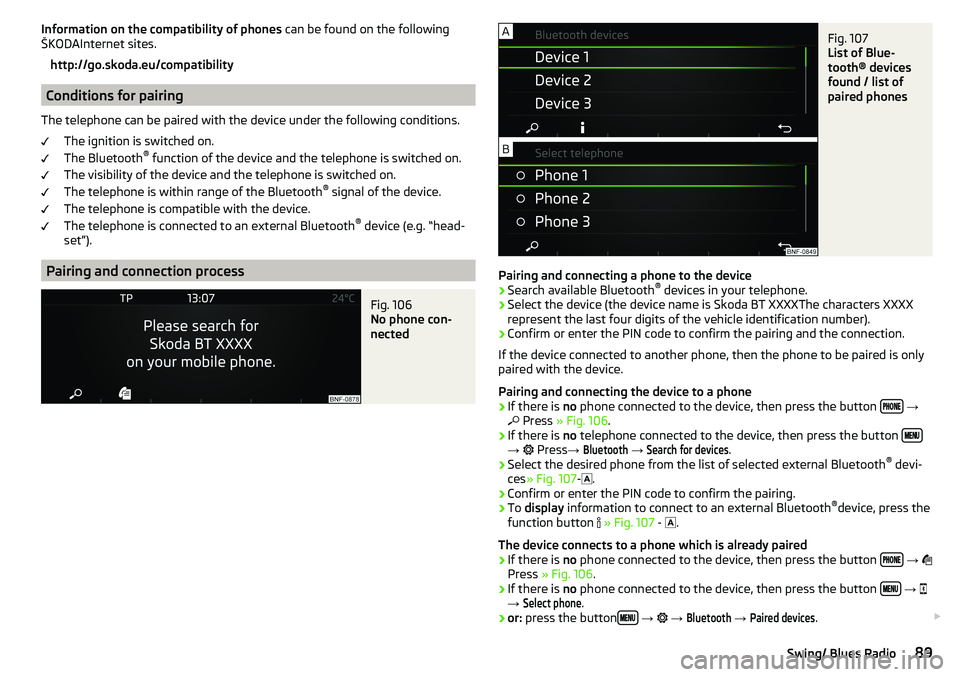
Fig. 106
No phone con-
nected
Fig. 107
List of Blue-
tooth® devices
found / list of
paired phones
Pairing and connecting a phone to the device
›
Search available Bluetooth ®
devices in your telephone.
›
Select the device (the device name is Skoda BT XXXXThe characters XXXX
represent the last four digits of the vehicle identification number).
›
Confirm or enter the PIN code to confirm the pairing and the connection.
If the device connected to another phone, then the phone to be paired is only
paired with the device.
Pairing and connecting the device to a phone
›
If there is no phone connected to the device, then press the button
→
Press » Fig. 106 .
›
If there is no telephone connected to the device, then press the button →
Press →
Bluetooth
→
Search for devices
.
›
Select the desired phone from the list of selected external Bluetooth ®
devi-
ces » Fig. 107 -
.
›
Confirm or enter the PIN code to confirm the pairing.
›
To display information to connect to an external Bluetooth ®
device, press the
function button
» Fig. 107 -
.
The device connects to a phone which is already paired
›
If there is no phone connected to the device, then press the button
→
Press » Fig. 106 .
›
If there is no phone connected to the device, then press the button
→
→
Select phone
.
›
or: press the button
→
→
Bluetooth
→
Paired devices
.
89Swing/ Blues Radio
Page 99 of 172
OperationFig. 118
Display
Vehicles with manual transmission
The engine is automatically switched offas soon as the vehicle comes to a halt,
the shift lever is moved into neutral and the clutch pedal is released.
The engine is automatically startedas soon as the clutch pedal is depressed.
Vehicles with automatic transmission
The engine is automatically switched offas soon as the vehicle comes to a
standstill and the brake pedal is operated.
The engine is automatically startedas soon as the brake pedal is released.
Requirements for the system to function correctly
The following conditions must be met for the system to function correctly.
The driver's door is closed.
The driver has fastened the seat belt.
The bonnet is closed.
The driving speed was higher than 4 km/h after the last stop.
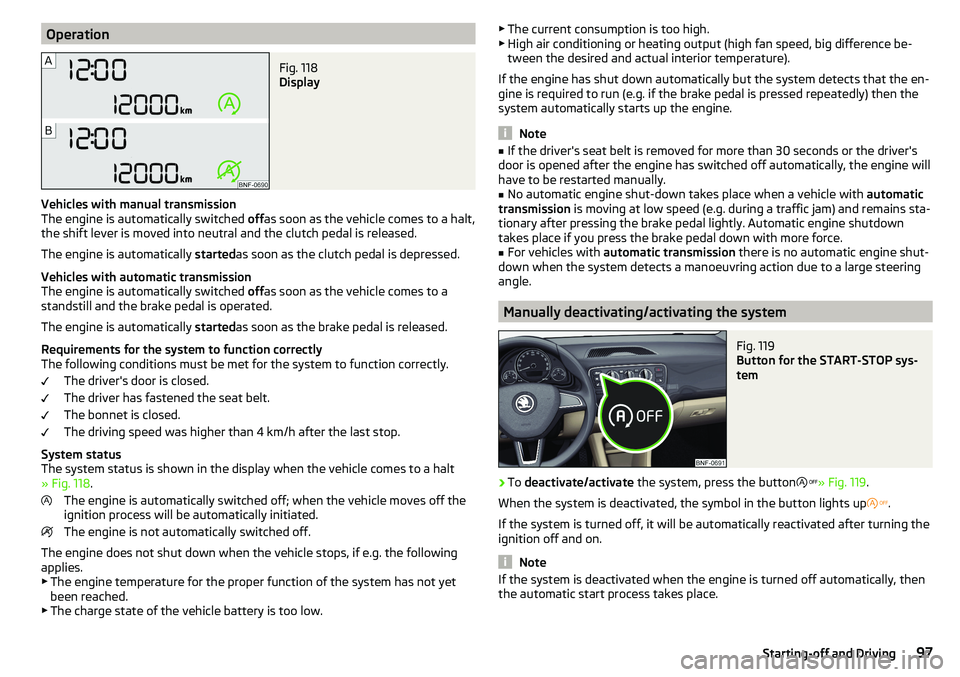
System status
The system status is shown in the display when the vehicle comes to a halt
» Fig. 118 .
The engine is automatically switched off; when the vehicle moves off the
ignition process will be automatically initiated.
The engine is not automatically switched off.
The engine does not shut down when the vehicle stops, if e.g. the following
applies.
▶ The engine temperature for the proper function of the system has not yet
been reached.
▶ The charge state of the vehicle battery is too low.
▶
The current consumption is too high.
▶ High air conditioning or heating output (high fan speed, big difference be-
tween the desired and actual interior temperature).
If the engine has shut down automatically but the system detects that the en-
gine is required to run (e.g. if the brake pedal is pressed repeatedly) then the
system automatically starts up the engine.
Note
■ If the driver's seat belt is removed for more than 30 seconds or the driver's
door is opened after the engine has switched off automatically, the engine will
have to be restarted manually.■
No automatic engine shut-down takes place when a vehicle with automatic
transmission is moving at low speed (e.g. during a traffic jam) and remains sta-
tionary after pressing the brake pedal lightly. Automatic engine shutdown
takes place if you press the brake pedal down with more force.
■
For vehicles with automatic transmission there is no automatic engine shut-
down when the system detects a manoeuvring action due to a large steering
angle.
Manually deactivating/activating the system
Fig. 119
Button for the START-STOP sys-
tem
›
To deactivate/activate the system, press the button
» Fig. 119 .
When the system is deactivated, the symbol in the button lights up
.
If the system is turned off, it will be automatically reactivated after turning the
ignition off and on.
Note
If the system is deactivated when the engine is turned off automatically, then
the automatic start process takes place.97Starting-off and Driving
Page 100 of 172
Brakes and Parking
Introduction
This chapter contains information on the following subjects:
Handbrake
98
Parking
99
The wear and tear on the brake pads is dependent on the operating condi-
tions and driving style. In difficult conditions (e.g. urban, sporty driving), the
condition of the brakes should be checked between services by a specialist ga-
rage.
Brake response can be slower if the brakes are covered in moisture or, in win-
ter, have a layer of ice or salt on them . The brakes should be cleaned and
dried by applying the brakes many times over »
.
Corrosion on the brake discs and dirt on the brake pads can occur if the vehicle
has been parked for a long period and if you do not make much use of the
braking system. The brakes are cleaned by applying the brakes several times
over »
.
Before negotiating a long or steep gradient , reduce speed and shift down a
gear. As a result, the braking effect of the engine will be used, reducing the
load on the brakes. If, nevertheless, there is a need for additional braking, it
should be carried out at intervals.
Emergency braking warning - If it is necessary to brake hard, the system may
cause the brake lights to automatically flash, to alert the traffic behind.
New brake pads must first be ““run in”” because these do not initially have the
best possible braking effect. Drive especially carefully for the first 200 km or
so.
If the brake fluid level is too low, it can cause faults in the braking system ;
the warning light will light up in the instrument cluster » page 32
,
Braking
system . If the warning light does not light up, yet the stopping distance is per-
ceived to be longer than before, the driving style should be adapted in view of
the unknown cause of the problem, and braking kept to a minimum - seek the
help of a specialist garage without delay.
The brake booster increases the pressure generated with the brake pedal. The
brake booster only operates when the engine is running.
WARNING■ Greater physical effort is required for braking when the engine is switch-
ed off – risk of accident!■
When braking in a vehicle with manual transmission, when the vehicle is
in gear and at low revs, the clutch pedal must be depressed. Otherwise, the
functionality of the brake system may be impaired – risk of accident!
■
Do not depress the brake pedal, if there is no requirement to slow down.
This causes the brakes to overheat and can also result in a longer braking
distance and excessive wear - risk of accident!
■
Only brake for the purpose of drying and cleaning the brake discs if the
traffic conditions permit this. Do not place any other road users in jeopardy.
■
Recommendations for new brake pads should be followed.
■
When stopping and parking, the parking brake should always be applied
firmly, otherwise the vehicle could move off - risk of accident!
■
If a front spoiler, full wheel trim, etc. is mounted retrospectively, it must
be ensured that the air supply to the front wheel brakes is not reduced.
Otherwise, the front brakes could be in danger of overheating – risk of acci-
dent!
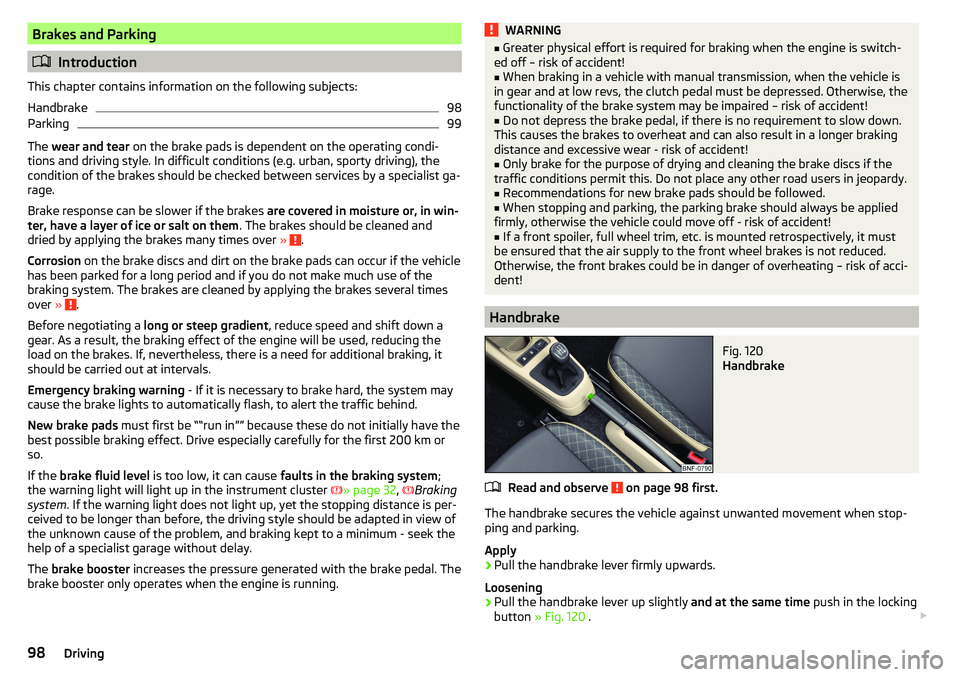
Handbrake
Fig. 120
Handbrake
Read and observe on page 98 first.
The handbrake secures the vehicle against unwanted movement when stop- ping and parking.
Apply
›
Pull the handbrake lever firmly upwards.
Loosening
›
Pull the handbrake lever up slightly and at the same time push in the locking
button » Fig. 120 .
98Driving
Page 104 of 172
Running in the engine
During the first 1,500 km, the driving style is decisive for successful the run-
ning in process is.
During the first 1,000 km the engine should not be pushed to more than 3/4
of the maximum permitted engine speed.
From about 1,000 to 1,500 km the engine can be pushed up to the maximum
permitted engine speed.
Tips on economical driving
Fuel consumption depends on the driving style, road and weather conditions,
and similar such factors.
For an economical driving style, the following instructions must be observed. ▶ Avoid unnecessary acceleration and braking.
▶ Engage the recommended gear » page 38.
▶ Avoid full throttle and high speeds.
▶ Reduce idling.
▶ Avoid short distances.
▶ Ensure the correct tyre inflation pressure is maintained » page 129.
▶ Avoid unnecessary ballast.
▶ Remove the roof rack before driving if it is not needed.
▶ Only turn on electrical consumers (e.g. seat heating) for as long as necessary.
▶ Briefly ventilate before turning on the cooling system, do not use the cooling
system with the windows open.
▶ Do not leave windows open at high speeds.
Avoiding damage to your vehicle
Introduction
This chapter contains information on the following subjects:
Driving Tips
102
Driving through water
102
Driving Tips
Only drive on roads and terrain that are appropriate to the vehicle parameters
» page 152 , Technical data .
The driver is always responsible for deciding whether the vehicle can cope
with the conditions and the terrain.WARNING■ Always adjust the speed and driving style to the visibility, weather, road
and traffic conditions applying at the time. Too high a speed or an errone-
ous manoeuvre may cause serious injury and damage to the vehicle.■
Combustible objects such as dry leaves or twigs caught under the base of
the vehicle could ignite on hot vehicle parts - risk of fire!
CAUTION
■ Pay attention to the ground clearance of the vehicle! When driving over ob-
jects which are larger than the ground clearance, the vehicle can get damaged.■
Any objects that get trapped under the vehicle floor must be removed as
soon as possible. These items can cause damage to the vehicle (e.g. to parts of
the fuel or brake system).
Driving through water
Fig. 124
Maximum permissible water lev-
el when driving through water
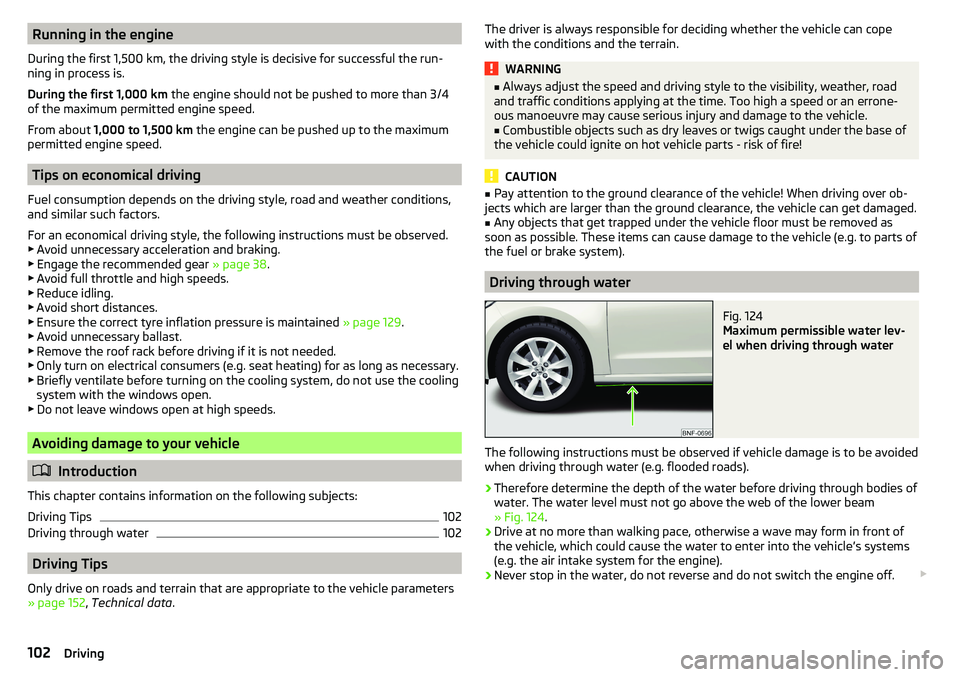
The following instructions must be observed if vehicle damage is to be avoided
when driving through water (e.g. flooded roads).
›
Therefore determine the depth of the water before driving through bodies of
water. The water level must not go above the web of the lower beam
» Fig. 124 .
›
Drive at no more than walking pace, otherwise a wave may form in front of
the vehicle, which could cause the water to enter into the vehicle’s systems
(e.g. the air intake system for the engine).
›
Never stop in the water, do not reverse and do not switch the engine off.
102Driving
Page 105 of 172
CAUTION■If water gets into the vehicle’s systems (e.g. the air intake system for the en-
gine) it can cause serious damage to the vehicle!■
Oncoming vehicles can generate water waves which can exceed the permis-
sible water level for your vehicle.
■
Do not drive through salt water, as the salt can cause corrosion. An vehicle
coming into contact with salt water is to be thoroughly rinsed with fresh wa-
ter.
Assist systems
General information
Introduction
WARNING■
The assistance systems serve merely to support the driver and do not re-
lieve the driver of responsibility for the operation of the vehicle.■
The increased safety as well as the increased occupant protection offered
by the assistance systems must not tempt you to take safety risks - there
is a risk of an accident!
■
Adjust the speed and driving style to the current visibility, weather, road
and traffic conditions.
■
The assistance systems have physical and system-related limitations. For
this reason, the driver may experience some undesired or delayed system
responses in certain situations. You should therefore always be alert and
ready to intervene!
■
Only activate, deactivate and set the assistance systems to keep you fully
in control of the vehicle in every traffic situation - otherwise there is a risk
of an accident!
Braking and stabilisation systems
Introduction
This chapter contains information on the following subjects:
Stability Control (ESC)
104
Anti-lock braking system (ABS)
104
Engine drag torque control (MSR)
104
Traction control (TCS)
104
Electronic Differential Lock (EDL)
104
Brake Assist (HBA)
104
Hill Start Assist (HHC)
104
The brake and stabilisation systems are automatically activated each time the
ignition is switched on, unless otherwise indicated.
The error display is in Chapter » page 31, Warning lights .
103Assist systems
Page 107 of 172
Parking aid (ParkPilot)
Introduction
This chapter contains information on the following subjects:
Function
105
Display in the swing radio display
106
The parking aid (hereinafter referred to only as a system) draws attention via
acoustic signals and an indication in the swing radio when manoeuvring
around obstacles in the vicinity of the vehicle.
WARNING■ The general information relating to the use of assistance systems must
be observed » page 103, in section Introduction .■
Moving persons or objects may not be recognized by the system sensors.
■
Under certain circumstances, surfaces of certain objects and types of
clothing cannot reflect the system signals. There is a danger that such ob-
jects or people may not be recognised by the system sensors.
■
External noise sources may affect the signals of the system sensors.
There is a danger that obstacles may not be recognised by the system sen-
sors.
■
Before reversing, you should make sure that there are no small obstacles
- such as rocks, small posts or similar - behind your vehicle. Such obstacles
may not be recognised by the system sensors.
CAUTION
■ Keep the system sensors » Fig. 125 on page 105 clean and free from snow
and ice, and do not cover them with any objects of any kind, otherwise the
functioning of the system may be restricted.■
In adverse weather conditions (heavy rain, water vapour, very low or high
temperatures, etc.), the functioning of the system may be impaired - “incorrect
recognition of obstacles”.
■
Accessories additionally installed on the vehicle rear, such as bicycle carriers,
can impair the system function.
FunctionFig. 125
Fitting the sensors / Range of the sensors
Read and observe
and on page 105 first.
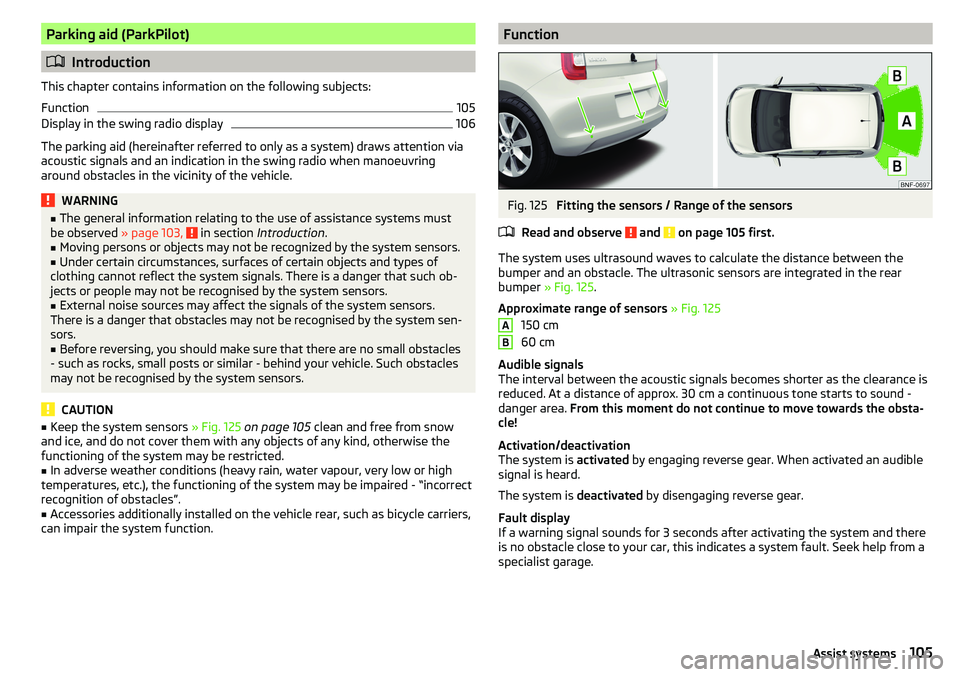
The system uses ultrasound waves to calculate the distance between the
bumper and an obstacle. The ultrasonic sensors are integrated in the rear
bumper » Fig. 125 .
Approximate range of sensors » Fig. 125
150 cm
60 cm
Audible signals
The interval between the acoustic signals becomes shorter as the clearance is
reduced. At a distance of approx. 30 cm a continuous tone starts to sound -
danger area. From this moment do not continue to move towards the obsta-
cle!
Activation/deactivation
The system is activated by engaging reverse gear. When activated an audible
signal is heard.
The system is deactivated by disengaging reverse gear.
Fault display
If a warning signal sounds for 3 seconds after activating the system and there
is no obstacle close to your car, this indicates a system fault. Seek help from a
specialist garage.
AB105Assist systems
Page 109 of 172
BTake control againa)
/ Increase speedCLaunch control / reduce speeda)
If no speed is set the current speed is adopted.
Once the controls are activated, the CCS maintains the vehicle at the set
speed; the indicator light
lights up in the instrument cluster.
After the interruption in control, the stored speed can be resumed by pressing
the
B
button.
Controls are automatically interrupted if any of the following occur.
▶ By pressing the brake or clutch pedal.
▶ When one of the brake assist systems (e.g. ESC) intervenes.
▶ Through an airbag deployment.
WARNING■ Always deactivate the cruise control system after use to prevent the sys-
tem being switched on unintentionally.■
Control may only be resumed if the set speed is not too high for the cur-
rent traffic conditions.
Note
During control, speed can be increased by pressing the accelerator pedal. Re-
leasing the accelerator pedal will cause the speed to drop again to the set
speed.
City Safe Drive
Introduction
This chapter contains information on the following subjects:
Operation
107
Disable / Enable
108
City Safe Drive (hereinafter referred to as: the system) monitors the traffic sit-
uation ahead of the vehicle. If the system detects a risk of collision with an ob-
stacle ahead of the vehicle, then automatic braking is applied. The risk of a col-
lision is thus reduced and the consequences of an impact are minimized.
WARNING■ The general information relating to the use of assistance systems must
be observed » page 103, in section Introduction .■
The system does not respond to crossing or oncoming objects.
CAUTION
The system can slow down the vehicle to a standstill. If the vehicle continues
to roll forward after stopping, then it should be stopped with the footbrake.
Operation
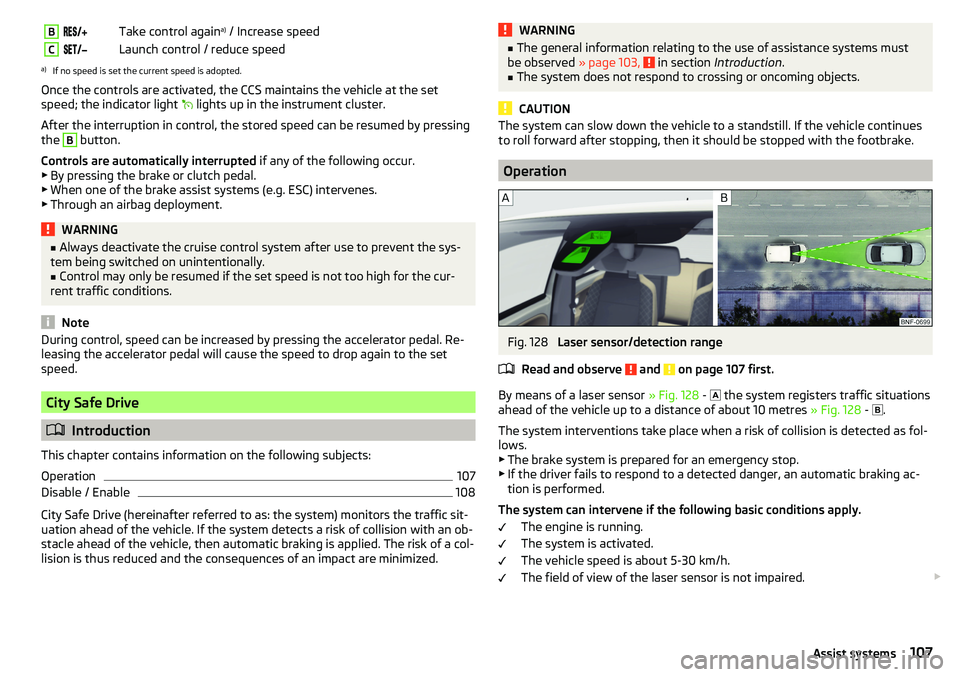
Fig. 128
Laser sensor/detection range
Read and observe
and on page 107 first.
By means of a laser sensor » Fig. 128 -
the system registers traffic situations
ahead of the vehicle up to a distance of about 10 metres » Fig. 128 -
.
The system interventions take place when a risk of collision is detected as fol- lows.
▶ The brake system is prepared for an emergency stop.
▶ If the driver fails to respond to a detected danger, an automatic braking ac-
tion is performed.
The system can intervene if the following basic conditions apply. The engine is running.
The system is activated.
The vehicle speed is about 5-30 km/h.
The field of view of the laser sensor is not impaired.
107Assist systems
Page 112 of 172
General Maintenance
Care and maintenance
Service work, adjustments and technical alterations
Introduction
This chapter contains information on the following subjects:
Vehicle operating under different weather conditions
110
Statutory checks
110
ŠKODA service partner
110
ŠKODA Original parts
111
ŠKODA Original accessories
111
Spoiler
111
Airbags
111
Trailer operation
112
Acceptance and recycling of used vehicles
112
The instructions and guidelines from ŠKODA AUTO a.s. must be observed when
using accessories or carrying out any modifications, repairs or technical altera-
tions to your vehicle.
Adhering to these instructions and guidelines helps ensure road safety and
helps keep your vehicle in a good technical condition.
WARNING■ Adjustments, repairs and technical changes to the vehicle should only be
carried out by a specialist. Work carried out incorrectly (including work on
the electronic components and their software) can result in malfunctions -
there is a risk of accident and, potentially, increased wear on parts!■
We recommend that you use only ŠKODA Original Accessories and ŠKODA
Original Parts which have been expressly approved for use on your vehicle.
Reliability, safety and suitability for your vehicle are guaranteed with these.
■
Do not use any products which have not been approved by ŠKODA AUTO,
even though these may be products with a type approval or which have
been approved by a nationally recognised testing laboratory.
Vehicle operating under different weather conditions
Read and observe
on page 110 first.
If you would like to operate your vehicle in countries other than those with itsintended weather conditions, you should contact a ŠKODA Partner. He or she
will advise you if certain precautions need to be taken to ensure the full func-
tioning of the vehicle or to prevent damage (e.g. coolant, changing the battery
or similar).
Statutory checks
Read and observe
on page 110 first.
Many countries have legislation requiring the operational reliability, safety and,where applicable, roadworthiness and/or exhaust gas properties of a vehicle
to be tested at regular intervals. These tests can be carried out by workshops
or checking stations that have been legally authorized for this purpose.
The ŠKODA Service partners can prepare your vehicle for the official inspec-
tions, so as to ensure that it passes.
Even if you want to take your vehicle to an officially approved test centre for
prior checking in preparation for a legally required test, we recommend that
you consult your ŠKODA Service Partner beforehand.
ŠKODA service partner
Read and observe
on page 110 first.
All ŠKODA service partners work according to the instructions and guidelines
from ŠKODA AUTO a.s. All service and repair work is therefore carried out on
time and at the appropriate quality. Adhering to these guidelines and instruc-
tions helps ensure road safety and helps keep your vehicle in a good technical
condition.
We therefore advise you to have all modifications, repairs and technical altera-
tions to your vehicle carried out by a ŠKODA Service Partner.
110General Maintenance