buttons SKODA CITIGO 2017 User Guide
[x] Cancel search | Manufacturer: SKODA, Model Year: 2017, Model line: CITIGO, Model: SKODA CITIGO 2017Pages: 172, PDF Size: 24.54 MB
Page 82 of 172
■Advanced FM settings - Additional FM broadcast range settings
■RDS Regional: ...
- Setting the automatic change to a regional stations with a
stronger reception signal ■
Automatic
- Switching on the automatic change
■
Fix
- Turn off the automatic change
■
Radio Data System (RDS)
- enable/disable RDS function (receiving additional in-
formation from the station)
■
Automatic frequency control (AF)
- Search for alternative frequencies of the sta-
tion currently being played to on/off
■
Advanced setup DAB
- Other DAB broadcast area settings
■
DAB traffic announcements
- Switch on/off DAB traffic announcements
■
Other DAB announcements
- Switch on/off other announcements (e.g., warn-
ings, regional weather, sports reports, financial news)
■
DAB - DAB station tracking
- Switch on/off automatic DAB station tracking on
another frequency or in other station groups
■
Automatic DAB - FM switching
- Switch on/off auto-switching from DAB to the
FM broadcasting range if the DAB signal is lost
Media settings
›
Press the button
→
.
■
Mix/repeat including subfolders
- Switching the title display including subfolders
■
Select Bluetooth device
- Display the list of paired Bluetooth ®
-Devices
» page 93 , Managing paired Bluetooth devices
Device settings - Blues
Sound settings
›
Press the button .
■
Volume
- Volume settings
■
Max. switch-on vol.
- Sets the maximum volume when the device is turned on
■
Announcements
- Adjustment of traffic announcements volume (TP)
■
Speed-dependent vol. adjustment
- increases the volume as speed increases
■
AUX volume: ...
- Sets the volume for the device connected via AUX
■
Quiet
- low volume
■
Medium
- Medium volume
■
Loud
- High volume
■
Balance - Fader
- Setting the sound focus between left and right, front and rear
(applies to equipment with four speakers)
■Balance - Setting the sound focus between the left and right (applies to equip-
ment with two speakers)
■Bass - Mid - Treble
- setting the equaliser
Main menu settings
›
Press the button .
›
Choose the desired menu item by turning the controller
.
›
Confirm menu item selection by pressing the controller
.
■
Radio
- Radio menu settings » page 80, Radio settings
■
Media
- Media menu settings » page 81, Media settings
■
Screen
- setting the screen displays » page 81, Display settings
■
Language
- set the device language » page 81, Device language settings
■
Remove source safely
- Safe removal of external devices » page 81, Safe re-
moval of the external device
■
Factory settings
- reset to factory settings » page 81, Factory settings (to fac-
tory settings)
■
System information
- System Information » page 81, System information
■
Copyright
- license information of the device
Radio settings
›
Press the button →
Radio
.
■
Arrow buttons: ...
- Setting the station change function (buttons and )
■
Presets
- Change between stations stored under the preset buttons
■
Stations
- Change between all available stations of the selected broadcast-
ing range
■
Traffic programme (TP)
- Switches TP traffic programme on/off
■
Delete presets
- Deletes the preset buttons
■
Sort: ...
- Sort the channels in the list of available stations on the FM radio
range
■
Alphabetically
- Sorting by name
■
By group
- Sorting by PI code
■
Advanced FM settings
- Additional FM broadcast range settings
■
RDS Reg .: ...
- Setting the automatic change to a regional stations with a
stronger reception signal ■
Automatic
Automatic - Switching on the automatic change function
■
Fix
- Turn off the automatic change
80Infotainment
Page 83 of 172
■Radio Data System (RDS) - enable/disable RDS function (receiving additional in-
formation from the station)
■Frequency control (AF)
- Search for alternative frequencies of the station cur-
rently being played to on/off
■
Advanced setup DAB
- Other DAB broadcast area settings
■
DAB traffic announcements
- Switch on/off DAB traffic announcements
■
Other DAB announcements
- Switch on/off other announcements (e.g., warn-
ings, regional weather, sports reports, financial news)
■
Station tracking. DAB
- Switch on/off automatic DAB station tracking on anoth-
er frequency or in other station groups
■
Aut. DAB - FM switching
- Switch on/off auto-switching from DAB to the FM
broadcasting range if the DAB signal is lost
Media settings
›
Press the button
→
Media
.
■
Mix/repeat including sub-folders
- Switching the title display on/off including sub-
folders
Display settings
›
Press the button →
Screen
.
■
Screen off (in 10 seconds)
- Enable / disable the automatic power off function
■
Brightness: ...
- Adjusts the brightness of the display
■
Show time in standby
- Time and date displayed on the screen when the ignition
is switched on and the unit is switched off
Device language settings
›
Press the button
→
Language
.
›
Set the desired language.
By selecting the menu item
Auto (= instrum. cluster)
the device language is set ac-
cording to the language setting for the MAXI DOTdisplay » page 41.
Safe removal of the external device
›
Press the button
→
Remove source safely
.
›
Select the external device to be removed.
Factory settings (to factory settings)›
Press the button →
Factory settings
.
›
Select the menu item to be reset to factory settings.
By selecting the menu item
Reset all
, all device menus are reset to factory set-
tings.
System information
›
Press the button →
System information
.
Displaying system information.
▶ Part No .: - Part number of the device
▶ Software: - Version of the software used
▶ Hardware: - Version of the hardware used
Radio
Introduction
This chapter contains information on the following subjects:
Main menu
82
Select broadcasting range
82
Search for stations and select frequency
82
List of available stations
83
Preset buttons for your favourite channels
83
The device allows analogue radio reception of FM and AM frequency ranges as
well as DAB digital radio reception.
CAUTION
■ For vehicles with window antennas do not stick foil or metal coated stickers
to the window - Radio signal reception could be affected.■
Car parks, tunnels, tall buildings or mountains can interfere with the radio
signal even causing it to fail completely.
81Swing/ Blues Radio
Page 84 of 172
Main menuFig. 96
Main menu:
Swing / Blues
Read and observe on page 81 first.
›
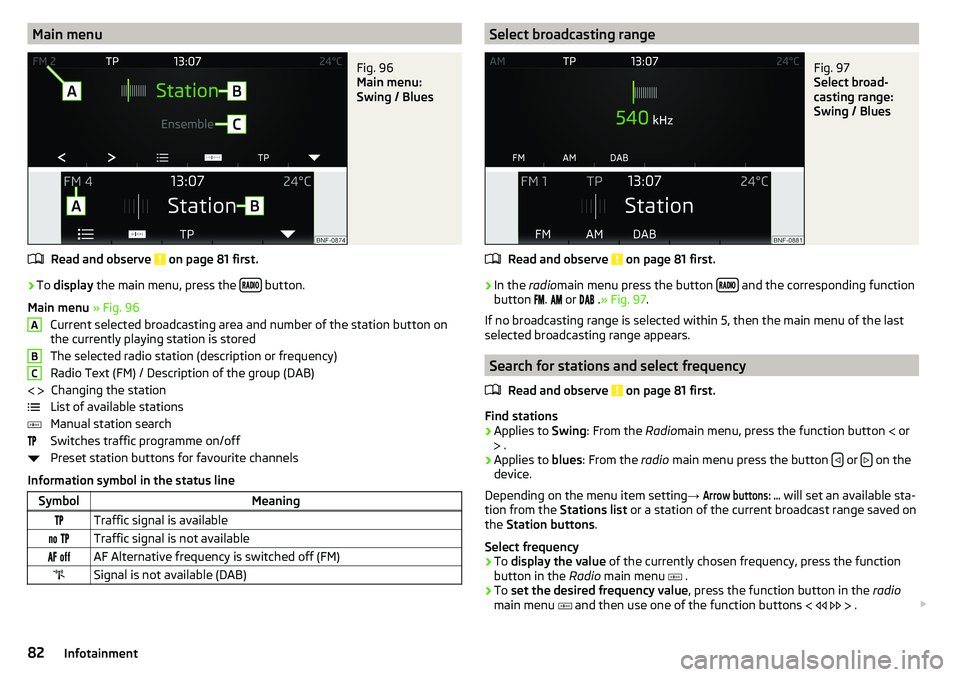
To display the main menu, press the button.
Main menu » Fig. 96
Current selected broadcasting area and number of the station button on
the currently playing station is stored
The selected radio station (description or frequency)
Radio Text (FM) / Description of the group (DAB) Changing the station
List of available stations
Manual station search
Switches traffic programme on/off
Preset station buttons for favourite channels
Information symbol in the status line
SymbolMeaningTraffic signal is available Traffic signal is not available AF Alternative frequency is switched off (FM)Signal is not available (DAB)ABC Select broadcasting rangeFig. 97
Select broad-
casting range:
Swing / Blues
Read and observe on page 81 first.
›
In the radiomain menu press the button and the corresponding function
button
.
or
.» Fig. 97 .
If no broadcasting range is selected within 5, then the main menu of the last
selected broadcasting range appears.
Search for stations and select frequency
Read and observe
on page 81 first.
Find stations
›
Applies to Swing: From the Radiomain menu, press the function button
or
.
›
Applies to blues: From the radio main menu press the button or on the
device.
Depending on the menu item setting →
Arrow buttons: ...
will set an available sta-
tion from the Stations list or a station of the current broadcast range saved on
the Station buttons .
Select frequency
›
To display the value of the currently chosen frequency, press the function
button in the Radio main menu
.
›
To set the desired frequency value , press the function button in the radio
main menu
and then use one of the function buttons
.
82Infotainment
Page 85 of 172
Scan through the stations one after the other (SCAN)
The function scans through all the available stations in the current frequency range in succession, for a few seconds each.›
To start/finish automatic playback of the available stations, press the dial in
the Radio main menu
.
List of available stations
Fig. 98
List of available
stations: Swing /
Blues
Read and observe on page 81 first.
›
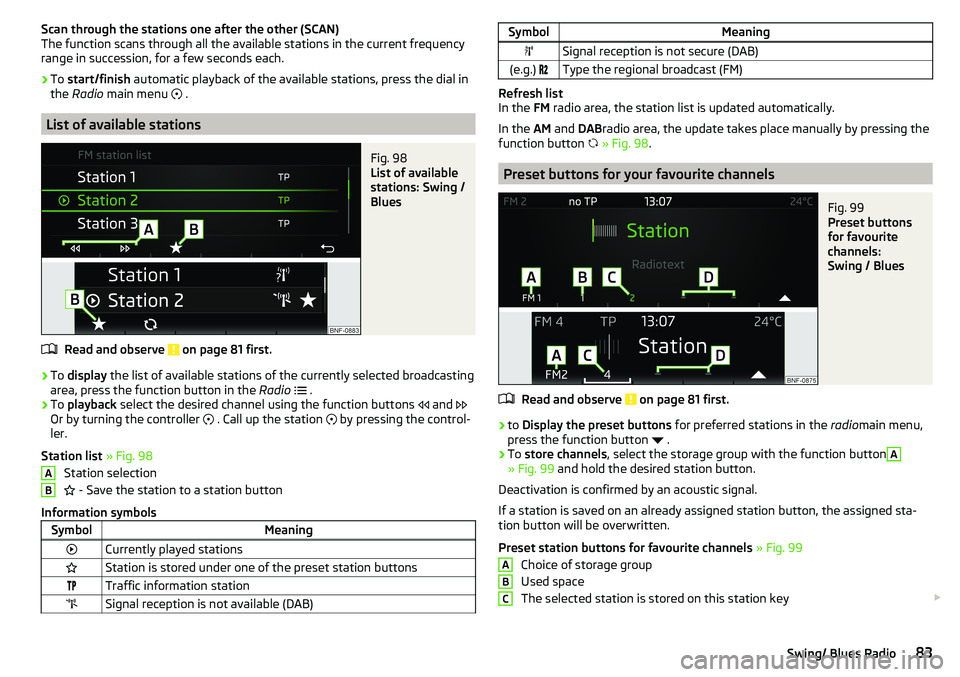
To display the list of available stations of the currently selected broadcasting
area, press the function button in the Radio
.
›
To playback select the desired channel using the function buttons
and
Or by turning the controller
. Call up the station
by pressing the control-
ler.
Station list » Fig. 98
Station selection
- Save the station to a station button
Information symbols
SymbolMeaningCurrently played stationsStation is stored under one of the preset station buttonsTraffic information stationSignal reception is not available (DAB)ABSymbolMeaningSignal reception is not secure (DAB)(e.g.) Type the regional broadcast (FM)
Refresh list
In the FM radio area, the station list is updated automatically.
In the AM and DABradio area, the update takes place manually by pressing the
function button
» Fig. 98 .
Preset buttons for your favourite channels
Fig. 99
Preset buttons
for favourite
channels:
Swing / Blues
Read and observe on page 81 first.
›
to Display the preset buttons for preferred stations in the radiomain menu,
press the function button
.
›
To store channels , select the storage group with the function button
A
» Fig. 99 and hold the desired station button.
Deactivation is confirmed by an acoustic signal.
If a station is saved on an already assigned station button, the assigned sta-
tion button will be overwritten.
Preset station buttons for favourite channels » Fig. 99
Choice of storage group
Used space
The selected station is stored on this station key
ABC83Swing/ Blues Radio
Page 87 of 172
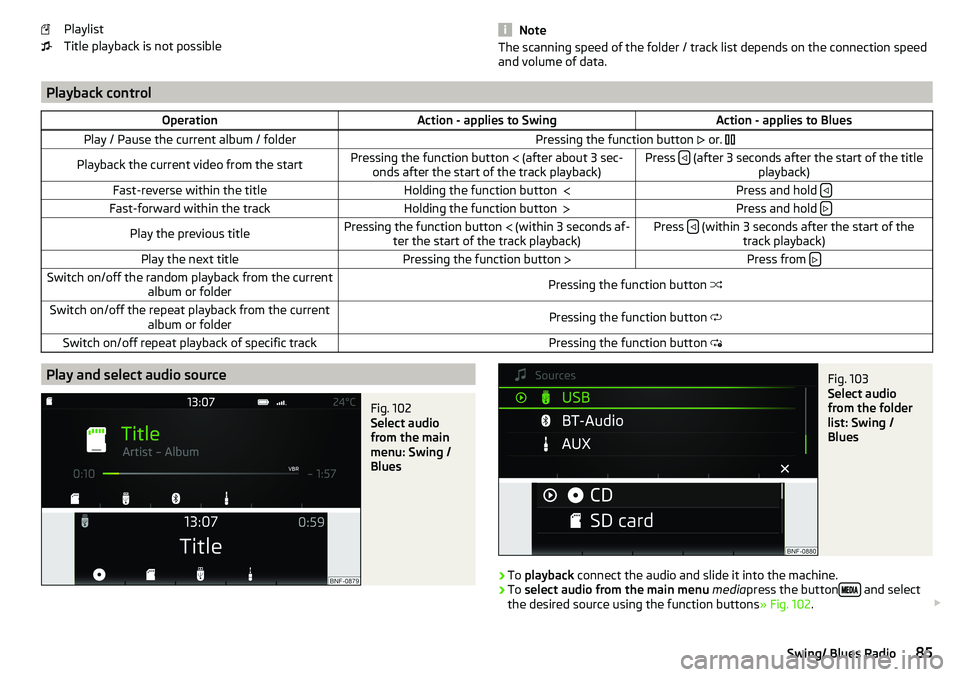
Playlist
Title playback is not possible
NoteThe scanning speed of the folder / track list depends on the connection speed
and volume of data.
Playback controlOperationAction - applies to SwingAction - applies to BluesPlay / Pause the current album / folderPressing the function button or. Playback the current video from the startPressing the function button (after about 3 sec-
onds after the start of the track playback)Press (after 3 seconds after the start of the title
playback)Fast-reverse within the titleHolding the function button Press and hold Fast-forward within the trackHolding the function button
Press and hold Play the previous titlePressing the function button
(within 3 seconds af-
ter the start of the track playback)Press (within 3 seconds after the start of the
track playback)Play the next titlePressing the function button Press from Switch on/off the random playback from the current
album or folderPressing the function button Switch on/off the repeat playback from the current
album or folderPressing the function button Switch on/off repeat playback of specific trackPressing the function button Play and select audio sourceFig. 102
Select audio
from the main
menu: Swing /
Blues
Fig. 103
Select audio
from the folder
list: Swing /
Blues
›
To playback connect the audio and slide it into the machine.
›
To select audio from the main menu media press the button and select
the desired source using the function buttons » Fig. 102.
85Swing/ Blues Radio
Page 92 of 172
›Select the phone
» Fig. 107 - or an external Bluetooth ®
-Device » Fig. 115 on
page 93 - in the list shown.
Telephone
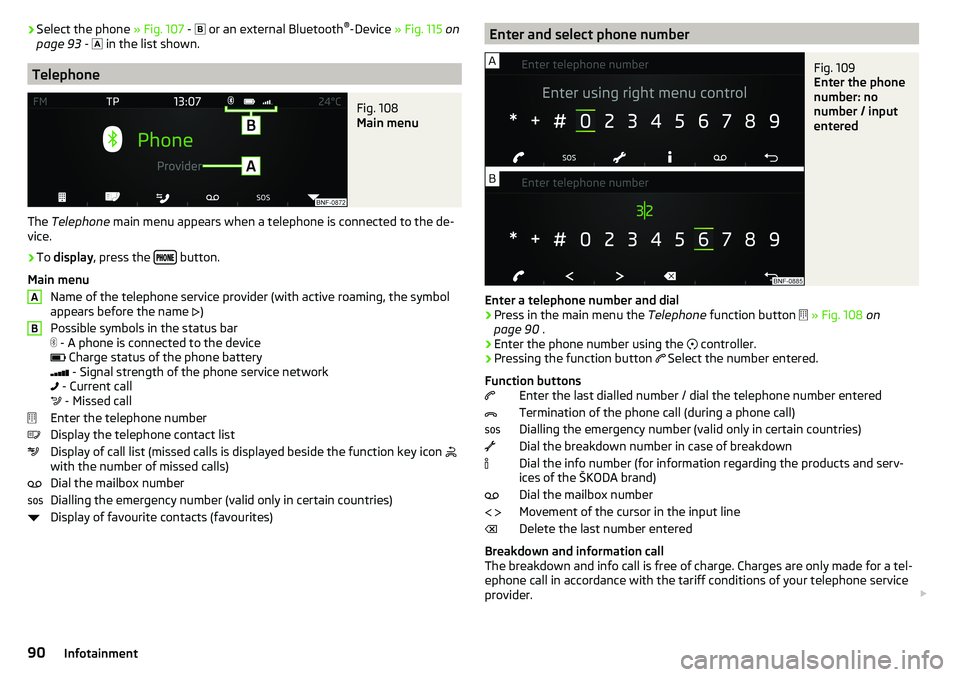
Fig. 108
Main menu
The Telephone main menu appears when a telephone is connected to the de-
vice.
›
To display , press the button.
Main menu Name of the telephone service provider (with active roaming, the symbol
appears before the name )
Possible symbols in the status bar
- A phone is connected to the device
Charge status of the phone battery
- Signal strength of the phone service network
- Current call
- Missed call
Enter the telephone number
Display the telephone contact list
Display of call list (missed calls is displayed beside the function key icon
with the number of missed calls)
Dial the mailbox number
Dialling the emergency number (valid only in certain countries)
Display of favourite contacts (favourites)
ABEnter and select phone numberFig. 109
Enter the phone
number: no
number / input
entered
Enter a telephone number and dial
›
Press in the main menu the Telephone function button
» Fig. 108 on
page 90 .
›
Enter the phone number using the
controller.
›
Pressing the function button
Select the number entered.
Function buttons Enter the last dialled number / dial the telephone number entered
Termination of the phone call (during a phone call)
Dialling the emergency number (valid only in certain countries)
Dial the breakdown number in case of breakdown
Dial the info number (for information regarding the products and serv-
ices of the ŠKODA brand)
Dial the mailbox number
Movement of the cursor in the input line
Delete the last number entered
Breakdown and information call
The breakdown and info call is free of charge. Charges are only made for a tel-
ephone call in accordance with the tariff conditions of your telephone service
provider.
90Infotainment
Page 94 of 172
›Press the function button A
» Fig. 112 repeatedly to select the desired
group.›
To start connection establishment press the function button of the desired
contact
B
» Fig. 112 .
›
To close the favourites list, press the function button
.
Delete favourite
›
Press the button
→
→
user profile
→
Clear favourites
.
›
Select the contact and confirm the deletion
with the controller.
All preferred contacts can be deleted by pressing the function button
Clear all
and confirm the deletion.
Call list
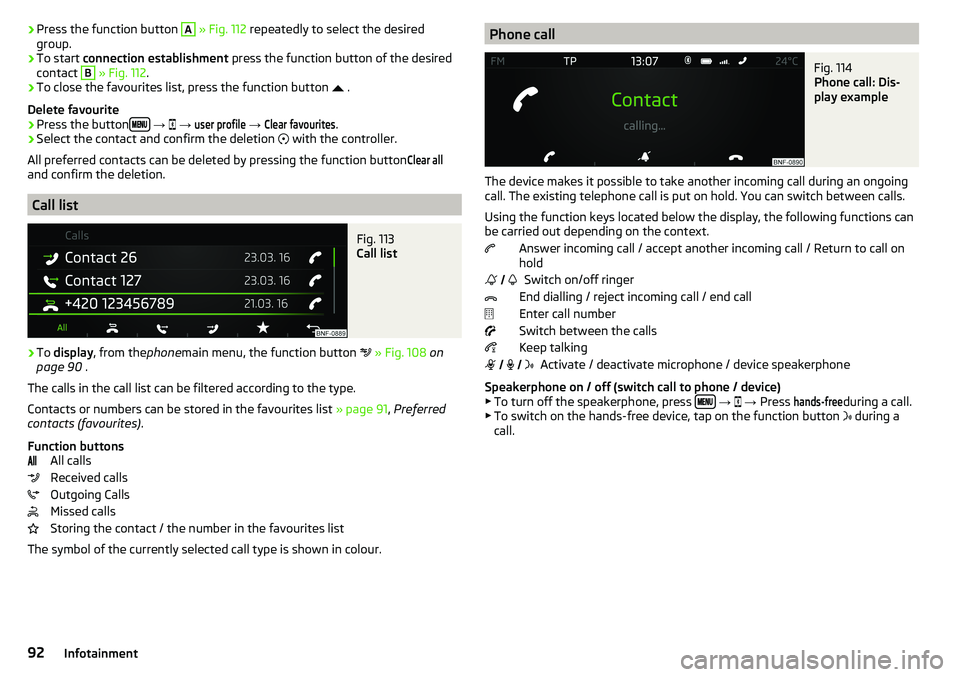
Fig. 113
Call list
›
To display , from the phonemain menu, the function button
» Fig. 108 on
page 90 .
The calls in the call list can be filtered according to the type.
Contacts or numbers can be stored in the favourites list » page 91, Preferred
contacts (favourites) .
Function buttons All calls
Received calls
Outgoing Calls
Missed calls
Storing the contact / the number in the favourites list
The symbol of the currently selected call type is shown in colour.
Phone callFig. 114
Phone call: Dis-
play example
The device makes it possible to take another incoming call during an ongoing
call. The existing telephone call is put on hold. You can switch between calls.
Using the function keys located below the display, the following functions can
be carried out depending on the context.
Answer incoming call / accept another incoming call / Return to call on
hold
Switch on/off ringer
End dialling / reject incoming call / end call
Enter call number
Switch between the calls
Keep talking Activate / deactivate microphone / device speakerphone
Speakerphone on / off (switch call to phone / device)
▶ To turn off the speakerphone, press
→
→ Press
hands-free
during a call.
▶ To switch on the hands-free device, tap on the function button during a
call.
92Infotainment
Page 96 of 172
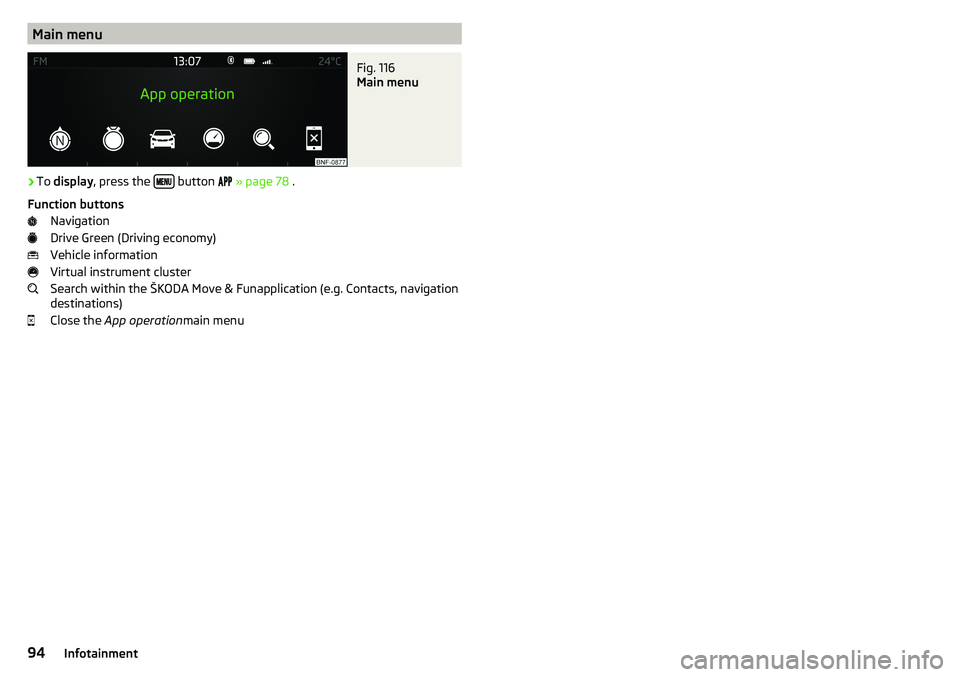
Main menuFig. 116
Main menu
›
To display , press the button
» page 78 .
Function buttons Navigation
Drive Green (Driving economy)
Vehicle information
Virtual instrument cluster
Search within the ŠKODA Move & Funapplication (e.g. Contacts, navigation
destinations)
Close the App operation main menu
94Infotainment
Page 149 of 172
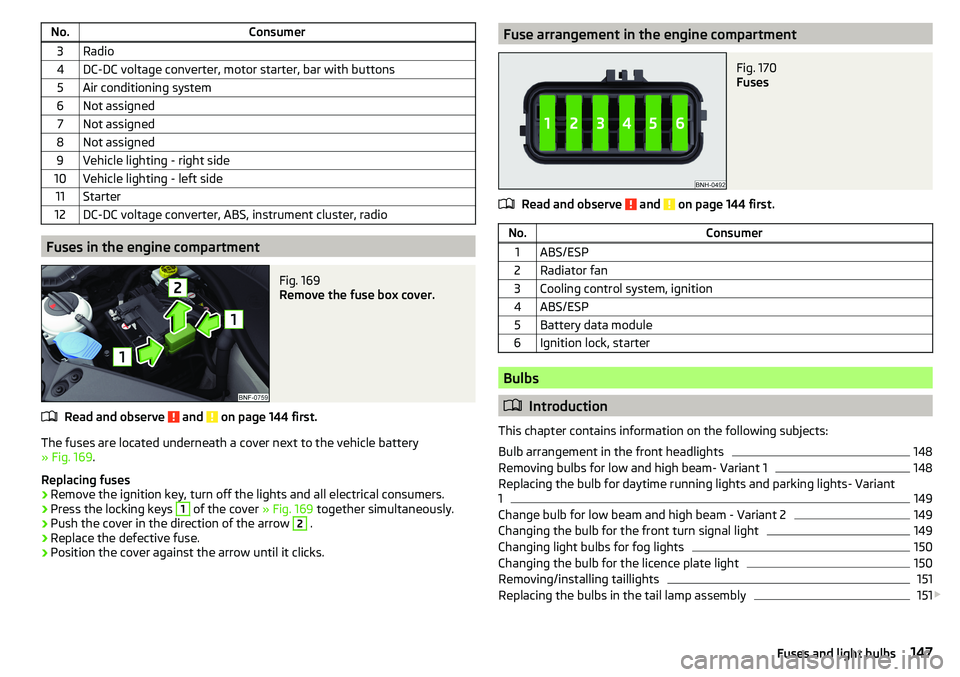
No.Consumer3Radio4DC-DC voltage converter, motor starter, bar with buttons5Air conditioning system6Not assigned7Not assigned8Not assigned9Vehicle lighting - right side10Vehicle lighting - left side11Starter12DC-DC voltage converter, ABS, instrument cluster, radio
Fuses in the engine compartment
Fig. 169
Remove the fuse box cover.
Read and observe and on page 144 first.
The fuses are located underneath a cover next to the vehicle battery
» Fig. 169 .
Replacing fuses
›
Remove the ignition key, turn off the lights and all electrical consumers.
›
Press the locking keys
1
of the cover » Fig. 169 together simultaneously.
›
Push the cover in the direction of the arrow
2
.
›
Replace the defective fuse.
›
Position the cover against the arrow until it clicks.
Fuse arrangement in the engine compartmentFig. 170
Fuses
Read and observe and on page 144 first.
No.Consumer1ABS/ESP2Radiator fan3Cooling control system, ignition4ABS/ESP5Battery data module6Ignition lock, starter
Bulbs
Introduction
This chapter contains information on the following subjects:
Bulb arrangement in the front headlights
148
Removing bulbs for low and high beam- Variant 1
148
Replacing the bulb for daytime running lights and parking lights- Variant
1
149
Change bulb for low beam and high beam - Variant 2
149
Changing the bulb for the front turn signal light
149
Changing light bulbs for fog lights
150
Changing the bulb for the licence plate light
150
Removing/installing taillights
151
Replacing the bulbs in the tail lamp assembly
151
147Fuses and light bulbs
Page 160 of 172
Broadcasting range82
buttons Swing Radio
76
Buttons Blues radio
76
C
Call list Call list
92
Car battery Disconnecting and reconnecting
127
Replacing127
Car care113
Exterior115
Interior116
Car computer see Multifunction display
39
Care and maintenance110
Carrier70
Car wash113
Car washing114
Exterior115
Interior116
washing114
CD86
Central locking42
problems45
Central locking button44
Change battery
142
Changing Windscreen wiper blades
143
Changing a wheel134
Changing134
Changing gear Selector lever
100
Tiptronic101
Changing wheels Wheels
134
Charging a vehicle battery127
Check Brake fluid
125
Engine oil124
Oil level124
Checking Battery condition
127
Coolant125
Checks Statutory checks
110
Children and safety21
Child safety lock45
Child seat21
Classification23
Installation location24, 25
in the passenger seat23
ISOFIX24, 25
on the front passenger seat22
on the passenger seat23
TOP TETHER26
Cigarette lighter62
City Safe Drive107
Disable/Enable108
Warning light36
Climatronic Automatic operation
73
Operating elements73
Clothes hook65
CNG120
Gas gauge31
Gas leaks120
In an accident120
Refuelling119
Regular checks120
Sticker120
cockpit29
Cockpit Lighting
52
Comfort signalling50
COMING HOME51
Compartments59
Compressed natural gas see CNG
120
Computer see Multifunction display
39
Conditions for pairing89
Coolant124
Checking125
Refilling125
Warning light33
Correct routing of seat belt
15
Correct seated position12
Correct seating position14
Cruise control system Warning light
36
Cruise Control System106
Cup holders61
D
DAB
82
DAY LIGHT see Daylight running lights
50
Daylight running lights50
Deactivation Airbag
20
Defrosting rear window53
Delayed locking of the boot lid See boot lid
46
Departure angle155
Digital Clock37
Digital Service Plan113
Dimmed headlights49
Dipstick124
Disclaimer75
Display Cardinal points
37
Fuel31
Fuel level31
158Index