key SKODA CITIGO 2017 User Guide
[x] Cancel search | Manufacturer: SKODA, Model Year: 2017, Model line: CITIGO, Model: SKODA CITIGO 2017Pages: 172, PDF Size: 24.54 MB
Page 52 of 172
To switch the light function on / off, switch A » Fig. 38 should be turned to
one of the following positions.
Switching off lights (except daytime running lights)Switching lights on/off automatically » page 51
Switch on daytime running lights and side lights or parking lights
» page 52
Turn on the low beam
To adjust the headlight range control , turn dial B
» Fig. 38 in line with the
vehicle load » .
Front seats occupied, boot empty
All seats occupied, boot empty
All seats occupied, boot loaded
Driver seat occupied, boot loaded
WARNINGAlways adjust the headlight beam to meet the following conditions - other-
wise risk of accident.■
The vehicle does not dazzle other road users, especially oncoming vehi-
cles.
■
The beam range is sufficient for safe driving.
Note
If the light switch is in the position , the ignition key is removed and the
driver's door is open, an audible warning signal will sound. After a few seconds
or after closing the driver's door, the audible alarm switches off, but the park-
ing lights will remain switched on.
Daylight running lights (DAY LIGHT)
The daytime running lights light up the area in front of and to the rear of the
vehicle (only applicable for some countries).
The daytime running lights are switched on automatically if the following
conditions are met.
The ignition is switched on.
The lights switch is in position
,
or
.
The light switch is in position
and the fog lights are turned on, the daytime
running lights will turn off.
WARNINGAlways switch on the low beam when visibility is poor.
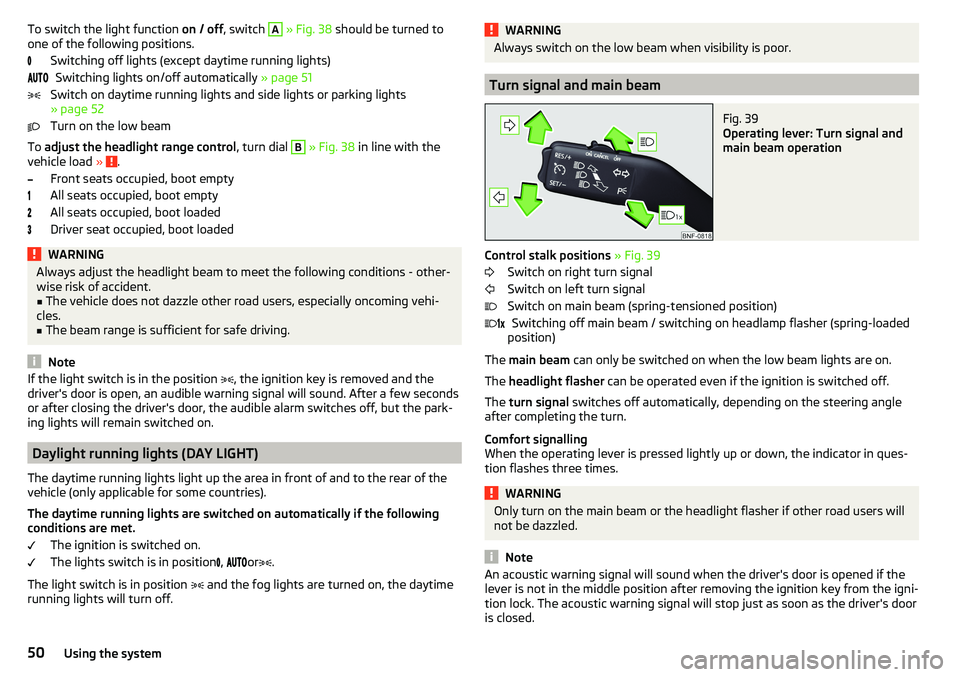
Turn signal and main beam
Fig. 39
Operating lever: Turn signal and
main beam operation
Control stalk positions » Fig. 39
Switch on right turn signal
Switch on left turn signal
Switch on main beam (spring-tensioned position) Switching off main beam / switching on headlamp flasher (spring-loaded
position)
The main beam can only be switched on when the low beam lights are on.
The headlight flasher can be operated even if the ignition is switched off.
The turn signal switches off automatically, depending on the steering angle
after completing the turn.
Comfort signalling
When the operating lever is pressed lightly up or down, the indicator in ques-
tion flashes three times.
WARNINGOnly turn on the main beam or the headlight flasher if other road users will
not be dazzled.
Note
An acoustic warning signal will sound when the driver's door is opened if the
lever is not in the middle position after removing the ignition key from the igni-
tion lock. The acoustic warning signal will stop just as soon as the driver's door
is closed. 50Using the system
Page 54 of 172
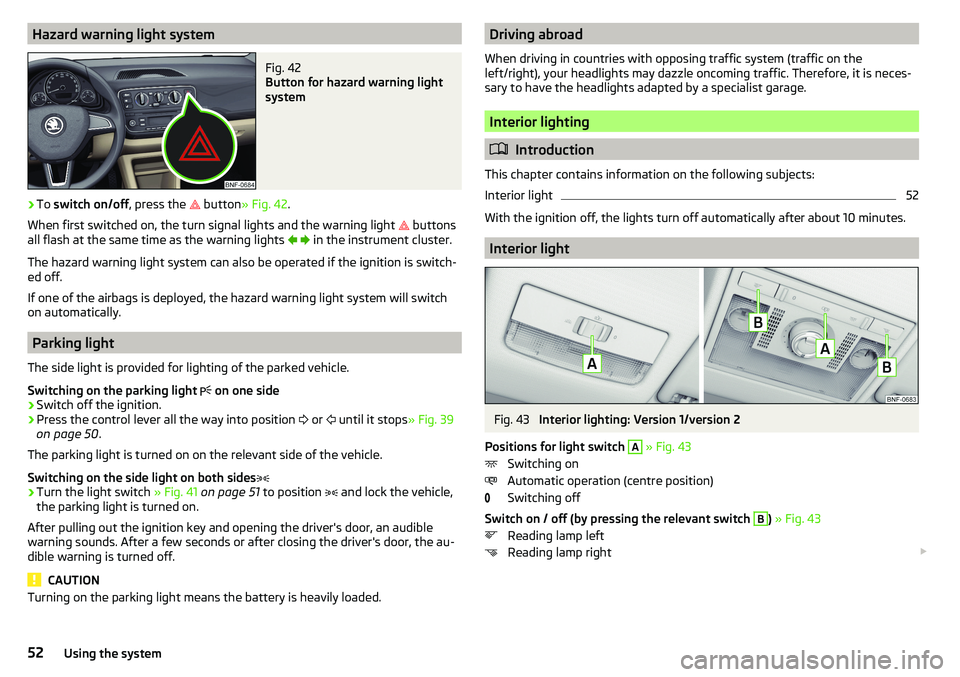
Hazard warning light systemFig. 42
Button for hazard warning light
system
›
To switch on/off , press the
button
» Fig. 42 .
When first switched on, the turn signal lights and the warning light buttons
all flash at the same time as the warning lights
in the instrument cluster.
The hazard warning light system can also be operated if the ignition is switch-
ed off.
If one of the airbags is deployed, the hazard warning light system will switch
on automatically.
Parking light
The side light is provided for lighting of the parked vehicle.
Switching on the parking light on one side
›
Switch off the ignition.
›
Press the control lever all the way into position
or
until it stops
» Fig. 39
on page 50 .
The parking light is turned on on the relevant side of the vehicle.
Switching on the side light on both sides
›
Turn the light switch » Fig. 41 on page 51 to position
and lock the vehicle,
the parking light is turned on.
After pulling out the ignition key and opening the driver's door, an audible
warning sounds. After a few seconds or after closing the driver's door, the au-
dible warning is turned off.
CAUTION
Turning on the parking light means the battery is heavily loaded.Driving abroad
When driving in countries with opposing traffic system (traffic on the
left/right), your headlights may dazzle oncoming traffic. Therefore, it is neces-
sary to have the headlights adapted by a specialist garage.
Interior lighting
Introduction
This chapter contains information on the following subjects:
Interior light
52
With the ignition off, the lights turn off automatically after about 10 minutes.
Interior light
Fig. 43
Interior lighting: Version 1/version 2
Positions for light switch
A
» Fig. 43
Switching on
Automatic operation (centre position)
Switching off
Switch on / off (by pressing the relevant switch
B
) » Fig. 43
Reading lamp left
Reading lamp right
52Using the system
Page 55 of 172
Automatic operation - position
The system is turned on when any of the following is present.
▶ The vehicle is unlocked.
▶ One of the doors is opened.
▶ The ignition key is removed.
The system is turned off when any of the following is present.
▶ The vehicle is locked.
▶ The ignition is switched on.
▶ About 30 seconds after all the doors have been closed.
Visibility
Introduction
This chapter contains information on the following subjects:
Rear window heater
53
Front sun visors
53WARNINGNo objects should be attached to the sun visor that could restrict the view
or endanger the vehicle occupants during sudden braking or in a collision.
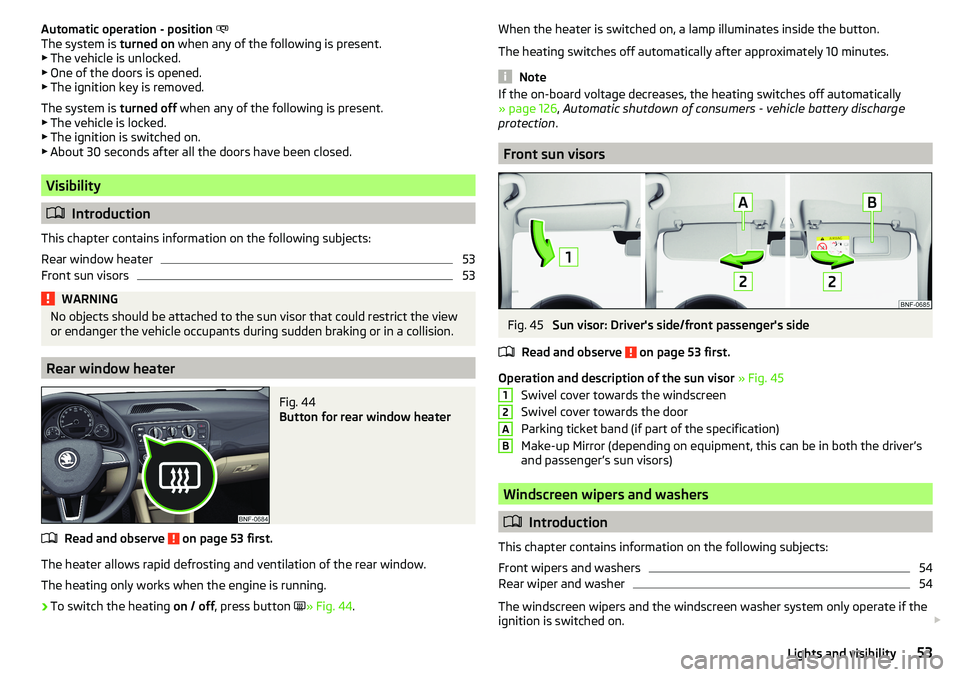
Rear window heater
Fig. 44
Button for rear window heater
Read and observe on page 53 first.
The heater allows rapid defrosting and ventilation of the rear window.
The heating only works when the engine is running.
›
To switch the heating on / off, press button
» Fig. 44 .
When the heater is switched on, a lamp illuminates inside the button.
The heating switches off automatically after approximately 10 minutes.
Note
If the on-board voltage decreases, the heating switches off automatically
» page 126 , Automatic shutdown of consumers - vehicle battery discharge
protection .
Front sun visors
Fig. 45
Sun visor: Driver's side/front passenger's side
Read and observe
on page 53 first.
Operation and description of the sun visor » Fig. 45
Swivel cover towards the windscreen
Swivel cover towards the door
Parking ticket band (if part of the specification)
Make-up Mirror (depending on equipment, this can be in both the driver’s
and passenger’s sun visors)
Windscreen wipers and washers
Introduction
This chapter contains information on the following subjects:
Front wipers and washers
54
Rear wiper and washer
54
The windscreen wipers and the windscreen washer system only operate if the
ignition is switched on.
12AB53Lights and visibility
Page 60 of 172
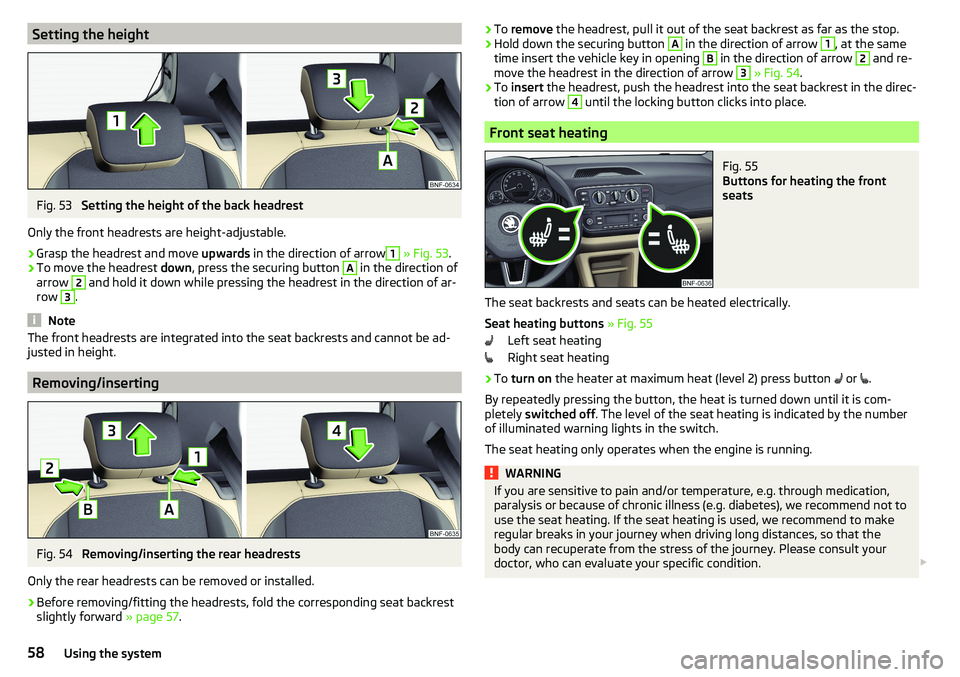
Setting the heightFig. 53
Setting the height of the back headrest
Only the front headrests are height-adjustable.
›
Grasp the headrest and move upwards in the direction of arrow
1
» Fig. 53 .
›
To move the headrest down, press the securing button
A
in the direction of
arrow
2
and hold it down while pressing the headrest in the direction of ar-
row
3
.
Note
The front headrests are integrated into the seat backrests and cannot be ad-
justed in height.
Removing/inserting
Fig. 54
Removing/inserting the rear headrests
Only the rear headrests can be removed or installed.
›
Before removing/fitting the headrests, fold the corresponding seat backrest slightly forward » page 57.
›To
remove the headrest, pull it out of the seat backrest as far as the stop.›Hold down the securing button A in the direction of arrow 1, at the same
time insert the vehicle key in opening B
in the direction of arrow
2
and re-
move the headrest in the direction of arrow
3
» Fig. 54 .
›
To insert the headrest, push the headrest into the seat backrest in the direc-
tion of arrow
4
until the locking button clicks into place.
Front seat heating
Fig. 55
Buttons for heating the front
seats
The seat backrests and seats can be heated electrically.
Seat heating buttons » Fig. 55
Left seat heating
Right seat heating
›
To turn on the heater at maximum heat (level 2) press button
or
.
By repeatedly pressing the button, the heat is turned down until it is com-
pletely switched off . The level of the seat heating is indicated by the number
of illuminated warning lights in the switch.
The seat heating only operates when the engine is running.
WARNINGIf you are sensitive to pain and/or temperature, e.g. through medication,
paralysis or because of chronic illness (e.g. diabetes), we recommend not to
use the seat heating. If the seat heating is used, we recommend to make
regular breaks in your journey when driving long distances, so that the
body can recuperate from the stress of the journey. Please consult your
doctor, who can evaluate your specific condition. 58Using the system
Page 69 of 172
Remove adapter›Push the release buttonB in the direction of arrow 3 and remove the
adapter in the direction of arrow 4
» Fig. 76 .
›
Seal the opening in the dashboard with the cover.
WARNINGAn incorrectly mounted adapter can break loose from the dashboard in sud-
den manoeuvre or an accident - there is risk of injury!
Inserting / removing phone
Fig. 77
Inserting phone / Removing phone
Read and observe
and on page 66 first.
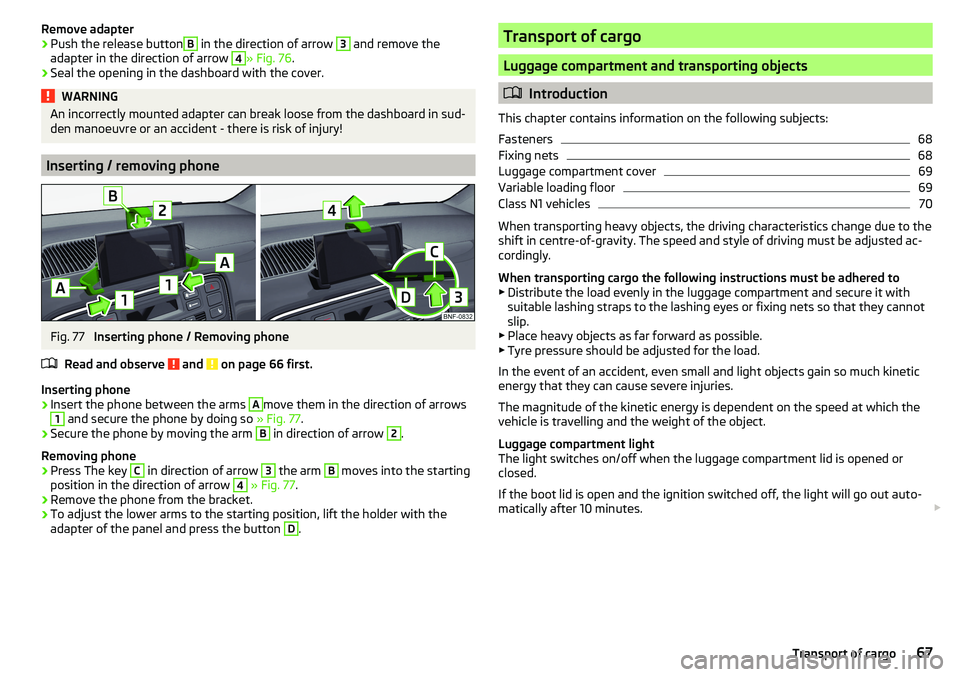
Inserting phone
›
Insert the phone between the arms
A
move them in the direction of arrows
1
and secure the phone by doing so » Fig. 77.
›
Secure the phone by moving the arm
B
in direction of arrow
2
.
Removing phone
›
Press The key
C
in direction of arrow
3
the arm
B
moves into the starting
position in the direction of arrow
4
» Fig. 77 .
›
Remove the phone from the bracket.
›
To adjust the lower arms to the starting position, lift the holder with the
adapter of the panel and press the button
D
.
Transport of cargo
Luggage compartment and transporting objects
Introduction
This chapter contains information on the following subjects:
Fasteners
68
Fixing nets
68
Luggage compartment cover
69
Variable loading floor
69
Class N1 vehicles
70
When transporting heavy objects, the driving characteristics change due to the
shift in centre-of-gravity. The speed and style of driving must be adjusted ac-
cordingly.
When transporting cargo the following instructions must be adhered to
▶ Distribute the load evenly in the luggage compartment and secure it with
suitable lashing straps to the lashing eyes or fixing nets so that they cannot
slip.
▶ Place heavy objects as far forward as possible.
▶ Tyre pressure should be adjusted for the load.
In the event of an accident, even small and light objects gain so much kinetic
energy that they can cause severe injuries.
The magnitude of the kinetic energy is dependent on the speed at which the
vehicle is travelling and the weight of the object.
Luggage compartment light
The light switches on/off when the luggage compartment lid is opened or
closed.
If the boot lid is open and the ignition switched off, the light will go out auto-
matically after 10 minutes.
67Transport of cargo
Page 79 of 172
OperationAction
Returning to higher-level menu
Applies to swing: By pressing the function
button Applies to
blues: By pressing
Select the menu item / function
value
- Selected menu item / function value - Deselected menu item / function val-
ue - Selected menu item / function valueSet valueTurning the knob .Pressing the function key or
Display areas
Fig. 93
Display areas:
Swing / Blues
Fig. 94
Display areas:
Swing
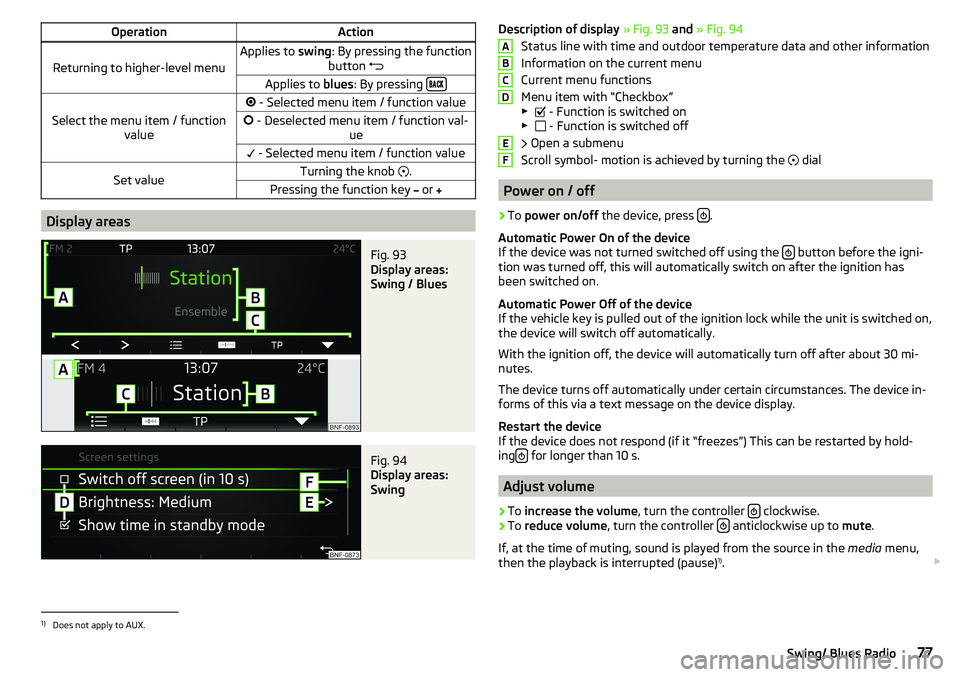
Description of display » Fig. 93 and » Fig. 94
Status line with time and outdoor temperature data and other information
Information on the current menu
Current menu functions
Menu item with “Checkbox”
▶ - Function is switched on
▶ - Function is switched off
Open a submenu
Scroll symbol- motion is achieved by turning the
dial
Power on / off
›
To power on/off the device, press .
Automatic Power On of the device
If the device was not turned switched off using the
button before the igni-
tion was turned off, this will automatically switch on after the ignition has
been switched on.
Automatic Power Off of the device
If the vehicle key is pulled out of the ignition lock while the unit is switched on,
the device will switch off automatically.
With the ignition off, the device will automatically turn off after about 30 mi-
nutes.
The device turns off automatically under certain circumstances. The device in-
forms of this via a text message on the device display.
Restart the device
If the device does not respond (if it “freezes”) This can be restarted by hold-
ing
for longer than 10 s.
Adjust volume
›
To
increase the volume , turn the controller clockwise.
›
To
reduce volume , turn the controller anticlockwise up to
mute.
If, at the time of muting, sound is played from the source in the media menu,
then the playback is interrupted (pause) 1)
.
ABCDEF1)
Does not apply to AUX.
77Swing/ Blues Radio
Page 81 of 172
System settings›
Press the button
→
.
Menus for the system settings ■
Screen
- setting the screen displays
■
Language
- set the device language
■
Bluetooth
- Bluetooth ®
device settings
■
App connection
- Turn the connection on / off with the Move & Funapplication
■
Remove source safely
- Safe removal of external devices
■
Factory settings
- reset to factory settings
■
System information
- System Information
■
Copyright
- license information of the device
Display settings ▶ Press the button
→
→
screen
.
■
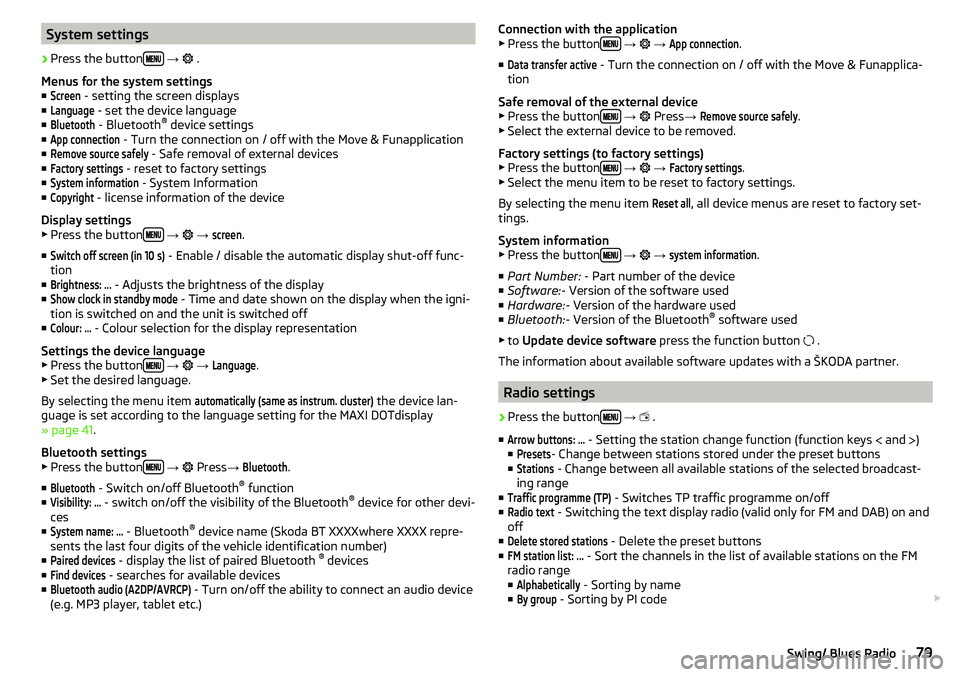
Switch off screen (in 10 s)
- Enable / disable the automatic display shut-off func-
tion
■
Brightness: ...
- Adjusts the brightness of the display
■
Show clock in standby mode
- Time and date shown on the display when the igni-
tion is switched on and the unit is switched off
■
Colour: ...
- Colour selection for the display representation
Settings the device language
▶ Press the button
→
→
Language
.
▶ Set the desired language.
By selecting the menu item
automatically (same as instrum. cluster)
the device lan-
guage is set according to the language setting for the MAXI DOTdisplay
» page 41 .
Bluetooth settings ▶ Press the button
→
Press
→
Bluetooth
.
■
Bluetooth
- Switch on/off Bluetooth ®
function
■
Visibility: ...
- switch on/off the visibility of the Bluetooth ®
device for other devi-
ces
■
System name: ...
- Bluetooth ®
device name (Skoda BT XXXXwhere XXXX repre-
sents the last four digits of the vehicle identification number)
■
Paired devices
- display the list of paired Bluetooth ®
devices
■
Find devices
- searches for available devices
■
Bluetooth audio (A2DP/AVRCP)
- Turn on/off the ability to connect an audio device
(e.g. MP3 player, tablet etc.)
Connection with the application
▶ Press the button
→ →
App connection
.
■
Data transfer active
- Turn the connection on / off with the Move & Funapplica-
tion
Safe removal of the external device ▶ Press the button
→
Press →
Remove source safely
.
▶ Select the external device to be removed.
Factory settings (to factory settings) ▶ Press the button
→
→
Factory settings
.
▶ Select the menu item to be reset to factory settings.
By selecting the menu item
Reset all
, all device menus are reset to factory set-
tings.
System information
▶ Press the button
→
→
system information
.
■ Part Number: - Part number of the device
■ Software: - Version of the software used
■ Hardware: - Version of the hardware used
■ Bluetooth: - Version of the Bluetooth ®
software used
▶ to Update device software press the function button
.
The information about available software updates with a ŠKODA partner.
Radio settings
›
Press the button
→
.
■
Arrow buttons: ...
- Setting the station change function (function keys and
)
■
Presets
- Change between stations stored under the preset buttons
■
Stations
- Change between all available stations of the selected broadcast-
ing range
■
Traffic programme (TP)
- Switches TP traffic programme on/off
■
Radio text
- Switching the text display radio (valid only for FM and DAB) on and
off
■
Delete stored stations
- Delete the preset buttons
■
FM station list: ...
- Sort the channels in the list of available stations on the FM
radio range
■
Alphabetically
- Sorting by name
■
By group
- Sorting by PI code
79Swing/ Blues Radio
Page 85 of 172
Scan through the stations one after the other (SCAN)
The function scans through all the available stations in the current frequency range in succession, for a few seconds each.›
To start/finish automatic playback of the available stations, press the dial in
the Radio main menu
.
List of available stations
Fig. 98
List of available
stations: Swing /
Blues
Read and observe on page 81 first.
›
To display the list of available stations of the currently selected broadcasting
area, press the function button in the Radio
.
›
To playback select the desired channel using the function buttons
and
Or by turning the controller
. Call up the station
by pressing the control-
ler.
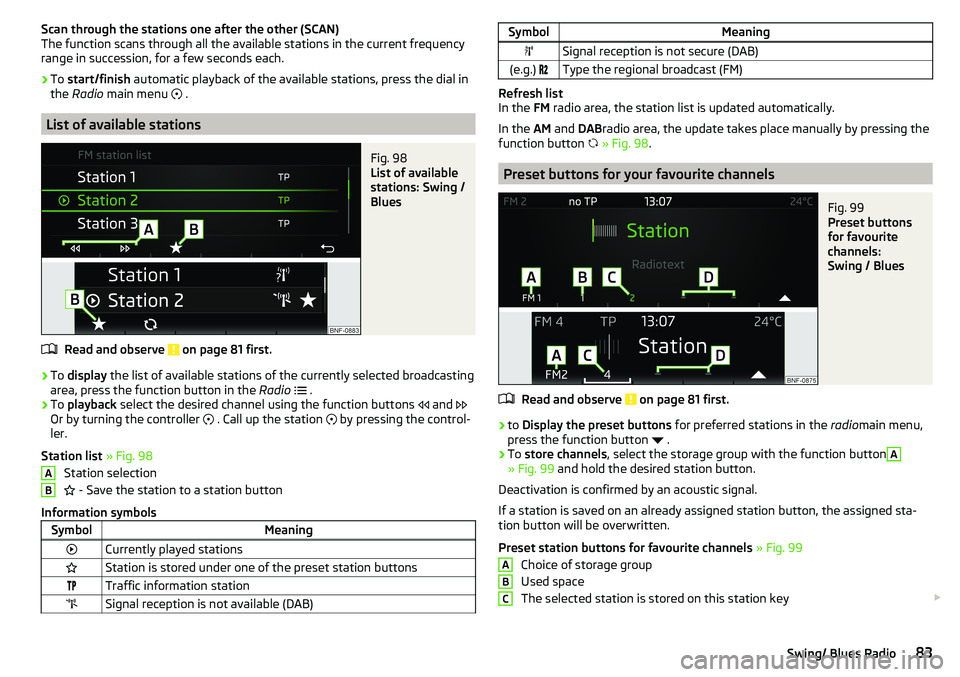
Station list » Fig. 98
Station selection
- Save the station to a station button
Information symbols
SymbolMeaningCurrently played stationsStation is stored under one of the preset station buttonsTraffic information stationSignal reception is not available (DAB)ABSymbolMeaningSignal reception is not secure (DAB)(e.g.) Type the regional broadcast (FM)
Refresh list
In the FM radio area, the station list is updated automatically.
In the AM and DABradio area, the update takes place manually by pressing the
function button
» Fig. 98 .
Preset buttons for your favourite channels
Fig. 99
Preset buttons
for favourite
channels:
Swing / Blues
Read and observe on page 81 first.
›
to Display the preset buttons for preferred stations in the radiomain menu,
press the function button
.
›
To store channels , select the storage group with the function button
A
» Fig. 99 and hold the desired station button.
Deactivation is confirmed by an acoustic signal.
If a station is saved on an already assigned station button, the assigned sta-
tion button will be overwritten.
Preset station buttons for favourite channels » Fig. 99
Choice of storage group
Used space
The selected station is stored on this station key
ABC83Swing/ Blues Radio
Page 86 of 172
Unused space
Return to Radio Main menu
There 12 (applies to swing) Or 9 (applies to blues) Station keys for storing pre-
ferred stations available n each broadcast area respectively, that are split in
three storage groups e.g. FM1, FM2, FM3).
Media
Introduction
This chapter contains information on the following subjects:
Main menu
84
Folder / track list
84
Playback control
85
Play and select audio source
85
SD-card
86
CD
86
USB input
87
AUX - input
87
Bluetooth ®
player
87
Supported audio sources and file formats
88
Main menu
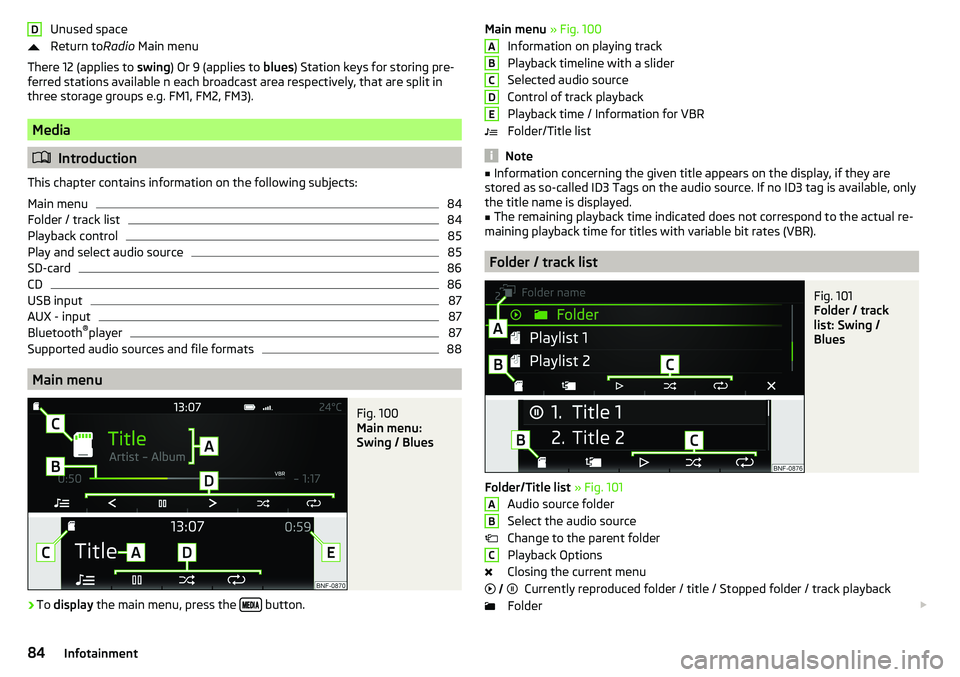
Fig. 100
Main menu:
Swing / Blues
›
To display the main menu, press the button.
DMain menu
» Fig. 100
Information on playing track
Playback timeline with a slider
Selected audio source
Control of track playback
Playback time / Information for VBR
Folder/Title list
Note
■ Information concerning the given title appears on the display, if they are
stored as so-called ID3 Tags on the audio source. If no ID3 tag is available, only the title name is displayed.■
The remaining playback time indicated does not correspond to the actual re-
maining playback time for titles with variable bit rates (VBR).
Folder / track list
Fig. 101
Folder / track
list: Swing /
Blues
Folder/Title list » Fig. 101
Audio source folder
Select the audio source
Change to the parent folder
Playback Options
Closing the current menu Currently reproduced folder / title / Stopped folder / track playback
Folder
ABCDEABC
84Infotainment
Page 88 of 172
If no audio source is chosen within 5 seconds, then the main menu of the last
selected audio source is displayed.›
To select the audio source in the folder / track list the function button
repeatedly until the display on the position
B
» Fig. 101 on page 84
is dis-
played.
›
Press the function key
. Using the dial
Select the sound source » Fig. 103
and select the desired folder / track.
Playback starts automatically (does not apply to AUX).
If AUX is selected as the audio source, the playback must be started on the
connected device.
CAUTION
■ Do not save any important data or that which has not been backed up on the
connected audio sources. ŠKODA assumes no responsibility for lost or dam-
aged files or connected audio sources.■
When changing or connecting an audio source, this may cause sudden
changes in volume. Reduce the volume before changing or connecting an au-
dio source.
■
When connecting an external audio source, the external source information
messages can be displayed. These messages must be observed and if neces-
sary confirmed (e.g. enabling data transfer etc).
Note
The national copyright laws that apply in your country must be observed.
SD-card
Fig. 104
Insert the SD card
›
Insert the SD card in the slot in the direction of the arrow (with the cut end
facing upwards), until it“locks” » Fig. 104.
›
Applies to Swing: To remove press the button
→
→
Remove source safely
→
SD card
.
› Applies to
Blues: Toremove , press the key
→ Remove source safely → SDcard
.›
Press on the inserted SD memory card. The SD card “jumps” into the eject
position.
CAUTION
■ Do not use an SD card with a broken write protection slide - there is a risk of
damage to the SD card reader!■
When using an SD card with an adapter, vehicle vibrations might cause the
card to fall out of the adapter.
CD
Applies to Blues.
›
To insert a CD, with the labelled side facing up, into the CD slot until it is au-
tomatically drawn in.
›
To eject , press the button , the CD is manoeuvred to the eject position.
If the ejected CD is not removed within 10 seconds, it is retracted again for
safety reasons.
WARNING■ The CD-player is a laser product.■This laser product classified in accordance with national / international
standards DIN EN 60825-1: 2008-05 and DHHS Rules 21 CFR. Subchapter J
classified as a Class 1 laser product to the date of manufacture. The laser
used in this class 1 laser product is so weak that there is no risk of danger
when operated correctly.■
This product is designed such that the laser is restricted to the inside of
the unit. However, the installed laser could be classified in a higher class
were the housing to be removed. For this reason, never remove the unit
housing.
CAUTION
■ Be sure to remove the CD before you try to insert a new CD. Otherwise you
can damage the drive inside the unit.■
Insert into the CD drive only original audio CDs or standardised CD-R/RWs.
■
Do not stick anything to the CDs!
86Infotainment