display SKODA CITIGO 2017 Owner's Manual
[x] Cancel search | Manufacturer: SKODA, Model Year: 2017, Model line: CITIGO, Model: SKODA CITIGO 2017Pages: 172, PDF Size: 24.54 MB
Page 80 of 172
CAUTION■High volumes can cause sound resonance in the vehicle.■When changing or connecting an audio source, this may cause sudden
changes in volume. Reduce the volume before changing or connecting an au-
dio source.
Device Settings - Swing
Main menu settings
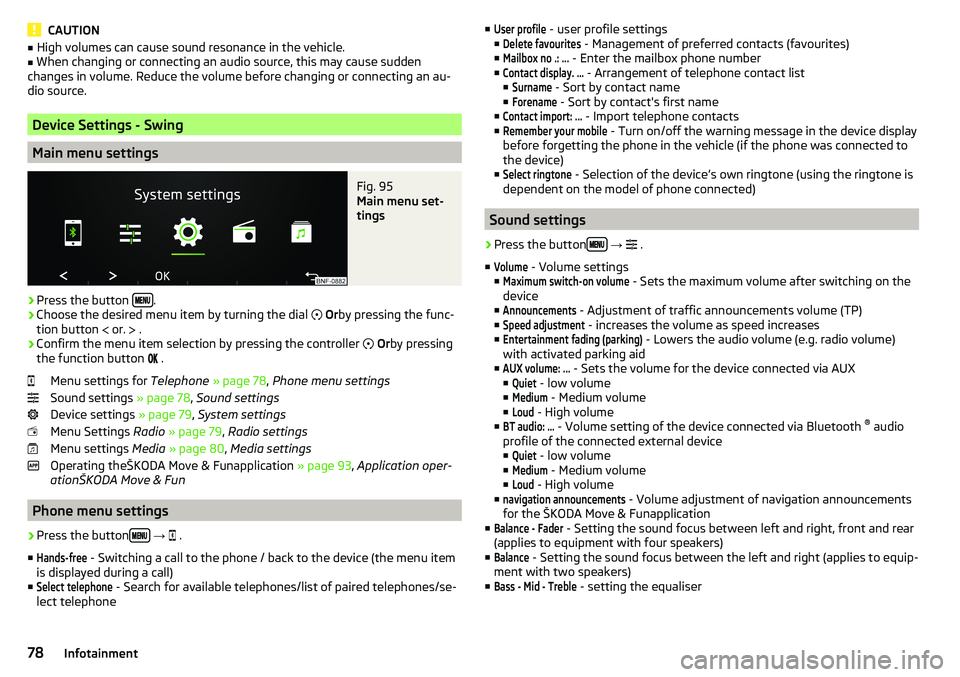
Fig. 95
Main menu set-
tings
›
Press the button .
›
Choose the desired menu item by turning the dial
Or by pressing the func-
tion button
or.
.
›
Confirm the menu item selection by pressing the controller
Or by pressing
the function button
.
Menu settings for Telephone » page 78 , Phone menu settings
Sound settings » page 78, Sound settings
Device settings » page 79, System settings
Menu Settings Radio » page 79 , Radio settings
Menu settings Media » page 80 , Media settings
Operating theŠKODA Move & Funapplication » page 93, Application oper-
ationŠKODA Move & Fun
Phone menu settings
›
Press the button
→
.
■
Hands-free
- Switching a call to the phone / back to the device (the menu item
is displayed during a call)
■
Select telephone
- Search for available telephones/list of paired telephones/se-
lect telephone
■User profile - user profile settings
■Delete favourites
- Management of preferred contacts (favourites)
■
Mailbox no .: ...
- Enter the mailbox phone number
■
Contact display. ...
- Arrangement of telephone contact list
■
Surname
- Sort by contact name
■
Forename
- Sort by contact's first name
■
Contact import: ...
- Import telephone contacts
■
Remember your mobile
- Turn on/off the warning message in the device display
before forgetting the phone in the vehicle (if the phone was connected to
the device)
■
Select ringtone
- Selection of the device’s own ringtone (using the ringtone is
dependent on the model of phone connected)
Sound settings
›
Press the button
→
.
■
Volume
- Volume settings
■
Maximum switch-on volume
- Sets the maximum volume after switching on the
device
■
Announcements
- Adjustment of traffic announcements volume (TP)
■
Speed adjustment
- increases the volume as speed increases
■
Entertainment fading (parking)
- Lowers the audio volume (e.g. radio volume)
with activated parking aid
■
AUX volume: ...
- Sets the volume for the device connected via AUX
■
Quiet
- low volume
■
Medium
- Medium volume
■
Loud
- High volume
■
BT audio: ...
- Volume setting of the device connected via Bluetooth ®
audio
profile of the connected external device ■
Quiet
- low volume
■
Medium
- Medium volume
■
Loud
- High volume
■
navigation announcements
- Volume adjustment of navigation announcements
for the ŠKODA Move & Funapplication
■
Balance - Fader
- Setting the sound focus between left and right, front and rear
(applies to equipment with four speakers)
■
Balance
- Setting the sound focus between the left and right (applies to equip-
ment with two speakers)
■
Bass - Mid - Treble
- setting the equaliser
78Infotainment
Page 81 of 172
System settings›
Press the button
→
.
Menus for the system settings ■
Screen
- setting the screen displays
■
Language
- set the device language
■
Bluetooth
- Bluetooth ®
device settings
■
App connection
- Turn the connection on / off with the Move & Funapplication
■
Remove source safely
- Safe removal of external devices
■
Factory settings
- reset to factory settings
■
System information
- System Information
■
Copyright
- license information of the device
Display settings ▶ Press the button
→
→
screen
.
■
Switch off screen (in 10 s)
- Enable / disable the automatic display shut-off func-
tion
■
Brightness: ...
- Adjusts the brightness of the display
■
Show clock in standby mode
- Time and date shown on the display when the igni-
tion is switched on and the unit is switched off
■
Colour: ...
- Colour selection for the display representation
Settings the device language
▶ Press the button
→
→
Language
.
▶ Set the desired language.
By selecting the menu item
automatically (same as instrum. cluster)
the device lan-
guage is set according to the language setting for the MAXI DOTdisplay
» page 41 .
Bluetooth settings ▶ Press the button
→
Press
→
Bluetooth
.
■
Bluetooth
- Switch on/off Bluetooth ®
function
■
Visibility: ...
- switch on/off the visibility of the Bluetooth ®
device for other devi-
ces
■
System name: ...
- Bluetooth ®
device name (Skoda BT XXXXwhere XXXX repre-
sents the last four digits of the vehicle identification number)
■
Paired devices
- display the list of paired Bluetooth ®
devices
■
Find devices
- searches for available devices
■
Bluetooth audio (A2DP/AVRCP)
- Turn on/off the ability to connect an audio device
(e.g. MP3 player, tablet etc.)
Connection with the application
▶ Press the button
→ →
App connection
.
■
Data transfer active
- Turn the connection on / off with the Move & Funapplica-
tion
Safe removal of the external device ▶ Press the button
→
Press →
Remove source safely
.
▶ Select the external device to be removed.
Factory settings (to factory settings) ▶ Press the button
→
→
Factory settings
.
▶ Select the menu item to be reset to factory settings.
By selecting the menu item
Reset all
, all device menus are reset to factory set-
tings.
System information
▶ Press the button
→
→
system information
.
■ Part Number: - Part number of the device
■ Software: - Version of the software used
■ Hardware: - Version of the hardware used
■ Bluetooth: - Version of the Bluetooth ®
software used
▶ to Update device software press the function button
.
The information about available software updates with a ŠKODA partner.
Radio settings
›
Press the button
→
.
■
Arrow buttons: ...
- Setting the station change function (function keys and
)
■
Presets
- Change between stations stored under the preset buttons
■
Stations
- Change between all available stations of the selected broadcast-
ing range
■
Traffic programme (TP)
- Switches TP traffic programme on/off
■
Radio text
- Switching the text display radio (valid only for FM and DAB) on and
off
■
Delete stored stations
- Delete the preset buttons
■
FM station list: ...
- Sort the channels in the list of available stations on the FM
radio range
■
Alphabetically
- Sorting by name
■
By group
- Sorting by PI code
79Swing/ Blues Radio
Page 82 of 172
■Advanced FM settings - Additional FM broadcast range settings
■RDS Regional: ...
- Setting the automatic change to a regional stations with a
stronger reception signal ■
Automatic
- Switching on the automatic change
■
Fix
- Turn off the automatic change
■
Radio Data System (RDS)
- enable/disable RDS function (receiving additional in-
formation from the station)
■
Automatic frequency control (AF)
- Search for alternative frequencies of the sta-
tion currently being played to on/off
■
Advanced setup DAB
- Other DAB broadcast area settings
■
DAB traffic announcements
- Switch on/off DAB traffic announcements
■
Other DAB announcements
- Switch on/off other announcements (e.g., warn-
ings, regional weather, sports reports, financial news)
■
DAB - DAB station tracking
- Switch on/off automatic DAB station tracking on
another frequency or in other station groups
■
Automatic DAB - FM switching
- Switch on/off auto-switching from DAB to the
FM broadcasting range if the DAB signal is lost
Media settings
›
Press the button
→
.
■
Mix/repeat including subfolders
- Switching the title display including subfolders
■
Select Bluetooth device
- Display the list of paired Bluetooth ®
-Devices
» page 93 , Managing paired Bluetooth devices
Device settings - Blues
Sound settings
›
Press the button .
■
Volume
- Volume settings
■
Max. switch-on vol.
- Sets the maximum volume when the device is turned on
■
Announcements
- Adjustment of traffic announcements volume (TP)
■
Speed-dependent vol. adjustment
- increases the volume as speed increases
■
AUX volume: ...
- Sets the volume for the device connected via AUX
■
Quiet
- low volume
■
Medium
- Medium volume
■
Loud
- High volume
■
Balance - Fader
- Setting the sound focus between left and right, front and rear
(applies to equipment with four speakers)
■Balance - Setting the sound focus between the left and right (applies to equip-
ment with two speakers)
■Bass - Mid - Treble
- setting the equaliser
Main menu settings
›
Press the button .
›
Choose the desired menu item by turning the controller
.
›
Confirm menu item selection by pressing the controller
.
■
Radio
- Radio menu settings » page 80, Radio settings
■
Media
- Media menu settings » page 81, Media settings
■
Screen
- setting the screen displays » page 81, Display settings
■
Language
- set the device language » page 81, Device language settings
■
Remove source safely
- Safe removal of external devices » page 81, Safe re-
moval of the external device
■
Factory settings
- reset to factory settings » page 81, Factory settings (to fac-
tory settings)
■
System information
- System Information » page 81, System information
■
Copyright
- license information of the device
Radio settings
›
Press the button →
Radio
.
■
Arrow buttons: ...
- Setting the station change function (buttons and )
■
Presets
- Change between stations stored under the preset buttons
■
Stations
- Change between all available stations of the selected broadcast-
ing range
■
Traffic programme (TP)
- Switches TP traffic programme on/off
■
Delete presets
- Deletes the preset buttons
■
Sort: ...
- Sort the channels in the list of available stations on the FM radio
range
■
Alphabetically
- Sorting by name
■
By group
- Sorting by PI code
■
Advanced FM settings
- Additional FM broadcast range settings
■
RDS Reg .: ...
- Setting the automatic change to a regional stations with a
stronger reception signal ■
Automatic
Automatic - Switching on the automatic change function
■
Fix
- Turn off the automatic change
80Infotainment
Page 83 of 172
■Radio Data System (RDS) - enable/disable RDS function (receiving additional in-
formation from the station)
■Frequency control (AF)
- Search for alternative frequencies of the station cur-
rently being played to on/off
■
Advanced setup DAB
- Other DAB broadcast area settings
■
DAB traffic announcements
- Switch on/off DAB traffic announcements
■
Other DAB announcements
- Switch on/off other announcements (e.g., warn-
ings, regional weather, sports reports, financial news)
■
Station tracking. DAB
- Switch on/off automatic DAB station tracking on anoth-
er frequency or in other station groups
■
Aut. DAB - FM switching
- Switch on/off auto-switching from DAB to the FM
broadcasting range if the DAB signal is lost
Media settings
›
Press the button
→
Media
.
■
Mix/repeat including sub-folders
- Switching the title display on/off including sub-
folders
Display settings
›
Press the button →
Screen
.
■
Screen off (in 10 seconds)
- Enable / disable the automatic power off function
■
Brightness: ...
- Adjusts the brightness of the display
■
Show time in standby
- Time and date displayed on the screen when the ignition
is switched on and the unit is switched off
Device language settings
›
Press the button
→
Language
.
›
Set the desired language.
By selecting the menu item
Auto (= instrum. cluster)
the device language is set ac-
cording to the language setting for the MAXI DOTdisplay » page 41.
Safe removal of the external device
›
Press the button
→
Remove source safely
.
›
Select the external device to be removed.
Factory settings (to factory settings)›
Press the button →
Factory settings
.
›
Select the menu item to be reset to factory settings.
By selecting the menu item
Reset all
, all device menus are reset to factory set-
tings.
System information
›
Press the button →
System information
.
Displaying system information.
▶ Part No .: - Part number of the device
▶ Software: - Version of the software used
▶ Hardware: - Version of the hardware used
Radio
Introduction
This chapter contains information on the following subjects:
Main menu
82
Select broadcasting range
82
Search for stations and select frequency
82
List of available stations
83
Preset buttons for your favourite channels
83
The device allows analogue radio reception of FM and AM frequency ranges as
well as DAB digital radio reception.
CAUTION
■ For vehicles with window antennas do not stick foil or metal coated stickers
to the window - Radio signal reception could be affected.■
Car parks, tunnels, tall buildings or mountains can interfere with the radio
signal even causing it to fail completely.
81Swing/ Blues Radio
Page 84 of 172
Main menuFig. 96
Main menu:
Swing / Blues
Read and observe on page 81 first.
›
To display the main menu, press the button.
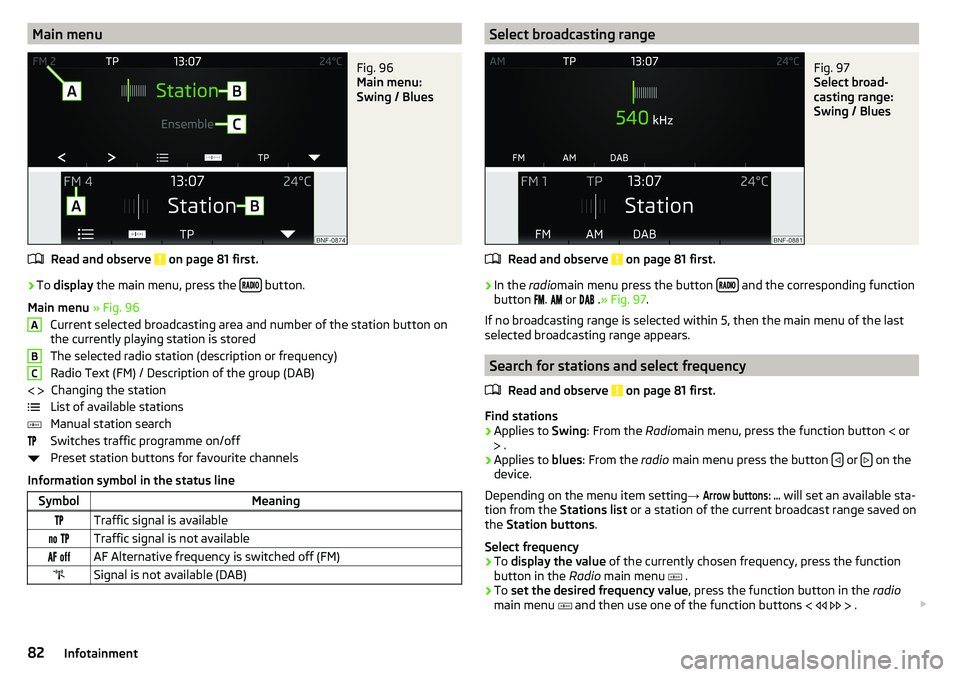
Main menu » Fig. 96
Current selected broadcasting area and number of the station button on
the currently playing station is stored
The selected radio station (description or frequency)
Radio Text (FM) / Description of the group (DAB) Changing the station
List of available stations
Manual station search
Switches traffic programme on/off
Preset station buttons for favourite channels
Information symbol in the status line
SymbolMeaningTraffic signal is available Traffic signal is not available AF Alternative frequency is switched off (FM)Signal is not available (DAB)ABC Select broadcasting rangeFig. 97
Select broad-
casting range:
Swing / Blues
Read and observe on page 81 first.
›
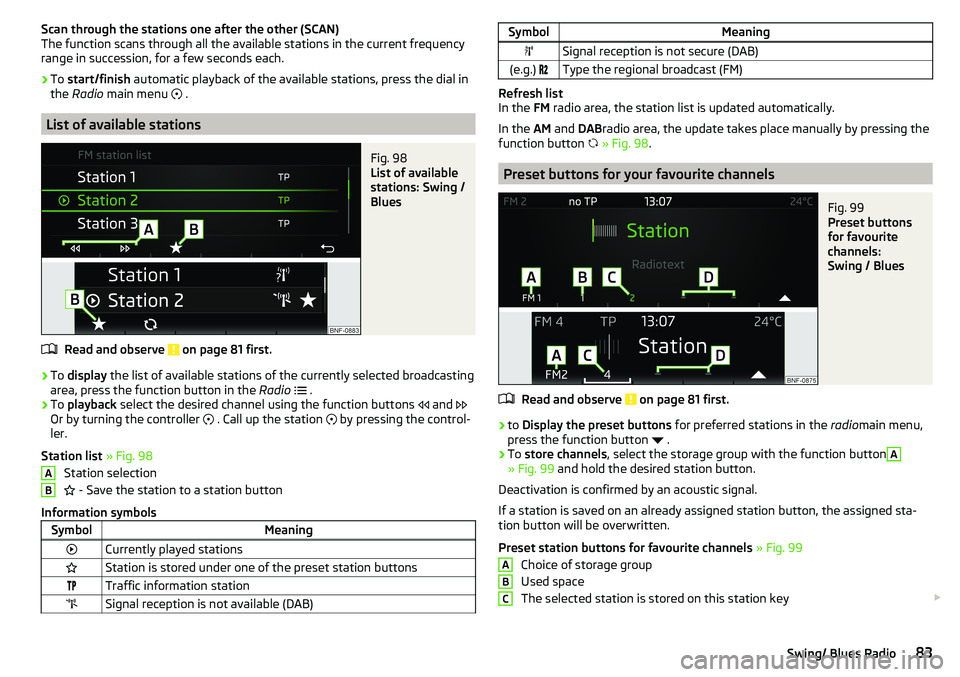
In the radiomain menu press the button and the corresponding function
button
.
or
.» Fig. 97 .
If no broadcasting range is selected within 5, then the main menu of the last
selected broadcasting range appears.
Search for stations and select frequency
Read and observe
on page 81 first.
Find stations
›
Applies to Swing: From the Radiomain menu, press the function button
or
.
›
Applies to blues: From the radio main menu press the button or on the
device.
Depending on the menu item setting →
Arrow buttons: ...
will set an available sta-
tion from the Stations list or a station of the current broadcast range saved on
the Station buttons .
Select frequency
›
To display the value of the currently chosen frequency, press the function
button in the Radio main menu
.
›
To set the desired frequency value , press the function button in the radio
main menu
and then use one of the function buttons
.
82Infotainment
Page 85 of 172
Scan through the stations one after the other (SCAN)
The function scans through all the available stations in the current frequency range in succession, for a few seconds each.›
To start/finish automatic playback of the available stations, press the dial in
the Radio main menu
.
List of available stations
Fig. 98
List of available
stations: Swing /
Blues
Read and observe on page 81 first.
›
To display the list of available stations of the currently selected broadcasting
area, press the function button in the Radio
.
›
To playback select the desired channel using the function buttons
and
Or by turning the controller
. Call up the station
by pressing the control-
ler.
Station list » Fig. 98
Station selection
- Save the station to a station button
Information symbols
SymbolMeaningCurrently played stationsStation is stored under one of the preset station buttonsTraffic information stationSignal reception is not available (DAB)ABSymbolMeaningSignal reception is not secure (DAB)(e.g.) Type the regional broadcast (FM)
Refresh list
In the FM radio area, the station list is updated automatically.
In the AM and DABradio area, the update takes place manually by pressing the
function button
» Fig. 98 .
Preset buttons for your favourite channels
Fig. 99
Preset buttons
for favourite
channels:
Swing / Blues
Read and observe on page 81 first.
›
to Display the preset buttons for preferred stations in the radiomain menu,
press the function button
.
›
To store channels , select the storage group with the function button
A
» Fig. 99 and hold the desired station button.
Deactivation is confirmed by an acoustic signal.
If a station is saved on an already assigned station button, the assigned sta-
tion button will be overwritten.
Preset station buttons for favourite channels » Fig. 99
Choice of storage group
Used space
The selected station is stored on this station key
ABC83Swing/ Blues Radio
Page 86 of 172
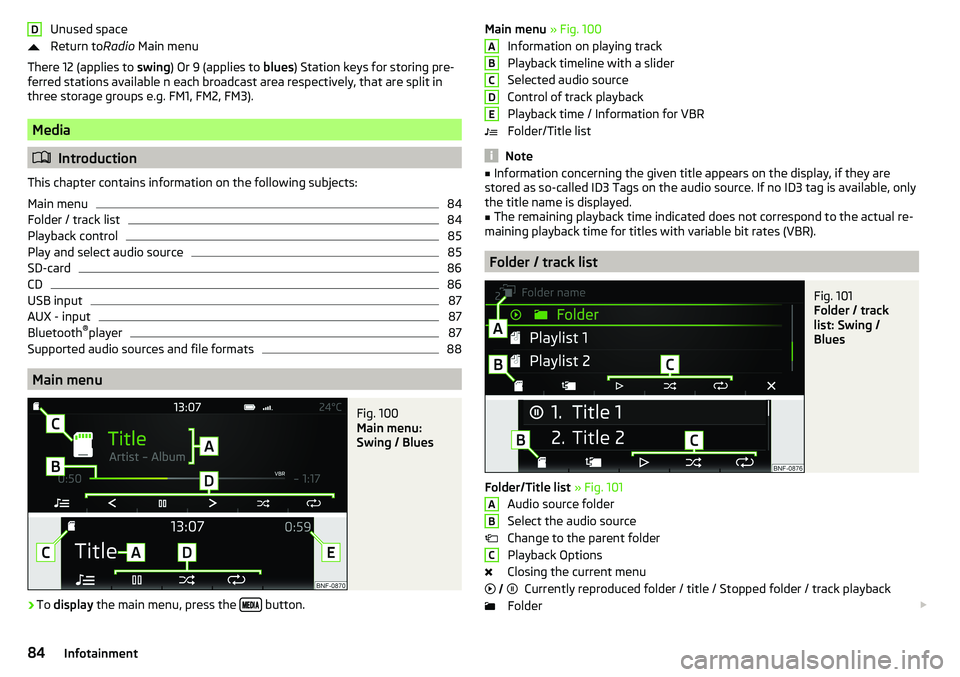
Unused space
Return to Radio Main menu
There 12 (applies to swing) Or 9 (applies to blues) Station keys for storing pre-
ferred stations available n each broadcast area respectively, that are split in
three storage groups e.g. FM1, FM2, FM3).
Media
Introduction
This chapter contains information on the following subjects:
Main menu
84
Folder / track list
84
Playback control
85
Play and select audio source
85
SD-card
86
CD
86
USB input
87
AUX - input
87
Bluetooth ®
player
87
Supported audio sources and file formats
88
Main menu
Fig. 100
Main menu:
Swing / Blues
›
To display the main menu, press the button.
DMain menu
» Fig. 100
Information on playing track
Playback timeline with a slider
Selected audio source
Control of track playback
Playback time / Information for VBR
Folder/Title list
Note
■ Information concerning the given title appears on the display, if they are
stored as so-called ID3 Tags on the audio source. If no ID3 tag is available, only the title name is displayed.■
The remaining playback time indicated does not correspond to the actual re-
maining playback time for titles with variable bit rates (VBR).
Folder / track list
Fig. 101
Folder / track
list: Swing /
Blues
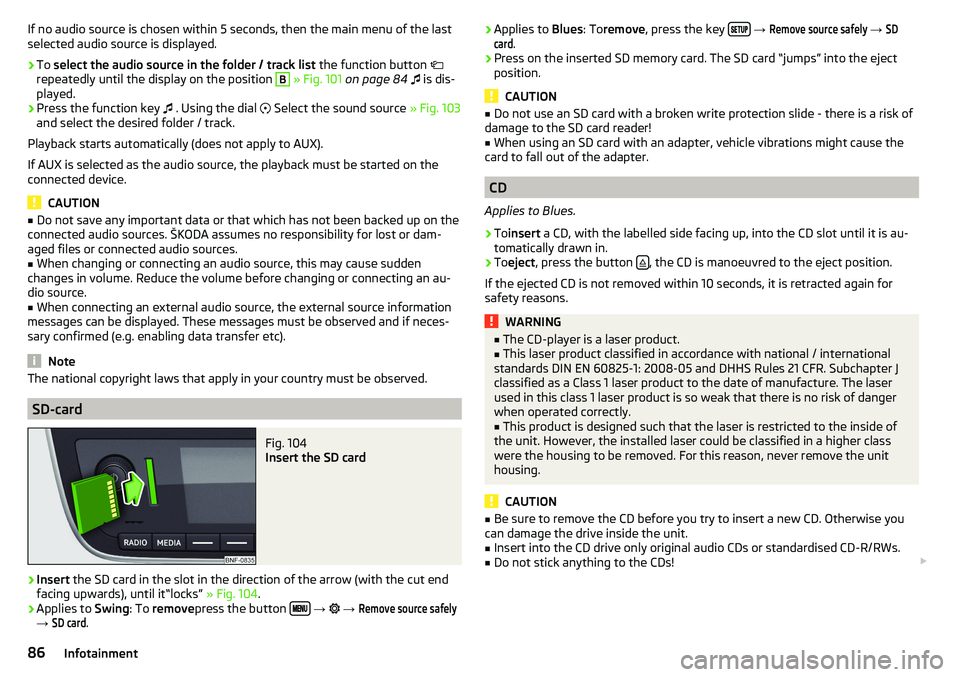
Folder/Title list » Fig. 101
Audio source folder
Select the audio source
Change to the parent folder
Playback Options
Closing the current menu Currently reproduced folder / title / Stopped folder / track playback
Folder
ABCDEABC
84Infotainment
Page 88 of 172
If no audio source is chosen within 5 seconds, then the main menu of the last
selected audio source is displayed.›
To select the audio source in the folder / track list the function button
repeatedly until the display on the position
B
» Fig. 101 on page 84
is dis-
played.
›
Press the function key
. Using the dial
Select the sound source » Fig. 103
and select the desired folder / track.
Playback starts automatically (does not apply to AUX).
If AUX is selected as the audio source, the playback must be started on the
connected device.
CAUTION
■ Do not save any important data or that which has not been backed up on the
connected audio sources. ŠKODA assumes no responsibility for lost or dam-
aged files or connected audio sources.■
When changing or connecting an audio source, this may cause sudden
changes in volume. Reduce the volume before changing or connecting an au-
dio source.
■
When connecting an external audio source, the external source information
messages can be displayed. These messages must be observed and if neces-
sary confirmed (e.g. enabling data transfer etc).
Note
The national copyright laws that apply in your country must be observed.
SD-card
Fig. 104
Insert the SD card
›
Insert the SD card in the slot in the direction of the arrow (with the cut end
facing upwards), until it“locks” » Fig. 104.
›
Applies to Swing: To remove press the button
→
→
Remove source safely
→
SD card
.
› Applies to
Blues: Toremove , press the key
→ Remove source safely → SDcard
.›
Press on the inserted SD memory card. The SD card “jumps” into the eject
position.
CAUTION
■ Do not use an SD card with a broken write protection slide - there is a risk of
damage to the SD card reader!■
When using an SD card with an adapter, vehicle vibrations might cause the
card to fall out of the adapter.
CD
Applies to Blues.
›
To insert a CD, with the labelled side facing up, into the CD slot until it is au-
tomatically drawn in.
›
To eject , press the button , the CD is manoeuvred to the eject position.
If the ejected CD is not removed within 10 seconds, it is retracted again for
safety reasons.
WARNING■ The CD-player is a laser product.■This laser product classified in accordance with national / international
standards DIN EN 60825-1: 2008-05 and DHHS Rules 21 CFR. Subchapter J
classified as a Class 1 laser product to the date of manufacture. The laser
used in this class 1 laser product is so weak that there is no risk of danger
when operated correctly.■
This product is designed such that the laser is restricted to the inside of
the unit. However, the installed laser could be classified in a higher class
were the housing to be removed. For this reason, never remove the unit
housing.
CAUTION
■ Be sure to remove the CD before you try to insert a new CD. Otherwise you
can damage the drive inside the unit.■
Insert into the CD drive only original audio CDs or standardised CD-R/RWs.
■
Do not stick anything to the CDs!
86Infotainment
Page 89 of 172
■If the ambient temperature is too high or too low, the CD playback may not
function properly.■
Damp (condensation) may affect the device in cold weather or high humidity.
This can cause the CD to jump or impair the play function. Once the moisture
has dissipated, playback is fully functional again.
Note
■ After pressing the button , there is a delay of a few seconds before the CD
is ejected.■
On uneven or unpaved roads, playback jumps may occur.
■
If the CD is damaged, is not readable or is inserted incorrectly, the following
message is displayed
CD is unreadable
.
■
It is possible that CDs protected by copyright cannot not be played back at all
or only in certain circumstances.
USB input
Fig. 105
USB input: in the front centre console / in the dashboard
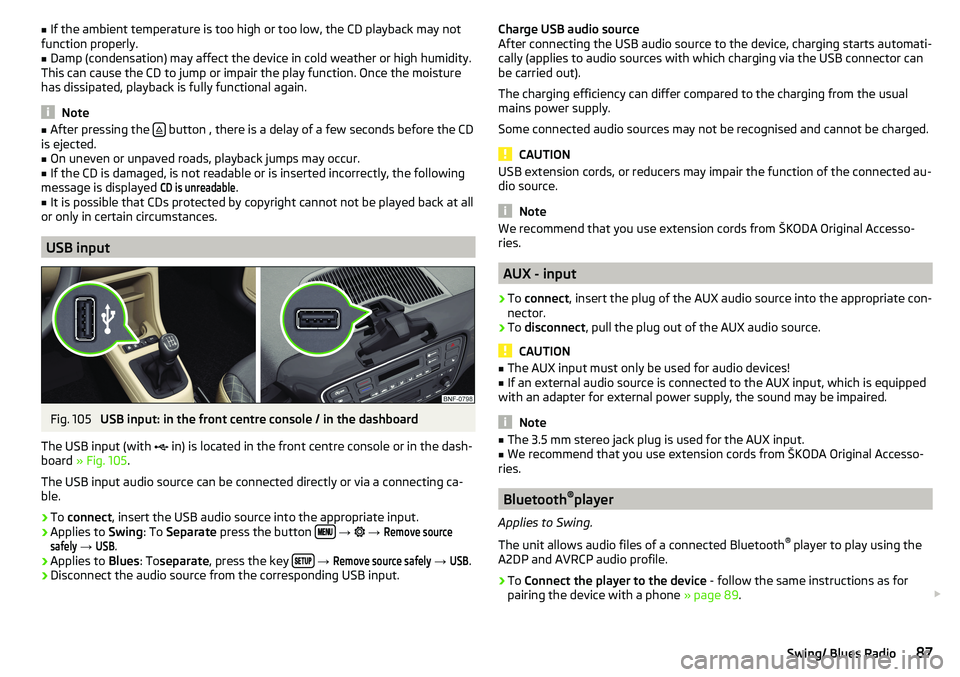
The USB input (with in) is located in the front centre console or in the dash-
board » Fig. 105 .
The USB input audio source can be connected directly or via a connecting ca-
ble.
›
To connect , insert the USB audio source into the appropriate input.
›
Applies to Swing: To Separate press the button
→
→
Remove sourcesafely
→
USB
.
›
Applies to Blues: Toseparate , press the key
→
Remove source safely
→
USB
.
›
Disconnect the audio source from the corresponding USB input.
Charge USB audio source
After connecting the USB audio source to the device, charging starts automati-
cally (applies to audio sources with which charging via the USB connector can
be carried out).
The charging efficiency can differ compared to the charging from the usual
mains power supply.
Some connected audio sources may not be recognised and cannot be charged.
CAUTION
USB extension cords, or reducers may impair the function of the connected au-
dio source.
Note
We recommend that you use extension cords from ŠKODA Original Accesso-
ries.
AUX - input
›
To connect , insert the plug of the AUX audio source into the appropriate con-
nector.
›
To disconnect , pull the plug out of the AUX audio source.
CAUTION
■
The AUX input must only be used for audio devices!■If an external audio source is connected to the AUX input, which is equipped
with an adapter for external power supply, the sound may be impaired.
Note
■ The 3.5 mm stereo jack plug is used for the AUX input.■We recommend that you use extension cords from ŠKODA Original Accesso-
ries.
Bluetooth ®
player
Applies to Swing.
The unit allows audio files of a connected Bluetooth ®
player to play using the
A2DP and AVRCP audio profile.
›
To Connect the player to the device - follow the same instructions as for
pairing the device with a phone » page 89.
87Swing/ Blues Radio
Page 91 of 172
Information on the compatibility of phones can be found on the following
ŠKODAInternet sites.
http://go.skoda.eu/compatibility
Conditions for pairing
The telephone can be paired with the device under the following conditions. The ignition is switched on.
The Bluetooth ®
function of the device and the telephone is switched on.
The visibility of the device and the telephone is switched on.
The telephone is within range of the Bluetooth ®
signal of the device.
The telephone is compatible with the device.
The telephone is connected to an external Bluetooth ®
device (e.g. “head-
set”).
Pairing and connection process
Fig. 106
No phone con-
nected
Fig. 107
List of Blue-
tooth® devices
found / list of
paired phones
Pairing and connecting a phone to the device
›
Search available Bluetooth ®
devices in your telephone.
›
Select the device (the device name is Skoda BT XXXXThe characters XXXX
represent the last four digits of the vehicle identification number).
›
Confirm or enter the PIN code to confirm the pairing and the connection.
If the device connected to another phone, then the phone to be paired is only
paired with the device.
Pairing and connecting the device to a phone
›
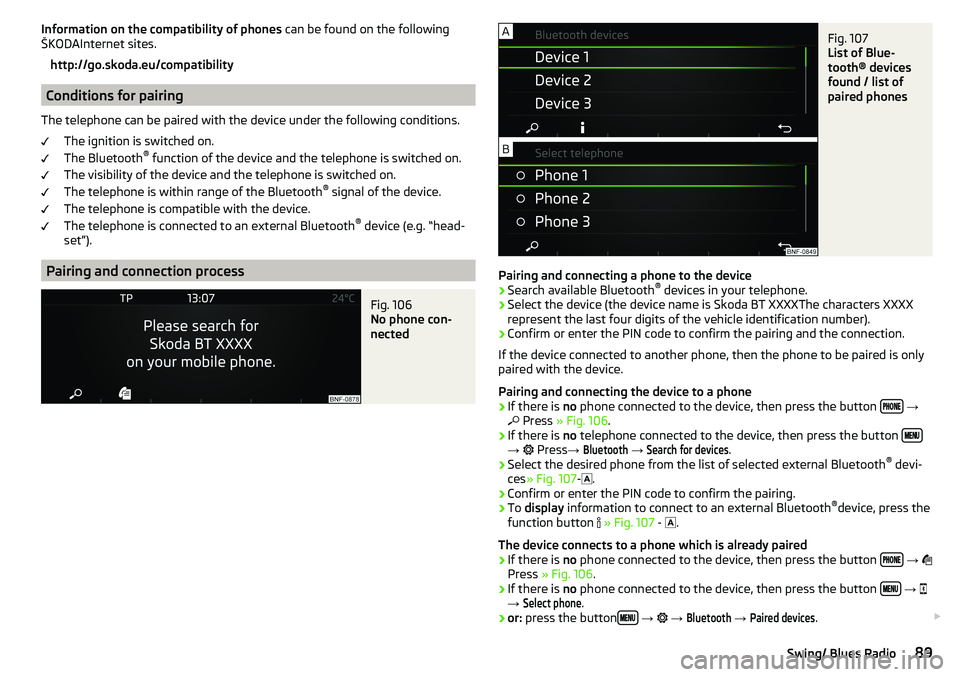
If there is no phone connected to the device, then press the button
→
Press » Fig. 106 .
›
If there is no telephone connected to the device, then press the button →
Press →
Bluetooth
→
Search for devices
.
›
Select the desired phone from the list of selected external Bluetooth ®
devi-
ces » Fig. 107 -
.
›
Confirm or enter the PIN code to confirm the pairing.
›
To display information to connect to an external Bluetooth ®
device, press the
function button
» Fig. 107 -
.
The device connects to a phone which is already paired
›
If there is no phone connected to the device, then press the button
→
Press » Fig. 106 .
›
If there is no phone connected to the device, then press the button
→
→
Select phone
.
›
or: press the button
→
→
Bluetooth
→
Paired devices
.
89Swing/ Blues Radio