warning SKODA CITIGO 2017 Workshop Manual
[x] Cancel search | Manufacturer: SKODA, Model Year: 2017, Model line: CITIGO, Model: SKODA CITIGO 2017Pages: 172, PDF Size: 24.54 MB
Page 71 of 172
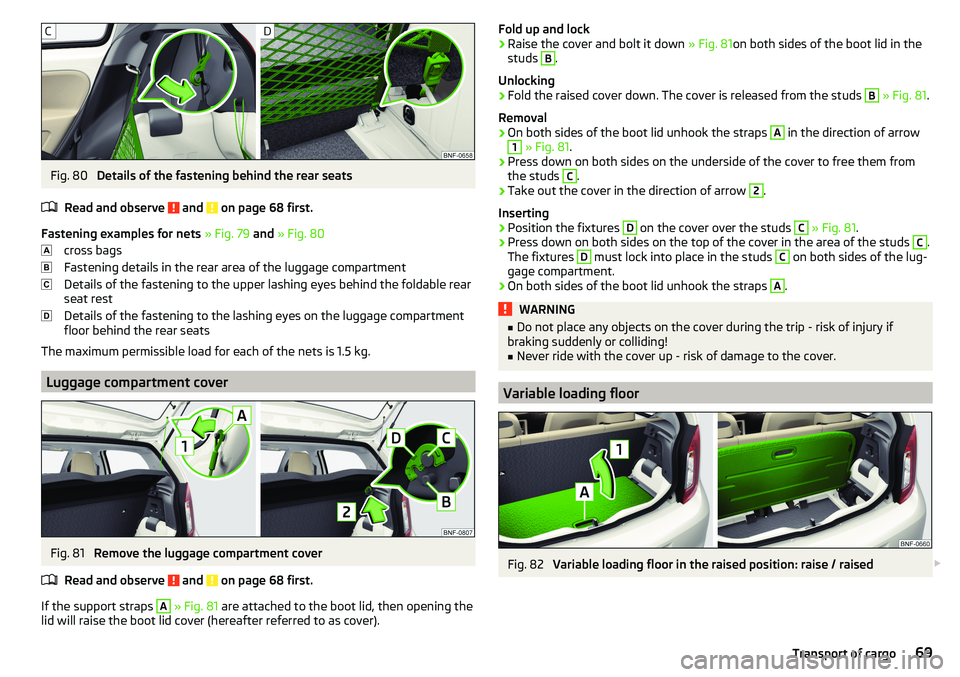
Fig. 80
Details of the fastening behind the rear seats
Read and observe
and on page 68 first.
Fastening examples for nets » Fig. 79 and » Fig. 80
cross bags
Fastening details in the rear area of the luggage compartment
Details of the fastening to the upper lashing eyes behind the foldable rear
seat rest
Details of the fastening to the lashing eyes on the luggage compartment
floor behind the rear seats
The maximum permissible load for each of the nets is 1.5 kg.
Luggage compartment cover
Fig. 81
Remove the luggage compartment cover
Read and observe
and on page 68 first.
If the support straps
A
» Fig. 81 are attached to the boot lid, then opening the
lid will raise the boot lid cover (hereafter referred to as cover).
Fold up and lock›Raise the cover and bolt it down » Fig. 81on both sides of the boot lid in the
studs B
.
Unlocking
›
Fold the raised cover down. The cover is released from the studs
B
» Fig. 81 .
Removal
›
On both sides of the boot lid unhook the straps
A
in the direction of arrow
1
» Fig. 81 .
›
Press down on both sides on the underside of the cover to free them from
the studs
C
.
›
Take out the cover in the direction of arrow
2
.
Inserting
›
Position the fixtures
D
on the cover over the studs
C
» Fig. 81 .
›
Press down on both sides on the top of the cover in the area of the studs
C
.
The fixtures
D
must lock into place in the studs
C
on both sides of the lug-
gage compartment.
›
On both sides of the boot lid unhook the straps
A
.
WARNING■ Do not place any objects on the cover during the trip - risk of injury if
braking suddenly or colliding!■
Never ride with the cover up - risk of damage to the cover.
Variable loading floor
Fig. 82
Variable loading floor in the raised position: raise / raised
69Transport of cargo
Page 72 of 172
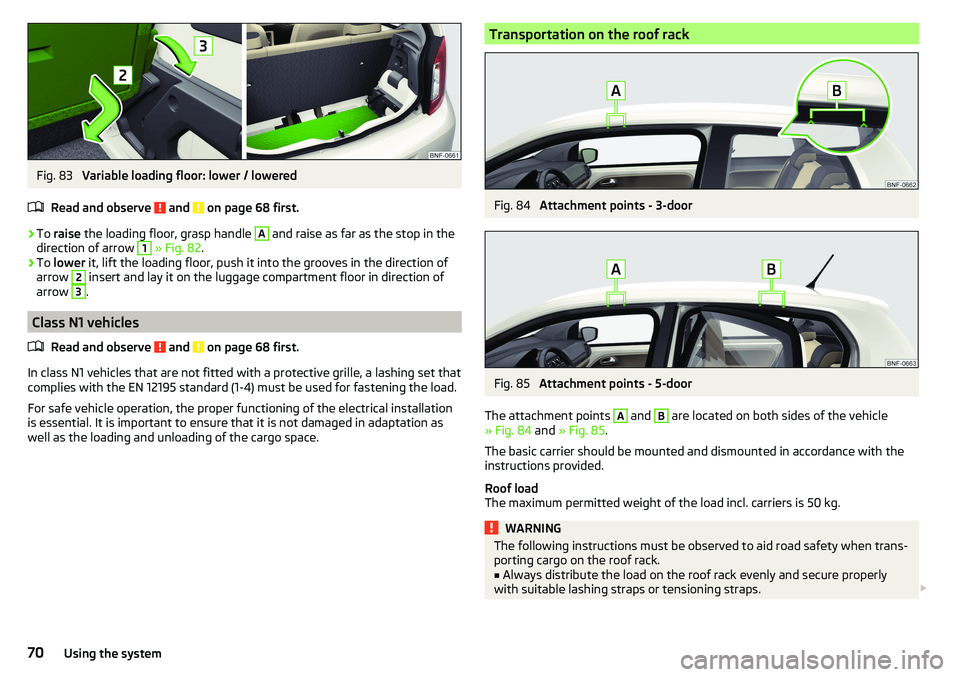
Fig. 83
Variable loading floor: lower / lowered
Read and observe
and on page 68 first.
›
To raise the loading floor, grasp handle
A
and raise as far as the stop in the
direction of arrow
1
» Fig. 82 .
›
To lower it, lift the loading floor, push it into the grooves in the direction of
arrow
2
insert and lay it on the luggage compartment floor in direction of
arrow
3
.
Class N1 vehicles
Read and observe
and on page 68 first.
In class N1 vehicles that are not fitted with a protective grille, a lashing set that
complies with the EN 12195 standard (1-4) must be used for fastening the load.
For safe vehicle operation, the proper functioning of the electrical installation
is essential. It is important to ensure that it is not damaged in adaptation as
well as the loading and unloading of the cargo space.
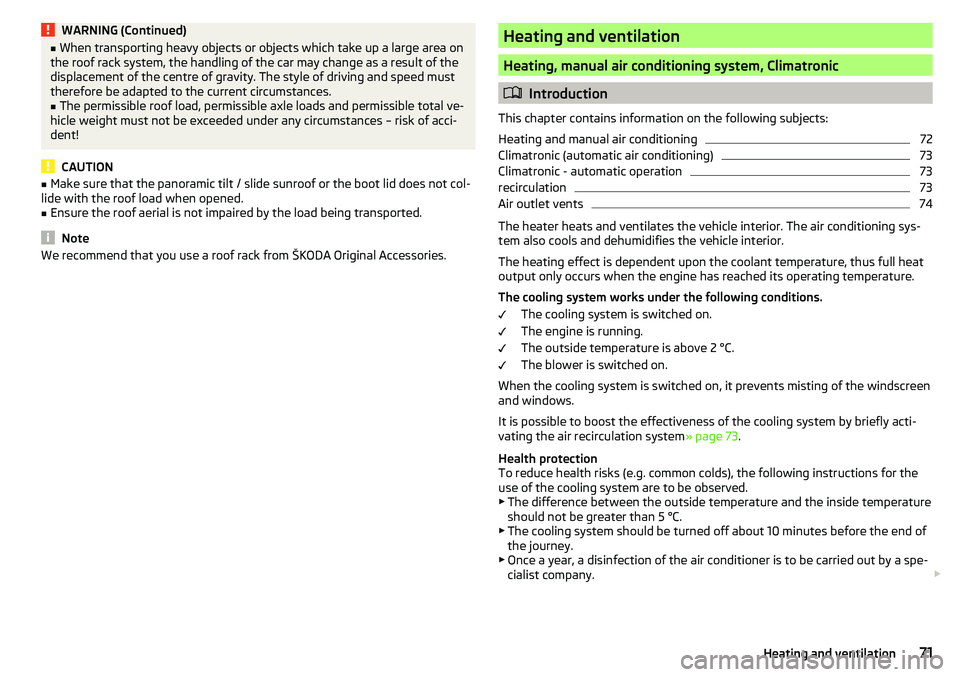
Transportation on the roof rackFig. 84
Attachment points - 3-door
Fig. 85
Attachment points - 5-door
The attachment points
A
and
B
are located on both sides of the vehicle
» Fig. 84 and » Fig. 85 .
The basic carrier should be mounted and dismounted in accordance with the
instructions provided.
Roof load
The maximum permitted weight of the load incl. carriers is 50 kg.
WARNINGThe following instructions must be observed to aid road safety when trans- porting cargo on the roof rack.■
Always distribute the load on the roof rack evenly and secure properly
with suitable lashing straps or tensioning straps.
70Using the system
Page 73 of 172
WARNING (Continued)■When transporting heavy objects or objects which take up a large area on
the roof rack system, the handling of the car may change as a result of the
displacement of the centre of gravity. The style of driving and speed must
therefore be adapted to the current circumstances.■
The permissible roof load, permissible axle loads and permissible total ve-
hicle weight must not be exceeded under any circumstances – risk of acci-
dent!
CAUTION
■ Make sure that the panoramic tilt / slide sunroof or the boot lid does not col-
lide with the roof load when opened.■
Ensure the roof aerial is not impaired by the load being transported.
Note
We recommend that you use a roof rack from ŠKODA Original Accessories.Heating and ventilation
Heating, manual air conditioning system, Climatronic
Introduction
This chapter contains information on the following subjects:
Heating and manual air conditioning
72
Climatronic (automatic air conditioning)
73
Climatronic - automatic operation
73
recirculation
73
Air outlet vents
74
The heater heats and ventilates the vehicle interior. The air conditioning sys-
tem also cools and dehumidifies the vehicle interior.
The heating effect is dependent upon the coolant temperature, thus full heat
output only occurs when the engine has reached its operating temperature.
The cooling system works under the following conditions. The cooling system is switched on.
The engine is running.
The outside temperature is above 2 °C.
The blower is switched on.
When the cooling system is switched on, it prevents misting of the windscreen
and windows.
It is possible to boost the effectiveness of the cooling system by briefly acti-
vating the air recirculation system » page 73.
Health protection
To reduce health risks (e.g. common colds), the following instructions for the
use of the cooling system are to be observed. ▶ The difference between the outside temperature and the inside temperature
should not be greater than 5 °C.
▶ The cooling system should be turned off about 10 minutes before the end of
the journey.
▶ Once a year, a disinfection of the air conditioner is to be carried out by a spe-
cialist company.
71Heating and ventilation
Page 74 of 172
WARNING■The blower should always be on to prevent the windows from misting.
Otherwise there is a risk of accident.■
Under certain circumstances, air at a temperature of about 5 °C can flow
out of the vents when the cooling system is switched on.
Note
■ The air inlet in front of the windscreen must be free of e.g. ice, snow or
leaves to ensure that the heating and cooling system operates properly.■
After switching on the cooling Condensation from the evaporator of the air
conditioning may drip down and form a puddle below the vehicle. This is not a
leak!
■
If the coolant temperature is too high, the cooling system is switched off to
ensure that the engine cools down.
Heating and manual air conditioning
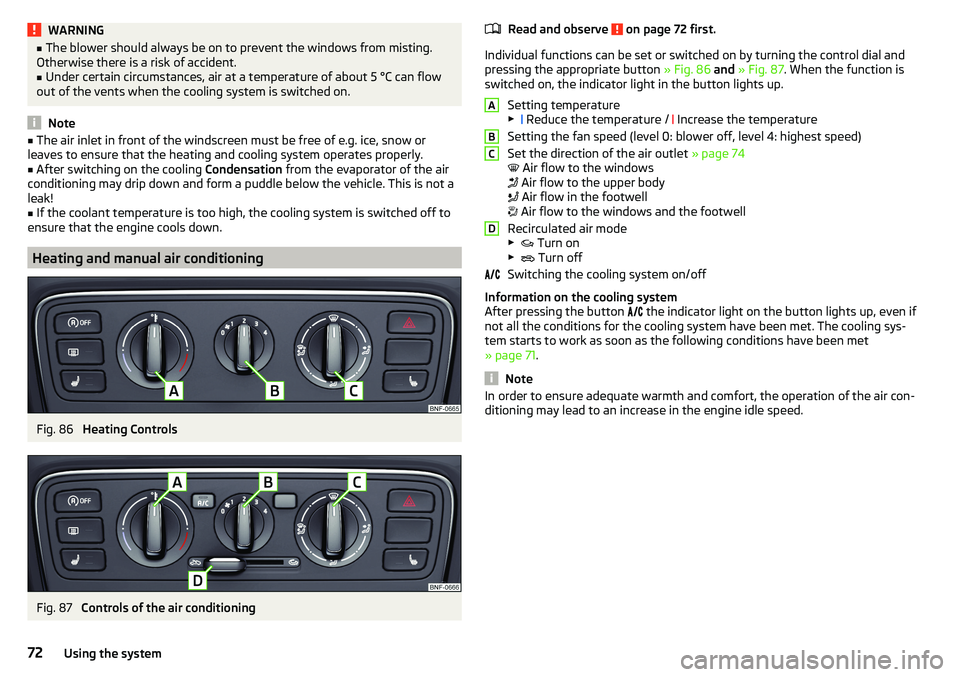
Fig. 86
Heating Controls
Fig. 87
Controls of the air conditioning
Read and observe on page 72 first.
Individual functions can be set or switched on by turning the control dial and
pressing the appropriate button » Fig. 86 and » Fig. 87 . When the function is
switched on, the indicator light in the button lights up.
Setting temperature▶ Reduce the temperature /
Increase the temperature
Setting the fan speed (level 0: blower off, level 4: highest speed)
Set the direction of the air outlet » page 74
Air flow to the windows
Air flow to the upper body
Air flow in the footwell
Air flow to the windows and the footwell
Recirculated air mode
▶ Turn on
▶ Turn off
Switching the cooling system on/off
Information on the cooling system
After pressing the button the indicator light on the button lights up, even if
not all the conditions for the cooling system have been met. The cooling sys-
tem starts to work as soon as the following conditions have been met
» page 71 .
Note
In order to ensure adequate warmth and comfort, the operation of the air con-
ditioning may lead to an increase in the engine idle speed.ABCD72Using the system
Page 75 of 172
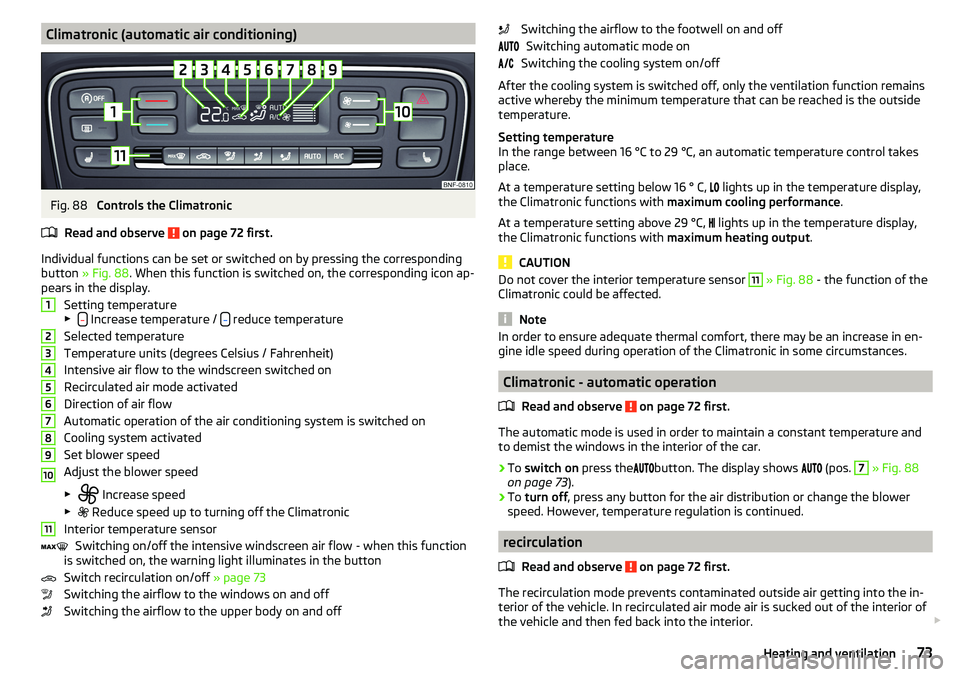
Climatronic (automatic air conditioning)Fig. 88
Controls the Climatronic
Read and observe
on page 72 first.
Individual functions can be set or switched on by pressing the corresponding
button » Fig. 88 . When this function is switched on, the corresponding icon ap-
pears in the display.
Setting temperature
▶
Increase temperature / reduce temperature
Selected temperature
Temperature units (degrees Celsius / Fahrenheit)
Intensive air flow to the windscreen switched on
Recirculated air mode activated
Direction of air flow
Automatic operation of the air conditioning system is switched on
Cooling system activated
Set blower speed
Adjust the blower speed
▶ Increase speed
▶ Reduce speed up to turning off the Climatronic
Interior temperature sensor Switching on/off the intensive windscreen air flow - when this function
is switched on, the warning light illuminates in the button
Switch recirculation on/off » page 73
Switching the airflow to the windows on and off
Switching the airflow to the upper body on and off
1234567891011Switching the airflow to the footwell on and off Switching automatic mode on
Switching the cooling system on/off
After the cooling system is switched off, only the ventilation function remains
active whereby the minimum temperature that can be reached is the outside
temperature.
Setting temperature
In the range between 16 °C to 29 °C, an automatic temperature control takes
place.
At a temperature setting below 16 ° C,
lights up in the temperature display,
the Climatronic functions with maximum cooling performance .
At a temperature setting above 29 °C, lights up in the temperature display,
the Climatronic functions with maximum heating output.
CAUTION
Do not cover the interior temperature sensor 11 » Fig. 88 - the function of the
Climatronic could be affected.
Note
In order to ensure adequate thermal comfort, there may be an increase in en-
gine idle speed during operation of the Climatronic in some circumstances.
Climatronic - automatic operation
Read and observe
on page 72 first.
The automatic mode is used in order to maintain a constant temperature and
to demist the windows in the interior of the car.
›
To switch on press the
button. The display shows
(pos.
7
» Fig. 88
on page 73 ).
›
To turn off , press any button for the air distribution or change the blower
speed. However, temperature regulation is continued.
recirculation
Read and observe
on page 72 first.
The recirculation mode prevents contaminated outside air getting into the in-
terior of the vehicle. In recirculated air mode air is sucked out of the interior of
the vehicle and then fed back into the interior.
73Heating and ventilation
Page 76 of 172
›To the
turn on move the slider D into position or press the button in
Climatronic.›
To Turn off move the slider
D
into position
or press the button
in Cli-
matronic.
WARNINGThe recirculation system cannot be switched on for a longer period of time,
because no fresh air is fed through from the outside. “Stale air” may result
in fatigue in the driver and occupants, reduce attention levels and also
cause the windows to mist up. As soon as windows mist up, turn on the re-
circulation system immediately - risk of accident!
CAUTION
We recommend not smoking in the vehicle when the recirculating air operation
is switched on. The smoke sucked from the interior is deposited on the evapo-
rator of the air conditioner. This produces a permanent odour when the air
conditioning system is operating which can only be eliminated through consid-
erable effort and expense (replacement of compressor).
Air outlet vents
Fig. 89
Air outlet vents
Read and observe
on page 72 first.
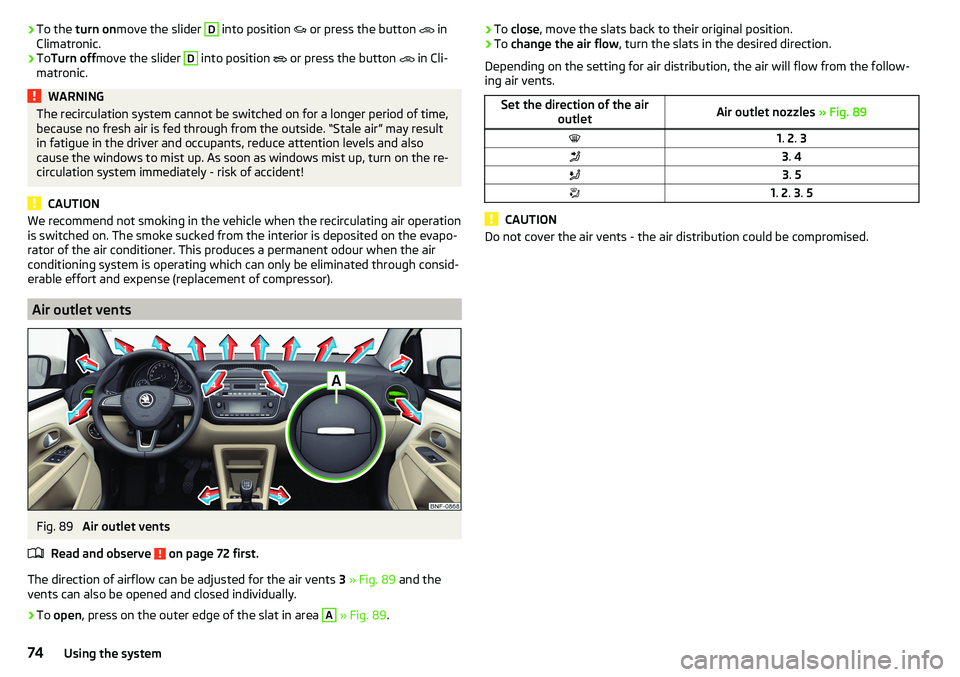
The direction of airflow can be adjusted for the air vents 3 » Fig. 89 and the
vents can also be opened and closed individually.
›
To open , press on the outer edge of the slat in area
A
» Fig. 89 .
›To
close , move the slats back to their original position.›To change the air flow , turn the slats in the desired direction.
Depending on the setting for air distribution, the air will flow from the follow-
ing air vents.Set the direction of the air outletAir outlet nozzles » Fig. 891. 2 . 33 . 43 . 51. 2 . 3 . 5
CAUTION
Do not cover the air vents - the air distribution could be compromised.74Using the system
Page 77 of 172
Infotainment
Swing/ Blues Radio
Important notes
Introduction
This chapter contains information on the following subjects:
Mobile phones and applications
75
The information contained in this section refer to Swing and Blues radio, un-
less it is indicated otherwise.
WARNING■ Adjust the volume to ensure that acoustic signals from outside the vehi-
cle, e.g. the police, ambulances and fire engines, can be heard at all times.■
High volumes can cause hearing damage.
Note
In some countries, some unit features can no longer be selected when the ve-
hicle is running faster than a certain speed. This is not a malfunction, but com-
plies with the national legal regulations.
Mobile phones and applications
Fig. 90
QR code with reference to web
pages for checking the compati-
bility of devices
Read and observe on page 75 first.
The availability of some of the functions described in this Owner's Manual depends on the type of device to be connected and the applications installed
in it.
Mobile phones
On the ŠKODApages, check to see if the device is compatible with the selected
mobile phones. This verification is done by reading the QR code » Fig. 90 by
the associated application in the external device (e.g. phone, tablet) or after
typing the following address into the web browser.
http://go.skoda.eu/compatibility
Due to the large number of mobile phones as well as the ongoing develop-
ment of these devices, ŠKODA AUTO cannot always ensure compatibility with
the device unconditionally. It is always recommended to physically check func-
tion on the associated vehicle, including the ŠKODA Partners, beforehand.
Only those versions of the selected phones will be tested and supported which
originate from the official distribution network. The same also applies to their
firmware and software.
The functions of the mobile phone to be tested may differ from the same type
of mobile phone depending on the specification for the respective country or
the specific service.
Mobile phones with the operating system and in the version available at the
time of these tests will be tested. In this regard, it could be the case that the
functions of a mobile phone may differ with a different operating system ver-
sion compared to the one used with the tested phone.
ŠKODA AUTO can accept no responsibility for the continuous changes made by
the mobile phone manufacturers and application vendors.
ŠKODA AUTO does not accept any liability for any damage to the device or ve-
hicle due to the use of incorrect or illegal applications or the improper or unau-
thorized use of mobile phones.
Applications
Due to the variety of applications and communication systems as well as their
ongoing development, the available applications may not work in all external
devices. ŠKODA AUTO can accept no liability for their proper function.
Applications, their use and the required data connection may be chargeable.
The range of available applications and their functionality is dependent on the
device, vehicle and region.
The function of mobile applications can be influenced by the quality of the In-
ternet connection.
Some applications are dependent on the availability of services that are provi-
ded by third parties.75Swing/ Blues Radio
Page 80 of 172
CAUTION■High volumes can cause sound resonance in the vehicle.■When changing or connecting an audio source, this may cause sudden
changes in volume. Reduce the volume before changing or connecting an au-
dio source.
Device Settings - Swing
Main menu settings
Fig. 95
Main menu set-
tings
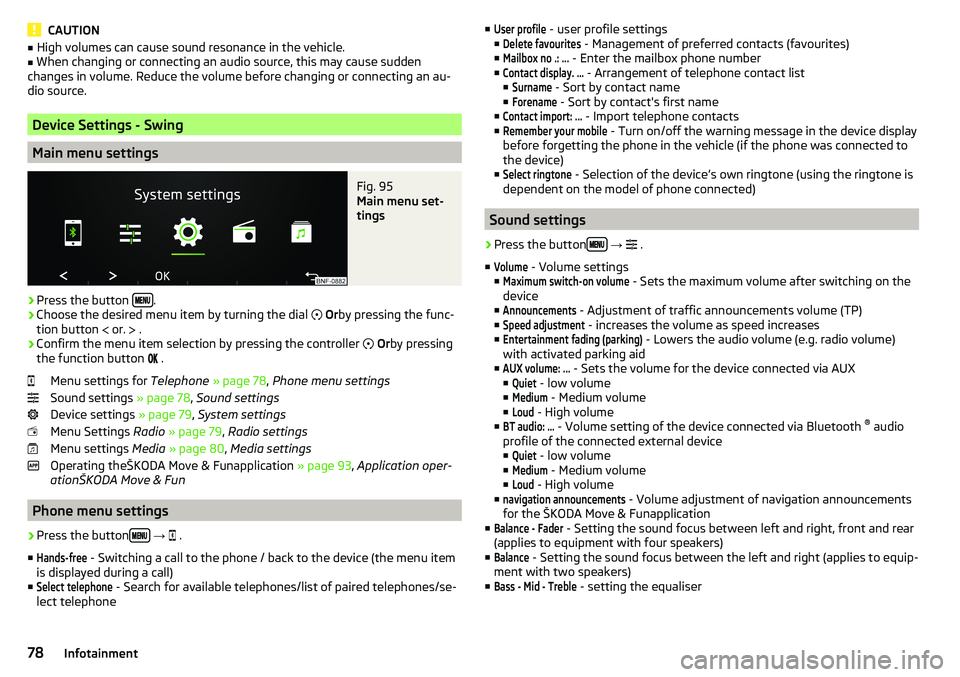
›
Press the button .
›
Choose the desired menu item by turning the dial
Or by pressing the func-
tion button
or.
.
›
Confirm the menu item selection by pressing the controller
Or by pressing
the function button
.
Menu settings for Telephone » page 78 , Phone menu settings
Sound settings » page 78, Sound settings
Device settings » page 79, System settings
Menu Settings Radio » page 79 , Radio settings
Menu settings Media » page 80 , Media settings
Operating theŠKODA Move & Funapplication » page 93, Application oper-
ationŠKODA Move & Fun
Phone menu settings
›
Press the button
→
.
■
Hands-free
- Switching a call to the phone / back to the device (the menu item
is displayed during a call)
■
Select telephone
- Search for available telephones/list of paired telephones/se-
lect telephone
■User profile - user profile settings
■Delete favourites
- Management of preferred contacts (favourites)
■
Mailbox no .: ...
- Enter the mailbox phone number
■
Contact display. ...
- Arrangement of telephone contact list
■
Surname
- Sort by contact name
■
Forename
- Sort by contact's first name
■
Contact import: ...
- Import telephone contacts
■
Remember your mobile
- Turn on/off the warning message in the device display
before forgetting the phone in the vehicle (if the phone was connected to
the device)
■
Select ringtone
- Selection of the device’s own ringtone (using the ringtone is
dependent on the model of phone connected)
Sound settings
›
Press the button
→
.
■
Volume
- Volume settings
■
Maximum switch-on volume
- Sets the maximum volume after switching on the
device
■
Announcements
- Adjustment of traffic announcements volume (TP)
■
Speed adjustment
- increases the volume as speed increases
■
Entertainment fading (parking)
- Lowers the audio volume (e.g. radio volume)
with activated parking aid
■
AUX volume: ...
- Sets the volume for the device connected via AUX
■
Quiet
- low volume
■
Medium
- Medium volume
■
Loud
- High volume
■
BT audio: ...
- Volume setting of the device connected via Bluetooth ®
audio
profile of the connected external device ■
Quiet
- low volume
■
Medium
- Medium volume
■
Loud
- High volume
■
navigation announcements
- Volume adjustment of navigation announcements
for the ŠKODA Move & Funapplication
■
Balance - Fader
- Setting the sound focus between left and right, front and rear
(applies to equipment with four speakers)
■
Balance
- Setting the sound focus between the left and right (applies to equip-
ment with two speakers)
■
Bass - Mid - Treble
- setting the equaliser
78Infotainment
Page 88 of 172
If no audio source is chosen within 5 seconds, then the main menu of the last
selected audio source is displayed.›
To select the audio source in the folder / track list the function button
repeatedly until the display on the position
B
» Fig. 101 on page 84
is dis-
played.
›
Press the function key
. Using the dial
Select the sound source » Fig. 103
and select the desired folder / track.
Playback starts automatically (does not apply to AUX).
If AUX is selected as the audio source, the playback must be started on the
connected device.
CAUTION
■ Do not save any important data or that which has not been backed up on the
connected audio sources. ŠKODA assumes no responsibility for lost or dam-
aged files or connected audio sources.■
When changing or connecting an audio source, this may cause sudden
changes in volume. Reduce the volume before changing or connecting an au-
dio source.
■
When connecting an external audio source, the external source information
messages can be displayed. These messages must be observed and if neces-
sary confirmed (e.g. enabling data transfer etc).
Note
The national copyright laws that apply in your country must be observed.
SD-card
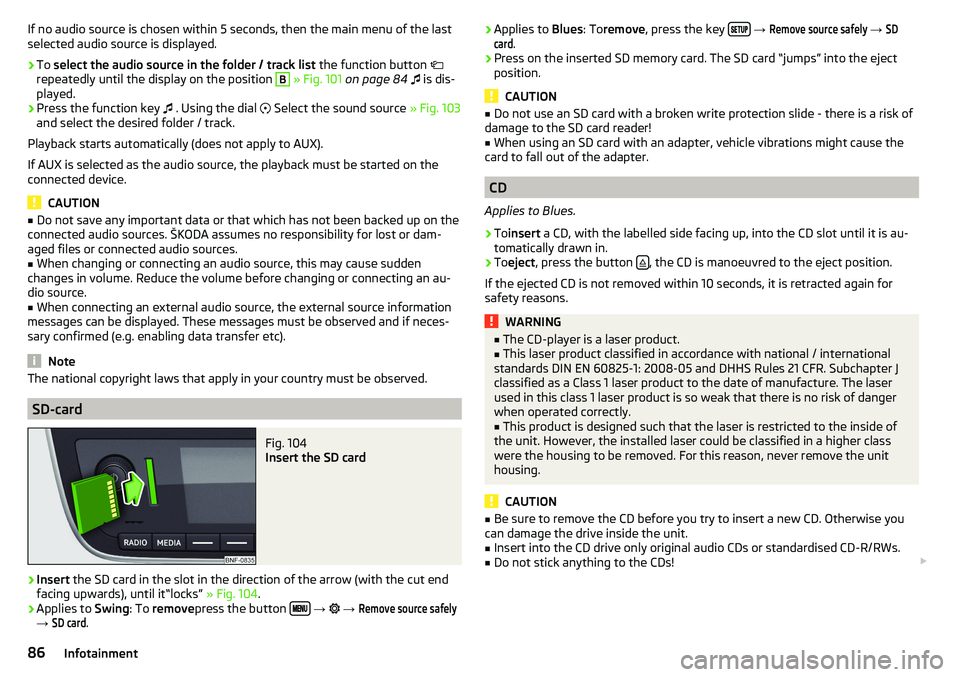
Fig. 104
Insert the SD card
›
Insert the SD card in the slot in the direction of the arrow (with the cut end
facing upwards), until it“locks” » Fig. 104.
›
Applies to Swing: To remove press the button
→
→
Remove source safely
→
SD card
.
› Applies to
Blues: Toremove , press the key
→ Remove source safely → SDcard
.›
Press on the inserted SD memory card. The SD card “jumps” into the eject
position.
CAUTION
■ Do not use an SD card with a broken write protection slide - there is a risk of
damage to the SD card reader!■
When using an SD card with an adapter, vehicle vibrations might cause the
card to fall out of the adapter.
CD
Applies to Blues.
›
To insert a CD, with the labelled side facing up, into the CD slot until it is au-
tomatically drawn in.
›
To eject , press the button , the CD is manoeuvred to the eject position.
If the ejected CD is not removed within 10 seconds, it is retracted again for
safety reasons.
WARNING■ The CD-player is a laser product.■This laser product classified in accordance with national / international
standards DIN EN 60825-1: 2008-05 and DHHS Rules 21 CFR. Subchapter J
classified as a Class 1 laser product to the date of manufacture. The laser
used in this class 1 laser product is so weak that there is no risk of danger
when operated correctly.■
This product is designed such that the laser is restricted to the inside of
the unit. However, the installed laser could be classified in a higher class
were the housing to be removed. For this reason, never remove the unit
housing.
CAUTION
■ Be sure to remove the CD before you try to insert a new CD. Otherwise you
can damage the drive inside the unit.■
Insert into the CD drive only original audio CDs or standardised CD-R/RWs.
■
Do not stick anything to the CDs!
86Infotainment
Page 97 of 172
Driving
Starting-off and Driving
Starting and stopping the engine
Introduction
This chapter contains information on the following subjects:
Electronic immobiliser and steering lock
95
Ignition on / off
96
Starting / Stopping the engine
96
It is possible, with the key in the ignition, to switch the ignition off and on and
start/stop the engine.
WARNING■ Never switch off the engine before the vehicle is stationary – risk of acci-
dent!■
While driving with the engine stopped the ignition must always be
switched on. Otherwise, the steering may lock - danger of an accident!
■
Do not withdraw the ignition key from the ignition lock until the vehicle
has come to a stop » page 99, Parking . Otherwise, the steering may lock -
danger of an accident!
■
Never leave the vehicle unattended with the engine running - risk of acci-
dent, theft or similar.
■
Never (e.g. in garages) run the engine in a closed place - there is the dan-
ger of poisoning and death!
CAUTION
■ Only start the engine when the engine and the vehicle are stationary - there
is a danger of starter and engine damage!■
Do not push-start the engine – risk of damaging the engine and the catalytic
converter. The battery from another vehicle can be used as a jump-start aid.
Note
Do not warm up the engine while the vehicle is stationary. If possible, start
your journey as soon as the engine has started. Through this, the engine rea-
ches its operating temperature faster.Electronic immobiliser and steering lock
Read and observe
and on page 95 first.
The electronic immobiliser (hereinafter referred to as immobiliser) makes thetheft or unauthorised use of your vehicle more difficult.
Immobiliser
The immobiliser allows the engine to start provided an original vehicle key only
is used.
Malfunction of the immobiliser
It is not possible to start the engine if there is a failure of the components in
the immobiliser key.
Use the other vehicle key to start the engine; if necessary, seek help from a
specialist garage.
Steering lock - lock
›
Remove the key and turn the steering wheel until the steering lock engages.
Steering lock - unlock
›
Insert the key into the ignition and turn on the ignition. If this is not possible,
then move the steering wheel slightly back and forth, as a result of which
the steering lock should unlock.
WARNINGNever let the vehicle roll with locked steering lock - danger of accident!95Starting-off and Driving