wheel SKODA FABIA 2007 2.G / 5J User Guide
[x] Cancel search | Manufacturer: SKODA, Model Year: 2007, Model line: FABIA, Model: SKODA FABIA 2007 2.G / 5JPages: 242, PDF Size: 48.29 MB
Page 70 of 242
Seats and Stowage69
Using the systemSafetyDriving TipsGeneral MaintenanceBreakdown assistanceTechnical Data
Opening and closing the storage compartments on the front
passenger side
– Pull or press the handle of the lid in the direction of arrow ⇒page 68,
fig. 68 and fold open the lid.
– Raise the lid until it is heard to engage.
A pin holder is located inside the lid.
WARNING
The storage compartment must always be closed when driving for safety reasons.
Cooling of storage compartment on front passenger side*
The storage compartment can be fitted for vehicles with an air-
conditioning system with a closable inlet for cooled air.
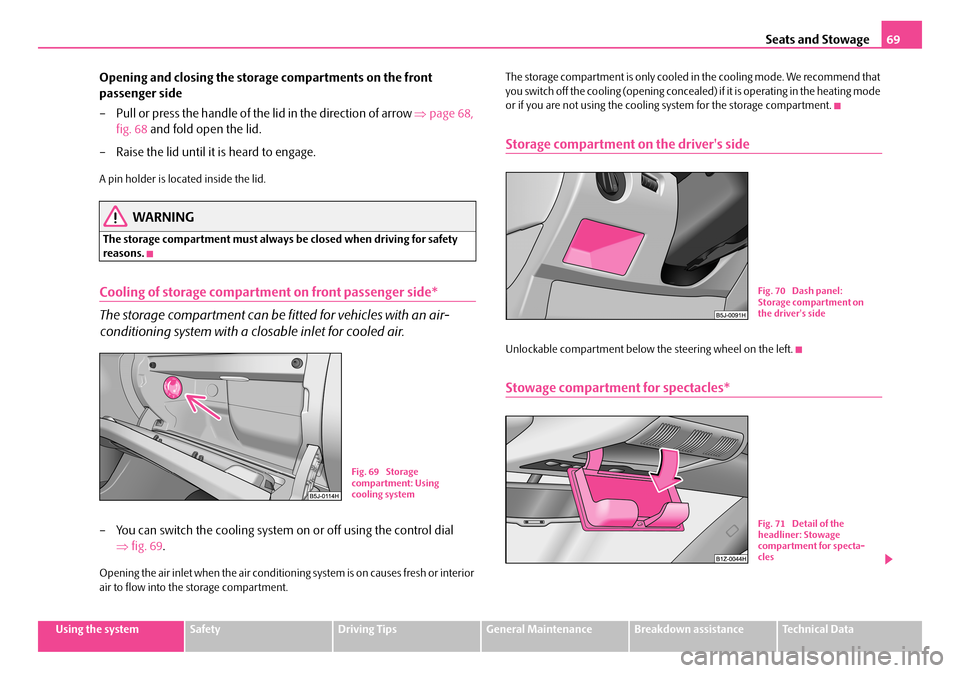
– You can switch the cooling system on or off using the control dial
⇒ fig. 69.
Opening the air inlet when the air conditioning system is on causes fresh or interior air to flow into the storage compartment.
The storage compartment is only cooled in the cooling mode. We recommend that you switch off the cooling (opening concealed) if it is operating in the heating mode or if you are not using the cooling system for the storage compartment.
Storage compartment on the driver's side
Unlockable compartment below the steering wheel on the left.
Stowage compartment for spectacles*
Fig. 69 Storage compartment: Using cooling system
Fig. 70 Dash panel: Storage compartment on the driver's side
Fig. 71 Detail of the headliner: Stowage compartment for specta-cles
NKO A05F 20 MR08.book Page 69 Thursday, April 19, 2007 11:34 AM
Page 87 of 242

Starting-off and Driving86
Starting-off and Driving
Setting steering wheel position*
You can set the height and the forward/back position of the steering
wheel to the desired position.
– Adjust the driver seat ⇒page 56.
– Pull the lever below the steering column ⇒fig. 88 down ⇒.
– Set the steering wheel to the desired position (concerning height and
forward/back position).
– Then push the lever up against the steering column until it locks into
place.
WARNING
•You must not adjust the steering wh eel when the vehicle is moving!
•The driver must maintain a distance of at least 25 cm to the steering wheel ⇒fig. 89. Not maintaining this minimum distance will mean that the airbag system will not be able to properly protect you - hazard!
•For s afe ty re a so ns t he le ve r m ust al wa y s b e fi rm ly pus he d up to a voi d the steering wheel alteri ng its position unintentionally when driving - risk of accident!
•If you adjust the steering wheel furthe r towards the head, you will reduce the protection offered by the driver airb ag in the event of an accident. Check that the steering wheel is aligned to the chest.
•When driving, hold the steering wheel with both hands firmly on the outer edge in the 9 o'clock and 3 o'clock position. Never hold the steering wheel firmly in the 12 o'clock position or in another way (e.g. in the middle of the steering wheel or at the inner steering wheel edge). In such cases, injuries to the arms, the hands and the head can occur when the driver airbag is deployed.
Fig. 88 Adjustable steering wheel: Lever below steering column
Fig. 89 Safe distance to steering wheel
NKO A05F 20 MR08.book Page 86 Thursday, April 19, 2007 11:34 AM
Page 88 of 242
Starting-off and Driving87
Using the systemSafetyDriving TipsGeneral MaintenanceBreakdown assistanceTechnical Data
Ignition lock
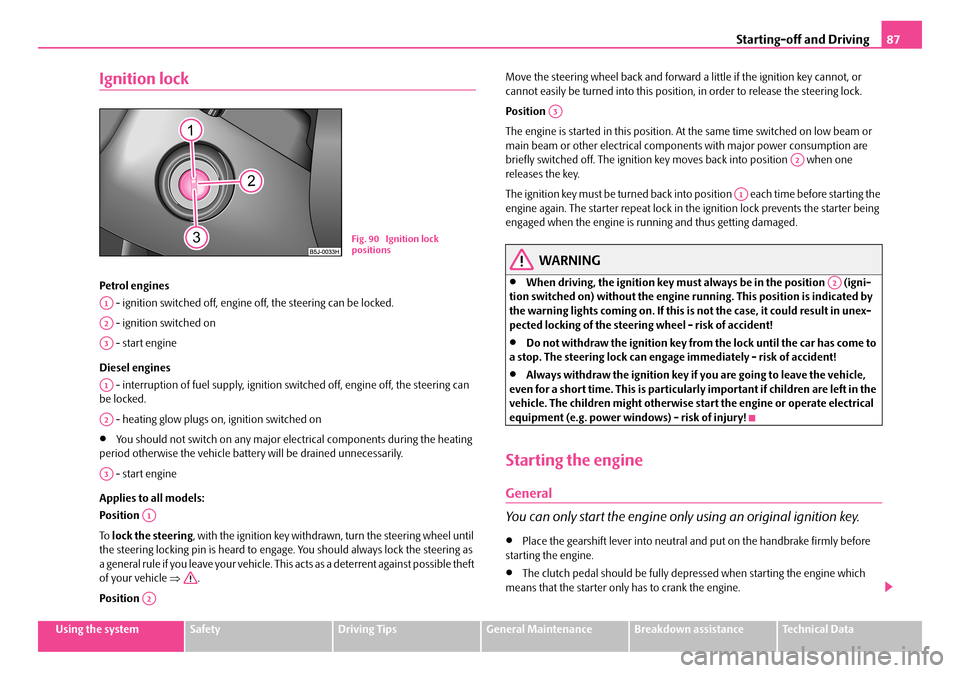
Petrol engines
- ignition switched off, engine off, the steering can be locked.
- ignition switched on
- start engine
Diesel engines
- interruption of fuel supply, ignition sw itched off, engine off, the steering can be locked.
- heating glow plugs on, ignition switched on
•You should not switch on any major elec trical components during the heating period otherwise the vehicle batter y will be drained unnecessarily.
- start engine
Applies to all models:
Position
To lock the steering, with the ignition key withdrawn, turn the steering wheel until the steering locking pin is heard to engage. You should always lock the steering as a general rule if you leave your vehicle. This acts as a deterrent against possible theft of your vehicle ⇒.
Position
Move the steering wheel back and forward a little if the ignition key cannot, or cannot easily be turned into this position, in order to release the steering lock.
Position
The engine is started in this position. At the same time switched on low beam or main beam or other electrical compon ents with major power consumption are briefly switched off. The ignition key moves back into position when one releases the key.
The ignition key must be turned back into position each time before starting the engine again. The starter repeat lock in th e ignition lock prevents the starter being engaged when the engine is ru nning and thus getting damaged.
WARNING
•When driving, the ignition key must always be in the position (igni- tion switched on) without the engine running. This position is indicated by the warning lights coming on. If this is not the case, it could result in unex- pected locking of the steering wheel - risk of accident!
•Do not withdraw the ignition key from the lock until the car has come to a stop. The steering lock can engage immediately - risk of accident!
•Always withdraw the ignition key if you are going to leave the vehicle, even for a short time. This is particularly important if children are left in the vehicle. The children migh t otherwise start the engine or operate electrical equipment (e.g. power windows) - risk of injury!
Starting the engine
General
You can only start the engine only using an original ignition key.
•Place the gearshift lever into neutral and put on the handbrake firmly before starting the engine.
•The clutch pedal should be fully depressed when starting the engine which means that the starter only has to crank the engine.
Fig. 90 Ignition lock positions
A1
A2
A3
A1
A2
A3
A1
A2
A3
A2
A1
A2
NKO A05F 20 MR08.book Page 87 Thursday, April 19, 2007 11:34 AM
Page 96 of 242

Automatic gearbox95
Using the systemSafetyDriving TipsGeneral MaintenanceBreakdown assistanceTechnical Data
•When the engine is running and the vehicle is stationary, it is necessary to hold the car with the brake pedal in all the positions of the selector lever (except P and N) since the power transmission is never completely inter- rupted, also not when the engine is idling - the vehicle "creeps".
Selector lever positions
The selector lever position you have engaged is shown in the information display of the instrument cluster with the corresponding gear symbol highlighted ⇒fig. 96.
In the positions D and S the gear you have already engaged will be additionally displayed on the display.
P - Parklock
The driven wheels are locked me chanically in this position.
The Parklock must only be engage d when the vehicle is stationary ⇒.
If you wish to move the select or lever into or out of this position, you must press the Shiftlock button in the handle of the select or lever and at the same time depress the brake pedal.
R - Reverse
Reverse gear must only be engaged when the vehicle is stationary and the engine idling ⇒.
The brake pedal must be depressed and at the same time the Shiftlock must be pressed, if you wish to obtain the selector lever positions R, P or N.
When the ignition is switched on and the selector lever is in position R, the reverse lights will come on.
N - Neutral
The transmission is in Neutral in this position.
The brake pedal must be depressed (if the le ver is in its position for longer than 2 seconds) in order to move the selector lever out of the position N into the position D , with the ignition switched on, on a vehicle travelling at less than 5 km/hour or on a stationary vehicle.
The brake pedal must be depressed (if the le ver is in its position for longer than 2 seconds) in order to move the selector lever out of the position N into the position R , with the ignition switched on, on a vehicle travelling at less than 5 km/hour or on a stationary vehicle.
D - Drive, position for driving forward
When the selector lever is in this position, the forward gears are shifted up and down automatically in line with engine load, vehicle speed and the dynamic shift programme.
WARNING (continued)
Fig. 95 Selector lever
Fig. 96 Information display: Selector lever positions
NKO A05F 20 MR08.book Page 95 Thursday, April 19, 2007 11:34 AM
Page 98 of 242

Automatic gearbox97
Using the systemSafetyDriving TipsGeneral MaintenanceBreakdown assistanceTechnical Data
WARNING
Please note that using the kickdown function can result in the driven wheels spinning on a smooth or slippery road surface - risk of skidding!
Dynamic shift programme
The automatic gearbox of your vehicle is controlled electronically. Shifting up and down through the gears is performed auto matically on the basis of pre-defined driving programmes.
Adopting a moderate style of driving will cause the gearbox to select the most economical driving programme. Shifting up in to a higher gear as soon as possible and shifting down as late as possible will have a favourable effect on your fuel consumption.
Adopting a sporty style of driving with rapid movements of the accelerator pedal combined with sharp acceleration and freq uent changes in speed, exploiting the top speed of the car or depressing the a ccelerator pedal (kickdown function), will cause the gearbox to switch over to this style of driving and shift down earlier with frequent changes in gears in comparison to the moderate style of driving.
Selecting the most appropriate driving programme for the particular style of driving is a continuous process. Irrespective of this it is, however, possible to switch or shift down into a dynamic shift programme by depressing the accelerator rapidly. The gearbox shifts down into a lower gear matc hing the speed of the car and this allows you to accelerate rapidly (e.g. when ov ertaking) without having to depress the accelerator pedal fully into the kickdown range. The original programme will be reactivated to match your particular style of driving once the gearbox has shifted up again.
When driving in hilly regions, the gears are selected to match uphill and downhill sections. This avoids the gearbox frequently shifting up and down when negotiating an uphill stretch. When driving downhill, it is possible to shift down into the Tiptronic position, in order to exploit the engine brake torque.
Tiptronic
The Tiptronic allows the driver to also shift gears manually.
Switching over to manual shifting
– Push the selector lever to the right out of position D. As soon as the
gearbox has switched over, 6 5 4 3 2 1 appears in the display, with the
gear engaged being highlighted.
Shifting up gears
– One-touch forward of the selector lever (in the Tiptronic position)
⇒ fig. 97 .
Fig. 97 Selector lever: Manual shifting of gears
Fig. 98 Information display: Manual shifting of gears
A+
NKO A05F 20 MR08.book Page 97 Thursday, April 19, 2007 11:34 AM
Page 100 of 242

Communication99
Using the systemSafetyDriving TipsGeneral MaintenanceBreakdown assistanceTechnical Data
Communication
Operating the radio
The driver can set the basic functions of the radio system by simply operating the buttons on the multi-functional module* be hind the steering wheel so that he can concentrate on the traffic situation without being distracted as little as possible by operating the radio system ⇒fig. 99.
This applies only if your radio equipment has been installed at the factory. You can of course operate the radio system at the appliance. You will find a description in the operating instructions of your radio system.
By pressing the buttons, you can carry out the following functions:
The buttons apply for the respective oper ating mode of the current radio system.
Note
The loudspeakers in the vehicle are matched to a power output of 30 W.
ButtonRadioCD
Thumbwheel for stored transmitter
forward
back
Title search
forward
back
Increase volume
Decrease volume
Fig. 99 Multi-functional module: Buttons for the operation of the radio
A1
A2
A3
Frequency search back Reading the
previous CD
Frequency search forward
Reading the
following CD
Mute switch
ButtonRadioCD
A4
A5
A6
NKO A05F 20 MR08.book Page 99 Thursday, April 19, 2007 11:34 AM
Page 101 of 242

Communication100
Radio and mobile phone operation
The driver can set the basic functions of the radio and telephone system by simply operating the buttons on the multi-functi onal module* behind the steering wheel so that he can concentrate on the traffic si tuation without being distracted as little as possible by operating the radio system ⇒fig. 100.
This applies only if your radio and mobi le phone equipment has been installed at the factory. You can of course operate the radio and mobile system at the appliance. You will find a description in the operating instructions of your radio system.
By pressing the buttons, you can carry out the following functions:
The buttons apply for the respective operating mode of the current radio system.Note
The operation of the mobile phone fitted with multi-functional module* is only possible on certain models of mobile phone. More detailed information is available from your Škoda Service Partner.
Fig. 100 Multi-func- tional module: Buttons for the radio and mobile phone operation
ButtonRadioCDPhone
Thumbwheel for stored transmitter
forward
back
Title search
forward
back
Scroll through with the aid of the thumbwheel
Increase volume
Decrease volume
Switching over between radio system and mobile phone
without functionReceive, accept a call, call up menu telephone,
confirm menu selection /
without functionActivation/deactivation button for voice control
(button PTT)
A1
A2
A3
A4
A5
A6
NKO A05F 20 MR08.book Page 100 Thursday, April 19, 2007 11:34 AM
Page 102 of 242

Communication101
Using the systemSafetyDriving TipsGeneral MaintenanceBreakdown assistanceTechnical Data
Universal telephone preinstallation with voice
control*
The voice control is activated according to equipment installed on the vehicle by pressing the button PTT (push to talk) on the adapter ⇒fig. 101 or the button on the multi-functional module* ⇒page 100.
A phone phonebook is part of the mobile ph one preinstallation with voice control. In the phone phonebook there are 1500 free memory locations available. This phone phonebook can be used in line with the mobile telephone.
For vehicles fitted with multi-functional module*, the operation is performed via the function buttons on the module ⇒page 100.
Furthermore the volume can be changed indi vidually at any time with the button for setting the radio or on vehicles fitted with multi-functional module* with func- tion buttons on the steering wheel.
If the system answers with the voice response “ Telephone is not ready”, please check the operating state of the telephone as follows:
•Is the telephone switched on?
•Is the PIN code entered?
Dialogue
The period, in which the telephone system is ready to receive voice commands and carry out the voice commands, is called DIALOGUE. The system gives audible feed-
back and guides you if necessary through the relevant functions. You can start or end the dialogue at any time by pressi ng the PTT button. You can also end the dialogue with the voice command CANCEL.
The dialogue is always automatically ended after carrying out an operation, e.g. after erasing the name from the phonebook.
The dialogue of the incoming call is im mediately interrupted and you can accept the call by pressing the button .
If a voice command is not detected, the system answers with “ Sorry?” and a new entry can be performed. After the 3rd error the answer “ Cancel” is given and the dialogue is ended.
Optimum understanding of the voice commands depends on the following factors:
•Speak with a normal tone of voice without intonation and excessive voice pauses.
•Avoid insufficient articulation.
•Close the doors, windows and sliding roof, in order to reduce or stop disturbing exterior noise.
•It is recommended to speak louder at higher speeds, so that the tone of your voice is louder than the increased surrounding noise.
•During the dialogue avoid additional noise in the vehicle, e.g. simultaneously talking occupants.
•Do not speak, if the system makes an announcement.
•The microphone for voice control is direct ed to the driver and front passenger. Therefore the driver and the front passenger can operate the equipment.
WARNING
Pay attention primarily to the traffic situation! As the driver you are fully responsible for the traffic safety. Use the telephone system only to such an extent, so that you are in full control of your vehicle at any time.
Fig. 101 Button for switching on the voice control
NKO A05F 20 MR08.book Page 101 Thursday, April 19, 2007 11:34 AM
Page 104 of 242

Communication103
Using the systemSafetyDriving TipsGeneral MaintenanceBreakdown assistanceTechnical Data
When inserting the mobile phone the next time only perform an update of the rele- vant phone book. The updating takes a few mi nutes, first of all the last read phone- book appears on the information displa y. Newly stored telephone numbers are only shown after the updating has ended.
The telephone numbers are loaded from the mobile phone depending on the memory date, beginning with the oldest en try. If the number of telephone numbers exceed 1 500, the newly stored telephone numbers are not loaded from the mobile phone. If several telephone numbers in the phonebook are under one name, all the telephone numbers with the same name are loaded separately.
If a telephone event (e.g. incoming or outg oing call, dialogue of the voice control) occurs during the updating procedure, the updating is interrupted. After the tele- phone event has ended, the updating starts anew.
The following is shown one after the other on the display:
PLEASE WAIT
LOADING... LAST CALLS
LOADING... ACCEPTED CALLS
LOADING... MISSED CALLS
LOADING... PHONE BOOK
After loading is completed, phone book, last calls, accepted calls, missed calls and memory appear in the display.
Using the system
•You can scroll through the telephone me mory for individual names or menus by slowly turning the thumbwheel ⇒page 102, fig. 103.
•You can scroll through from A to Z or from Z to A within the telephone memory by slowly turning the thumbwheel downwards or upwards.
•You can always return to one level higher in the menu of the information display by pressing the button at the top for a lengthy period.
•The selected menu is displayed by briefly pressing the button .
Overview of the possible functions and read outs:
You can operate the mobile phone via the voice control ⇒page 101 or via the buttons of the multi-functional module* ⇒page 100.
Note
It a yellow or red warning symbol lights up in the information display, the menu phonebook cannot be selected.
Voice commands
Voice commands for mobile phone operation
AA
AA
AB
AB
ActivityRead out in display
Call terminatedINCOMING CALL TERMINATED
Number engagedLINE BUSY
No service foundNO SERVICE
Enter PIN codeENTER PIN
Voice commandActivity
ENTER PIN/PIN CODEAfter this command the PIN code of the mobile phone can be entered ⇒page 104.
DIAL NUMBERAfter this command a telephone number can be entered which establishe s a connection to the requested partner ⇒page 105.
REDIALAfter this command the last selected telephone number is selected again ⇒page 105.
NKO A05F 20 MR08.book Page 103 Thursday, April 19, 2007 11:34 AM
Page 116 of 242
Passive Safety115
Using the systemSafetyDriving TipsGeneral MaintenanceBreakdown assistanceTechnical Data
Correct seated position
Correct seated position for the driver
Correct seated position for the driver is important for safe and
relaxed driving.
For your own safety and to reduce the risk of injury in the event of an accident, we recommend the following setting.
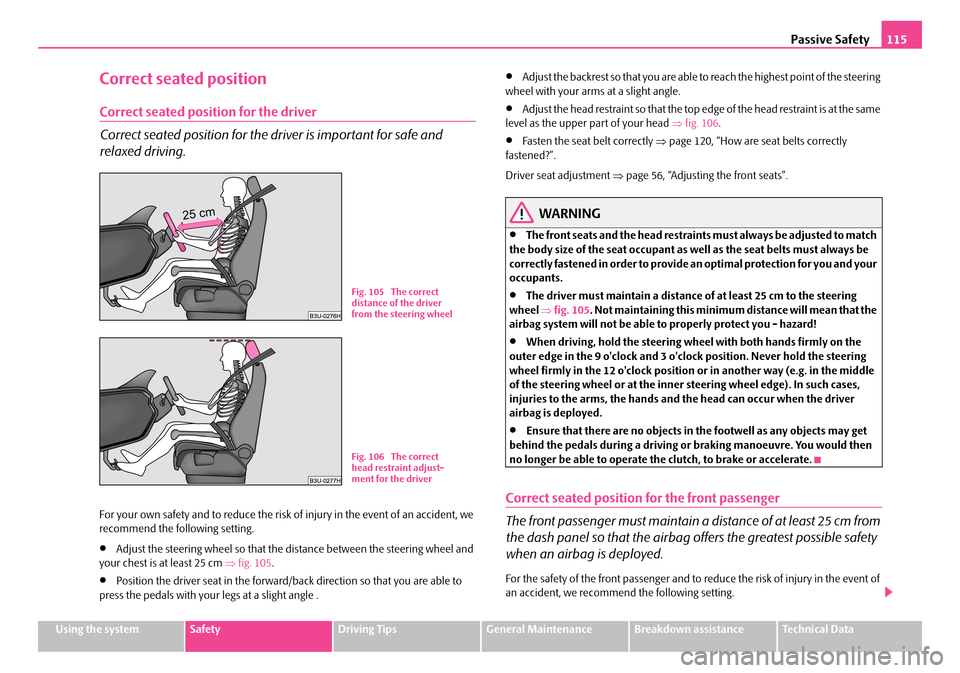
•Adjust the steering wheel so that the distance between the steering wheel and your chest is at least 25 cm ⇒fig. 105.
•Position the driver seat in the forward/back direction so that you are able to press the pedals with your legs at a slight angle .
•Adjust the backrest so that you are able to reach the highest point of the steering wheel with your arms at a slight angle.
•Adjust the head restraint so that the top edge of the head restraint is at the same level as the upper part of your head ⇒fig. 106.
•Fasten the seat belt correctly ⇒page 120, “How are seat belts correctly fastened?”.
Driver seat adjustment ⇒page 56, “Adjusting the front seats”.
WARNING
•The front seats and the head restraints must always be adjusted to match the body size of the seat occupant as well as the seat belts must always be correctly fastened in order to provide an optimal protection for you and your occupants.
•The driver must maintain a distance of at least 25 cm to the steering wheel ⇒fig. 105. Not maintaining this minimum distance will mean that the airbag system will not be able to properly protect you - hazard!
•When driving, hold the steering wheel with both hands firmly on the outer edge in the 9 o'clock and 3 o'clock position. Never hold the steering wheel firmly in the 12 o'clock position or in another way (e.g. in the middle of the steering wheel or at the inner steering wheel edge). In such cases, injuries to the arms, the hands and the head can occur when the driver airbag is deployed.
•Ensure that there are no objects in the footwell as any objects may get behind the pedals during a driving or braking manoeuvre. You would then no longer be able to operate the clutch, to brake or accelerate.
Correct seated position for the front passenger
The front passenger must maintain a distance of at least 25 cm from
the dash panel so that the airbag offers the greatest possible safety
when an airbag is deployed.
For the safety of the front passenger and to reduce the risk of injury in the event of an accident, we recommend the following setting.
Fig. 105 The correct distance of the driver from the steering wheel
Fig. 106 The correct head restraint adjust-ment for the driver
NKO A05F 20 MR08.book Page 115 Thursday, April 19, 2007 11:34 AM