automatic SKODA FABIA 2008 2.G / 5J Owner's Guide
[x] Cancel search | Manufacturer: SKODA, Model Year: 2008, Model line: FABIA, Model: SKODA FABIA 2008 2.G / 5JPages: 252, PDF Size: 40.88 MB
Page 46 of 252
Lights and Visibility45
Using the systemSafetyDriving TipsGeneral MaintenanceBreakdown assistanceTechnical Data
Lights and Visibility
Lights
Switching lights on and off
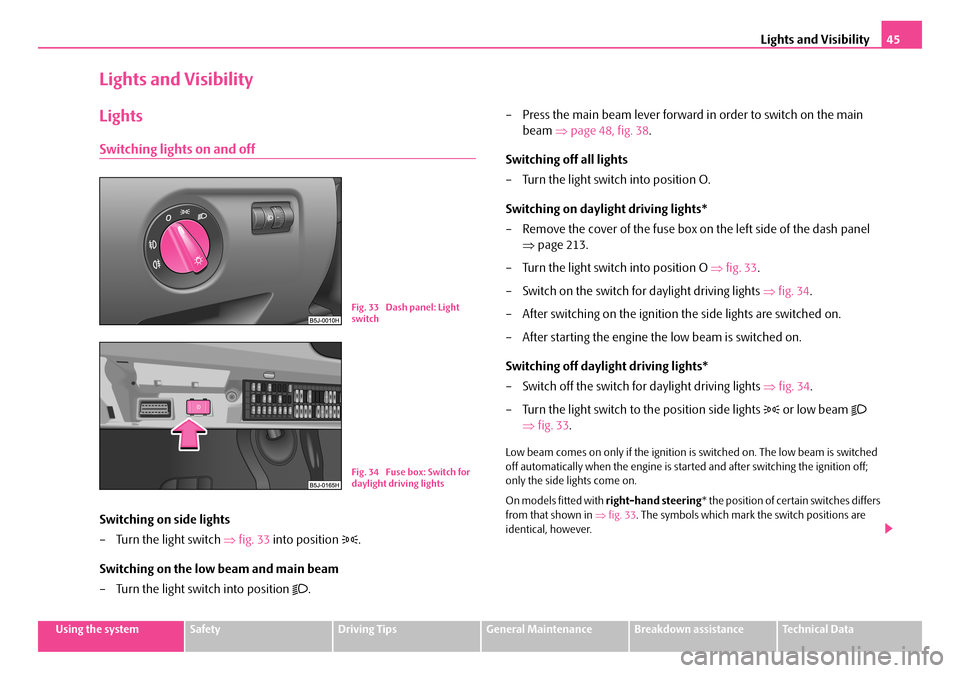
Switching on side lights
– Turn the light switch ⇒fig. 33 into position .
Switching on the low beam and main beam
– Turn the light switch into position .
– Press the main beam lever forward in order to switch on the main
beam ⇒page 48, fig. 38.
Switching off all lights
– Turn the light switch into position O.
Switching on daylight driving lights*
– Remove the cover of the fuse box on the left side of the dash panel
⇒page 213.
– Turn the light switch into position O ⇒fig. 33.
– Switch on the switch for daylight driving lights ⇒fig. 34.
– After switching on the ignition the side lights are switched on.
– After starting the engine the low beam is switched on.
Switching off daylight driving lights*
– Switch off the switch for daylight driving lights ⇒fig. 34.
– Turn the light switch to the position side lights or low beam
⇒fig. 33.
Low beam comes on only if the ignition is switched on. The low beam is switched off automatically when the engine is started and after switching the ignition off; only the side lights come on.
On models fitted with right-hand steering* the position of certain switches differs from that shown in ⇒fig. 33. The symbols which mark the switch positions are identical, however.
Fig. 33 Dash panel: Light switch
Fig. 34 Fuse box: Switch for daylight driving lights
NKO A05F 20.book Page 45 Wednesday, April 2, 2008 1:02 PM
Page 47 of 252
Lights and Visibility46
WARNING
Never drive with side lights on - risk of accident! The side lights are not bright enough to light up the road sufficiently in front of you or to be seen by other oncoming traffic. In this case, always switch on the low beam when it is dark or if visibility is poor.
Note
•An audible warning will sound if you withdraw the ignition key and open the driver's door when the vehicle lights are still on.
•The acoustic warning signal is switched off over the door contact when the driver's door is closed (ignition off). The vehicle can be parked with the side lights on.
•If the car is parked for a lengthy period, we recommend switching off all lights, or leaving only the parking lights switched on.
•The switching on of the described lights should only be undertaken in accord-ance with the legal requirements.
•In the event of cool or humid weather conditions, the headlights can be misted up from inside.
−The temperature difference between interior and external area of the head-light lenses is decisive.
−When the driving lights are switched on, the light outlet surfaces are free from mist after a short period. The headlight lenses can possibly mist up at the border areas.
−It also concerns reverse light and turn signal lights.
−This mist has no influence on the life of the lighting system.
Cornering lights*
For a better cornering illumination the cornering lights are controlled in the optimal position in line with the vehicle speed and the steering angle.
If the warning light flashes for 1 minute while driving or after switching on the ignition and a warning signal sounds, a fault is confirmed.
WARNING
If there is a fault in the cornering lights, the warning light flashes in the instrument cluster. The cornering lights are automatically lowered to the emergency position, which prevents a possible dazzling of oncoming traffic. Thus the illuminated length of the road is shortened. Drive carefully and have the car inspected immediately by a specialist garage.
Fog lights*
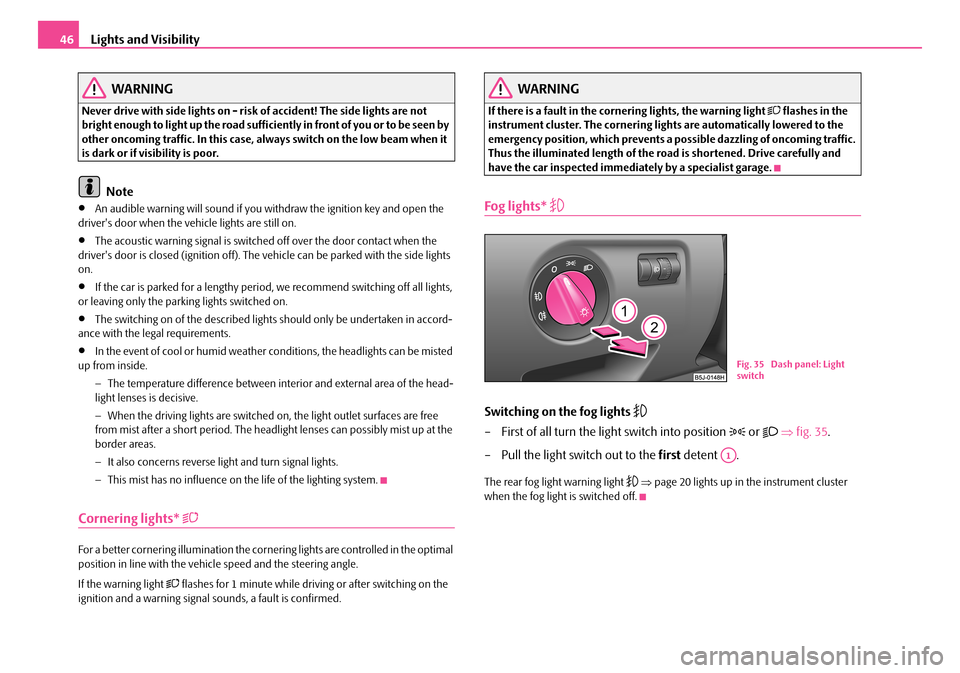
Switching on the fog lights
– First of all turn the light switch into position or ⇒fig. 35.
– Pull the light switch out to the first detent .
The rear fog light warning light ⇒page 20 lights up in the instrument cluster when the fog light is switched off.
Fig. 35 Dash panel: Light switch
A1
NKO A05F 20.book Page 46 Wednesday, April 2, 2008 1:02 PM
Page 50 of 252
Lights and Visibility49
Using the systemSafetyDriving TipsGeneral MaintenanceBreakdown assistanceTechnical Data
– Pull the lever back into the initial position in order to switch the main
beam off again.
Headlight flasher
– Pull on the lever of the steering wheel (sprung position) - the main
beam and warning light in the instrument cluster come on.
Parking light
– Switch off the ignition.
– Push the lever up or down - the right-hand or left-hand parking light
is switched on.
Information concerning the function of the lights.
•The turn signal system only operates when the ignition is switched on. The corresponding indicator light or in the instrument cluster also flashes.
•The turn signal is automatically cancelled after negotiating a curve.
•The side light and rear light on the appropriate side of the vehicle are switched on when the parking light is selected. The parking light function only operates if the ignition is switched off.
•An acoustic warning signal will sound when the driver's door is opened if the lever is not in the middle position after removing the ignition key. The acoustic warning signal will stop just as soon as the driver's door is closed.
Caution
Use main beam or the headlight flasher only if this does not risk dazzling other road users.
Note
Use only in accordance with the legal requirements the described lighting and signal systems.
Interior lighting
Front interior lighting and storage compartment on front
passenger side
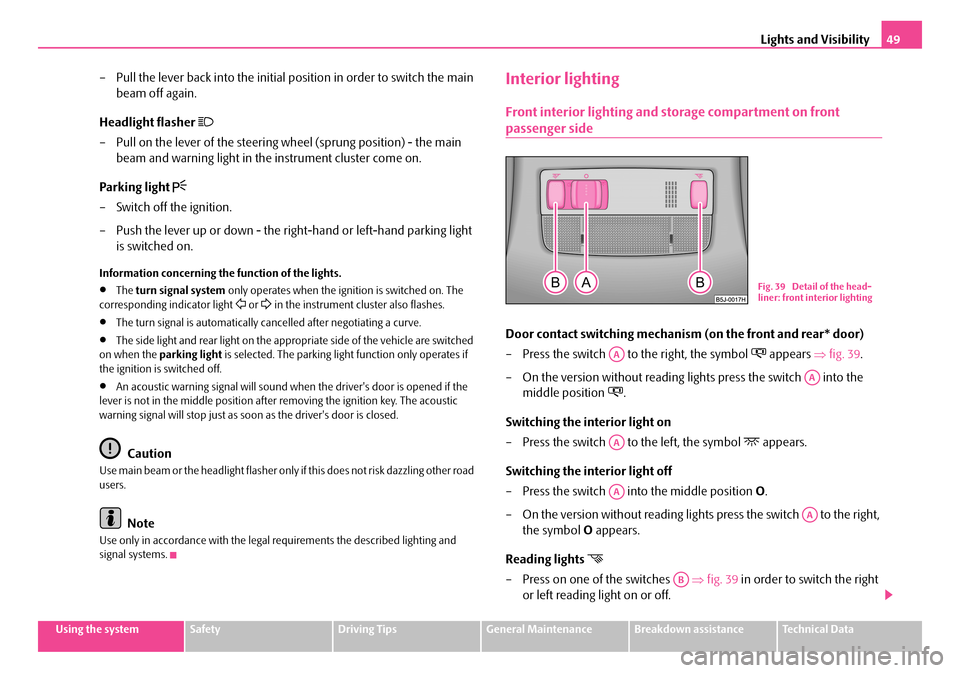
Door contact switching mechanism (on the front and rear* door)
– Press the switch to the right, the symbol appears ⇒fig. 39.
– On the version without reading lights press the switch into the
middle position .
Switching the interior light on
– Press the switch to the left, the symbol appears.
Switching the interior light off
– Press the switch into the middle position O.
– On the version without reading lights press the switch to the right,
the symbol O appears.
Reading lights
– Press on one of the switches ⇒fig. 39 in order to switch the right
or left reading light on or off.
Fig. 39 Detail of the head-liner: front interior lighting
AA
AA
AA
AA
AA
AB
NKO A05F 20.book Page 49 Wednesday, April 2, 2008 1:02 PM
Page 51 of 252
Lights and Visibility50
The interior light is switched on for about 20 seconds when a vehicle with a central locking system is unlocked, when a door is opened or when the ignition key is removed. The requirement for this is that the switch is in the door contact position. The inner light goes out out immediately after the ignition is switched on.
A time delay switch* causes the inner lighting on vehicles without a central locking system stays on for a few seconds after the doors have been closed. The inner light goes out out immediately after the ignition is switched on.
The interior lighting is switched off after about 30 minutes when a door has been left open in order to avoid discharging the battery of the vehicle.
Rear interior lighting* - type 1
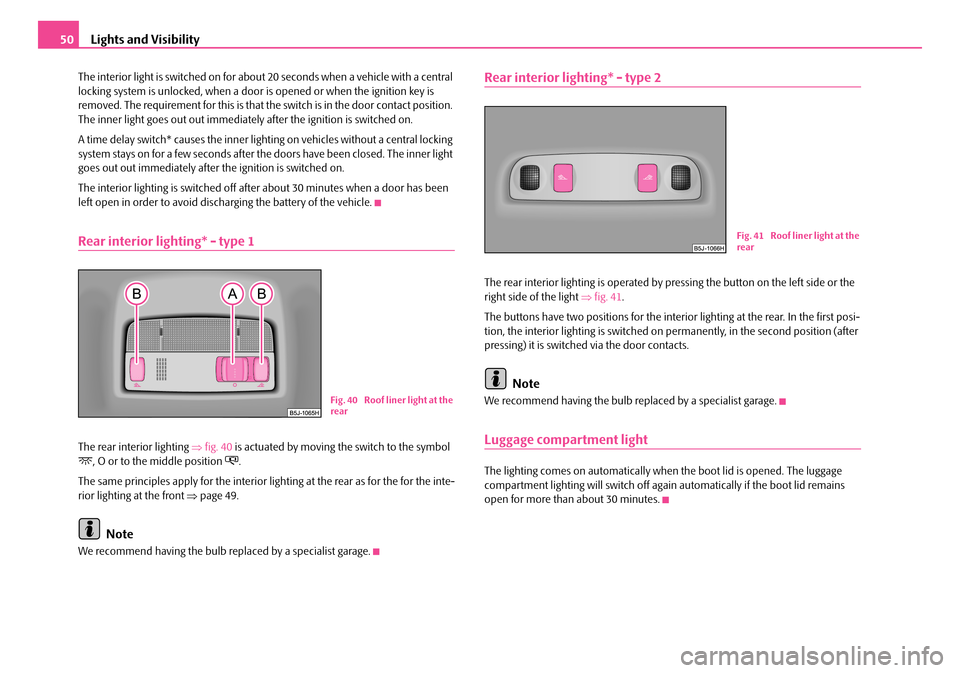
The rear interior lighting ⇒fig. 40 is actuated by moving the switch to the symbol , O or to the middle position .
The same principles apply for the interior lighting at the rear as for the for the inte-rior lighting at the front ⇒page 49.
Note
We recommend having the bulb replaced by a specialist garage.
Rear interior lighting* - type 2
The rear interior lighting is operated by pressing the button on the left side or the right side of the light ⇒fig. 41.
The buttons have two positions for the interior lighting at the rear. In the first posi-tion, the interior lighting is switched on permanently, in the second position (after pressing) it is switched via the door contacts.
Note
We recommend having the bulb replaced by a specialist garage.
Luggage compartment light
The lighting comes on automatically when the boot lid is opened. The luggage compartment lighting will switch off again automatically if the boot lid remains open for more than about 30 minutes.
Fig. 40 Roof liner light at the rear
Fig. 41 Roof liner light at the rear
NKO A05F 20.book Page 50 Wednesday, April 2, 2008 1:02 PM
Page 52 of 252
Lights and Visibility51
Using the systemSafetyDriving TipsGeneral MaintenanceBreakdown assistanceTechnical Data
Visibility
Rear window heater
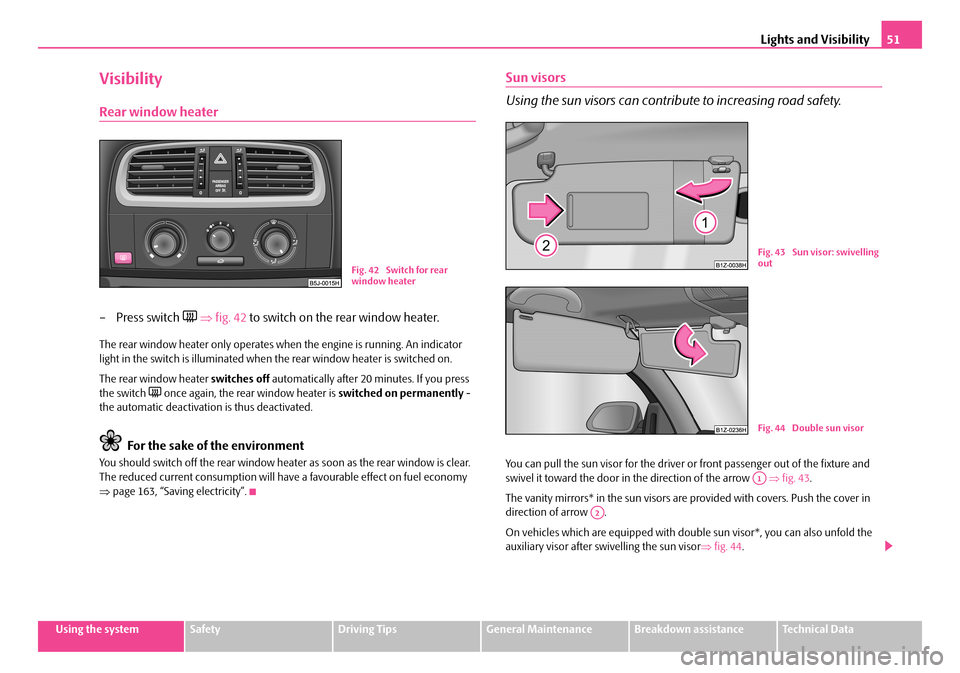
– Press switch ⇒fig. 42 to switch on the rear window heater.
The rear window heater only operates when the engine is running. An indicator light in the switch is illuminated when the rear window heater is switched on.
The rear window heater switches off automatically after 20 minutes. If you press the switch once again, the rear window heater is switched on permanently - the automatic deactivation is thus deactivated.
For the sake of the environment
You should switch off the rear window heater as soon as the rear window is clear. The reduced current consumption will have a favourable effect on fuel economy ⇒page 163, “Saving electricity”.
Sun visors
Using the sun visors can contribute to increasing road safety.
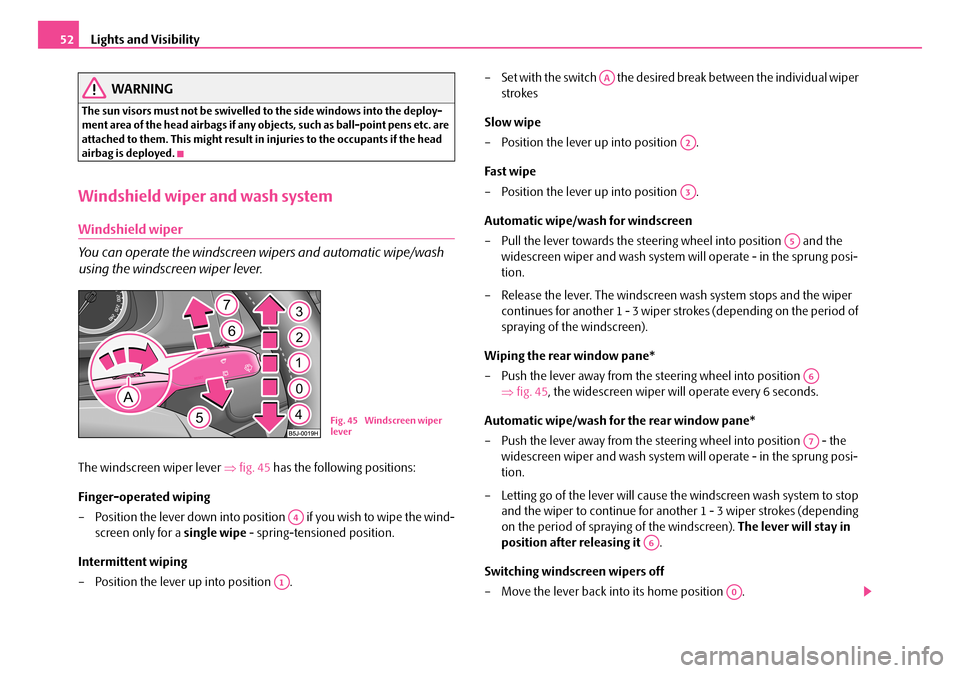
You can pull the sun visor for the driver or front passenger out of the fixture and swivel it toward the door in the direction of the arrow ⇒fig. 43.
The vanity mirrors* in the sun visors are provided with covers. Push the cover in direction of arrow .
On vehicles which are equipped with double sun visor*, you can also unfold the auxiliary visor after swivelling the sun visor⇒fig. 44.
Fig. 42 Switch for rear window heater
Fig. 43 Sun visor: swivelling out
Fig. 44 Double sun visor
A1
A2
NKO A05F 20.book Page 51 Wednesday, April 2, 2008 1:02 PM
Page 53 of 252
Lights and Visibility52
WARNING
The sun visors must not be swivelled to the side windows into the deploy-ment area of the head airbags if any objects, such as ball-point pens etc. are attached to them. This might result in injuries to the occupants if the head airbag is deployed.
Windshield wiper and wash system
Windshield wiper
You can operate the windscreen wipers and automatic wipe/wash
using the windscreen wiper lever.
The windscreen wiper lever ⇒fig. 45 has the following positions:
Finger-operated wiping
– Position the lever down into position if you wish to wipe the wind-
screen only for a single wipe - spring-tensioned position.
Intermittent wiping
– Position the lever up into position .
– Set with the switch the desired break between the individual wiper
strokes
Slow wipe
– Position the lever up into position .
Fast wipe
– Position the lever up into position .
Automatic wipe/wash for windscreen
– Pull the lever towards the steering wheel into position and the
widescreen wiper and wash system will operate - in the sprung posi-
tion.
– Release the lever. The windscreen wash system stops and the wiper
continues for another 1 - 3 wiper strokes (depending on the period of
spraying of the windscreen).
Wiping the rear window pane*
– Push the lever away from the steering wheel into position
⇒fig. 45, the widescreen wiper will operate every 6 seconds.
Automatic wipe/wash for the rear window pane*
– Push the lever away from the steering wheel into position - the
widescreen wiper and wash system will operate - in the sprung posi-
tion.
– Letting go of the lever will cause the windscreen wash system to stop
and the wiper to continue for another 1 - 3 wiper strokes (depending
on the period of spraying of the windscreen). The lever will stay in
position after releasing it .
Switching windscreen wipers off
– Move the lever back into its home position .
Fig. 45 Windscreen wiper lever
A4
A1
AA
A2
A3
A5
A6
A7
A6
A0
NKO A05F 20.book Page 52 Wednesday, April 2, 2008 1:02 PM
Page 54 of 252

Lights and Visibility53
Using the systemSafetyDriving TipsGeneral MaintenanceBreakdown assistanceTechnical Data
The windscreen wipers and the windscreen washer system only operate if the igni-tion is switched on.
The rear window will be wiped again if the front window wipers are on when reverse gear is selected.
The windscreen washer nozzles are heated* when the ignition is switched on.
Top up with wash liquid ⇒page 193.
WARNING
•Properly maintained windscreen wiper blades are essential for clear visi-bility and safe driving ⇒page 53.
•Do not use the windscreen washer system at low temperatures, without heating the windscreen beforehand. Otherwise the window cleaner could freeze on the windscreen and restrict the view to the front.
•In the event of a freezing up of the windscreen, first of all eliminate the ice ⇒page 172 and then operate the windscreen wiper otherwise the wind-screen wiper blades could be damaged.
Caution
In frosty weather, please first of all check whether the windscreen wiper blades are not frozen to the windscreen before switching them on. Switching on windscreen wipers when the blades are frozen to the windscreen may result in damage both to the blades and the motor of the windscreen wipers!
Headlight cleaning system*
The headlights are being cleaned after the windscreen washer system has been operated for the fifth time, the low beam or main beam are switched on as well as the windscreen wiper lever is held in the position ⇒page 52, fig. 45 for about 1 second.
You should remove stubborn dirt (such as insect residues) from the headlight lenses at regular intervals, for example when refuelling. Please refer to the following guidelines ⇒page 172, “The headlight lenses”.
You should remove any snow from the fixtures of the washer nozzles and clear ice in winter with a de-icing spray in order to ensure proper operation of the cleaning system.
Replacing wiper blades for the windscreen wipers
Taking off the wiper blade
– Fold windscreen wiper arm away from the windscreen.
– Press the locking button, in order to unlock the wiper blade and pull
off in the direction of arrow.
Attaching a wiper blade
– Push the wiper blade until it locks up to the stop.
– Check whether the wiper blade is correctly attached.
– Fold the windscreen wiper arm back onto the windscreen.
Wiper blades in proper condition are essential to obtain good visibility. Wiper blades should not be allowed to become dirtied by dust, insect remains and preserving wax.
Juddering or smearing of the wiper blades could then be due to wax residues left on the windscreen by vehicle washing in automatic vehicle wash systems. It is
A5
Fig. 46 Wiper blade for the windscreen wiper
NKO A05F 20.book Page 53 Wednesday, April 2, 2008 1:02 PM
Page 55 of 252
Lights and Visibility54
therefore important to degrease the lips of the wiper blades after every pass through an automatic vehicle wash system.
WARNING
•If the windscreen wipers are handled carelessly, there is a risk of damage to the windscreen.
•You should clean the wiper blades regularly with a windscreen cleaner in order to avoid any smears. Clean a wiper blade with a sponge or cloth if it is very dirty, for example from insect residues.
•Replace the wiper blades once or twice a year for safety reasons. The wiper blades are available from Škoda Service Partners.
Replacing the wiper blade on the rear window wiper
Taking off the wiper blade
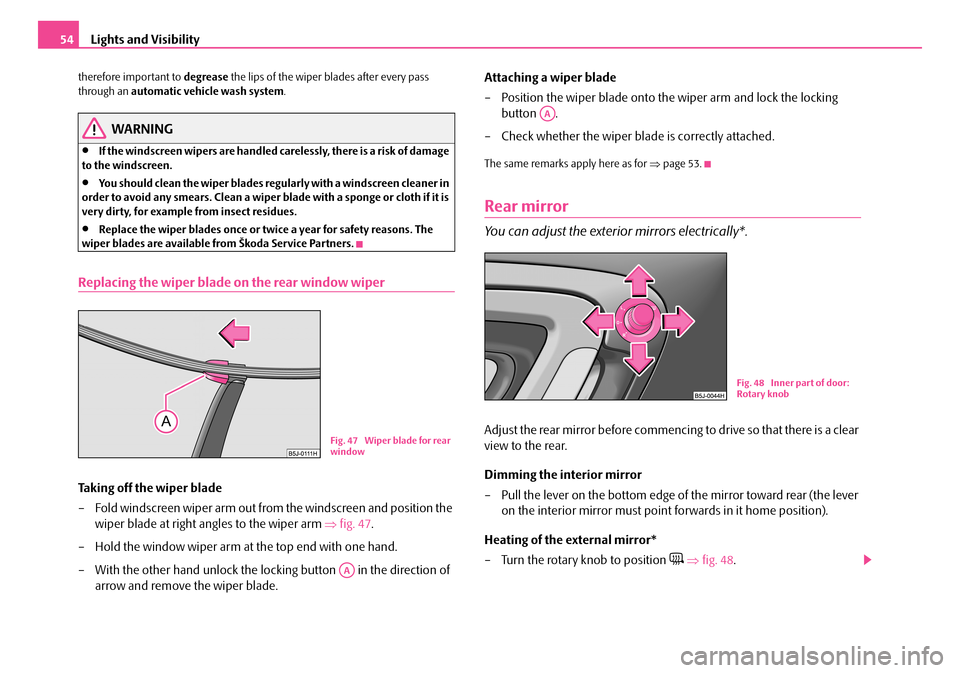
– Fold windscreen wiper arm out from the windscreen and position the
wiper blade at right angles to the wiper arm ⇒fig. 47.
– Hold the window wiper arm at the top end with one hand.
– With the other hand unlock the locking button in the direction of
arrow and remove the wiper blade.
Attaching a wiper blade
– Position the wiper blade onto the wiper arm and lock the locking
button .
– Check whether the wiper blade is correctly attached.
The same remarks apply here as for ⇒page 53.
Rear mirror
You can adjust the exterior mirrors electrically*.
Adjust the rear mirror before commencing to drive so that there is a clear
view to the rear.
Dimming the interior mirror
– Pull the lever on the bottom edge of the mirror toward rear (the lever
on the interior mirror must point forwards in it home position).
Heating of the external mirror*
– Turn the rotary knob to position ⇒fig. 48.
Fig. 47 Wiper blade for rear window
AA
AA
Fig. 48 Inner part of door: Rotary knob
NKO A05F 20.book Page 54 Wednesday, April 2, 2008 1:02 PM
Page 67 of 252
Seats and Stowage66
Unrolling
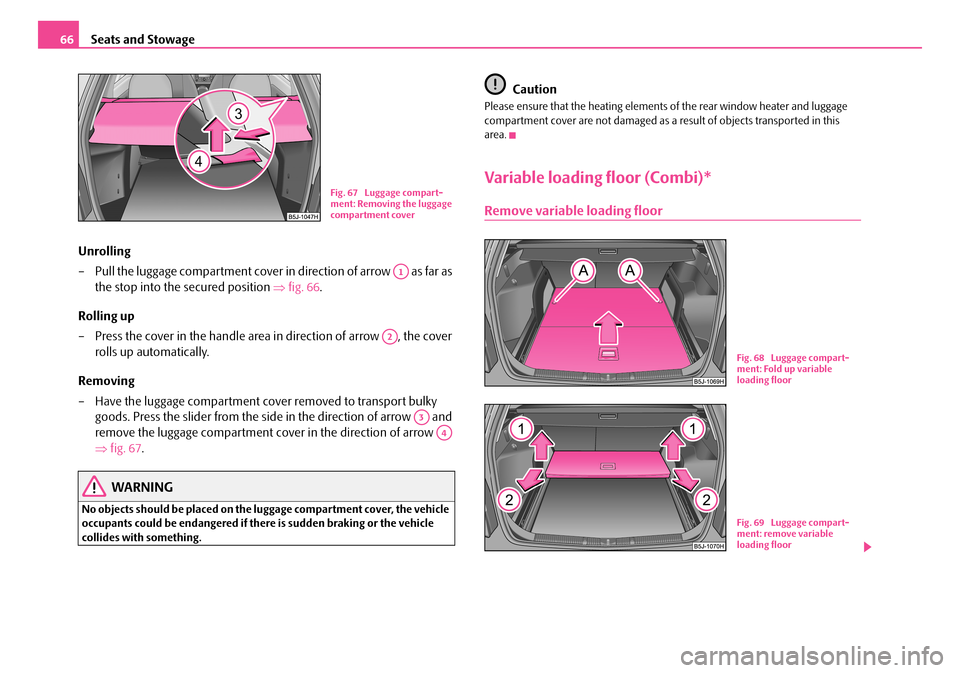
– Pull the luggage compartment cover in direction of arrow as far as
the stop into the secured position ⇒fig. 66.
Rolling up
– Press the cover in the handle area in direction of arrow , the cover
rolls up automatically.
Removing
– Have the luggage compartment cover removed to transport bulky
goods. Press the slider from the side in the direction of arrow and
remove the luggage compartment cover in the direction of arrow
⇒fig. 67.
WARNING
No objects should be placed on the luggage compartment cover, the vehicle occupants could be endangered if there is sudden braking or the vehicle collides with something.
Caution
Please ensure that the heating elements of the rear window heater and luggage compartment cover are not damaged as a result of objects transported in this area.
Variable loading floor (Combi)*
Remove variable loading floor
Fig. 67 Luggage compart-ment: Removing the luggage compartment cover
A1
A2
A3
A4
Fig. 68 Luggage compart-ment: Fold up variable loading floor
Fig. 69 Luggage compart-ment: remove variable loading floor
NKO A05F 20.book Page 66 Wednesday, April 2, 2008 1:02 PM
Page 85 of 252
Heating and air conditioning system84
Set heating
Recommended settings of heating controls for:
Defrosting the windscreen and side windows
•Turn control dial ⇒page 83, fig. 105 to the right up to the stop,
•Blower switch in position 3,
•Turn the air distribution control into the position ,
•Open air outlet vents 4 ⇒page 85, fig. 106 and point towards the side window.
Keeping windscreen and side windows demisted
We recommend that you use the following setting in cases where the windows are misted up more than usual (e.g. when it is raining):
•Control dial where necessary to the heating range,
•Blower switch in position 2 or 3,
•Control dial to or as required or to any desired position between these symbols,
•Open air outlet vents 4 and point towards the side window.
Warming up the inside of the vehicle as rapidly as possible
•Turn control dial to the right up to the stop,
•Blower switch in position 3 or 4,
•Turn the air distribution control into the position ,
•Open the air outlet vents 4,
•We recommend that you briefly switch on the recirculated air mode with the pushbutton . The windows can steam up in this position however.
Heating the vehicle to a comfortable temperature
We recommend the following setting once the windows are no longer misted up and the desired temperature has been reached:
•Control dial at the desired heat output,
•Blower switch in position 2 or 3,
•Turn the air distribution control into the position between and ,
•Open the air outlet vents 4,
•Set the air distribution regulator as required between positions and , if the windscreen gets misted up again.
Fresh air mode - ventilation
Non pre-warmed fresh air streams through the air inlet nozzles 3 and 4 for the following settings.
Recirculated air mode must not be switched on.
•Turn the control dial ⇒page 83, fig. 105 to the left up to the stop,
•Blower switch in the desired position,
•Turn the air distribution control into the position ,
•Open air outlet vents 3 and 4 ⇒page 85, fig. 106
The control dial can be set to other positions as required.
Recirculated air mode
In recirculated air mode air is sucked out of the interior of the vehicle
and then fed back into the interior.
Recirculated air mode prevents polluted air outside the vehicle from
getting into the vehicle, for example when driving through a tunnel or
when standing in a traffic jam.
Switching recirculated air mode on
– Press button , the button symbol lights up ⇒page 83, fig. 105.
Switching recirculated air mode off
– Press button again, the button symbol goes out.
The recirculated air mode is switched off automatically if the air distribution control is in position ⇒page 83, fig. 105. You can also switch recirculated air mode on again from this setting by repeatedly pressing button .
AA
AB
AC
AA
AB
AC
AA
AB
AC
A1
AA
AB
AC
AC
AA
AB
AC
AC
AC
NKO A05F 20.book Page 84 Wednesday, April 2, 2008 1:02 PM