turn signal SKODA FABIA 2012 2.G / 5J User Guide
[x] Cancel search | Manufacturer: SKODA, Model Year: 2012, Model line: FABIA, Model: SKODA FABIA 2012 2.G / 5JPages: 196, PDF Size: 4.83 MB
Page 44 of 196
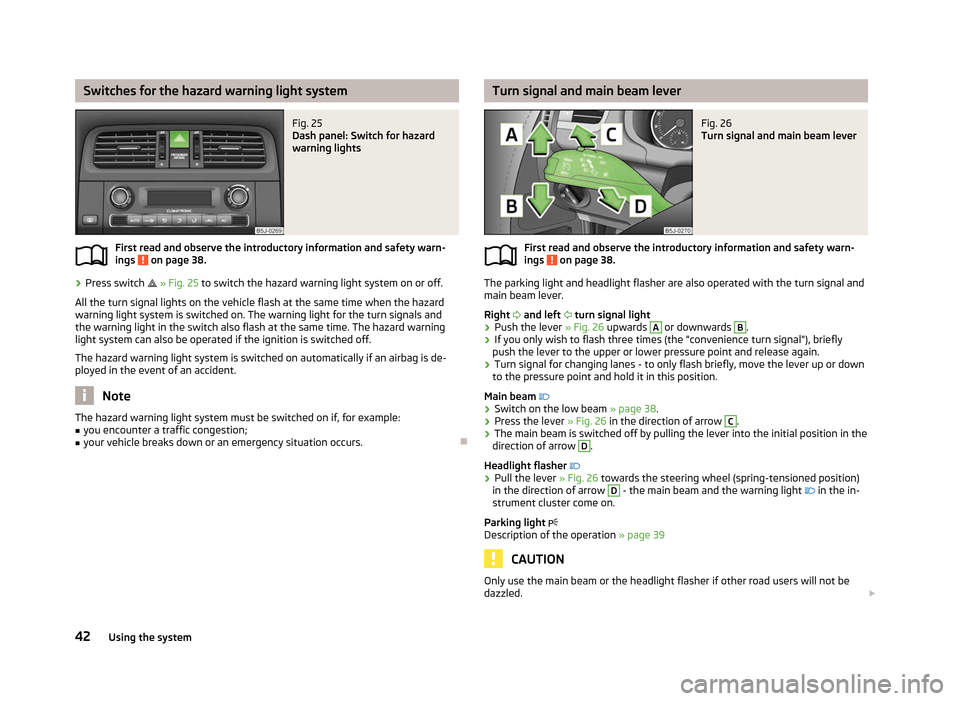
Switches for the hazard warning light system
Fig. 25
Dash panel: Switch for hazard
warning lights
First read and observe the introductory information and safety warn-
ings on page 38.
›
Press switch
» Fig. 25 to switch the hazard warning light system on or off.
All the turn signal lights on the vehicle flash at the same time when the hazard
warning light system is switched on. The warning light for the turn signals and
the warning light in the switch also flash at the same time. The hazard warning
light system can also be operated if the ignition is switched off.
The hazard warning light system is switched on automatically if an airbag is de-
ployed in the event of an accident. Note
The hazard warning light system must be switched on if, for example:
■ you encounter a traffic congestion;
■ your vehicle breaks down or an emergency situation occurs. Ð
ä Turn signal and main beam lever
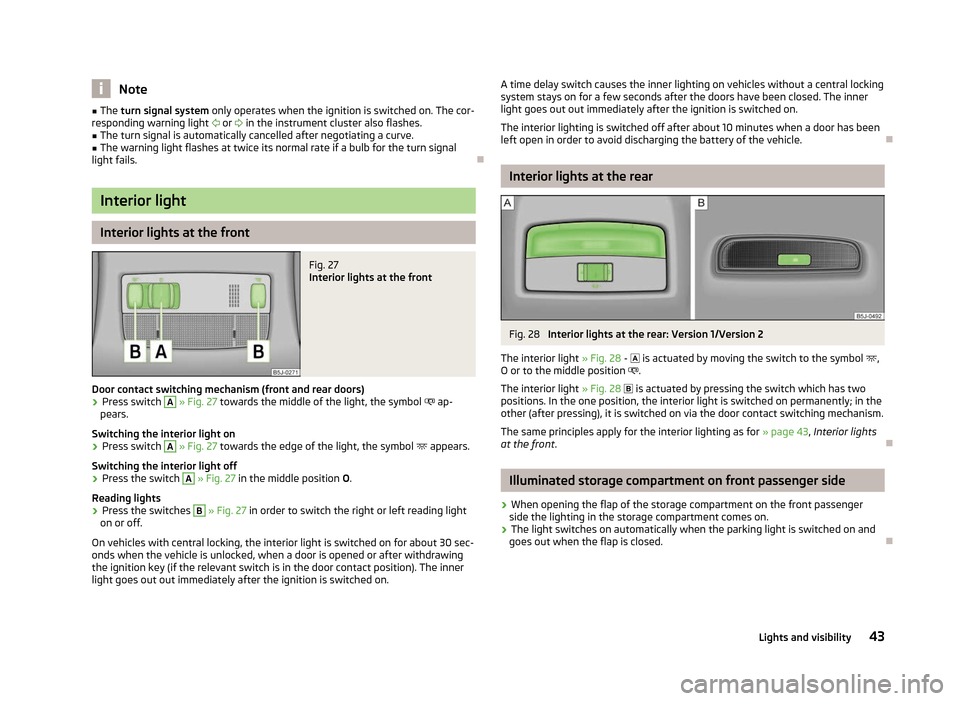
Fig. 26
Turn signal and main beam lever
First read and observe the introductory information and safety warn-
ings on page 38.
The parking light and headlight flasher are also operated with the turn signal and
main beam lever.
Right and left turn signal light
› Push the lever
» Fig. 26 upwards A
or downwards B
.
› If you only wish to flash three times (the "convenience turn signal"), briefly
push the lever to the upper or lower pressure point and release again.
› Turn signal for changing lanes - to only flash briefly, move the lever up or down
to the pressure point and hold it in this position.
Main beam
› Switch on the low beam » page 38.
› Press the lever
» Fig. 26 in the direction of arrow C
.
› The main beam is switched off by pulling the lever into the initial position in the
direction of arrow D
.
Headlight flasher
› Pull the lever
» Fig. 26 towards the steering wheel (spring-tensioned position)
in the direction of arrow D
- the main beam and the warning light
in the in-
strument cluster come on.
Parking light
Description of the operation » page 39 CAUTION
Only use the main beam or the headlight flasher if other road users will not be
dazzled. £
ä
42 Using the system
Page 45 of 196
Note
■ The turn signal system only operates when the ignition is switched on. The cor-
responding warning light or in the instrument cluster also flashes.
■ The turn signal is automatically cancelled after negotiating a curve.
■ The warning light flashes at twice its normal rate if a bulb for the turn signal
light fails. ÐInterior light
Interior lights at the front
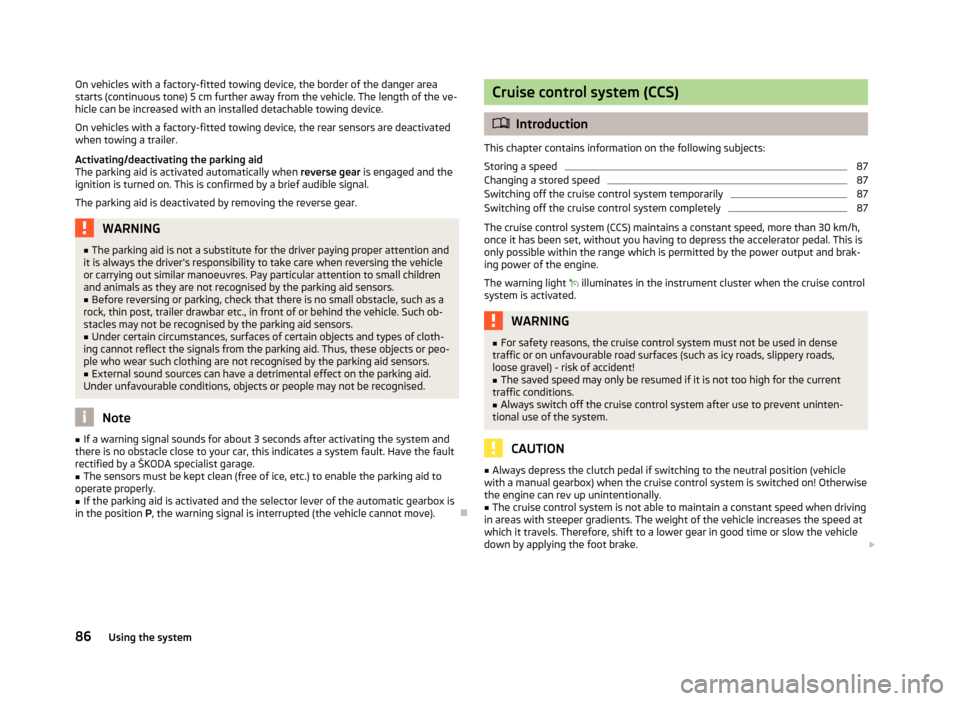
Fig. 27
Interior lights at the front
Door contact switching mechanism (front and rear doors) › Press switch A
» Fig. 27 towards the middle of the light, the symbol
ap-
pears.
Switching the interior light on
› Press switch A
» Fig. 27 towards the edge of the light, the symbol
appears.
Switching the interior light off
› Press the switch A
» Fig. 27 in the middle position
O.
Reading lights
› Press the switches B
» Fig. 27 in order to switch the right or left reading light
on or off.
On vehicles with central locking, the interior light is switched on for about 30 sec-
onds when the vehicle is unlocked, when a door is opened or after withdrawing
the ignition key (if the relevant switch is in the door contact position). The inner
light goes out out immediately after the ignition is switched on. A time delay switch causes the inner lighting on vehicles without a central locking
system stays on for a few seconds after the doors have been closed. The inner
light goes out out immediately after the ignition is switched on.
The interior lighting is switched off after about 10 minutes when a door has been
left open in order to avoid discharging the battery of the vehicle. Ð Interior lights at the rear
Fig. 28
Interior lights at the rear: Version 1/Version 2
The interior light » Fig. 28 -
is actuated by moving the switch to the symbol ,
O or to the middle position .
The interior light » Fig. 28 is actuated by pressing the switch which has two
positions. In the one position, the interior light is switched on permanently; in the
other (after pressing), it is switched on via the door contact switching mechanism.
The same principles apply for the interior lighting as for » page 43, Interior lights
at the front . Ð Illuminated storage compartment on front passenger side
› When opening the flap of the storage compartment on the front passenger
side the lighting in the storage compartment comes on.
› The light switches on automatically when the parking light is switched on and
goes out when the flap is closed. Ð
43
Lights and visibility
Page 88 of 196
On vehicles with a factory-fitted towing device, the border of the danger area
starts (continuous tone) 5
cm further away from the vehicle. The length of the ve-
hicle can be increased with an installed detachable towing device.
On vehicles with a factory-fitted towing device, the rear sensors are deactivated
when towing a trailer.
Activating/deactivating the parking aid
The parking aid is activated automatically when reverse gear is engaged and the
ignition is turned on. This is confirmed by a brief audible signal.
The parking aid is deactivated by removing the reverse gear. WARNING
■ The parking aid is not a substitute for the driver paying proper attention and
it is always the driver's responsibility to take care when reversing the vehicle
or carrying out similar manoeuvres. Pay particular attention to small children
and animals as they are not recognised by the parking aid sensors.
■ Before reversing or parking, check that there is no small obstacle, such as a
rock, thin post, trailer drawbar etc., in front of or behind the vehicle. Such ob-
stacles may not be recognised by the parking aid sensors.
■ Under certain circumstances, surfaces of certain objects and types of cloth-
ing cannot reflect the signals from the parking aid. Thus, these objects or peo-
ple who wear such clothing are not recognised by the parking aid sensors.
■ External sound sources can have a detrimental effect on the parking aid.
Under unfavourable conditions, objects or people may not be recognised. Note
■ If a warning signal sounds for about 3
seconds after activating the system and
there is no obstacle close to your car, this indicates a system fault. Have the fault
rectified by a ŠKODA specialist garage. ■ The sensors must be kept clean (free of ice, etc.) to enable the parking aid to
operate properly.
■ If the parking aid is activated and the selector lever of the automatic gearbox is
in the position P, the warning signal is interrupted (the vehicle cannot move). Ð Cruise control system (CCS)
ä
Introduction
This chapter contains information on the following subjects:
Storing a speed 87
Changing a stored speed 87
Switching off the cruise control system temporarily 87
Switching off the cruise control system completely 87
The cruise control system (CCS) maintains a constant speed, more than 30 km/h,
once it has been set, without you having to depress the accelerator pedal. This is
only possible within the range which is permitted by the power output and brak-
ing power of the engine.
The warning light illuminates in the instrument cluster when the cruise control
system is activated. WARNING
■ For safety reasons, the cruise control system must not be used in dense
traffic or on unfavourable road surfaces (such as icy roads, slippery roads,
loose gravel) - risk of accident!
■ The saved speed may only be resumed if it is not too high for the current
traffic conditions.
■ Always switch off the cruise control system after use to prevent uninten-
tional use of the system. CAUTION
■ Always depress the clutch pedal if switching to the neutral position (vehicle
with a manual gearbox) when the cruise control system is switched on! Otherwise
the engine can rev up unintentionally.
■ The cruise control system is not able to maintain a constant speed when driving
in areas with steeper gradients. The weight of the vehicle increases the speed at
which it travels. Therefore, shift to a lower gear in good time or slow the vehicle
down by applying the foot brake. £
86 Using the system
Page 89 of 196
Note
It is not possible on vehicles fitted with an automatic gearbox to switch on the
cruise control system if the selector lever is in the position P, N or R. ÐStoring a speed
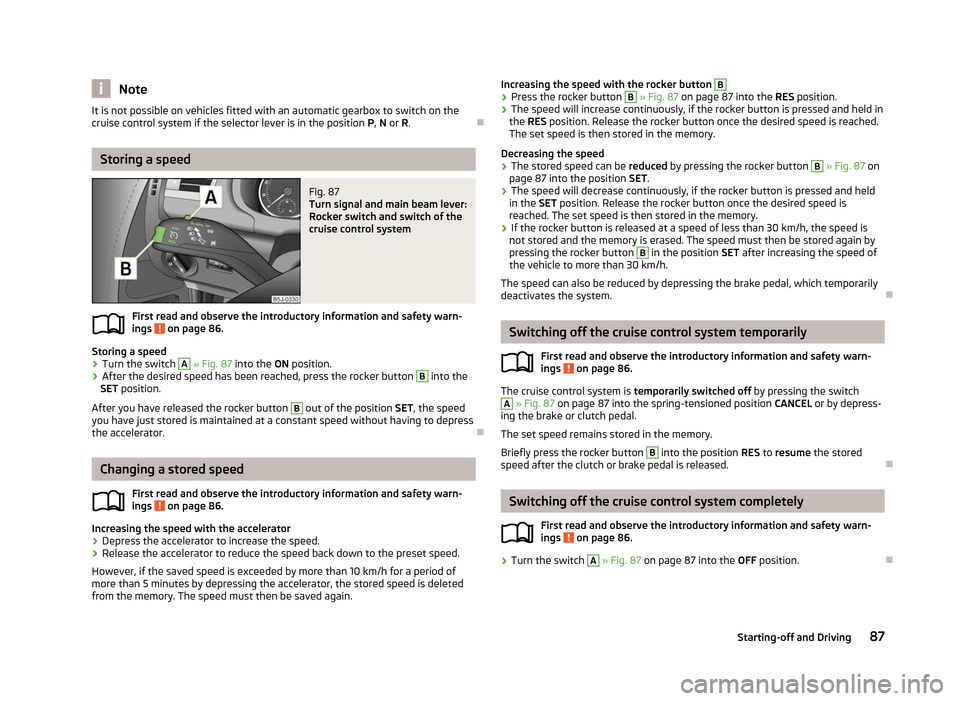
Fig. 87
Turn signal and main beam lever:
Rocker switch and switch of the
cruise control system
First read and observe the introductory information and safety warn-
ings on page 86.
Storing a speed
›
Turn the switch A
» Fig. 87 into the
ON position.
› After the desired speed has been reached, press the rocker button B
into the
SET position.
After you have released the rocker button B
out of the position SET
, the speed
you have just stored is maintained at a constant speed without having to depress
the accelerator. ÐChanging a stored speed
First read and observe the introductory information and safety warn-
ings on page 86.
Increasing the speed with the accelerator
›
Depress the accelerator to increase the speed.
› Release the accelerator to reduce the speed back down to the preset speed.
However, if the saved speed is exceeded by more than 10 km/h for a period of
more than 5 minutes by depressing the accelerator, the stored speed is deleted
from the memory. The speed must then be saved again. ä
ä Increasing the speed with the rocker button B
›
Press the rocker button B
» Fig. 87 on page 87 into the
RES position.
› The speed will increase continuously, if the rocker button is pressed and held in
the RES position. Release the rocker button once the desired speed is reached.
The set speed is then stored in the memory.
Decreasing the speed
› The stored speed can be
reduced by pressing the rocker button B
» Fig. 87 on
page 87 into the position SET.
› The speed will decrease continuously, if the rocker button is pressed and held
in the SET position. Release the rocker button once the desired speed is
reached. The set speed is then stored in the memory.
› If the rocker button is released at a speed of less than 30 km/h, the speed is
not stored and the memory is erased. The speed must then be stored again by
pressing the rocker button B
in the position SET after increasing the speed of
the vehicle to more than 30
km/h.
The speed can also be reduced by depressing the brake pedal, which temporarily
deactivates the system. Ð Switching off the cruise control system temporarily
First read and observe the introductory information and safety warn-
ings on page 86.
The cruise control system is
temporarily switched off
by pressing the switch A
» Fig. 87 on page 87 into the spring-tensioned position
CANCEL or by depress-
ing the brake or clutch pedal.
The set speed remains stored in the memory.
Briefly press the rocker button B
into the position RES
to resume the stored
speed after the clutch or brake pedal is released. Ð Switching off the cruise control system completely
First read and observe the introductory information and safety warn-
ings on page 86.
›
Turn the switch A
» Fig. 87 on page 87 into the
OFF position. Ð
ä
ä
87
Starting-off and Driving
Page 100 of 196
›
If the hands-free system announces (as standard
SKODA_BT) on the display of
the mobile phone, enter the PIN 1)
within 30 seconds and wait, until the connec-
tion is established 2)
.
› After terminating the connection, confirm the creation of a new user profile in
the information display.
If there is no free space available to create a new user profile, delete an existing
user profile.
During the connecting procedure, no other mobile phone may be connected with
the hands-free system.
Up to four mobile phones can be paired with the hands-free system, whereby on-
ly one mobile phone can communicate with the hands-free system.
The visibility of the hands-free system is automatically switched off 3
minutes af-
ter the ignition is switched on and is also deactivated when the mobile phone has
connected to the hands-free system.
Restoring the visibility of the hands-free system
If you have not managed to connect your mobile phone with the hands-free sys-
tem within 3 minutes of switching on the ignition, the visibility of the hands-free
system can be reestablished for 3 minutes in the following ways.
› By turning the ignition off and on.
› By turning voice control off and on.
› Via the information display in the menu item Bluetooth
- Visibility.
Creating a connection with an already paired mobile phone
After switching on the ignition, the connection is automatically established for
the already paired mobile phone 2)
. Check on your mobile phone if the automatic
connection has been established.
Disconnecting the connection
› By withdrawing the ignition key.
› By disconnecting the hands-free system in the mobile phone.
› By disconnecting the user in the information display in the menu
Bluetooth -
User . Solving connection problems
If the system announces
No paired phone found, check the operating state of the
mobile phone.
› Is the mobile phone switched on?
› Is the PIN code entered?
› Is Bluetooth ®
active?
› Is the visibility of the mobile phone active?
› Has the mobile phone already been paired with the hands-free system? Note
■ If a suitable adapter is available for your mobile phone, only use your mobile
phone in the adapter inserted in the telephone mount so that the radiation in the
vehicle drops to a minimum. ■ Placing the mobile phone in the adapter inserted in the telephone mount en-
sures optimum sending and receiving power. Ð Symbols in the information display
Symbol Importance
Charge status of the phone battery a)
Signal strength a)
a phone is connected to the hands-free system.
The hands-free system is visible to other devices.
A multimedia unit is connected to the hands-free system. a)
This function is only supported by some mobile phones. Ð1)
Depending on the Bluetooth ®
version on the mobile phone, an automatically generated 6-digit PIN is
either displayed or the PIN 1234 has to be entered manually.
2) Some mobile phones have a menu, in which the authorisation for establishing a Bluetooth ®
connec-
tion is completed by inputting a code. If the authorisation input is required, it must always be per-
formed when re-establishing the Bluetooth connection.
98 Using the system
Page 105 of 196
Safety
Passive Safety
General information
ä
Introduction
This chapter contains information on the following subjects:
Safety equipment 103
Before setting off 103
What influences the driving safety? 104
In this section you will find important information, tips and notes on the subject
of passive safety in your vehicle. We have combined everything here which you
should be familiar with, for example, regarding seat belts, airbags, child seats and
safety of children. It is therefore important, in particular, to comply with the notes
and warnings in this section for your own interest and in the interest of those
travelling with you. WARNING
■ This chapter contains important information on how to use the vehicle for
the driver and his occupants. You will find further information on safety, which
concerns you and those travelling with you, in the following chapters of this
Owner's Manual.
■ The complete on-board literature should always be in the vehicle. This ap-
plies in particular, if you rent out or sell the vehicle. ÐSafety equipment
First read and observe the introductory information and safety warn-
ings on page 103.
The following list contains part of the safety equipment in your vehicle:
› three-point seat belts for all the seats;
› belt force limiters for the front seats;
ä ›
belt tensioners for front seats;
› seat belt height adjusters for front seats;
› Front airbag for the driver and the front seat passenger;
› side airbags;
› head airbags;
› anchoring points for child seat using the
ISOFIX system;
› anchoring points for child seat using the TOP TETHER system;
› head restraints adjustable for height;
› adjustable steering column.
The specified safety equipment works together, in order to optimally protect you
and those travelling with you in accident situations. The safety equipment does
not protect you or the people travelling with you, if you or your occupants adopt
an incorrect seated position or the equipment is not correctly adjusted or used. Ð Before setting off
First read and observe the introductory information and safety warn-
ings on page 103.
For your own safety and the safety of the people travelling with you, please pay
attention to the following points before setting off.
›
Ensure that the lighting and the turn signal system are functioning properly.
› Check the tyre inflation pressure.
› Ensure that all of the windows offer good visibility to the outside.
› Secure all items of luggage
» page 53.
› Ensure that no objects can obstruct the pedals.
› Adjust the mirrors, the front seat and head restraint to your body size.
› Advise your passengers to adjust the head restraints to their body size.
› Protect children in suitable child seats with correctly fastened seat
belts
» page 117 , Transporting children safely .
› Adopt the correct seated position
» page 104. Tell your passengers to assume
the correct seated position.
› Correctly fasten the seat belt. Also inform passengers to fasten the seat belt
correctly » page 107. Ð
ä
103
Passive Safety
Page 168 of 196
›
Attach the other end 4
to a solid metal part which is connected firmly to the
engine block, or to the engine block itself.
Starting engine
› Start the engine on the vehicle providing the power and allow it to idle.
› Now start the engine of the vehicle with the discharged battery.
› If the engine does not start, terminate the attempt to start the engine after
10 seconds and wait for about 30 seconds before repeating the process.
› Disconnect the cables in exactly the
reverse order to the one described above. ÐJump-starting in vehicles with the START-STOP system
Fig. 139
Jump-starting - START-STOP
system
First read and observe the introductory information and safety warn-
ings on page 165.
On vehicles with the START-STOP system, the jump-start cable of the charger
must never be connected directly to the negative pole of the vehicle battery, but
only to the engine earth » Fig. 139. ÐTowing the vehicle
ä
Introduction
This chapter contains information on the following subjects:
Front towing eye 167
Rear towing eye 167
Vehicles with manual transmission can be towed in with a tow bar or a tow rope
or with the front or rear wheels raised.
ä Vehicles with automatic transmission can be towed in with a tow bar or a tow
rope or with the front wheels raised. If the vehicle is raised at rear, the automatic
gearbox is damaged!
A tow bar
is the safest way of towing a vehicle and also minimises any shocks.
Only use a tow rope if a suitable tow bar is not available.
When towing, the following guidelines must be observed.
Driver of the tow vehicle
› Release the clutch particularly gently when starting off or depress the accelera-
tor particularly gently if the vehicle is fitted with an automatic gearbox.
› On vehicles with a manual transmission, only push down on the accelerator
pedal once the rope is taught.
The maximum towing speed is 50 km/h.
Driver of the towed vehicle
› Switch on the ignition so that the steering wheel is not blocked and so that the
turn signal lights, horn, windscreen wipers and windscreen washer system can
be switched on.
› Take the vehicle out of gear or move the selector lever into position
N if the
vehicle is fitted with an automatic gearbox.
Please note that the brake servo unit and power steering only operate if the en-
gine is running. If the engine is not running, significantly more physical force is re-
quired to depress the brake pedal and steer the vehicle.
If using a tow rope, ensure that it is always kept taught. CAUTION
■ Do not tow start the engine - danger of damaging the engine! On vehicles with
a catalytic converter, unburnt fuel may get into the catalytic converter where it
may ignite. This in turn may damage or destroy the catalytic converter. The bat-
tery from another vehicle can be used as a jump-start aid » page 165, Jump-start-
ing .
■ If the gearbox of your vehicle no longer contains any oil because of a defect,
your vehicle must only be towed in with the driven wheels raised clear of the
ground, or on a special vehicle transporter or trailer.
■ The vehicle must be transported on a special vehicle or trailer if it is not possible
to tow in the vehicle in the way described or if the towing distance is greater than
50 km. ■ To protect both vehicles when tow-starting or towing, the tow rope should be
elastic. Thus one should only use plastic fibre rope or a rope made out of a simi-
larly elastic material. £
166 Do-it-yourself
Page 172 of 196
No. Power consumer
32 High pressure fuel pump, pressure valve
33 Engine control unit
34 Engine control unit, vacuum pump 35 Power supply of ignition lock
36 Main beam 37 Rear fog light, DC/DC converter START-STOP
38 Fog lights 39 Air blower for heating
40-41 Not assigned 42 Rear window heater
43 Horn
44 Windscreen wipers 45 Central control unit for convenience system
46 Engine control unit, fuel pump 47 Cigarette lighter, power socket in the luggage compartment
48 ABS, START-STOP (DC/DC) converter ESP 49 Turn signal lights, brake lights50 START-STOP (DC/DC) converter infotainment, radio 51 Electrical power window (front and rear) - left side
52 Electrical power window (front and rear) - right side
53 Parking light = left side, electrical sliding/tilting roof
54 START-STOP (instrument cluster), alarm 55 Control unit for automatic gearbox
56 Headlight cleaning system, parking light - right side 57 Left low beam, headlight range adjustment
58 Low beam on the right Ð Fuses in the engine compartment
Fig. 144
Vehicle battery: Distribution board cover. Fig. 145
Schematic representation of
fuse box in engine compartment
First read and observe the introductory information and safety warn-
ings on page 168.
›
Press together the circlips in the fuse box cover at the same time in the direc-
tion of arrow A
» Fig. 144
and remove the cover in the direction of arrow B
.
› Release the fixtures in the openings C
using a flat screwdriver and fold the
cover upwards in direction of arrow D
.
Fuse assignment in engine compartment No. Power consumer
1 Generator
2 Not assigned
3 Interior
4 Electrical auxiliary heating system 5 Interior £ ä
170 Do-it-yourself
Page 173 of 196
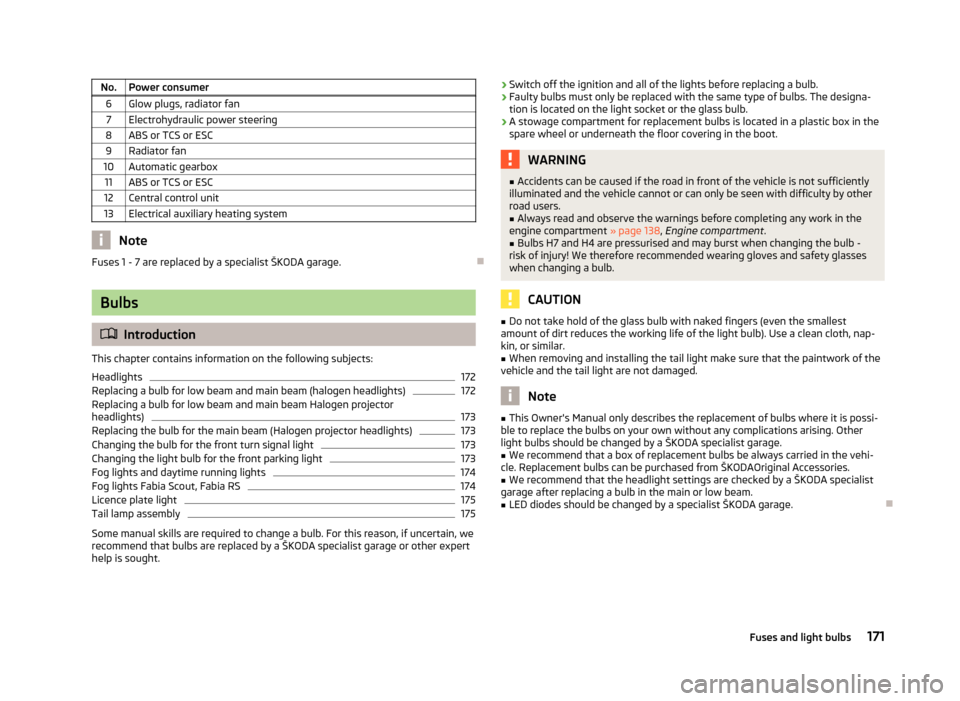
No. Power consumer
6 Glow plugs, radiator fan7 Electrohydraulic power steering
8 ABS or TCS or ESC 9 Radiator fan
10 Automatic gearbox 11 ABS or TCS or ESC
12 Central control unit
13 Electrical auxiliary heating system Note
Fuses 1 - 7 are replaced by a specialist ŠKODA garage. ÐBulbs
ä
Introduction
This chapter contains information on the following subjects:
Headlights 172
Replacing a bulb for low beam and main beam (halogen headlights) 172
Replacing a bulb for low beam and main beam Halogen projector
headlights) 173
Replacing the bulb for the main beam (Halogen projector headlights) 173
Changing the bulb for the front turn signal light 173
Changing the light bulb for the front parking light 173
Fog lights and daytime running lights 174
Fog lights Fabia Scout, Fabia RS 174
Licence plate light 175
Tail lamp assembly 175
Some manual skills are required to change a bulb. For this reason, if uncertain, we
recommend that bulbs are replaced by a ŠKODA specialist garage or other expert
help is sought. ›
Switch off the ignition and all of the lights before replacing a bulb.
› Faulty bulbs must only be replaced with the same type of bulbs. The designa-
tion is located on the light socket or the glass bulb.
› A stowage compartment for replacement bulbs is located in a plastic box in the
spare wheel or underneath the floor covering in the boot. WARNING
■ Accidents can be caused if the road in front of the vehicle is not sufficiently
illuminated and the vehicle cannot or can only be seen with difficulty by other
road users.
■ Always read and observe the warnings before completing any work in the
engine compartment » page 138, Engine compartment .
■ Bulbs H7 and H4 are pressurised and may burst when changing the bulb -
risk of injury! We therefore recommended wearing gloves and safety glasses
when changing a bulb. CAUTION
■ Do not take hold of the glass bulb with naked fingers (even the smallest
amount of dirt reduces the working life of the light bulb). Use a clean cloth, nap-
kin, or similar. ■ When removing and installing the tail light make sure that the paintwork of the
vehicle and the tail light are not damaged. Note
■ This Owner's Manual only describes the replacement of bulbs where it is possi-
ble to replace the bulbs on your own without any complications arising. Other
light bulbs should be changed by a
ŠKODA specialist garage.
■ We recommend that a box of replacement bulbs be always carried in the vehi-
cle. Replacement bulbs can be purchased from
ŠKODAOriginal Accessories.
■ We recommend that the headlight settings are checked by a ŠKODA specialist
garage after replacing a bulb in the main or low beam.
■ LED diodes should be changed by a specialist ŠKODA garage. Ð
171
Fuses and light bulbs
Page 174 of 196
Headlights
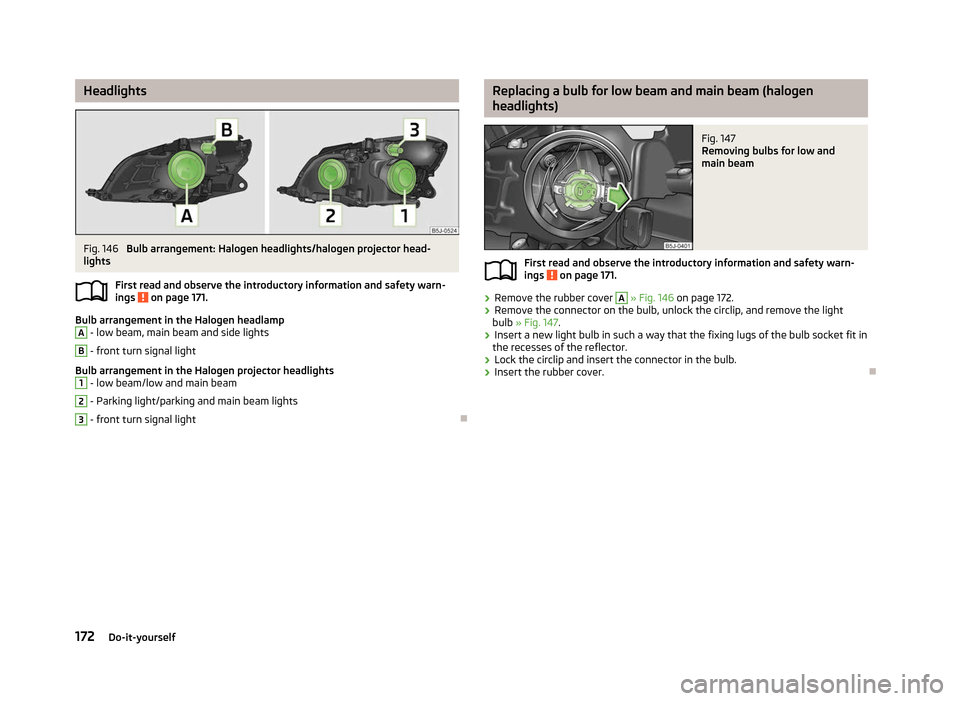
Fig. 146
Bulb arrangement: Halogen headlights/halogen projector head-
lights
First read and observe the introductory information and safety warn-
ings on page 171.
Bulb arrangement in the Halogen headlamp
A
- low beam, main beam and side lights
B
- front turn signal light
Bulb arrangement in the Halogen projector headlights 1
- low beam/low and main beam
2
- Parking light/parking and main beam lights
3
- front turn signal light
Ð
ä Replacing a bulb for low beam and main beam (halogen
headlights)
Fig. 147
Removing bulbs for low and
main beam
First read and observe the introductory information and safety warn-
ings on page 171.
›
Remove the rubber cover A
» Fig. 146 on page 172.
› Remove the connector on the bulb, unlock the circlip, and remove the light
bulb » Fig. 147 .
› Insert a new light bulb in such a way that the fixing lugs of the bulb socket fit in
the recesses of the reflector.
› Lock the circlip and insert the connector in the bulb.
› Insert the rubber cover. Ð
ä
172 Do-it-yourself