heating SKODA FABIA 2013 2.G / 5J Owner's Manual
[x] Cancel search | Manufacturer: SKODA, Model Year: 2013, Model line: FABIA, Model: SKODA FABIA 2013 2.G / 5JPages: 223, PDF Size: 12.77 MB
Page 6 of 223
Table of Contents
Materials defect liability and ŠKODA warranty for
new cars5
Mobility warranty and ŠKODA extended
warranty
6
Abbreviations
Using the system
Cockpit
9
Overview
8
Instruments and Indicator Lights
10
Instrument cluster
10
Multifunction display (MFD)
13
Service Interval Display
16
MAXI DOT display
18
Warning lights
20
Unlocking and locking
28
Unlocking and locking
28
Central locking system
31
Remote control
34
Anti-theft alarm system
35
Tailgate
37
Electrical power windows
38
Electric sliding/tilting roof
40
Lights and visibility
43
Lights
43
Interior lights
48
Visibility
49
Windscreen wipers and washers
50
Rear window
53Seats and storage54Front seats54
Rear seats
56
Head restraints
57
Boot
58
Variable loading floor in the luggage
compartment (Fabia Estate)
62
Net partition (Fabia Estate)
64
Bicycle carrier in the luggage compartment
65
Roof rack system
67
Useful equipment
69
Storage compartments
72
Heating and air conditioning
77
Heating, ventilation, cooling
77
Heating
78
Air conditioning system (manual air conditioning
system)
80
Climatronic (automatic air conditioningsystem)
83
Communication and multimedia
86
Universal telephone preinstallation GSM II
86
Voice control
91
Multimedia
92
Driving
Starting-off and Driving
95
Steering
95
Starting and stopping the engine
96
Brakes
98
Manual gear shifting and pedals
99
Automatic transmission
100
Running in
103
Economical driving and respect the
environment
104
Avoiding damage to your vehicle
108
Driving abroad
109Assist systems111Brake assist systems111
Parking aid
113
Cruise control system
114
START-STOP
116
Towing a trailer
118
Towing device
118
Trailer
121
Safety
Passive Safety
124
General information
124
Correct seated position
125
Seat belts
128
Wearing seat belts
128
Inertia reel and belt pretensioners
131
Airbag system
133
Description of the airbag system
133
Airbag overview
134
Deactivating airbags
137
Transporting children safely
140
Child seat
140
Fastening systems
143
General Maintenance
Car care
145
Service intervals
145
Services, modifications and technical
alterations
147
Washing the car
150
Vehicle exterior care
151
Care of the interior
1553Table of Contents
Page 12 of 223
Using the system
Cockpit
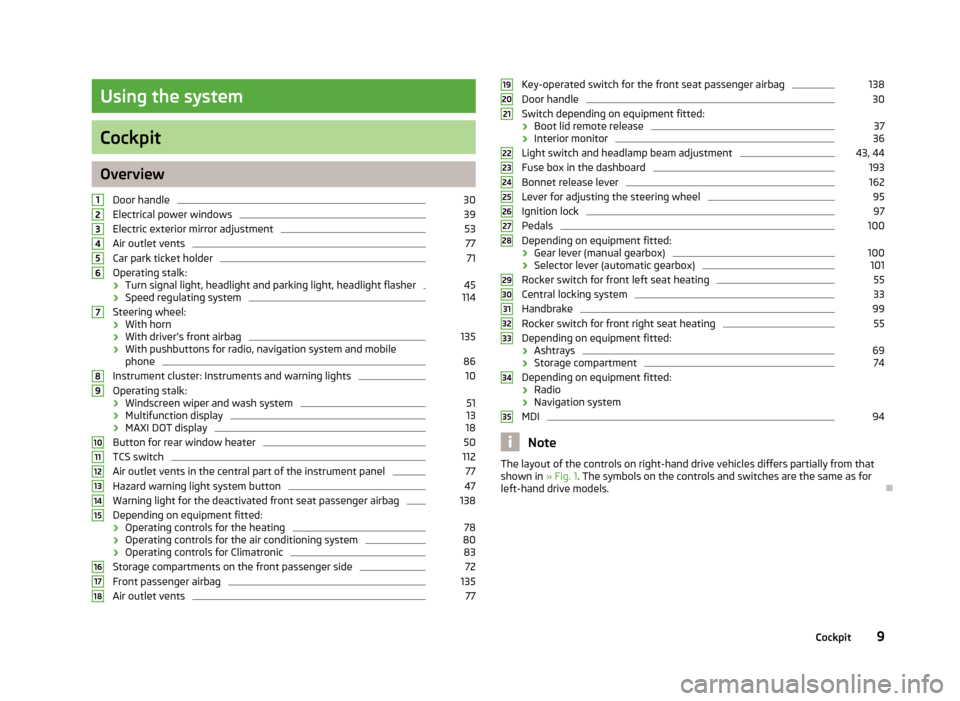
OverviewDoor handle
30
Electrical power windows
39
Electric exterior mirror adjustment
53
Air outlet vents
77
Car park ticket holder
71
Operating stalk:
› Turn signal light, headlight and parking light, headlight flasher
45
›
Speed regulating system
114
Steering wheel:
› With horn
› With driver’s front airbag
135
›With pushbuttons for radio, navigation system and mobile
phone
86
Instrument cluster: Instruments and warning lights
10
Operating stalk:
› Windscreen wiper and wash system
51
›Multifunction display
13
›
MAXI DOT display
18
Button for rear window heater
50
TCS switch
112
Air outlet vents in the central part of the instrument panel
77
Hazard warning light system button
47
Warning light for the deactivated front seat passenger airbag
138
Depending on equipment fitted:
› Operating controls for the heating
78
›Operating controls for the air conditioning system
80
›Operating controls for Climatronic
83
Storage compartments on the front passenger side
72
Front passenger airbag
135
Air outlet vents
77123456789101112131415161718Key-operated switch for the front seat passenger airbag138Door handle30
Switch depending on equipment fitted:
› Boot lid remote release
37
›Interior monitor
36
Light switch and headlamp beam adjustment
43, 44
Fuse box in the dashboard
193
Bonnet release lever
162
Lever for adjusting the steering wheel
95
Ignition lock
97
Pedals
100
Depending on equipment fitted:
› Gear lever (manual gearbox)
100
›Selector lever (automatic gearbox)
101
Rocker switch for front left seat heating
55
Central locking system
33
Handbrake
99
Rocker switch for front right seat heating
55
Depending on equipment fitted:
› Ashtrays
69
›Storage compartment
74
Depending on equipment fitted:
› Radio
› Navigation system
MDI
94
Note
The layout of the controls on right-hand drive vehicles differs partially from that
shown in » Fig. 1. The symbols on the controls and switches are the same as for
left-hand drive models.19202122232425262728293031323334359Cockpit
Page 22 of 223
Winter tyres
Here, you can set the speed at which an audible signal should sound. This func-
tion is, for example, used for winter tyres where the maximum permissible speed
is lower than the maximum speed of the vehicle.
The following is shown on the information display if this speed is exceeded: Winter tyres: maximum ... km/h.
Units of measurement
The units for the temperature, consumption and distance driven can be set here.
Alt. speed dis.
Display of the second speed in mph 1)
can be activated here.
Service
The days and kilometres remaining until the next service can be displayed here.
Factory setting
The display can be restored to its factory settings here.
Door, boot lid and bonnet warning
First read and observe the introductory information and safety warn-ings
on page 18.
If at least one door is open, or the boot or bonnet is open, the MAXI DOT display
shows the vehicle with the corresponding door or boot/bonnet open.
An audible signal also sounds if the vehicle is travelling at more than 6 km/h.
Auto Check Control
First read and observe the introductory information and safety warn-
ings
on page 18.
Vehicle condition
Certain functions and conditions of individual vehicle systems are checked contin-
uously when the ignition is switched on and also while driving.
Some error messages and other information are displayed in the MAXI DOT dis-
play. The messages are displayed simultaneously with the icons in the MAXI DOT
display or with the warning lights in the instrument cluster » page 20.
The Vehicle status menu item is shown in the main menu of the MAXI DOT dis-
play whenever at least one fault message is present. The first of the fault mes-
sages is displayed after this menu item is selected. Several error messages are
shown on the display under the message e.g. 1/3. This indicates that the first of a
total of three error messages is being displayed.
As long as the operational faults are not rectified, the symbols are always indica- ted again. After they are displayed for the first time, the symbols continue to be
indicated without any extra messages for the driver.
Warning symbolsEngine oil pressure too low» page 21Clutches in the automatic gearbox are too
hot» page 19Check engine oil level,
engine oil sensor defective» page 21
Clutches in the automatic gearbox are too hot
The
symbol in the MAXI DOT display indicates that the temperature of the au-
tomatic gearbox clutches is too high.
The following message is shown in the MAXI DOT display.
Gearbox overheating. Stop. Read manual.
Stop the vehicle, switch off the engine, and wait until the
icon goes out – there
is a risk of gearbox damage. You can continue your journey as soon as the icon
disappears.
WARNINGIf you have to stop for technical reasons, park the vehicle at a safe distance
from the traffic, switch off the engine and activate the hazard warning light
system » page 47 . 1)
On models on which the speedometer indicates mph, the second speed is displayed in km/h.
19Instruments and Indicator Lights
Page 42 of 223
Note■After switching the ignition off, it is still possible to open or close the windows
for approx. 10 minutes. The electrical power windows are only switched off com- pletely once the driver's door or front passenger door are opened.■
When driving always use the existing heating, air conditioning and ventilation
system for ventilating the interior of the vehicle. If the windows are opened, dust
as well as other dirt can get into the vehicle and in addition the wind noise is
more at certain speeds.
Opening/closing the windows
Fig. 20
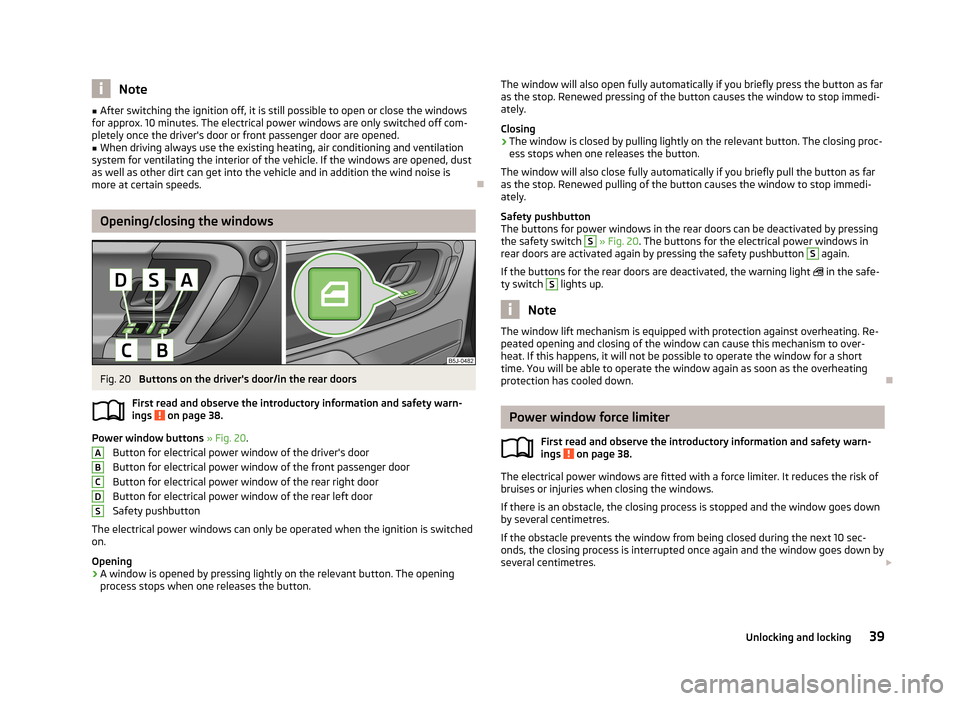
Buttons on the driver's door/in the rear doors
First read and observe the introductory information and safety warn-
ings
on page 38.
Power window buttons » Fig. 20 .
Button for electrical power window of the driver's door
Button for electrical power window of the front passenger door
Button for electrical power window of the rear right door Button for electrical power window of the rear left door
Safety pushbutton
The electrical power windows can only be operated when the ignition is switched
on.
Opening
›
A window is opened by pressing lightly on the relevant button. The opening process stops when one releases the button.
ABCDSThe window will also open fully automatically if you briefly press the button as far
as the stop. Renewed pressing of the button causes the window to stop immedi- ately.
Closing›
The window is closed by pulling lightly on the relevant button. The closing proc-
ess stops when one releases the button.
The window will also close fully automatically if you briefly pull the button as far as the stop. Renewed pulling of the button causes the window to stop immedi-
ately.
Safety pushbutton
The buttons for power windows in the rear doors can be deactivated by pressing
the safety switch
S
» Fig. 20 . The buttons for the electrical power windows in
rear doors are activated again by pressing the safety pushbutton
S
again.
If the buttons for the rear doors are deactivated, the warning light
in the safe-
ty switch
S
lights up.
Note
The window lift mechanism is equipped with protection against overheating. Re-
peated opening and closing of the window can cause this mechanism to over-
heat. If this happens, it will not be possible to operate the window for a short
time. You will be able to operate the window again as soon as the overheating
protection has cooled down.
Power window force limiter
First read and observe the introductory information and safety warn-
ings
on page 38.
The electrical power windows are fitted with a force limiter. It reduces the risk of
bruises or injuries when closing the windows.
If there is an obstacle, the closing process is stopped and the window goes down
by several centimetres.
If the obstacle prevents the window from being closed during the next 10 sec-
onds, the closing process is interrupted once again and the window goes down by several centimetres.
39Unlocking and locking
Page 52 of 223
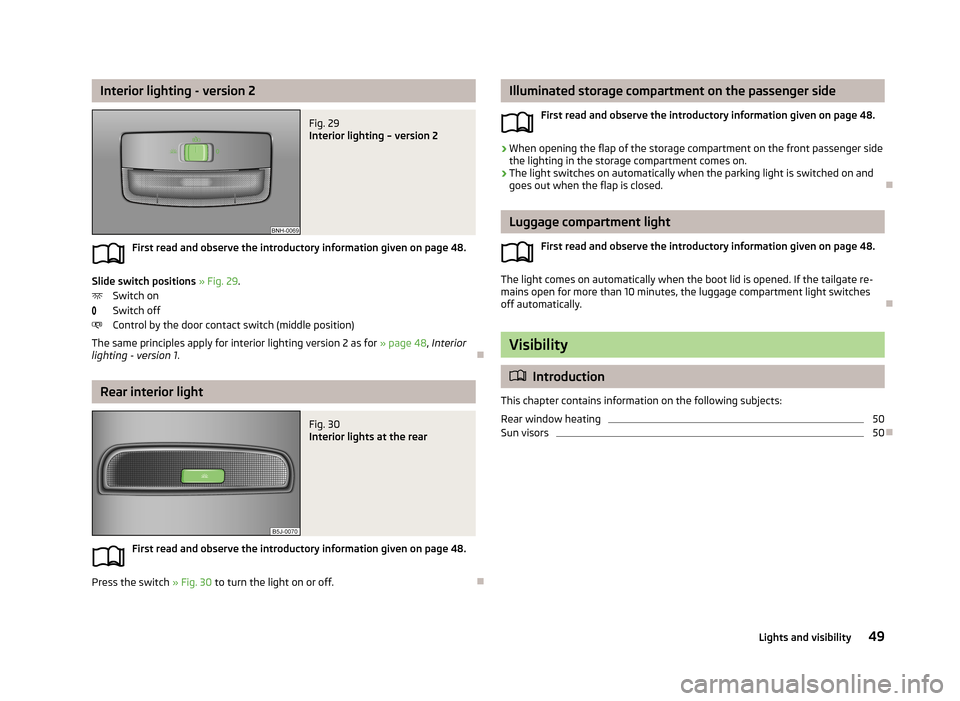
Interior lighting - version 2Fig. 29
Interior lighting – version 2
First read and observe the introductory information given on page 48.
Slide switch positions » Fig. 29 .
Switch on
Switch off
Control by the door contact switch (middle position)
The same principles apply for interior lighting version 2 as for » page 48, Interior
lighting - version 1 .
Rear interior light
Fig. 30
Interior lights at the rear
First read and observe the introductory information given on page 48.
Press the switch » Fig. 30 to turn the light on or off.
Illuminated storage compartment on the passenger side
First read and observe the introductory information given on page 48.›
When opening the flap of the storage compartment on the front passenger side
the lighting in the storage compartment comes on.
›
The light switches on automatically when the parking light is switched on and
goes out when the flap is closed.
Luggage compartment light
First read and observe the introductory information given on page 48.
The light comes on automatically when the boot lid is opened. If the tailgate re-
mains open for more than 10 minutes, the luggage compartment light switches
off automatically.
Visibility
Introduction
This chapter contains information on the following subjects:
Rear window heating
50
Sun visors
50
49Lights and visibility
Page 53 of 223
Rear window heatingFig. 31
Button for rear window heater
First read and observe the introductory information given on page 49.
›
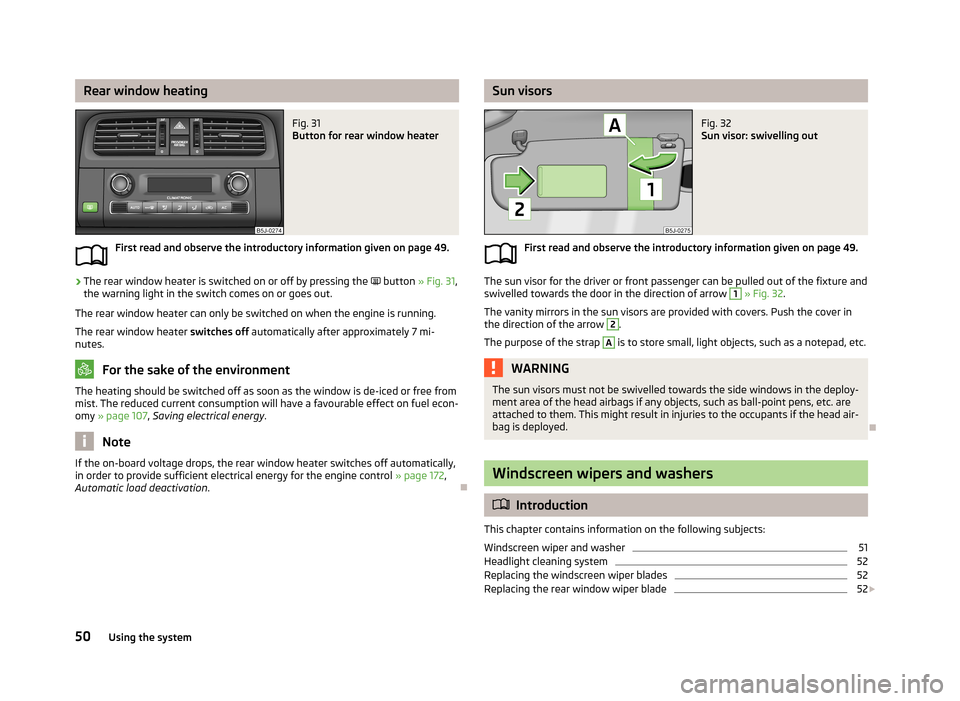
The rear window heater is switched on or off by pressing the
button » Fig. 31 ,
the warning light in the switch comes on or goes out.
The rear window heater can only be switched on when the engine is running.
The rear window heater switches off automatically after approximately 7 mi-
nutes.
For the sake of the environment
The heating should be switched off as soon as the window is de-iced or free from
mist. The reduced current consumption will have a favourable effect on fuel econ-
omy » page 107 , Saving electrical energy .
Note
If the on-board voltage drops, the rear window heater switches off automatically,
in order to provide sufficient electrical energy for the engine control » page 172,
Automatic load deactivation .
Sun visorsFig. 32
Sun visor: swivelling out
First read and observe the introductory information given on page 49.
The sun visor for the driver or front passenger can be pulled out of the fixture and
swivelled towards the door in the direction of arrow
1
» Fig. 32 .
The vanity mirrors in the sun visors are provided with covers. Push the cover in the direction of the arrow
2
.
The purpose of the strap
A
is to store small, light objects, such as a notepad, etc.
WARNINGThe sun visors must not be swivelled towards the side windows in the deploy-
ment area of the head airbags if any objects, such as ball-point pens, etc. are attached to them. This might result in injuries to the occupants if the head air-
bag is deployed.
Windscreen wipers and washers
Introduction
This chapter contains information on the following subjects:
Windscreen wiper and washer
51
Headlight cleaning system
52
Replacing the windscreen wiper blades
52
Replacing the rear window wiper blade
52
50Using the system
Page 54 of 223
The windscreen wipers and the windscreen washer system only operate when
the ignition is switched on.
The rear window is wiped once automatically if the windscreen wipers are on when reverse gear is selected.
Top up with windscreen wiper fluid » page 163.WARNING■
Properly maintained windscreen wiper blades are essential for clear visibility
and safe driving » page 52.■
Do not use the windscreen washer system at low temperatures, without
heating the windscreen beforehand. Otherwise the window cleaner could
freeze on the windscreen and restrict the view to the front.
■
Replace the windscreen wiper blades once or twice a year for safety rea-
sons. These can be purchased from a ŠKODA Partner.
CAUTION
■ In cold temperatures and during the winter, check before the journey or before
switching on the ignition that the wiper blades are not frozen to the windscreen. If the windscreen wipers are switched on when the blades are frozen to the
windscreen, this may damage both the blades and windscreen wiper motor!■
If the ignition is switched off while the windscreen wipers are switched on, the
windscreen wipers will continue wiping in the same mode after the ignition is
turned back on. The windscreen wipers could freeze up in cold temperatures be- tween the time the ignition was turned off and when it was turned back on again.
■
Carefully detach frozen wiper blades from the front or rear window.
■
Remove snow and ice from the windscreen wipers before driving.
■
If the windscreen wipers are handled carelessly, there is a risk of damage to the
windscreen.
Note
■ The windscreen washer nozzles for the windscreen are heated when the en-
gine is running and the outside temperature is less than approx. +10 °C.■
The content of the windscreen washer fluid reservoir is 3.5 litres. On vehicles
fitted with the headlight cleaning system, the volume is around 5.4 litres.
■
The wiper blades should be cleaned on a regular basis with a windscreen clean-
er to avoid any smears. The wiper blades should be cleaned with a sponge or
cloth if they are heavily soiled by insect residues, for example.
Windscreen wiper and washerFig. 33
Operating stalk: Windscreen
wipers and washer settings
First read and observe the introductory information and safety warn-
ings on page 50.
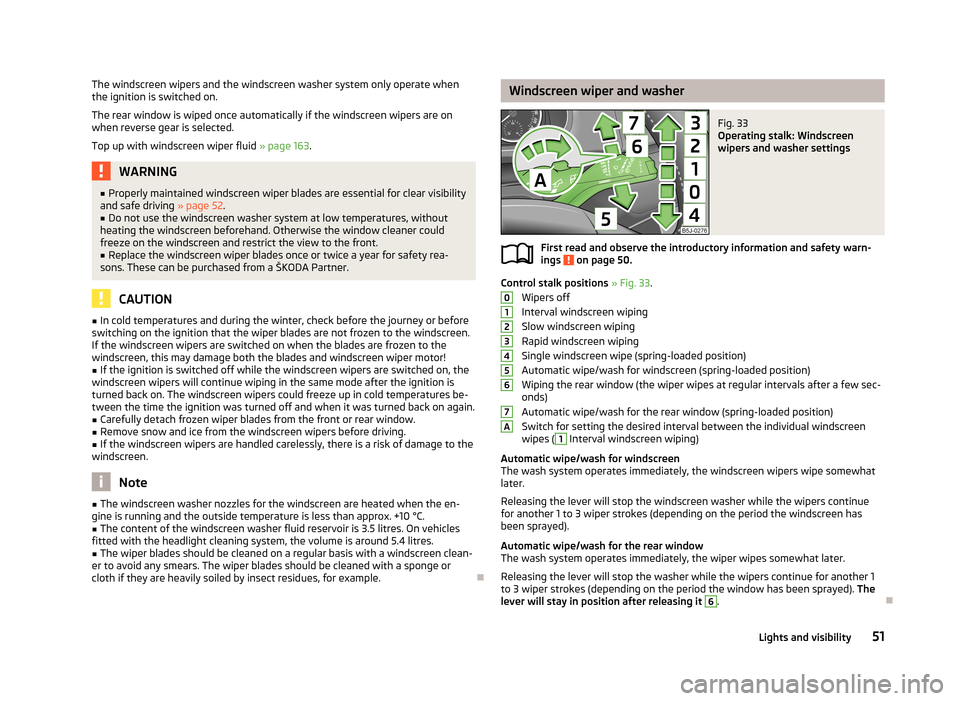
Control stalk positions » Fig. 33 .
Wipers off
Interval windscreen wiping
Slow windscreen wiping
Rapid windscreen wiping
Single windscreen wipe (spring-loaded position)
Automatic wipe/wash for windscreen (spring-loaded position) Wiping the rear window (the wiper wipes at regular intervals after a few sec-
onds)
Automatic wipe/wash for the rear window (spring-loaded position)
Switch for setting the desired interval between the individual windscreen wipes (
1
Interval windscreen wiping)
Automatic wipe/wash for windscreen
The wash system operates immediately, the windscreen wipers wipe somewhat
later.
Releasing the lever will stop the windscreen washer while the wipers continue
for another 1 to 3 wiper strokes (depending on the period the windscreen has
been sprayed).
Automatic wipe/wash for the rear window The wash system operates immediately, the wiper wipes somewhat later.
Releasing the lever will stop the washer while the wipers continue for another 1
to 3 wiper strokes (depending on the period the window has been sprayed). The
lever will stay in position after releasing it
6
.
01234567A51Lights and visibility
Page 57 of 223
Seats and storage
Front seats
Introduction
This chapter contains information on the following subjects:
Adjusting the front seats - Version 1
55
Adjusting the front seats - Variant 2
55
Front seat heating
55
The driver's seat should be adjusted in such a way that the pedals can be fully
pressed to the floor with slightly bent legs.
The seat backrest on the driver's seat should be adjusted in such a way that the
upper point of the steering wheel can be easily reached with slightly bent arms.
Correct adjustment of the seats is particularly important:
› for reaching the controls safely and quickly;
› for a relaxed, fatigue-free body position;
› for achieving maximum protection from the seat belts and the airbag system.
WARNINGGeneral information■Caution when adjusting the seat! You may suffer injuries or bruises as a re-
sult of adjusting the seat without paying proper attention.■
The seat backrests must not be reclined too far when driving otherwise this
will affect proper operation of the seat belts and of the airbag system – risk of
injury.
■
Never carry more people than the number of seats in the vehicle.
■
Each occupant must correctly fasten the seat belt belonging to the seat.
Children must be fastened » page 140, Transporting children safely with a
suitable restraint system.
■
The front seats and head restraints must be adjusted to match the body
size at all times and the seat belt must always be fastened properly to provide the most effective levels of protection to the passengers.
■
Do not transport any objects on the front passenger seat other than objects
(e.g. child safety seat) intended for this purpose – there is the risk of an acci-
dent.
WARNINGInformation for the driver■Only adjust the driver's seat when the vehicle is stationary – there is the risk
of an accident.■
Keep a distance of at least 25 cm from the steering wheel. Not keeping to
this minimum distance will mean that the airbag system will not be able to
properly protect you – risk of death.
■
Ensure that there are no objects in the driver's footwell as they may get
caught behind the pedals while you are driving or under braking. You would
then no longer be able to operate the clutch, brake or accelerate.
WARNINGInformation for the front seat passenger■Maintain a distance of at least 25 cm from the dash panel. Not maintaining
this minimum distance will mean that the airbag system will not be able to
properly protect you - there is a risk that you could be killed.■
Always keep your feet in the footwell when the car is being driven - never
place your feet on the instrument panel, out of the window or on the seats.
You will be exposed to increased risk of injury if it becomes necessary to apply
the brakes or in the event of an accident. You may suffer fatal injuries when
an airbag is deployed if you have adopted an incorrect seating position.
Note
After a certain time, play can develop within the adjustment mechanism of the
backrest angle.
54Using the system
Page 58 of 223
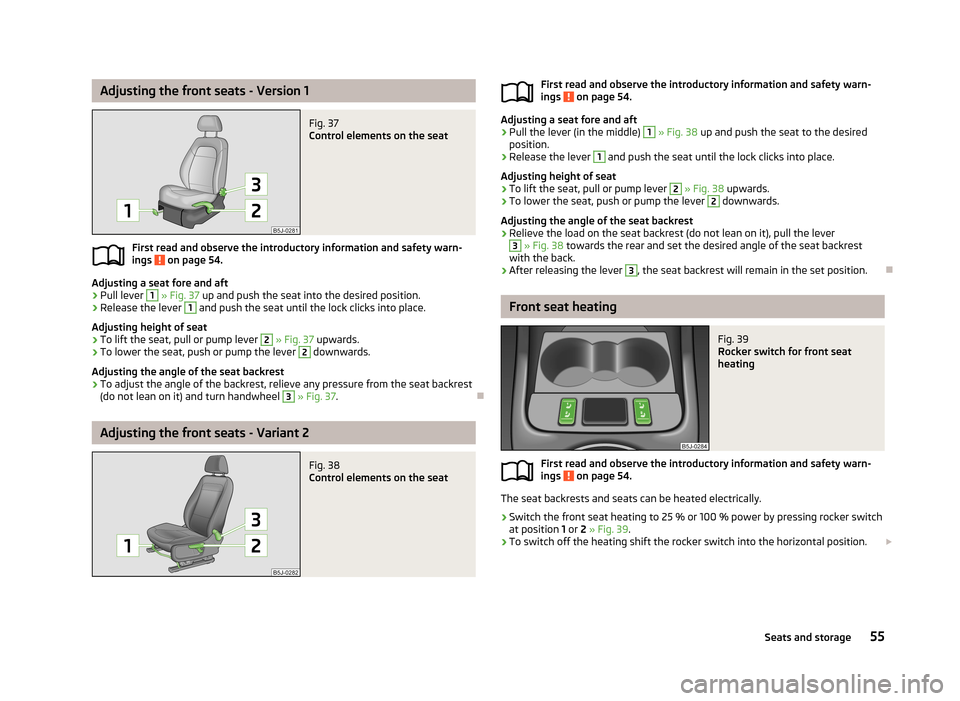
Adjusting the front seats - Version 1Fig. 37
Control elements on the seat
First read and observe the introductory information and safety warn-
ings on page 54.
Adjusting a seat fore and aft
›
Pull lever
1
» Fig. 37 up and push the seat into the desired position.
›
Release the lever
1
and push the seat until the lock clicks into place.
Adjusting height of seat
›
To lift the seat, pull or pump lever
2
» Fig. 37 upwards.
›
To lower the seat, push or pump the lever
2
downwards.
Adjusting the angle of the seat backrest
›
To adjust the angle of the backrest, relieve any pressure from the seat backrest
(do not lean on it) and turn handwheel
3
» Fig. 37 .
Adjusting the front seats - Variant 2
Fig. 38
Control elements on the seatFirst read and observe the introductory information and safety warn-
ings on page 54.
Adjusting a seat fore and aft
›
Pull the lever (in the middle)
1
» Fig. 38 up and push the seat to the desired
position.
›
Release the lever
1
and push the seat until the lock clicks into place.
Adjusting height of seat
›
To lift the seat, pull or pump lever
2
» Fig. 38 upwards.
›
To lower the seat, push or pump the lever
2
downwards.
Adjusting the angle of the seat backrest
›
Relieve the load on the seat backrest (do not lean on it), pull the lever
3
» Fig. 38 towards the rear and set the desired angle of the seat backrest
with the back.
›
After releasing the lever
3
, the seat backrest will remain in the set position.
Front seat heating
Fig. 39
Rocker switch for front seat
heating
First read and observe the introductory information and safety warn-
ings on page 54.
The seat backrests and seats can be heated electrically.
›
Switch the front seat heating to 25 % or 100 % power by pressing rocker switch
at position 1 or 2 » Fig. 39 .
›
To switch off the heating shift the rocker switch into the horizontal position.
55Seats and storage
Page 59 of 223
WARNINGIf, as an occupant, you have a subdued pain and/or temperature sensitivity,
e.g. through medication, paralysis or because of chronic illness (e.g. diabetes),
we recommend not to use the seat heating. This can lead to burns on the
back, the posterior and the legs which are difficult to heal. If the seat heating
is used, we recommend to make regular breaks in your journey when driving
long distances, so that the body can recuperate from the stress of the jour- ney. Please consult your doctor, who can evaluate your specific condition.
CAUTION
■ Do not kneel on the seats or otherwise apply pressure at specific points to
avoid damaging the heating elements for the seat heaters.■
Do not turn on the seat heater if seats are not occupied.
■
Do not switch on the seat heating if the seats have objects attached to or
placed on them, for example a child seat, a bag, etc. A fault of the heating ele- ments in the seat heating can occur.
■
If additional seat covers or protective covers are attached to the seats, do not
turn on the seat heater - there is a risk of damaging the seat covers and seat
heating.
■
Do not clean the seats using moisture » page 157.
Note
■
The seat heating should only be switched on when the engine is running. This
has a significant effect of saving on the battery capacity.■
If the on-board voltage drops, the seat heating is switched off automatically, in
order to provide sufficient electrical energy for the engine control » page 172,
Automatic load deactivation .
Rear seats
Introduction
This chapter contains information on the following subjects:
Folding the seat backrest forwards
56
Folding the seat cushions forwards, removing
57
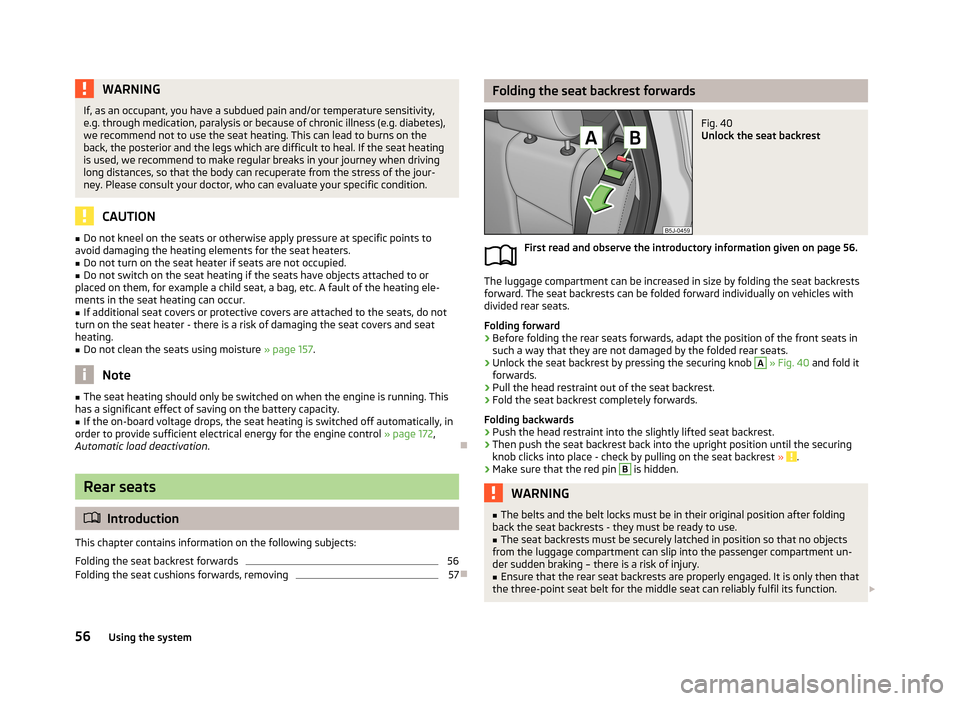
Folding the seat backrest forwardsFig. 40
Unlock the seat backrest
First read and observe the introductory information given on page 56.
The luggage compartment can be increased in size by folding the seat backrests
forward. The seat backrests can be folded forward individually on vehicles with
divided rear seats.
Folding forward
›
Before folding the rear seats forwards, adapt the position of the front seats in such a way that they are not damaged by the folded rear seats.
›
Unlock the seat backrest by pressing the securing knob
A
» Fig. 40 and fold it
forwards.
›
Pull the head restraint out of the seat backrest.
›
Fold the seat backrest completely forwards.
Folding backwards
›
Push the head restraint into the slightly lifted seat backrest.
›
Then push the seat backrest back into the upright position until the securing knob clicks into place - check by pulling on the seat backrest » .
›
Make sure that the red pin
B
is hidden.
WARNING■
The belts and the belt locks must be in their original position after folding
back the seat backrests - they must be ready to use.■
The seat backrests must be securely latched in position so that no objects
from the luggage compartment can slip into the passenger compartment un-
der sudden braking – there is a risk of injury.
■
Ensure that the rear seat backrests are properly engaged. It is only then that
the three-point seat belt for the middle seat can reliably fulfil its function.
56Using the system