remote start SKODA FABIA 2014 2.G / 5J Owner's Manual
[x] Cancel search | Manufacturer: SKODA, Model Year: 2014, Model line: FABIA, Model: SKODA FABIA 2014 2.G / 5JPages: 197, PDF Size: 13.56 MB
Page 5 of 197
Table of Contents
Abbreviations
Safety
Passive Safety
6
General information
6
Correct and safe seated position
7
Seat belts
10
Wearing seat belts
10
Inertia reel and belt pretensioners
13
Airbag system
14
Description of the airbag system
14
Airbag overview
15
Deactivating airbags
17
Transporting children safely
19
Child seat
19
Fastening systems
22
Using the system
Cockpit
25
Overview
24
Instruments and Indicator Lights
26
Instrument cluster
26
Multifunction display (MFD)
29
Service Interval Display
32
MAXI DOT display
33
Warning lights
35
Unlocking and locking
42
Unlocking and locking
42
Central locking system
45
Remote control
48
Anti-theft alarm system
49
Tailgate
50Electrical power windows51Electric sliding/tilting roof53
Lights and visibility
55
Lights
55
Interior lights
59
Visibility
61
Windscreen wipers and washers
61
Rear window
63
Seats and storage
65
Front seats
65
Rear seats
66
Head restraints
67
Boot
68
Variable loading floor in the luggage
compartment (Fabia Estate)
72
Net partition (Fabia Estate)
73
Bicycle carrier in the luggage compartment
75
Roof rack system
76
Useful equipment
77
Storage compartments
80
Heating and air conditioning
84
Heating, ventilation, cooling
84
Heating
86
Air conditioning system (manual air
conditioning system)
87
Climatronic (automatic air conditioning
system)
90
Communication and multimedia
92
Universal telephone preinstallation GSM II
92
Voice control
97
Multimedia
98
Driving
Starting-off and Driving
101
Starting and stopping the engine
101
Brakes
102Manual gear shifting and pedals104Automatic transmission105
Running in
108
Economical driving and respect the
environment
109
Avoiding damage to your vehicle
112
Driving abroad
113
Assist systems
114
Brake assist systems
114
Parking aid
116
Cruise control system
117
START-STOP
118
Towing a trailer
120
Towing device
120
Trailer
124
General Maintenance
Car care
126
Services, modifications and technical
alterations
126
Washing the car
128
Vehicle exterior care
129
Care of the interior
132
Inspecting and replenishing
135
Fuel
135
Engine compartment
138
Engine oil
141
Coolant
143
Brake fluid
145
Vehicle battery
145
Wheels
149
Tyres and rims
149
Winter use
1563Table of Contents
Page 45 of 197
WARNING■Never leave the key in the vehicle when you exit the vehicle. Unauthor-
ized persons, such as children, for example, could lock the car, turn on the
ignition or start the engine - there is the danger of injury and accidents oc-
curring!■
When leaving the vehicle, never leave people who are not completely in-
dependent, such as children, unattended in the vehicle. The children might,
for example, release the handbrake or take the vehicle out of gear. The
vehicle could then start to move – risk of accident! These individuals would
possibly not be able to leave the vehicle on their own or to help them-
selves. At very high or very low temperatures can be fatal!
CAUTION
■ Each key contains electronic components; therefore it must be protected
against moisture and severe shocks.■
Keep the groove of the keys absolutely clean. Impurities (textile fibres, dust,
etc.) have a negative effect on the functionality of the locking cylinder and ig-
nition lock.
■
Operation of the remote control may temporarily be affected by interference
from transmitters close to the car operating in the same frequency range (e.g.
mobile phone, TV transmitter).
■
The battery must be replaced if the central locking only reacts to the remote
control at less than 3 metres away » page 43.
Note
■
When leaving the vehicle, always check if this is locked.■Please contact a specialist garage if you lose a key as they can obtain a new
one for you.Replacing the battery in the remote control keyFig. 26
Remote control key: Remove cover/remove battery
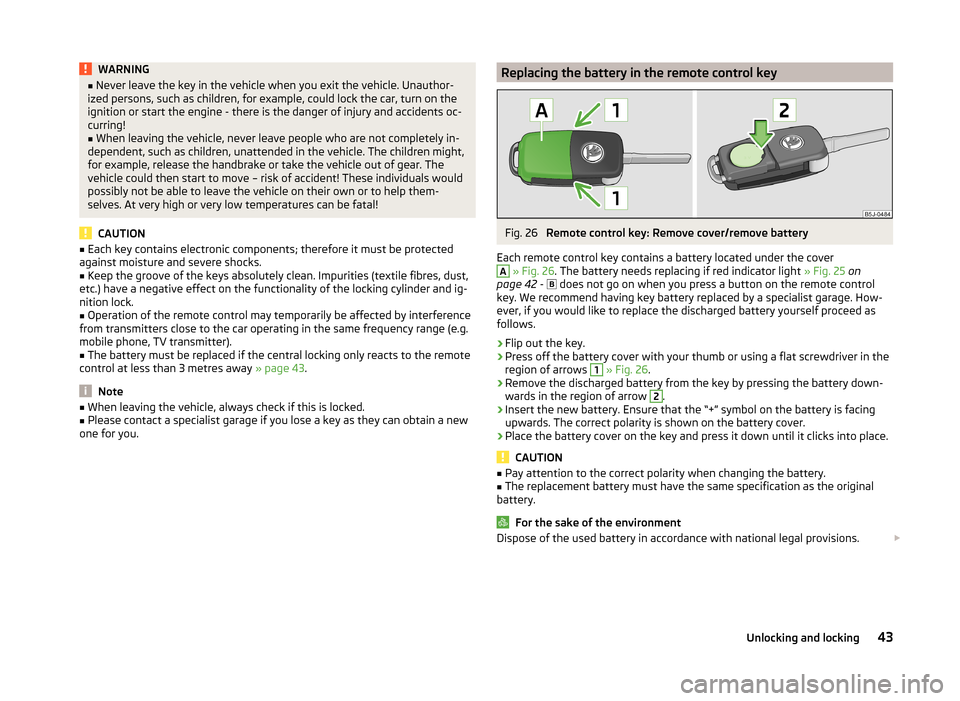
Each remote control key contains a battery located under the cover
A
» Fig. 26 . The battery needs replacing if red indicator light » Fig. 25 on
page 42 -
does not go on when you press a button on the remote control
key. We recommend having key battery replaced by a specialist garage. How-
ever, if you would like to replace the discharged battery yourself proceed as
follows.
›
Flip out the key.
›
Press off the battery cover with your thumb or using a flat screwdriver in the
region of arrows
1
» Fig. 26 .
›
Remove the discharged battery from the key by pressing the battery down-
wards in the region of arrow
2
.
›
Insert the new battery. Ensure that the “+” symbol on the battery is facing upwards. The correct polarity is shown on the battery cover.
›
Place the battery cover on the key and press it down until it clicks into place.
CAUTION
■ Pay attention to the correct polarity when changing the battery.■The replacement battery must have the same specification as the original
battery.
For the sake of the environment
Dispose of the used battery in accordance with national legal provisions. 43Unlocking and locking
Page 50 of 197
›If at least one door has been opened, the vehicle cannot be locked.
› In the event of an accident in which the airbags are deployed, the locked
doors are automatically unlocked in order to enable rescuers to gain access
to the vehicle.WARNING■ Doors locked from the inside make it difficult for rescuers to get into the
vehicle in an emergency – danger to life!■
If the safelock system is switched on » page 46, the door opening lever
and the central locking buttons do not operate.
Remote control
Introduction
This chapter contains information on the following subjects:
Unlocking/locking
48
Synchronization
49
You can use the remote control key to:
› unlock and lock the vehicle,
› unlocking boot lid;
› open and close the windows
» page 53, Window convenience operation .
The transmitter with the battery is housed in the handle of the remote control
key. The receiver is located in the interior of the vehicle. The operating range of the remote control key is approx. 30 m. But this range of the remote control
can be reduced if the batteries are weak.
The key has a fold-open key bit which can be used for unlocking and locking
the car manually and also for starting the engine.
The system must be initialised by a specialist garage if a lost key is replaced or
if the receiver unit has been repaired or replaced. Only then can the remote
control key be used again.
Note
■ The remote control is automatically deactivated when the ignition is switch-
ed on.■
Operation of the remote control may temporarily be affected by interference
from transmitters close to the car operating in the same frequency range (e.g.
mobile phone, TV transmitter).
■ The battery must be replaced if the central locking or anti-theft alarm system
does react to the remote control at less than 3 metres away » page 43.■
If the driver door is open, the vehicle cannot be locked using the remote con-
trol key.
Unlocking/locking
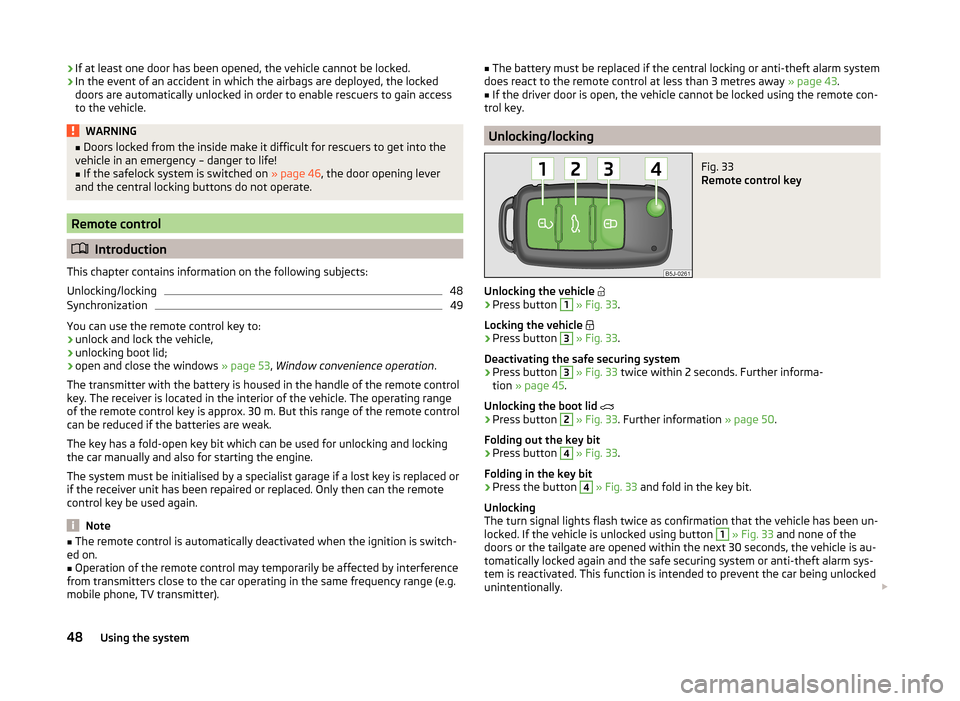
Fig. 33
Remote control key
Unlocking the vehicle
›
Press button
1
» Fig. 33 .
Locking the vehicle
›
Press button
3
» Fig. 33 .
Deactivating the safe securing system
›
Press button
3
» Fig. 33 twice within 2 seconds. Further informa-
tion » page 45 .
Unlocking the boot lid
›
Press button
2
» Fig. 33 . Further information » page 50.
Folding out the key bit
›
Press button
4
» Fig. 33 .
Folding in the key bit
›
Press the button
4
» Fig. 33 and fold in the key bit.
Unlocking
The turn signal lights flash twice as confirmation that the vehicle has been un-
locked. If the vehicle is unlocked using button
1
» Fig. 33 and none of the
doors or the tailgate are opened within the next 30 seconds, the vehicle is au-
tomatically locked again and the safe securing system or anti-theft alarm sys-
tem is reactivated. This function is intended to prevent the car being unlocked
unintentionally.
48Using the system
Page 190 of 197
Refuelling136
Unleaded petrol136
fuel consumption177
Fuel consumption109
Fuses Assignment
168
Changing168
Colour coding168
G
Gear Recommended gear
28
Gearbox Display messages
34
Gear changing Gear stick
104
General view Cockpit
25
Glow plug system Warning light
39
GSM92
H
Handbrake
104
Hazard warning light system59
Head airbag17
Headlight cleaning system Headlight cleaning system
63
Headlights171
Driving abroad113
Headlight cleaning system63
Head restraint68
Storing in the seat squabs68
Heating Deicing the windows
87
Exterior mirrors64
Operating86
Operation86
Rear window61
Recirculated air mode87
Seats66
Heating and air conditioning84
Hill hold control114
Horn25
I
Ignition
102
Ignition lock102
Immobilizer101
Individual settings locking
46
unlocking46
Inertia reel13
Instrument cluster26
Overview26
see instrument cluster26
Interior monitor50
ISOFIX22
J
Jack
159
Maintenance132
Jacking points Raise vehicle
161
Jump-starting164, 165
L
Light Beam adjustment
56
Cockpit59
Headlight flash57
Lights55
Cockpit60
Daylight running56
Fog lights58
Foglights with the CORNER function58
Halogen projector headlights with cornering light function
57
Hazard warning light system59
Low beam lights56
Main beam lights57
Parking lights56, 59
Rear fog light58
Replacing bulbs170
Switching on and off56
Tourist lights58
Turn signals57
warning lights35
Lock Central locking system
47
Locking Emergency locking
45
Remote control48
without central locking45
Locking and unlocking from the inside47
Low beam lights56
Luggage compartment Class N1 vehicles
69
Lighting61
Retractable luggage compartment cover (Fabia Estate)
71
Variable loading floor72
M
Main beam
57
Maintenance111
Decorative films131
Manual air conditioning Recirculated air mode
89
Manual gear changing see Gear changing
104
MAXI DOT Main menu
33
see MAXI DOT display33
Settings34
MAXI DOT display33
maximum allowable weights
176
188Index