fuel consumption SKODA FABIA 2014 3.G / NJ Owner's Manual
[x] Cancel search | Manufacturer: SKODA, Model Year: 2014, Model line: FABIA, Model: SKODA FABIA 2014 3.G / NJPages: 216, PDF Size: 30.7 MB
Page 45 of 216

CAUTION■As long as the warning icon lights up, you must take into account an in-
creased fuel consumption and in certain circumstances a power reduction of
the engine.■
Using diesel fuel with increased sulphur content can significantly reduce the
service life of the diesel particle filter. A ŠKODA Partner will be able to tell you
which countries use diesel fuel with increased sulphur content.
Note
■ We encourage you to avoid constant short journeys. This will improve the
combustion process of the soot particles in the diesel particulate filter.■
If the engine is turned off during the filter cleaning process or shortly after-
wards, the cooling fan may turn on automatically for a few minutes.
Windscreen washer fluid level
Read and observe
on page 39 first.
If the warning icon
comes on , the windscreen washer fluid level is too low.
The following message is shown in the information cluster display. Top up washer fluid!
TOP UP WASHER FLUID
Top up with liquid » page 153, Windscreen washer system .
START-STOP-system
Read and observe
on page 39 first.
The warning lights
indicate the state of the START STOP system
» page 124 .
Display of a low temperature
Read and observe
on page 39 first.
The indicator symbol
indicates an outside temperature below +4 ° C.
WARNINGEven at temperatures of around +4 °C, there may still be black ice on the
road surface. You should therefore not rely solely on the outside tempera-
ture display for accurate information as to whether there is ice on the road. Distance warning (Front Assistant)
Read and observe
on page 39 first.
If the warning icon
lights up , the safe distance to the vehicle ahead has
been undershot.
Information on the Front Assistant system » page 121.
Advance warning/emergency brake (Front Assistant)
Read and observe
on page 39 first.
If the warning icon lights up
, the system detects a risk of collision or emer-
gency braking has been automatically triggered.
Information on the Front Assistant system » page 121.
42Operation
Page 47 of 216
Outside temperatureRead and observe
on page 43 first.
The current outside temperature is shown in the display.
If the outside temperature drops below +4 °C while driving, the following sym-
bol
(low temperature warning) is displayed and an audible signal will sound.
If the outside temperature when the ignition is switched on is below +4 ° C,
the following icon appears in the display
.
WARNINGEven at temperatures of around +4 °C, there may still be black ice on the
road surface. You should therefore not rely solely on the outside tempera-
ture display for accurate information as to whether there is ice on the road.
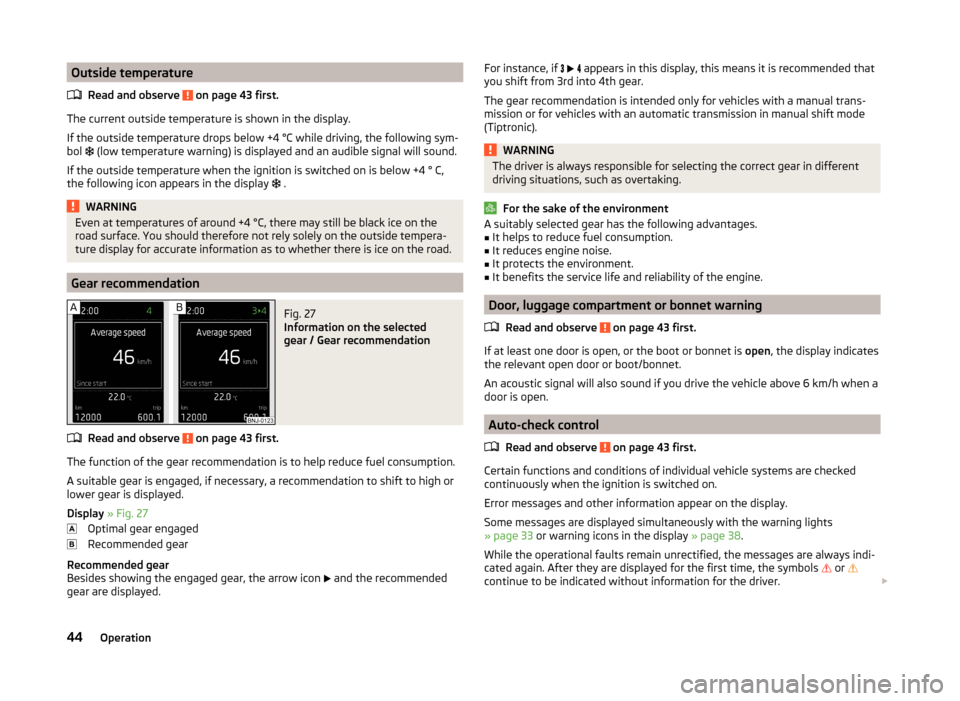
Gear recommendation
Fig. 27
Information on the selected
gear / Gear recommendation
Read and observe on page 43 first.
The function of the gear recommendation is to help reduce fuel consumption.
A suitable gear is engaged, if necessary, a recommendation to shift to high or
lower gear is displayed.
Display » Fig. 27
Optimal gear engaged
Recommended gear
Recommended gear
Besides showing the engaged gear, the arrow icon
and the recommended
gear are displayed.
For instance, if appears in this display, this means it is recommended that
you shift from 3rd into 4th gear.
The gear recommendation is intended only for vehicles with a manual trans-
mission or for vehicles with an automatic transmission in manual shift mode
(Tiptronic).WARNINGThe driver is always responsible for selecting the correct gear in different
driving situations, such as overtaking.
For the sake of the environment
A suitably selected gear has the following advantages.■It helps to reduce fuel consumption.■
It reduces engine noise.
■
It protects the environment.
■
It benefits the service life and reliability of the engine.
Door, luggage compartment or bonnet warning
Read and observe
on page 43 first.
If at least one door is open, or the boot or bonnet is open, the display indicates
the relevant open door or boot/bonnet.
An acoustic signal will also sound if you drive the vehicle above 6 km/h when a
door is open.
Auto-check control
Read and observe
on page 43 first.
Certain functions and conditions of individual vehicle systems are checked
continuously when the ignition is switched on.
Error messages and other information appear on the display.
Some messages are displayed simultaneously with the warning lights
» page 33 or warning icons in the display » page 38.
While the operational faults remain unrectified, the messages are always indi-
cated again. After they are displayed for the first time, the symbols
or
continue to be indicated without information for the driver.
44Operation
Page 49 of 216
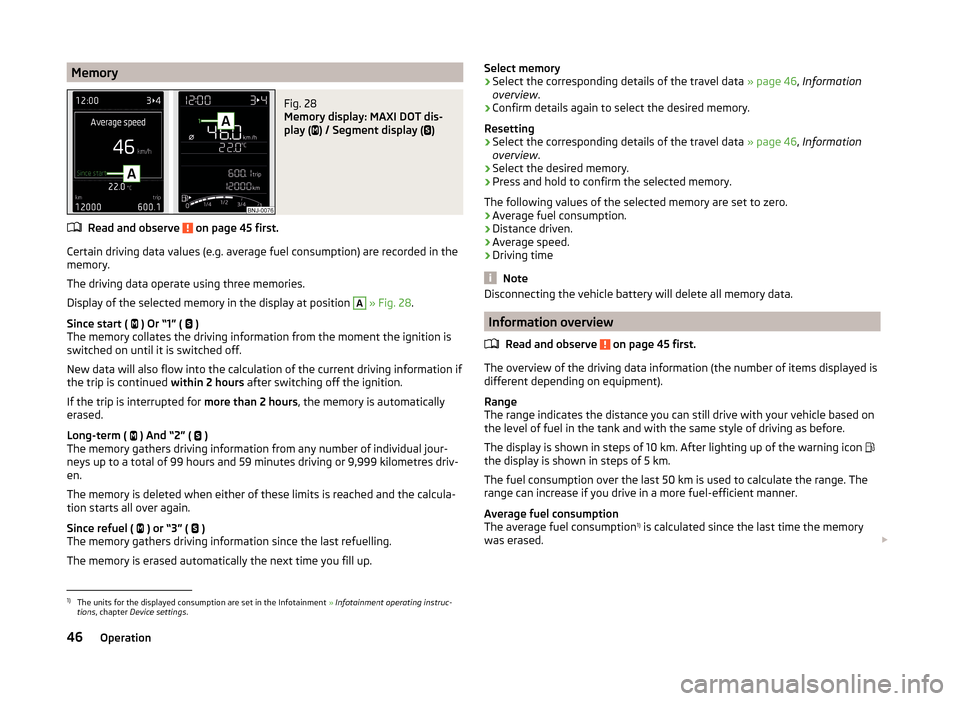
MemoryFig. 28
Memory display: MAXI DOT dis-
play (
) / Segment display (
)
Read and observe on page 45 first.
Certain driving data values (e.g. average fuel consumption) are recorded in the
memory.
The driving data operate using three memories.
Display of the selected memory in the display at position
A
» Fig. 28 .
Since start ( ) Or “1” (
)
The memory collates the driving information from the moment the ignition is
switched on until it is switched off.
New data will also flow into the calculation of the current driving information if
the trip is continued within 2 hours after switching off the ignition.
If the trip is interrupted for more than 2 hours, the memory is automatically
erased.
Long-term ( ) And “2” (
)
The memory gathers driving information from any number of individual jour-
neys up to a total of 99 hours and 59 minutes driving or 9,999 kilometres driv-
en.
The memory is deleted when either of these limits is reached and the calcula-
tion starts all over again.
Since refuel ( ) or “3” (
)
The memory gathers driving information since the last refuelling.
The memory is erased automatically the next time you fill up.
Select memory›Select the corresponding details of the travel data » page 46, Information
overview .›
Confirm details again to select the desired memory.
Resetting
›
Select the corresponding details of the travel data » page 46, Information
overview .
›
Select the desired memory.
›
Press and hold to confirm the selected memory.
The following values of the selected memory are set to zero. › Average fuel consumption.
› Distance driven.
› Average speed.
› Driving time
Note
Disconnecting the vehicle battery will delete all memory data.
Information overview
Read and observe
on page 45 first.
The overview of the driving data information (the number of items displayed is
different depending on equipment).
Range
The range indicates the distance you can still drive with your vehicle based on
the level of fuel in the tank and with the same style of driving as before.
The display is shown in steps of 10 km. After lighting up of the warning icon
the display is shown in steps of 5 km.
The fuel consumption over the last 50 km is used to calculate the range. The
range can increase if you drive in a more fuel-efficient manner.
Average fuel consumption
The average fuel consumption 1)
is calculated since the last time the memory
was erased.
1)
The units for the displayed consumption are set in the Infotainment
» Infotainment operating instruc-
tions , chapter Device settings .
46Operation
Page 50 of 216
Set the memory to zero at the start of a new measurement if you wish to de-
termine the average fuel consumption over a certain period » page 46.
After erasing the memory, no fuel consumption data will appear for the first 100 m driven.
The indicated information is updated continuously while you are driving.
Current fuel consumption
You can use this information to adapt your driving style to the desired fuel
consumption 1)
.
The display appears in litres/hour if the vehicle is stationary or driving at a low
speed 2)
.
Oil temperature
If the engine oil temperature is in the range of 80-110 °C, the engine operating
temperature has been reached.
If the oil temperature is lower than 80 °C or above 110 °C, avoid high engine
revs, full throttle and high engine loads.
If the oil temperature is lower than 50 °C or if there is a fault in the system for
checking the oil temperature are displayed instead of the oil temperature.
Warning against speeding
Set the speed limit, e.g. for the maximum permissible speed in towns
» page 47 .
Current driving speed
The current speed display is identical to the display on the speedometer 3
» Fig. 20 on page 30 or » Fig. 21 on page 30 .
Average speed
The average speed since the memory was last erased is displayed in km/hour .
Set the memory to zero at the start of measurement to determine the average
speed over a certain period » page 46.
After erasing the memory, no data will appear for the first 300 m driven.
The indicated information is updated continuously while you are driving.
Distance travelled
The distance travelled since the memory was last erased is displayed.
Reset the memory to zero if you want to measure the distance travelled from
a particular moment » page 46.
The maximum distance indicated is 9,999 km. The indicator is automatically
set back to zero if this period is exceeded.
Driving time
The time travelled since the memory was last erased is displayed.
If you want to measure the time travelled from a particular moment in time,
reset the memory to zero at that point in time » page 46.
The maximum distance indicated is 99 hours and 59 minutes. The indicator is
automatically set back to zero if this period is exceeded.
Coolant temperature
If the engine oil temperature is in the range 80-110 °C, the engine operating
temperature is reached.
If the temperature lies below 80 °C or above 110 °C, avoid high engine revs, full
throttle and high engine loads.
Warning at excessive speeds
Read and observe
on page 45 first.
The system allows you to set a speed limit and when this is reached, an acous-
tic warning signal sounds.
The following warning message is shown in the display. Speed … km exceeded.
SPEED TOO HIGH
Adjust the speed limit while the vehicle is stationary
›
Select the menu item Warning at (
) or
(
).
›
Activate the speed limit option by confirming this menu item.
›
Set the desired speed limit, e.g. 50 km/h.
1)
The units for the displayed consumption are set in the Infotainment
» Infotainment operating instruc-
tions , chapter Device settings .
2)
On some models in certain countries, the display appears in --,- kilometres/litres if the vehicle is station-
ary.
47Information system
Page 60 of 216
WARNINGPower windows in the driver's door and the rear doors are equipped with a
force limiter (only applies to the Variant 2 ) » page 58 . If there is an obsta-
cle, the closing process is stopped and the window goes down by several
centimetres. The windows should nevertheless be closed carefully – risk of
injury.
CAUTION
■ Keep the windows clean to ensure the correct functionality of the electric
windows.■
In the event that the windows are frozen, first of all eliminate the ice
» page 143 , Windows and external mirrors and only then operate the electrical
power windows. Otherwise, the window sealing and the electrical power win-
dow mechanism could be damaged.
■
In the winter, ice on the window may cause greater resistance as the win-
dow is closed. The window will stop and open again by several centimetres. It
is necessary to deactivate the force limiter to close the window » page 58.
■
Always make sure that the windows are closed when you leave the locked
vehicle.
■
Always close the windows before disconnecting the battery » page 58,
Force limitation .
■
The window lift mechanism is equipped with protection against overheater.
Repeated opening and closing of the window can cause this mechanism to
overheat. If this happens, it will not be possible to operate the window for a
short time. You will be able to operate the window again as soon as the over-
heater protection has cooled down.
For the sake of the environment
At high speeds you should keep the windows closed to prevent unnecessarily high fuel consumption.
Note
When driving always use the existing heater, air conditioning and ventilation
system for ventilating the interior of the vehicle. With the windows open, dust
and other dirt can get into the vehicle. In addition, wind noises can occur at
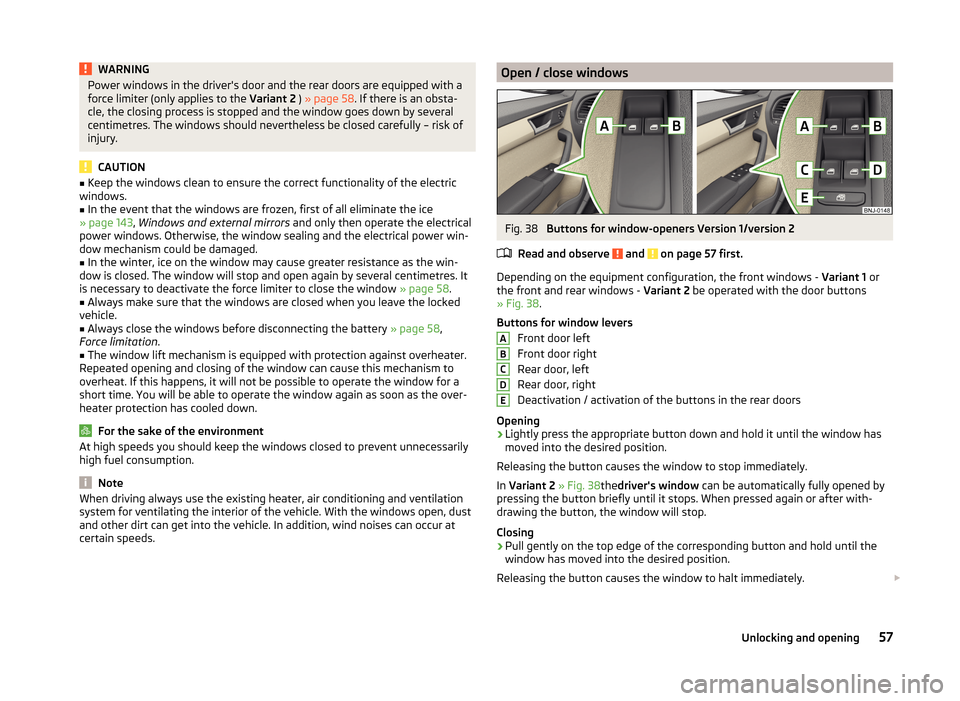
certain speeds.Open / close windowsFig. 38
Buttons for window-openers Version 1/version 2
Read and observe
and on page 57 first.
Depending on the equipment configuration, the front windows - Variant 1 or
the front and rear windows - Variant 2 be operated with the door buttons
» Fig. 38 .
Buttons for window levers Front door left
Front door right
Rear door, left
Rear door, right
Deactivation / activation of the buttons in the rear doors
Opening
›
Lightly press the appropriate button down and hold it until the window has
moved into the desired position.
Releasing the button causes the window to stop immediately.
In Variant 2 » Fig. 38thedriver's window can be automatically fully opened by
pressing the button briefly until it stops. When pressed again or after with-
drawing the button, the window will stop.
Closing
›
Pull gently on the top edge of the corresponding button and hold until the
window has moved into the desired position.
Releasing the button causes the window to halt immediately.
ABCDE57Unlocking and opening
Page 62 of 216
›Pull the relevant button upwards again for approx. 1 seconds, and keep it
pressed down.
Mechanical windows
Introduction
This chapter contains information on the following subjects:
Opening / closing windows
59
The window can be operated mechanically by the winder attached to the re-
spective door panel.
WARNINGThe windows should be closed carefully – risk of injury!
CAUTION
■ In the event that the windows are frozen, first of all eliminate the ice
» page 143 , Windows and external mirrors and only then operate the electri-
cal power windows. Otherwise, the window sealing and the electrical power
window mechanism could be damaged.■
Always make sure that the windows are closed when you leave the locked
vehicle.
For the sake of the environment
At high speeds, you should keep the windows closed to prevent unnecessarily high fuel consumption.
Note
When driving always use the existing heater, air conditioning and ventilation
system for ventilating the interior of the vehicle. If the windows are opened,
dust as well as other dirt can get into the vehicle and in addition the wind
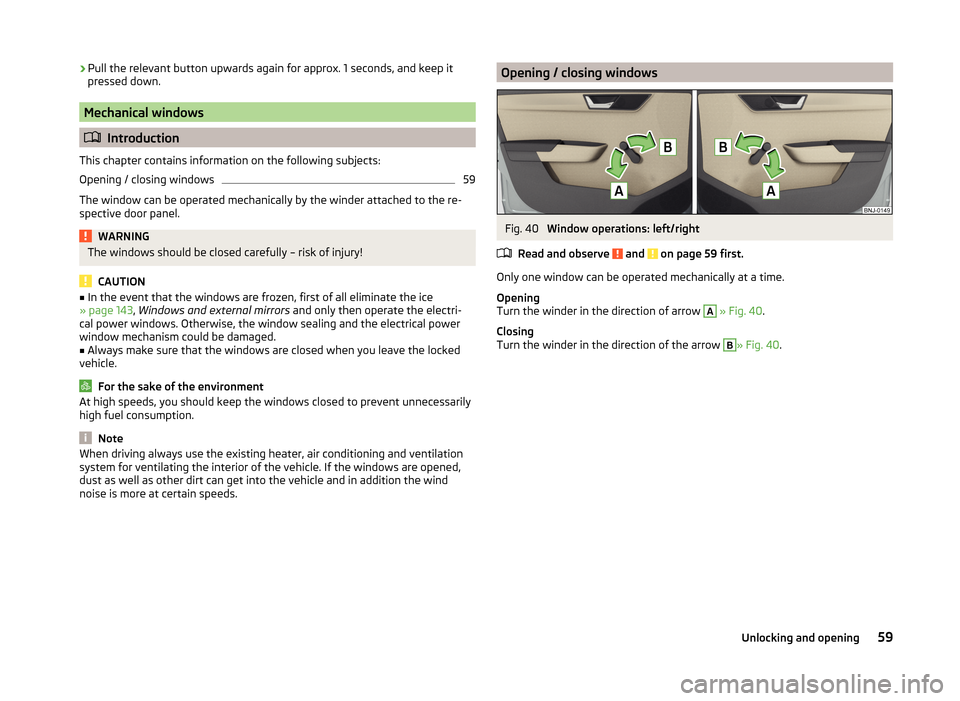
noise is more at certain speeds.Opening / closing windowsFig. 40
Window operations: left/right
Read and observe
and on page 59 first.
Only one window can be operated mechanically at a time.
Opening
Turn the winder in the direction of arrow
A
» Fig. 40 .
Closing
Turn the winder in the direction of the arrow
B
» Fig. 40 .
59Unlocking and opening
Page 69 of 216
The system is turned off when any of the following is present.
› The vehicle is locked.
› The ignition is switched on.
› About 30 seconds after all the doors have been closed.
Rear interior light
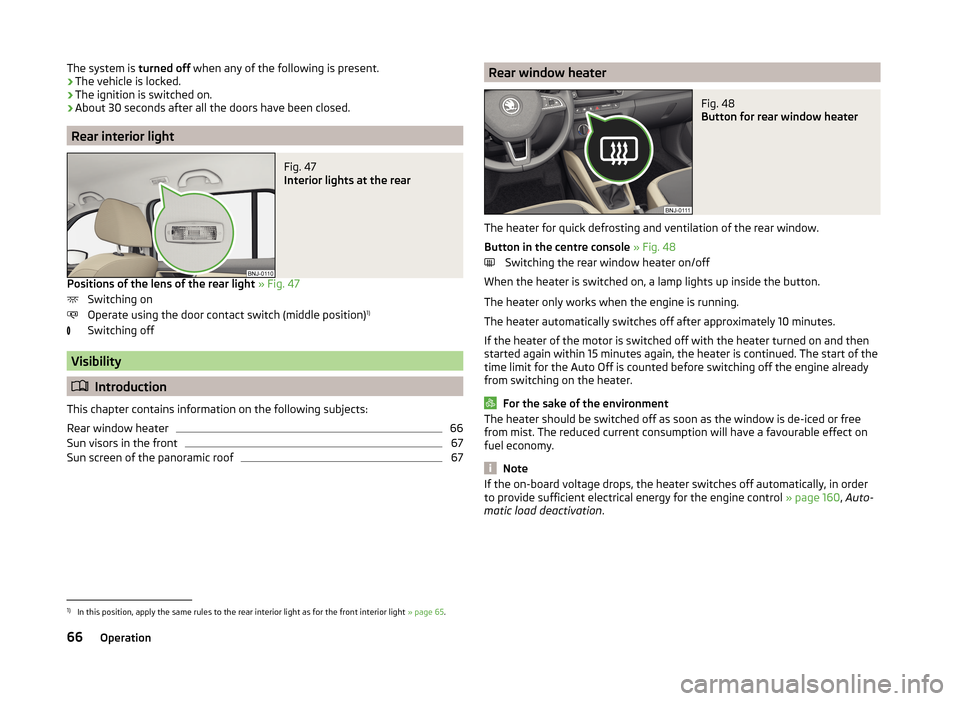
Fig. 47
Interior lights at the rear
Positions of the lens of the rear light
» Fig. 47
Switching on
Operate using the door contact switch (middle position) 1)
Switching off
Visibility
Introduction
This chapter contains information on the following subjects:
Rear window heater
66
Sun visors in the front
67
Sun screen of the panoramic roof
67Rear window heaterFig. 48
Button for rear window heater
The heater for quick defrosting and ventilation of the rear window.
Button in the centre console » Fig. 48
Switching the rear window heater on/off
When the heater is switched on, a lamp lights up inside the button.
The heater only works when the engine is running.
The heater automatically switches off after approximately 10 minutes.
If the heater of the motor is switched off with the heater turned on and then
started again within 15 minutes again, the heater is continued. The start of the
time limit for the Auto Off is counted before switching off the engine already
from switching on the heater.
For the sake of the environment
The heater should be switched off as soon as the window is de-iced or free
from mist. The reduced current consumption will have a favourable effect on
fuel economy.
Note
If the on-board voltage drops, the heater switches off automatically, in order
to provide sufficient electrical energy for the engine control » page 160, Auto-
matic load deactivation .1)
In this position, apply the same rules to the rear interior light as for the front interior light » page 65.
66Operation
Page 97 of 216
WARNING■The items being transported on the roof rack must be reliably attached –
risk of accident.■
Always secure the load with appropriate and undamaged lashing straps
or tensioning straps.
■
Distribute the load evenly over the roof rack system.
■
When transporting heavy objects or objects which take up a large area on
the roof rack system, handling of the car may change as a result of the dis-
placement of the centre of gravity. The style of driving and speed must
therefore be adapted to circumstances.
■
Avoid abrupt and sudden driving/braking manoeuvres.
■
The permissible roof load, permissible axle loads and gross permissible
weight of the vehicle must not be exceeded under any circumstances – risk
of accident.
CAUTION
■ Only roof racks from the ŠKODA Original Accessories range should be used.■The fitting instructions supplied with the roof luggage rack system must be
observed when handling roof racks.■
Ensure that the boot lid does not hit the roof load when opened.
■
The height of the vehicle changes after mounting a roof luggage rack system
and the load that is secured to it. Compare the vehicle height with available
clearances, such as underpasses and garage doors.
■
Always remove the roof luggage rack system before entering an automated
car wash.
■
Ensure the roof aerial is not impaired by the secured load.
For the sake of the environment
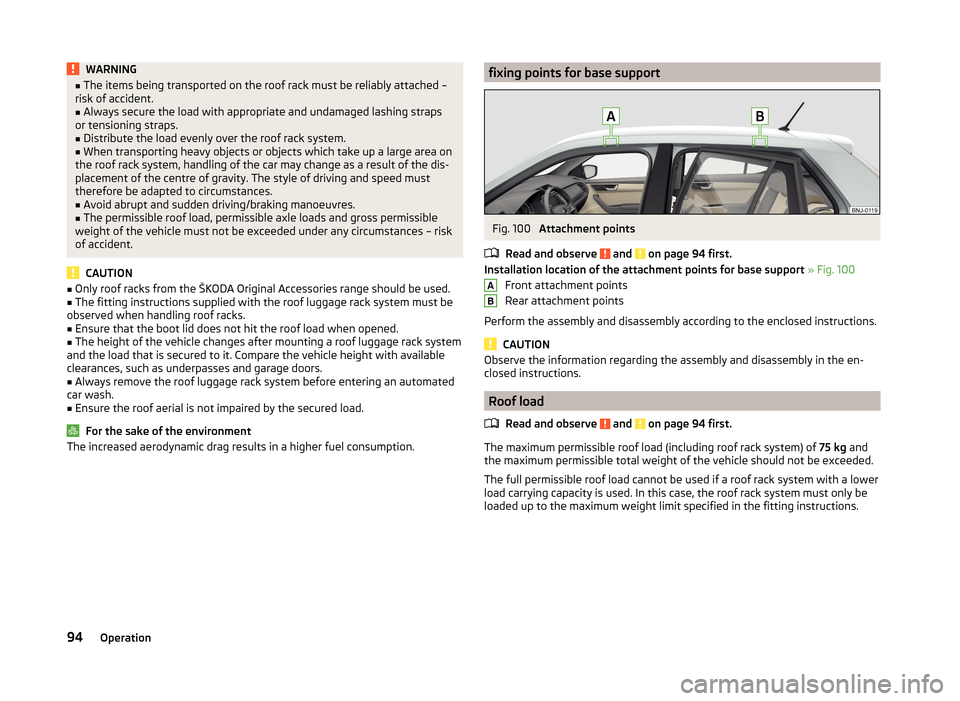
The increased aerodynamic drag results in a higher fuel consumption.fixing points for base supportFig. 100
Attachment points
Read and observe
and on page 94 first.
Installation location of the attachment points for base support » Fig. 100
Front attachment points
Rear attachment points
Perform the assembly and disassembly according to the enclosed instructions.
CAUTION
Observe the information regarding the assembly and disassembly in the en-
closed instructions.
Roof load
Read and observe
and on page 94 first.
The maximum permissible roof load (including roof rack system) of 75 kg and
the maximum permissible total weight of the vehicle should not be exceeded.
The full permissible roof load cannot be used if a roof rack system with a lower
load carrying capacity is used. In this case, the roof rack system must only be
loaded up to the maximum weight limit specified in the fitting instructions.
AB94Operation
Page 102 of 216
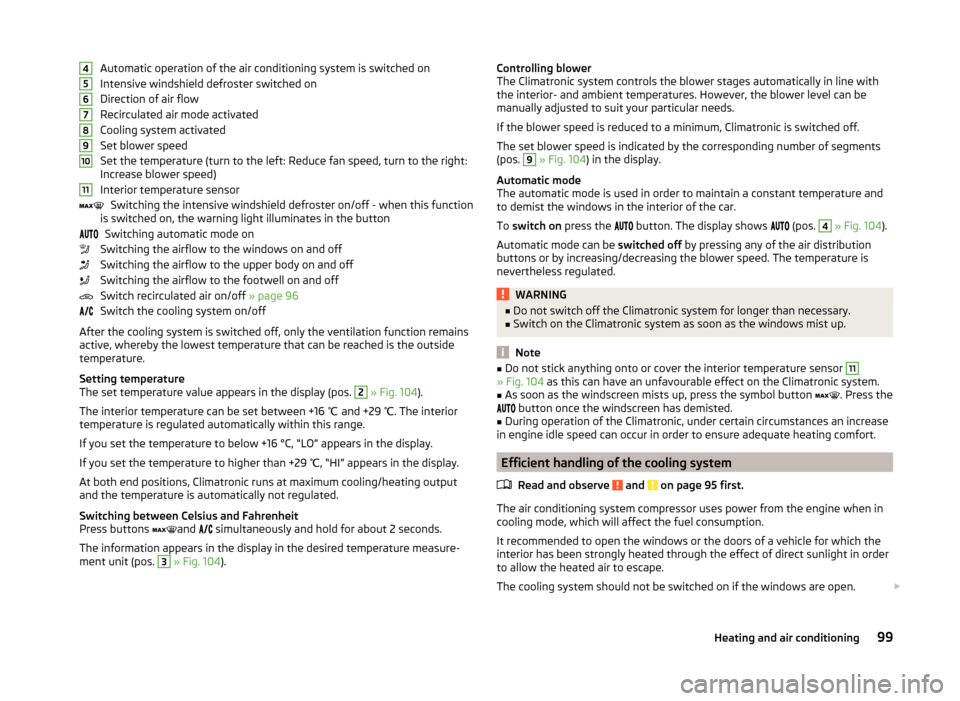
Automatic operation of the air conditioning system is switched on
Intensive windshield defroster switched on
Direction of air flow
Recirculated air mode activated
Cooling system activated
Set blower speed
Set the temperature (turn to the left: Reduce fan speed, turn to the right:
Increase blower speed)
Interior temperature sensor Switching the intensive windshield defroster on/off - when this function
is switched on, the warning light illuminates in the button
Switching automatic mode on
Switching the airflow to the windows on and off
Switching the airflow to the upper body on and off
Switching the airflow to the footwell on and off
Switch recirculated air on/off » page 96
Switch the cooling system on/off
After the cooling system is switched off, only the ventilation function remains active, whereby the lowest temperature that can be reached is the outside
temperature.
Setting temperature
The set temperature value appears in the display (pos. 2
» Fig. 104 ).
The interior temperature can be set between +16 ℃ and +29 ℃. The interior
temperature is regulated automatically within this range.
If you set the temperature to below +16 °C, “LO” appears in the display. If you set the temperature to higher than +29 ℃, “HI” appears in the display.
At both end positions, Climatronic runs at maximum cooling/heating output
and the temperature is automatically not regulated.
Switching between Celsius and Fahrenheit
Press buttons and
simultaneously and hold for about 2 seconds.
The information appears in the display in the desired temperature measure-
ment unit (pos.
3
» Fig. 104 ).
4567891011Controlling blower
The Climatronic system controls the blower stages automatically in line with
the interior- and ambient temperatures. However, the blower level can be
manually adjusted to suit your particular needs.
If the blower speed is reduced to a minimum, Climatronic is switched off.
The set blower speed is indicated by the corresponding number of segments
(pos. 9
» Fig. 104 ) in the display.
Automatic mode
The automatic mode is used in order to maintain a constant temperature and
to demist the windows in the interior of the car.
To switch on press the
button. The display shows
(pos.
4
» Fig. 104 ).
Automatic mode can be switched off by pressing any of the air distribution
buttons or by increasing/decreasing the blower speed. The temperature is
nevertheless regulated.
WARNING■ Do not switch off the Climatronic system for longer than necessary.■Switch on the Climatronic system as soon as the windows mist up.
Note
■Do not stick anything onto or cover the interior temperature sensor 11» Fig. 104 as this can have an unfavourable effect on the Climatronic system.■
As soon as the windscreen mists up, press the symbol button
. Press the
button once the windscreen has demisted.
■
During operation of the Climatronic, under certain circumstances an increase
in engine idle speed can occur in order to ensure adequate heating comfort.
Efficient handling of the cooling system
Read and observe
and on page 95 first.
The air conditioning system compressor uses power from the engine when incooling mode, which will affect the fuel consumption.
It recommended to open the windows or the doors of a vehicle for which the
interior has been strongly heated through the effect of direct sunlight in order
to allow the heated air to escape.
The cooling system should not be switched on if the windows are open.
99Heating and air conditioning
Page 116 of 216
The fuel consumption, degree of pollution and vehicle wear depend on driving
style, road condition, weather conditions and the like.
Driving in
Driving in the engine
The engine has to be run in during the first 1 500 kilometres. During this peri-
od, the driving style decides on the quality of the driving-in process.
During the first 1,000 km ,we recommend not driving faster than 3/4 of the
maximum permissible engine speed, not to drive at full throttle and not to use
a trailer.
In the range of 1,000 to 1,500 kilometres, the engine load can be increased up
to the maximum permitted engine speed.
New tyres
New tyres have to be “run in” since they do not offer optimal grip at first.
Drive especially carefully for the first 500 km or so.
New brake pads
New brake pads have to first “grind in” because these do not initially have the
best possible braking effect.
Drive especially carefully for the first 200 km or so.
Tips for economical driving
To achieve the lowest possible fuel consumption, the following instructions
must be observed.
Looking ahead when driving
Avoid unnecessary acceleration and braking.
Change gear in an energy saving and timely manner
Observe the recommended gear » page 44.
Avoid full throttle and high speeds
Fuel consumption will be halved if you drive at only three-quarters of the pos-
sible top speed of your vehicle.
Reducing idling
When the engine is switched off, such as when waiting in a traffic jam, the fuel
economy is already greater after 30 - 40 s than the fuel quantity which is re-
quired for engine re-start.
Avoid short distances
When driving a short distance of less than about 4 km, the engine cannot
reach its operating temperature. As long as the engine has not reached oper-
ating temperature, the fuel consumption is significantly higher than with the
engine hot.
Pay attention to the correct tyre inflation pressure being maintained
Further information » page 162.
Avoid unnecessary ballast
Per 100 kg of weight, consumption increases by about 1 l/100 km. At a speed of
100 - 120 km/h, a vehicle fitted with a roof rack cross member without a load
will use about 10 % more fuel than normal due to the increased aerodynamic
drag.
Saving electricity
Electrical consumers (e.g. seat heating, air conditioning and the like) should
only be turned on for as long as necessary.
Driving through water and driving off made-up roads
Introduction
This chapter contains information on the following subjects:
Driving through water
114
Driving off paved roads
114WARNINGImmediately after driving through water, mud, slush and the like, braking
effectiveness will be temporarily impaired » page 107, Information for brak-
ing . For this reason, sudden and violent braking manoeuvres are to be avoi-
ded - there is a risk of accident!113Starting-off and driving