gearbox SKODA FABIA 2014 3.G / NJ Owner's Manual
[x] Cancel search | Manufacturer: SKODA, Model Year: 2014, Model line: FABIA, Model: SKODA FABIA 2014 3.G / NJPages: 216, PDF Size: 30.7 MB
Page 10 of 216
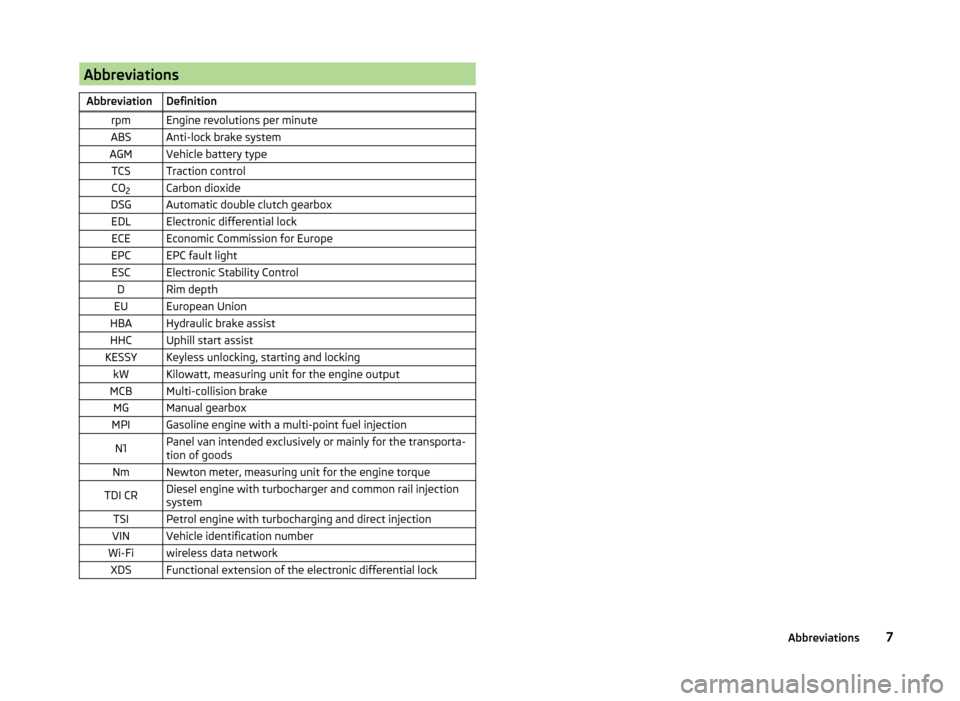
AbbreviationsAbbreviationDefinitionrpmEngine revolutions per minuteABSAnti-lock brake systemAGMVehicle battery typeTCSTraction controlCO2Carbon dioxideDSGAutomatic double clutch gearboxEDLElectronic differential lockECEEconomic Commission for EuropeEPCEPC fault lightESCElectronic Stability ControlDRim depthEUEuropean UnionHBAHydraulic brake assistHHCUphill start assistKESSYKeyless unlocking, starting and lockingkWKilowatt, measuring unit for the engine outputMCBMulti-collision brakeMGManual gearboxMPIGasoline engine with a multi-point fuel injectionN1Panel van intended exclusively or mainly for the transporta-
tion of goodsNmNewton meter, measuring unit for the engine torqueTDI CRDiesel engine with turbocharger and common rail injection
systemTSIPetrol engine with turbocharging and direct injectionVINVehicle identification numberWi-Fiwireless data networkXDSFunctional extension of the electronic differential lock7Abbreviations
Page 31 of 216
Operation
Cockpit
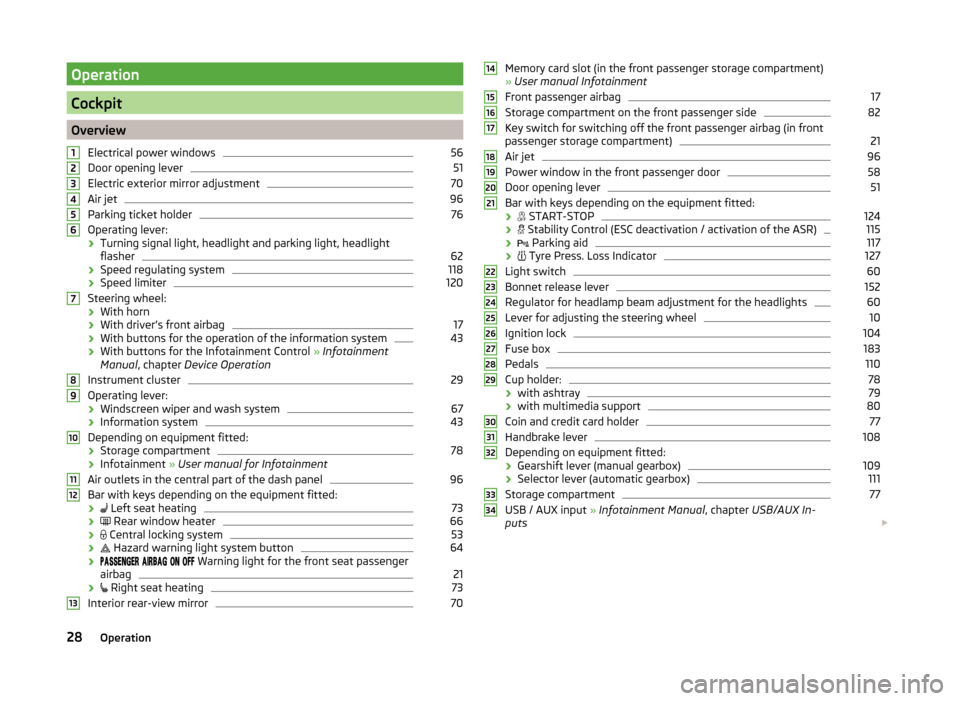
OverviewElectrical power windows
56
Door opening lever
51
Electric exterior mirror adjustment
70
Air jet
96
Parking ticket holder
76
Operating lever:
› Turning signal light, headlight and parking light, headlight
flasher
62
› Speed regulating system
118
›Speed limiter
120
Steering wheel:
› With horn
› With driver’s front airbag
17
›With buttons for the operation of the information system
43
›With buttons for the Infotainment Control
» Infotainment
Manual , chapter Device Operation
Instrument cluster
29
Operating lever: › Windscreen wiper and wash system
67
›Information system
43
Depending on equipment fitted:
› Storage compartment
78
›Infotainment
» User manual for Infotainment
Air outlets in the central part of the dash panel
96
Bar with keys depending on the equipment fitted: ›
Left seat heating
73
›
Rear window heater
66
›
Central locking system
53
›
Hazard warning light system button
64
›
Warning light for the front seat passenger
airbag
21
›
Right seat heating
73
Interior rear-view mirror
7012345678910111213Memory card slot (in the front passenger storage compartment)
» User manual Infotainment
Front passenger airbag17
Storage compartment on the front passenger side
82
Key switch for switching off the front passenger airbag (in front
passenger storage compartment)
21
Air jet
96
Power window in the front passenger door
58
Door opening lever
51
Bar with keys depending on the equipment fitted:
›
START-STOP
124
›
Stability Control (ESC deactivation / activation of the ASR)
115
›
Parking aid
117
›
Tyre Press. Loss Indicator
127
Light switch
60
Bonnet release lever
152
Regulator for headlamp beam adjustment for the headlights
60
Lever for adjusting the steering wheel
10
Ignition lock
104
Fuse box
183
Pedals
110
Cup holder:
78
› with ashtray
79
›with multimedia support
80
Coin and credit card holder
77
Handbrake lever
108
Depending on equipment fitted:
› Gearshift lever (manual gearbox)
109
›Selector lever (automatic gearbox)
111
Storage compartment
77
USB / AUX input
» Infotainment Manual , chapter USB/AUX In-
puts
14151617181920212223242526272829303132333428Operation
Page 33 of 216
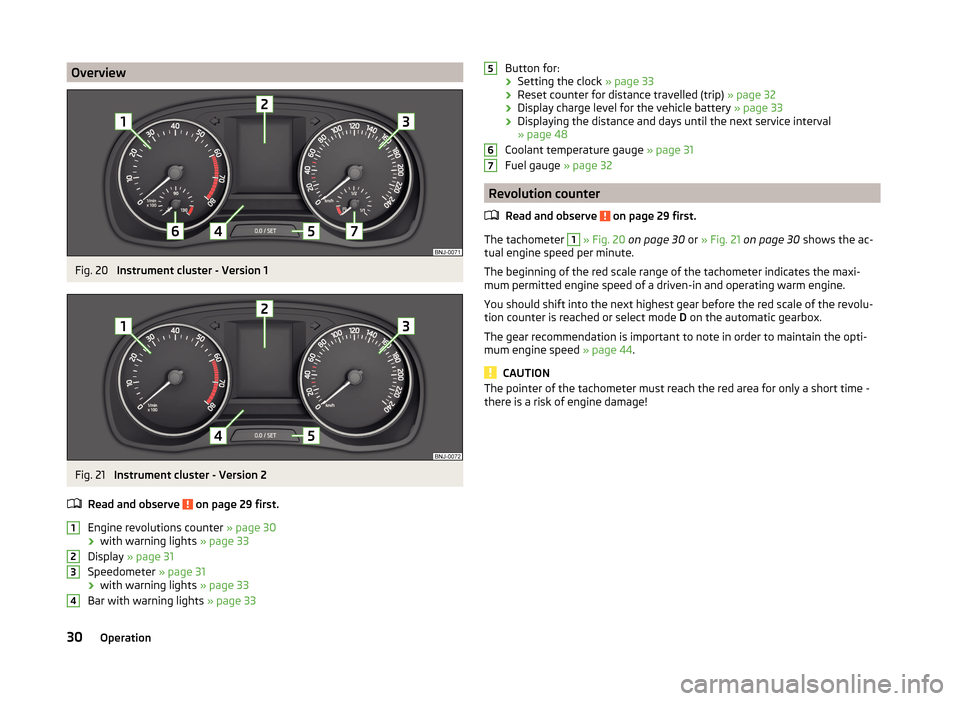
OverviewFig. 20
Instrument cluster - Version 1
Fig. 21
Instrument cluster - Version 2
Read and observe
on page 29 first.
Engine revolutions counter » page 30
› with warning lights
» page 33
Display » page 31
Speedometer » page 31
› with warning lights
» page 33
Bar with warning lights » page 33
1234Button for:
› Setting the clock
» page 33
› Reset counter for distance travelled (trip)
» page 32
› Display charge level for the vehicle battery
» page 33
› Displaying the distance and days until the next service interval
» page 48
Coolant temperature gauge » page 31
Fuel gauge » page 32
Revolution counter
Read and observe
on page 29 first.
The tachometer
1
» Fig. 20 on page 30 or » Fig. 21 on page 30 shows the ac-
tual engine speed per minute.
The beginning of the red scale range of the tachometer indicates the maxi-
mum permitted engine speed of a driven-in and operating warm engine.
You should shift into the next highest gear before the red scale of the revolu- tion counter is reached or select mode D on the automatic gearbox.
The gear recommendation is important to note in order to maintain the opti-
mum engine speed » page 44.
CAUTION
The pointer of the tachometer must reach the red area for only a short time -
there is a risk of engine damage!56730Operation
Page 42 of 216

If the tested systems are OK, the corresponding warning lights go out for a
few seconds after switching on the ignition or after starting the engine.
The status of some features and systems is shown by the warning lights
» page 33 .WARNING■
Ignoring illuminated warning icons and related messages or instructions
in the display of the instrument cluster may lead to serious personal injury
or damage to the vehicle.■
If you have to stop for technical reasons, then park the vehicle at a safe
distance from the traffic, switch off the engine and activate the hazard
warning lights system » page 64. The warning triangle must be set up at
the prescribed distance - observe the national legal provisions when doing
so.
■
The engine compartment of your car is a hazardous area. While working in
the engine compartment, be sure to observe the following warnings
» page 150 , Engine compartment .
Automatic transmission
Read and observe
on page 39 first.
The warning icon and the corresponding message indicate a malfunction or
the status of the automatic transmission.
The warning icon and the message is shown in the MAXI DOT display.
The message appears only in the segment display.
Message, meaning and action
Gearbox faulty. Workshop!
GEARBOX FAULTY WORKSHOP Fault in the automatic transmission.
Seek assistance from a specialist garage immediately.
Gearbox overheated. Stop! Owner's Manual!
STOP VEHICLE GEARBOX OVERHEAT
Gearbox overheated.
GEARBOX OVERHEATEDMessage, meaning and action
The temperature of the automatic transmission clutches is too high. do not continue to drive!
Stop the vehicle and turn off the engine.
Switch on the ignition and wait until the message disappears – risk of
gearbox damage!
The journey can be continued as soon as the warning light and the mes-
sage go out.
If the warning light and the message do not go out, do not continue
driving. Seek help from a specialist garage.
Error: gearbox. Reverse gear not available.
GEARBOX ERROR REV_ GEAR NOT AVAIL Fault in the automatic transmission, reverse gear cannot be engaged.
Seek assistance from a specialist garage immediately.
Error: Transmission
GEARBOX ERROR Fault in the automatic transmission.
Seek assistance from a specialist garage immediately.
Rear seat belt warning
Read and observe
on page 39 first.
A rear seat belt is not fastened
A rear seat belt is fastened
The warning icons or
light up after the ignition has been switched on.
When the seat belt is fastened/unfastened, the respective icon lights up brief-
ly and indicates the current belt status.
Alternator
Read and observe
on page 39 first.
The warning icon
lights up if the vehicle battery is not charged when the
engine is running.
Seek assistance from a specialist garage immediately.
39Instruments and warning lights
Page 55 of 216
Unlocking / locking - KESSYFig. 33
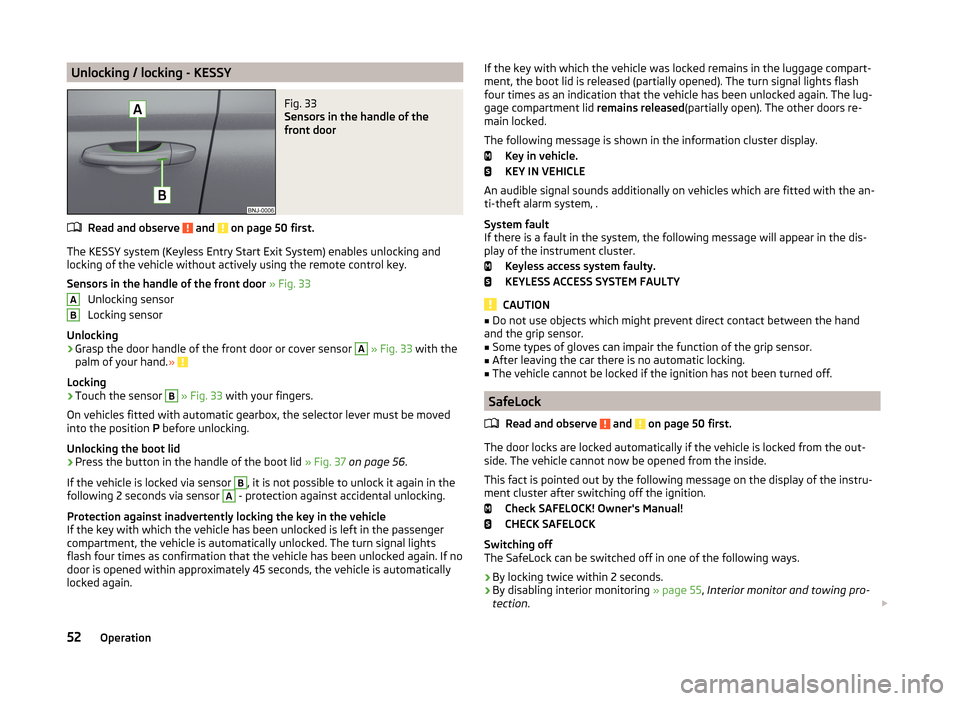
Sensors in the handle of the
front door
Read and observe and on page 50 first.
The KESSY system (Keyless Entry Start Exit System) enables unlocking and
locking of the vehicle without actively using the remote control key.
Sensors in the handle of the front door » Fig. 33
Unlocking sensor
Locking sensor
Unlocking
›
Grasp the door handle of the front door or cover sensor
A
» Fig. 33 with the
palm of your hand. »
Locking
›
Touch the sensor
B
» Fig. 33 with your fingers.
On vehicles fitted with automatic gearbox, the selector lever must be moved
into the position P before unlocking.
Unlocking the boot lid
›
Press the button in the handle of the boot lid » Fig. 37 on page 56 .
If the vehicle is locked via sensor
B
, it is not possible to unlock it again in the
following 2 seconds via sensor
A
- protection against accidental unlocking.
Protection against inadvertently locking the key in the vehicle
If the key with which the vehicle has been unlocked is left in the passenger
compartment, the vehicle is automatically unlocked. The turn signal lights
flash four times as confirmation that the vehicle has been unlocked again. If no
door is opened within approximately 45 seconds, the vehicle is automatically
locked again.
ABIf the key with which the vehicle was locked remains in the luggage compart-
ment, the boot lid is released (partially opened). The turn signal lights flash
four times as an indication that the vehicle has been unlocked again. The lug-
gage compartment lid remains released(partially open). The other doors re-
main locked.
The following message is shown in the information cluster display. Key in vehicle.
KEY IN VEHICLE
An audible signal sounds additionally on vehicles which are fitted with the an-
ti-theft alarm system, .
System fault
If there is a fault in the system, the following message will appear in the dis- play of the instrument cluster.
Keyless access system faulty.
KEYLESS ACCESS SYSTEM FAULTY
CAUTION
■ Do not use objects which might prevent direct contact between the hand
and the grip sensor.■
Some types of gloves can impair the function of the grip sensor.
■
After leaving the car there is no automatic locking.
■
The vehicle cannot be locked if the ignition has not been turned off.
SafeLock
Read and observe
and on page 50 first.
The door locks are locked automatically if the vehicle is locked from the out-side. The vehicle cannot now be opened from the inside.
This fact is pointed out by the following message on the display of the instru- ment cluster after switching off the ignition.
Check SAFELOCK! Owner's Manual!
CHECK SAFELOCK
Switching off
The SafeLock can be switched off in one of the following ways.
›
By locking twice within 2 seconds.
›
By disabling interior monitoring » page 55, Interior monitor and towing pro-
tection .
52Operation
Page 114 of 216
Modes and use of selector leverFig. 110
Selection lever / lock button / display
Read and observe
and on page 110 first.
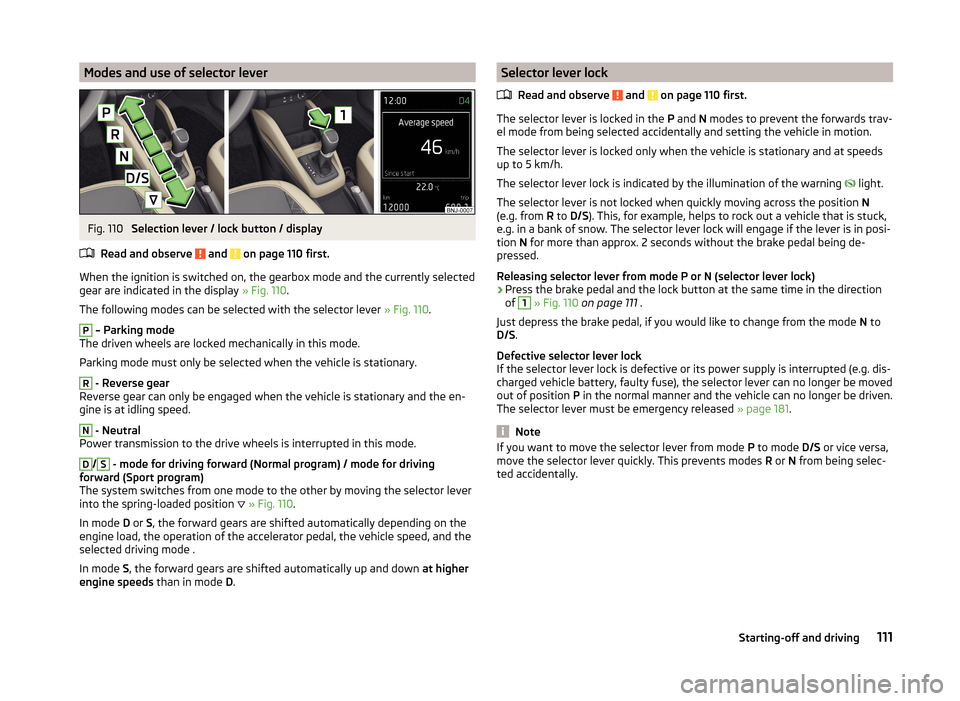
When the ignition is switched on, the gearbox mode and the currently selected gear are indicated in the display » Fig. 110.
The following modes can be selected with the selector lever » Fig. 110.
P
– Parking mode
The driven wheels are locked mechanically in this mode.
Parking mode must only be selected when the vehicle is stationary.
R
- Reverse gear
Reverse gear can only be engaged when the vehicle is stationary and the en-
gine is at idling speed.
N
- Neutral
Power transmission to the drive wheels is interrupted in this mode.
D
/
S
- mode for driving forward (Normal program) / mode for driving
forward (Sport program)
The system switches from one mode to the other by moving the selector lever
into the spring-loaded position
» Fig. 110 .
In mode D or S, the forward gears are shifted automatically depending on the
engine load, the operation of the accelerator pedal, the vehicle speed, and the
selected driving mode .
In mode S, the forward gears are shifted automatically up and down at higher
engine speeds than in mode D.
Selector lever lock
Read and observe
and on page 110 first.
The selector lever is locked in the P and N modes to prevent the forwards trav-
el mode from being selected accidentally and setting the vehicle in motion.
The selector lever is locked only when the vehicle is stationary and at speeds
up to 5 km/h.
The selector lever lock is indicated by the illumination of the warning
light.
The selector lever is not locked when quickly moving across the position N
(e.g. from R to D/S ). This, for example, helps to rock out a vehicle that is stuck,
e.g. in a bank of snow. The selector lever lock will engage if the lever is in posi-
tion N for more than approx. 2 seconds without the brake pedal being de-
pressed.
Releasing selector lever from mode P or N (selector lever lock)
›
Press the brake pedal and the lock button at the same time in the direction
of
1
» Fig. 110 on page 111 .
Just depress the brake pedal, if you would like to change from the mode N to
D/S .
Defective selector lever lock
If the selector lever lock is defective or its power supply is interrupted (e.g. dis-
charged vehicle battery, faulty fuse), the selector lever can no longer be moved
out of position P in the normal manner and the vehicle can no longer be driven.
The selector lever must be emergency released » page 181.
Note
If you want to move the selector lever from mode P to mode D/S or vice versa,
move the selector lever quickly. This prevents modes R or N from being selec-
ted accidentally.111Starting-off and driving
Page 115 of 216
Manual gear shifting (Tiptronic)Fig. 111
Selector lever
Read and observe and on page 110 first.
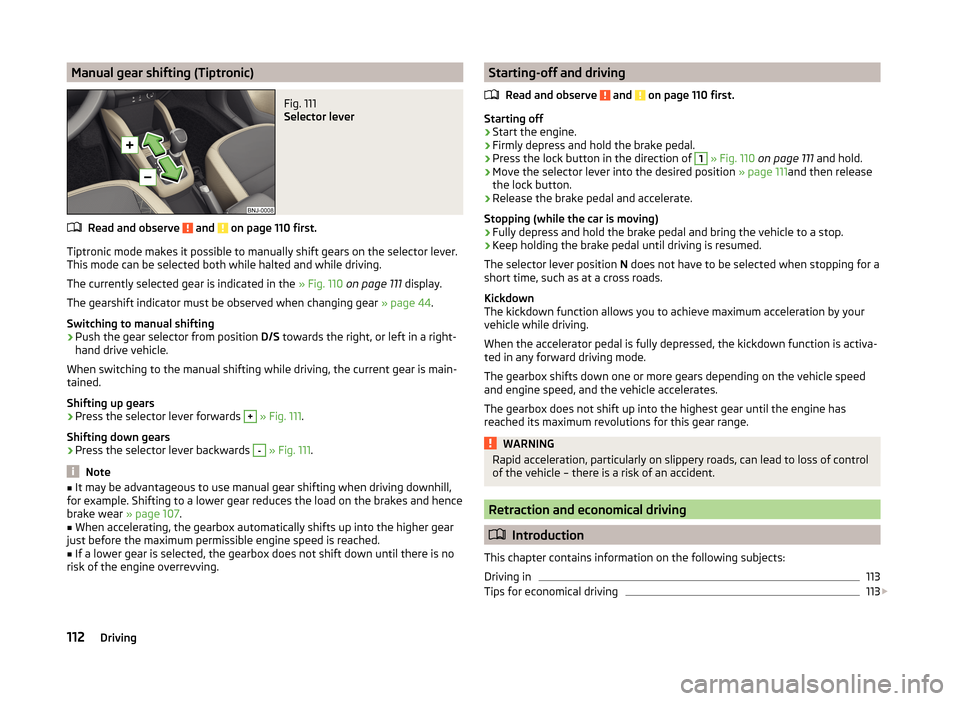
Tiptronic mode makes it possible to manually shift gears on the selector lever.This mode can be selected both while halted and while driving.
The currently selected gear is indicated in the » Fig. 110 on page 111 display.
The gearshift indicator must be observed when changing gear » page 44.
Switching to manual shifting
›
Push the gear selector from position D/S towards the right, or left in a right-
hand drive vehicle.
When switching to the manual shifting while driving, the current gear is main-
tained.
Shifting up gears
›
Press the selector lever forwards
+
» Fig. 111 .
Shifting down gears
›
Press the selector lever backwards
-
» Fig. 111 .
Note
■
It may be advantageous to use manual gear shifting when driving downhill,
for example. Shifting to a lower gear reduces the load on the brakes and hence
brake wear » page 107.■
When accelerating, the gearbox automatically shifts up into the higher gear
just before the maximum permissible engine speed is reached.
■
If a lower gear is selected, the gearbox does not shift down until there is no
risk of the engine overrevving.
Starting-off and driving
Read and observe
and on page 110 first.
Starting off
›
Start the engine.
›
Firmly depress and hold the brake pedal.
›
Press the lock button in the direction of
1
» Fig. 110 on page 111 and hold.
›
Move the selector lever into the desired position » page 111and then release
the lock button.
›
Release the brake pedal and accelerate.
Stopping (while the car is moving)
›
Fully depress and hold the brake pedal and bring the vehicle to a stop.
›
Keep holding the brake pedal until driving is resumed.
The selector lever position N does not have to be selected when stopping for a
short time, such as at a cross roads.
Kickdown
The kickdown function allows you to achieve maximum acceleration by your vehicle while driving.
When the accelerator pedal is fully depressed, the kickdown function is activa-
ted in any forward driving mode.
The gearbox shifts down one or more gears depending on the vehicle speed
and engine speed, and the vehicle accelerates.
The gearbox does not shift up into the highest gear until the engine has
reached its maximum revolutions for this gear range.
WARNINGRapid acceleration, particularly on slippery roads, can lead to loss of control
of the vehicle – there is a risk of an accident.
Retraction and economical driving
Introduction
This chapter contains information on the following subjects:
Driving in
113
Tips for economical driving
113
112Driving
Page 127 of 216
WARNINGIn the following situations, Front Assistant should be switched off for safe-
ty reasons.■
When the vehicle is being towed away.
■
When the vehicle is on a rolling test bench.
■
If an unfounded warning or a system action was taken.
■
When on a truck, or a car ferry service or similar.
Information messages
Read and observe
and on page 122 first.
The warning symbols are shown in the instrument cluster display. Front Assist: No sensor view.
The sensor is soiled or covered.
Stop the car, switch off the engine and clean the sensor or eliminate the dis-
turbance causing the lack of visibility » Fig. 123 on page 122 .
If the message appears again after starting the engine, the system should be disabled » page 123 . Seek help from a specialist garage.
Front Assist not available.
The system is not available for an unknown reason.
Stop the vehicle, switch off the engine and then start it again.
If the message appears again after starting the engine, the system should be disabled » page 123 . Seek help from a specialist garage.
START-STOP
Introduction
This chapter contains information on the following subjects:
Operating conditions for the system
124
Operation in vehicles with manual gearbox
125
Operation in vehicles with automatic gearbox
125
System conditioned automatic start-up
126
Manually deactivating/activating
126
Information messages
126The START-STOP system (hereinafter referred to just as the system) reduces
fuel consumption and polluting emissions and CO 2 emissions by turning the
engine off, e.g. when stopping at traffic lights, and starting the engine again
when moving off.WARNING■ Never let the vehicle roll with the engine switched off.■The brake servo unit and power steering only operate if the engine is run-
ning.
Operating conditions for the system
Fig. 125
Engine is automatically switched
off / automatic engine cut off is
not possible
Read and observe on page 124 first.
For the system-dependent automatic engine shutdown to operate, the follow-
ing conditions must be met.
The driver's door is closed.
The driver has fastened the seat belt.
The bonnet is closed.
The driving speed exceeded 4 km/h after the last stop.
No trailer is coupled.
Some additional conditions for the system to function cannot be either influ-
enced or recognised by the driver. Therefore, the system can react differently
in situations which are identical from the driver's view.
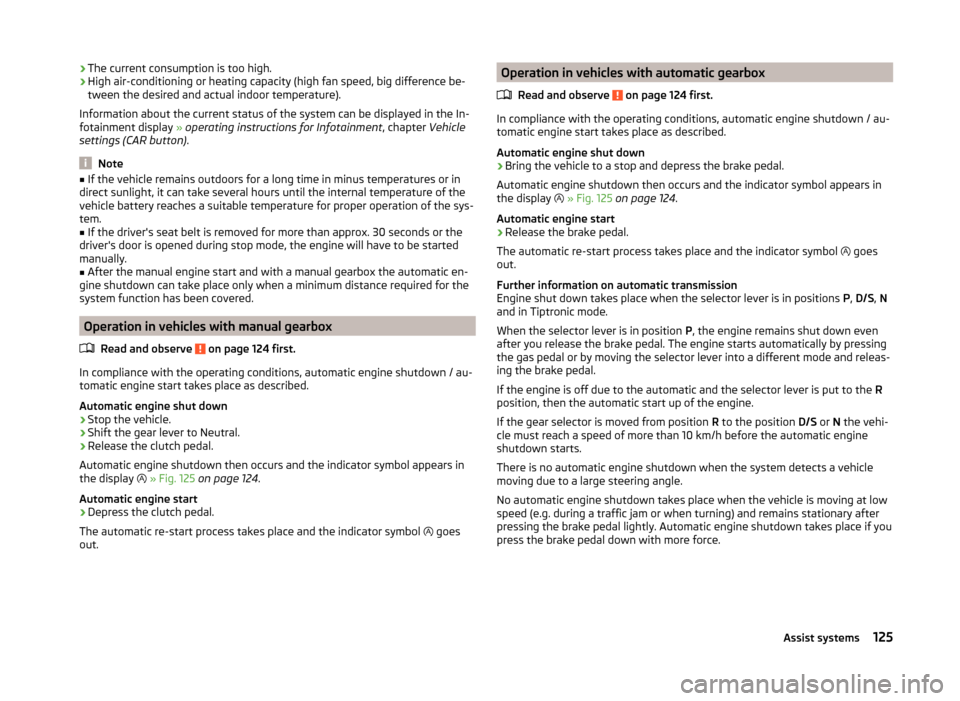
If, after stopping the vehicle, the check icon
» Fig. 125 appears on the dis-
play, then the conditions for automatic engine shutdown are not met.
Running the engine is essential, for example, for the following reasons.
› The engine temperature for the proper function of the system has not yet
been reached.
› The charge state of the vehicle battery is too low.
124Driving
Page 128 of 216
›The current consumption is too high.
› High air-conditioning or heating capacity (high fan speed, big difference be-
tween the desired and actual indoor temperature).
Information about the current status of the system can be displayed in the In-
fotainment display » operating instructions for Infotainment , chapter Vehicle
settings (CAR button) .
Note
■
If the vehicle remains outdoors for a long time in minus temperatures or in
direct sunlight, it can take several hours until the internal temperature of the
vehicle battery reaches a suitable temperature for proper operation of the sys-
tem.■
If the driver's seat belt is removed for more than approx. 30 seconds or the
driver's door is opened during stop mode, the engine will have to be started
manually.
■
After the manual engine start and with a manual gearbox the automatic en-
gine shutdown can take place only when a minimum distance required for the
system function has been covered.
Operation in vehicles with manual gearbox
Read and observe
on page 124 first.
In compliance with the operating conditions, automatic engine shutdown / au-
tomatic engine start takes place as described.
Automatic engine shut down
›
Stop the vehicle.
›
Shift the gear lever to Neutral.
›
Release the clutch pedal.
Automatic engine shutdown then occurs and the indicator symbol appears in
the display
» Fig. 125 on page 124 .
Automatic engine start
›
Depress the clutch pedal.
The automatic re-start process takes place and the indicator symbol goes
out.
Operation in vehicles with automatic gearbox
Read and observe
on page 124 first.
In compliance with the operating conditions, automatic engine shutdown / au-
tomatic engine start takes place as described.
Automatic engine shut down
›
Bring the vehicle to a stop and depress the brake pedal.
Automatic engine shutdown then occurs and the indicator symbol appears in
the display
» Fig. 125 on page 124 .
Automatic engine start
›
Release the brake pedal.
The automatic re-start process takes place and the indicator symbol goes
out.
Further information on automatic transmission
Engine shut down takes place when the selector lever is in positions P, D/S , N
and in Tiptronic mode.
When the selector lever is in position P, the engine remains shut down even
after you release the brake pedal. The engine starts automatically by pressing
the gas pedal or by moving the selector lever into a different mode and releas-
ing the brake pedal.
If the engine is off due to the automatic and the selector lever is put to the R
position, then the automatic start up of the engine.
If the gear selector is moved from position R to the position D/S or N the vehi-
cle must reach a speed of more than 10 km/h before the automatic engine
shutdown starts.
There is no automatic engine shutdown when the system detects a vehicle
moving due to a large steering angle.
No automatic engine shutdown takes place when the vehicle is moving at low
speed (e.g. during a traffic jam or when turning) and remains stationary after
pressing the brake pedal lightly. Automatic engine shutdown takes place if you
press the brake pedal down with more force.
125Assist systems
Page 180 of 216

›If the engine does not start, halt the attempt to start the engine after 10 sec-
onds and wait for 30 seconds before repeating the process.›
Detach the jumper cables in the exact reverse order that they were attached.
Both batteries must have a rated voltage of 12 V. The capacity (Ah) of the bat-
tery supplying the power must not be significantly less than the capacity of
the discharged battery in your vehicle.
Jump-start cables
Only use jump-start cables which have an adequately large cross-section and
insulated terminal clamps. Obey the instructions of the jump start cable manu-
facturer.
Positive cable - colour coding in the majority of cases is red.
Negative cable - colour coding in the majority of cases is black.
WARNING■
Do not clamp the jump-start cable to the negative terminal of the dis-
charged battery. There is the risk of detonating gas seeping out the battery
being ignited by the strong spark which results from the engine being star-
ted.■
The non-insulated parts of the terminal clamps must never touch each
other – risk of short circuit.
■
The jump-start cable connected to the positive terminal of the battery
must not come into contact with electrically conducting parts of the vehicle
– risk of short circuit.
■
Route the jump-start cables so that they cannot be caught by any rotat-
ing parts in the engine compartment.
■
There must not be any contact between the two vehicles otherwise cur-
rent may flow as soon as the negative terminals are connected.
Towing the vehicle
Introduction
Fig. 168
Braided tow ropes/spiral tow rope
This chapter contains information on the following subjects:
Front towing eye
178
Rear towing eye
179
Vehicles with a tow hitch
179
A braided tow rope must be used for towing » Fig. 168 -
.
The following guidelines must be observed when towing.
Vehicles with manual transmission may be towed with a tow bar or a tow rope
or with the front or rear wheels raised.
Vehicles with automatic transmission may be towed with a tow bar or a tow
rope or with the front wheels raised. If the vehicle is raised at rear, the auto-
matic gearbox is damaged!
Driver of the tow vehicle
›
Engage the clutch gently when starting off or depress the accelerator partic-
ularly gently if the vehicle is fitted with an automatic gearbox.
›
Only then, approach correctly when the rope is taut.
The maximum towing speed is 50 km/h.
Driver of the towed vehicle
›
Switch on the ignition so that the steering wheel is not locked and so that
the turn signal lights, windscreen wipers and windscreen washer system can
be used.
177Emergency equipment, and self-help