remote control SKODA FABIA 2014 3.G / NJ Owner's Manual
[x] Cancel search | Manufacturer: SKODA, Model Year: 2014, Model line: FABIA, Model: SKODA FABIA 2014 3.G / NJPages: 216, PDF Size: 30.7 MB
Page 6 of 216
Coolant155Brake fluid156
Vehicle battery
157
Wheels
161
Tyres and rims
161
Manufacturer-approved tyre variants
164
Winter use
165
Do-it-yourself
Emergency equipment, and self-help
167
Emergency equipment
167
Reserve and temporary spare wheel
169
Changing a wheel
170
Breakdown kit
173
Jump-starting
176
Towing the vehicle
177
Remote control
179
Emergency unlocking/locking
180
Replacing windscreen wiper blades
181
Fuses and light bulbs
182
Fuses
182
Replacing bulbs
186
Technical data
Technical data
194
Vehicle data
194
Index
3Table of Contents
Page 52 of 216
Resetting the service interval display
We recommend that the display be reset by a specialist garage.
We recommend that you do not reset the service interval display yourself. In-
correctly setting the service interval display could cause problems to the vehi-
cle.
Variable service interval
For vehicles with variable service intervals, after resetting the oil change serv-
ice display in a specialist garage, the values of the new service interval are dis-
played, which are based on the previous operating conditions of the vehicle.
These values are then continuously matched according to the actual operating
conditions of the vehicle.Unlocking and opening
Unlocking and locking
Introduction
This chapter contains information on the following subjects:
Locking/unlocking using the key via the lock cylinder
50
Unlocking/locking with the remote control key
50
Opening/closing the door
51
Unlocking / locking - KESSY
52
SafeLock
52
Individual settings
53
Locking/unlocking the vehicle with the central locking button
53
Child safety lock
54
Malfunctions
54
Your car is equipped with a central locking system.
The central locking system allows you to lock and unlock all doors, the fuel fill-
er flap and boot lid at the same time.
Depending on the equipment configuration, the following is true after
unlocking
› The turn signal lights flash twice as confirmation that the vehicle has been
unlocked.
› The doors, the boot lid and the fuel filler flap are unlocked.
› The interior light, which is switched by the door contact, comes on.
› The SafeLock system is switched off.
› The warning icon in the driver door stops flashing.
› The anti-theft alarm system is deactivated.
If you unlock the vehicle and do not open a door or the boot lid within the next
45 seconds, the vehicle will lock again automatically and the SafeLock system
or anti-theft alarm system will be switched on. This function is intended to
prevent the car being unlocked unintentionally.
Depending on the equipment configuration, the following is true after
locking
› The turn signal lights flash once as confirmation that the vehicle has been
locked.
› The doors, the boot lid and the fuel filler flap are locked.
49Unlocking and opening
Page 53 of 216
›The interior light switched by the door contact goes off.
› The SafeLock system is switched on.
› The warning light in the driver door begins flashing.
› The anti-theft alarm system is activated.
If the doors or the boot lid remain open after the vehicle doors have been
locked, the turn signal lights do not flash until they have been closed.WARNING■ Never leave the key in the vehicle when you exit the vehicle. Unauthor-
ized persons, such as children, for example, could lock the car, turn on the
ignition or start the engine - danger of injury and accidents!■
When leaving the vehicle, never leave people who are not completely in-
dependent, such as children, unattended in the vehicle. The children might,
for example, release the handbrake or take the vehicle out of gear. The ve-
hicle could then start to move – risk of accident! These individuals would
possibly not be able to leave the vehicle on their own or to help them-
selves. At very high or very low temperatures can be fatal!
CAUTION
■ Each key contains electronic components; therefore it must be protected
against moisture and severe shocks.■
Keep the groove of the keys absolutely clean. Impurities (textile fibres, dust,
etc.) impair the function of the locking cylinder and ignition lock.
■
The battery must be replaced if the central locking or anti-theft alarm system
does react to the remote control at less than approx. 3 metres away
» page 179 .
■
Always check that the vehicle is locked before leaving it.
■
If the driver's door has been opened, the vehicle cannot be locked.
Note
In the event of an accident in which the airbags are deployed, the locked doors
are automatically unlocked in order to enable rescuers to gain access to the
vehicle.Locking/unlocking using the key via the lock cylinderFig. 29
Left side of the vehicle: Turning
the key for unlocking and locking
the vehicle
Read and observe and on page 50 first.
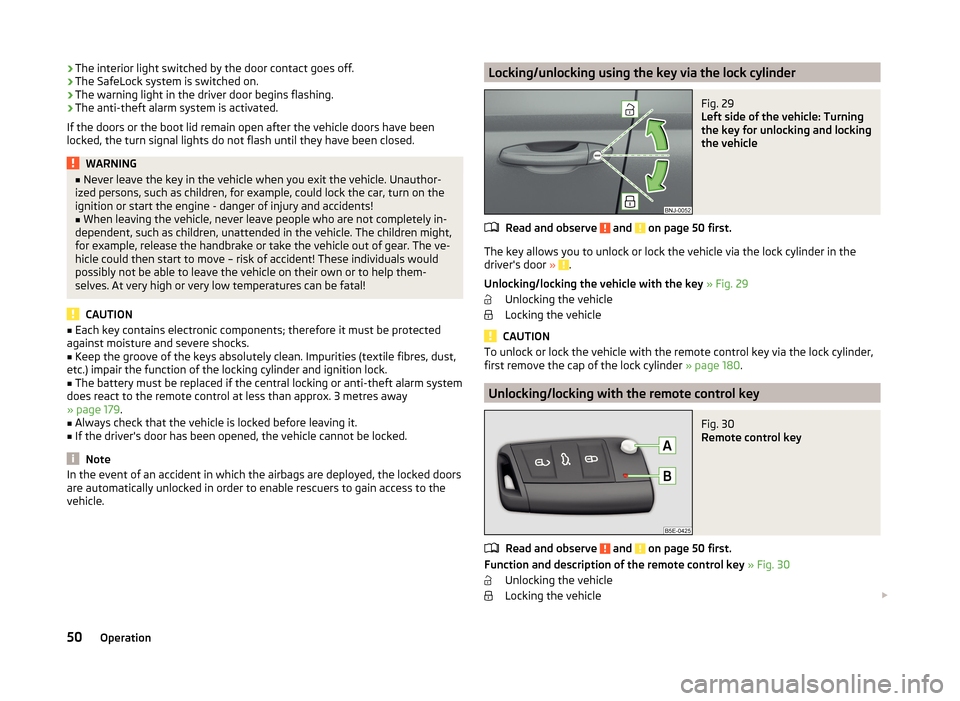
The key allows you to unlock or lock the vehicle via the lock cylinder in the
driver's door » .
Unlocking/locking the vehicle with the key » Fig. 29
Unlocking the vehicle
Locking the vehicle
CAUTION
To unlock or lock the vehicle with the remote control key via the lock cylinder,
first remove the cap of the lock cylinder » page 180.
Unlocking/locking with the remote control key
Fig. 30
Remote control key
Read and observe and on page 50 first.
Function and description of the remote control key » Fig. 30
Unlocking the vehicle
Locking the vehicle
50Operation
Page 54 of 216
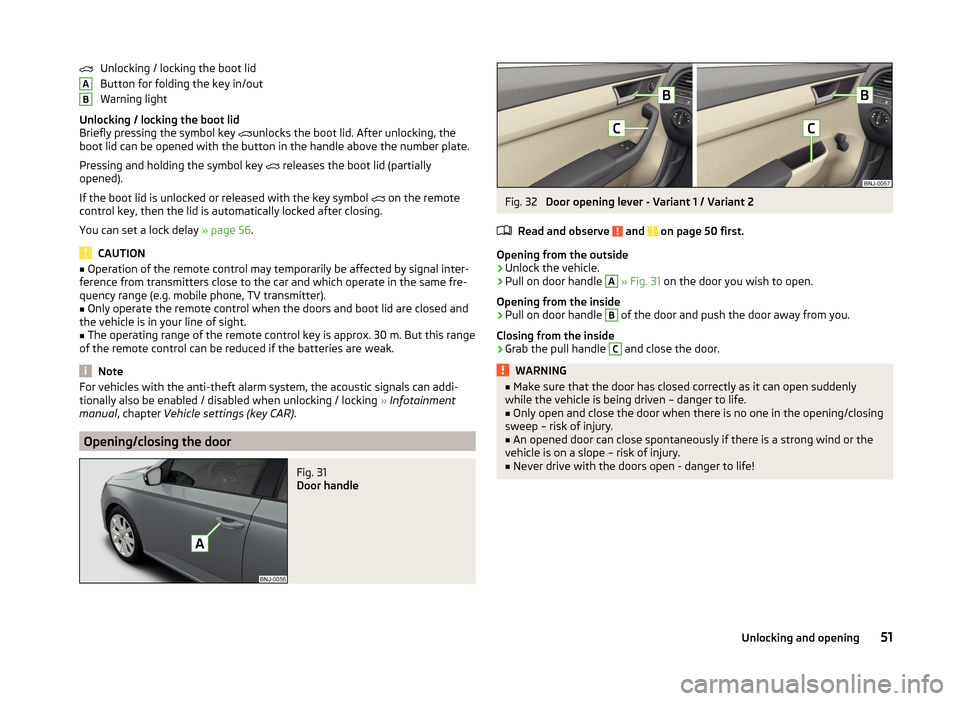
Unlocking / locking the boot lid
Button for folding the key in/out
Warning light
Unlocking / locking the boot lid
Briefly pressing the symbol key
unlocks the boot lid. After unlocking, the
boot lid can be opened with the button in the handle above the number plate.
Pressing and holding the symbol key
releases the boot lid (partially
opened).
If the boot lid is unlocked or released with the key symbol
on the remote
control key, then the lid is automatically locked after closing.
You can set a lock delay » page 56.
CAUTION
■
Operation of the remote control may temporarily be affected by signal inter-
ference from transmitters close to the car and which operate in the same fre-
quency range (e.g. mobile phone, TV transmitter).■
Only operate the remote control when the doors and boot lid are closed and
the vehicle is in your line of sight.
■
The operating range of the remote control key is approx. 30 m. But this range
of the remote control can be reduced if the batteries are weak.
Note
For vehicles with the anti-theft alarm system, the acoustic signals can addi-
tionally also be enabled / disabled when unlocking / locking » Infotainment
manual , chapter Vehicle settings (key CAR) .
Opening/closing the door
Fig. 31
Door handle
ABFig. 32
Door opening lever - Variant 1 / Variant 2
Read and observe
and on page 50 first.
Opening from the outside
›
Unlock the vehicle.
›
Pull on door handle
A
» Fig. 31 on the door you wish to open.
Opening from the inside
›
Pull on door handle
B
of the door and push the door away from you.
Closing from the inside
›
Grab the pull handle
C
and close the door.
WARNING■ Make sure that the door has closed correctly as it can open suddenly
while the vehicle is being driven – danger to life.■
Only open and close the door when there is no one in the opening/closing
sweep – risk of injury.
■
An opened door can close spontaneously if there is a strong wind or the
vehicle is on a slope – risk of injury.
■
Never drive with the doors open - danger to life!
51Unlocking and opening
Page 55 of 216
Unlocking / locking - KESSYFig. 33
Sensors in the handle of the
front door
Read and observe and on page 50 first.
The KESSY system (Keyless Entry Start Exit System) enables unlocking and
locking of the vehicle without actively using the remote control key.
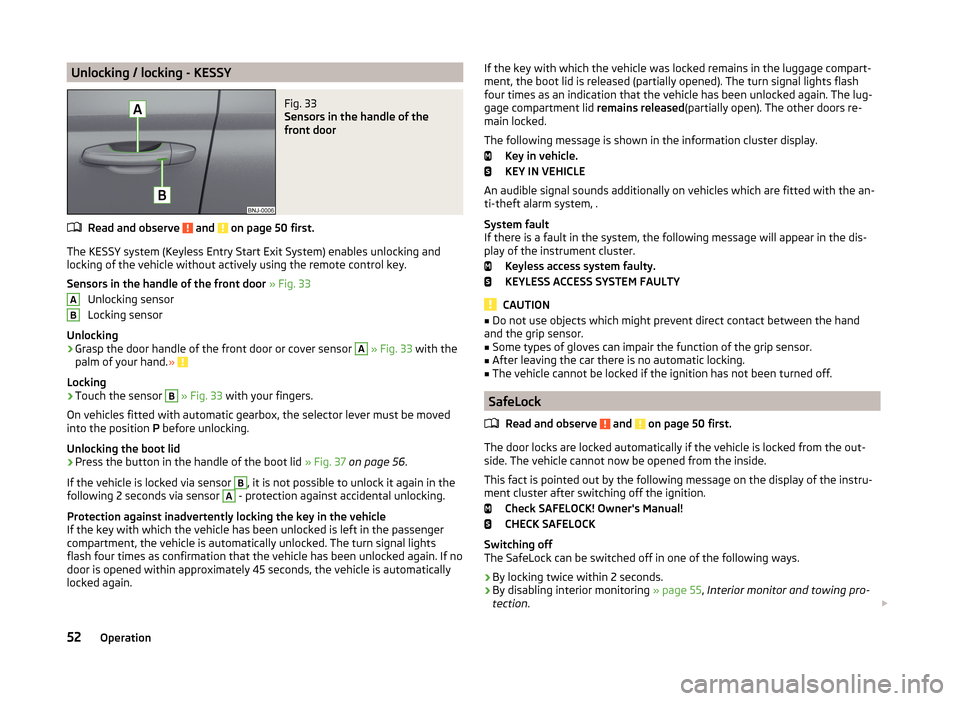
Sensors in the handle of the front door » Fig. 33
Unlocking sensor
Locking sensor
Unlocking
›
Grasp the door handle of the front door or cover sensor
A
» Fig. 33 with the
palm of your hand. »
Locking
›
Touch the sensor
B
» Fig. 33 with your fingers.
On vehicles fitted with automatic gearbox, the selector lever must be moved
into the position P before unlocking.
Unlocking the boot lid
›
Press the button in the handle of the boot lid » Fig. 37 on page 56 .
If the vehicle is locked via sensor
B
, it is not possible to unlock it again in the
following 2 seconds via sensor
A
- protection against accidental unlocking.
Protection against inadvertently locking the key in the vehicle
If the key with which the vehicle has been unlocked is left in the passenger
compartment, the vehicle is automatically unlocked. The turn signal lights
flash four times as confirmation that the vehicle has been unlocked again. If no
door is opened within approximately 45 seconds, the vehicle is automatically
locked again.
ABIf the key with which the vehicle was locked remains in the luggage compart-
ment, the boot lid is released (partially opened). The turn signal lights flash
four times as an indication that the vehicle has been unlocked again. The lug-
gage compartment lid remains released(partially open). The other doors re-
main locked.
The following message is shown in the information cluster display. Key in vehicle.
KEY IN VEHICLE
An audible signal sounds additionally on vehicles which are fitted with the an-
ti-theft alarm system, .
System fault
If there is a fault in the system, the following message will appear in the dis- play of the instrument cluster.
Keyless access system faulty.
KEYLESS ACCESS SYSTEM FAULTY
CAUTION
■ Do not use objects which might prevent direct contact between the hand
and the grip sensor.■
Some types of gloves can impair the function of the grip sensor.
■
After leaving the car there is no automatic locking.
■
The vehicle cannot be locked if the ignition has not been turned off.
SafeLock
Read and observe
and on page 50 first.
The door locks are locked automatically if the vehicle is locked from the out-side. The vehicle cannot now be opened from the inside.
This fact is pointed out by the following message on the display of the instru- ment cluster after switching off the ignition.
Check SAFELOCK! Owner's Manual!
CHECK SAFELOCK
Switching off
The SafeLock can be switched off in one of the following ways.
›
By locking twice within 2 seconds.
›
By disabling interior monitoring » page 55, Interior monitor and towing pro-
tection .
52Operation
Page 57 of 216
Child safety lockFig. 35
Back door: left/right
Read and observe
and on page 50 first.
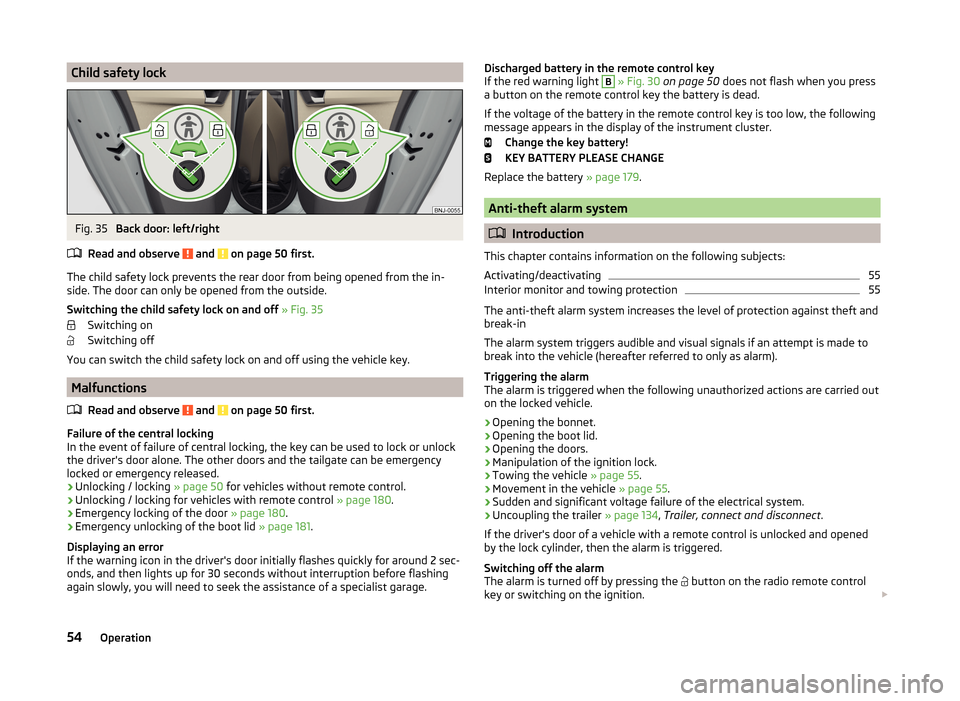
The child safety lock prevents the rear door from being opened from the in- side. The door can only be opened from the outside.
Switching the child safety lock on and off » Fig. 35
Switching on
Switching off
You can switch the child safety lock on and off using the vehicle key.
Malfunctions
Read and observe
and on page 50 first.
Failure of the central locking
In the event of failure of central locking, the key can be used to lock or unlock
the driver's door alone. The other doors and the tailgate can be emergency
locked or emergency released.
› Unlocking / locking
» page 50 for vehicles without remote control.
› Unlocking / locking for vehicles with remote control
» page 180.
› Emergency locking of the door
» page 180.
› Emergency unlocking of the boot lid
» page 181.
Displaying an error
If the warning icon in the driver's door initially flashes quickly for around 2 sec-
onds, and then lights up for 30 seconds without interruption before flashing
again slowly, you will need to seek the assistance of a specialist garage.
Discharged battery in the remote control key
If the red warning light B » Fig. 30 on page 50 does not flash when you press
a button on the remote control key the battery is dead.
If the voltage of the battery in the remote control key is too low, the following
message appears in the display of the instrument cluster.
Change the key battery!
KEY BATTERY PLEASE CHANGE
Replace the battery » page 179.
Anti-theft alarm system
Introduction
This chapter contains information on the following subjects:
Activating/deactivating
55
Interior monitor and towing protection
55
The anti-theft alarm system increases the level of protection against theft and
break-in
The alarm system triggers audible and visual signals if an attempt is made to
break into the vehicle (hereafter referred to only as alarm).
Triggering the alarm
The alarm is triggered when the following unauthorized actions are carried out
on the locked vehicle.
› Opening the bonnet.
› Opening the boot lid.
› Opening the doors.
› Manipulation of the ignition lock.
› Towing the vehicle
» page 55.
› Movement in the vehicle
» page 55.
› Sudden and significant voltage failure of the electrical system.
› Uncoupling the trailer
» page 134, Trailer, connect and disconnect .
If the driver's door of a vehicle with a remote control is unlocked and opened by the lock cylinder, then the alarm is triggered.
Switching off the alarm
The alarm is turned off by pressing the button on the radio remote control
key or switching on the ignition.
54Operation
Page 59 of 216
WARNING■Ensure that the lock is properly engaged after closing the boot lid. Other-
wise, the lid might open suddenly while the vehicle is moving, even if the
lid was locked – risk of accident!■
Never drive with the tailgate fully opened or slightly ajar otherwise ex-
haust gases may get into the interior of the vehicle – risk of poisoning.
■
Do not press on the rear window when closing the tailgate, as otherwise
this could crack – risk of injury.
■
Make sure that when closing the boot lid, no body parts are crushed -
there is danger of injury!
Note
The function of the button in the grip above the licence plate is deactivated
when starting off or at a speed of 5 km/hour or more for vehicles with central
locking. The function is restored after the vehicle stops and the door is
opened.
Opening/closing
Fig. 37
Opening / closing tailgate
Read and observe
on page 56 first.
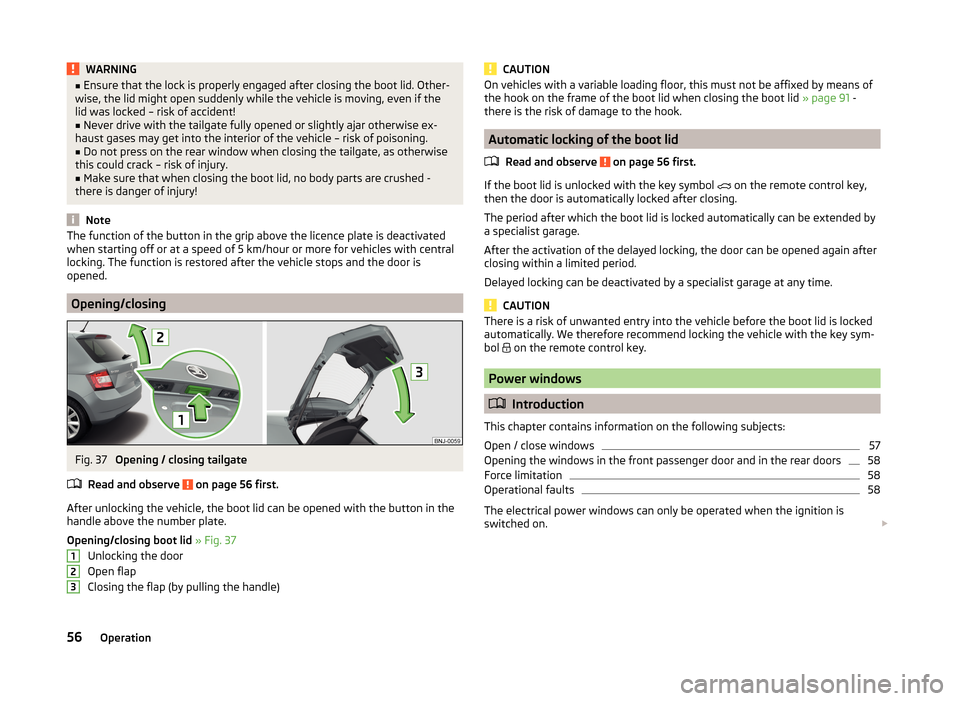
After unlocking the vehicle, the boot lid can be opened with the button in the
handle above the number plate.
Opening/closing boot lid » Fig. 37
Unlocking the door
Open flap
Closing the flap (by pulling the handle)
123CAUTIONOn vehicles with a variable loading floor, this must not be affixed by means of
the hook on the frame of the boot lid when closing the boot lid » page 91 -
there is the risk of damage to the hook.
Automatic locking of the boot lid
Read and observe
on page 56 first.
If the boot lid is unlocked with the key symbol on the remote control key,
then the door is automatically locked after closing.
The period after which the boot lid is locked automatically can be extended by
a specialist garage.
After the activation of the delayed locking, the door can be opened again after
closing within a limited period.
Delayed locking can be deactivated by a specialist garage at any time.
CAUTION
There is a risk of unwanted entry into the vehicle before the boot lid is locked
automatically. We therefore recommend locking the vehicle with the key sym-
bol
on the remote control key.
Power windows
Introduction
This chapter contains information on the following subjects:
Open / close windows
57
Opening the windows in the front passenger door and in the rear doors
58
Force limitation
58
Operational faults
58
The electrical power windows can only be operated when the ignition is
switched on.
56Operation
Page 67 of 216
LEAVING HOME (hereinafter referred to only as function) switches the light au-
tomatically for a short time when approaching the vehicle.
The daytime running lights are switched on automatically if the following
conditions are met.
The light switch is in position
» Fig. 43 on page 62 .
The visibility in the vehicle environment is reduced.
The ignition is switched off.
The parking aid is activated.
The function is switched on (the driver's door is opened / the car is un-
locked with the remote control).
The function switches on the following light. › Parking lights
› Low beam
› Licence plate light
Poorer visibility is detected by a sensor mounted in the holder of the inside
mirror or in the control panel .
Enabling / disabling and setting function
The functions and setting of the lighting duration can be activated or deactiva-
ted in the Infotainment system » Operating instructions for Infotainment ,
chapter Vehicle settings (button CAR) .
COMING HOME
The light turns on automatically when you open the driver's door on (within 60
seconds of turning off the ignition).
The light turns off 10 seconds after closing all the doors and the boot lid or af-
ter the pre-set time has expired.
If a door or the boot lid remains open, the light goes out after 60 seconds.
LEAVING HOME
The light turns on automatically after the vehicle is unlocked with the remote
control.
The light turns off after 10 seconds or after a pre-set time or after the vehicle
is locked.CAUTION■ Do not attach any stickers or similar objects in front of the light sensor on
the windscreen. This can impair its function or reliability.■
If this function is activated constantly, the battery will be heavily discharged
particularly in short-haul travel.
Hazard warning light system
Fig. 45
Hazard warning light system
button
Read and observe on page 60 first.
Switching on/off
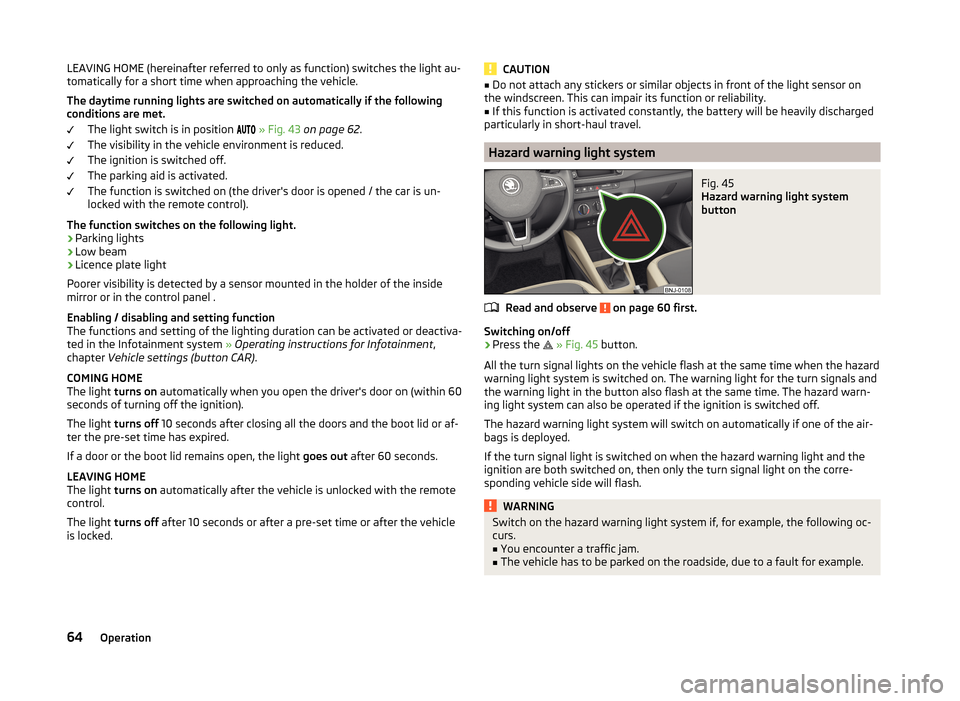
›
Press the
» Fig. 45 button.
All the turn signal lights on the vehicle flash at the same time when the hazard
warning light system is switched on. The warning light for the turn signals and
the warning light in the button also flash at the same time. The hazard warn-
ing light system can also be operated if the ignition is switched off.
The hazard warning light system will switch on automatically if one of the air-
bags is deployed.
If the turn signal light is switched on when the hazard warning light and the
ignition are both switched on, then only the turn signal light on the corre-
sponding vehicle side will flash.
WARNINGSwitch on the hazard warning light system if, for example, the following oc-
curs.■
You encounter a traffic jam.
■
The vehicle has to be parked on the roadside, due to a fault for example.
64Operation
Page 182 of 216

Rear towing eyeFig. 170
Rear towing eye
Read and observe and on page 178 first.
The rear towing eye is located below the rear bumper on the right » Fig. 170.
Vehicles with a tow hitch
Read and observe
and on page 178 first.
The removable towing ball may be fitted and used for towing on vehicles witha factory fitted tow hitch » page 129, Hitch .
Towing the vehicle using the towing device is a viable alternative solution to
using the towing eye.
CAUTION
The detachable ball rod and/or the vehicle can be damaged if an unsuitable
tow bar is used.
Remote control
Introduction
This chapter contains information on the following subjects:
Replacing the battery in the remote control key
179
Synchronising the remote control
180CAUTION■ The replacement battery must have the same specification as the original
battery.■
We recommend having faulty rechargeable batteries replaced by a ŠKODA
service partner.
■
Pay attention to the correct polarity when changing the battery.
For the sake of the environment
Dispose of the used battery in accordance with national legal provisions.
Replacing the battery in the remote control key
Fig. 171
Remove cover/take out battery
Read and observe
on page 179 first.
The battery change is carried out as follows.
›
Flip out the key.
›
Press off the battery cover
A
» Fig. 171 with your thumb or by using a flat
screwdriver in region
B
.
›
Open the battery in the direction of the arrow
1
.
›
Remove the discharged battery in the direction of arrow
2.›
Insert the new battery.
›
Insert the battery cover
A
and press it down until it clicks audibly into place.
The key has to be synchronised if the vehicle cannot be unlocked or locked
with the remote control key after replacing the battery » page 180.
Note
Replacing the battery in the key a glued decorative cover requires the cover to
be destroyed. A replacement cover can be purchased from a ŠKODA Partner.179Emergency equipment, and self-help
Page 183 of 216

Synchronising the remote controlRead and observe
on page 179 first.
If the vehicle does not unlock when the remote control is pressed, the key maynot be synchronised. This can occur when the buttons on the remote control
key are actuated a number of times outside of the operative range of the
equipment or the battery in the remote control key has been replaced.
Synchronise the key as follows.
›
Press any button on the remote control key.
›
Unlock the door with the key in the lock cylinder within 1 minute of pressing the button.
Emergency unlocking/locking
Introduction
This chapter contains information on the following subjects:
Unlocking/locking the driver's door
180
Locking the door without a locking cylinder
180
Unlocking the tailgate
181
Selector lever-emergency unlocking
181
Unlocking/locking the driver's door
Fig. 172
Handle on the driver's door: covered locking cylinder / locking
cylinder with key
The driver's door can be unlocked or locked in an emergency.
›
Pull on the door handle and hold it pulled.
› Insert the vehicle key into the slot on the bottom of the cover
» Fig. 172.›Open the cover in the direction of the arrow.›
Release the door handle.
›
For vehicles with LHD insert the remote control key with the buttons facing
up into the lock cylinder and unlock or lock the vehicle.
›
For vehicles with RHD insert the remote control key directed with buttons
down into the lock cylinder and unlock or lock the vehicle.
›
Pull on the door handle and hold it pulled.
›
Replace the cap in its original position.
CAUTION
Make sure you do not damage the paint when performing an emergency lock-
ing/unlocking.
Locking the door without a locking cylinder
Fig. 173
Emergency locking: Left/right rear door
An emergency locking mechanism is located on the face side of the doors
which have no locking cylinder. It is only visible after opening the door.
›
Remove the cover
A
» Fig. 173 .
›
Insert the vehicle key into the slot and turn in the direction of the arrow
(sprung position).
›
Replace the cover
A
.
180Do-it-yourself