remote control SKODA KODIAQ 2016 1.G User Guide
[x] Cancel search | Manufacturer: SKODA, Model Year: 2016, Model line: KODIAQ, Model: SKODA KODIAQ 2016 1.GPages: 344, PDF Size: 58.96 MB
Page 117 of 344
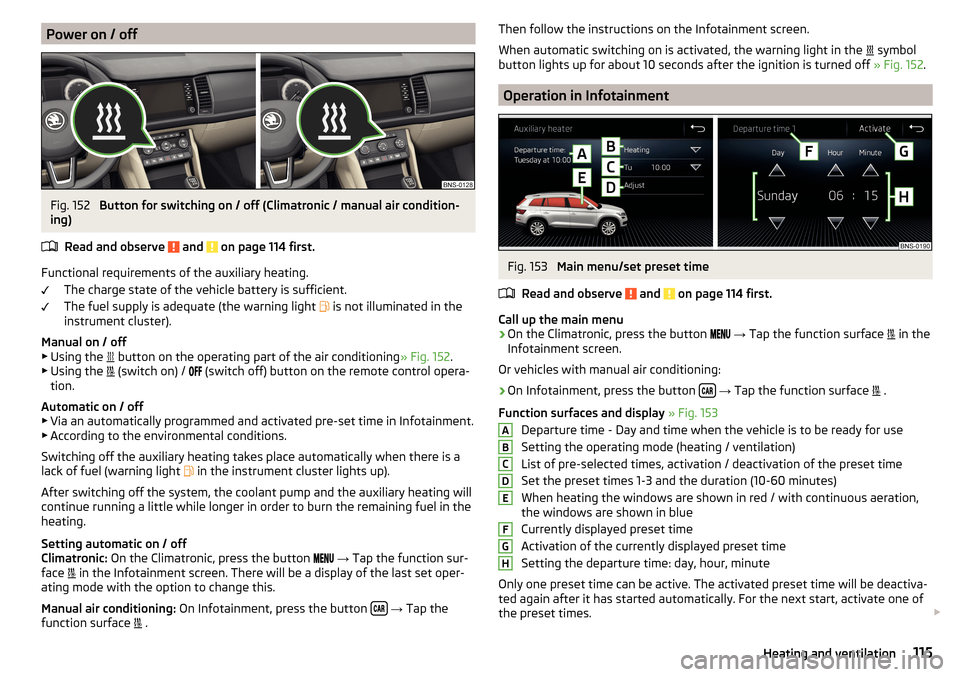
Power on / offFig. 152
Button for switching on / off (Climatronic / manual air condition-
ing)
Read and observe
and on page 114 first.
Functional requirements of the auxiliary heating. The charge state of the vehicle battery is sufficient.
The fuel supply is adequate (the warning light is not illuminated in the
instrument cluster).
Manual on / off ▶ Using the button on the operating part of the air conditioning
» Fig. 152.
▶ Using the (switch on) /
(switch off) button on the remote control opera-
tion.
Automatic on / off ▶ Via an automatically programmed and activated pre-set time in Infotainment.
▶ According to the environmental conditions.
Switching off the auxiliary heating takes place automatically when there is a
lack of fuel (warning light in the instrument cluster lights up).
After switching off the system, the coolant pump and the auxiliary heating will
continue running a little while longer in order to burn the remaining fuel in the
heating.
Setting automatic on / off
Climatronic: On the Climatronic, press the button
→ Tap the function sur-
face in the Infotainment screen. There will be a display of the last set oper-
ating mode with the option to change this.
Manual air conditioning: On Infotainment, press the button
→ Tap the
function surface .
Then follow the instructions on the Infotainment screen.
When automatic switching on is activated, the warning light in the
symbol
button lights up for about 10 seconds after the ignition is turned off » Fig. 152.
Operation in Infotainment
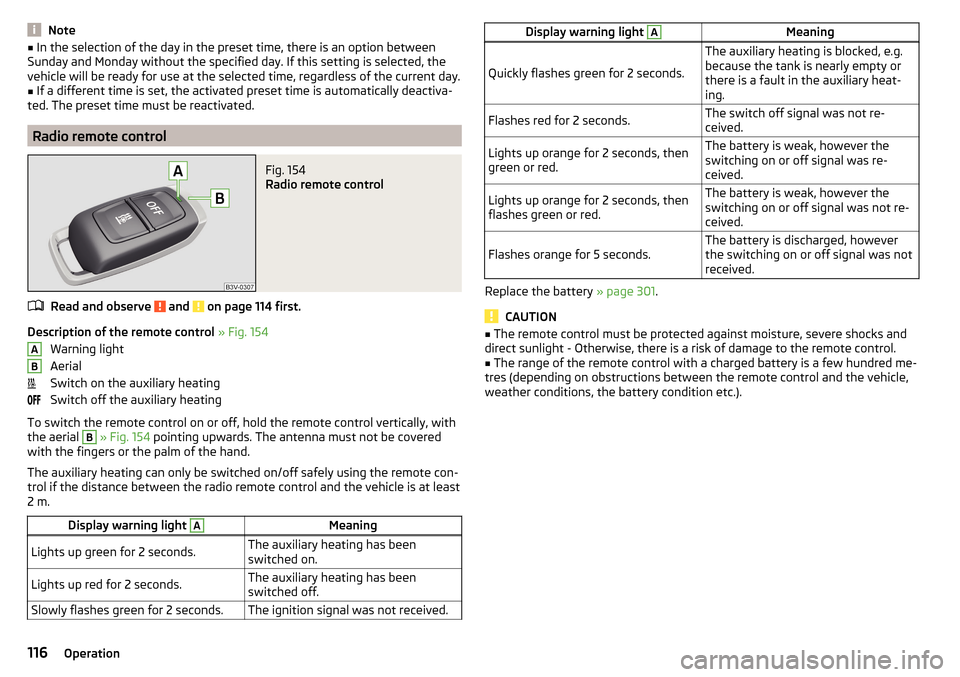
Fig. 153
Main menu/set preset time
Read and observe
and on page 114 first.
Call up the main menu
›
On the Climatronic, press the button
→ Tap the function surface
in the
Infotainment screen.
Or vehicles with manual air conditioning:
›
On Infotainment, press the button
→ Tap the function surface
.
Function surfaces and display » Fig. 153
Departure time - Day and time when the vehicle is to be ready for use
Setting the operating mode (heating / ventilation)
List of pre-selected times, activation / deactivation of the preset time Set the preset times 1-3 and the duration (10-60 minutes)
When heating the windows are shown in red / with continuous aeration,
the windows are shown in blue
Currently displayed preset time
Activation of the currently displayed preset time
Setting the departure time: day, hour, minute
Only one preset time can be active. The activated preset time will be deactiva-
ted again after it has started automatically. For the next start, activate one of
the preset times.
ABCDEFGH115Heating and ventilation
Page 118 of 344
Note■In the selection of the day in the preset time, there is an option between
Sunday and Monday without the specified day. If this setting is selected, the
vehicle will be ready for use at the selected time, regardless of the current day.■
If a different time is set, the activated preset time is automatically deactiva-
ted. The preset time must be reactivated.
Radio remote control
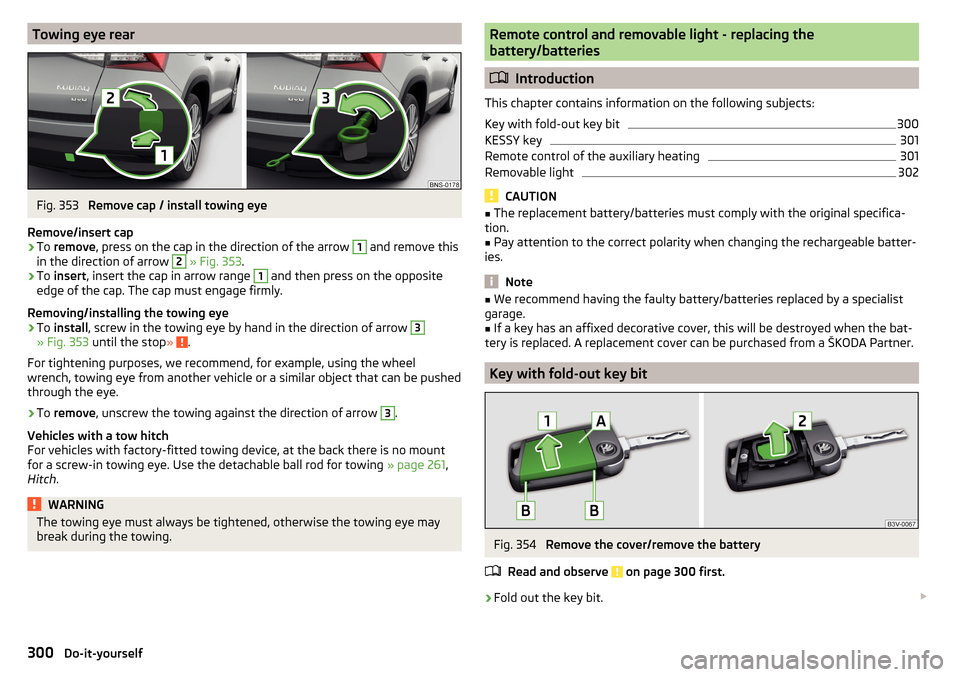
Fig. 154
Radio remote control
Read and observe and on page 114 first.
Description of the remote control » Fig. 154
Warning light
Aerial
Switch on the auxiliary heating
Switch off the auxiliary heating
To switch the remote control on or off, hold the remote control vertically, with the aerial
B
» Fig. 154 pointing upwards. The antenna must not be covered
with the fingers or the palm of the hand.
The auxiliary heating can only be switched on/off safely using the remote con-
trol if the distance between the radio remote control and the vehicle is at least
2 m.
Display warning light AMeaningLights up green for 2 seconds.The auxiliary heating has been
switched on.Lights up red for 2 seconds.The auxiliary heating has been
switched off.Slowly flashes green for 2 seconds.The ignition signal was not received.ABDisplay warning light AMeaning
Quickly flashes green for 2 seconds.
The auxiliary heating is blocked, e.g.
because the tank is nearly empty or
there is a fault in the auxiliary heat-
ing.Flashes red for 2 seconds.The switch off signal was not re-
ceived.Lights up orange for 2 seconds, then
green or red.The battery is weak, however the
switching on or off signal was re-
ceived.Lights up orange for 2 seconds, then
flashes green or red.The battery is weak, however the
switching on or off signal was not re-
ceived.Flashes orange for 5 seconds.The battery is discharged, however
the switching on or off signal was not
received.
Replace the battery » page 301.
CAUTION
■
The remote control must be protected against moisture, severe shocks and
direct sunlight - Otherwise, there is a risk of damage to the remote control.■
The range of the remote control with a charged battery is a few hundred me-
tres (depending on obstructions between the remote control and the vehicle,
weather conditions, the battery condition etc.).
116Operation
Page 302 of 344
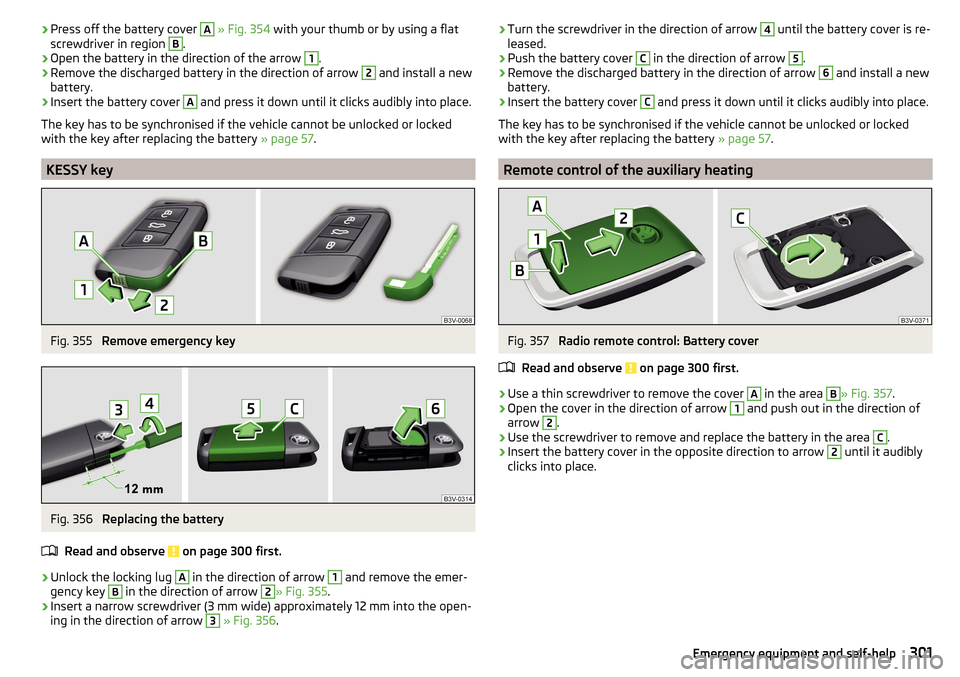
Towing eye rearFig. 353
Remove cap / install towing eye
Remove/insert cap
›
To remove , press on the cap in the direction of the arrow
1
and remove this
in the direction of arrow
2
» Fig. 353 .
›
To insert , insert the cap in arrow range
1
and then press on the opposite
edge of the cap. The cap must engage firmly.
Removing/installing the towing eye
›
To install , screw in the towing eye by hand in the direction of arrow
3
» Fig. 353 until the stop » .
For tightening purposes, we recommend, for example, using the wheel
wrench, towing eye from another vehicle or a similar object that can be pushed through the eye.
›
To remove , unscrew the towing against the direction of arrow
3
.
Vehicles with a tow hitch
For vehicles with factory-fitted towing device, at the back there is no mount
for a screw-in towing eye. Use the detachable ball rod for towing » page 261,
Hitch .
WARNINGThe towing eye must always be tightened, otherwise the towing eye may
break during the towing.Remote control and removable light - replacing the
battery/batteries
Introduction
This chapter contains information on the following subjects:
Key with fold-out key bit
300
KESSY key
301
Remote control of the auxiliary heating
301
Removable light
302
CAUTION
■ The replacement battery/batteries must comply with the original specifica-
tion.■
Pay attention to the correct polarity when changing the rechargeable batter-
ies.
Note
■ We recommend having the faulty battery/batteries replaced by a specialist
garage.■
If a key has an affixed decorative cover, this will be destroyed when the bat-
tery is replaced. A replacement cover can be purchased from a ŠKODA Partner.
Key with fold-out key bit
Fig. 354
Remove the cover/remove the battery
Read and observe
on page 300 first.
›
Fold out the key bit.
300Do-it-yourself
Page 303 of 344
›Press off the battery cover A
» Fig. 354 with your thumb or by using a flat
screwdriver in region B.›
Open the battery in the direction of the arrow
1
.
›
Remove the discharged battery in the direction of arrow
2
and install a new
battery.
›
Insert the battery cover
A
and press it down until it clicks audibly into place.
The key has to be synchronised if the vehicle cannot be unlocked or locked
with the key after replacing the battery » page 57.
KESSY key
Fig. 355
Remove emergency key
Fig. 356
Replacing the battery
Read and observe
on page 300 first.
›
Unlock the locking lug
A
in the direction of arrow
1
and remove the emer-
gency key
B
in the direction of arrow
2
» Fig. 355 .
›
Insert a narrow screwdriver (3 mm wide) approximately 12 mm into the open-
ing in the direction of arrow
3
» Fig. 356 .
›Turn the screwdriver in the direction of arrow 4 until the battery cover is re-
leased.›
Push the battery cover
C
in the direction of arrow
5
.
›
Remove the discharged battery in the direction of arrow
6
and install a new
battery.
›
Insert the battery cover
C
and press it down until it clicks audibly into place.
The key has to be synchronised if the vehicle cannot be unlocked or locked
with the key after replacing the battery » page 57.
Remote control of the auxiliary heating
Fig. 357
Radio remote control: Battery cover
Read and observe
on page 300 first.
›
Use a thin screwdriver to remove the cover
A
in the area
B
» Fig. 357 .
›
Open the cover in the direction of arrow
1
and push out in the direction of
arrow
2
.
›
Use the screwdriver to remove and replace the battery in the area
C
.
›
Insert the battery cover in the opposite direction to arrow
2
until it audibly
clicks into place.
301Emergency equipment and self-help
Page 308 of 344
Fuses in the dashboard - RHDFig. 369
Storage compartment on the front passenger side
Read and observe
and on page 305 first.
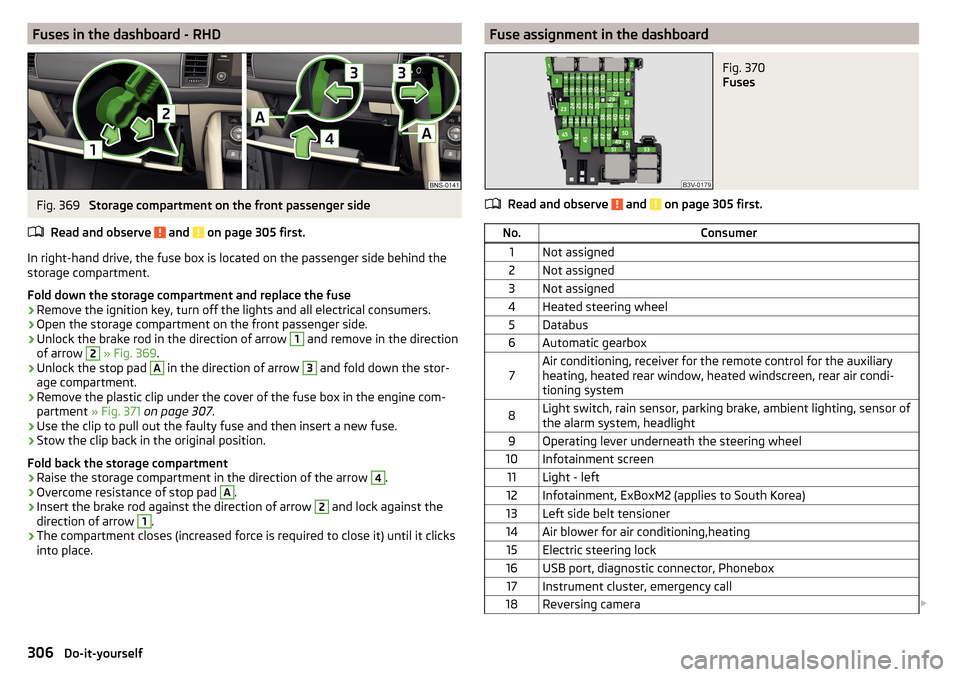
In right-hand drive, the fuse box is located on the passenger side behind the storage compartment.
Fold down the storage compartment and replace the fuse
›
Remove the ignition key, turn off the lights and all electrical consumers.
›
Open the storage compartment on the front passenger side.
›
Unlock the brake rod in the direction of arrow
1
and remove in the direction
of arrow
2
» Fig. 369 .
›
Unlock the stop pad
A
in the direction of arrow
3
and fold down the stor-
age compartment.
›
Remove the plastic clip under the cover of the fuse box in the engine com-
partment » Fig. 371 on page 307 .
›
Use the clip to pull out the faulty fuse and then insert a new fuse.
›
Stow the clip back in the original position.
Fold back the storage compartment
›
Raise the storage compartment in the direction of the arrow
4
.
›
Overcome resistance of stop pad
A
.
›
Insert the brake rod against the direction of arrow
2
and lock against the
direction of arrow
1
.
›
The compartment closes (increased force is required to close it) until it clicks
into place.
Fuse assignment in the dashboardFig. 370
Fuses
Read and observe and on page 305 first.
No.Consumer1Not assigned2Not assigned3Not assigned4Heated steering wheel5Databus6Automatic gearbox7Air conditioning, receiver for the remote control for the auxiliary
heating, heated rear window, heated windscreen, rear air condi-
tioning system8Light switch, rain sensor, parking brake, ambient lighting, sensor of
the alarm system, headlight9Operating lever underneath the steering wheel10Infotainment screen11Light - left12Infotainment, ExBoxM2 (applies to South Korea)13Left side belt tensioner14Air blower for air conditioning,heating15Electric steering lock16USB port, diagnostic connector, Phonebox17Instrument cluster, emergency call18Reversing camera 306Do-it-yourself
Page 324 of 344
Manual shifting on the multifunction steeringwheel211
Selector lever lock210
Start and drive211
Tiptronic211
Warning light39
Automatic switch-off of Infotainment125
Automatic transmission209
Selector lever emergency release303
AUX90, 148
Settings134
Auxiliary heating (auxiliary heating and ventila- tion)
114
In infotainment115
set to115
Auxiliary heating (heating and ventilation) Radio remote control
116
Avoiding damage to your vehicle213
B
Basstöner
130
Battery Changing batteries for the removable light
302
Changing in key300, 301
Replace the battery in the remote control in the auxiliary heating
301
Belts15
Belt tensioners18
reversible18
Blanket96
Bluetooth A2DP / AVRCP
132
Name132
on / off132
Paired external devices132
Profile160
rSAP163
Set139
set to132, 134
Set to132
Switch on/off139
Update129, 133
Updates139
Visibility132, 139
Bluetooth Player149
Bluetooth® update160
bolero external module
123
infotainment Description122
Bonnet279
Boot Class N1 vehicles
106
Boot lid59
Automatic locking59
Contactless open/close61
Open/close58, 60
See boot lid58
Boot lid contactless open/close61
Brake Assist (HBA)217
Brake booster206
Brake fluid282
Check282
specification282
Brake linings Warning light
38
Brake pads new
206
Brake pedal (automatic gearbox) Warning light
38
Brakes Brake booster
206
Brake fluid282
Braking and stabilisation systems215
Information on braking206
Parking brake206
Run in212
Warning light35
Brake system215
breakdown call118
Breakdown call164
Broadcasting141, 142
Bulbs Replacing
308
Buttons on the driver door Electric windows
62
C
Call list Call list
166
CAR201
Car battery Automatic consumer shutdown
283
Check condition284
Cover284
Disconnecting and reconnecting285
Replacing285
Winter operation284
Car care Exterior
273
Interior273
Car cleaning Exterior
273
Windscreens273
Car computer see multifunction display
46
Care and maintenance266
Care Connect118
breakdown call118
emergency call118
information call118
Cargo element105
Carrier108
Carstick171
CD147
cellphone Disclaimer
120
Central locking52
Problems57
Central locking button54
322Index
Page 329 of 344
L
L-band
134
Lamp failure41
Lamps Warning light
41
Lane Assist38, 254
Malfunctions256
Settings in Infotainment254
Lane Departure Warning Activation / deactivation
232, 256
Operation255
Lane recommendation193
Language characters131
Last destinations184
Latitude178
LEAVING HOME69
LED headlights68
Lever ACC
245
Cruise control240
Front Assist250
Operation of the information system45
Speed limiter with ACC243
Speed limiter with CCS242
Speed limiter with GRA242
Turn signal/main beam67
Windscreen wipers74, 75
Liability for defects5
Light65
Cockpit71
COMING HOME / LEAVING HOME69
Daytime running lights66
Flash67
Fog lights/rear fog light69
Fog lights with CORNER function69
Hazard warning light system70
Headlight cleaning system75
LED headlights68
Light Assist68
Parking light70
Replacing bulbs308
Turn signal/main beam67
Light Assist68
See Light Assist68
Lighting Ambient lighting
72
Entry space70
Interior lighting71
Luggage compartment100
Lights Automatic driving light control
67
Dipped beam66
Driving abroad70
Headlight range control66
Parking lights66
Switching on and off66
Warning lights33
List of available stations
142
of telephone contacts165
With folder / track list146
Liste gekoppelter externer Geräte160
List of traffic reports199
Load314
Lock Individual settings
54
KESSY53
Locking Central locking button
54
in case of emergency303
Remote control52
Lock steering lock202
Longitude178
Luggage compartment100
Cargo Elements105
Fastening elements101
Fastening the flooring103
Fixing nets101
Floor covering on both sides103
foldable hook102
Lighting100
Net partition104
Removable light106
Side pockets105
unlock manually303
Unlock the boot lid303
Variable loading floor106
Luggage compartment cover103
Luggage Storage Roll-up cover
103
M
Main beam
67
Warning light39
main menu Android car
174
Apple carplay174
Images151
infotainment online119
MirrorLink®175
radio141
Video DVD153
WIRELESS INTERNET ACCESS170
Main menu Media
144
Media Command154
Navigation179
SmartLink173
SMS168
Waypoint mode197
Make up mirror73
Manage favourites140
Manage Favourites134
Manage memory137
Management of online services ŠKODA Connect 133, 139
Managing saved routes
196
Manoeuvre Graphical driving recommendations
193
Nav. announcements194
327Index
Page 332 of 344
Parking236
Search for parking space235
Switch to park mode235
Parking208
Park Assist233
Parking aid220
Rear View Camera227
Parking aid220
Automatic emergency braking223
Automatic system activation when moving for- ward
223
Operation221
Settings in Infotainment221
Parking assistance Activation / deactivation
223
Parking brake206
Warning light34
Parking lights66
Parking sensors Display Infotainment screen
222
parking spot184
Parking the vehicle see Parking
208
Parking ticket holder88
ParkPilot220
Part replacement266
Passive safety Before setting off
12
Driving safety12
Passive Safety12
Pedals209
Floor mats209
Personalisation Configuration wizard
126
Personalization50
Operating principle50
Overview of some personalized functions51
Set51
Petrol275
Petrol station logo136
phone connect to the infotainment
159
couple159
Phone Adjust text messages
134
Bluetooth® update160
Clear calls134
Compatibility160
Diverting calls134
Import contacts134
Introductory information156
Manage Favourites134
Phone call167
Premium134
rSAP163
Settings call134
set to134
User profile134
Voice control127
Phonebox89
Phone call167
Phone compatibility160
Phone Premium SIM card
162
Pictures Compatible sources
152
File formats152
Requirements and restrictions152
Supported file formats152
Pin code set to
134
Playback Video DVD
153
Plsyback Media
145
Pockets94
POI187 , 188, 189
Pop-up window Map
191
Power limitTilt / slide sunroof64
Power steering35
Practical equipment 230-volt socket
97
Practical features 12-volt socket in the interior
97
12 volt socket in luggage compartment97
Ashtray98
Cigarette lighter99
Parking ticket holder88
Pockets94
Reflective vest290
Storage compartment87
Storage compartment for umbrella94
Storage compartment under the passenger seat
93
Waste container91
Preferred contacts166
Preheating unit36
Principles of Infotainment operation124
Proactive passenger protection253
Proactive passenger protection warning light37
Puncture repair kit295
R
radio Broadcasting
142
L-band134
main menu141
Radio stations Logo143
scan142
serve141
Radio List of available stations
142
set to133, 140
Traffic program (TP)144
Voice control127
Radio remote control Auxiliary heating (heating and ventilation)
116
330Index
Page 333 of 344
Radio station143
Preset buttons143
Radio station logos143
Update133
radio stations Select channels and search
142
Raising the vehicle295
Rear fog light69
Warning light36
Rear seats80
Rear traffic alert224
Rear Traffic Alert Activation / deactivation
226
Malfunctions226
Operation225
Rear View Camera227
Rear view mirror75
Rear window - heating72
Record waypoints197
Refill Windscreen washer fluid
280
refilling AdBlue
277
Refilling Coolant
282
Engine oil281
Reflective vest290
Refuelling275
Fuel275
Register online services ŠKODA Connect133, 139
Regulation Headlight beam
66
Remote control Changing battery
300
Synchronisation process57
Unlocking/locking52
Remote transfer of SIM data163
Removable light106
Changing batteries302
Removable through-loading bag95
Repairs and technical alterations266
Replace Battery
301
Replacing Bulbs
308
Fuses305
Windscreen wiper blades304
Reset counter for distance driven (trip)43
restaurant184
Reversible belt tensioners18
Rims285
Road Signs infotainment display
191
Roller blind See luggage compartment cover
103
Roof Load
108
Roof racks108
route new route
196
Online Route Import196
route list196
Route192
Store route194
Route calculation192
Trailer towing193
Route details194
Route information194
route list196
Route options136
rSAP163
Data Connection171
Run-in Engine
212
Running in Brake pads
206
Tyres285
S
SafeLock
54
Safe removal of the data source132, 139
Safety12
Airbag19
Child safety23
Child seats23
Correct seated position12
Headrests83
I-Size28
ISOFIX27
TOP TETHER28
SAFE, SAFELOCK See SafeLock
54
Save radio Save channel
143
Saving electrical energy212
Saving fuel212
Screen see Infotainment screen
123
Screen display124
SD card148
Safe removal139
search aim
182
Gas station184
Online goals182
parking spot184
restaurant184
Seat belt height adjustment
16
Warning light35, 39
Seat belts15
Belt tensioners18
fastening and unfastening17
Inertia reels18
Seat electrical adjustment78
331Index
Page 334 of 344
SeatsElectrical adjustment78
Folding front passenger seat80
Front78
Front armrest80
Headrests83
Heating85, 86
Manually adjusting78
Memory Function of the electrically adjustable seat
79
Rear80
Setting78
Storing in memory of remote control key79
Ventilation86
Second row of seats Headrests
84
Second seat row Easy Entry
81
Fold forward seat backrests82
Fold seat backrests forward81
Setting81
see Instrument cluster see Instrument cluster
32
Selector lever210
Selector lever control210
Selector lever lock38
service media
144
radio141
Service266
Service interval display49
Warning light43
Service Interval269
Service interval display49
Service intervals268
Service Plan270
Setting Headrests
83
Mirror76
Positions of the variable loading floor107
Seat belt height16
Seats78
settings Basstöner
130
DAB134, 140
equalizer130
FM133, 140
Images134
infotainment130, 138
Infotainment language131, 139
Infotainment screen131, 138
Reset to factory settings201
Software Update129
sound130
sound system130
surround130
system information129
ŠKODA Connect133, 139
vehicle201
Video DVD134
Settings Additional keyboard languages
131, 139
Advanced settings138
AUX134
Bluetooth132, 134, 139
Codecs134
Configuration wizard126
Data connection132
External device data transfer131, 139
Fuel options137
Information regarding the version of the navi- gation data
137
Manage favourites166
Manage memory137
Map136
Media134, 140
Navigation136
Nav. announcements137
Network132
Phone134
Pin code134
Radio133, 140
Reset to factory settings132
Restore factory settings139
Route options136
SmartLink136, 141
Software updates139
Sound138
System information133, 139
Telephone140
Time and date131, 138
Top speeds137
Units131, 139
Update software133
User profile166
Voice control132
Volume125
WLAN132
Settings Call Clear calls SettingsText messages
134
Setting the Clock
44
Set to Auxiliary heating (auxiliary heating and ventila- tion)
115
Show POIs on the map189
Side compartments in the luggage compart- ment
105
SIM card Change PIN code
162
Data Connection171
Insert162
PIN code162
Remove162
Sleep package Blanket
96
Headrest84
Sliding/tilting roof Activate operation
64
Activating operation of the sunshade65
332Index