ad blue SKODA KODIAQ 2016 1.G Owner's Guide
[x] Cancel search | Manufacturer: SKODA, Model Year: 2016, Model line: KODIAQ, Model: SKODA KODIAQ 2016 1.GPages: 344, PDF Size: 58.96 MB
Page 159 of 344
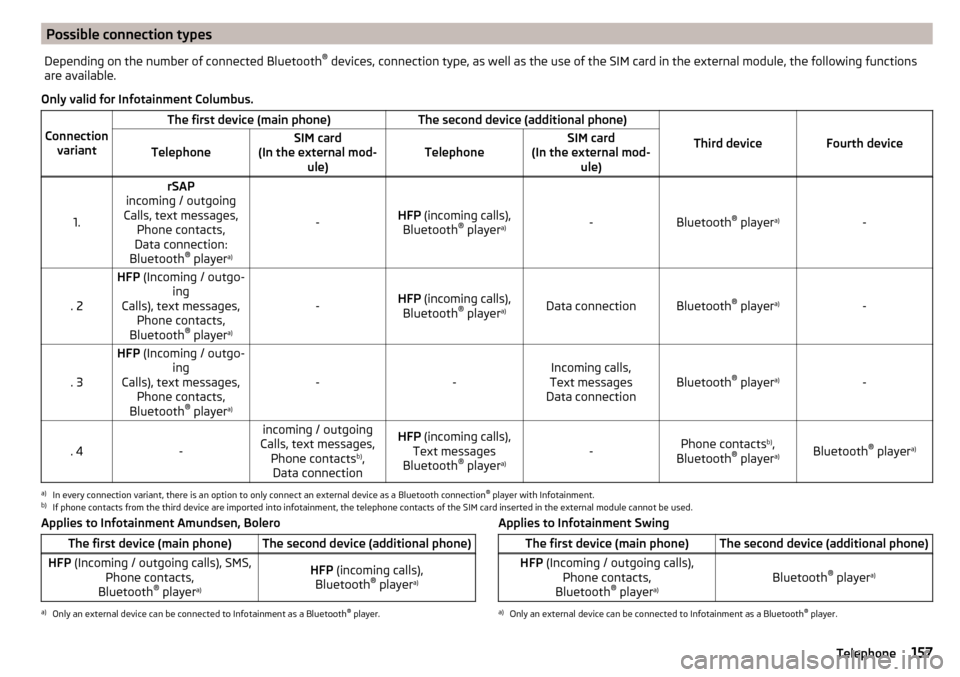
Possible connection typesDepending on the number of connected Bluetooth®
devices, connection type, as well as the use of the SIM card in the external module, the following functions
are available.
Only valid for Infotainment Columbus.
Connection variant
The first device (main phone)The second device (additional phone)
Third deviceFourth deviceTelephoneSIM card
(In the external mod- ule)TelephoneSIM card
(In the external mod- ule)
1.
rSAP
incoming / outgoing
Calls, text messages, Phone contacts,
Data connection:
Bluetooth ®
player a)
-HFP
(incoming calls),
Bluetooth ®
player a)-Bluetooth
®
player a)-. 2
HFP
(Incoming / outgo-
ing
Calls), text messages, Phone contacts,
Bluetooth ®
player a)
-HFP
(incoming calls),
Bluetooth ®
player a)Data connectionBluetooth ®
player a)-. 3
HFP
(Incoming / outgo-
ing
Calls), text messages, Phone contacts,
Bluetooth ®
player a)
--Incoming calls,
Text messages
Data connectionBluetooth ®
player a)-. 4-
incoming / outgoing
Calls, text messages, Phone contacts b)
,
Data connectionHFP (incoming calls),
Text messages
Bluetooth ®
player a)-Phone contacts b)
,
Bluetooth ®
player a)Bluetooth ®
player a)
a)
In every connection variant, there is an option to only connect an external device as a Bluetooth connection
®
player with Infotainment.
b)
If phone contacts from the third device are imported into infotainment, the telephone contacts of the SIM card inserted in the external module cannot be used.
Applies to Infotainment Amundsen, BoleroThe first device (main phone)The second device (additional phone)HFP (Incoming / outgoing calls), SMS,
Phone contacts,
Bluetooth ®
player a)HFP
(incoming calls),
Bluetooth ®
player a)a)
Only an external device can be connected to Infotainment as a Bluetooth
®
player.
Applies to Infotainment SwingThe first device (main phone)The second device (additional phone)HFP (Incoming / outgoing calls),
Phone contacts,
Bluetooth ®
player a)Bluetooth ®
player a)
a)
Only an external device can be connected to Infotainment as a Bluetooth
®
player.
157Telephone
Page 161 of 344
Telephone
Applies to Infotainment Swing.Fig. 190
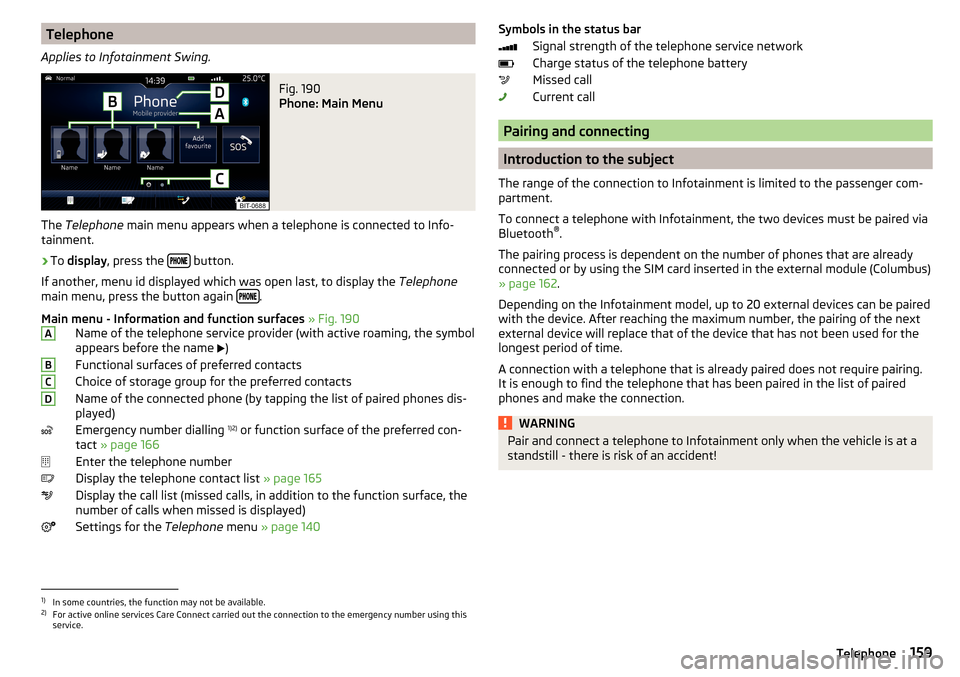
Phone: Main Menu
The Telephone main menu appears when a telephone is connected to Info-
tainment.
›
To display , press the button.
If another, menu id displayed which was open last, to display the Telephone
main menu, press the button again
.
Main menu - Information and function surfaces » Fig. 190
Name of the telephone service provider (with active roaming, the symbol
appears before the name )
Functional surfaces of preferred contacts
Choice of storage group for the preferred contacts
Name of the connected phone (by tapping the list of paired phones dis- played)
Emergency number dialling 1)2)
or function surface of the preferred con-
tact » page 166
Enter the telephone number
Display the telephone contact list » page 165
Display the call list (missed calls, in addition to the function surface, the
number of calls when missed is displayed)
Settings for the Telephone menu » page 140
ABCDSymbols in the status bar
Signal strength of the telephone service network
Charge status of the telephone battery
Missed call
Current call
Pairing and connecting
Introduction to the subject
The range of the connection to Infotainment is limited to the passenger com-
partment.
To connect a telephone with Infotainment, the two devices must be paired via
Bluetooth ®
.
The pairing process is dependent on the number of phones that are already
connected or by using the SIM card inserted in the external module (Columbus)
» page 162 .
Depending on the Infotainment model, up to 20 external devices can be paired
with the device. After reaching the maximum number, the pairing of the next
external device will replace that of the device that has not been used for the
longest period of time.
A connection with a telephone that is already paired does not require pairing.
It is enough to find the telephone that has been paired in the list of paired
phones and make the connection.
WARNINGPair and connect a telephone to Infotainment only when the vehicle is at a
standstill - there is risk of an accident!1)
In some countries, the function may not be available.
2)
For active online services Care Connect carried out the connection to the emergency number using this
service.
159Telephone
Page 162 of 344
conditions for pairingFig. 191
QR code with reference to the
ŠKODA websites
The telephone can be paired with Infotainment under the following conditions.
The ignition is switched on.
The Bluetooth ®
function of the infotainment and the telephone is switch-
ed on.
The visibility of the infotainment and the telephone is switched on.
The telephone is within range of the Bluetooth ®
signal of Infotainment.
The telephone is compatible with the infotainment.
There is no external device connected to Infotainment using Apple
CarPlay.
The pairing can be initiated from Infotainment or from the telephone.
During the pairing and connection process, information messages are dis-
played on the Infotainment screen and the telephone screen. These messages
must be observed and if necessary confirmed (e.g. enabling the contact import,
connecting the Bluetooth ®
player among others).
Compatibility and update
By reading the QR code » Fig. 191 or after typing the following address into the
web browser, information about the compatibility of phones and updates are
available for Infotainment Bluetooth ®
can be displayed.
http://go.skoda.eu/compatibility
Pairing and connection process
Pair the telephone with Infotainment
›
Search available Bluetooth ®
devices in your telephone.
›
Select Infotainment (name of Infotainment
→
Bluetooth
→
Name:
).
›
Confirm or enter the PIN code to confirm the pairing.
The phone is connected to the infotainment or merely coupled, depending on
the number of already connected external devices and using the SIM card in-
serted in the external module (Columbus).
Pair Infotainment with the telephone›
If there is no telephone connected to Infotainment, then press the but-
ton then tap the function surface
Find telephone
.
›
or If Infotainment is connected to a phone, then in the main menu Telephone
tap on the function surface
→
Search phone
.
›
or: If a SIM card with activated telephone services is inserted in the external
module of infotainment Columbus, then, in the main menu Telephone, tap on
the function surface
→
Find telephone
.
›
Select the desired telephone from the list of visited external Bluetooth ®
de-
vices.
›
Confirm the PIN code (enter and confirm if necessary to confirm the pairing.
If external Bluetooth ®
devices are already connected to Infotainment, then
during the Infotainment pairing and connection process, messages and op-
tions for the possible connection type (e.g. replacement of the connected ex-
ternal Bluetooth ®
device) are displayed.
Possible connection types for phones, if required, for the SIM card in the exter- nal module » page 157 .
Managing paired external devices
Fig. 192
Infotainment Columbus: list of paired external devices / list of
available Bluetooth® profiles
160Infotainment
Page 163 of 344
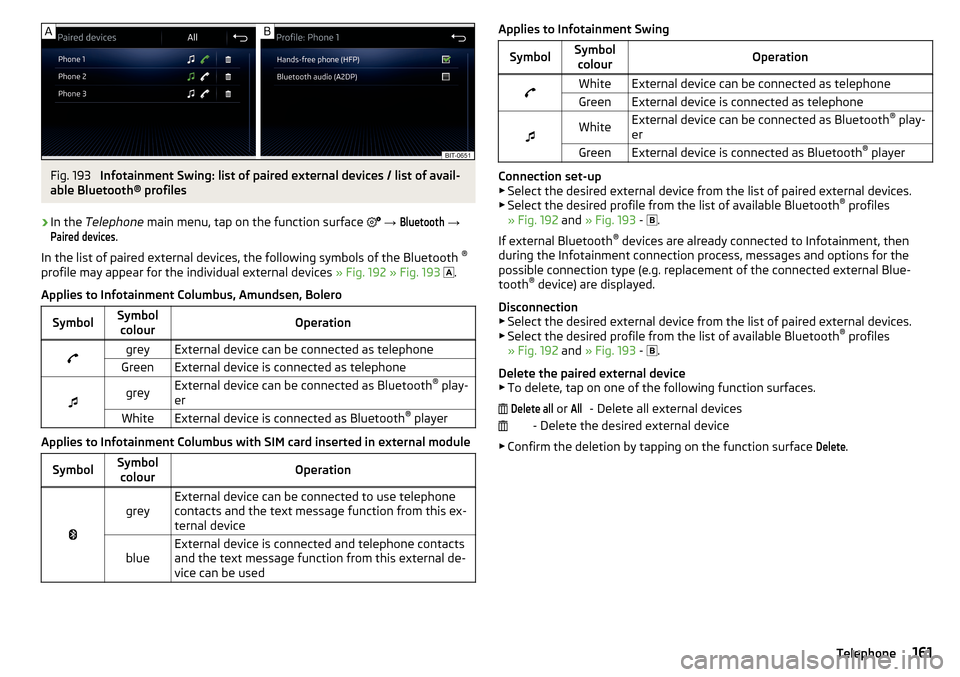
Fig. 193
Infotainment Swing: list of paired external devices / list of avail-
able Bluetooth® profiles
›
In the Telephone main menu, tap on the function surface
→
Bluetooth
→
Paired devices
.
In the list of paired external devices, the following symbols of the Bluetooth ®
profile may appear for the individual external devices » Fig. 192 » Fig. 193
.
Applies to Infotainment Columbus, Amundsen, Bolero
SymbolSymbol colourOperationgreyExternal device can be connected as telephoneGreenExternal device is connected as telephone
greyExternal device can be connected as Bluetooth ®
play-
erWhiteExternal device is connected as Bluetooth ®
player
Applies to Infotainment Columbus with SIM card inserted in external module
SymbolSymbol
colourOperation
greyExternal device can be connected to use telephone
contacts and the text message function from this ex-
ternal deviceblueExternal device is connected and telephone contacts
and the text message function from this external de-
vice can be usedApplies to Infotainment SwingSymbolSymbol colourOperationWhiteExternal device can be connected as telephoneGreenExternal device is connected as telephone
WhiteExternal device can be connected as Bluetooth ®
play-
erGreenExternal device is connected as Bluetooth ®
player
Connection set-up
▶ Select the desired external device from the list of paired external devices.
▶ Select the desired profile from the list of available Bluetooth ®
profiles
» Fig. 192 and » Fig. 193 -
.
If external Bluetooth ®
devices are already connected to Infotainment, then
during the Infotainment connection process, messages and options for the
possible connection type (e.g. replacement of the connected external Blue-
tooth ®
device) are displayed.
Disconnection
▶ Select the desired external device from the list of paired external devices.
▶ Select the desired profile from the list of available Bluetooth ®
profiles
» Fig. 192 and » Fig. 193 -
.
Delete the paired external device ▶ To delete, tap on one of the following function surfaces.
- Delete all external devices
- Delete the desired external device
▶ Confirm the deletion by tapping on the function surface
Delete
.
Delete all or All161Telephone
Page 165 of 344
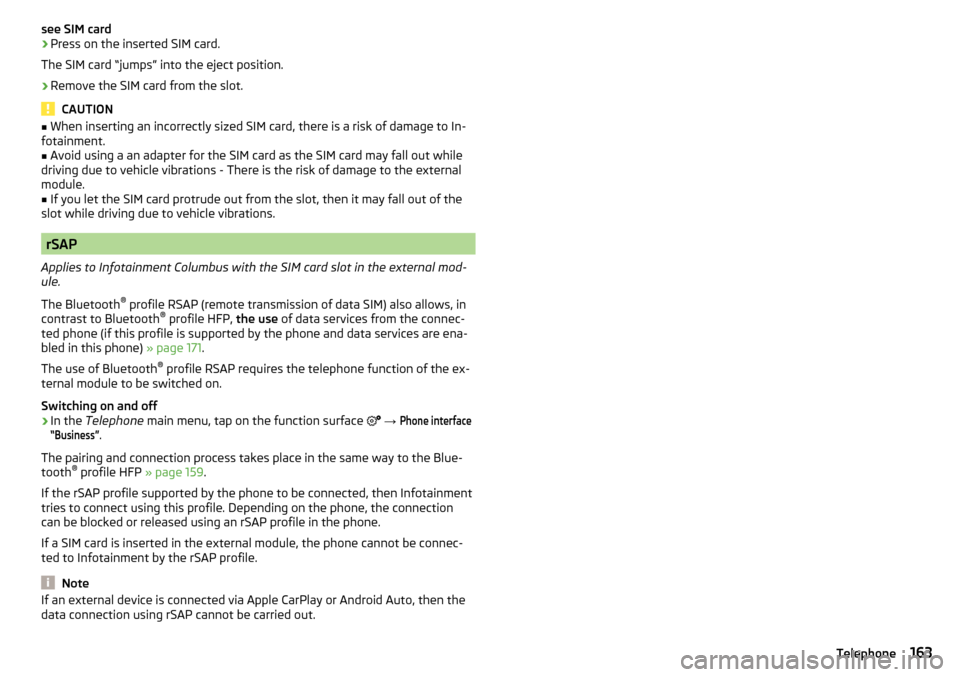
see SIM card›Press on the inserted SIM card.
The SIM card “jumps” into the eject position.›
Remove the SIM card from the slot.
CAUTION
■ When inserting an incorrectly sized SIM card, there is a risk of damage to In-
fotainment.■
Avoid using a an adapter for the SIM card as the SIM card may fall out while
driving due to vehicle vibrations - There is the risk of damage to the external
module.
■
If you let the SIM card protrude out from the slot, then it may fall out of the
slot while driving due to vehicle vibrations.
rSAP
Applies to Infotainment Columbus with the SIM card slot in the external mod-
ule.
The Bluetooth ®
profile RSAP (remote transmission of data SIM) also allows, in
contrast to Bluetooth ®
profile HFP, the use of data services from the connec-
ted phone (if this profile is supported by the phone and data services are ena-
bled in this phone) » page 171.
The use of Bluetooth ®
profile RSAP requires the telephone function of the ex-
ternal module to be switched on.
Switching on and off
›
In the Telephone main menu, tap on the function surface
→
Phone interface“Business”
.
The pairing and connection process takes place in the same way to the Blue-
tooth ®
profile HFP » page 159.
If the rSAP profile supported by the phone to be connected, then Infotainment
tries to connect using this profile. Depending on the phone, the connection
can be blocked or released using an rSAP profile in the phone.
If a SIM card is inserted in the external module, the phone cannot be connec-
ted to Infotainment by the rSAP profile.
Note
If an external device is connected via Apple CarPlay or Android Auto, then the
data connection using rSAP cannot be carried out.163Telephone
Page 171 of 344
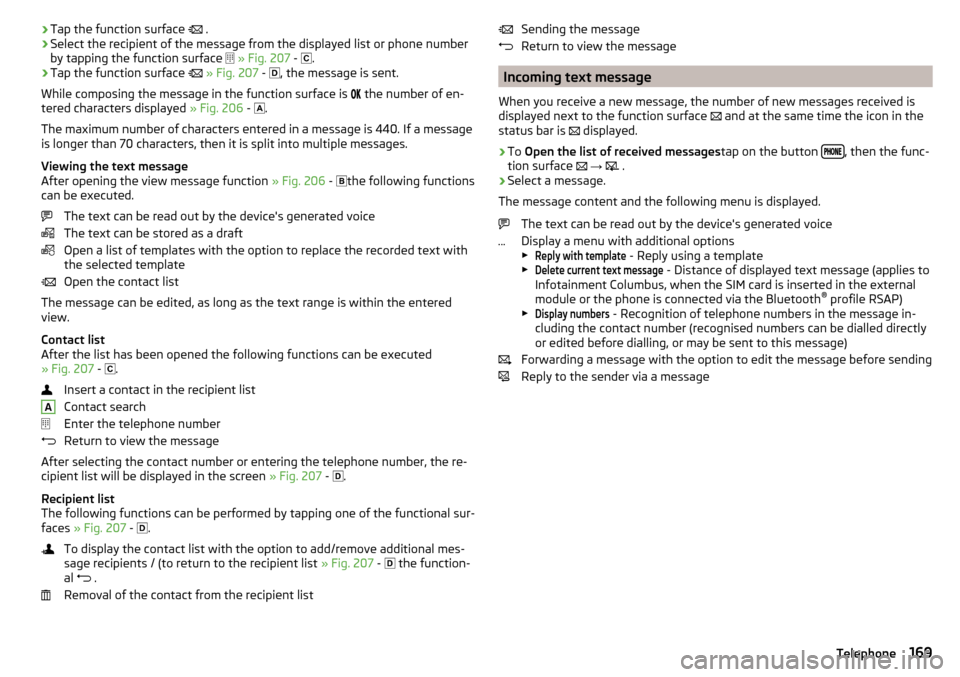
›Tap the function surface
.›Select the recipient of the message from the displayed list or phone number
by tapping the function surface
» Fig. 207 -
.›
Tap the function surface
» Fig. 207 -
, the message is sent.
While composing the message in the function surface is
the number of en-
tered characters displayed » Fig. 206 -
.
The maximum number of characters entered in a message is 440. If a message
is longer than 70 characters, then it is split into multiple messages.
Viewing the text message
After opening the view message function » Fig. 206 -
the following functions
can be executed.
The text can be read out by the device's generated voice
The text can be stored as a draft
Open a list of templates with the option to replace the recorded text with
the selected template
Open the contact list
The message can be edited, as long as the text range is within the entered
view.
Contact list
After the list has been opened the following functions can be executed
» Fig. 207 -
.
Insert a contact in the recipient list
Contact search
Enter the telephone number
Return to view the message
After selecting the contact number or entering the telephone number, the re- cipient list will be displayed in the screen » Fig. 207 -
.
Recipient list
The following functions can be performed by tapping one of the functional sur-
faces » Fig. 207 -
.
To display the contact list with the option to add/remove additional mes-
sage recipients / (to return to the recipient list » Fig. 207 -
the function-
al .
Removal of the contact from the recipient list
ASending the message
Return to view the message
Incoming text message
When you receive a new message, the number of new messages received is
displayed next to the function surface
and at the same time the icon in the
status bar is
displayed.
›
To Open the list of received messages tap on the button , then the func-
tion surface
→
.
›
Select a message.
The message content and the following menu is displayed.
The text can be read out by the device's generated voice
Display a menu with additional options
▶
Reply with template
- Reply using a template
▶
Delete current text message
- Distance of displayed text message (applies to
Infotainment Columbus, when the SIM card is inserted in the external
module or the phone is connected via the Bluetooth ®
profile RSAP)
▶
Display numbers
- Recognition of telephone numbers in the message in-
cluding the contact number (recognised numbers can be dialled directly
or edited before dialling, or may be sent to this message)
Forwarding a message with the option to edit the message before sending
Reply to the sender via a message
169Telephone
Page 172 of 344
Hotspot (WLAN) and data connection
Hotspot (WLAN)
Introduction to the subject
Applies to Infotainment Columbus, Amundsen.
WLAN can be used to connect to the Internet, to playback audio files in the menu media (if the connected external device allows this) or for operating the
device using an application in the external device (e.g. ŠKODA Media Command
or ŠKODA One App).
The requirement for the WLAN function is that the ignition is switched on. Af-
ter switching on the ignition, the last-used WLAN connection appears.
It is possible to connect up to 8 external devices to the Infotainment hotspot
and at the same time to connect Infotainment to the hotspot of other external
devices.
If there is a SIM card with activated data services in the external module of In-
fotainment Columbus or there is a connection to the phone via Bluetooth ®
profile RSAP, a connection cannot be established to the external device hot- spot.
connect an external device to the hotspot (WLAN) infotainment
Switch Infotainment hotspot on / off
›
Press the button, then tap on the function surface
Tap on
→
WLAN
→
Mobile hotspot
→
Mobile hotspot
.
Set infotainment Hotspot
▶ Press the
button, then tap on the function surface
Tap on
→
WLAN
→
Mobile hotspot
→
Hotspot (WLAN) settings
.
▶ Setting required menu items from the following menu.
■
Security level:
- Setting the connection security
■
Network key
- Entering the access password
■
SSID:
- Name of the infotainment Hotspots
■
Do not send network name (SSID)
-Turn Infotainment hotspot visibility on/off
▶ Tap the function surface Store to save the parameters of the Infotainment
hotspot.
Connect ▶ Enable the Wi-Fi in the external device and search for any available hotspots.
▶ Select the Infotainment hotspot (if necessary, enter the required password).
▶ Confirm the connection.
Establish secure connection using WPS (applies to Infotainment Amundsen) ▶ Turn on Infotainment in the device.
▶ Press the
button, then tap on the function surface
→
WIRELESS INTER-NET ACCESS
→
WIRELESS INTERNET ACCESS
→
WPS quick connection (WPS button)
Tap.
▶ Turn on the option to connect to Infotainment hotspot using WPS.
Note
If the external device is connected to the Infotainment hotspot (WLAN), then
the data connection to the external device cannot be used.
Connect infotainment with the hotspot (WLAN) of the external
device
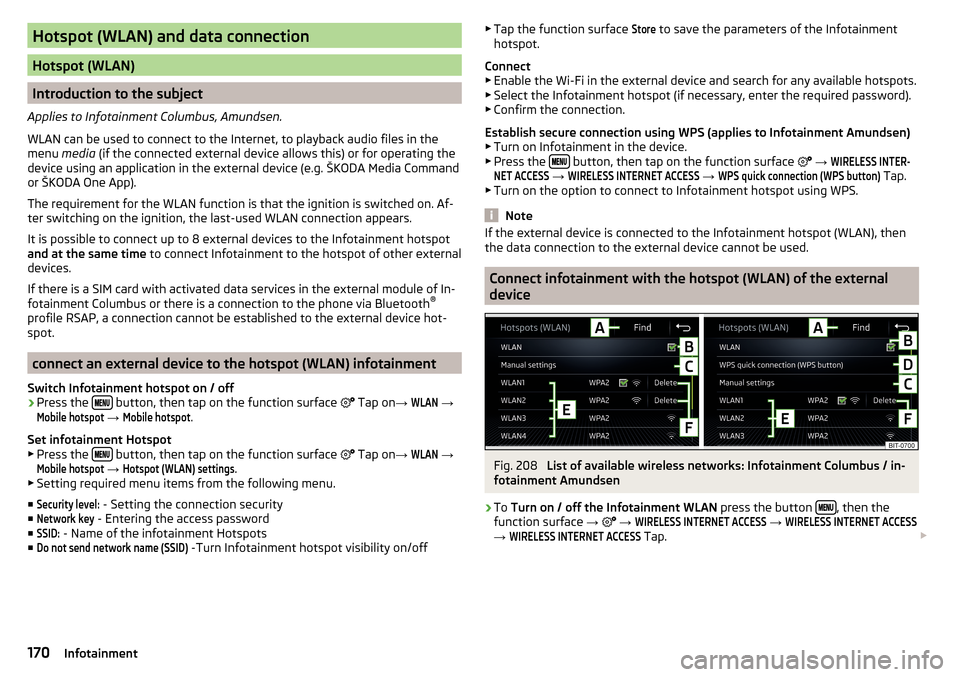
Fig. 208
List of available wireless networks: Infotainment Columbus / in-
fotainment Amundsen
›
To Turn on / off the Infotainment WLAN press the button , then the
function surface →
→
WIRELESS INTERNET ACCESS
→
WIRELESS INTERNET ACCESS
→
WIRELESS INTERNET ACCESS
Tap.
170Infotainment
Page 173 of 344
Show available hotspots
▶ Press the button, then tap on the function surface
→
WIRELESS INTER-NET ACCESS
→
WIRELESS INTERNET ACCESS
1)
Tap.
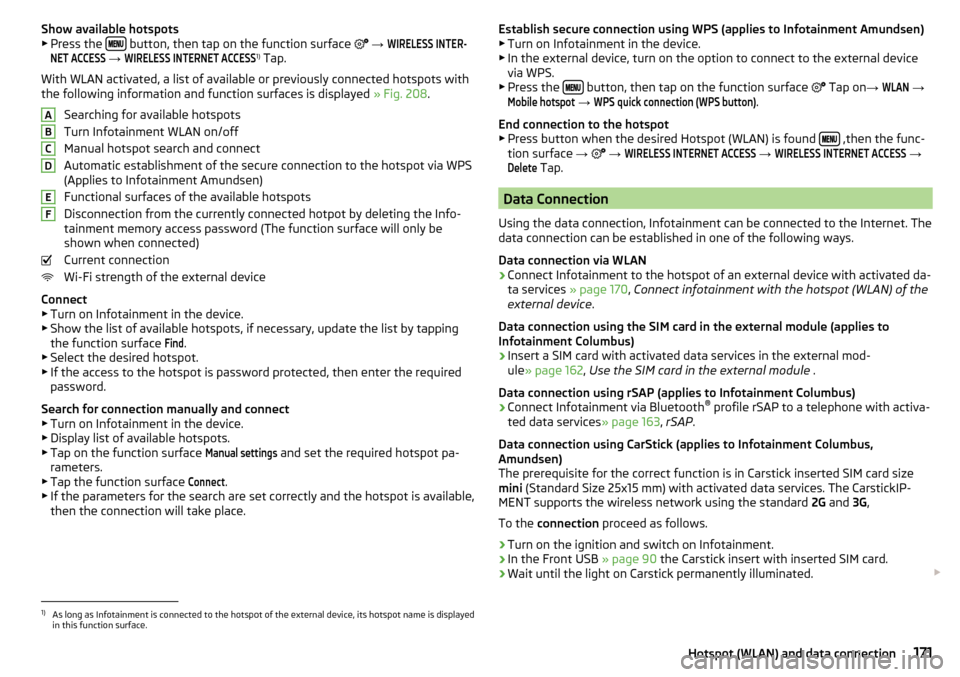
With WLAN activated, a list of available or previously connected hotspots with
the following information and function surfaces is displayed » Fig. 208.
Searching for available hotspots
Turn Infotainment WLAN on/off
Manual hotspot search and connect
Automatic establishment of the secure connection to the hotspot via WPS
(Applies to Infotainment Amundsen)
Functional surfaces of the available hotspots
Disconnection from the currently connected hotpot by deleting the Info-
tainment memory access password (The function surface will only be
shown when connected)
Current connection
Wi-Fi strength of the external device
Connect ▶ Turn on Infotainment in the device.
▶ Show the list of available hotspots, if necessary, update the list by tapping
the function surface
Find
.
▶ Select the desired hotspot.
▶ If the access to the hotspot is password protected, then enter the required
password.
Search for connection manually and connect ▶ Turn on Infotainment in the device.
▶ Display list of available hotspots.
▶ Tap on the function surface
Manual settings
and set the required hotspot pa-
rameters.
▶ Tap the function surface
Connect
.
▶ If the parameters for the search are set correctly and the hotspot is available,
then the connection will take place.
ABCDEFEstablish secure connection using WPS (applies to Infotainment Amundsen) ▶ Turn on Infotainment in the device.
▶ In the external device, turn on the option to connect to the external device
via WPS.
▶ Press the
button, then tap on the function surface
Tap on →
WLAN
→
Mobile hotspot
→
WPS quick connection (WPS button)
.
End connection to the hotspot ▶ Press button when the desired Hotspot (WLAN) is found
,then the func-
tion surface →
→
WIRELESS INTERNET ACCESS
→
WIRELESS INTERNET ACCESS
→
Delete
Tap.
Data Connection
Using the data connection, Infotainment can be connected to the Internet. The
data connection can be established in one of the following ways.
Data connection via WLAN
›
Connect Infotainment to the hotspot of an external device with activated da-
ta services » page 170, Connect infotainment with the hotspot (WLAN) of the
external device .
Data connection using the SIM card in the external module (applies to
Infotainment Columbus)
›
Insert a SIM card with activated data services in the external mod-
ule » page 162 , Use the SIM card in the external module .
Data connection using rSAP (applies to Infotainment Columbus)
›
Connect Infotainment via Bluetooth ®
profile rSAP to a telephone with activa-
ted data services » page 163, rSAP .
Data connection using CarStick (applies to Infotainment Columbus,
Amundsen)
The prerequisite for the correct function is in Carstick inserted SIM card size
mini (Standard Size 25x15 mm) with activated data services. The CarstickIP-
MENT supports the wireless network using the standard 2G and 3G,
To the connection proceed as follows.
›
Turn on the ignition and switch on Infotainment.
›
In the Front USB » page 90 the Carstick insert with inserted SIM card.
›
Wait until the light on Carstick permanently illuminated.
1)
As long as Infotainment is connected to the hotspot of the external device, its hotspot name is displayed
in this function surface.
171Hotspot (WLAN) and data connection
Page 175 of 344
CAUTIONTo establish the connection, it is necessary that the date and time in Infotain-
ment are set correctly. If the date and time setting is based on the GPS signal,
then problems may arise with establishing a connection with a poor GPS signal
reception.
Note
■ During the connection process, information messages may be displayed on
the Infotainment screen, and in the phone display. These messages must be
observed and confirmed if necessary (e.g. Release of data transfer, enabling
the contact import, release of text messages).■
We recommend that you use extension cords from ŠKODA Original Accesso-
ries.
■
With some connected devices, it is necessary that the connected external
device is unlocked over the entire duration of the connection for trouble-free
functioning of the SmartLink function“”.
Main menu
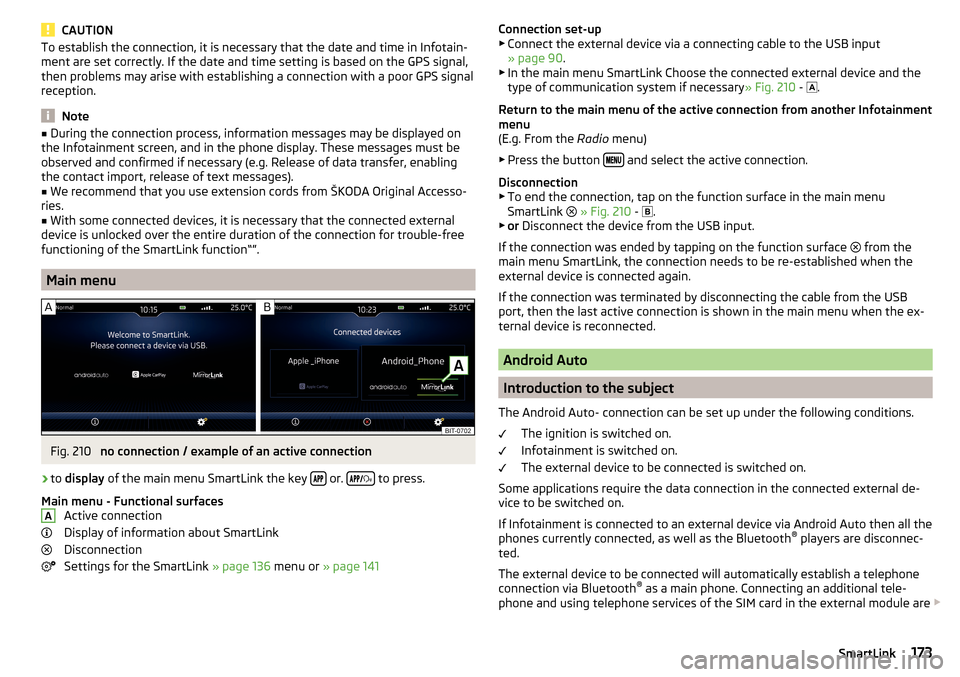
Fig. 210
no connection / example of an active connection
›
to display of the main menu SmartLink the key or.
to press.
Main menu - Functional surfaces Active connection
Display of information about SmartLink
Disconnection
Settings for the SmartLink » page 136 menu or » page 141
AConnection set-up
▶ Connect the external device via a connecting cable to the USB input
» page 90 .
▶ In the main menu SmartLink Choose the connected external device and the
type of communication system if necessary » Fig. 210 -
.
Return to the main menu of the active connection from another Infotainment
menu
(E.g. From the Radio menu)
▶ Press the button
and select the active connection.
Disconnection ▶ To end the connection, tap on the function surface in the main menu
SmartLink
» Fig. 210 -
.
▶ or Disconnect the device from the USB input.
If the connection was ended by tapping on the function surface from the
main menu SmartLink, the connection needs to be re-established when the
external device is connected again.
If the connection was terminated by disconnecting the cable from the USB
port, then the last active connection is shown in the main menu when the ex-
ternal device is reconnected.
Android Auto
Introduction to the subject
The Android Auto- connection can be set up under the following conditions. The ignition is switched on.
Infotainment is switched on.
The external device to be connected is switched on.
Some applications require the data connection in the connected external de-
vice to be switched on.
If Infotainment is connected to an external device via Android Auto then all the
phones currently connected, as well as the Bluetooth ®
players are disconnec-
ted.
The external device to be connected will automatically establish a telephone
connection via Bluetooth ®
as a main phone. Connecting an additional tele-
phone and using telephone services of the SIM card in the external module are
173SmartLink
Page 176 of 344
not possible for the duration of the connection. A possible data connection us-
ing the SIM card inserted in the external module remains operational
» page 171 .
An external device connected using Android Auto cannot be used as an audio source in the menu Media.
If route guidance is taking place at this moment in Infotainment, then there is
the option to start the route guidance in the Android Auto application. This is
also true reciprocally.
A list of devices and applications that the Android Autoconnection supports
can be found on the Google websites. Functionality is not guaranteed outside
of the supported regions.
main menu
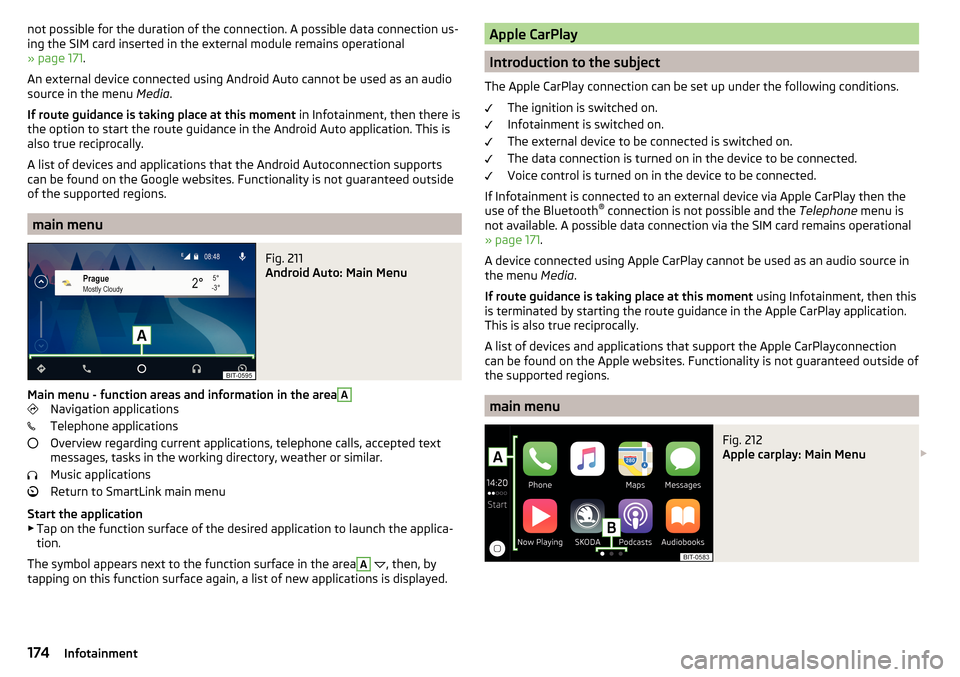
Fig. 211
Android Auto: Main Menu
Main menu - function areas and information in the area
A
Navigation applications
Telephone applications
Overview regarding current applications, telephone calls, accepted text
messages, tasks in the working directory, weather or similar.
Music applications
Return to SmartLink main menu
Start the application ▶ Tap on the function surface of the desired application to launch the applica-
tion.
The symbol appears next to the function surface in the area
A
, then, by
tapping on this function surface again, a list of new applications is displayed.
Apple CarPlay
Introduction to the subject
The Apple CarPlay connection can be set up under the following conditions. The ignition is switched on.
Infotainment is switched on.
The external device to be connected is switched on.
The data connection is turned on in the device to be connected.
Voice control is turned on in the device to be connected.
If Infotainment is connected to an external device via Apple CarPlay then the use of the Bluetooth ®
connection is not possible and the Telephone menu is
not available. A possible data connection via the SIM card remains operational
» page 171 .
A device connected using Apple CarPlay cannot be used as an audio source in
the menu Media.
If route guidance is taking place at this moment using Infotainment, then this
is terminated by starting the route guidance in the Apple CarPlay application.
This is also true reciprocally.
A list of devices and applications that support the Apple CarPlayconnection
can be found on the Apple websites. Functionality is not guaranteed outside of
the supported regions.
main menu
Fig. 212
Apple carplay: Main Menu
174Infotainment