warning light SKODA KODIAQ 2016 1.G Service Manual
[x] Cancel search | Manufacturer: SKODA, Model Year: 2016, Model line: KODIAQ, Model: SKODA KODIAQ 2016 1.GPages: 344, PDF Size: 58.96 MB
Page 88 of 344
With repeated pressing of the button, the level is down-regulated until it
switches off . The level of the seat heating is indicated by the number of illu-
minated warning lights underneath / in the button.
Increasing in heating power of the rear seat heating can be locked / unlocked .
To do this, press button
on the Climatronic → Tap the function surfaces
/
on the Infotainment screen (applies to vehicles with Climatronic controls
in the rear). In the locked heating power increase, the heating power can only
be adjusted down to turn off.
Front seats with heating and ventilation
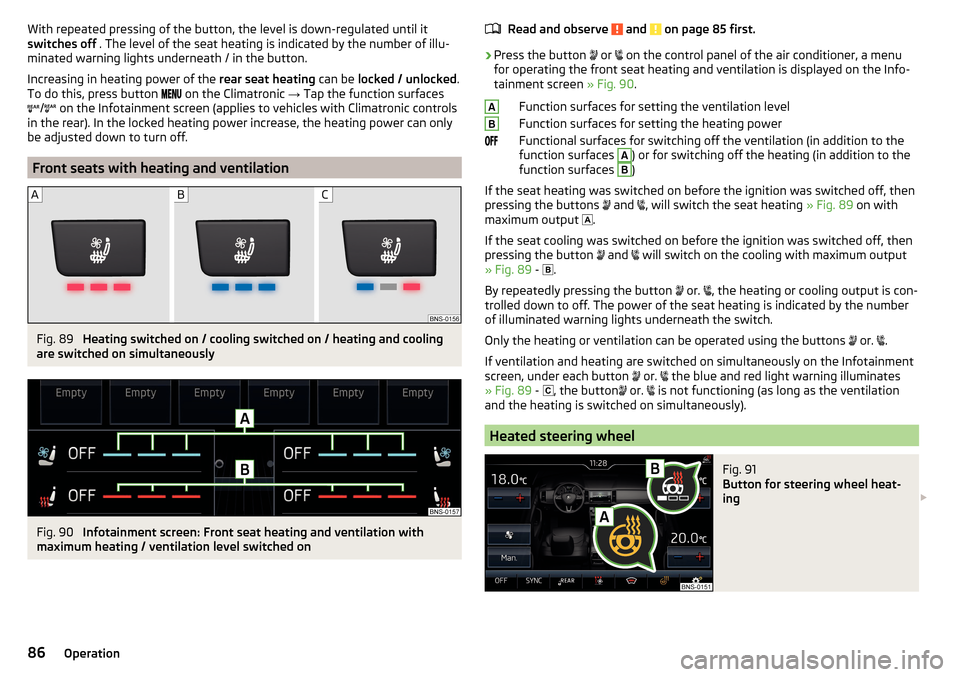
Fig. 89
Heating switched on / cooling switched on / heating and cooling
are switched on simultaneously
Fig. 90
Infotainment screen: Front seat heating and ventilation with
maximum heating / ventilation level switched on
Read and observe and on page 85 first.›
Press the button
or
on the control panel of the air conditioner, a menu
for operating the front seat heating and ventilation is displayed on the Info-
tainment screen » Fig. 90.
Function surfaces for setting the ventilation level
Function surfaces for setting the heating power
Functional surfaces for switching off the ventilation (in addition to the
function surfaces
A
) or for switching off the heating (in addition to the
function surfaces
B
)
If the seat heating was switched on before the ignition was switched off, then
pressing the buttons and
, will switch the seat heating
» Fig. 89 on with
maximum output .
If the seat cooling was switched on before the ignition was switched off, then
pressing the button and
will switch on the cooling with maximum output
» Fig. 89 -
.
By repeatedly pressing the button or.
, the heating or cooling output is con-
trolled down to off. The power of the seat heating is indicated by the number
of illuminated warning lights underneath the switch.
Only the heating or ventilation can be operated using the buttons or.
.
If ventilation and heating are switched on simultaneously on the Infotainment
screen, under each button or.
the blue and red light warning illuminates
» Fig. 89 -
, the button
or.
is not functioning (as long as the ventilation
and the heating is switched on simultaneously).
Heated steering wheel
Fig. 91
Button for steering wheel heat-
ing
AB86Operation
Page 99 of 344
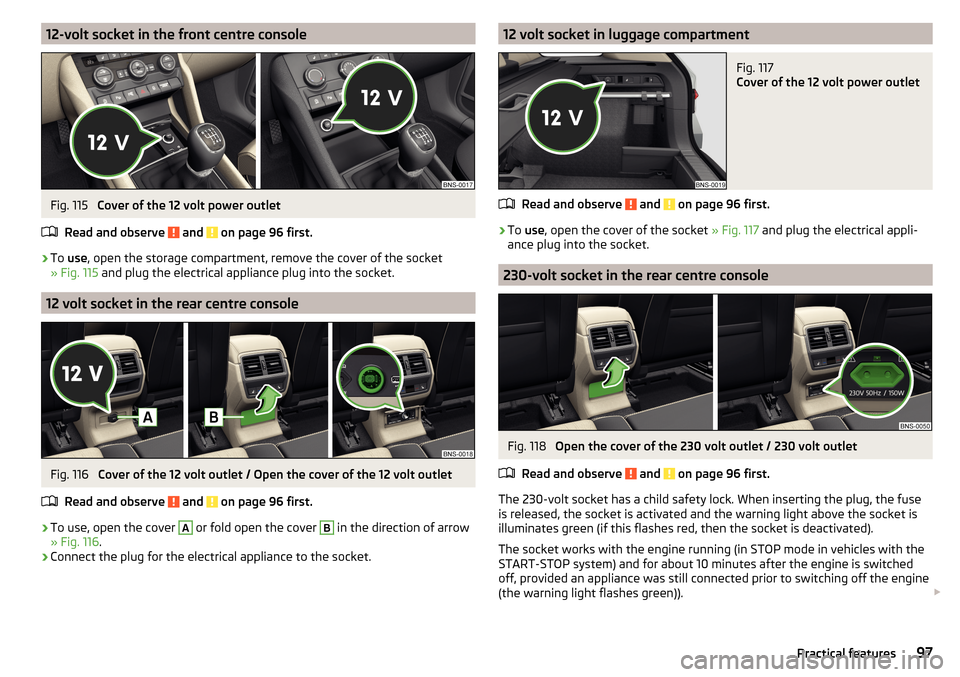
12-volt socket in the front centre consoleFig. 115
Cover of the 12 volt power outlet
Read and observe
and on page 96 first.
›
To use , open the storage compartment, remove the cover of the socket
» Fig. 115 and plug the electrical appliance plug into the socket.
12 volt socket in the rear centre console
Fig. 116
Cover of the 12 volt outlet / Open the cover of the 12 volt outlet
Read and observe
and on page 96 first.
›
To use, open the cover
A
or fold open the cover
B
in the direction of arrow
» Fig. 116 .
›
Connect the plug for the electrical appliance to the socket.
12 volt socket in luggage compartmentFig. 117
Cover of the 12 volt power outlet
Read and observe and on page 96 first.
›
To use , open the cover of the socket » Fig. 117 and plug the electrical appli-
ance plug into the socket.
230-volt socket in the rear centre console
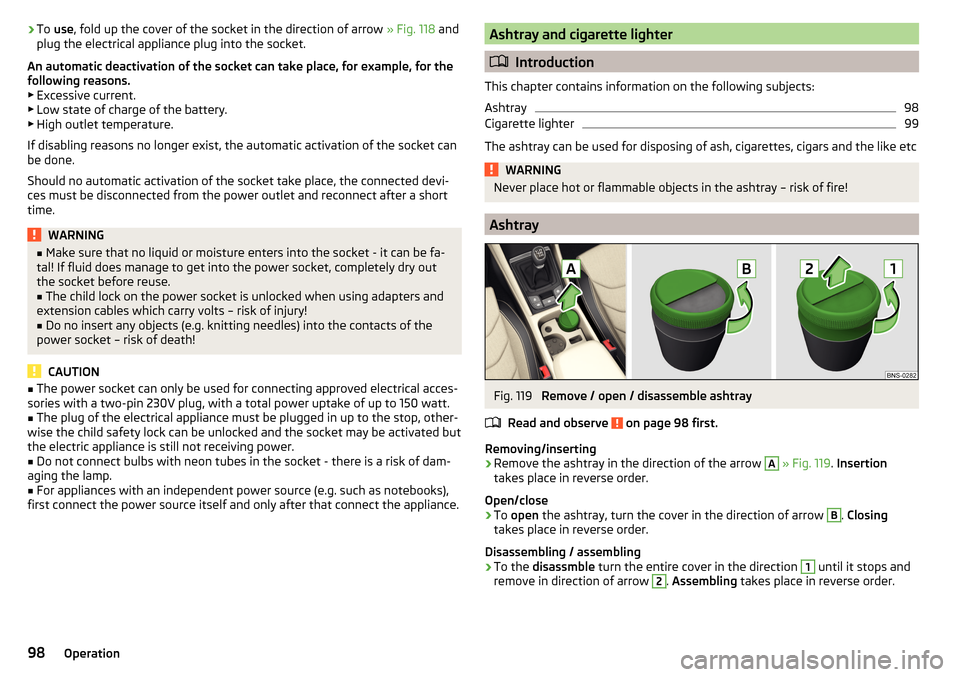
Fig. 118
Open the cover of the 230 volt outlet / 230 volt outlet
Read and observe
and on page 96 first.
The 230-volt socket has a child safety lock. When inserting the plug, the fuse
is released, the socket is activated and the warning light above the socket is
illuminates green (if this flashes red, then the socket is deactivated).
The socket works with the engine running (in STOP mode in vehicles with the
START-STOP system) and for about 10 minutes after the engine is switched
off, provided an appliance was still connected prior to switching off the engine
(the warning light flashes green)).
97Practical features
Page 100 of 344
›To
use , fold up the cover of the socket in the direction of arrow » Fig. 118 and
plug the electrical appliance plug into the socket.
An automatic deactivation of the socket can take place, for example, for the
following reasons. ▶ Excessive current.
▶ Low state of charge of the battery.
▶ High outlet temperature.
If disabling reasons no longer exist, the automatic activation of the socket can
be done.
Should no automatic activation of the socket take place, the connected devi-
ces must be disconnected from the power outlet and reconnect after a short
time.WARNING■ Make sure that no liquid or moisture enters into the socket - it can be fa-
tal! If fluid does manage to get into the power socket, completely dry out
the socket before reuse.■
The child lock on the power socket is unlocked when using adapters and
extension cables which carry volts – risk of injury!
■
Do no insert any objects (e.g. knitting needles) into the contacts of the
power socket – risk of death!
CAUTION
■ The power socket can only be used for connecting approved electrical acces-
sories with a two-pin 230V plug, with a total power uptake of up to 150 watt.■
The plug of the electrical appliance must be plugged in up to the stop, other-
wise the child safety lock can be unlocked and the socket may be activated but
the electric appliance is still not receiving power.
■
Do not connect bulbs with neon tubes in the socket - there is a risk of dam-
aging the lamp.
■
For appliances with an independent power source (e.g. such as notebooks),
first connect the power source itself and only after that connect the appliance.
Ashtray and cigarette lighter
Introduction
This chapter contains information on the following subjects:
Ashtray
98
Cigarette lighter
99
The ashtray can be used for disposing of ash, cigarettes, cigars and the like etc
WARNINGNever place hot or flammable objects in the ashtray – risk of fire!
Ashtray
Fig. 119
Remove / open / disassemble ashtray
Read and observe
on page 98 first.
Removing/inserting
›
Remove the ashtray in the direction of the arrow
A
» Fig. 119 . Insertion
takes place in reverse order.
Open/close
›
To open the ashtray, turn the cover in the direction of arrow
B
. Closing
takes place in reverse order.
Disassembling / assembling
›
To the disassmble turn the entire cover in the direction
1
until it stops and
remove in direction of arrow
2
. Assembling takes place in reverse order.
98Operation
Page 101 of 344
Cigarette lighterFig. 120
Cigarette lighter
Read and observe
on page 98 first.
›
To use , open the respective storage compartment and push in the lighter un-
til it stops » Fig. 120.
›
Wait until the glowing lighter protrudes, remove it immediately and use.
›
Put the lighter back in the socket and close the storage compartment.
WARNING■
The cigarette lighter also works if the ignition is switched off. When leav-
ing the vehicle, never leave people who are not completely independent,
such as children, unattended in the vehicle - there is a risk of burning, fire
or damage to the vehicle interior.■
Be careful when using the cigarette lighter - it can cause burns.
Note
The cigarette lighter socket can also be used as a 12 volt socket.
Tablet holder
Introduction
This chapter contains information on the following subjects:
Attaching the rear headrests
99
Handling the holder
100
External devices (e.g. tablet, smartphone etc.) measuring min. 122 mm and
max. 195 mm can be secured in the holder.
The maximum permissible load of the compartment is 750 g.
CAUTION
Never exceed the maximum permissible load of the holder - there is a risk of
damage or functional impairment.
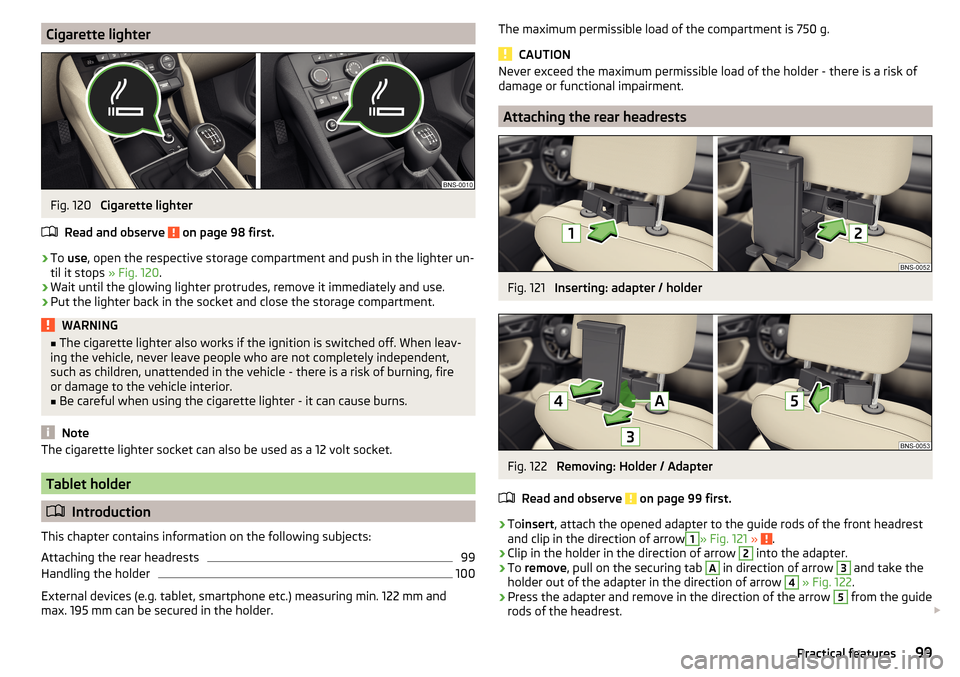
Attaching the rear headrests
Fig. 121
Inserting: adapter / holder
Fig. 122
Removing: Holder / Adapter
Read and observe
on page 99 first.
›
To insert , attach the opened adapter to the guide rods of the front headrest
and clip in the direction of arrow
1
» Fig. 121 » .
›
Clip in the holder in the direction of arrow
2
into the adapter.
›
To remove , pull on the securing tab
A
in direction of arrow
3
and take the
holder out of the adapter in the direction of arrow
4
» Fig. 122 .
›
Press the adapter and remove in the direction of the arrow
5
from the guide
rods of the headrest.
99Practical features
Page 102 of 344
WARNINGBe careful with the adapter- otherwise there is a risk of finger injury.
Handling the holder
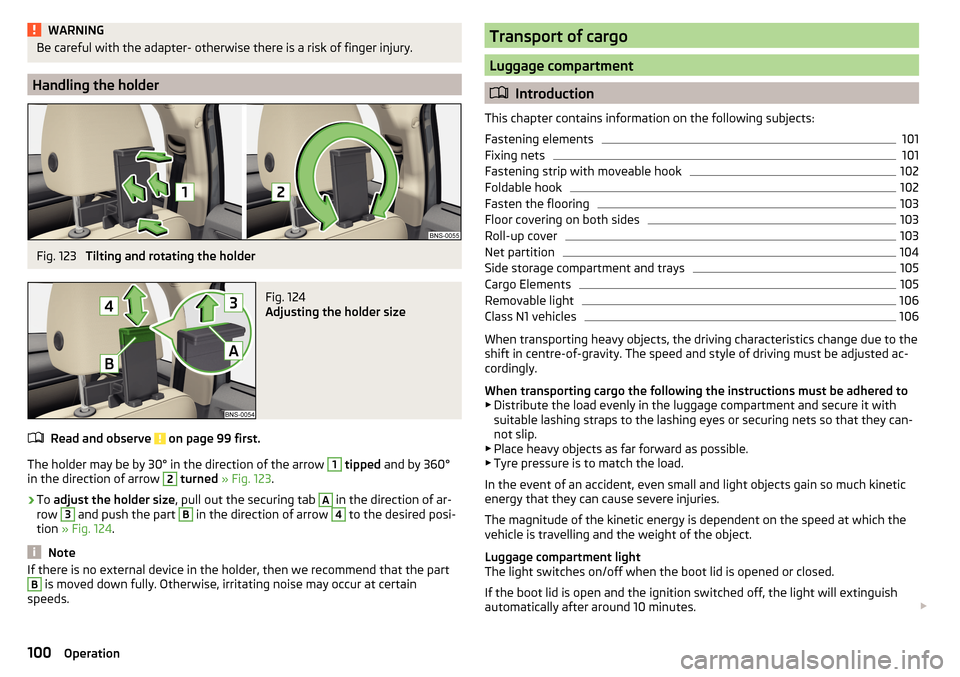
Fig. 123
Tilting and rotating the holder
Fig. 124
Adjusting the holder size
Read and observe on page 99 first.
The holder may be by 30° in the direction of the arrow
1
tipped and by 360°
in the direction of arrow
2
turned » Fig. 123 .
›
To adjust the holder size , pull out the securing tab
A
in the direction of ar-
row
3
and push the part
B
in the direction of arrow
4
to the desired posi-
tion » Fig. 124 .
Note
If there is no external device in the holder, then we recommend that the partB is moved down fully. Otherwise, irritating noise may occur at certain
speeds.Transport of cargo
Luggage compartment
Introduction
This chapter contains information on the following subjects:
Fastening elements
101
Fixing nets
101
Fastening strip with moveable hook
102
Foldable hook
102
Fasten the flooring
103
Floor covering on both sides
103
Roll-up cover
103
Net partition
104
Side storage compartment and trays
105
Cargo Elements
105
Removable light
106
Class N1 vehicles
106
When transporting heavy objects, the driving characteristics change due to the
shift in centre-of-gravity. The speed and style of driving must be adjusted ac-
cordingly.
When transporting cargo the following the instructions must be adhered to
▶ Distribute the load evenly in the luggage compartment and secure it with
suitable lashing straps to the lashing eyes or securing nets so that they can-
not slip.
▶ Place heavy objects as far forward as possible.
▶ Tyre pressure is to match the load.
In the event of an accident, even small and light objects gain so much kinetic
energy that they can cause severe injuries.
The magnitude of the kinetic energy is dependent on the speed at which the
vehicle is travelling and the weight of the object.
Luggage compartment light
The light switches on/off when the boot lid is opened or closed.
If the boot lid is open and the ignition switched off, the light will extinguish
automatically after around 10 minutes.
100Operation
Page 112 of 344
WARNING■The blower should always be on to prevent the windows from misting.
Otherwise there could be an accident.■
Under certain circumstances, air at a temperature of about 5 °C can flow
out of the vents when the cooling system is switched on.
Note
■ The air inlet in front of the windscreen must be free of e.g. ice, snow or
leaves to ensure that the heating and cooling system operates properly.■
After switching on the cooling Condensation from the evaporator of the air
conditioning may drip down and form a puddle below the vehicle. This is not a
leak!
■
If the coolant temperature is too high, the cooling system is switched off to
ensure that the engine cools down.
Heating and manual air conditioning
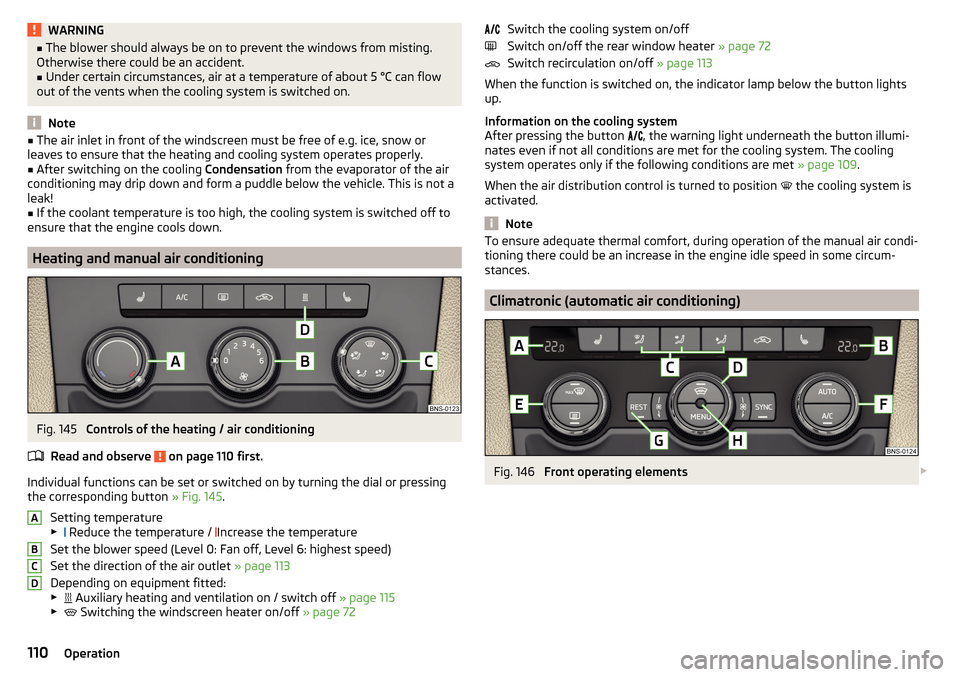
Fig. 145
Controls of the heating / air conditioning
Read and observe
on page 110 first.
Individual functions can be set or switched on by turning the dial or pressing the corresponding button » Fig. 145.
Setting temperature
▶ Reduce the temperature /
Increase the temperature
Set the blower speed (Level 0: Fan off, Level 6: highest speed)
Set the direction of the air outlet » page 113
Depending on equipment fitted:
▶ Auxiliary heating and ventilation on / switch off
» page 115
▶ Switching the windscreen heater on/off
» page 72
ABCDSwitch the cooling system on/off
Switch on/off the rear window heater » page 72
Switch recirculation on/off » page 113
When the function is switched on, the indicator lamp below the button lights up.
Information on the cooling system
After pressing the button
, the warning light underneath the button illumi-
nates even if not all conditions are met for the cooling system. The cooling
system operates only if the following conditions are met » page 109.
When the air distribution control is turned to position
the cooling system is
activated.
Note
To ensure adequate thermal comfort, during operation of the manual air condi-
tioning there could be an increase in the engine idle speed in some circum-
stances.
Climatronic (automatic air conditioning)
Fig. 146
Front operating elements
110Operation
Page 115 of 344
Air distribution controlRead and observe
on page 110 first.
The recirculation mode prevents contaminated outside air getting into the In-terior of the vehicle. In recirculated air mode air is sucked out of the interior of
the vehicle and then fed back into the interior.
›
To switch on , press the
button. The warning light below the button lights
up.
›
To switch off , press the
button again. The warning light below the button
goes out.
Heating and manual air conditioning system
If the air distribution control is set to position when the recirculation modes
is switched on, the recirculated-air mode is switched off. By pressing the
button, the air recirculation also in this position can be switched on again.
When the cooling system (button ) is switched on and the temperature reg-
ulator is “turned” to the left, the recirculated-air mode is switched on.
Climatronic
The Climatronic can have a sensor that measures the air recirculation mode and automatically turns on if there is an increased concentration of pollutants
in the incoming air.
When the pollutant concentration decreases to the normal level, the recircula-
ted air mode is automatically switched off.
Automatically switch on / off the air recirculation function can be set in the In-
fotainment screen. by pressing the button on the Climatronic and by sub-
sequently pressing the function surfaces
→
Automatic air recirculation
. Auto-
matic power on / off function at a temperature above 2 ° C.
A shut-off of the air recirculation function is carried out by pressing the
button, possibly depending on the moisture conditions in the vehicle interior.
WARNINGThe air recirculation cannot be switched on for a longer period of time be-
cause there is no supply of fresh air from the outside. “Stale air” may result
in fatigue in the driver and occupants, reduce attention levels and also
cause the windows to mist up. As soon as the windows mist up, turn the air
recirculation mode off immediately - there is a risk of accident!CAUTIONWe recommend not smoking in the vehicle when the recirculating air operation
is switched on. The smoke sucked from inside the vehicle is deposited on the
evaporator of the air conditioner. This produces a permanent odour when the
air conditioning system is operating which can only be eliminated through con-
siderable effort and expense (replacement of compressor).
Air outlet vents
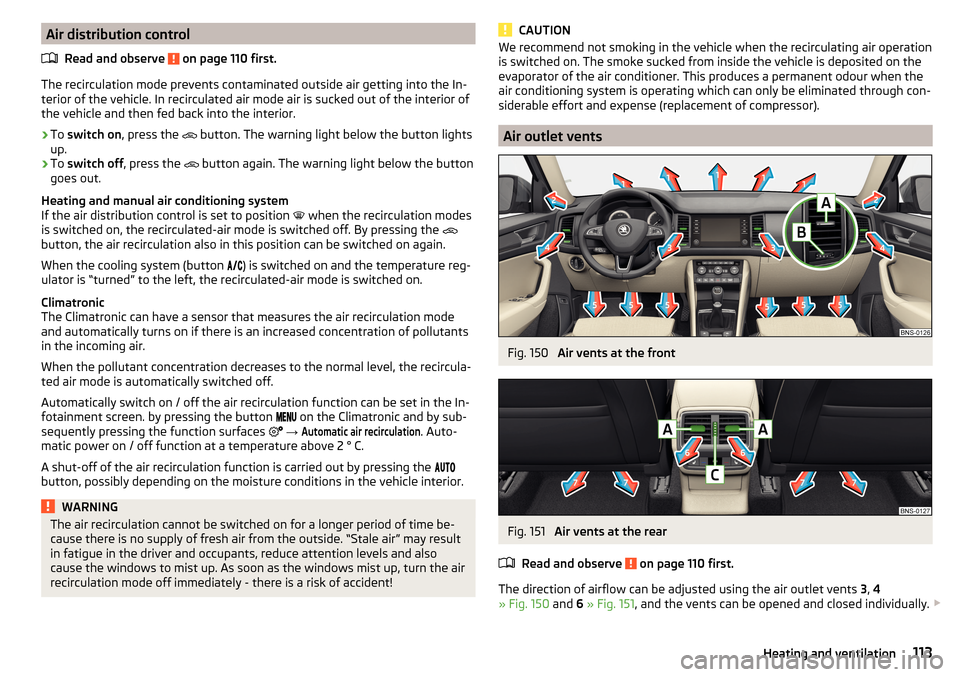
Fig. 150
Air vents at the front
Fig. 151
Air vents at the rear
Read and observe
on page 110 first.
The direction of airflow can be adjusted using the air outlet vents 3, 4
» Fig. 150 and 6 » Fig. 151 , and the vents can be opened and closed individually.
113Heating and ventilation
Page 117 of 344
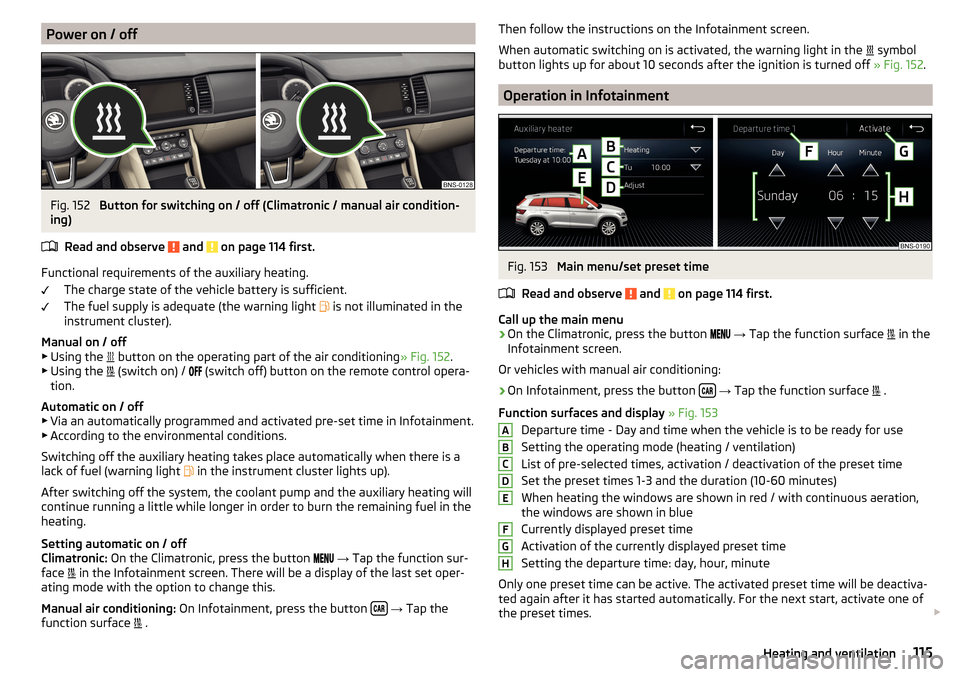
Power on / offFig. 152
Button for switching on / off (Climatronic / manual air condition-
ing)
Read and observe
and on page 114 first.
Functional requirements of the auxiliary heating. The charge state of the vehicle battery is sufficient.
The fuel supply is adequate (the warning light is not illuminated in the
instrument cluster).
Manual on / off ▶ Using the button on the operating part of the air conditioning
» Fig. 152.
▶ Using the (switch on) /
(switch off) button on the remote control opera-
tion.
Automatic on / off ▶ Via an automatically programmed and activated pre-set time in Infotainment.
▶ According to the environmental conditions.
Switching off the auxiliary heating takes place automatically when there is a
lack of fuel (warning light in the instrument cluster lights up).
After switching off the system, the coolant pump and the auxiliary heating will
continue running a little while longer in order to burn the remaining fuel in the
heating.
Setting automatic on / off
Climatronic: On the Climatronic, press the button
→ Tap the function sur-
face in the Infotainment screen. There will be a display of the last set oper-
ating mode with the option to change this.
Manual air conditioning: On Infotainment, press the button
→ Tap the
function surface .
Then follow the instructions on the Infotainment screen.
When automatic switching on is activated, the warning light in the
symbol
button lights up for about 10 seconds after the ignition is turned off » Fig. 152.
Operation in Infotainment
Fig. 153
Main menu/set preset time
Read and observe
and on page 114 first.
Call up the main menu
›
On the Climatronic, press the button
→ Tap the function surface
in the
Infotainment screen.
Or vehicles with manual air conditioning:
›
On Infotainment, press the button
→ Tap the function surface
.
Function surfaces and display » Fig. 153
Departure time - Day and time when the vehicle is to be ready for use
Setting the operating mode (heating / ventilation)
List of pre-selected times, activation / deactivation of the preset time Set the preset times 1-3 and the duration (10-60 minutes)
When heating the windows are shown in red / with continuous aeration,
the windows are shown in blue
Currently displayed preset time
Activation of the currently displayed preset time
Setting the departure time: day, hour, minute
Only one preset time can be active. The activated preset time will be deactiva-
ted again after it has started automatically. For the next start, activate one of
the preset times.
ABCDEFGH115Heating and ventilation
Page 118 of 344
Note■In the selection of the day in the preset time, there is an option between
Sunday and Monday without the specified day. If this setting is selected, the
vehicle will be ready for use at the selected time, regardless of the current day.■
If a different time is set, the activated preset time is automatically deactiva-
ted. The preset time must be reactivated.
Radio remote control
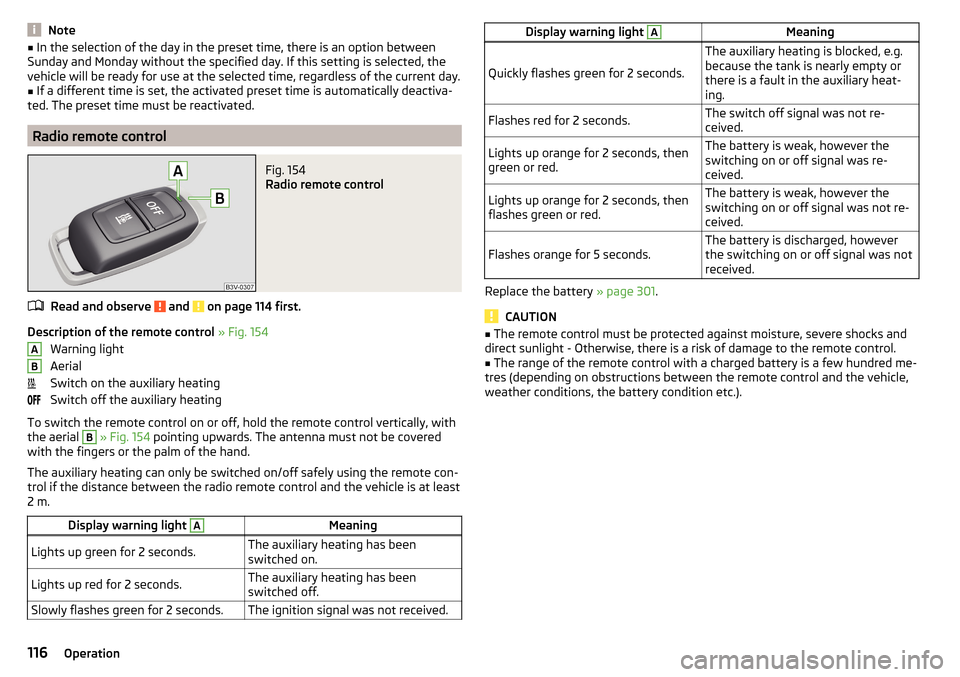
Fig. 154
Radio remote control
Read and observe and on page 114 first.
Description of the remote control » Fig. 154
Warning light
Aerial
Switch on the auxiliary heating
Switch off the auxiliary heating
To switch the remote control on or off, hold the remote control vertically, with the aerial
B
» Fig. 154 pointing upwards. The antenna must not be covered
with the fingers or the palm of the hand.
The auxiliary heating can only be switched on/off safely using the remote con-
trol if the distance between the radio remote control and the vehicle is at least
2 m.
Display warning light AMeaningLights up green for 2 seconds.The auxiliary heating has been
switched on.Lights up red for 2 seconds.The auxiliary heating has been
switched off.Slowly flashes green for 2 seconds.The ignition signal was not received.ABDisplay warning light AMeaning
Quickly flashes green for 2 seconds.
The auxiliary heating is blocked, e.g.
because the tank is nearly empty or
there is a fault in the auxiliary heat-
ing.Flashes red for 2 seconds.The switch off signal was not re-
ceived.Lights up orange for 2 seconds, then
green or red.The battery is weak, however the
switching on or off signal was re-
ceived.Lights up orange for 2 seconds, then
flashes green or red.The battery is weak, however the
switching on or off signal was not re-
ceived.Flashes orange for 5 seconds.The battery is discharged, however
the switching on or off signal was not
received.
Replace the battery » page 301.
CAUTION
■
The remote control must be protected against moisture, severe shocks and
direct sunlight - Otherwise, there is a risk of damage to the remote control.■
The range of the remote control with a charged battery is a few hundred me-
tres (depending on obstructions between the remote control and the vehicle,
weather conditions, the battery condition etc.).
116Operation
Page 120 of 344
Applies to Infotainment Columbus, Amundsen, Bolero
▶ The Enter the activation PIN code takes place in the Infotainment menu
→
→
ŠKODA Connect (online services)
→
registration
,
Applies to Infotainment Swing ▶ The Enter the activation PIN code takes place in the Infotainment menu
→
ŠKODA Connect (online services)
→
registration
,
▶ After entering the activation PIN code to activate the user profile on the
website ŠKODA Connect Portal complete.
Care Connect-Services
Introduction to the subject
The Care ConnectServices enable information / breakdown / emergency, the transmission of information concerning the vehicle condition to the selected
service partner or to control some vehicle functions by means of installed in
the mobile phone ŠKODA Connect-Application.
To the Care ConnectTo use services, the following conditions must be met. The registration in the user profile on the website ŠKODA Connect Portal
has taken place.
Entering the Activation PIN code for online services in infotainment is
done.
A wireless network is available.
Information / breakdown / emergency
Only valid for some countries.
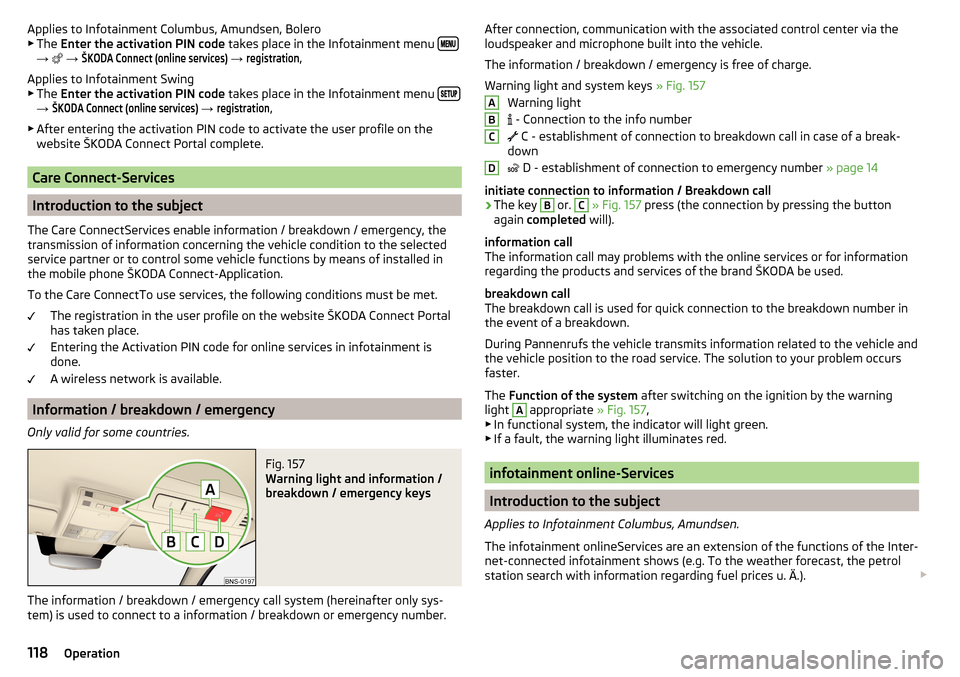
Fig. 157
Warning light and information /
breakdown / emergency keys
The information / breakdown / emergency call system (hereinafter only sys-
tem) is used to connect to a information / breakdown or emergency number.
After connection, communication with the associated control center via the
loudspeaker and microphone built into the vehicle.
The information / breakdown / emergency is free of charge.
Warning light and system keys » Fig. 157
Warning light
- Connection to the info number
C - establishment of connection to breakdown call in case of a break-
down
D - establishment of connection to emergency number
» page 14
initiate connection to information / Breakdown call›
The key
B
or.
C
» Fig. 157 press (the connection by pressing the button
again completed will).
information call
The information call may problems with the online services or for information
regarding the products and services of the brand ŠKODA be used.
breakdown call
The breakdown call is used for quick connection to the breakdown number in the event of a breakdown.
During Pannenrufs the vehicle transmits information related to the vehicle and
the vehicle position to the road service. The solution to your problem occurs
faster.
The Function of the system after switching on the ignition by the warning
light
A
appropriate » Fig. 157,
▶ In functional system, the indicator will light green.
▶ If a fault, the warning light illuminates red.
infotainment online-Services
Introduction to the subject
Applies to Infotainment Columbus, Amundsen.
The infotainment onlineServices are an extension of the functions of the Inter-
net-connected infotainment shows (e.g. To the weather forecast, the petrol
station search with information regarding fuel prices u. Ä.).
ABCD118Operation