door lock SKODA KODIAQ 2016 1.G Owner's Manual
[x] Cancel search | Manufacturer: SKODA, Model Year: 2016, Model line: KODIAQ, Model: SKODA KODIAQ 2016 1.GPages: 344, PDF Size: 58.96 MB
Page 6 of 344
Do-it-yourself
Emergency equipment and self-help290
Emergency equipment
290
Changing a wheel
291
Puncture repair kit
295
Jump-starting
297
Towing the vehicle
298
Remote control and removable light -
replacing the battery/batteries
300
Emergency unlocking / locking of doors
302
Replacing windscreen wiper blades
303
Fuses and light bulbs
305
Fuses
305
Bulbs
308
Technical data
Technical data
313
Basic vehicle data
313
Vehicle-specific details per engine type
318
Index
4Table of Contents
Page 22 of 344
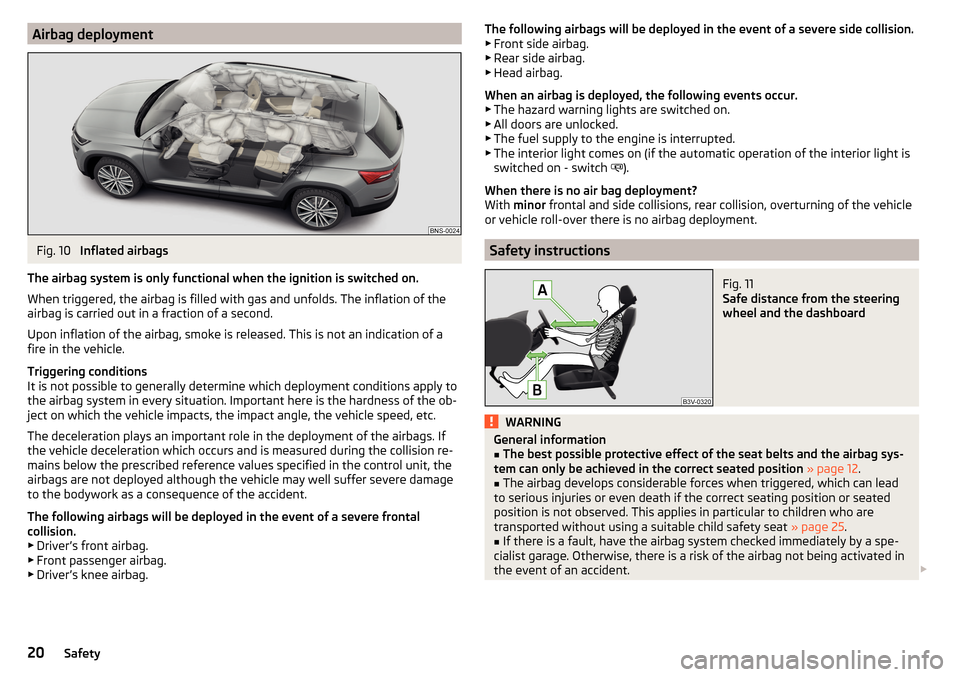
Airbag deploymentFig. 10
Inflated airbags
The airbag system is only functional when the ignition is switched on.
When triggered, the airbag is filled with gas and unfolds. The inflation of the
airbag is carried out in a fraction of a second.
Upon inflation of the airbag, smoke is released. This is not an indication of a fire in the vehicle.
Triggering conditions
It is not possible to generally determine which deployment conditions apply to
the airbag system in every situation. Important here is the hardness of the ob-
ject on which the vehicle impacts, the impact angle, the vehicle speed, etc.
The deceleration plays an important role in the deployment of the airbags. If
the vehicle deceleration which occurs and is measured during the collision re-
mains below the prescribed reference values specified in the control unit, the
airbags are not deployed although the vehicle may well suffer severe damage
to the bodywork as a consequence of the accident.
The following airbags will be deployed in the event of a severe frontal
collision.
▶ Driver’s front airbag.
▶ Front passenger airbag.
▶ Driver’s knee airbag.
The following airbags will be deployed in the event of a severe side collision.
▶ Front side airbag.
▶ Rear side airbag.
▶ Head airbag.
When an airbag is deployed, the following events occur. ▶ The hazard warning lights are switched on.
▶ All doors are unlocked.
▶ The fuel supply to the engine is interrupted.
▶ The interior light comes on (if the automatic operation of the interior light is
switched on - switch
).
When there is no air bag deployment?
With minor frontal and side collisions, rear collision, overturning of the vehicle
or vehicle roll-over there is no airbag deployment.
Safety instructions
Fig. 11
Safe distance from the steering
wheel and the dashboard
WARNINGGeneral information■The best possible protective effect of the seat belts and the airbag sys-
tem can only be achieved in the correct seated position » page 12 .■
The airbag develops considerable forces when triggered, which can lead
to serious injuries or even death if the correct seating position or seated
position is not observed. This applies in particular to children who are
transported without using a suitable child safety seat » page 25.
■
If there is a fault, have the airbag system checked immediately by a spe-
cialist garage. Otherwise, there is a risk of the airbag not being activated in
the event of an accident.
20Safety
Page 33 of 344
Operation
Cockpit
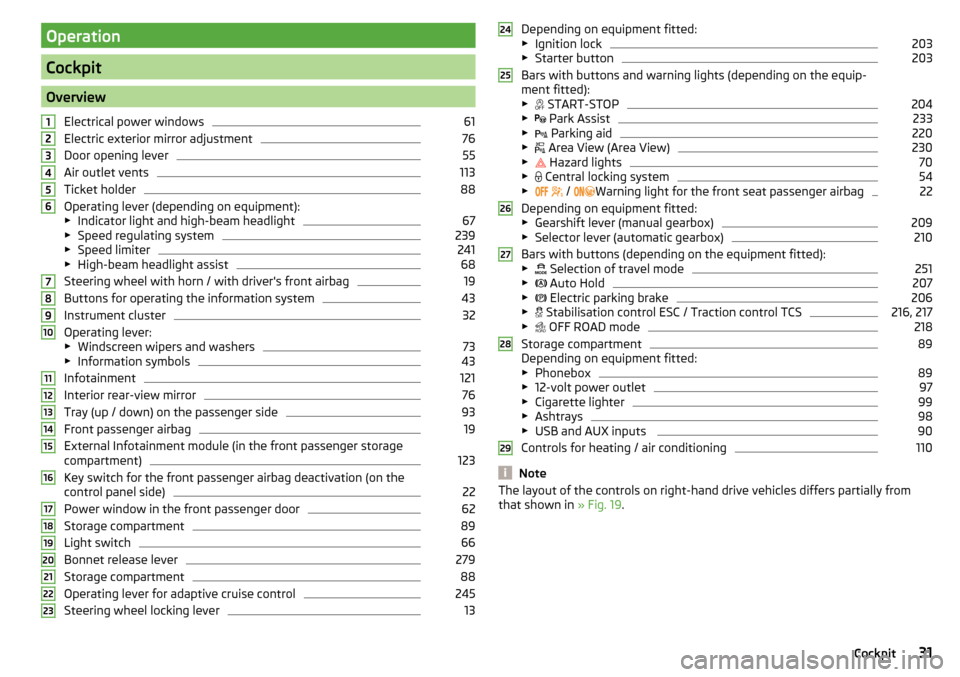
OverviewElectrical power windows
61
Electric exterior mirror adjustment
76
Door opening lever
55
Air outlet vents
113
Ticket holder
88
Operating lever (depending on equipment):
▶ Indicator light and high-beam headlight
67
▶Speed regulating system
239
▶Speed limiter
241
▶High-beam headlight assist
68
Steering wheel with horn / with driver's front airbag
19
Buttons for operating the information system
43
Instrument cluster
32
Operating lever:
▶ Windscreen wipers and washers
73
▶Information symbols
43
Infotainment
121
Interior rear-view mirror
76
Tray (up / down) on the passenger side
93
Front passenger airbag
19
External Infotainment module (in the front passenger storage
compartment)
123
Key switch for the front passenger airbag deactivation (on the
control panel side)
22
Power window in the front passenger door
62
Storage compartment
89
Light switch
66
Bonnet release lever
279
Storage compartment
88
Operating lever for adaptive cruise control
245
Steering wheel locking lever
131234567891011121314151617181920212223Depending on equipment fitted:
▶ Ignition lock203
▶Starter button
203
Bars with buttons and warning lights (depending on the equip-
ment fitted): ▶ START-STOP
204
▶
Park Assist
233
▶
Parking aid
220
▶
Area View (Area View)
230
▶
Hazard lights
70
▶
Central locking system
54
▶
/
Warning light for the front seat passenger airbag
22
Depending on equipment fitted:
▶ Gearshift lever (manual gearbox)
209
▶Selector lever (automatic gearbox)
210
Bars with buttons (depending on the equipment fitted):
▶ Selection of travel mode
251
▶
Auto Hold
207
▶
Electric parking brake
206
▶
Stabilisation control ESC / Traction control TCS
216, 217
▶
OFF ROAD mode
218
Storage compartment
89
Depending on equipment fitted:
▶ Phonebox
89
▶12-volt power outlet
97
▶Cigarette lighter
99
▶Ashtrays
98
▶USB and AUX inputs
90
Controls for heating / air conditioning
110
Note
The layout of the controls on right-hand drive vehicles differs partially from
that shown in » Fig. 19.24252627282931Cockpit
Page 46 of 344
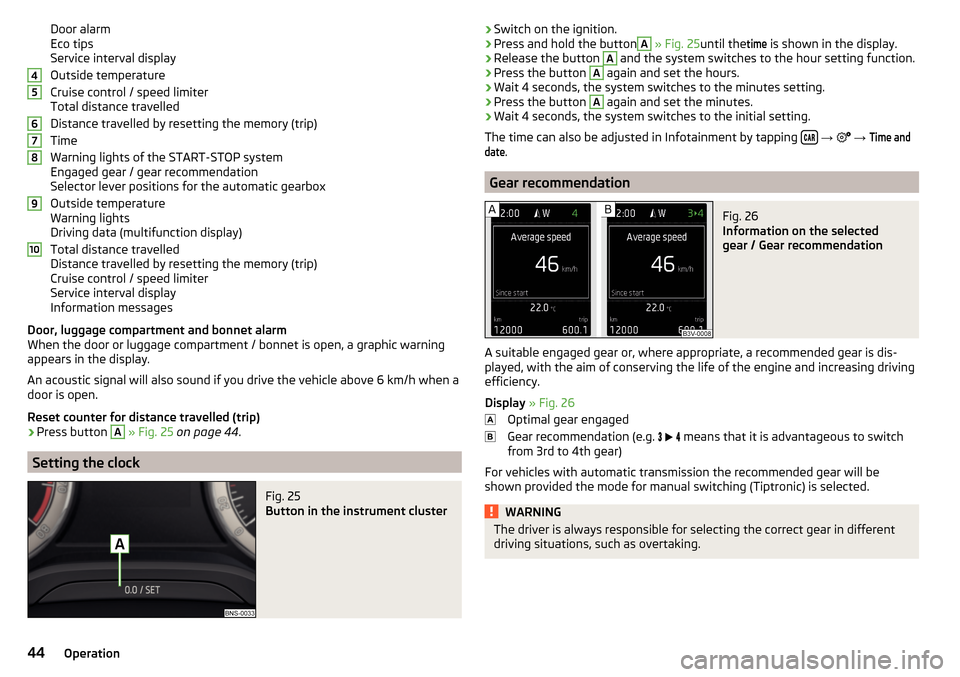
Door alarm
Eco tips
Service interval display
Outside temperature
Cruise control / speed limiter
Total distance travelled
Distance travelled by resetting the memory (trip)
Time
Warning lights of the START-STOP system
Engaged gear / gear recommendation
Selector lever positions for the automatic gearbox
Outside temperature
Warning lights
Driving data (multifunction display)
Total distance travelled
Distance travelled by resetting the memory (trip)
Cruise control / speed limiter
Service interval display
Information messages
Door, luggage compartment and bonnet alarm
When the door or luggage compartment / bonnet is open, a graphic warning
appears in the display.
An acoustic signal will also sound if you drive the vehicle above 6 km/h when a
door is open.
Reset counter for distance travelled (trip)›
Press button
A
» Fig. 25 on page 44 .
Setting the clock
Fig. 25
Button in the instrument cluster
45678910›Switch on the ignition.›Press and hold the buttonA
» Fig. 25 until the
time
is shown in the display.›
Release the button
A
and the system switches to the hour setting function.
›
Press the button
A
again and set the hours.
›
Wait 4 seconds, the system switches to the minutes setting.
›
Press the button
A
again and set the minutes.
›
Wait 4 seconds, the system switches to the initial setting.
The time can also be adjusted in Infotainment by tapping
→
→
Time anddate
.
Gear recommendation
Fig. 26
Information on the selected
gear / Gear recommendation
A suitable engaged gear or, where appropriate, a recommended gear is dis-
played, with the aim of conserving the life of the engine and increasing driving
efficiency.
Display » Fig. 26
Optimal gear engaged
Gear recommendation (e.g.
means that it is advantageous to switch
from 3rd to 4th gear)
For vehicles with automatic transmission the recommended gear will be
shown provided the mode for manual switching (Tiptronic) is selected.
WARNINGThe driver is always responsible for selecting the correct gear in different
driving situations, such as overtaking.44Operation
Page 52 of 344
Resetting the service interval display
We recommend that the display reset is completed by a specialist garage.
We recommend that you do not reset the service interval display yourself. In-
correctly setting the service interval display could cause problems to the vehi-
cle.
Variable service interval
For vehicles with variable service intervals, after resetting the oil change serv-
ice display in a specialist garage, the values of the new service interval are dis-
played, which are based on the previous operating conditions of the vehicle.
These values are then continuously matched according to the actual operating
conditions of the vehicle.
Personalization
Introduction
This chapter contains information on the following subjects:
Operating principle
50
Overview of some personalized functions
51
Setting the personalization
51
Thanks to the personalisation, more drivers have the opportunity to use a ve-
hicle with individually set system functions by means of a user account which
is assigned to the respective vehicle key.
WARNINGMake all adjustments when the vehicle is stationary - otherwise there is
the risk of accident!Operating principleFig. 33
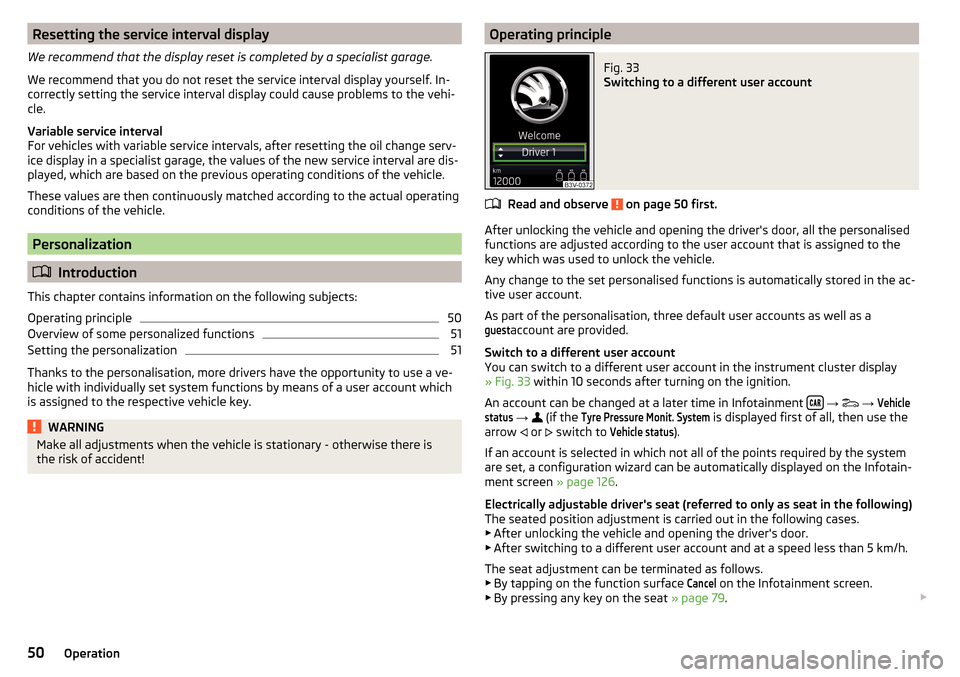
Switching to a different user account
Read and observe on page 50 first.
After unlocking the vehicle and opening the driver's door, all the personalised
functions are adjusted according to the user account that is assigned to the
key which was used to unlock the vehicle.
Any change to the set personalised functions is automatically stored in the ac- tive user account.
As part of the personalisation, three default user accounts as well as a
guest
account are provided.
Switch to a different user account
You can switch to a different user account in the instrument cluster display
» Fig. 33 within 10 seconds after turning on the ignition.
An account can be changed at a later time in Infotainment
→
→
Vehiclestatus
→
(if the
Tyre Pressure Monit. System
is displayed first of all, then use the
arrow or
switch to
Vehicle status
).
If an account is selected in which not all of the points required by the system
are set, a configuration wizard can be automatically displayed on the Infotain-
ment screen » page 126.
Electrically adjustable driver's seat (referred to only as seat in the following)
The seated position adjustment is carried out in the following cases. ▶ After unlocking the vehicle and opening the driver's door.
▶ After switching to a different user account and at a speed less than 5 km/h.
The seat adjustment can be terminated as follows.
▶ By tapping on the function surface
Cancel
on the Infotainment screen.
▶ By pressing any key on the seat » page 79.
50Operation
Page 54 of 344
Unlocking and opening
Unlocking and locking
Introduction
This chapter contains information on the following subjects:
Unlocking/locking with the remote control key
52
Remove KESSY emergency key
53
Locking / unlocking - KESSY
53
Locking/unlocking the vehicle with the central locking button
54
SafeLock
54
Individual settings
54
Opening / closing door
55
Door edge protection
55
Child safety lock
56
Malfunctions
57
The vehicle is equipped with a central locking system which makes it possible
to unlock / lock all the doors, the fuel filler flap and boot lid simultaneously.
The door unlocking can be adjusted individually » page 54.
The unlocking of the vehicle is displayed by the turn signal lights flashing
twice.
If you unlock the vehicle and do not open a door or the boot lid within the next
45 seconds, the vehicle will lock again automatically.
The locking of the vehicle is displayed by the turn signal lights flashing once.
If the driver's door has been opened, the vehicle cannot be locked.
If the doors or the boot lid remain open after the vehicle has been locked, the turn signal lights do not flash until they have been closed.
WARNING■ Never leave the key in the vehicle when you exit the vehicle. Unauthor-
ized persons (e.g. children) could lock the car, turn on the ignition or start
the engine - there is a danger of injury and accidents!■
When leaving the vehicle, never leave people who are not completely in-
dependent, such as children, unattended in the vehicle. These individuals
might not be able to leave the vehicle on their own or to help themselves.
Can be fatal at very high or very low temperatures!
CAUTION
■ Each key contains electronic components; therefore it must be protected
against moisture and severe shocks.■
Keep the keyway clean. Impurities (textile fibres, dust etc.) have a negative
effect on the functionality of the locking cylinder and ignition lock.
Unlocking/locking with the remote control key
Fig. 34
Key with fold/out key bit/KESSY key
Read and observe
and on page 52 first.
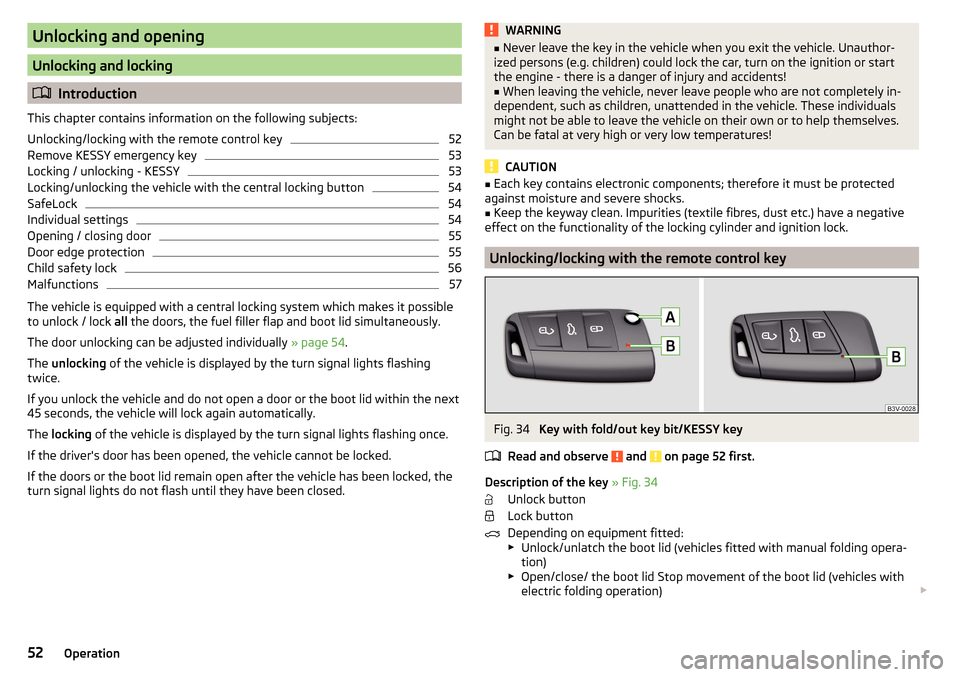
Description of the key » Fig. 34
Unlock button
Lock button
Depending on equipment fitted:
▶ Unlock/unlatch the boot lid (vehicles fitted with manual folding opera-
tion)
▶ Open/close/ the boot lid Stop movement of the boot lid (vehicles with
electric folding operation)
52Operation
Page 55 of 344
Locking button for folding the key bit in/out
Warning light for the battery charge - if the warning light does not flash
when a button on the key is pressed, the battery is discharged.
Unlock/unlatch the boot lid (vehicles fitted with manual folding operation)
By pressing the button
, the lid is unlocked.
By holding the button
, the lid is unlocked and unlatched (partially open).
If the lid is unlocked or unlatched using the
button, then the lid is automat-
ically locked after closing. The period after which the lid is locked can be set
» page 59 .
CAUTION
■
The remote control may be affected by signal superposition of transmitters
that are in the vicinity of the vehicle.■
The effective area of the remote control key is around 30 m. If the central
locking on the remote control responds from a distance of less than around 3
m, the battery must be replaced » page 300.
Remove KESSY emergency key
Fig. 35
KESSY key
Read and observe
and on page 52 first.
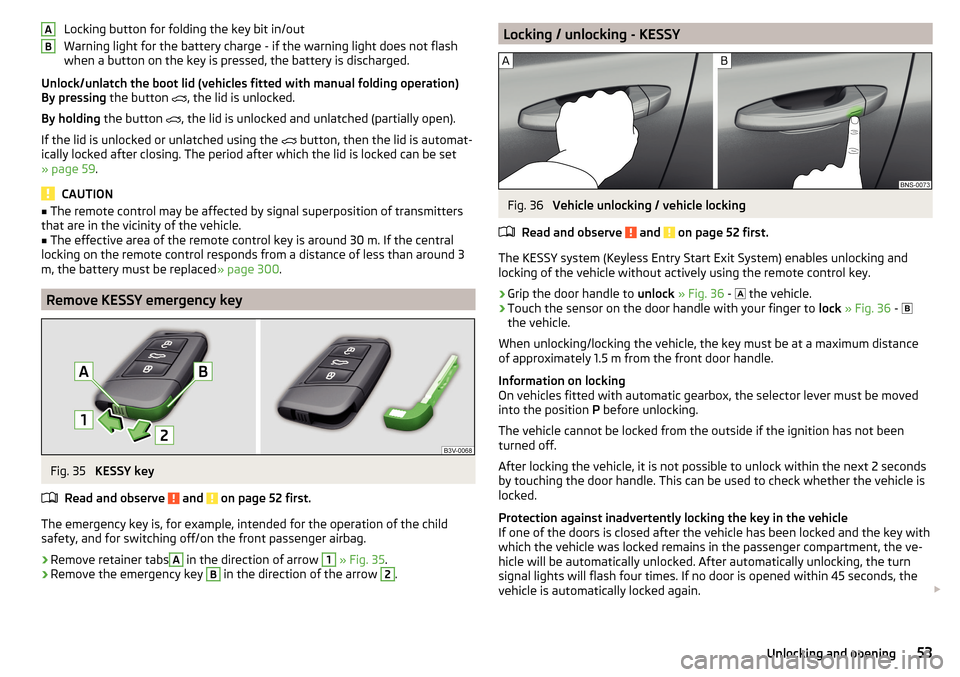
The emergency key is, for example, intended for the operation of the child
safety, and for switching off/on the front passenger airbag.
›
Remove retainer tabs
A
in the direction of arrow
1
» Fig. 35 .
›
Remove the emergency key
B
in the direction of the arrow
2
.
ABLocking / unlocking - KESSYFig. 36
Vehicle unlocking / vehicle locking
Read and observe
and on page 52 first.
The KESSY system (Keyless Entry Start Exit System) enables unlocking and
locking of the vehicle without actively using the remote control key.
›
Grip the door handle to unlock » Fig. 36 -
the vehicle.
›
Touch the sensor on the door handle with your finger to
lock » Fig. 36 -
the vehicle.
When unlocking/locking the vehicle, the key must be at a maximum distance
of approximately 1.5 m from the front door handle.
Information on locking
On vehicles fitted with automatic gearbox, the selector lever must be moved
into the position P before unlocking.
The vehicle cannot be locked from the outside if the ignition has not been
turned off.
After locking the vehicle, it is not possible to unlock within the next 2 seconds
by touching the door handle. This can be used to check whether the vehicle is
locked.
Protection against inadvertently locking the key in the vehicle
If one of the doors is closed after the vehicle has been locked and the key with
which the vehicle was locked remains in the passenger compartment, the ve-
hicle will be automatically unlocked. After automatically unlocking, the turn
signal lights will flash four times. If no door is opened within 45 seconds, the
vehicle is automatically locked again.
53Unlocking and opening
Page 56 of 344
If the boot lid is closed after locking the vehicle and the key with which the
vehicle was locked remains in the luggage compartment, the lid is automatical-
ly unlatched (partially opened). After automatically unlocking, the turn signal
lights will flash four times. The boot lid remains unlatched (partially opened);
the other doors remain locked.
CAUTION
Some types of gloves can affect the unlocking or locking device via the sen-
sors in the door handle.
Locking/unlocking the vehicle with the central locking button
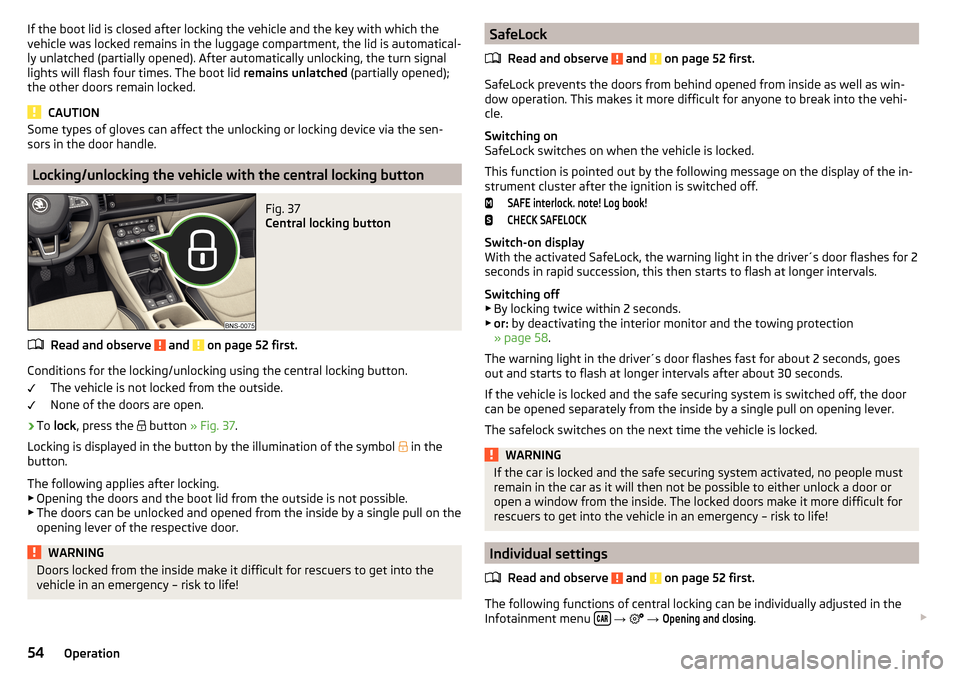
Fig. 37
Central locking button
Read and observe and on page 52 first.
Conditions for the locking/unlocking using the central locking button.
The vehicle is not locked from the outside.
None of the doors are open.
›
To lock , press the
button » Fig. 37 .
Locking is displayed in the button by the illumination of the symbol
in the
button.
The following applies after locking. ▶ Opening the doors and the boot lid from the outside is not possible.
▶ The doors can be unlocked and opened from the inside by a single pull on the
opening lever of the respective door.
WARNINGDoors locked from the inside make it difficult for rescuers to get into the
vehicle in an emergency – risk to life!SafeLock
Read and observe
and on page 52 first.
SafeLock prevents the doors from behind opened from inside as well as win-
dow operation. This makes it more difficult for anyone to break into the vehi-
cle.
Switching on
SafeLock switches on when the vehicle is locked.
This function is pointed out by the following message on the display of the in-
strument cluster after the ignition is switched off.
SAFE interlock. note! Log book!CHECK SAFELOCK
Switch-on display
With the activated SafeLock, the warning light in the driver´s door flashes for 2
seconds in rapid succession, this then starts to flash at longer intervals.
Switching off ▶ By locking twice within 2 seconds.
▶ or: by deactivating the interior monitor and the towing protection
» page 58 .
The warning light in the driver´s door flashes fast for about 2 seconds, goes
out and starts to flash at longer intervals after about 30 seconds.
If the vehicle is locked and the safe securing system is switched off, the door
can be opened separately from the inside by a single pull on opening lever.
The safelock switches on the next time the vehicle is locked.
WARNINGIf the car is locked and the safe securing system activated, no people must
remain in the car as it will then not be possible to either unlock a door or
open a window from the inside. The locked doors make it more difficult for
rescuers to get into the vehicle in an emergency – risk to life!
Individual settings
Read and observe
and on page 52 first.
The following functions of central locking can be individually adjusted in the
Infotainment menu
→
→
Opening and closing
.
54Operation
Page 57 of 344
All doors
The function allows you to unlock all doors, the boot lid and the fuel filler flap.
Single door
The function allows you to unlock only the driver's door and the fuel filler flap
with the radio remote control. KESSY allows the unlocking of a single door
which is in the vicinity of the key, as well as the fuel filler flap. The other doors
and the boot lid are only unlocked once the door handle is unlocked or
touched.
Doors on a vehicle side
This function enables you to unlock both doors on the driver's side and the
fuel filler flap with the radio remote control unit. KESSY allows the unlocking of
both doors which are in the vicinity of the key, as well as the fuel filler flap. The
other doors and the boot lid are only unlocked once the door handle is un-
locked or touched.
Automatic locking/unlocking
This function enables the locking of all doors and the boot lid from a speed of
15 km/h. Opening the doors and the boot lid from the outside is not possible.
The renewed unlocking of the doors and the boot lid is carried out when the
ignition key is removed or when the door is opened from inside (depending on
the individual setting for the central locking system).
Note
The individual adjustment of the central locking system is stored (depending
on the Infotainment type) in the active user account personalisation
» page 50 .
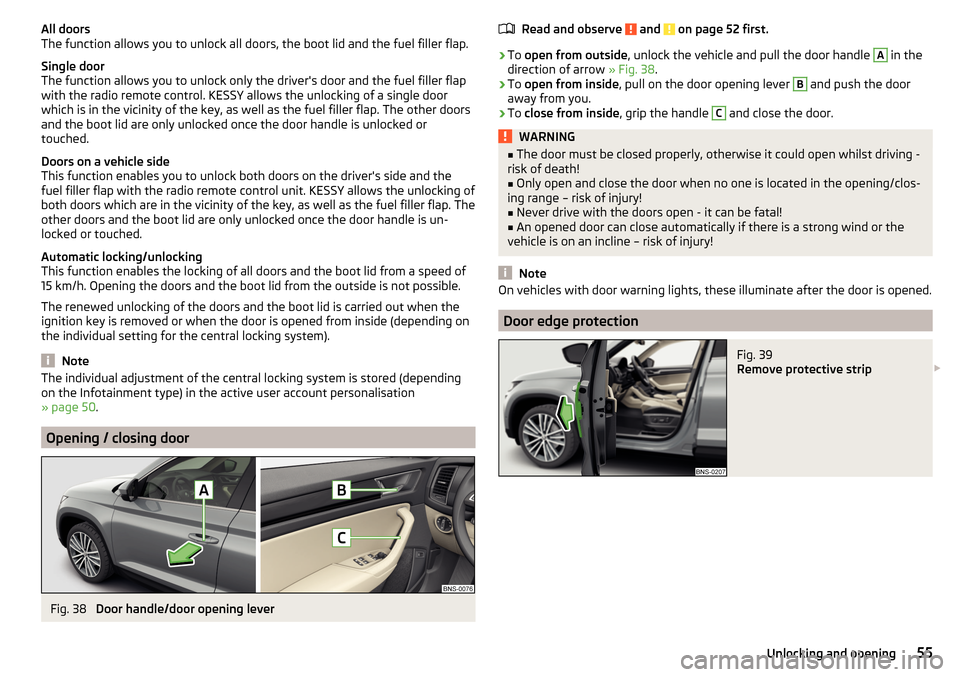
Opening / closing door
Fig. 38
Door handle/door opening lever
Read and observe and on page 52 first.›
To open from outside , unlock the vehicle and pull the door handle
A
in the
direction of arrow » Fig. 38.
›
To open from inside , pull on the door opening lever
B
and push the door
away from you.
›
To close from inside , grip the handle
C
and close the door.
WARNING■
The door must be closed properly, otherwise it could open whilst driving -
risk of death!■
Only open and close the door when no one is located in the opening/clos-
ing range – risk of injury!
■
Never drive with the doors open - it can be fatal!
■
An opened door can close automatically if there is a strong wind or the
vehicle is on an incline – risk of injury!
Note
On vehicles with door warning lights, these illuminate after the door is opened.
Door edge protection
Fig. 39
Remove protective strip
55Unlocking and opening
Page 58 of 344
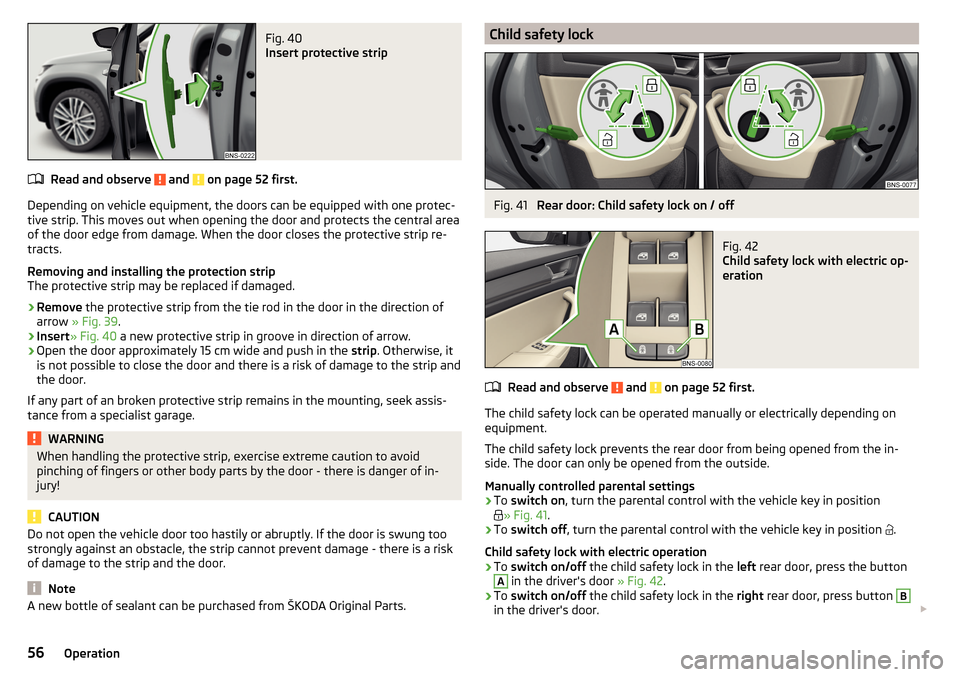
Fig. 40
Insert protective strip
Read and observe and on page 52 first.
Depending on vehicle equipment, the doors can be equipped with one protec-
tive strip. This moves out when opening the door and protects the central area
of the door edge from damage. When the door closes the protective strip re-
tracts.
Removing and installing the protection strip
The protective strip may be replaced if damaged.
›
Remove the protective strip from the tie rod in the door in the direction of
arrow » Fig. 39 .
›
Insert» Fig. 40 a new protective strip in groove in direction of arrow.
›
Open the door approximately 15 cm wide and push in the strip. Otherwise, it
is not possible to close the door and there is a risk of damage to the strip and
the door.
If any part of an broken protective strip remains in the mounting, seek assis-
tance from a specialist garage.
WARNINGWhen handling the protective strip, exercise extreme caution to avoid
pinching of fingers or other body parts by the door - there is danger of in-
jury!
CAUTION
Do not open the vehicle door too hastily or abruptly. If the door is swung too
strongly against an obstacle, the strip cannot prevent damage - there is a risk
of damage to the strip and the door.
Note
A new bottle of sealant can be purchased from ŠKODA Original Parts.Child safety lockFig. 41
Rear door: Child safety lock on / off
Fig. 42
Child safety lock with electric op-
eration
Read and observe and on page 52 first.
The child safety lock can be operated manually or electrically depending on
equipment.
The child safety lock prevents the rear door from being opened from the in-
side. The door can only be opened from the outside.
Manually controlled parental settings
›
To switch on , turn the parental control with the vehicle key in position
» Fig. 41
.
›
To switch off , turn the parental control with the vehicle key in position
.
Child safety lock with electric operation
›
To switch on/off the child safety lock in the left rear door, press the button
A
in the driver's door » Fig. 42.
›
To switch on/off the child safety lock in the right rear door, press button
B
in the driver's door.
56Operation